mercy-video
 Hamza Qandeel
Video chat app

Comments (0)
Sign in to leave a comment
System Requirements
System Requirements Document (SRD)
Project Name: mercy-video
1. Introduction
The mercy-video project is a comprehensive video chat application designed to provide seamless real-time communication for users in the United Arab Emirates (AE) and beyond. This platform will cater to a wide range of use cases, including personal, educational, and professional communication. With features such as group calls, screen sharing, and recording, mercy-video aims to deliver a robust and user-friendly experience.
This document outlines the system requirements for mercy-video, ensuring alignment with Hamza Qandeel's vision and the project's goals.
2. System Overview
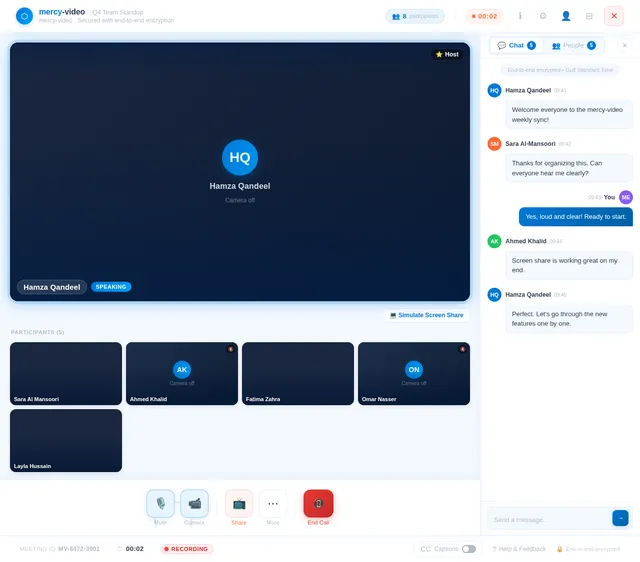
mercy-video is a multi-platform video chat application that supports web and mobile interfaces. The system will leverage modern technologies to provide high-quality video and audio communication, with additional features like screen sharing, call recording, and group chat functionality.
The application will prioritize:
- Ease of Use: Intuitive interfaces for all user personas.
- Scalability: Support for large group calls and high user concurrency.
- Security: End-to-end encryption for all communications.
- Localization: Tailored for the UAE market, including timezone (Gulf Standard Time) and language preferences (English and Arabic).
3. Functional Requirements
- As a User, I should be able to initiate one-on-one video calls.
- As a User, I should be able to host and join group video calls.
- As a User, I should be able to share my screen during a call.
- As a User, I should be able to record video calls and save them locally or in the cloud.
- As a User, I should be able to send text messages during a video call.
- As a User, I should be able to mute/unmute my microphone and turn my camera on/off during a call.
- As an Admin, I should be able to manage user accounts and permissions.
- As an Admin, I should be able to monitor system performance and usage statistics.
- As a Guest, I should be able to join a video call via a shared link without creating an account.
- As a User, I should be able to schedule calls and send invitations.
- As a User, I should be able to customize my profile, including uploading a profile picture.
4. User Personas
4.1 Admin
- Description: Responsible for managing the platform, user accounts, and system performance.
- Key Actions: User management, monitoring analytics, and resolving technical issues.
4.2 Registered User
- Description: A regular user with access to all features, including video calls, screen sharing, and recording.
- Key Actions: Initiating and managing calls, customizing profiles, and scheduling meetings.
4.3 Guest
- Description: A temporary user who can join calls via invitation links without creating an account.
- Key Actions: Joining calls and participating in discussions.
5. Visuals Colors and Theme
Color Palette
- Background: #F4F9FF (Soft Sky Blue)
- Surface: #FFFFFF (Pure White)
- Text: #2C3E50 (Deep Slate Gray)
- Accent: #0078D7 (Azure Blue)
- Muted: #B0BEC5 (Light Steel Gray)
This palette reflects a clean, professional, and modern aesthetic, suitable for both personal and professional use.
6. Signature Design Concept
The mercy-video homepage will feature an interactive 3D globe that represents global connectivity.
-
Design Details:
- The globe will rotate slowly, with glowing dots representing active users or call locations.
- Hovering over a dot will display a tooltip with user statistics or call details.
- The globe will be surrounded by floating UI elements (e.g., "Start a Call," "Join a Meeting") that respond to mouse movements with subtle animations.
-
Animations:
- Smooth transitions between sections as users scroll down.
- Micro-interactions, such as buttons lighting up when hovered over.
-
User Experience:
- The design will evoke a sense of global connection and technological sophistication.
- The interactive globe will serve as both a visual centerpiece and a functional navigation tool.
7. Non-Functional Requirements
- Performance: The system must support up to 1,000 concurrent users per group call with minimal latency.
- Security: End-to-end encryption for all communications.
- Availability: 99.9% uptime guarantee.
- Scalability: The system must scale to accommodate up to 1 million active users.
- Localization: Support for English and Arabic languages.
- Compliance: Adherence to UAE data protection laws.
8. Tech Stack
Frontend
- React for Web
- React Native for Mobile
Backend
- Python
- FastAPI
Database
- MySQL (with Alembic for migrations)
AI Models
- GPT 5.4 for user-friendly responses
- Claude 4.6 Opas for academic or coding work
AI Tools
- Langchain
- Litellm for LLM Routing
Orchestration
- Docker and docker-compose for local development
- Kubernetes for server-side orchestration
9. Assumptions and Constraints
- The application will primarily target users in the UAE but will be accessible globally.
- The system will rely on cloud infrastructure for scalability and storage.
- Internet connectivity is assumed to be stable for all users.
- Compliance with UAE-specific regulations is mandatory.
10. Glossary
- End-to-End Encryption: A method of secure communication that prevents third parties from accessing data while it’s transferred.
- LLM: Large Language Model, used for AI-driven responses.
- FastAPI: A modern web framework for building APIs with Python.
- Alembic: A database migration tool for SQLAlchemy.
- Docker: A platform for developing, shipping, and running applications in containers.
- Kubernetes: An open-source system for automating deployment, scaling, and management of containerized applications.

Global Video
Communication
Made Simple
Crystal-clear video calls protected by end-to-end AES-256 encryption. Connect with anyone, anywhere — no downloads, no hassle. Just one click to start.
Everything You Need to Connect
From private conversations to large team meetings, mercy-video gives you professional communication tools that just work.
One-on-One Calls
Crystal-clear private video calls with end-to-end encryption. Connect with anyone, anywhere in the world with just one click.
Learn More→Group Meetings
Host seamless group video meetings with up to 100 participants. Collaborate with your team, classroom, or community effortlessly.
Learn More→Screen Sharing
Share your screen instantly during any call. Present slides, demonstrate workflows, or troubleshoot together in real time.
Learn More→Connect with Anyone, Anywhere
Our interactive globe visualizes the mercy-video network in real time. Every glowing dot represents a live connection — hover to see regional stats, click for detailed insights on call quality and user activity across the world.
- Hover over dots to view live user statistics
- Click any region for call quality and latency details
- Animated connections show real-time call activity
- AES-256 encrypted across every connection path
Everything You Need to Communicate
From call recording to mobile access, mercy-video provides all the tools for seamless video collaboration.
Call Recording
Record video calls in high quality and save them locally or to the cloud. Revisit important meetings anytime.
Cloud & LocalText Chat
Send instant messages during live calls. Share links, notes, and reactions without interrupting the conversation.
Real-timeHD Video Quality
Crystal-clear 1080p video streaming with adaptive bitrate. Automatically adjusts to your network for smooth calls.
Up to 1080pMobile Support
Join or start calls from any device. Fully optimized for iOS and Android with native-like performance and touch controls.
iOS & AndroidBuilt for Every Type of User
Whether you manage the platform, host daily meetings, or join as a guest — mercy-video adapts to your needs.
Admin
Responsible for managing the platform, user accounts, and system performance.
Key Actions
- Manage user accounts and permissions
- Monitor system analytics and performance
- Resolve technical issues and escalations
- Configure platform security settings
Registered User
Full access to video calls, screen sharing, recording, and profile management.
Key Actions
- Initiate and manage video calls
- Share screen and record meetings
- Schedule calls and send invitations
- Customize profile and preferences
Guest
Temporary access via invitation links, no account required to participate.
Key Actions
- Join calls via shared invitation link
- Participate in group discussions
- Use text chat during meetings
- No account creation needed
Military-Grade Security for Your Peace of Mind
mercy-video is built from the ground up with security at its core. Every layer of our platform is designed to protect your communications and data.
End-to-End Encryption
Every video call, message, and file is protected with AES-256 encryption. Your data is secured in transit and at rest, ensuring only participants can access the content.
AES-256Data Compliance
Fully compliant with UAE data protection regulations, GDPR, and international privacy standards. Regular third-party audits verify our security posture.
CertifiedPrivacy Controls
Granular privacy settings give you full control over your data. Manage recording permissions, call visibility, and data retention policies at the account level.
User ControlZero-Knowledge Architecture
We cannot access your calls or messages. Our zero-knowledge design means your encryption keys never leave your device, guaranteeing absolute privacy.
Zero AccessTrusted by Teams Worldwide
See how professionals, educators, and creators use mercy-video to stay connected across the globe.
“mercy-video transformed our daily standups and client calls. The screen sharing is seamless, and the recording feature means we never miss action items. Our team across Dubai and Abu Dhabi stays perfectly in sync.”
“I use mercy-video for all my virtual lectures and office hours. Group calls with up to 200 students run flawlessly, and the end-to-end encryption gives both me and my students confidence that discussions remain private.”
“Finally a video app that just works! I schedule calls with clients worldwide, share my screen to walk through designs, and the HD quality makes every detail crystal clear. The guest invite link is a game-changer.”
Simple, Transparent Pricing
Choose the plan that fits your communication needs. All plans include end-to-end encryption and 99.9% uptime.
Free
Perfect for getting started with video calls
What's included
- ✓One-on-one video calls
- ✓Up to 4 participants per group call
- ✓Text chat during calls
- ✓720p video quality
- ✓40-minute group call limit
- ✓Basic profile customization
Pro
Ideal for teams and professionals
What's included
- ✓Unlimited group calls, up to 100 participants
- ✓Full HD 1080p video quality
- ✓Screen sharing & annotation
- ✓Call recording & cloud storage
- ✓Meeting scheduling & invitations
- ✓Priority support & custom branding
Enterprise
For large organizations and custom needs
What's included
- ✓Up to 1,000 concurrent participants
- ✓End-to-end encryption & compliance
- ✓Admin dashboard & analytics
- ✓SSO & user permission management
- ✓Dedicated account manager
- ✓Custom API integrations & SLA
Ready to Transform Your Communication?
Join over a million users who trust mercy-video for seamless, secure video communication. Get started in seconds with no setup required.
No comments yet. Be the first!