mercy-provide

byAastha Tiwari

provide me a website

LandingLogin
Landing

Comments (0)

No comments yet. Be the first!

System Requirements

System Requirements Document for mercy-provide

Page 1 of 33

1. Introduction

PROJECT: GENDERISTI AI

AI-Powered Government Fund Transparency & Ground Reality Monitoring Platform

Tagline

"Every Citizen's Voice Matters. Every Public Fund Deserves Accountability."

Build a complete, modern, responsive, AI-powered web application called Genderisti AI.

Example:

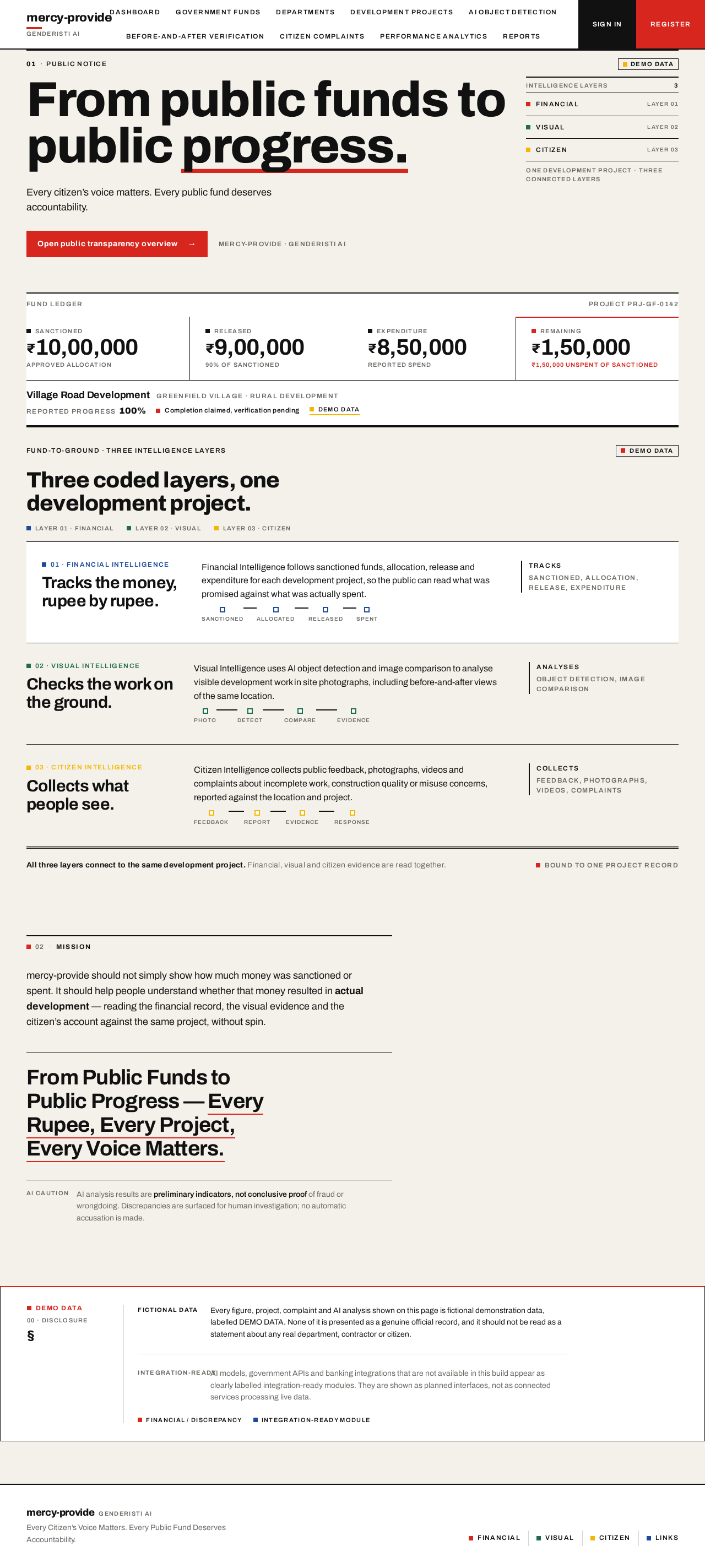
Project: Village Road Development

Sanctioned Budget: ₹10,00,000

Reported Expenditure: ₹8,50,000

Remaining Amount: ₹1,50,000

Reported Progress: 100%

FINAL MISSION

Build Genderisti AI as a citizen-centric public development transparency platform.

The platform should not simply show how much money was sanctioned or spent. It should help people understand whether that money resulted in actual development.

Final tagline: "From Public Funds to Public Progress — Every Rupee, Every Project, Every Voice Matters."

Page 2 of 33
  • Deliver a website based on the attached prompt (Pasted_prompt.txt).
  • Project name: mercy-provide.
  • The website must be realistic and use real-time images.
Page 3 of 33

2. System Overview

This platform aims to improve transparency and accountability in public development projects by connecting government fund allocation, expenditure records, physical development progress, AI-powered object detection, and citizen participation.

  1. CORE CONCEPT

The platform should help citizens understand:

  • How much government funding was sanctioned for a development project?

  • Which department or administrative authority received the funds?

  • Where was the money allocated?

  • Which contractor or agency was assigned the work?

  • How much money was actually spent?

  1. FINAL INNOVATION

The unique innovation of Genderisti AI is the combination of three intelligence layers:

Layer 1: Financial Intelligence

Tracks sanctioned funds, allocation, release, and expenditure.

Layer 2: Visual Intelligence

Uses AI object detection and image comparison to analyse visible development work.

Layer 3: Citizen Intelligence

Page 4 of 33

Collects public feedback, photographs, videos, and complaints.

All three layers must connect to the same development project.

Page 5 of 33

3. Functional Requirements

  • Was the promised development work completed?

  • Does the physical condition match the official project report?

  • Can citizens report incomplete or poor-quality work?

The platform must connect financial information with real-world visual evidence.

  1. GOVERNMENT FUND TRACKING

Create a complete government fund management module.

Store the following information:

  • Scheme or project name

  • Government department

  • State, district, block, and village

  • Sanctioned amount

  • Fund release date

  • Fund allocation details

  • Implementing authority

  • Responsible officer

  • Contractor or agency

  • Approved project budget

Page 6 of 33
  • Actual expenditure

  • Remaining amount

  • Payment history

  • Supporting documents

Create a financial flow:

Government Fund Sanctioned → Department Allocation → Administrative Approval → Contractor Assignment → Fund Release → Development Work → Evidence Upload → AI Verification → Citizen Feedback.

Display sanctioned, allocated, released, and spent amounts separately.

  1. DEVELOPMENT CATEGORIES

Support these public development categories:

  • Infrastructure and roads

  • Education and schools

  • Healthcare facilities

  • Cleanliness and sanitation

  • Drinking water supply

  • Environmental protection and greenery

  • Public spaces and parks

  • Social welfare

  • Sports facilities

Page 7 of 33
  • Rural development

Each project must have its own budget, location, timeline, responsible authority, contractor, and evidence records.

The system should analyse uploaded photographs and videos of development sites.

Detect:

Road Infrastructure

  • Potholes

  • Road cracks

  • Damaged footpaths

  • Broken streetlights

  • Damaged public infrastructure

Cleanliness

  • Garbage piles

  • Overflowing dustbins

  • Scattered waste

Show detected objects with bounding boxes, labels, confidence scores, and image annotations.

Allow users to upload images and videos from their devices.

  1. BEFORE-AND-AFTER COMPARISON

Create an AI-based development verification module.

Page 8 of 33

For every project, store:

  • Before-work photographs

  • During-work photographs

  • After-work photographs

  • Project location

  • Project dates

  • Approved budget

  • Reported expenditure

  • Contractor details

Project: Village Road Construction

Sanctioned Amount: ₹10,00,000

Reported Work: Road construction completed.

Compare before-and-after photographs to identify visible improvements.

Example:

AI Analysis:

  • Road surface detected.

  • Visible cracks identified.

  • Possible damaged sections highlighted.

  • Before-and-after comparison generated.

Display the result as:

Page 9 of 33
  • Visible improvement detected

  • Partial improvement detected

  • No clear improvement detected

  1. FUND-TO-GROUND VERIFICATION

Create a unique feature called Fund-to-Ground Intelligence.

Connect each sanctioned fund with its actual development project and visual evidence.

AI Visual Analysis:

  • Road construction visible.

  • Some cracks detected.

  • Possible incomplete sections identified.

Citizen Feedback:

  • Residents report poor road quality.

Show financial records, project progress, AI analysis, and citizen feedback together.

Citizen Feedback:

  • Residents report poor road quality.

System Status:

  • Discrepancy reported.

System Status:

  • Independent inspection recommended.
Page 10 of 33
  1. CITIZEN COMPLAINT SYSTEM

Allow citizens to:

  • Register and log in.
  1. CITIZEN COMPLAINT SYSTEM

Allow citizens to:

  • Search development projects.
  1. CITIZEN COMPLAINT SYSTEM

Allow citizens to:

  • View public project information.
  1. CITIZEN COMPLAINT SYSTEM

Allow citizens to:

  • Upload photographs and videos.
  1. CITIZEN COMPLAINT SYSTEM

Allow citizens to:

  • Report incomplete development work.
  1. CITIZEN COMPLAINT SYSTEM

Allow citizens to:

  • Report poor-quality construction.
  1. CITIZEN COMPLAINT SYSTEM

Allow citizens to:

Page 11 of 33
  • Report misuse-related concerns.

  • Submit complaints with location details.

  • Track complaint status.

  • View official responses where available.

Each complaint must receive a unique Complaint ID.

Complaint statuses:

  • Submitted

  • Under review

  • Assigned

  • Investigation in progress

  • Response received

  • Resolved

  • Rejected with explanation

  • Escalation recommended

  1. AI EVIDENCE VERIFICATION

Build an AI-powered evidence analysis system.

Features:

  • Duplicate image detection

  • Similarity checking

  • Image metadata inspection

Page 12 of 33
  • Possible image manipulation indicators

  • Project-image relevance checking

  • Missing evidence detection

  • Before-and-after image comparison

  • Object detection

Generate warning flags for suspicious or inconsistent evidence.

AI results must be treated as preliminary indicators, not conclusive proof of fraud or wrongdoing.

  1. OFFICER AND CONTRACTOR ACCOUNTABILITY

Create separate dashboards for administrative authorities and contractors.

Display:

  • Assigned projects

  • Approved budgets

  • Funds released

  • Reported expenses

  • Work completion status

  • Uploaded invoices

  • Project photographs

  • Pending work

  • Citizen complaints

Page 13 of 33
  • Response history

Record who approved, updated, or verified each project.

Where authorized financial integrations exist, support payment verification using official transaction references.

Do not treat screenshots alone as independently verified payments.

  1. GOVERNMENT DEVELOPMENT PERFORMANCE DASHBOARD

Create a dashboard showing:

  • Total sanctioned funds

  • Total funds released

  • Total expenditure reported

  • Remaining funds

  • Active projects

  • Completed projects

  • Delayed projects

  • Projects awaiting verification

  • Citizen complaints

  • Resolved complaints

  • Projects with missing evidence

  • Projects flagged for manual inspection

Include charts, maps, category-wise spending, and district-wise project information.

Page 14 of 33
  1. CITIZEN PARTICIPATION AND FEEDBACK

Give citizens a voice through:

  • Public project feedback

  • Development priority suggestions

  • Community polls

  • Complaint submissions

  • Project ratings

  • Public issue reporting

Where applicable, allow citizens to suggest development priorities for their village or locality.

  1. REPORTS AND ANALYTICS

Generate downloadable reports:

  • Project-wise fund report

  • Department-wise expenditure

  • District-wise development report

  • Contractor-wise project report

  • Delayed project report

  • Citizen complaint report

  • AI evidence analysis report

Support PDF and Excel exports.

Page 15 of 33

Maintain an audit trail for financial and project updates.

  1. USER ROLES

Implement role-based access for:

  1. Citizen

  2. Government Department Administrator

  3. Authorized Government Officer

  4. Contractor

  5. Platform Super Administrator

Each role should have appropriate access permissions.

  1. MAP AND LOCATION INTELLIGENCE

Integrate an interactive map.

Display:

  • Project locations

  • Village and district boundaries where available

  • Development project status

  • Reported infrastructure issues

  • Citizen complaints

  • Project progress

Allow users to filter projects by location, category, department, and status.

Page 16 of 33

Design requirements:

  • Search and filtering

Main navigation:

  1. Dashboard

  2. Government Funds

  3. Departments

  4. Development Projects

  5. AI Object Detection

  6. Before-and-After Verification

  7. Citizen Complaints

Start by creating the complete project structure, database schema, frontend, backend, and working dashboards. Then implement the modules step by step, test all important workflows, and provide clear setup instructions.

Page 17 of 33

4. User Personas

Mercy-Provide serves five human roles, each scoped by role-based access permissions; detailed rules live in Functional Requirements.

RoleResponsibilities and goalsInputsDecisions / observable successAccess
CitizenUnderstand how much funding was sanctioned, which department received it, where it was allocated, which contractor or agency was assigned, and how much was actually spent; judge whether promised work was completed and whether physical condition matches official reports; raise concerns and shape local prioritiesProject searches, photographs and videos, location details, complaints, feedback, ratings, priority suggestions, poll votesCan trace a project from sanction to spend to visible outcome; complaint status and official responses are trackableRegister/log in; search and view public project information; upload media; submit and track complaints; give feedback, ratings, priority suggestions; vote in community polls
Government Department AdministratorOversee departmental projects and fund flowsAssigned projects, approved budgets, funds released, reported expensesDepartmental dashboard reflects assigned projects, approved budgets, funds released and reported expensesDepartment dashboard
Authorized Government OfficerVerify reported progress against physical evidence and respond to citizen reportsAssigned projects, budget and expense figures, uploaded visual evidence, complaintsDiscrepancies between official reports and physical condition are identified; official responses issuedOfficer dashboard covering assigned projects, approved budgets, funds released, reported expenses
ContractorExecute assigned work and account for expenditureAssigned projects, approved budgets, funds released, reported expensesProject records show assigned work and reported expensesContractor dashboard
Platform Super AdministratorGovern platform-wide access and role permissionsRole assignments, permission settingsEach role holds appropriate access permissionsPlatform-wide administration

Primary journey (Citizen). Register and log in → search a development project → view public project information (sanctioned amount, receiving department, allocation location, assigned contractor or agency, actual spend) → compare with physical evidence → upload photographs/videos and submit a complaint with location details → track complaint status and view official responses → contribute feedback, ratings, priority suggestions and poll votes.

Supporting actors. AI-powered object detection and the platform itself support verification and transparency; they are not human personas.

Default: persona names beyond the five listed roles, and any additional duties or permissions, are not established by current evidence.

Page 18 of 33

5. Core User Flows

Each journey below is independent; none requires completing another first. All three intelligence layers (financial, visual, citizen) attach to the same project record.

5.1 Trace a project's funds from sanction to spending

Actor: Citizen (public view); Officer/Contractor (their own records). Trigger: Citizen wants to know what was sanctioned and whether it was spent.

  1. Citizen opens Government Funds or Development Projects and searches/filters by location, category, department, or status.
  2. System shows sanctioned, allocated, released, and spent amounts separately, plus approved budget, actual expenditure, remaining amount, payment history, and supporting documents.
  3. Citizen opens the project to see location, timeline, responsible authority, contractor, and evidence records.
  4. Citizen follows the financial flow: sanction → department allocation → administrative approval → contractor assignment → fund release → work → evidence upload → AI verification → citizen feedback.

Result: Citizen can judge whether sanctioned money maps to a real project and visible work. Failure/recovery: If evidence is missing, the project is flagged as missing evidence and surfaced for manual inspection. Continuation: Citizen proceeds to visual verification (Journey 2) or files a complaint (Journey 3).

Page 19 of 33

5.2 Verify claimed work against photographic evidence

Actor: Citizen or Officer. Trigger: A project claims completion or progress that the user wants to check.

  1. User opens AI Object Detection or Before-and-After Verification for the project.
  2. User uploads images/videos from their device.
  3. System runs object detection (potholes, road cracks, damaged footpaths, broken streetlights, damaged public infrastructure, cleanliness) and shows bounding boxes, labels, confidence scores, and annotations.
  4. System compares before-and-after photographs and returns: visible improvement detected, partial improvement detected, or no clear improvement detected.
  5. System runs integrity checks — similarity, metadata inspection, manipulation indicators, project-image relevance, missing evidence — and raises warning flags for suspicious or inconsistent evidence.

Result: A preliminary visual assessment (e.g., road construction visible, some cracks detected, possible incomplete sections) shown alongside financial records and citizen feedback. Constraint: AI results are preliminary indicators, not conclusive proof of fraud. Failure/recovery: Flagged or low-confidence evidence routes the project to manual inspection. Continuation: User may attach findings to a complaint.

Page 20 of 33

5.3 Report and track a complaint

Actor: Registered Citizen. Trigger: Resident observes incomplete work, poor-quality construction, or misuse-related concerns.

  1. Citizen registers/logs in.
  2. Citizen searches for the project and views its public information.
  3. Citizen submits a complaint with location details and uploads photographs/videos.
  4. System records the complaint against the project; officer dashboard shows it under citizen complaints.
  5. Citizen tracks complaint status and views official responses where available.

Result: Complaint is linked to the project's financial and visual record; resolved complaints count toward the government dashboard. Failure/recovery: If the complaint cannot be matched to a project, it remains a public issue report pending location-based review. Continuation: Citizen may also rate the project or submit feedback.

5.4 Participate in local development priorities

Actor: Citizen. Trigger: Citizen wants a say in local spending.

  1. Citizen opens Citizen Participation and submits public project feedback, project ratings, or a development priority suggestion for their village/locality.
  2. Citizen votes in community polls and reports public issues.

Result: Feedback aggregates into the project's citizen-intelligence layer. Continuation: Suggestions inform future prioritization; no approval step is implied.

Page 21 of 33

5.5 Officer/Contractor accountability review

Actor: Administrative authority or Contractor. Trigger: Routine review of assigned work.

  1. Actor opens their dashboard to see assigned projects, approved budgets, funds released, and reported expenses.
  2. Actor reviews work completion status, uploaded invoices, project photographs, pending work, citizen complaints, and response history.
  3. Actor responds to complaints and uploads evidence; the system records who approved, updated, or verified each project.

Result: Auditable trail of actions per project. Continuation: Updated evidence re-enters AI verification (Journey 2).

5.6 Monitor aggregate performance

Actor: Government administrator. Trigger: Periodic oversight.

  1. Administrator opens the Government Development Performance Dashboard.
  2. Reviews total sanctioned, released, expenditure, remaining funds, active/completed/delayed projects, projects awaiting verification, complaints and resolutions, missing-evidence projects, and projects flagged for manual inspection, with charts, maps, category-wise spending, and district-wise views.
  3. Administrator filters the interactive map by location, category, department, and status, and exports PDF/Excel reports (fund, expenditure, district, contractor, delayed project, complaint, AI evidence).

Result: Consolidated view across all three layers. Continuation: Flagged projects feed manual inspection.

Page 22 of 33

5.7 Demonstration walkthrough

Greenfield Village road project (Rural Development): ₹10,00,000 sanctioned, ₹8,50,000 reported expenditure, ₹1,50,000 remaining, status "completion claimed, verification pending" — used to exercise Journeys 1–3 end to end.

6. Visuals Colors and Theme

[Design proposal; unspecified choices are defaults.]

Visuals, Colours and Theme

mercy-provide is a civic-tech transparency platform for two audiences at once: citizens checking whether a sanctioned road, drain or streetlight actually exists, and district officials and contractors answering for it. The register is trust without warmth-theatre — legibility of money, place and evidence. The muse is Erik Spiekermann: typography as public infrastructure, signal colours used like transit lines, numbered categories, pictograms always paired with type. The brief's "premium government-tech dashboard" is honoured through order, ruled columns and real photographic evidence, not generic dashboard chrome.

Palette (light mode, AA at body size): background #F4F1EA (warm paper), surface #FFFDF8 (off-white panels), text #1A1A18 (near-black ink), primary #1F4E3D (deep transit green — navigation, headers, primary action), accent #D93A1E (signal red-orange — reserved for discrepancies, pending verification and complaint flags, never decoration), muted #6E6A60. Category line-codes: mustard #C9922B (waste), slate blue #2C5F7C (water), ochre #8A6D3B (environment), green #1F4E3D (infrastructure). Proportions: 70% paper/ink, 20% green structure, 10% signal colour. Hairline rules #DAD4C7.

Page 23 of 33

Typography: Fira Sans throughout — headings SemiBold/Bold, tracking -0.02em, sentence case, flush-left ragged-right, never centred; small-caps Fira Sans for section labels and table headers (letter-spacing 0.08em, 12–13px). Numbers in tabular figures; rupee figures carry the largest weight in any row. Scale 1.25 modular with display jumps: 20 / 22 / 28 / 36 / clamp(44px, 8vw, 112px) hero; body 17px/1.6, table 15px, micro-label 12px small caps. No Inter, Roboto, Poppins or system-ui.

Shape language: rectilinear and honest — 2px radius on inputs and buttons, 0px on cards and tables, 1px hairline rules as the main structural device, 6px colour-coded left borders marking project category and status. Pictograms on a 24px grid, 2px stroke, always with text labels. No soft shadows beyond a single 1px offset line; status chips are rectangles with 2px radius.

Imagery: real, current, geotagged site photography is the evidence layer — before/after photos of roads, drains, streetlights, waste bins and water points, full-bleed inside ruled frames with a caption bar carrying date, district and AI detection confidence. AI detection panels overlay thin signal-red bounding boxes with small-caps labels and confidence scores. Maps are schematic and line-coded by department colour, not satellite decoration. No stock people, no illustration, no gradients. Sample demonstration data is clearly labelled fictional.

Layout: 12-column ruled grid with a persistent 240px left sidebar carrying numbered navigation (01 Overview, 02 Funds, 03 Projects, 04 Visual Evidence, 05 Complaints, 06 Map) and a top strip with district selector and role. Content is tabular: fund rows aligned label-left / value-right on a shared baseline, horizontal rules between every row. Mobile collapses to one column with the sidebar as a numbered drawer; tables become stacked label/value pairs, never horizontally clipped. Headlines, labels, numbers and controls stay whole at 375px, 768px and 1280px.

Page 24 of 33
  1. MODERN UI/UX DESIGN

Create a premium, professional government-tech dashboard.

Design requirements:

  • Clean modern interface

  • Responsive layout

  • Sidebar navigation

  • Professional typography

Design requirements:

  • Interactive charts

  • Financial summary cards

  • Project tables

  • Image galleries

  • AI detection panels

  • Map visualisation

  • Complaint tracking timeline

Page 25 of 33

7. Signature Design Concept

[Design proposal; unspecified choices are defaults.]

The public entry is a ruled editorial hero, not a dashboard card. The left 8 columns hold an oversized flush-left Fira Sans statement — "₹10,00,000 sanctioned. Is there a road?" — at clamp(44px, 8vw, 112px), with a small-caps line-code label above it: "PROJECT 04 · VILLAGE ROAD DEVELOPMENT · DISTRICT PUNE". Directly beneath, a full-width ruled fund-to-ground band runs edge to edge with four aligned tabular figures — sanctioned, released, spent, verified on ground — each with a tiny pictogram and a green or signal-red verification mark, separated by 1px vertical rules and reading as a transit timetable for money. The right 4 columns are a single real site photograph in a hard-edged frame with a caption bar and one AI detection box. Paper ground, ink type, green structure, one red flag. No centred headline, no gradient, no floating cards.

Signature moves:

  • The full-bleed ruled fund-to-ground band stitching sanctioned → released → spent → verified-on-ground into one continuous ruled strip.
  • Numbered sidebar navigation (01–06) with small-caps labels and category colour bars, so the app reads as a wayfinding system rather than a menu.
  • Evidence photographs framed in hard 1px rules with a caption bar (date, district, AI confidence) and hairline signal-red bounding boxes on the image.
  • A horizontal complaint timeline drawn as a ruled transit line with square station nodes, small-caps labelled SUBMITTED → AI VERIFIED → FIELD CHECK → RESPONSE, current node filled green.
  • Tabular numerals as ornament: every rupee figure right-aligned on a shared baseline grid, columns of money lining up like a printed ledger.
Page 26 of 33

These moves carry the three connected intelligence layers — Financial, Visual and Citizen — onto the same project record, and surface discrepancies as "flagged for human review", never as corruption.

8. Interaction Model & Motion Direction

[Design proposal; unspecified choices are defaults.]

Interaction Model: Static (direction) Motion Tempo: restrained Hero Dimensionality: flat

Landing Hero Motion Brief

Focal subject: the real site photograph in its hard-edged frame, paired with the ruled fund-to-ground band beneath the statement. Input → transformation → outcome: as the band scrolls into view, the four rupee figures count up once from zero to their sanctioned, released, spent and verified values, and each verification mark resolves from neutral to green or signal red — the citizen's outcome is a legible, settled ledger, not an animation.

Motion vocabulary: 120–180ms ease-out on drawer open, tab switch and status chip change; a single count-up per financial strip on first scroll into view; no parallax, no decorative loops, no hover-lift. The hero's first frame is fully composed and static — statement, line-code label, four figures and photograph all present before any motion.

Reduced-motion state: prefers-reduced-motion removes counting and transitions entirely, leaving instant final values and states; the hero remains complete and readable. Scrollable rows wrap or scroll so every item can be brought fully into view.

Page 27 of 33

9. Non-Functional Requirements

Private personal information must not be exposed publicly.

  1. SECURITY AND TECHNICAL REQUIREMENTS

Implement:

  • Secure authentication

  • Role-based access control

  • Database integration

  • Backend APIs

  • Image and video storage

  • Secure document upload

  • Audit logs

  • Data validation

  • Error handling

  • Backup support

  • Privacy protection

Page 28 of 33

10. Tech Stack

  1. AI-POWERED OBJECT DETECTION

Integrate a Computer Vision system using YOLO or another suitable object detection model.

Use a suitable technology stack supported by the development environment.

Page 29 of 33

11. Assumptions and Constraints

INSTRUCTIONS FOR GOOGLE ANTIGRAVITY IDE

Act as a senior full-stack developer, AI/ML engineer, UI/UX designer, and software architect.

Do not build only a static landing page or UI prototype. Develop a functional application with a proper frontend, backend, database structure, authentication, dashboards, and AI integration architecture.

  • Evidence insufficient

  • Manual inspection required

AI must not automatically declare corruption or fraud. It should identify possible discrepancies for human investigation.

AI results must be treated as preliminary indicators, not conclusive proof of fraud or wrongdoing.

  1. SAMPLE DEMONSTRATION DATA

Create a fictional demonstration project:

Project: Village Road Development

Location: Greenfield Village

Department: Rural Development

Sanctioned Budget: ₹10,00,000

Reported Expenditure: ₹8,50,000

Remaining Balance: ₹1,50,000

Page 30 of 33

Project Status: Completion claimed, verification pending.

Generate realistic sample project data, charts, complaints, and AI analysis examples.

Clearly label all fictional data as DEMO DATA.

Never present simulated payments, government approvals, or AI analysis as genuine official records.

If an actual AI model, government API, or banking integration is not available, create a clearly labelled integration-ready module rather than pretending the service is connected.

Page 31 of 33

12. Glossary

  • Visible drainage blockages

Water Supply

  • Visible water leakage

  • Waterlogging

  • Damaged water infrastructure

  • Overflowing water tanks where visually identifiable

Environment

  • Trees

  • Plants

  • Green areas

  • Visible vegetation changes

  • Damaged or dry plants

Public Infrastructure

  • Benches

  • Playground equipment

  • Public buildings

  • Sports infrastructure

  • Visible construction or maintenance defects

Page 32 of 33
  1. Contractor Management

  2. Performance Analytics

  3. Reports

  4. User Management

  5. Settings

Page 33 of 33
Live
Landing design preview
Landing: View public notice
Login: Sign in
dashboard: View officer dashboard
Development Projects: Review assigned projects
Citizen Complaints: Review citizen complaint
Citizen Complaints: Record official response
AI Object Detection: Review AI detection results
Before-and-After Verification: Confirm or flag verification
Performance Analytics: View flagged projects
Live
Landing design preview
Landing: View public notice
Login: Sign in
dashboard: View officer dashboard
Development Projects: Review assigned projects
Citizen Complaints: Review citizen complaint
Citizen Complaints: Record official response
AI Object Detection: Review AI detection results
Before-and-After Verification: Confirm or flag verification
Performance Analytics: View flagged projects