mercy-calculator
 Diya Trivedi
start a project to build a simple single page design of calculator

Comments (0)
Sign in to leave a comment
System Requirements
System Requirements Document for mercy-calculator
1. Introduction
mercy-calculator is a simple, single-page calculator design. The product intent is a focused arithmetic tool presented as exactly one page: a person opens the page, sees a legible calculator instrument, enters numbers and operators, and reads computed results. There is no brand story beyond the tool itself, no audience beyond "a person doing arithmetic," and no multi-page application around it. The design must be simple, and the calculator must live on a single page.
The audience is the Calculator User — any person who wants to perform basic arithmetic in a clear, trustworthy, instrument-like interface. The emotional register is that of an honest, legible machine: typographic backbone, signal colours used like transit lines, warmth inside order.
2. System Overview
mercy-calculator is delivered as a single custom page, Calculator, owned by the application. The page is the public entry and the working surface at once: it presents the calculator instrument (wordmark, descriptor, display, keypad, operator column, footer hints) and hosts all number/operator entry and computed results. There is no authentication, no account, no persistence requirement, and no second page.
Actors
- Calculator User (active human persona): opens the single page and performs arithmetic entry to see computed results.
- No other human personas, systems, providers, or external services are part of the current product.
Accepted behavior
- A simple single-page calculator design.
- The calculator is presented as one page.
- Number and operator entry with computed results, shown within the one-page constraint.
Narrow exclusions
- No additional pages, routes, or destinations beyond the single Calculator page.
- No accounts, sign-in, profiles, or identity continuity.
- No history, memory persistence across sessions, scientific functions, unit conversion, currency, or graphing — none are requested.
- No backend service, API, or storage is required by the accepted behavior.
2a. Product Interpretation and Delivery Boundary
The entire product is one page. The Calculator page is publicly reachable with no access requirement: a Calculator User lands directly on the tool and can immediately begin arithmetic. There is no anonymous-to-authenticated transition, because no identity is needed to perform or read arithmetic. Nothing is deferred to a future horizon in the authoritative requirements; the current delivery is the complete accepted scope. The page is composed like a page from a transit manual — the calculator itself is the hero, and the first screen is the tool.
2b. Source Content Inventory
Not applicable — no reference directive declares a content_source.
2c. Page Content and Component Coverage
Calculator
The single page of the product. It is the public entry and the working surface; it owns all accepted behavior.
Information and state
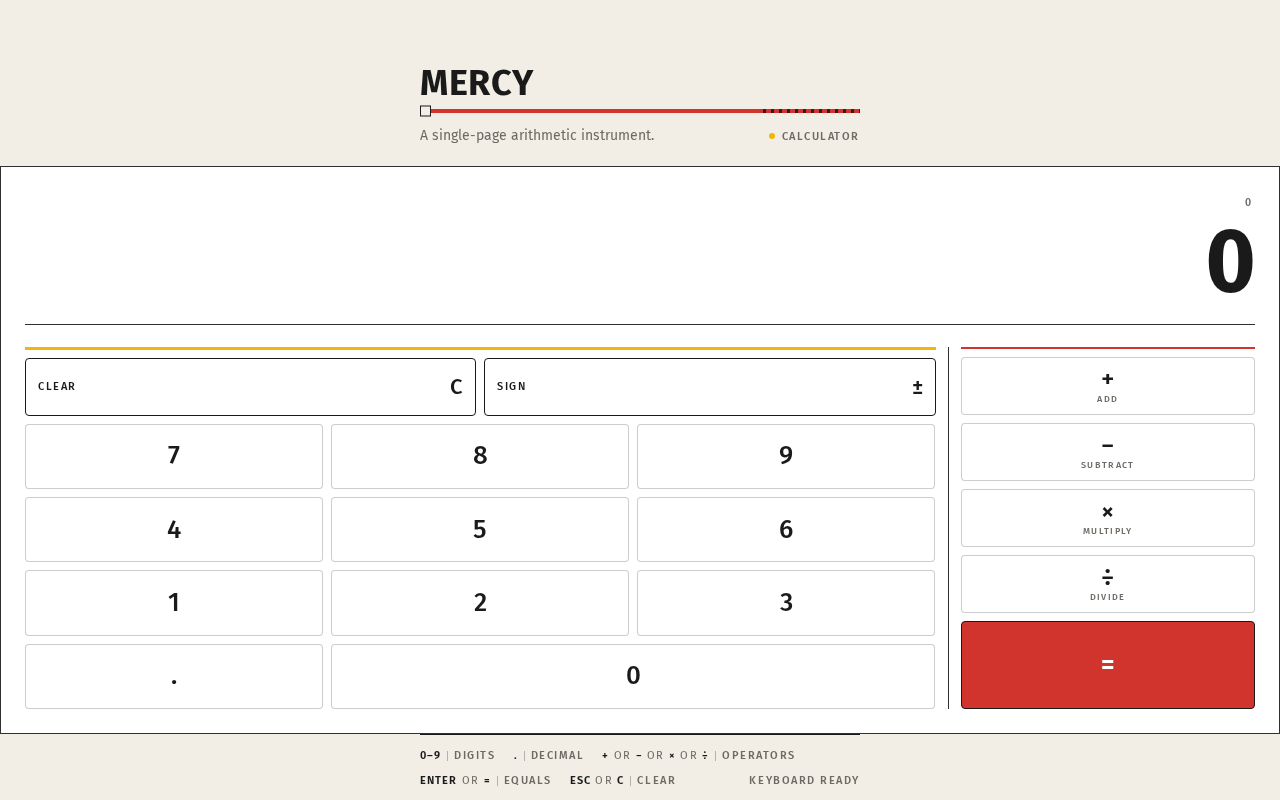
- Wordmark: all-caps "MERCY" in Fira Sans Bold, with a 4px signal-red rule running its full width beneath it.
- One-line descriptor beneath the wordmark (muted grey micro-type).
- Live expression line: the current expression shown above the result in muted grey micro-type; fades 200ms when the operator changes.
- Result display: oversized tabular numerals, flush right, dominating the top third of the calculator body; clamps 40px mobile → 88px desktop.
- Keypad: strict 4-column grid of white keys with ink legends — digits 0–9, decimal point, clear, and any basic arithmetic entry keys the design presents.
- Operator column: vertical right column separated by a full-height 1px ink hairline, with a thin red rule above the operators; the equals key is a solid signal-red (#D0342C) block — the only filled colour area on screen.
- Memory/clear row marked with signal yellow (#F2B705).
- Footer: thin ruled footer with keyboard-shortcut hints in micro-caps.
Primary actions
- Enter digits and decimal point.
- Select an operator (+, −, ×, ÷) — the live operator indicator uses signal red; the active operator tab uses signal yellow.
- Press equals to compute and display the result.
- Clear the current entry/expression.
Supporting actions
- Keyboard entry mirroring the on-screen keypad, with shortcut hints listed in the footer.
Domain entities
- Expression (the sequence of operands and operators currently entered).
- Operand (a numeric value being entered).
- Operator (one of the basic arithmetic operations).
- Result (the computed numeric value).
Component responsibilities
- Wordmark + red rule: identity and framing of the instrument.
- Descriptor: one-line explanation of the tool.
- Display block: live expression line + result digits; the number is the largest thing on the page.
- Keypad grid: digit and clear entry; 90ms signal-yellow background flash with 1px inset border on press.
- Operator column: operator selection and equals; equals is the signal-red block.
- Footer: keyboard-shortcut hints.
States
- Loading: none required — the page is static markup with client-side arithmetic; it renders immediately.
- Empty / initial: result display shows a starting value (0); live expression line empty or showing the starting state; no operator active.
- Entry in progress: digits append to the current operand; live expression line reflects the entered expression.
- Operator selected: active operator indicated (signal red live operator indicator / signal yellow active operator tab); live expression line fades in over 200ms.
- Success: equals computes and the result digits swap without transition into the result display.
- Error / recovery: invalid arithmetic (for example division by zero) is surfaced in the display area as a clear error state; the Calculator User recovers by pressing clear and entering a new expression. No data is lost because nothing is persisted.
- Reduced motion: the 90ms key-press flash is removed; all other states remain usable and static.
3. Functional Requirements
FR-1 — Single-page calculator design As a Calculator User, I should see a simple calculator design presented as exactly one page, so that I can use the tool without navigating anywhere.
- Provenance: explicit.
- Lifecycle: the Calculator User opens the application and lands directly on the Calculator page; the page renders the complete calculator instrument (wordmark, descriptor, display, keypad, operator column, footer). Observable result: one page, no navigation, no additional destinations. Access: public, no identity. Failure/recovery: not applicable — static render. Continuation: the user proceeds to arithmetic entry (FR-2).
- Acceptance: exactly one page exists; the calculator is fully usable on it; no links, menus, or routes lead elsewhere.
FR-2 — Number and operator entry As a Calculator User, I should enter digits, a decimal point, and arithmetic operators on the keypad, so that I can build the expression I want to compute.
- Provenance: explicit (number/operator entry with computed results is the accepted calculator behavior).
- Lifecycle: the Calculator User presses digit keys and operator keys; each press gives a 90ms signal-yellow background flash with a 1px inset border (removed under prefers-reduced-motion). Observable result: digits append to the current operand; the live expression line shows the entered expression in muted grey; the selected operator is indicated (signal red live operator indicator, signal yellow active operator tab) and the live expression line fades in over 200ms on operator change. Access: public. Failure/recovery: pressing clear resets the entry. Continuation: the user presses equals (FR-3).
- Acceptance: every key press is reflected in the display; the live expression line matches what was entered; operator selection is visibly indicated.
FR-3 — Computed results As a Calculator User, I should press equals and see the computed result, so that I get the answer to my arithmetic.
- Provenance: explicit.
- Lifecycle: the Calculator User presses the signal-red equals key; the result digits swap without transition into the oversized tabular-numeral result display, flush right. Observable result: the computed numeric value is the largest thing on the page. Access: public. Failure/recovery: if the expression is invalid (for example division by zero), the display shows a clear error state; the user presses clear and re-enters. Continuation: the user may continue entering a new expression or chain from the result.
- Acceptance: equals produces the correct arithmetic result for the entered expression; the result is displayed in the result display; invalid expressions produce a visible error state rather than a silent failure.
FR-4 — Clear and reset As a Calculator User, I should clear the current entry, so that I can start over or recover from a mistake.
- Provenance: required_inference (indispensable recovery mechanic for FR-2/FR-3; the clear row is part of the accepted keypad design).
- Lifecycle: the Calculator User presses the clear key (in the signal-yellow memory/clear row); the current entry and expression reset to the initial state. Observable result: display returns to its starting value; live expression line clears. Access: public. Failure/recovery: this is the recovery path itself. Continuation: the user begins a new expression.
- Acceptance: clear returns the calculator to its initial state from any entry or error state.
FR-5 — Keyboard entry As a Calculator User, I should use my keyboard to enter digits and operators, so that I can work faster with the same calculator.
- Provenance: required_inference (the accepted design includes a footer of keyboard-shortcut hints, which presupposes keyboard entry).
- Lifecycle: the Calculator User types digits, operators, equals, and clear on the keyboard; the same display updates as on-screen key presses. Observable result: identical behavior to keypad entry. Access: public. Failure/recovery: same as FR-2/FR-4. Continuation: same as FR-2/FR-3.
- Acceptance: keyboard input produces the same results as keypad input; the footer hints accurately describe the shortcuts.
4. User Personas
Calculator User
Product context. The Calculator User is a person doing arithmetic — no brand loyalty, no account, no audience beyond the task. They arrive at the single page expecting a legible, trustworthy instrument and nothing else.
Primary goal. Enter an arithmetic expression and read the correct result quickly, on one page, without distraction or navigation.
Distinct accepted responsibilities.
- Opens the single Calculator page and reads the instrument (wordmark, descriptor, display, keypad).
- Enters digits, decimal point, and operators via the keypad or keyboard.
- Selects an operator and observes the live operator indicator and live expression line.
- Presses equals and reads the computed result in the oversized tabular-numeral display.
- Clears the entry to start over or recover from an error.
Relevant inputs or decisions. Which digits and operators to enter; when to press equals; when to clear. The user decides the expression and reads the result — there is no other participant.
Interactions with other accepted participants. None. The Calculator User is the sole human actor; there is no counterparty, recipient, or beneficiary whose state changes. The calculator itself is the instrument, not a participant.
Observable success. The result display shows the correct answer in large tabular numerals; the live expression line matches what was entered; operator selection is visibly indicated; the page remains a single, simple, legible instrument at every viewport.
What makes this role distinct. The role is defined by arithmetic entry and result reading on a single page — not by account management, collaboration, or multi-step workflow. Its success is measured by the clarity and correctness of the instrument, not by any downstream outcome.
5. Core User Flows
Flow 1 — Perform a basic calculation
- The Calculator User opens mercy-calculator. The single Calculator page renders immediately: the "MERCY" wordmark with its signal-red rule, the one-line descriptor, the result display showing its starting value, the empty live expression line, the 4-column keypad, and the operator column with the signal-red equals key.
- The Calculator User presses digit keys. Each press gives a 90ms signal-yellow flash with a 1px inset border; the digits appear in the result display and the live expression line.
- The Calculator User presses an operator key. The operator is indicated (signal red live operator indicator, signal yellow active operator tab); the live expression line fades in over 200ms.
- The Calculator User enters the second operand.
- The Calculator User presses the signal-red equals key. The result digits swap without transition into the oversized tabular-numeral result display, flush right.
- The Calculator User reads the result. Continuation: they may begin a new expression or chain from the result.
Flow 2 — Recover from a mistake or invalid expression
- The Calculator User is mid-entry or has pressed equals on an invalid expression (for example division by zero). The display shows a clear error state.
- The Calculator User presses the clear key in the signal-yellow memory/clear row. The display returns to its starting value and the live expression line clears.
- The Calculator User re-enters the expression and presses equals. The correct result appears.
Flow 3 — Keyboard entry
- The Calculator User opens the Calculator page and reads the footer's keyboard-shortcut hints in micro-caps.
- The Calculator User types digits, operators, equals, and clear on the keyboard. The display updates identically to keypad entry.
- The Calculator User reads the result. Continuation: same as Flow 1.
Flow 4 — Reduced-motion use
- The Calculator User with
prefers-reduced-motionopens the Calculator page. The key-press flash is removed; all other states remain usable and static. - The Calculator User performs arithmetic as in Flow 1, with no motion feedback but identical results.
6. Visuals Colors and Theme
Muse and headline. Erik Spiekermann — typographic infrastructure for a calculator: Fira Sans as the machine's own voice. The register is instrument-like: an honest, legible machine you trust with numbers. Not playful, not luxury, not a SaaS dashboard — a tool with typographic backbone.
Mode. Light mode.
Colour tokens (exact hex by role)
- Background (warm paper ground):
#F2EEE6 - Surface (calculator body):
#FFFFFF - Text (ink):
#1A1A1A - Primary (signal red — equals key, live operator indicator, rule beneath wordmark, thin rule above operators):
#D0342C - Accent (signal yellow — memory/clear row, active operator tab, key-press flash):
#F2B705 - Muted (secondary labels, key legends, live expression line):
#6E6A63
Proportion. 70% paper/white, 20% ink, 10% signal colour.
Typography
- Headings and keys: Fira Sans — Medium 500 for labels and keys; Bold 700 for the wordmark and result digits.
- Body: Fira Sans.
- All-caps micro-labels at 11px with 0.14em tracking for key legends and operator names.
- Result digits: Fira Sans tabular numerals at large scale with tight −0.02em tracking.
- No display serif, no decorative face — the type IS the interface.
- Scale: 1.25 modular — 64/48/36/28/22/18/16/14/11. Result display clamps 40px mobile → 88px desktop. Key labels 22px mobile → 26px desktop. Micro-labels 11px fixed.
Shape language. Square-cornered keys with 4px radius — honest controls, not pills. A 1px ink hairline frames the calculator body. Operator keys sit in a vertical right column separated by a 1px rule, like a transit map's interchange line. No shadows, no gloss, no bezel drama. The keypad is a strict 4-column grid with equal gutters.
Layout. Single centred column, max-width 420px on mobile, 520px on desktop, on the warm paper ground with generous margins (the calculator is an object on a desk, not a full-bleed app). Above the calculator: a small all-caps wordmark "MERCY" with a red rule beneath it, and a one-line descriptor. The display sits at the top of the calculator body, flush right, with the live expression above it in muted grey. Below the keypad: a thin ruled footer with keyboard-shortcut hints in micro-caps. Everything on one page, no scroll needed at desktop.
Imagery. No photography, no illustration. The interface is the imagery: a numbered keypad, ruled operator column, and the transit-line signal colours doing all the visual work. A subtle paper grain at 2% opacity on the background is the only texture.
Readable text and controls. Headlines, wordmarks, labels, numbers, and controls stay entirely inside the viewport and their container at 375px, 768px, and 1280px, wrapping or scaling (for example font-size: clamp(...) with its mobile size) to fit; no other element covers any part of them.
7. Signature Design Concept
The calculator itself is the hero — a white square-cornered instrument sitting off-centre on a warm paper ground, framed by a 1px ink hairline, with a large all-caps "MERCY" wordmark set above it in Fira Sans Bold with a 4px signal-red rule running its full width. The result display is oversized (88px desktop, 40px mobile) and flush right in tabular numerals, dominating the top third of the body. The keypad below is a strict 4×5 grid of white keys with ink legends; the operator column on the right is separated by a vertical hairline and the equals key is a full signal-red block. No centred headline, no subtext, no CTA button — the first screen IS the tool, composed like a page from a transit manual.
Signature moves
- Oversized tabular-numeral result display (88px desktop / 40px mobile) flush right, with the live expression above it in muted grey micro-type — the number is the largest thing on the page.
- Operator column separated by a full-height 1px ink hairline, with the equals key as a solid signal-red (
#D0342C) block — the only filled colour area on screen. - All-caps Fira Sans micro-labels at 11px / 0.14em tracking for every key legend and operator name, like station signage.
- A 4px signal-red rule running the full width beneath the "MERCY" wordmark, echoing a transit line on a map.
- Key press feedback is a 90ms signal-yellow background flash with a 1px inset border — mechanical, no spring, no scale.
Avoid. Rounded pill keys or soft drop shadows; any blue or indigo accent; gradient backgrounds or glassmorphism; centred hero headline with subtext and a CTA button; playful bounce or spring easing; Inter, Roboto, Poppins or system-ui fonts; photography or illustration of any kind; card grids or hover-lift effects.
8. Interaction Model & Motion Direction
Interaction Model: Animated Motion Tempo: restrained Hero Dimensionality: flat
Landing Hero Motion Brief
- Focal subject. The calculator instrument itself — the white square-cornered body with its oversized tabular-numeral result display, the ruled operator column, and the signal-red equals block.
- Input → transformation → outcome thesis. A key press (input) produces a 90ms signal-yellow background flash with a 1px inset border (transformation), and the display updates with the entered digit or computed result (outcome). The only other motion is a 200ms fade of the live expression line when the operator changes.
- Motion vocabulary. Instant, mechanical, no easing theatrics; result digits swap without transition; no spring, no scale, no bounce.
- Composed first frame. The warm paper ground with the off-centre white calculator body, the "MERCY" wordmark with its 4px signal-red rule above, the oversized result display flush right, the strict 4×5 keypad, and the signal-red equals block — composed like a page from a transit manual.
- Reduced-motion state. The 90ms key-press flash is removed; all other states remain usable and static; the 200ms expression-line fade is removed.
9. Non-Functional Requirements
- Simplicity (explicit). The design must be simple. Rationale: explicit hard constraint in the authoritative user evidence. Acceptance: no feature, page, or control beyond the accepted calculator behavior.
- Single page (explicit). The calculator must be a single page. Rationale: explicit hard constraint. Acceptance: exactly one page; no navigation to other destinations.
- Readable text and controls at every viewport (explicit). Headlines, wordmarks, labels, numbers, and controls stay entirely inside the viewport and their container at 375px, 768px, and 1280px, wrapping or scaling to fit; no other element covers any part of them. Rationale: explicit design constraint.
- Reduced motion (explicit). With
prefers-reduced-motion, the key-press flash is removed and a usable static arrangement is provided. Rationale: explicit design constraint. - No blue or indigo accent (explicit). The generic indigo/blue-on-white SaaS template is forbidden for this project. Rationale: explicit design constraint.
- No photography or illustration (explicit). The interface is the imagery. Rationale: explicit design constraint.
- No backend, API, or storage (required_inference). The accepted behavior is client-side arithmetic on a single page; no server-side behavior is requested. Rationale: narrowest delivery that satisfies the accepted scope.
10. Tech Stack
- Frontend: React (single-page application) with Fira Sans loaded as the typeface. Rationale: the accepted delivery is a custom single-page UI; React is the appropriate default for a single-page custom interface.
- Styling: CSS with the exact tokens in Section 6 (colours, type scale, 4px radius, 1px hairlines, 2% paper grain).
- Arithmetic: client-side computation in the browser; no backend service, API, or storage is required by the accepted behavior.
- Deployment: static hosting of the single page. No Docker, docker-compose, or Kubernetes is required because no server-side service is part of the accepted scope.
11. Assumptions and Constraints
- Assumption (narrow): The calculator supports the basic arithmetic operations presented on its keypad (digits, decimal point, addition, subtraction, multiplication, division, equals, clear). No scientific functions, memory persistence, history, or unit conversion are assumed because none are requested.
- Assumption (narrow): Keyboard entry is supported because the accepted design includes a footer of keyboard-shortcut hints; the exact shortcut mapping is a design detail within the accepted behavior.
- Constraint (explicit): The design must be simple.
- Constraint (explicit): The calculator must be a single page.
- Constraint (explicit): The palette, fonts, surfaces, tone, and layout in Section 6 are preserved as requested; the catalogue fills only unspecified details.
- Constraint (explicit): The generic indigo/blue-on-white SaaS template is forbidden.
- Constraint (explicit): No photography or illustration of any kind.
- Constraint (explicit): Readable text and controls stay whole at 375px, 768px, and 1280px.
12. Glossary
- Calculator User: The sole active human persona; a person who opens the single-page calculator and performs arithmetic entry to see computed results.
- Calculator page: The single page of the product; the public entry and working surface that owns all accepted behavior.
- Live expression line: The muted-grey micro-type line above the result display showing the current expression; fades 200ms when the operator changes.
- Result display: The oversized tabular-numeral display, flush right, showing the current value or computed result.
- Operator column: The vertical right column of operator keys separated by a full-height 1px ink hairline, with the equals key as a solid signal-red block.
- Signal red (
#D0342C): The primary colour marking the equals key, the live operator indicator, the rule beneath the wordmark, and the thin rule above the operators. - Signal yellow (
#F2B705): The accent colour marking the memory/clear row, the active operator tab, and the key-press flash. - Paper ground (
#F2EEE6): The warm background on which the white calculator body sits. - Tabular numerals: Fira Sans digits of equal width, used at large scale for the result display with −0.02em tracking.
Mercy
A single-page arithmetic instrument.
Mercy
A single-page arithmetic instrument.
No comments yet. Be the first!