memecoin-launchpad

byDinesh Babar

Act as a Senior Web3 Full-Stack and Smart Contract Engineer. I want to build a decentralized memecoin launchpad and bonding curve platform similar to Pump.fun. Please design and write the complete codebase and architecture for this platform with the following specifications: 1. Target Blockchain & Tech Stack: - Blockchain: Solana (using Anchor framework / Rust) OR Ethereum/EVM (using Solidity, Hardhat/Foundry). Let's build for [Specify: Solana / EVM]. - Frontend: React.js / Next.js with Tailwind CSS. - Wallet Integration: Solana Wallet Adapter (Phantom, Solflare) or MetaMask/Rainbow for EVM. 2. Core Smart Contract / Program Features: - Token Factory: Allow any user to deploy a new memecoin with a name, ticker symbol, and image metadata (stored via IPFS or Arweave). - Bonding Curve Mechanics: - Implement a deterministic bonding curve (e.g., linear or exponential curve) where early buyers get a lower token price. - Define virtual reserves (e.g., virtual SOL and virtual token reserves) to govern the pricing formula (like Constant Product AMM: x * y = k). - Buy & Sell Functions: - `create_token`: Initializes the bonding curve state and mints supply. - `buy`: Handles native currency (SOL/ETH) in, transfers tokens out, deducts a small platform fee (e.g., 1%), and updates the curve state. - `sell`: Accepts token returns, deducts fees, and returns native currency to the user. - Graduation / Migration Milestone: - When the token's market cap or bonding curve reaches a specific target (e.g., \$69,000 market cap), automatically graduate the token by migrating the accumulated liquidity into a DEX pool (like Raydium on Solana or Uniswap on EVM) and burn the liquidity provider (LP) tokens to prevent rug pulls. 3. Frontend & UI Requirements: - Homepage showing a real-time feed of newly created tokens, trending tokens, and completion progress bars toward the DEX migration goal. - Token detail page with a live price chart (Candlestick/TradingView style), a trade panel (Buy/Sell interface with slippage settings), and a holder distribution list. - A "Create Coin" modal form to input Name, Ticker, Description, Image Upload, and Twitter/Telegram links. 4. Deliverables requested: - Step 1: The core Smart Contract / Rust (Anchor) or Solidity code with thorough comments. - Step 2: The TypeScript/JavaScript SDK or hooks to interact with the contract (buying, selling, creating). - Step 3: The Next.js frontend components for the token creation and trade view. - Step 4: A brief deployment and local testing guide. Please write clean, production-ready code with built-in safety checks against overflow, re-entrancy (for EVM), or unauthorized state manipulation.

Landing
Landing

Comments (0)

No comments yet. Be the first!

System Requirements

System Requirements Document for memecoin-launchpad

1. Introduction

memecoin-launchpad is a decentralized memecoin launchpad and bonding curve platform, in the spirit of Pump.fun. It lets any wallet holder deploy a new memecoin with a name, ticker, description, image metadata, and social links; it prices that token along a deterministic constant-product bonding curve governed by virtual reserves; it lets traders buy and sell against that curve with a small platform fee; and it automatically graduates a token once it reaches a target market cap by migrating accumulated liquidity into a DEX pool and burning the LP tokens to prevent rug pulls.

The product is delivered as a complete codebase and architecture: a commented core smart contract/program, a TypeScript/JavaScript SDK or hooks layer for creating, buying, and selling, Next.js frontend components for token creation and the trade view, and a brief deployment and local testing guide. The audience is crypto-native retail traders and launch participants — an audience fluent in terminal UIs, live tickers, and speculative energy — plus the platform operator who owns fee configuration and graduation behavior.

The blockchain target is explicitly left open by the source as a choice between Solana (Anchor/Rust) and Ethereum/EVM (Solidity, Hardhat/Foundry). This document preserves that open choice as a hard constraint and specifies the platform so that either target satisfies it, with the chain-matched wallet integration and DEX migration path selected accordingly.

Page 1 of 33

2. System Overview

The platform consists of four cooperating layers:

  1. On-chain program/contract — the authoritative source of token state, bonding curve reserves, fee accounting, and graduation. It exposes create_token, buy, and sell, plus the graduation/migration routine. It enforces overflow safety, re-entrancy safety (EVM), and unauthorized-state-manipulation safety.
  2. SDK / hooks layer — TypeScript/JavaScript functions and React hooks that wrap create_token, buy, and sell, handle wallet signing, slippage parameters, and read curve state.
  3. Next.js + Tailwind frontend — the public Landing, the Homepage with the real-time new-token feed, trending tokens, and migration progress bars, the Token detail page with a live price chart, trade panel, and holder distribution, and the Create Coin modal form.
  4. Platform operations — the Platform Operator's restricted dashboard for monitoring tokens approaching the graduation target, confirming DEX migration with LP tokens burned, and configuring the platform fee.

Actors. The closed active-human catalog is Token Creator, Trader, and Platform Operator. The blockchain network, the DEX (Raydium on Solana or Uniswap on EVM), the IPFS/Arweave metadata store, and the connected wallet providers (Phantom, Solflare, or MetaMask/Rainbow) are typed non-persona actors and external systems.

Current delivery. All behavior described in Sections 3–5 is current. Wallet connection establishes identity for protected work; the Landing and Homepage are anonymously reachable; the Token detail page, Create Coin, and Operator Dashboard require an established wallet identity, with the Operator Dashboard additionally restricted to the provisioned Platform Operator.

Page 2 of 33

Narrow exclusions. This document does not add adjacent capabilities such as fiat on-ramps, social feeds beyond the specified Twitter/Telegram links, portfolio analytics, or account-management features beyond wallet-based identity establishment and returning verification. The blockchain target remains an open choice between Solana and EVM; the document does not silently pick one.

2a. Product Interpretation and Delivery Boundary

The product is a launch-and-trade market floor, not a banking app. Its defining object is the bonding curve: a deterministic constant-product relationship between virtual SOL/ETH reserves and virtual token reserves (x * y = k) that makes early buyers pay a lower price. Every screen exists to make that curve legible and actionable — the Homepage shows how far each token has traveled toward graduation, the Token detail page shows the live price and lets a trader act on it, and the Operator Dashboard shows the migration milestone being honored.

Delivery and access ownership. The frontend is first-party (Next.js + Tailwind). Identity is established by connecting a supported wallet — Solana Wallet Adapter (Phantom, Solflare) or MetaMask/Rainbow for EVM, matching the chosen chain. The Landing and Homepage are public and anonymous. The Token detail page, Create Coin, and Operator Dashboard are protected: a visitor must connect a wallet before trading, creating, or operating. The Operator Dashboard is further restricted to the Platform Operator, who is provisioned rather than self-enrolled. Wallet connection is the identity mechanism; the platform does not add password accounts, email accounts, or adjacent account-management flows.

Current vs. future. Everything in Sections 3–5 is current. No future-horizon capabilities are accepted by the source; the open blockchain-target choice is a current decision the implementation must resolve, not a future feature.

Page 3 of 33

2b. Source Content Inventory

Not applicable — no reference directive declares a content_source.

2c. Page Content and Component Coverage

Landing

  • Purpose and access. Anonymous public entry. Explains the memecoin launchpad, who it serves, and what it does before wallet connection or protected work. Reachable without a wallet.
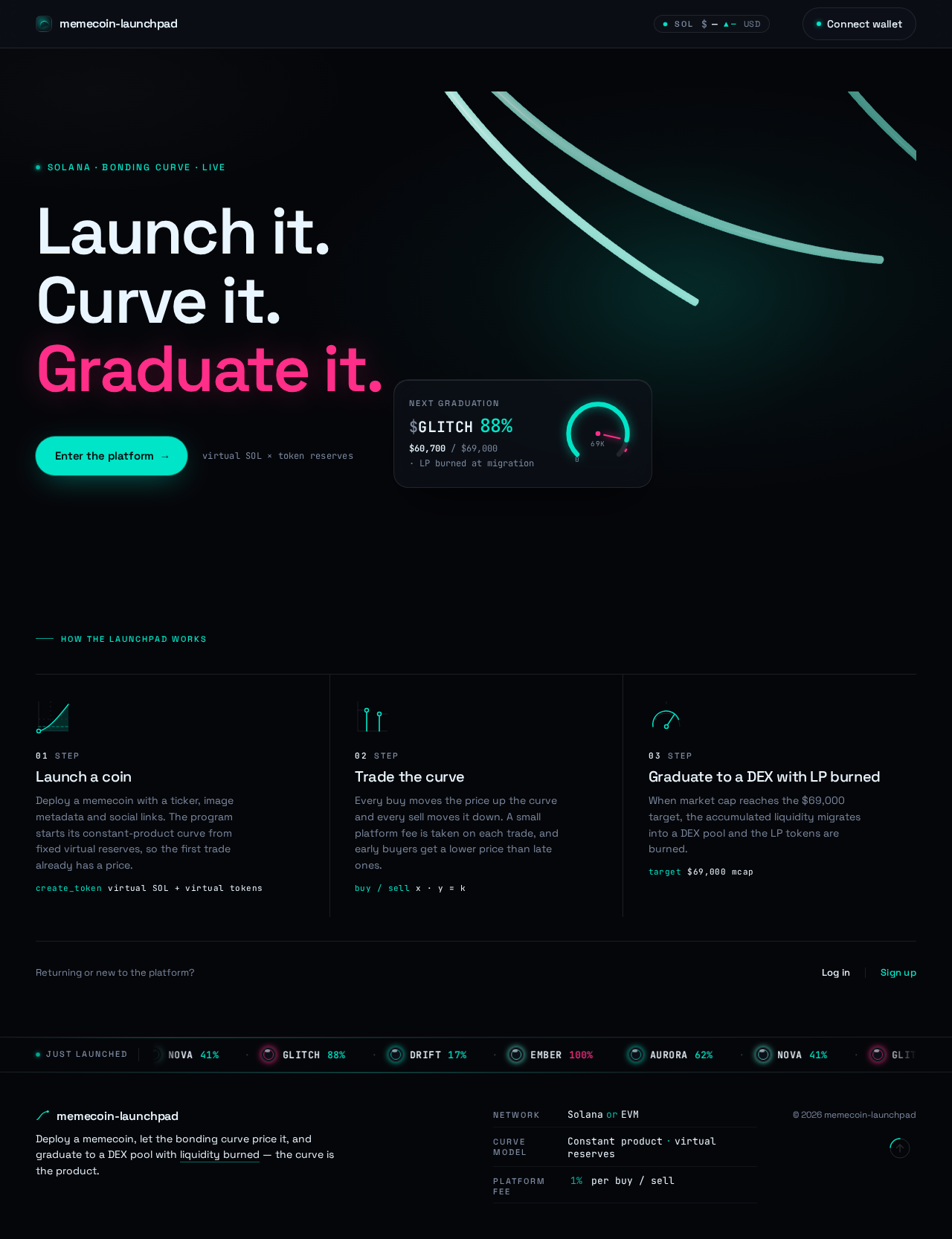
  • Information and state. Product identity and value proposition; the three-step story (launch a coin, trade the curve, graduate to a DEX with LP burned); a live "next graduation" counter and circular migration gauge; a thin bottom ticker of just-launched tickers; a single primary call to action that leads into wallet connection and then the Homepage.
  • Primary actions. Enter the platform (connect wallet → Homepage); read the product explanation; follow the live ticker into a token.
  • Supporting actions. Open Login or Sign Up for returning or new wallet holders.
  • Domain entities. Token (ticker, thumbnail), graduation target, live SOL/ETH price ticker.
  • Component responsibilities. Hero stage with the display headline and micro-label; WebGL bond-curve ribbon field; floating glass HUD card with graduation counter and magenta gauge; bottom ticker; top rail with logo, live native-currency price ticker, and wallet button.
  • States. Loading: hero canvas and HUD counter initialize. Empty: no tokens launched yet — ticker shows a neutral placeholder and the HUD counter reads zero. Success: hero renders, ticker scrolls, CTA is active. Error: WebGL unavailable — a static composed frame replaces the canvas without blocking the CTA. Recovery: retry the canvas or proceed with the static frame.
Page 4 of 33

Homepage

  • Purpose and access. Anonymous public market view. Shows the real-time feed of newly created tokens, trending tokens, and completion progress bars toward the DEX migration goal.
  • Information and state. Newly launched token rows (thumbnail orb, ticker, inline bonding-curve sparkline, segmented progress bar to migration); trending tokens; just-graduated tokens; live native-currency price ticker.
  • Primary actions. Open a token row to the Token detail page; open Create Coin (requires wallet); connect wallet.
  • Supporting actions. Sort or filter the feed by recency or trending; follow the bottom ticker.
  • Domain entities. Token, bonding curve reserves, market cap, graduation progress, platform fee.
  • Component responsibilities. Two-zone layout — a wide "newly launched" column of horizontal HUD-strip rows against a narrow right rail of "trending" and "just graduated" stacks; segmented progress bars that fill teal and snap to magenta at 100%; tabular-numeral figures for SOL raised and market cap.
  • States. Loading: skeleton HUD strips. Empty: no tokens yet — an invitation to create the first coin. Success: rows stream in with live progress. Error: feed fetch fails — a retry control with the last known rows retained. Recovery: retry or refresh.
Page 5 of 33

Token detail page

  • Purpose and access. Protected — requires an established wallet identity. Shows a live price chart (candlestick/TradingView style), a trade panel with Buy/Sell and slippage settings, and a holder distribution list.
  • Information and state. Token identity (name, ticker, image, description, Twitter/Telegram links); live price chart; current price, market cap, virtual reserves, and graduation progress; holder distribution; the connected wallet's token balance and native-currency balance.
  • Primary actions. Buy with native currency; Sell tokens back; set slippage (0.5% / 1% / 2% / custom).
  • Supporting actions. Copy the contract address; open the token's Twitter/Telegram links; return to the Homepage.
  • Domain entities. Token, bonding curve state, trade, holder, platform fee, graduation progress.
  • Component responsibilities. 12-column split — 8 columns for chart and holder distribution, 4 columns for a sticky glass trade panel; hard Buy/Sell segmented toggle (Buy teal with void text, Sell magenta with void text); mono slippage chip row; tabular-numeral price and reserve figures that count up on change.
  • States. Loading: chart and holder list load. Empty: no holders beyond the creator — distribution shows the creator only. Success: trade confirms, curve state and balances update, chart ticks. Error: insufficient balance, slippage exceeded, or transaction rejected — an inline message with the trade panel preserved for retry. Recovery: adjust amount or slippage and resubmit. Graduated: the trade panel reflects that the token has migrated and curve trading is closed.
Page 6 of 33

Create Coin

  • Purpose and access. Protected — requires an established wallet identity. The "Create Coin" modal form for Name, Ticker, Description, Image Upload, and Twitter/Telegram links; submitting initializes the bonding curve state and mints supply.
  • Information and state. Form fields (Name, Ticker, Description, Image Upload, Twitter link, Telegram link); image upload progress to IPFS or Arweave; the resulting metadata URI; the initialized curve parameters.
  • Primary actions. Upload the image to IPFS or Arweave; submit the form to call create_token; confirm the wallet transaction.
  • Supporting actions. Cancel and close the modal; edit fields before submission.
  • Domain entities. Token, image metadata, bonding curve state, minted supply.
  • Component responsibilities. Modal shell; field group with validation; image drop/upload control with progress; social-link inputs; submit control that reflects wallet-signing state.
  • States. Loading: image uploading or transaction pending. Empty: blank form. Success: token created — the modal closes and the new token appears in the Homepage feed and opens on its Token detail page. Error: upload failed, validation failed, or transaction rejected — inline field-level messages with entered values preserved. Recovery: retry upload or resubmit.
Page 7 of 33

Operator Dashboard

  • Purpose and access. Protected and role-restricted — requires an established wallet identity provisioned as the Platform Operator. The restricted view for monitoring tokens approaching the graduation target, confirming DEX migration with LP tokens burned, and fee configuration.
  • Information and state. Tokens approaching the graduation target with their progress; graduation events with migration status and LP-burn confirmation; the current platform fee configuration.
  • Primary actions. Review tokens near graduation; confirm a completed DEX migration with LP tokens burned; update the platform fee configuration.
  • Supporting actions. Open a token's Token detail page for context.
  • Domain entities. Token, graduation target, DEX pool, LP tokens, platform fee.
  • Component responsibilities. Monitoring list with progress gauges; migration confirmation panel showing the DEX pool and burn status; fee configuration form.
  • States. Loading: monitoring list loads. Empty: no tokens near graduation. Success: migration confirmed with LP burn recorded; fee updated. Error: migration confirmation fails or fee update rejected — inline message with the prior state retained. Recovery: retry or correct the input.
Page 8 of 33

Login

  • Purpose and access. Anonymous identity-access surface. Wallet-based returning verification for creators, traders, and the platform operator to control their application-owned durable state.
  • Information and state. Supported wallet options (Phantom, Solflare, or MetaMask/Rainbow per chosen chain); connection status; the destination the visitor will return to.
  • Primary actions. Select a supported wallet and sign the verification; return to the intended protected destination.
  • Supporting actions. Switch to Sign Up for a first-time wallet.
  • Domain entities. Wallet identity, session.
  • Component responsibilities. Wallet-option list; connection and signing status; return-to-destination handling.
  • States. Loading: wallet detection. Empty: no wallet detected — guidance to install a supported wallet. Success: verified and returned to the intended destination. Error: signature rejected or wallet unavailable — retry. Recovery: choose another wallet or retry.
Page 9 of 33

Sign Up

  • Purpose and access. Anonymous identity-access surface. Self-service wallet enrollment for any user independently beginning to create tokens or trade.
  • Information and state. Supported wallet options; the enrollment confirmation; the destination the new user will enter.
  • Primary actions. Connect a supported wallet and complete first-use enrollment; proceed to the Homepage or Create Coin.
  • Supporting actions. Switch to Login for an existing wallet.
  • Domain entities. Wallet identity, session.
  • Component responsibilities. Wallet-option list; enrollment confirmation; destination handoff.
  • States. Loading: wallet detection. Empty: no wallet detected — install guidance. Success: enrolled and handed to the intended destination. Error: signature rejected — retry. Recovery: choose another wallet or retry.

3. Functional Requirements

Page 10 of 33

Token Factory

  • As a Token Creator, I should be able to deploy a new memecoin with a name, ticker symbol, and image metadata stored via IPFS or Arweave, so that my token exists on the platform with an initialized bonding curve. (explicit)
    • Lifecycle: initiated from Create Coin after wallet connection; the image is uploaded to IPFS or Arweave and its URI is attached to the token; create_token initializes the bonding curve state and mints supply. Observable result: the token appears in the Homepage feed and opens on its Token detail page with a progress bar toward the DEX migration goal. Failure: upload or transaction rejection surfaces inline with entered values preserved; recovery is retry. Continuation: the creator can share the token's detail page and social links.
  • As a Token Creator, I should supply Name, Ticker, Description, Image Upload, and Twitter/Telegram links in the Create Coin modal form, so that my token's identity and social presence are complete. (explicit)
    • Observable result: all fields are captured and validated before submission; the image upload shows progress; the social links render on the Token detail page.
  • As a Token Creator, I should have create_token initialize the bonding curve state and mint supply, so that the token is immediately tradable against its curve. (explicit)
    • Observable result: virtual reserves are set and the token's price is defined by the constant-product formula from the first trade.
Page 11 of 33

Bonding Curve Mechanics

  • As a Trader, I should trade against a deterministic bonding curve where early buyers get a lower token price, so that price discovery is transparent and predictable. (explicit)
    • Observable result: the price shown on the Token detail page and the inline sparkline on the Homepage both derive from the same curve state.
  • As a Trader, I should see pricing governed by virtual reserves (virtual SOL/ETH and virtual token reserves) using the constant-product formula x * y = k, so that the curve behaves like a constant-product AMM. (explicit)
    • Observable result: reserve values are displayed in tabular numerals on the Token detail page and update after each trade.
Page 12 of 33

Buy and Sell

  • As a Trader, I should call buy with native currency (SOL/ETH) in, receive tokens out, have a small platform fee (e.g., 1%) deducted, and see the curve state updated, so that I can enter a position at the current curve price. (explicit)
    • Lifecycle: initiated from the Token detail page trade panel after wallet connection; the trader sets slippage (0.5% / 1% / 2% / custom), enters an amount, and confirms the wallet transaction. Observable result: tokens arrive in the trader's wallet, the fee is deducted, and the curve state, price, market cap, and graduation progress update. Failure: insufficient balance, slippage exceeded, or transaction rejected — inline message with the trade panel preserved. Recovery: adjust amount or slippage and resubmit. Continuation: the trader can sell or continue watching the chart.
  • As a Trader, I should call sell to return tokens, have fees deducted, and receive native currency back, so that I can exit a position against the curve. (explicit)
    • Lifecycle: initiated from the trade panel's Sell toggle; the trader enters a token amount and confirms. Observable result: native currency arrives in the trader's wallet net of fees, and the curve state, price, market cap, and graduation progress update. Failure: insufficient token balance, slippage exceeded, or transaction rejected — inline message with the panel preserved. Recovery: adjust and resubmit. Continuation: the trader can buy again or leave.
  • As a Trader, I should set slippage (0.5% / 1% / 2% / custom) in the trade panel, so that my trade executes within my tolerance. (explicit)
    • Observable result: the selected slippage is applied to the buy or sell transaction; exceeding it fails the trade with an inline message.
Page 13 of 33

Graduation and Migration

  • As a Platform Operator, I should have tokens automatically graduate when their market cap or bonding curve reaches the target (e.g., $69,000 market cap), migrating accumulated liquidity into a DEX pool (Raydium on Solana or Uniswap on EVM) and burning the LP tokens, so that rug pulls are prevented. (explicit)
    • Lifecycle: the graduation condition is evaluated against the curve state; on reaching the target, the migration routine moves accumulated liquidity into the DEX pool and burns the LP tokens. Observable result: the token appears in the "just graduated" stack on the Homepage, its progress bar snaps to magenta at 100%, and the Token detail page reflects that curve trading is closed. Failure: migration fails — the Operator Dashboard surfaces the failure for review and retry. Continuation: the graduated token trades on the DEX.
  • As a Platform Operator, I should monitor tokens approaching the graduation target and confirm DEX migration with LP tokens burned, so that I can verify the milestone was honored. (required_inference)
    • Lifecycle: initiated from the Operator Dashboard after operator provisioning; the operator reviews tokens near graduation and confirms completed migrations with LP-burn status. Observable result: the migration is recorded as confirmed with LP tokens burned. Failure: confirmation fails — inline message with prior state retained. Recovery: retry. Continuation: the operator continues monitoring.
  • As a Platform Operator, I should configure the platform fee, so that the fee applied to buys and sells matches the platform's specification. (required_inference)
    • Observable result: the updated fee is applied to subsequent buys and sells. Failure: update rejected — inline message with the prior fee retained. Recovery: correct and resubmit.
Page 14 of 33

Frontend and UI

  • As a Trader, I should see a Homepage with a real-time feed of newly created tokens, trending tokens, and completion progress bars toward the DEX migration goal, so that I can discover tokens and gauge how close each is to graduation. (explicit)
    • Observable result: new tokens stream into the feed; trending tokens are surfaced; each row shows a segmented progress bar that fills teal and snaps to magenta at 100%.
  • As a Trader, I should see a Token detail page with a live price chart (candlestick/TradingView style), a trade panel with Buy/Sell and slippage settings, and a holder distribution list, so that I can evaluate and act on a token in one place. (explicit)
    • Observable result: the chart ticks with price changes; the trade panel is sticky and reachable; the holder distribution lists holders.
  • As a Token Creator, I should open a "Create Coin" modal form to input Name, Ticker, Description, Image Upload, and Twitter/Telegram links, so that I can launch a token without leaving the market view. (explicit)
    • Observable result: the modal opens over the current page, captures all fields, and on success closes with the new token visible in the feed.
Page 15 of 33

Deliverables

  • As a developer, I should receive the core smart contract/program (Anchor/Rust or Solidity) with thorough comments, so that the on-chain logic is auditable. (explicit)
  • As a developer, I should receive a TypeScript/JavaScript SDK or hooks layer to interact with the contract for buying, selling, and creating, so that the frontend can call the program cleanly. (explicit)
  • As a developer, I should receive Next.js frontend components for token creation and the trade view, so that the UI is implementable as specified. (explicit)
  • As a developer, I should receive a brief deployment and local testing guide, so that I can run and verify the platform locally. (explicit)

Safety

  • As a developer, I should have built-in safety checks against overflow, re-entrancy (for EVM), and unauthorized state manipulation, so that the platform is production-ready. (explicit)
    • Observable result: arithmetic uses checked operations; EVM contracts use re-entrancy guards; state-changing instructions verify the signer's authority.
Page 16 of 33

Identity and Access

  • As a Token Creator or Trader, I should connect a supported wallet (Solana Wallet Adapter with Phantom/Solflare, or MetaMask/Rainbow for EVM) to establish identity, so that I can create and trade. (required_inference)
    • Lifecycle: initiated from the Landing, Homepage, or a protected destination; the visitor selects a supported wallet and signs. Observable result: the wallet identity is established and the visitor is returned to the intended protected destination. Failure: signature rejected or wallet unavailable — retry. Continuation: protected work proceeds.
  • As a new Token Creator or Trader, I should self-enroll through Sign Up with my wallet, so that I can begin creating or trading. (required_inference)
    • Observable result: enrollment completes and the user is handed to the Homepage or Create Coin.
  • As a returning Token Creator, Trader, or Platform Operator, I should verify through Login with my wallet, so that I can resume my application-owned durable state. (required_inference)
    • Observable result: verification completes and the user returns to the intended protected destination.
  • As a Platform Operator, I should be provisioned for role-restricted dashboard access, so that only the operator can monitor graduation and configure fees. (required_inference)
    • Observable result: the provisioned operator reaches the Operator Dashboard; non-operators do not.

4. User Personas

Page 17 of 33

Token Creator

The Token Creator is a wallet holder who wants to launch a memecoin on the platform. Their product context is the Create Coin modal form, reached after connecting a supported wallet. Their primary goal is to deploy a token with a complete identity — Name, Ticker, Description, Image Upload, and Twitter/Telegram links — such that create_token initializes the bonding curve state and mints supply. Their distinct responsibility is authorship of the token's identity and metadata: they upload the image to IPFS or Arweave, supply the social links, and confirm the wallet transaction. They interact with the IPFS/Arweave store (for image metadata) and the on-chain program (for initialization). Their observable success is a live token that appears in the Homepage feed and opens on its Token detail page with a visible progress bar toward the DEX migration goal. Their work differs from the Trader's because it is a one-time creation act with metadata authorship, not a repeated market action.

Page 18 of 33

Trader

The Trader is a wallet holder who participates in the market. Their product context is the Homepage feed and the Token detail page. Their primary goal is to buy and sell tokens against the bonding curve with the platform fee applied and the curve state updated. Their distinct responsibilities are discovery (browsing the new-token feed and trending tokens), evaluation (reviewing the live price chart and holder distribution), and execution (using the trade panel's Buy/Sell toggle and slippage settings). They interact with the on-chain program (for buy and sell) and with other traders implicitly through the shared curve state. Their observable success is a confirmed trade with tokens or native currency received, the fee deducted, and the curve state, price, market cap, and graduation progress updated. Their work differs from the Creator's because it is repeated, price-sensitive market action rather than a one-time creation act.

Platform Operator

The Platform Operator is the provisioned role that owns the platform fee configuration and the graduation/migration milestone behavior. Their product context is the Operator Dashboard, reached after wallet connection and operator provisioning. Their primary goal is to monitor tokens as they approach the target market cap and confirm that accumulated liquidity migrates to the DEX pool with LP tokens burned. Their distinct responsibilities are monitoring tokens near graduation, confirming completed migrations with LP-burn status, and configuring the platform fee. They interact with the DEX (Raydium or Uniswap) and the on-chain program. Their observable success is graduated tokens migrated without rug-pull risk and fees collected as specified. Their work differs from the Creator's and Trader's because it is oversight and configuration of platform-wide behavior rather than individual token authorship or trading.

Page 19 of 33

5. Core User Flows

Flow 1 — Token Creator launches a memecoin

  1. The Token Creator arrives at the Landing anonymously and reads the product explanation.
  2. They select the call to action and are taken to Sign Up (first time) or Login (returning), where they connect a supported wallet (Phantom/Solflare on Solana, or MetaMask/Rainbow on EVM) and sign.
  3. They are handed to the Homepage, where the new-token feed, trending tokens, and migration progress bars are visible.
  4. They open the Create Coin modal form and enter Name, Ticker, Description, upload an image (which uploads to IPFS or Arweave with visible progress), and add Twitter/Telegram links.
  5. They submit; the SDK/hooks layer calls create_token, which initializes the bonding curve state and mints supply; they confirm the wallet transaction.
  6. On success the modal closes and the new token appears in the Homepage feed; opening it shows the Token detail page with a progress bar toward the DEX migration goal.
  7. Failure/recovery: if the image upload fails, validation fails, or the transaction is rejected, inline field-level messages appear with entered values preserved; the creator retries the upload or resubmits.
  8. Continuation: the creator shares the token's detail page and social links.
Page 20 of 33

Flow 2 — Trader buys against the bonding curve

  1. The Trader arrives at the Homepage (anonymously or already connected) and browses the newly launched feed and trending tokens, reading each row's inline sparkline and migration progress bar.
  2. They open a token's Token detail page; because it is protected, if they are not yet connected they are routed through Login to connect a supported wallet and are returned to the token.
  3. They review the live price chart, current price, market cap, virtual reserves, and holder distribution.
  4. In the sticky trade panel they select Buy, choose slippage (0.5% / 1% / 2% / custom), enter a native-currency amount, and confirm the wallet transaction.
  5. The SDK/hooks layer calls buy: native currency goes in, tokens come out, the small platform fee (e.g., 1%) is deducted, and the curve state updates.
  6. Observable result: tokens arrive in the trader's wallet; the price, market cap, reserves, chart, and graduation progress update with counting numerals.
  7. Failure/recovery: insufficient balance, slippage exceeded, or transaction rejection shows an inline message with the trade panel preserved; the trader adjusts the amount or slippage and resubmits.
  8. Continuation: the trader can sell, continue watching the chart, or return to the Homepage.
Page 21 of 33

Flow 3 — Trader sells back to the curve

  1. From the Token detail page, the Trader selects Sell in the trade panel.
  2. They enter a token amount, confirm slippage, and confirm the wallet transaction.
  3. The SDK/hooks layer calls sell: tokens are returned, fees are deducted, and native currency is returned to the trader; the curve state updates.
  4. Observable result: native currency arrives net of fees; price, market cap, reserves, chart, and graduation progress update.
  5. Failure/recovery: insufficient token balance, slippage exceeded, or transaction rejection shows an inline message with the panel preserved; the trader adjusts and resubmits.
  6. Continuation: the trader can buy again or leave.

Flow 4 — Graduation and DEX migration

  1. As trades accumulate, the token's market cap and bonding curve approach the target (e.g., $69,000 market cap); the Homepage progress bar fills teal.
  2. When the target is reached, the graduation condition triggers the migration routine: accumulated liquidity moves into the DEX pool (Raydium on Solana or Uniswap on EVM) and the LP tokens are burned.
  3. Observable result: the token appears in the "just graduated" stack on the Homepage, its progress bar snaps to magenta at 100%, and its Token detail page reflects that curve trading is closed.
  4. Failure/recovery: if migration fails, the Operator Dashboard surfaces the failure for review and retry.
  5. Continuation: the graduated token trades on the DEX.
Page 22 of 33

Flow 5 — Platform Operator monitors and confirms migration

  1. The Platform Operator connects a supported wallet through Login and, being provisioned, reaches the Operator Dashboard.
  2. They review tokens approaching the graduation target with their progress gauges.
  3. They confirm a completed DEX migration, verifying the DEX pool and that LP tokens are burned.
  4. Observable result: the migration is recorded as confirmed with LP-burn status.
  5. Failure/recovery: if confirmation fails, an inline message appears with the prior state retained; the operator retries.
  6. Continuation: the operator continues monitoring.

Flow 6 — Platform Operator configures the platform fee

  1. From the Operator Dashboard, the Platform Operator opens the fee configuration form.
  2. They update the platform fee and submit.
  3. Observable result: the updated fee is applied to subsequent buys and sells.
  4. Failure/recovery: if the update is rejected, an inline message appears with the prior fee retained; the operator corrects and resubmits.
Page 23 of 33

6. Visuals Colors and Theme

Muse: Gleb Kuznetsov. Headline direction: Launch it. Curve it. Graduate it. — a cinematic future-tech market floor at 3am, a cockpit rather than a banking app.

Mode: dark only. Near-black void #05060A covers ~70% of every screen; glass panels sit at #0D1018 with 1px rgba(234,246,255,0.10) borders and a soft inner top highlight.

Colour tokens by role:

RoleHexUsage
Background (void)#05060AStage ground, ~70% of every screen
Surface (glass)#0D1018Panels, HUD cards, trade slab
Text#EAF6FFAll body text on void (>16:1 contrast)
Primary (signal)#00E5C7Buy actions, live curve strokes, progress fills, teal micro-labels (>11:1 on void)
Accent (hot)#FF2E88Sell/exit actions, graduation events, the single hottest data point — never more than one per viewport
Muted#7C8AA0Micro-labels and secondary metadata

Never place teal text on a teal fill — use void text on filled teal buttons. Magenta fills use void text.

Typography:

Page 24 of 33
  • Headings: Space Grotesk — wide geometric grotesk; uppercase for section and data labels at 11–12px with 0.18em tracking; display headlines in mixed case at 500–600 weight with tight -0.03em tracking.
  • Body: Space Grotesk.
  • On-chain data: JetBrains Mono for contract addresses, tickers, SOL/ETH amounts, block slots — with tabular figures via font-feature-settings: 'tnum' everywhere so price columns never jitter.
  • Scale: 1.25 modular for UI (12/13/14/16/20/25), 1.5 for display; display headlines clamp(40px, 7vw, 88px); 11px uppercase micro-labels. Line-height 1.05 on display, 1.55 on body.

Shape language: thin luminous strokes and glassy translucency. Panels 16–20px radius with 1px light border and soft inner top highlight; data chips are full pills. Radial and arc motifs — the bonding curve renders as a glowing arc, progress-to-graduation as a circular gauge with a magenta needle at the threshold. No heavy drop shadows; depth comes from glow, blur, and stacking order.

Spacing rhythm: 8px base unit; generous void margins around the hero stage; tight 12–16px internal padding in HUD strips; consistent 24px gutters between the wide feed column and the narrow right rail.

Imagery style: no stock photography, no mascot clip art. The imagery is the data — a real-time 3D field of bond curves as luminous teal ribbons over black void; token thumbnails as circular glass orbs with a rim glow derived from the token's own accent; HUD micro-diagrams (curve slope, reserve bars, migration gauge).

Page 25 of 33

Avoid: white or near-white grounds; any blue/indigo primary or Bootstrap-blue CTA; gradient-blob hero backgrounds or pastel glassmorphism; a grid of identical hover-lift cards for the token feed; stock people photography, mascots, or cartoon coin illustrations; Inter, Roboto, or system-ui as the type voice; more than one magenta element per viewport; decorative animation that obscures or delays price and balance figures.

7. Signature Design Concept

The public entry is a full-bleed black stage, not a centred SaaS hero. The left 45% of the viewport holds a stacked, left-aligned display headline — Launch it. Curve it. Graduate it. — set in Space Grotesk 600 at clamp(40px, 7vw, 88px), with the word Graduate rendered in magenta as the only colour break. Above it sits a 12px uppercase teal micro-label: SOLANA · BONDING CURVE · LIVE. Beneath it, pinned to the baseline of the headline block, is a single solid teal pill CTA with void text.

The right 55% is a WebGL field of three glowing teal bond-curve ribbons drifting in slow orbit over pure #05060A. A floating glass HUD card overlaps the canvas's lower-left edge, showing a live "next graduation" counter and a circular magenta gauge. A thin horizontal ticker of just-launched tickers runs along the very bottom edge of the viewport, moving continuously and pausing on hover.

The concept recomposes only accepted content and controls: the product explanation, the graduation counter and gauge, the just-launched tickers, and the CTA into wallet connection and the Homepage. No gradient blob, no centred stack, no blue button.

Page 26 of 33

8. Interaction Model & Motion Direction

Interaction Model: Animated Motion Tempo: cinematic Hero Dimensionality: webgl

Landing Hero Motion Brief

  • Focal subject: three luminous teal bond-curve ribbons drifting in slow orbit over pure #05060A, with a floating glass HUD card overlapping the canvas's lower-left edge showing a live "next graduation" counter and a circular magenta gauge.
  • Input → transformation → outcome thesis: as the visitor arrives, the ribbon field drifts and the HUD counter counts up on change; the single teal CTA transforms the anonymous visitor into a wallet-connected participant who lands on the Homepage. The motion never obscures or delays the counter, the gauge, or the CTA.
  • Motion vocabulary: one continuous slow-drifting generative curve field; scroll-scrubbed camera parallax of no more than 40px between layers; light sweeps across glass panel edges on mount; counting numerals on price and market-cap changes; 150ms functional fades on trade-panel state changes; the bottom ticker scrolls right-to-left and pauses on hover.
  • Composed first frame: left-aligned display headline with the magenta "Graduate" break, teal micro-label above, teal pill CTA at the baseline; right-side ribbon field mid-drift; HUD card overlapping the canvas edge with the counter and magenta gauge; bottom ticker already in motion.
  • Reduced-motion state: the hero canvas freezes to a single composed frame; all reveals become instant; the bottom ticker becomes a wrapped, statically readable row.
Page 27 of 33

Landing Hero 3D Scene Brief — DIRECTION-DERIVED

A crafted real-time WebGL scene of three glowing teal bond-curve ribbons drifting in slow orbit over pure #05060A, with a floating glass HUD card overlapping the canvas's lower-left edge showing a live "next graduation" counter and a circular magenta gauge. The scene shows the product's defining state — the bonding curve as the hero subject — and freezes to a single composed frame under prefers-reduced-motion.

9. Non-Functional Requirements

Page 28 of 33
  • Chain target is an open choice. The blockchain target must be chosen as either Solana (Anchor/Rust) or Ethereum/EVM (Solidity, Hardhat/Foundry); the source does not specify which. (explicit) Rationale: the source leaves the choice open and the implementation must resolve it before deployment.
  • Wallet integration matches the chosen chain. Solana Wallet Adapter (Phantom, Solflare) or MetaMask/Rainbow for EVM. (explicit)
  • Image metadata storage. Image metadata must be stored via IPFS or Arweave. (explicit)
  • Bonding curve formula. Pricing must use virtual reserves with the constant-product formula x * y = k, giving early buyers a lower token price. (explicit)
  • Platform fee. The buy fee is small (e.g., 1%); sells also deduct fees. (explicit)
  • Graduation. Graduation must migrate accumulated liquidity into a DEX pool (Raydium on Solana or Uniswap on EVM) and burn the LP tokens to prevent rug pulls. (explicit)
  • Safety checks. The code must guard against overflow, re-entrancy (for EVM), and unauthorized state manipulation. (explicit)
  • Frontend stack. React.js/Next.js with Tailwind CSS. (explicit)
  • Readable text and controls stay whole at every viewport. Headlines, wordmarks, labels, numbers, cards' text and controls stay entirely inside the viewport and their container at 375px, 768px, and 1280px, wrapping or scaling (e.g., clamp(...) with its mobile size) to fit; no other element covers any part of them. Moving and scrollable content (tickers, marquees) may cross the viewport edge by design and must become fully readable as it passes; under prefers-reduced-motion, provide a usable static arrangement (wrap or horizontal scroll). (explicit — creative direction)
  • Accessibility contrast. Body text #EAF6FF on #05060A exceeds 16:1; teal #00E5C7 on void exceeds 11:1 and is safe for 14px labels; never place teal text on teal fill. (explicit — creative direction)
Page 29 of 33

10. Tech Stack

  • Blockchain target: Solana (Anchor/Rust) or Ethereum/EVM (Solidity, Hardhat/Foundry) — the source leaves this choice open and the implementation must resolve it. (explicit)
  • Smart contract/program: Anchor (Rust) for Solana, or Solidity with Hardhat/Foundry for EVM, with thorough comments and safety checks against overflow, re-entrancy (EVM), and unauthorized state manipulation. (explicit)
  • Frontend: React.js / Next.js with Tailwind CSS. (explicit)
  • Wallet integration: Solana Wallet Adapter (Phantom, Solflare) or MetaMask/Rainbow for EVM, matching the chosen chain. (explicit)
  • SDK / hooks: TypeScript/JavaScript layer wrapping create_token, buy, and sell. (explicit)
  • Metadata storage: IPFS or Arweave for image metadata. (explicit)
  • DEX: Raydium on Solana or Uniswap on EVM for graduation migration. (explicit)
  • Price chart: candlestick/TradingView-style live chart on the Token detail page. (explicit)
  • Deployment and local testing: a brief guide covering local program/contract deployment, SDK wiring, and frontend startup. (explicit)
Page 30 of 33

11. Assumptions and Constraints

  • Blockchain target is unresolved. The source explicitly leaves the choice between Solana and EVM open; this document preserves that open choice and does not silently pick one. The implementation must resolve it before deployment, and the wallet integration and DEX migration path follow the chosen chain. (explicit)
  • Platform fee value. The source gives "e.g., 1%" as an example; the exact fee is configurable by the Platform Operator and the example is not a fixed mandate. (explicit)
  • Graduation target value. The source gives "$69,000 market cap" as an example; the exact target is a configuration value and the example is not a fixed mandate. (explicit)
  • Bonding curve shape. The source gives "linear or exponential" as examples and specifies the constant-product formula x * y = k with virtual reserves; the constant-product formula is the binding constraint. (explicit)
  • Identity is wallet-based. Wallet connection establishes identity; the platform does not add password or email accounts. The Operator Dashboard is provisioned rather than self-enrolled. (required_inference)
  • Anonymous reachability. The Landing and Homepage are anonymously reachable; the Token detail page, Create Coin, and Operator Dashboard require an established wallet identity, with the Operator Dashboard additionally restricted to the provisioned Platform Operator. (required_inference)
  • No adjacent capabilities. Fiat on-ramps, social feeds beyond the specified Twitter/Telegram links, portfolio analytics, and account-management features beyond wallet-based identity establishment and returning verification are out of scope. (explicit — narrow exclusions)
  • No future-horizon capabilities. The source accepts no future-horizon features; the open blockchain-target choice is a current decision, not a future feature. (explicit)
Page 31 of 33

12. Glossary

Page 32 of 33
  • Bonding curve — the deterministic price function governing a token's price against its virtual reserves; here a constant-product curve x * y = k.
  • Virtual reserves — the virtual SOL/ETH and virtual token balances that parameterize the bonding curve and set the price.
  • Constant product AMM — the x * y = k pricing model used by the bonding curve.
  • create_token — the program instruction that initializes a token's bonding curve state and mints supply.
  • buy — the program instruction that accepts native currency, transfers tokens out, deducts the platform fee, and updates the curve state.
  • sell — the program instruction that accepts token returns, deducts fees, and returns native currency.
  • Platform fee — the small fee (e.g., 1%) deducted on buys and sells, configurable by the Platform Operator.
  • Graduation / migration — the milestone at which a token reaches its target market cap and its accumulated liquidity migrates into a DEX pool with LP tokens burned.
  • LP tokens — the liquidity provider tokens minted by the DEX pool; burned at graduation to prevent rug pulls.
  • DEX — the decentralized exchange (Raydium on Solana or Uniswap on EVM) that receives graduated liquidity.
  • IPFS / Arweave — the decentralized storage options for token image metadata.
  • Slippage — the trader-selected tolerance (0.5% / 1% / 2% / custom) within which a buy or sell must execute.
  • Token Creator — the persona who deploys a new memecoin with name, ticker, description, image metadata, and social links.
  • Trader — the persona who buys and sells against the bonding curve.
  • Platform Operator — the provisioned persona who owns fee configuration and the graduation/migration milestone behavior.
Page 33 of 33
Landing design preview
Landing: Read product explanation
Login: Verify provisioned wallet
Operator Dashboard: Review tokens near graduation
Operator Dashboard: 1. Confirm migration and LP burn
Operator Dashboard: 2. Retry failed confirmation
Operator Dashboard: 1. Update platform fee
Operator Dashboard: 2. Correct and resubmit fee
Token detail page: Open token for context
Landing design preview
Landing: Read product explanation
Login: Verify provisioned wallet
Operator Dashboard: Review tokens near graduation
Operator Dashboard: 1. Confirm migration and LP burn
Operator Dashboard: 2. Retry failed confirmation
Operator Dashboard: 1. Update platform fee
Operator Dashboard: 2. Correct and resubmit fee
Token detail page: Open token for context