mellow-start
 Diya Trivedi
start a project to build simple single page of design of calculator

Comments (0)
Sign in to leave a comment
System Requirements
System Requirements Document for mellow-start
1. Introduction
mellow-start is a small, single-page calculator design. The product intent is narrow and deliberate: one page where a person enters numbers and operators and immediately sees the calculated result, presented with the calm, "super normal" restraint of Naoto Fukasawa's design language. There is no account, no navigation, no history, and no second screen — the calculator is the page.
The audience is a general calculator user who wants fast, quiet arithmetic on one page: a student checking a sum, a shopper totalling a basket, anyone who needs a quick answer without ceremony. The experience should feel like a well-made physical object — warm paper ground, soft raised keys, one oversized ink numeral, and a single terracotta equals key as the only point of heat.
This document is the System Requirements Document for mellow-start, written for the requester, Diya Trivedi.
2. System Overview
mellow-start delivers exactly one page, Calculator, which is simultaneously the public entry surface and the working surface. A visitor lands directly on the calculator, presses keys, and reads the result. There is no separate landing page, no sign-in, and no other destination.
The active human actor is the Calculator user, who enters numbers and operators and reads the calculated result. The system performs the arithmetic and renders the display state. The frontend React application owns the keypad, the display panel, and the input/result state; the shared FastAPI backend and MariaDB are provisioned infrastructure available to the application but are not required to carry any accepted calculator behavior, since no accepted requirement calls for persistence, accounts, or server-side computation.
Removed from scope (concepts not present in the accepted requirements; listed to prevent adjacent expansion):
- Multi-page navigation, routing, or a menu of destinations
- User accounts, sign-in, profiles, or identity of any kind
- Calculation history, saved results, or memory keys (M+, M−, MR, MC)
- Scientific functions (trigonometry, logarithms, powers, roots, constants)
- Unit conversion, currency conversion, or any domain-specific calculator mode
- Sharing, export, or printing of results
- Server-side persistence of calculations
2a. Product Interpretation and Delivery Boundary
mellow-start is a first-party, single-page web experience with no access boundary: the Calculator page is publicly reachable and requires no identity, because no accepted behavior creates durable actor-specific state, a commitment, an entitlement, or a value transfer that must remain bound to a particular person. Nothing is stored between visits.
All accepted behavior is current. The calculator's arithmetic, keypad, and display are the whole product. The provisioned backend and database exist as shared infrastructure for the application but carry no current calculator requirement; they are not surfaced as product behavior, and no domain entities, authentication, or data model are implied by their presence. There is no future-horizon requirement in the authoritative thread; anything beyond the single-page calculator is out of scope for this document.
2c. Page Content and Component Coverage
Calculator
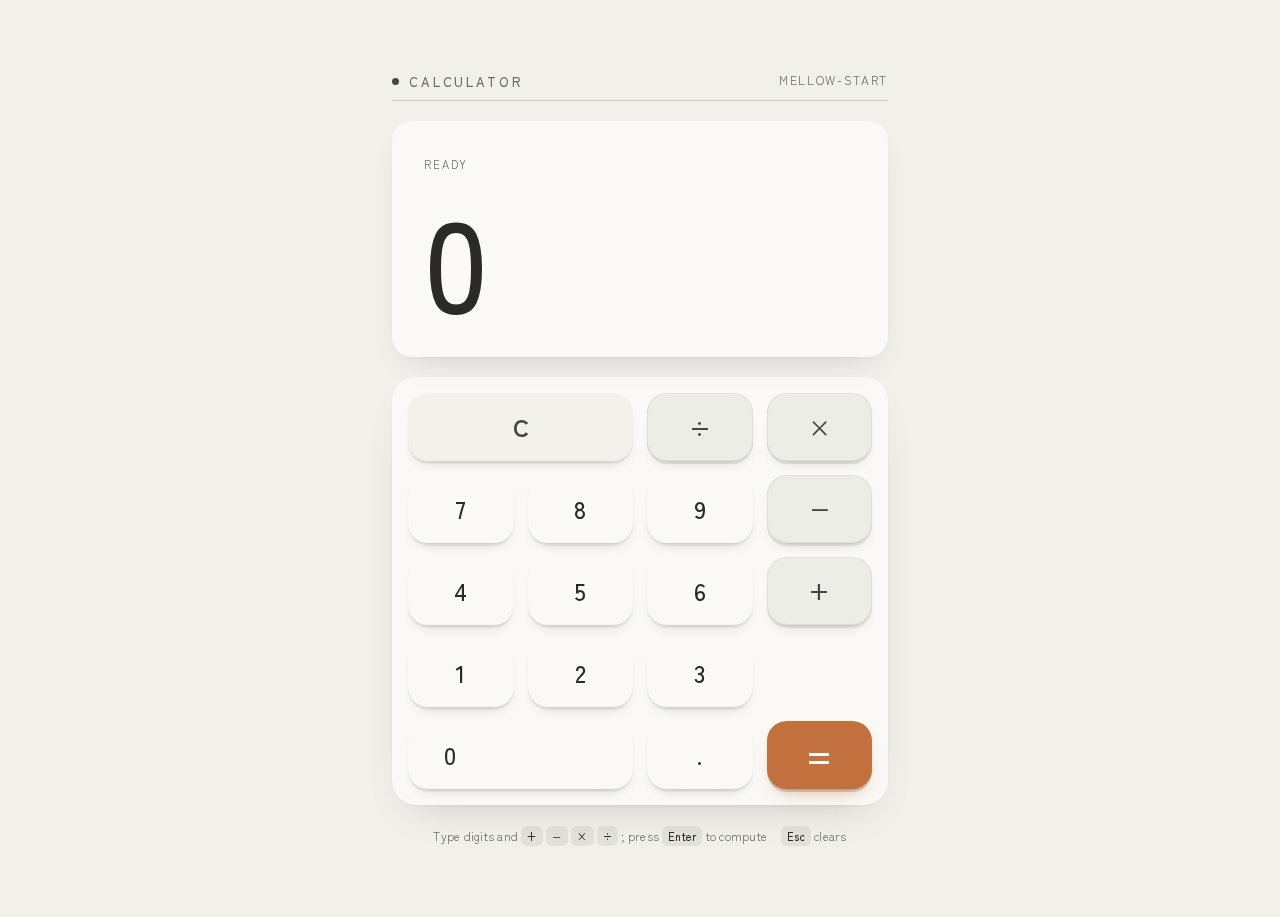
The single page. A centered column on a warm paper ground, containing a small-caps label row above a wide result panel, and a 4-column keypad directly below.
Information and state
- Current display value: the numeral shown in the result panel. Initial state is
0. - Pending operand and pending operator: the first entered number and the operator awaiting a second operand.
- Entry state: whether the next digit starts a fresh number or appends to the current one.
- Error state: an invalid operation (for example division by zero) replaces the display with an error indication until the user clears or begins a new entry.
Primary actions
- Digit keys
0–9: enter digits into the current number. - Decimal point key
.: begin a fractional part of the current number. - Operator keys
+,−,×,÷: record the current number as the pending operand, record the operator, and prepare for the second operand. - Equals key
=: compute the pending operation with the current number and show the result. This is the only key carrying the terracotta accent#C2703D. - Clear key
C: reset the display to0and discard any pending operand and operator.
Supporting actions and controls
- Every key is a focusable button reachable by keyboard, with a visible focus state, so the calculator is operable without a pointer.
Domain entities
- Display value (number or error state).
- Pending operand (number).
- Pending operator (one of
+,−,×,÷).
Component responsibilities
- Label row: small-caps label above the panel on a hairline rule, identifying the surface (for example "Calculator").
- Result panel: soft-white surface
#FBF9F5holding the oversized ink numeral atclamp(48px, 12vw, 128px), flush left, with tabular figures so digits do not shift as they change. - Keypad: a 4-column grid of raised pads with 20px radii, no outlines and no gloss, each pressing down 2px over 120ms.
- Equals key: identical pad form, filled with terracotta
#C2703D, the single hot point on the page.
States
- Loading: none required; the page renders its initial
0immediately with no data fetch. - Empty: the initial state is the display showing
0with no pending operand — this is the normal first frame, not an error. - Success: pressing
=replaces the display with the computed result, which fades in over 160ms. - Error: an invalid operation shows an error indication in the result panel in place of a numeral; the next digit press or
Creturns the calculator to a usable state. - Recovery:
Calways returns to0with no pending operand or operator, from any state including error.
3. Functional Requirements
FR-1 — Enter numbers and operators and see the result (explicit) As a Calculator user, I should enter numbers and operators and see the calculated result, so that I can do quick arithmetic on one page.
- Trigger/input: the user presses digit keys, an operator key, further digits, and the equals key.
- Observable result: the result panel shows the computed value.
- Access state: public; no identity required.
- Failure/recovery: an invalid operation shows an error indication;
Cor a new digit entry restores a usable state. - Continuation: the result can be used as the first operand of a further calculation by pressing an operator.
FR-2 — Digit entry (explicit, as the mechanics of FR-1)
As a Calculator user, I should press digit keys 0–9 to build the number I am entering, so that the display reflects exactly what I have typed.
- Trigger/input: a digit key press.
- Observable result: the digit appears in the result panel; a leading
0is replaced rather than appended. - Access state: public.
- Failure/recovery: none specific;
Cclears. - Continuation: further digits append to the current number.
FR-3 — Decimal entry (explicit, as the mechanics of FR-1) As a Calculator user, I should press the decimal point key to enter a fractional number, so that I can calculate with non-integers.
- Trigger/input: the decimal key press.
- Observable result: a decimal point appears in the current number; a second decimal point in the same number is ignored.
- Access state: public.
- Failure/recovery: ignored duplicate decimal point leaves the number unchanged.
- Continuation: digits after the point append to the fractional part.
FR-4 — Choose an operator (explicit, as the mechanics of FR-1)
As a Calculator user, I should press +, −, ×, or ÷ to choose the operation, so that the calculator knows what to do with my next number.
- Trigger/input: an operator key press.
- Observable result: the current number is held as the pending operand and the operator is recorded; the display is ready for the second operand.
- Access state: public.
- Failure/recovery: pressing a different operator before entering a second operand replaces the pending operator.
- Continuation: entering the second number and pressing
=completes the operation.
FR-5 — Compute the result (explicit, as the mechanics of FR-1) As a Calculator user, I should press the equals key to see the calculated result, so that I get my answer.
- Trigger/input: the equals key press with a pending operand, a pending operator, and a current number.
- Observable result: the result panel shows the computed value, fading in over 160ms.
- Access state: public.
- Failure/recovery: division by zero shows an error indication instead of a numeral;
Cor a new digit entry recovers. - Continuation: the result becomes the current number, ready to be used in a further operation.
FR-6 — Clear (explicit, as the mechanics of FR-1)
As a Calculator user, I should press C to reset the calculator, so that I can start a fresh calculation.
- Trigger/input: the clear key press.
- Observable result: the display returns to
0and any pending operand and operator are discarded. - Access state: public.
- Failure/recovery: works from any state, including the error state.
- Continuation: the user begins a new entry.
FR-7 — Keyboard operation (required_inference) As a Calculator user, I should be able to operate the calculator from the keyboard, so that the single page is usable without a pointer.
- Trigger/input: digit keys,
.,+,-,*,/,Enter/=, andEscape/con a focused page. - Observable result: the same display changes as the corresponding on-screen key.
- Access state: public.
- Failure/recovery: unrecognized keys are ignored.
- Continuation: the user continues entering or clears.
4. User Personas
Calculator user
Product context. A general calculator user who arrives at mellow-start with a small, concrete arithmetic task — a sum, a difference, a product, a division — and wants the answer in seconds. They are not looking for a tool to learn, configure, or return to; they are looking for a well-made object that does one thing quietly.
Primary goal. Enter numbers and operators and see the calculated result on one page, with no friction between the thought and the answer.
Distinct accepted responsibilities.
- Entering digits and a decimal point to build each number.
- Choosing one of the four operators to set the operation.
- Pressing equals to compute and read the result.
- Clearing the calculator to start again, including after an invalid operation.
Relevant inputs and decisions. Which numbers to enter, which operator applies, when the entry is complete enough to compute, and whether to continue from the result or clear and start fresh.
Interactions with other accepted participants. None. The Calculator user is the only active human actor; the system computes and displays, but no other person participates in or is affected by the calculation.
Observable success. The result panel shows the correct computed value for the entered numbers and operator, the numeral is legible at every viewport, and the user can immediately begin another calculation or clear the page.
What makes this role distinct. The role's entire work is a short, self-contained input-and-read loop on a single surface. There is no handoff, no stored state, no return visit, and no decision that outlives the page — which is precisely why the product needs no identity, no history, and no second destination.
5. Core User Flows
Flow 1 — Perform a calculation
- The Calculator user opens mellow-start. The Calculator page loads directly; the result panel shows
0and the keypad is ready. No sign-in or navigation occurs. - The user presses digit keys to enter the first number. Each digit appears in the result panel, replacing the leading
0on the first press. - If the number is fractional, the user presses the decimal point key and continues with digits; a second decimal point in the same number is ignored.
- The user presses an operator key (
+,−,×, or÷). The current number is held as the pending operand and the operator is recorded; the display is ready for the second number. - The user enters the second number with digit and decimal keys.
- The user presses the terracotta equals key. The result panel replaces the entry with the computed value, which fades in over 160ms.
- Continuation: the user either presses an operator to use the result as the first operand of a further calculation, or presses
Cto reset to0and start fresh.
Flow 2 — Recover from an invalid operation
- The user has entered a first number, chosen
÷, and entered0as the second number. - The user presses equals. The result panel shows an error indication in place of a numeral.
- Recovery: the user presses
C, which returns the display to0and discards the pending operand and operator, or simply begins a new digit entry, which starts a fresh number. - The user proceeds with a new calculation as in Flow 1.
Flow 3 — Operate by keyboard
- The user opens the Calculator page and tabs to the keypad; the focused key shows a visible focus state.
- The user types digits,
., an operator, the second number, andEnter(or=). The display changes exactly as if the corresponding on-screen keys were pressed. - The user presses
Escape(orc) to clear, returning the display to0. - The user continues with a new calculation or leaves the page.
6. Visuals Colors and Theme
The creative direction — Super normal arithmetic after Naoto Fukasawa — is authoritative for this section.
Muse and headline. Naoto Fukasawa; the headline idea is super normal arithmetic — a quiet, obvious, well-made everyday object.
Palette (light mode)
| Role | Hex | Use |
|---|---|---|
| Background | #F2F0EB | Warm paper ground covering most of the page |
| Surface | #FBF9F5 | Soft-white result panel and key pads |
| Text | #2B2A27 | Ink numeral and labels |
| Primary | #3F4A3C | Forest-green fill for the result bar and primary key treatment |
| Accent | #C2703D | Terracotta, used only on the equals key |
| Muted | #8A867D | Hairline rules and secondary labels |
Typography. Zen Kaku Gothic New for both headings and body. Headings at Medium weight with wide tracking on small-caps labels; large calm numerals with tabular figures. Modular scale 1.25: 96 / 64 / 40 / 28 / 18 / 16. Display numeral clamp(48px, 12vw, 128px).
Shape language. Soft rounded blocks with 20px radii. Keys are gentle raised pads with a single soft shadow. No outlines and no gloss.
Layout. One centered column on the warm paper ground. A wide result panel sits above a 4-column keypad. Small-caps labels sit above the panel on a hairline rule.
Spacing rhythm. Generous, even padding around the panel and between keys; the keypad reads as one calm block rather than a grid of separate tiles.
Imagery style. No photography. The keypad itself is the only object, lit by one soft shadow.
Avoid. Blue or indigo accents; gradient blobs; glass panels; neon glow; bouncy key animation; stock photography.
Readability. Headlines, labels, numerals, and controls stay entirely inside the viewport and their container at 375px, 768px, and 1280px, wrapping or scaling to fit; no element covers any part of them.
7. Signature Design Concept
The first screen is the calculator, composed as a single calm object on a warm paper field.
- A full-width warm paper ground
#F2F0EBholds the composition. - A small-caps label sits above the panel on a hairline rule in muted
#8A867D, anchoring the surface without decoration. - A large soft-white result panel
#FBF9F5carries one oversized ink numeral atclamp(48px, 12vw, 128px), flush left, in tabular figures so the number never jitters as it changes. - Directly below, the 4-column keypad sits as one calm block of raised pads with 20px radii and a single soft shadow — no outlines, no gloss.
- The equals key alone carries terracotta
#C2703D: the single hot point that tells the eye where the answer is made.
The concept recomposes only accepted content — the display, the digits, the four operators, equals, and clear — into a hero that is the working surface itself. Nothing is added that the calculator does not already do.
8. Interaction Model & Motion Direction
Interaction Model: Static (direction) Motion Tempo: still Hero Dimensionality: flat
Landing Hero Motion Brief
- Focal subject: the oversized result numeral in the soft-white panel, with the keypad as the single object below it.
- Input → transformation → outcome thesis: a key press travels 2px down over 120ms and returns; the display updates; on equals, the computed result fades in over 160ms. The motion is the physical give of a well-made key, nothing more.
- Motion vocabulary: 2px press travel at 120ms ease on every key; 160ms fade-in on the result. No other motion.
- Composed first frame: warm paper ground, small-caps label on a hairline rule, soft-white panel with a large ink
0flush left, 4-column keypad below, terracotta equals key as the only hot point. - Reduced-motion state: with
prefers-reduced-motion, the press travel and result fade are removed; keys show a static pressed state (a subtle surface shift) and the result appears immediately. The layout is unchanged and fully usable.
9. Non-Functional Requirements
- Single page (explicit). The product is exactly one page; no routing, navigation, or additional destinations exist.
- Simplicity (explicit). The design is a simple single-page calculator; no feature beyond entering numbers and operators and seeing the result is included.
- Responsive legibility (explicit, from the creative direction). Readable text and controls stay whole at 375px, 768px, and 1280px; the display numeral scales with
clamp(48px, 12vw, 128px). - Accessibility (required_inference). Every key is a focusable button with a visible focus state and an accessible name; the calculator is operable by keyboard; the ink-on-surface and terracotta-on-surface pairings meet readable contrast.
- Reduced motion (explicit, from the creative direction). A usable static arrangement is provided under
prefers-reduced-motion. - No persistence (required_inference). No calculation state is stored between visits; the page always opens at
0.
10. Tech Stack
- Frontend: React application UI — owns the Calculator page, keypad, display panel, and input/result state.
- Backend: shared FastAPI process for application APIs and domain modules. Provisioned and available; no current calculator requirement depends on it.
- Database: MariaDB for application-owned persistent data. Provisioned; no calculator domain entities are defined, since no accepted requirement stores data.
- Containerization: Docker / docker-compose as the inventory of runnable services (frontend, backend, database).
11. Assumptions and Constraints
- A-1 (explicit). The product is one single page; the Calculator page is both the public entry and the working surface.
- A-2 (explicit). The calculator supports the four basic operations
+,−,×,÷, digits0–9, a decimal point, equals, and clear. No scientific or memory functions are assumed. - A-3 (required_inference). No identity, account, or session is required; the page is public and stateless.
- A-4 (required_inference). Arithmetic is performed in the frontend; the provisioned backend and database are not required for accepted behavior and introduce no domain entities.
- A-5 (required_inference). Division by zero is treated as an invalid operation and shown as an error indication recoverable via
Cor a new digit entry. - A-6 (explicit, from the creative direction). The palette, typography, shape language, and motion specified in Sections 6–8 are binding; blue/indigo accents, gradients, glass, neon, bouncy animation, and stock photography are excluded.
12. Glossary
- Calculator page — the single page of mellow-start; the public entry and the working surface.
- Result panel — the soft-white surface holding the oversized ink numeral.
- Keypad — the 4-column grid of raised key pads below the result panel.
- Pending operand — the first number held while an operator awaits the second number.
- Pending operator — the chosen operation (
+,−,×,÷) awaiting the second number. - Equals key — the compute key, the only control carrying the terracotta accent
#C2703D. - Clear key (
C) — resets the display to0and discards any pending operand and operator. - Super normal — Naoto Fukasawa's design language of quiet, obvious, well-made everyday objects, applied here to the calculator's form and motion.
Type digits and + − × ÷ ; press Enter to computeEsc clears
Type digits and + − × ÷ ; press Enter to computeEsc clears
No comments yet. Be the first!