mellow-fatakseride
 Nikhil Perjapti
BUILD A PRODUCTION-QUALITY ANDROID APPLICATION CALLED: FATAKSERIDE TAGLINE: "Ride Faster. Work Smarter." Act as a senior Flutter + Android Kotlin developer, UI/UX designer, accessibility engineer, performance engineer, and QA engineer. I will provide screenshots/reference UI separately. Use them as behavioral and visual references. Do not build a generic taxi app or a simple mockup. 1. CORE PURPOSE FatakSeRide is a driver-focused ride-request filtering and assistance application. The driver selects a supported ride platform, configures filters, uses the target ride app, and FatakSeRide detects relevant ride requests, evaluates them locally, and assists with the appropriate platform-specific action. 2. TECHNOLOGY Use Flutter/Dart for FatakSeRide's UI and native Android Kotlin for performance-critical functionality. Use AccessibilityService, AccessibilityEvent, AccessibilityNodeInfo, GestureDescription, dispatchGesture(), Room, and Flutter Platform Channels or Pigeon. 3. ARCHITECTURE Use: Flutter UI ↓ Platform Channel ↓ Native Kotlin ↓ AccessibilityService ↓ Event Processor ↓ Platform Adapter ↓ Ride Parser ↓ Filter Engine ↓ Decision Engine ↓ Action Engine ↓ Verification 4. LOW LATENCY Optimize the complete detection-to-action pipeline. Keep critical processing in Kotlin. Do not send ride information to a server before making a filter decision. Measure actual latency instead of claiming guaranteed one-second performance. 5. EVENT-DRIVEN PROCESSING Use AccessibilityEvent-driven processing. Do not continuously screenshot, OCR, or poll the screen every few milliseconds. Process only relevant events and use debouncing/deduplication. 6. PLATFORM ADAPTERS Create separate adapters: UberAdapter OlaAdapter RapidoAdapter PorterAdapter Never use one universal implementation for every platform. 7. PACKAGE DETECTION Identify the active Android package and route it to the correct adapter. Unknown packages must be ignored. If the active package changes while an action is pending, cancel the action. 8. REQUEST DETECTION Detect only genuine active ride/order requests. Do not trigger on home screens, profiles, settings, maps, navigation, completed trips, login, OTP, messages, or unrelated popups. 9. ACCESSIBILITY TREE Use getRootInActiveWindow() and AccessibilityNodeInfo to inspect relevant UI information including text, contentDescription, resourceName, className, clickable state, enabled state, visibility, bounds, and available actions. 10. FRAMEWORK INDEPENDENCE Do not assume the target app is Flutter. It may use native Android, Flutter, React Native, custom rendering, or another framework. FatakSeRide must interact through legitimate Android accessibility/UI mechanisms. 11. ACTION DETECTION Support: NONE TAP_ACCEPT SWIPE_ACCEPT MATCH TAP_MATCH DISMISS CUSTOM_GESTURE Never blindly assume that Accept and Match are the same action. 12. MULTILINGUAL SUPPORT Support English and Hindi action text. Examples: Accept Accept Ride Accept Order Match Confirm स्वीकार स्वीकार करें मैच मिलान Also inspect contentDescription, accessibility labels, resource IDs, and accessibility actions. 13. DYNAMIC SWIPE For swipe-to-accept controls, dynamically locate the current control and obtain its bounds. Calculate start/end points from those bounds and use GestureDescription + dispatchGesture(). Never rely on permanent coordinates such as x=500,y=1800. 14. GESTURE ENGINE Create a GestureActionEngine supporting: TAP SWIPE_LEFT SWIPE_RIGHT SWIPE_UP SWIPE_DOWN CUSTOM Each action should contain target bounds, coordinates, duration, action type, and confidence. 15. UBER ADAPTER Implement Uber-specific request detection. Distinguish request types such as Exclusive requests and Trip Radar where the current UI provides sufficient evidence. If the current UI requires Accept, find Accept. If it requires Match, find Match. Never blindly press the wrong action. 16. RAPIDO ADAPTER Create an independent Rapido adapter. Detect, where available: fare pickup distance trip distance pickup destination ride type request state accept control dismiss control Determine dynamically whether the correct action is tap or swipe. 17. OLA ADAPTER Create an independent Ola adapter. Detect the current request UI and identify fare, pickup, destination, distance, ride type, request type, request state, and action control. Do not reuse hardcoded coordinates from another platform. 18. PORTER ADAPTER Create an independent Porter adapter supporting platform-specific order information such as amount, pickup, drop, distance, vehicle/order type, request state, and accept action. 19. RIDE DATA MODEL Create RideRequest with: id platform requestType fare pickupDistance tripDistance pickupAddress destinationAddress rideType rating actionType timestamp actionBounds confidence Use nullable fields where information is unavailable. Never fabricate missing data. 20. FILTER ENGINE Create a fast local FilterEngine. Example: Minimum Fare = ₹200 ₹199 → IGNORE ₹200 → MATCH ₹201 → MATCH ₹500 → MATCH The comparison MUST be: fare >= minimumFare ₹200 means ₹200 and above, not exact ₹200. 21. ADVANCED FILTERS Support: Minimum Fare Maximum Fare Minimum Trip Distance Maximum Trip Distance Maximum Pickup Distance Minimum Fare/KM Maximum Fare/KM Ride Type Platform Request Type All enabled filters must be evaluated using AND logic. 22. FARE/KM Calculate: farePerKm = fare / tripDistance Example: ₹900 / 30 km = ₹30/km If trip distance is zero or unavailable, fare/km is unavailable. If the fare/km filter is enabled and the required value is unavailable, do not accept. 23. FILTER PRIORITY Optimize filtering by evaluating cheap conditions first: Platform Request validity Fare Pickup distance Trip distance Fare/KM Ride type Request type If an early condition fails, stop processing immediately. 24. NO GUESSING If a required filter value is unavailable, do not guess it. Example: Minimum Fare = ₹200 Maximum Pickup = 5 km Fare = ₹300 Pickup = unavailable Result: NO ACTION Reason: Pickup distance unavailable. 25. ACTION CONFIDENCE Before executing an action, calculate confidence based on platform, request, data, and action detection. If the correct action cannot be confidently identified, do nothing. 26. FINAL VALIDATION Immediately before executing: FatakSeRide must be ON correct package must be active request must still exist request must still be active filter must still match action control must still exist action control must be enabled bounds must still be valid confidence must be sufficient emergency stop must not be active. 27. POST-ACTION VERIFICATION After tap/swipe/match, verify that the action actually succeeded. Possible signals: request disappears accepted screen appears matched screen appears request card changes confirmation appears new trip screen appears If verification fails, record ACTION_UNCONFIRMED and do not blindly repeat the action. 28. DUPLICATE PROTECTION Create a request fingerprint using relevant information such as: platform fare pickupDistance tripDistance destination rideType requestType Use a short deduplication window so multiple accessibility events do not process the same request repeatedly. 29. FLUTTER UI Create a premium driver-focused UI containing: Home Live Rides Filters History Analytics Settings Permissions Subscription Account Test Mode Developer Mode Home should show: FATAKSERIDE "Ride Faster. Work Smarter." Assist ON/OFF Selected platform Current filters Matched today Accepted today Ignored today Average processing time STOP ASSIST 30. TESTING + DEVELOPER MODE Create a Filter Tester and Developer Diagnostics screen. Test examples: ₹199 + minimum ₹200 → IGNORE ₹200 + minimum ₹200 → MATCH ₹300 + pickup 7 km + maximum pickup 5 km → IGNORE ₹900 / 30 km → ₹30/km missing required data → NO ACTION unknown package → IGNORE package changes → CANCEL duplicate event → PROCESS ONCE emergency stop → CANCEL Developer screen should show current package, service status, last event, parsed RideRequest, filter result, action type, confidence, bounds, errors, and real latency. 31. PERMISSIONS, STORAGE, SAFETY Create a Permission Center showing only permissions actually required, such as Accessibility Service, Notification Access, Overlay, Foreground Service, and Notifications. Use Room for local history/settings. Do not collect passwords, OTPs, unrelated messages, or unnecessary personal information. When uncertain: DO NOTHING. Never randomly tap, swipe, or guess missing ride information. 32. PRODUCTION REQUIREMENTS This must be a REAL Android application, not a screenshot mockup or fake demo. Implement: Flutter UI Native Kotlin AccessibilityService Platform adapters Ride parser Local filter engine Dynamic action detection Gesture engine Action validation Post-action verification Room database History Analytics Test Mode Developer Mode Permission Center Flutter/Kotlin bridge Unit tests Integration tests Android tests Latency monitoring Error handling Responsive UI Release-ready Gradle configuration. Do not leave core functionality as fake APIs, simulated acceptance, fake latency, hardcoded success, or placeholder methods. Do not hardcode screen coordinates as the primary interaction method. Build the project, run tests, fix compilation/runtime errors, and verify the Flutter/Kotlin integration before declaring the application complete. PRIORITIES: 1. Correctness 2. Safety 3. Reliability 4. Low latency 5. Maintainability 6. Professional UI/UX When the UI or target application behavior is uncertain, use the provided screenshots/reference material and official Android capabilities. Do not invent behavior. FINAL PRODUCT: FATAKSERIDE "Ride Faster. Work Smarter."

Comments (0)
Sign in to leave a comment
Project Tasks
119 planning tasksGenerate system requirement document
Generate personas & user flows
Create flow for Ride-Hailing Driver
Create flow for Developer / QA Engineer
Landing
Repair Landing JSX
Repair Landing JSX
Landing / Identity Band
Landing / Assist Bezel
Landing / Workflow Ledger
Landing / Platform Bezels
Landing / Safety Panel
Landing / Entry Plate
Landing / Footer
Footer
Login
Login / Identity Band
Login / Verification Console
Login / Access Status Ledger
Login / Enrollment Handoff
Login / Footer
Sign Up
Sign Up / Identity Band
Sign Up / Enrollment Panel
Sign Up / Enrollment Ledger
Sign Up / Footer
Home
Home / Identity Bar
Home / Assist Bezel
Home / Counter Strip
Home / Platform Rail
Home / Filter Summary
Home / Destination Bar
Home / Footer
Live Rides
Live Rides / Instrument Header
Live Rides / Ledger
Live Rides / Session Strip
Live Rides / Footer
Filters
Filters / Instrument Header
Filters / Configuration Ledger
Filters / Evaluation Order
Filters / Active Summary
Filters / Footer
History
History / Instrument Header
History / Ledger
History / Entry Detail
History / Outcome Reference
History / Footer
Analytics
Analytics / Period Selector
Analytics / Earnings Instrument
Analytics / Quick Stats
Analytics / Earnings Overview
Analytics / Ride Performance
Analytics / Acceptance Rate
Analytics / Supporting Navigation
Analytics / Footer
Settings
Settings / Instrument Header
Settings / Preference Ledger
Settings / Destination Index
Settings / Footer
Permissions
Permissions / Header
Permissions / Readiness Gauge
Permissions / Required Set
Permissions / Dependency Matrix
Permissions / Handoff
Permissions / Footer
Permission Center
Permission Center / Header
Permission Center / Ledger
Permission Center / Dependency Map
Permission Center / Safety Note
Permission Center / Footer
Subscription
Subscription / Instrument Header
Subscription / Option Ledger
Subscription / Context Strip
Subscription / Footer
Account
Account / Identity Plate
Account / Update Plate
Account / Destination Ledger
Account / Footer
Wallet
Wallet / Balance Instrument
Wallet / Transaction Ledger
Wallet / Security Notice
Wallet / Footer
Test Mode
Test Mode / State Console
Test Mode / Case Ledger
Test Mode / Safety Boundary
Test Mode / Footer
Developer Mode
Developer Mode / Console
Developer Mode / Pipeline Reference
Developer Mode / Safety Boundary
Developer Mode / Footer
Filter Tester
Filter Tester / Header
Filter Tester / Case Bench
Filter Tester / Pipeline Reference
Filter Tester / Outcome Legend
Filter Tester / Footer
Developer Diagnostics
Developer Diagnostics / Dev Diag Header
Developer Diagnostics / Dev Diag Pipeline Status
Developer Diagnostics / Dev Diag Request Inspector
Developer Diagnostics / Dev Diag Decision Readout
Developer Diagnostics / Dev Diag Bounds And Latency
Developer Diagnostics / Dev Diag Error Log
Developer Diagnostics / Footer
Architecture
Workspace task plan
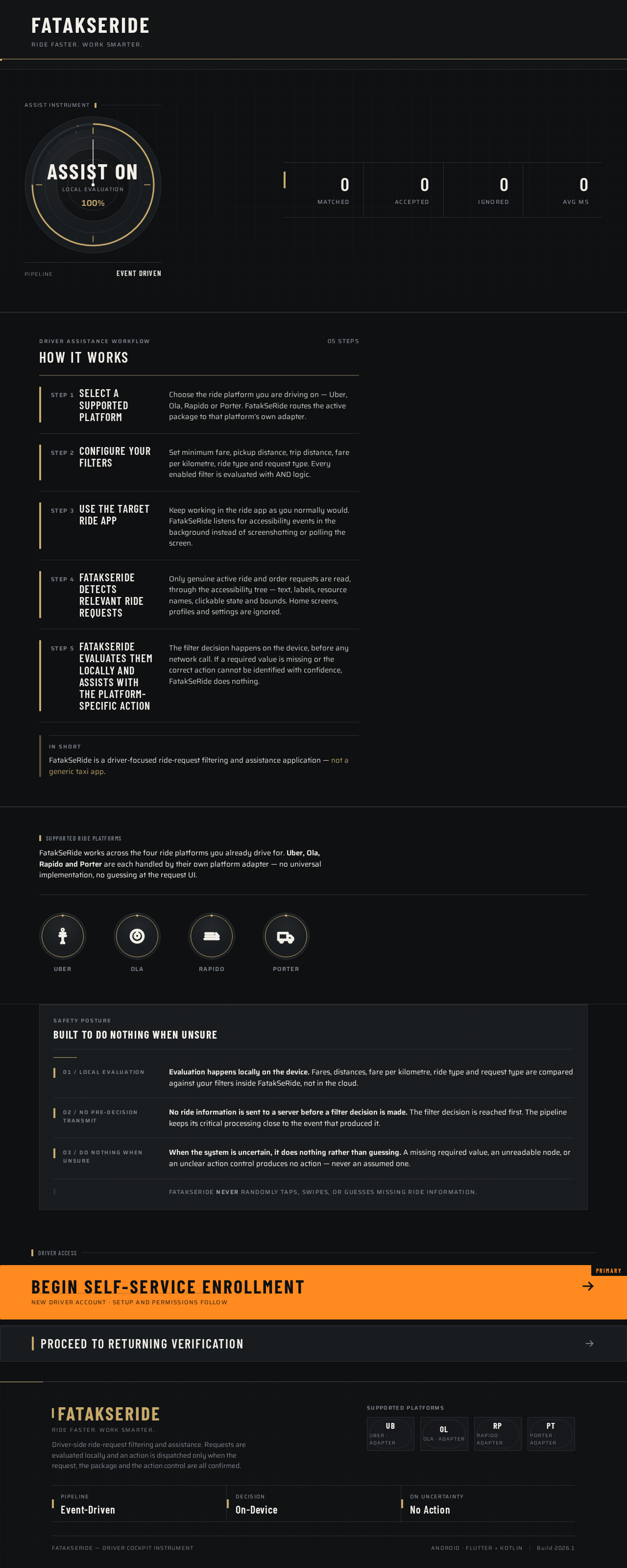
FATAKSERIDE
Ride Faster. Work Smarter.
Driver assistance workflow
How It Works
- Step 1Select a supported platform
Choose the ride platform you are driving on — Uber, Ola, Rapido or Porter. FatakSeRide routes the active package to that platform’s own adapter.
- Step 2Configure your filters
Set minimum fare, pickup distance, trip distance, fare per kilometre, ride type and request type. Every enabled filter is evaluated with AND logic.
- Step 3Use the target ride app
Keep working in the ride app as you normally would. FatakSeRide listens for accessibility events in the background instead of screenshotting or polling the screen.
- Step 4FatakSeRide detects relevant ride requests
Only genuine active ride and order requests are read, through the accessibility tree — text, labels, resource names, clickable state and bounds. Home screens, profiles and settings are ignored.
- Step 5FatakSeRide evaluates them locally and assists with the platform-specific action
The filter decision happens on the device, before any network call. If a required value is missing or the correct action cannot be identified with confidence, FatakSeRide does nothing.
In short
FatakSeRide is a driver-focused ride-request filtering and assistance application — not a generic taxi app.
Supported ride platforms
FatakSeRide works across the four ride platforms you already drive for. Uber, Ola, Rapido and Porter are each handled by their own platform adapter — no universal implementation, no guessing at the request UI.
- Uber
- Ola
- Rapido
- Porter
Built to do nothing when unsure
- 01 / Local evaluation
Evaluation happens locally on the device. Fares, distances, fare per kilometre, ride type and request type are compared against your filters inside FatakSeRide, not in the cloud.
- 02 / No pre-decision transmit
No ride information is sent to a server before a filter decision is made. The filter decision is reached first. The pipeline keeps its critical processing close to the event that produced it.
- 03 / Do nothing when unsure
When the system is uncertain, it does nothing rather than guessing. A missing required value, an unreadable node, or an unclear action control produces no action — never an assumed one.
FatakSeRide never randomly taps, swipes, or guesses missing ride information.
FATAKSERIDE
Ride Faster. Work Smarter.
Driver assistance workflow
How It Works
- Step 1Select a supported platform
Choose the ride platform you are driving on — Uber, Ola, Rapido or Porter. FatakSeRide routes the active package to that platform’s own adapter.
- Step 2Configure your filters
Set minimum fare, pickup distance, trip distance, fare per kilometre, ride type and request type. Every enabled filter is evaluated with AND logic.
- Step 3Use the target ride app
Keep working in the ride app as you normally would. FatakSeRide listens for accessibility events in the background instead of screenshotting or polling the screen.
- Step 4FatakSeRide detects relevant ride requests
Only genuine active ride and order requests are read, through the accessibility tree — text, labels, resource names, clickable state and bounds. Home screens, profiles and settings are ignored.
- Step 5FatakSeRide evaluates them locally and assists with the platform-specific action
The filter decision happens on the device, before any network call. If a required value is missing or the correct action cannot be identified with confidence, FatakSeRide does nothing.
In short
FatakSeRide is a driver-focused ride-request filtering and assistance application — not a generic taxi app.
Supported ride platforms
FatakSeRide works across the four ride platforms you already drive for. Uber, Ola, Rapido and Porter are each handled by their own platform adapter — no universal implementation, no guessing at the request UI.
- Uber
- Ola
- Rapido
- Porter
Built to do nothing when unsure
- 01 / Local evaluation
Evaluation happens locally on the device. Fares, distances, fare per kilometre, ride type and request type are compared against your filters inside FatakSeRide, not in the cloud.
- 02 / No pre-decision transmit
No ride information is sent to a server before a filter decision is made. The filter decision is reached first. The pipeline keeps its critical processing close to the event that produced it.
- 03 / Do nothing when unsure
When the system is uncertain, it does nothing rather than guessing. A missing required value, an unreadable node, or an unclear action control produces no action — never an assumed one.
FatakSeRide never randomly taps, swipes, or guesses missing ride information.
No comments yet. Be the first!