mega-wanted
I wanted to create app that will be transferring battery percent form one phone to another

Comments (0)
Sign in to leave a comment
System Requirements
System Requirements Document for mega-wanted
1. Introduction
The mega-wanted application is designed to facilitate the transfer of battery percentage from one mobile device to another. This innovative solution aims to provide users with a practical and friendly way to share battery power, enhancing connectivity and utility among mobile device users.
2. System Overview
The mega-wanted app will enable users to transfer battery percentage between mobile devices. The primary audience includes mobile device users who frequently face battery shortages and wish to share power with others. The app will focus on a user-friendly interface with a vibrant and welcoming design, aligning with the creative direction of big-hearted boldness.
2a. Product Interpretation and Delivery Boundary
The app will be delivered as a mobile application available for download on major app stores. It will require access to device battery information and the ability to communicate with other devices for battery transfer. The app will not include adjacent capabilities such as device management or additional power-saving features. Future expansions may explore additional functionalities, but they are not part of the current scope.
2b. Source Content Inventory
Not applicable as no content source directive was provided.
2c. Page Content and Component Coverage
Battery Transfer Page
- Information Display
- Current battery percentage of the user's device
- List of nearby devices available for battery transfer
- Primary Actions
- Initiate battery transfer to a selected device
- Set the amount of battery percentage to transfer
- Supporting Actions
- Cancel transfer
- Refresh list of available devices
- Domain Entities
- User device
- Target device
- States
- Loading: Searching for nearby devices
- Success: Battery transfer completed
- Error: Transfer failed due to connectivity issues
- Recovery: Retry transfer option
3. Functional Requirements
- As a user, I should be able to view my current battery percentage and nearby devices available for battery transfer. (explicit)
- As a user, I should be able to select a nearby device and initiate a battery transfer, specifying the percentage to transfer. (explicit)
- As a user, I should receive a confirmation when the battery transfer is successful or an error message if it fails. (explicit)
4. User Personas
- Mobile Device User
- Initiates battery transfers
- Selects target devices for transfer
- Monitors transfer status and outcomes
5. Core User Flows
-
Initiating a Battery Transfer
- User opens the app and views their current battery percentage.
- User sees a list of nearby devices available for transfer.
- User selects a target device and specifies the percentage to transfer.
- User initiates the transfer.
- System confirms the transfer success or notifies the user of any errors.
-
Handling Transfer Errors
- If a transfer fails, the user receives an error message.
- User can choose to retry the transfer or cancel the operation.
6. Visuals Colors and Theme
- Muse: Haraldur Thorleifsson
- Palette:
- Background: #FFF5E6
- Surface: #FFFFFF
- Text: #333333
- Primary: #FF6F61
- Accent: #FFD700
- Muted: #D3D3D3
- Typography:
- Headings: Sora — Bold, large, upper-case, tight tracking
- Body: Outfit
- Scale: 1.5 modular, 64/42/28/20/16
- Shape Language: Chunky rounded cards and bold iconography
- Layout: Color-blocked sections with illustration-led heroes
- Motion: Lively entrance animations and hover pops
7. Signature Design Concept
The entry page will feature an illustration-led hero with a playful, oversized headline. The design will use vibrant color blocks with the primary color as the background, accented by playful illustrations that convey energy sharing and connectivity. Chunky, rounded action buttons will animate with lively transitions to engage users.
8. Interaction Model & Motion Direction
- Interaction Model: Animated
- Motion Tempo: Expressive
- Hero Dimensionality: Layered_2d
- Landing Hero Motion Brief: The hero section will feature a vibrant illustration of devices sharing energy, with lively animations that highlight the transfer process. The motion vocabulary will include hover pops and entrance animations, with a reduced-motion state for accessibility.
9. Non-Functional Requirements
- The app must maintain a secure connection between devices during battery transfer.
- The app should have a responsive design to accommodate various screen sizes.
- The app must handle errors gracefully and provide clear feedback to users.
10. Tech Stack
- Frontend: React Native for cross-platform mobile application development
- Backend: Python/FastAPI for handling device communication and battery transfer logic
- Deployment: Docker for containerization, Kubernetes for orchestration
11. Assumptions and Constraints
- The app assumes that devices have Bluetooth or Wi-Fi capabilities for proximity detection.
- Battery transfer is limited by device compatibility and operating system restrictions.
- The app will not manage device settings or power-saving features beyond battery transfer.
12. Glossary
- Battery Transfer: The process of transferring a specified percentage of battery power from one device to another.
- Device Compatibility: The ability of devices to communicate and perform battery transfers based on hardware and software capabilities.
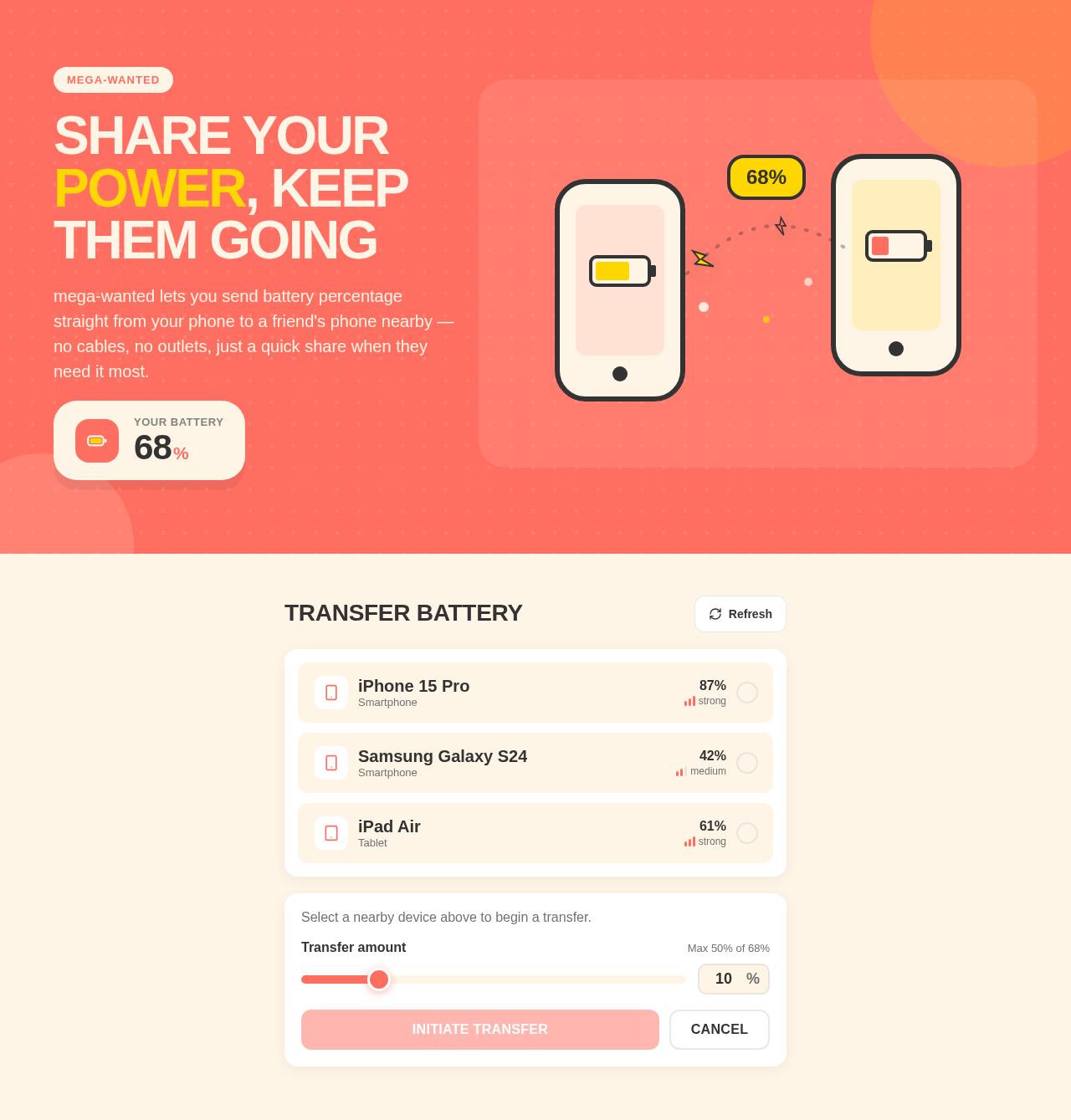
Share your power, keep them going
mega-wanted lets you send battery percentage straight from your phone to a friend's phone nearby — no cables, no outlets, just a quick share when they need it most.
Transfer Battery
Share your power, keep them going
mega-wanted lets you send battery percentage straight from your phone to a friend's phone nearby — no cables, no outlets, just a quick share when they need it most.
No comments yet. Be the first!