mega-todo
Begin project to make the todo application with single page design and minimal design


Comments (0)
Sign in to leave a comment
System Requirements
mega-todo System Requirements Document
Introduction
The "mega-todo" project is a single-page, minimalistic todo application designed to enhance personal productivity. The focus is on simplicity and efficiency, providing users with a clean interface to manage their tasks effectively.
System Overview
The mega-todo application will be a web-based platform that allows users to manage their tasks on a single page. The design will be minimalistic, ensuring that users can focus on their tasks without unnecessary distractions. The application will be intuitive and easy to use, catering to individuals who prefer a straightforward approach to task management.
Functional Requirements
- As a User, I should be able to add new tasks.
- As a User, I should be able to edit existing tasks.
- As a User, I should be able to delete tasks.
- As a User, I should be able to view all tasks on a single page.
User Personas
- User: An individual looking for a simple and efficient way to manage personal tasks without complex features.
Visuals Colors and Theme
- primary: #2A9D8F (a calming teal)
- primary_light: #A8DADC (a lighter tint of teal for hover states)
- secondary: #E76F51 (a warm coral for emphasis)
- accent: #F4A261 (a vibrant orange for CTAs and active states)
- highlight: #E9C46A (a soft gold for notifications and hover states)
- bg: #F1FAEE (a light, clean background color)
- surface: rgba(255, 255, 255, 0.9) (a subtle white for card backgrounds)
- text: #264653 (a deep blue for primary text)
- text_muted: #6D6875 (a muted gray for secondary text)
- border: rgba(38, 70, 83, 0.2) (a subtle teal for borders)
Signature Design Concept
The homepage of mega-todo will feature an interactive "Task Canvas" concept. Users will see their tasks represented as sticky notes on a virtual corkboard. Each note can be dragged and repositioned, providing a tactile and engaging way to organize tasks. The corkboard will have a subtle texture, and notes will animate with a slight bounce when moved, using framer-motion for smooth transitions. This interactive approach will make task management feel dynamic and personal.
Interaction Model & Motion Direction
The landing page will utilize a "parallax" interaction model. As users scroll, the background will shift subtly, creating a sense of depth. Task notes will have animated reveals and hover transitions, enhancing the minimalistic design with a touch of polish. Internal pages will maintain a "static" interaction model to ensure clarity and focus on task management.
Non-Functional Requirements
- The application should load quickly and perform efficiently on all modern web browsers.
- The design should be responsive and accessible on various devices, including desktops, tablets, and smartphones.
- The application should be intuitive and require minimal user guidance.
Tech Stack
- Frontend: React for Web
- Backend: FastAPI
- Database: MySQL or MariaDB, using alembic for migrations
- Local orchestration: Docker, docker-compose
Assumptions and Constraints
- The application will be developed for the Indian market, considering local preferences and timezone (IST).
- The design will prioritize simplicity and ease of use, avoiding complex features that could detract from the minimalistic approach.
Glossary
- SPA: Single Page Application
- CTA: Call to Action
- IST: Indian Standard Time
This document outlines the requirements and design approach for the mega-todo project, ensuring a focused and user-friendly task management experience.
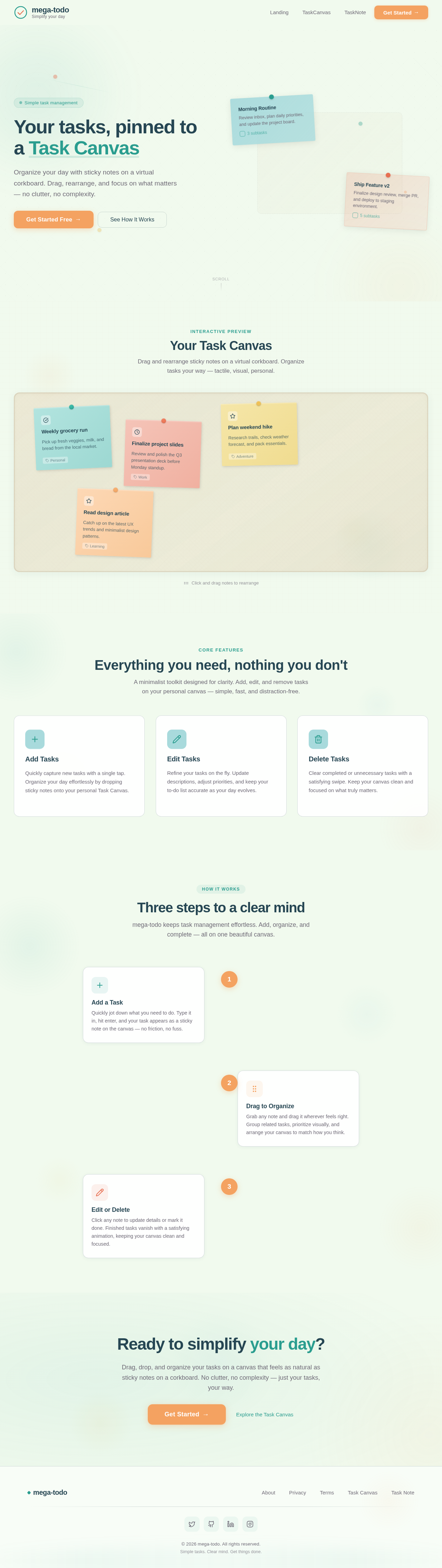
Your tasks, pinned to a Task Canvas
Organize your day with sticky notes on a virtual corkboard. Drag, rearrange, and focus on what matters — no clutter, no complexity.
Interactive Preview
Your Task Canvas
Drag and rearrange sticky notes on a virtual corkboard. Organize tasks your way — tactile, visual, personal.
Tap a note to expand
Everything you need, nothing you don't
A minimalist toolkit designed for clarity. Add, edit, and remove tasks on your personal canvas — simple, fast, and distraction-free.
Add Tasks
Quickly capture new tasks with a single tap. Organize your day effortlessly by dropping sticky notes onto your personal Task Canvas.
Edit Tasks
Refine your tasks on the fly. Update descriptions, adjust priorities, and keep your to-do list accurate as your day evolves.
Delete Tasks
Clear completed or unnecessary tasks with a satisfying swipe. Keep your canvas clean and focused on what truly matters.
Three steps to a clear mind
mega-todo keeps task management effortless. Add, organize, and complete — all on one beautiful canvas.
Add a Task
Quickly jot down what you need to do. Type it in, hit enter, and your task appears as a sticky note on the canvas — no friction, no fuss.
Drag to Organize
Grab any note and drag it wherever feels right. Group related tasks, prioritize visually, and arrange your canvas to match how you think.
Edit or Delete
Click any note to update details or mark it done. Finished tasks vanish with a satisfying animation, keeping your canvas clean and focused.
Ready to simplify your day?
Drag, drop, and organize your tasks on a canvas that feels as natural as sticky notes on a corkboard. No clutter, no complexity — just your tasks, your way.
No comments yet. Be the first!