mega-smart
 Nency Chovatiya
i want to build smart expense analyzer Smart Expense Analyzer is an AI-powered personal finance application that analyzes a user's expenses and provides meaningful spending insights. It automatically categorizes transactions, tracks budgets, identifies unusual spending using Machine Learning (Isolation Forest), and generates simple AI-based recommendations. The system uses Python, FastAPI, SQLite, Streamlit, Pandas, Plotly, and LLMs to provide an interactive and intelligent expense-management experience.


Comments (0)
Sign in to leave a comment
System Requirements
System Requirements Document for mega-smart
1. Introduction
Mega-smart is an AI-powered personal finance application designed to analyze a user's expenses and provide meaningful spending insights. It automatically categorizes transactions, tracks budgets, identifies unusual spending using Machine Learning (Isolation Forest), and generates simple AI-based recommendations. The application aims to offer an interactive and intelligent expense-management experience, utilizing technologies such as Python, FastAPI, SQLite, Streamlit, Pandas, Plotly, and LLMs.
2. System Overview
Mega-smart is a personal finance application that leverages AI to help users manage their expenses effectively. The system automatically categorizes transactions, tracks budgets, identifies unusual spending patterns, and provides AI-based recommendations. The application is built using Python, FastAPI, SQLite, Streamlit, Pandas, Plotly, and LLMs, ensuring a robust and interactive user experience.
2a. Product Interpretation and Delivery Boundary
Mega-smart is delivered as a custom UI application with app-owned identity, requiring users to self-enroll and verify their identity to access and manage their financial data. The system is designed for individual consumers seeking intelligent spending insights, with a focus on providing a playful and engaging user experience. The application does not include adjacent capabilities such as account management beyond the necessary identity verification for accessing personal finance data.
2b. Source Content Inventory
Not applicable as no content_source directive is provided.
2c. Page Content and Component Coverage
Landing
- Purpose: Introduce the Smart Expense Analyzer and its features.
- Components:
- Overview of the application's capabilities.
- Call to action for signing up.
- Visual elements reflecting the playful maximalism theme.
Sign Up
- Purpose: Allow users to self-enroll in the application.
- Components:
- User registration form.
- Confirmation and welcome message.
Login
- Purpose: Enable returning users to verify their identity.
- Components:
- Login form with email and password fields.
- Password recovery option.
Dashboard
- Purpose: Provide an overview of the user's financial data.
- Components:
- Summary of expenses, budgets, and recommendations.
- Navigation to detailed sections like Expenses, Budgets, and Insights.
Expenses
- Purpose: Manage and review individual expenses.
- Components:
- List of transactions with automatic categorization.
- Option to add or import new expenses.
Expense Details
- Purpose: Edit and review specific expense records.
- Components:
- Detailed view of a single expense.
- Edit options for data and category information.
Insights
- Purpose: Offer spending insights and visual summaries.
- Components:
- Graphical representation of spending patterns.
- Insights derived from expense data.
Budgets
- Purpose: Create and track personal budget targets.
- Components:
- Budget creation and management tools.
- Comparison of actual expenses against budget targets.
Unusual Spending
- Purpose: Highlight and review unusual spending patterns.
- Components:
- List of flagged transactions.
- Analysis of spending anomalies.
Recommendations
- Purpose: Provide AI-based spending recommendations.
- Components:
- List of personalized recommendations.
- Explanation of each recommendation's basis.
3. Functional Requirements
- As an Expense Manager, I should be able to self-enroll before first use to access the application. (required_inference)
- As an Expense Manager, I should be able to log in to resume access to my expenses and budgets. (required_inference)
- As an Expense Manager, I should be able to view a dashboard summarizing my financial data. (required_inference)
- As an Expense Manager, I should be able to enter or import expense data and browse transactions. (required_inference)
- As an Expense Manager, I should be able to review and edit individual expense records. (required_inference)
- As an Expense Manager, I should be able to view spending insights and visual summaries. (required_inference)
- As an Expense Manager, I should be able to create, review, and track budgets. (required_inference)
- As an Expense Manager, I should be able to examine expenses flagged as unusual. (required_inference)
- As an Expense Manager, I should be able to generate and review AI-based spending recommendations. (required_inference)
4. User Personas
Expense Manager
- Context: Manages personal expenses using the Smart Expense Analyzer.
- Primary Goal: Understand spending patterns and make informed financial decisions.
- Responsibilities:
- Review transactions with automatic categorization.
- Track budgets and examine unusual spending.
- Receive and act on spending recommendations.
- Interactions:
- Self-enroll and log in to access financial data.
- Navigate through the dashboard, expenses, insights, budgets, and recommendations.
- Success: Achieving a clear understanding of personal spending habits and improving financial management.
5. Core User Flows
5.1 Self-Enrollment
- Starting Context: User lands on the Landing page.
- Action: User clicks on the sign-up call to action.
- Page: Sign Up
- Action: User fills out the registration form and submits.
- Result: User receives a confirmation and welcome message.
- Next Step: User is directed to the Login page.
5.2 Returning Verification
- Starting Context: User has an existing account.
- Action: User navigates to the Login page.
- Page: Login
- Action: User enters credentials and submits.
- Result: User gains access to the Dashboard.
- Next Step: User can navigate to other sections like Expenses or Budgets.
5.3 Expense Management
- Starting Context: User is on the Dashboard.
- Action: User selects the Expenses section.
- Page: Expenses
- Action: User reviews transactions or adds new expenses.
- Result: Expenses are categorized and displayed.
- Next Step: User can view detailed information or edit expenses.
5.4 Budget Tracking
- Starting Context: User is on the Dashboard.
- Action: User selects the Budgets section.
- Page: Budgets
- Action: User creates or reviews budget targets.
- Result: Budgets are tracked against expenses.
- Next Step: User can adjust budgets or view insights.
5.5 Spending Insights
- Starting Context: User is on the Dashboard.
- Action: User selects the Insights section.
- Page: Insights
- Action: User reviews spending patterns and visual summaries.
- Result: Insights are displayed graphically.
- Next Step: User can explore recommendations or unusual spending.
5.6 Unusual Spending Review
- Starting Context: User is on the Dashboard.
- Action: User selects the Unusual Spending section.
- Page: Unusual Spending
- Action: User examines flagged transactions.
- Result: Anomalies are highlighted and explained.
- Next Step: User can take corrective actions or view recommendations.
5.7 AI-Based Recommendations
- Starting Context: User is on the Dashboard.
- Action: User selects the Recommendations section.
- Page: Recommendations
- Action: User reviews AI-based spending recommendations.
- Result: Recommendations are personalized and explained.
- Next Step: User can implement recommendations or adjust spending habits.
6. Visuals Colors and Theme
- Muse: Jessica Walsh
- Palette:
- Background: #F5F5F5
- Surface: #FFFFFF
- Text: #333333
- Primary: #FF6F61
- Accent: #00B2FF
- Muted: #CCCCCC
- Typography:
- Headings: Archivo Black
- Body: Inter Tight
- Scale: 1.5 modular (64/42/28/18/16)
- Shape Language: Bold color fields, overlapping shapes, sticker-like elements
- Layout: Bold color fields, overlapping shapes, sticker-like elements
- Motion: Bouncy scale-ins, marquee text, color flips on hover
7. Signature Design Concept
The Landing page features a full-bleed hero with an oversized headline in Archivo Black over a coral (#FF6F61) block. Playful 3D props interact with the UI, and a contrasting blue (#00B2FF) call to action invites users to sign up. The design incorporates color flips on hover and marquee text effects for data highlights, creating an engaging and dynamic first impression.
8. Interaction Model & Motion Direction
- Interaction Model: Animated
- Motion Tempo: Expressive
- Hero Dimensionality: Layered_2d
- Landing Hero Motion Brief:
- Focal Subject: Oversized headline with playful 3D props
- Input→Transformation→Outcome: User hovers over elements, triggering color flips and marquee text effects
- Motion Vocabulary: Bouncy scale-ins, color flips
- First Frame: Full-bleed hero with headline and props
- Reduced-Motion State: Static elements with no hover effects
9. Non-Functional Requirements
- Performance: The application must provide real-time feedback and updates to ensure a responsive user experience.
- Scalability: The system should handle a growing number of users and transactions without degradation in performance.
- Security: User data must be securely stored and transmitted, with appropriate encryption and access controls.
10. Tech Stack
- Frontend: Streamlit
- Backend: Python, FastAPI
- Database: SQLite
- Data Processing: Pandas, Plotly
- AI/ML: LLMs, Isolation Forest for anomaly detection
11. Assumptions and Constraints
- The application is designed for individual consumers managing personal finances.
- Users must self-enroll and verify their identity to access the application.
- The system uses specified technologies and does not support alternative tech stacks.
12. Glossary
- Expense Manager: The user persona responsible for managing personal expenses using the application.
- Isolation Forest: A machine learning algorithm used to identify unusual spending patterns.
- LLMs: Large Language Models used for generating AI-based recommendations.
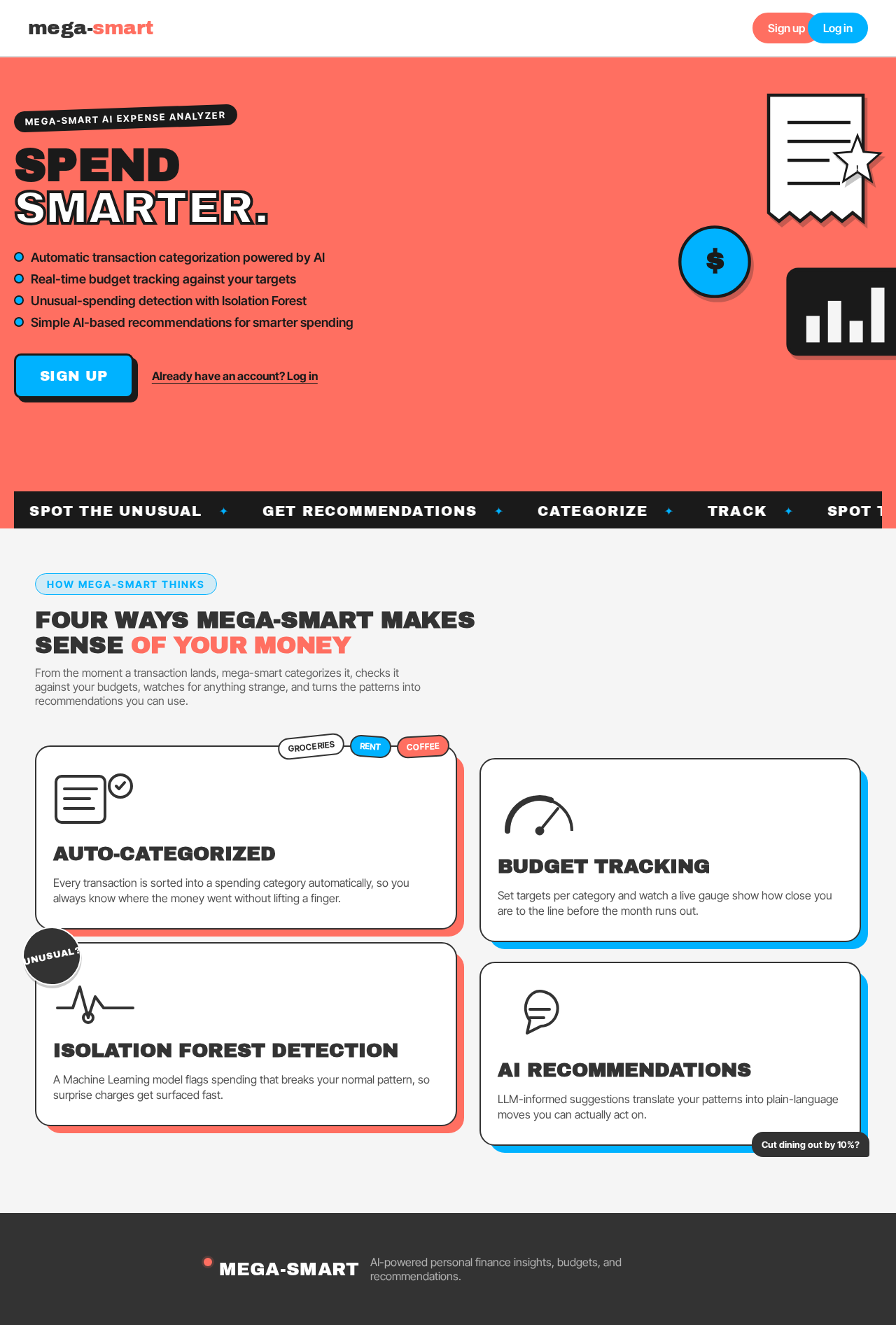
SpendSmarter.
- Automatic transaction categorization powered by AI
- Real-time budget tracking against your targets
- Unusual-spending detection with Isolation Forest
- Simple AI-based recommendations for smarter spending
Four ways mega-smart makes sense of your money
From the moment a transaction lands, mega-smart categorizes it, checks it against your budgets, watches for anything strange, and turns the patterns into recommendations you can use.
Auto-Categorized
Every transaction is sorted into a spending category automatically, so you always know where the money went without lifting a finger.
Budget Tracking
Set targets per category and watch a live gauge show how close you are to the line before the month runs out.
Isolation Forest Detection
A Machine Learning model flags spending that breaks your normal pattern, so surprise charges get surfaced fast.
AI Recommendations
LLM-informed suggestions translate your patterns into plain-language moves you can actually act on.
SpendSmarter.
- Automatic transaction categorization powered by AI
- Real-time budget tracking against your targets
- Unusual-spending detection with Isolation Forest
- Simple AI-based recommendations for smarter spending
Four ways mega-smart makes sense of your money
From the moment a transaction lands, mega-smart categorizes it, checks it against your budgets, watches for anything strange, and turns the patterns into recommendations you can use.
Auto-Categorized
Every transaction is sorted into a spending category automatically, so you always know where the money went without lifting a finger.
Budget Tracking
Set targets per category and watch a live gauge show how close you are to the line before the month runs out.
Isolation Forest Detection
A Machine Learning model flags spending that breaks your normal pattern, so surprise charges get surfaced fast.
AI Recommendations
LLM-informed suggestions translate your patterns into plain-language moves you can actually act on.
No comments yet. Be the first!