mega-project
start a project to build a to-do application with single page design and minimal design as well

Comments (0)
Sign in to leave a comment
System Requirements
mega-project System Requirements Document
Introduction
The "mega-project" is a to-do application designed with a single-page and minimalistic approach. This project aims to provide users with a streamlined, efficient, and user-friendly interface for managing daily tasks. The focus is on simplicity and functionality, ensuring that users can easily create, edit, and delete tasks without unnecessary complexity.
System Overview
The mega-project is a web-based application that allows users to manage their tasks efficiently. The application will be built as a single-page application (SPA) to enhance user experience by reducing load times and providing a seamless interaction model. The minimal design approach ensures that the interface remains clean and intuitive, focusing on essential functionalities.
Functional Requirements
- As a User, I should be able to create new tasks easily.
- As a User, I should be able to edit existing tasks.
- As a User, I should be able to delete tasks that are no longer needed.
- As a User, I should be able to view all tasks in a single, organized list.
User Personas
- User: The primary user of the application who needs to manage personal tasks efficiently.
Visuals Colors and Theme
- primary: #2E4053 (a deep slate blue for a professional and calming effect)
- primary_light: #5A6D7C (a lighter tint of the primary color for hover states)
- secondary: #A93226 (a rich crimson for emphasis and important elements)
- accent: #F39C12 (a vibrant orange for call-to-action buttons and active states)
- highlight: #F5B041 (a warm amber for hover states and notifications)
- bg: #FDFEFE (a clean white background for clarity and focus)
- surface: rgba(46, 64, 83, 0.8) (a semi-transparent slate blue for cards and panels)
- text: #1C2833 (a dark charcoal for primary text)
- text_muted: #839192 (a soft gray for secondary text and labels)
- border: rgba(44, 62, 80, 0.2) (a subtle border color for delineation)
Signature Design Concept
The mega-project will feature an interactive "Task Canvas" on the homepage. This canvas will allow users to drag and drop tasks into different categories or priorities, providing a tactile and engaging way to organize their to-do list. The canvas will have a grid layout where tasks can be moved around freely. Each task card will flip to reveal editing options when clicked, using framer-motion for smooth animations. The background will subtly change colors based on the time of day, using gsap for dynamic transitions, enhancing the user's connection to the app's environment.
Interaction Model & Motion Direction
The landing page will utilize a "parallax" interaction model, providing a layered depth effect as users scroll through their tasks. Decorative elements will move at different speeds, creating a dynamic and engaging visual experience. Internal pages will maintain a "static" interaction model to ensure clarity and focus on task management.
Non-Functional Requirements
- The application must load within 2 seconds on a standard broadband connection.
- The interface should be responsive and accessible on both desktop and mobile devices.
- The application should support the latest versions of major browsers (Chrome, Firefox, Safari, Edge).
Tech Stack
- Frontend: React for Web
- Backend: Python with FastAPI
- Database: MySQL or MariaDB, using Alembic for migrations
- Local Orchestration: Docker and docker-compose
Assumptions and Constraints
- The application is intended for personal use, focusing on individual productivity.
- The design must remain minimalistic, avoiding unnecessary features or complex interactions.
- The application should be developed with scalability in mind, allowing for future enhancements.
Glossary
- SPA: Single-Page Application
- UI: User Interface
- UX: User Experience
- CRUD: Create, Read, Update, Delete
- Responsive Design: An approach to web design that makes web pages render well on a variety of devices and window or screen sizes.
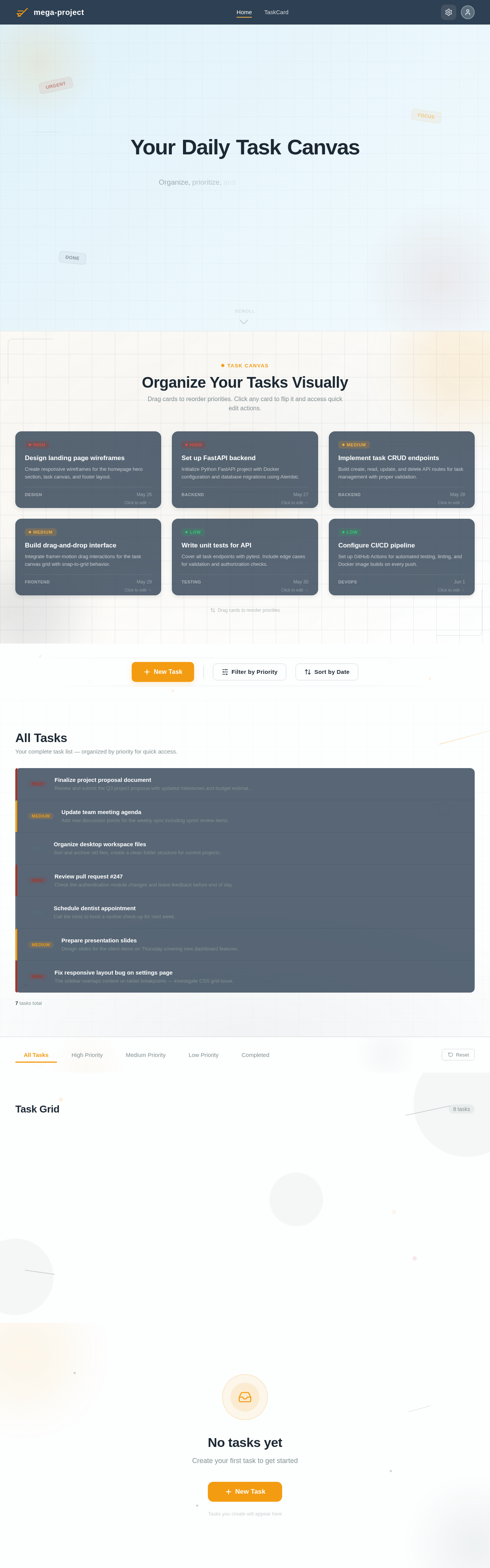
Organize Your Tasks Visually
Drag cards to reorder priorities. Click any card to flip it and access quick edit actions.
All Tasks
Your complete task list — organized by priority for quick access.
- highFinalize project proposal documentReview and submit the Q3 project proposal with updated milestones and budget estimates.
- mediumUpdate team meeting agendaAdd new discussion points for the weekly sync including sprint review items.
- lowOrganize desktop workspace filesSort and archive old files, create a clean folder structure for current projects.
- highReview pull request #247Check the authentication module changes and leave feedback before end of day.
- lowSchedule dentist appointmentCall the clinic to book a routine check-up for next week.
- mediumPrepare presentation slidesDesign slides for the client demo on Thursday covering new dashboard features.
- highFix responsive layout bug on settings pageThe sidebar overlaps content on tablet breakpoints — investigate CSS grid issue.
Task Grid
8 tasksCreate low-fidelity wireframes for the landing page layout, including hero section and task overview grid.
Initialize the Python FastAPI project with database models, Alembic migrations, and CORS configuration.
Build create, read, update, and delete API routes for tasks with proper validation and error handling.
Enable task reordering on the interactive Task Canvas using pointer events and smooth animation transitions.
Cover all task endpoints with pytest test cases, including edge cases for validation and auth.
Ensure all views render correctly on devices from 320px to 1440px with touch-friendly interactions.
Set up docker-compose with React frontend, FastAPI backend, and MariaDB database services.
Implement login and registration pages with JWT token management and protected route middleware.
No comments yet. Be the first!