mega-instagram
 Abhishek
Mujhe instagram content creator bna h or meri id analysis kro tum kya glti h kya thik Krna kya rehta h or shadow banned to ni ho gai vo bhi dekho kya tume access du ya login krne ka option dedo tumhare hi pass login kr dunga tum dekh lena kya kami h kya nhi jise mere views likes comments shares viral content sab ho jaye


Comments (0)
Sign in to leave a comment
System Requirements
System Requirements Document for mega-instagram
1. Introduction
mega-instagram is a creator-growth analysis app for Instagram content creators. Abhishek Patil, an Instagram content creator in India, wants a tool that looks at his Instagram account and tells him three things plainly: what he is doing wrong, what he needs to correct, and whether his account is shadow banned. On top of that diagnosis, the app must give him advice that helps him increase views, likes, comments, shares and viral content.
The product intent is diagnostic and prescriptive, not a passive analytics dashboard. The creator arrives with a growth problem, connects the Instagram account he wants examined, and leaves with a concrete read on his account's health plus a set of next moves. The audience is a single working creator who manages his own account and wants a confident, social, energetic experience — not a quiet admin report.
This document is the System Requirements Document for mega-instagram. It specifies the current product: account connection, account analysis, shadow-ban checking, mistake-and-correction reporting, and growth advice, wrapped in app-owned identity so the creator's connected account and saved analysis persist between visits.
2. System Overview
mega-instagram is a web application with a React frontend, a shared FastAPI backend, and MariaDB for application-owned persistent data. The backend calls model providers through a LiteLLM gateway (backed by its own PostgreSQL instance) to produce the analysis, shadow-ban assessment, mistake report and growth advice for a connected Instagram account.
The single active human actor is the Instagram content creator. The creator self-enrolls, verifies identity on return, connects an Instagram account, and then reads four result surfaces: the overall analysis, the shadow-ban check, the mistakes-and-corrections report, and growth advice. Each result is bound to the creator's own connected account and persists so it can be revisited.
Delivery is first-party custom UI with app-owned identity. The public entry (Landing) and the two identity surfaces (Sign Up, Login) are reachable without login; every account-bound surface (Connect Account, Analysis, Shadow Ban Check, Mistakes, Growth Advice) requires login. The app does not perform direct analysis of social media accounts on the builder platform and does not manage Instagram logins on the builder platform; the creator supplies the account to be analyzed through the app's own Connect Account flow, and the app's analysis is produced from that connected account context.
Removed from scope
- Direct analysis of social media accounts performed by the builder platform itself (also: builder-side account analysis).
- Management of Instagram logins on the builder platform (also: builder-managed Instagram login).
2a. Product Interpretation and Delivery Boundary
mega-instagram is delivered as a first-party web app. The creator owns the journey end to end: he creates his own account on the app, logs back in when he returns, and connects the Instagram account he wants examined. The app owns identity, the connection record, and the stored analysis results; it does not take over or hold the creator's Instagram credentials on the builder platform, and it does not run the analysis on the builder platform's behalf outside the app.
Everything the creator needs to act on — the analysis, the shadow-ban verdict, the mistakes and their corrections, and the growth advice — is current, first-party, and reachable from the logged-in app. There is no future-horizon feature set in this document; the four result surfaces and the connection flow are the whole current product.
2c. Page Content and Component Coverage
Landing
- Information/state: Public entry. Explains that the app analyzes an Instagram account, surfaces mistakes and corrections, checks shadow-ban status, and gives growth advice for views, likes, comments, shares and viral content. Hero headline "Find the leaks in your Instagram growth.", subline "Connect your account. See your mistakes, your shadow-ban status and the next moves.", CTA "Check my account". No account data shown.
- Primary action: "Check my account" CTA leads to Sign Up (new creator) with a visible path to Login (returning creator).
- Supporting actions: Navigate to Login; navigate to Sign Up.
- Domain entities: None persisted; presents the product promise only.
- Component responsibilities: Hero block with headline, subline and pink pill CTA; tilted stack of three result cards (pink, yellow, cream) overlapping the hero edge with hard offset shadows; one marquee band of pink and yellow words; oversized Unbounded section numbers on solid colour blocks; alternating plum and pink section grounds.
- States: Loading — not applicable (static public page). Empty — not applicable. Success — page renders fully. Error — not applicable. Recovery — CTA and Login/Sign Up links remain reachable at all viewports; under
prefers-reduced-motionthe marquee becomes a static wrapped row and card scale-ins are disabled.
Sign Up
- Information/state: Anonymous first-use identity establishment. Collects the creator's enrollment details and creates the app-owned account. No Instagram account is connected yet.
- Primary action: Submit enrollment to create the account and proceed to Connect Account.
- Supporting actions: Navigate to Login if the creator already has an account; return to Landing.
- Domain entities: Creator account (app-owned identity).
- Component responsibilities: Enrollment form with validation; submit pill button; inline error region; link to Login.
- States: Loading — submit disabled with progress indicator while the account is created. Empty — blank form with field-level guidance. Success — account created, creator routed to Connect Account. Error — invalid or incomplete input shown inline with the field at fault; duplicate/invalid enrollment shown as a form-level message with the form preserved for correction. Recovery — the creator can correct and resubmit without losing entered values.
Login
- Information/state: Anonymous returning verification. Verifies the creator's identity so saved connected-account analysis can be resumed.
- Primary action: Submit credentials to verify identity and enter the logged-in app.
- Supporting actions: Navigate to Sign Up; return to Landing.
- Domain entities: Creator account (app-owned identity).
- Component responsibilities: Credential form; submit pill button; inline error region; link to Sign Up.
- States: Loading — submit disabled with progress indicator during verification. Empty — blank form. Success — verified, creator routed to Connect Account (if no account connected) or to Analysis (if a connected account and results exist). Error — incorrect credentials shown as a form-level message with the form preserved. Recovery — retry without losing the entered identifier.
Connect Account
- Information/state: Logged-in. Shows whether an Instagram account is already connected for this creator; if not, prompts the creator to supply the Instagram account to be analyzed. This is the app's own connection step; the builder platform does not manage Instagram logins.
- Primary action: Submit the Instagram account to connect and start analysis.
- Supporting actions: Re-connect or replace the connected account; navigate to Analysis once connected.
- Domain entities: Creator account; connected Instagram account record (handle/identifier, connection status, connection timestamp).
- Component responsibilities: Connection form/field for the Instagram account; connected-state summary card; submit pill button; inline error region; link into Analysis.
- States: Loading — submit disabled with progress indicator while the connection is recorded. Empty — no account connected, prompt shown. Success — connected account summary displayed with a clear path to Analysis. Error — invalid or unverifiable account shown inline with the form preserved. Recovery — creator can correct the account and resubmit; an existing connection can be replaced.
Analysis
- Information/state: Logged-in. Shows the analysis result for the creator's connected Instagram account: what the creator is doing wrong and what must be corrected, in summary. Bound to the connected account; persists for revisit.
- Primary action: Read the analysis result; refresh/re-run the analysis for the connected account.
- Supporting actions: Navigate to Shadow Ban Check, Mistakes, Growth Advice.
- Domain entities: Creator account; connected Instagram account; analysis result (findings, summary, generated timestamp).
- Component responsibilities: Result cards with hard offset shadows; summary of findings; refresh control; links to the three companion result surfaces; loading and error regions.
- States: Loading — result cards in a loading state while analysis is produced. Empty — no analysis yet for the connected account, with a prompt to run it. Success — analysis findings rendered. Error — analysis failure shown with a retry control. Recovery — retry re-runs analysis for the same connected account without losing the connection.
Shadow Ban Check
- Information/state: Logged-in. Shows whether the creator's connected Instagram account is shadow banned, with the verdict and supporting detail. Bound to the connected account; persists for revisit.
- Primary action: Read the shadow-ban verdict; re-run the check.
- Supporting actions: Navigate to Analysis, Mistakes, Growth Advice.
- Domain entities: Creator account; connected Instagram account; shadow-ban check result (verdict, detail, generated timestamp).
- Component responsibilities: Verdict card (clear banned/not-banned signal using the acid-yellow signal colour); supporting detail; re-run control; loading and error regions.
- States: Loading — verdict card in a loading state while the check runs. Empty — no check yet, with a prompt to run it. Success — verdict and detail rendered. Error — check failure shown with a retry control. Recovery — retry re-runs the check for the same connected account.
Mistakes
- Information/state: Logged-in. Shows the mistakes the creator is making on the connected account and, for each, the correction to make. Bound to the connected account; persists for revisit.
- Primary action: Read each mistake with its correction; re-run the report.
- Supporting actions: Navigate to Analysis, Shadow Ban Check, Growth Advice.
- Domain entities: Creator account; connected Instagram account; mistake entries (mistake description, correction, generated timestamp).
- Component responsibilities: List of mistake cards, each pairing a mistake with its correction; re-run control; loading and error regions.
- States: Loading — mistake cards in a loading state while the report is produced. Empty — no report yet, with a prompt to run it. Success — mistake/correction pairs rendered. Error — report failure shown with a retry control. Recovery — retry re-runs the report for the same connected account.
Growth Advice
- Information/state: Logged-in. Shows advice to increase views, likes, comments, shares and viral content for the connected account. Bound to the connected account; persists for revisit.
- Primary action: Read the growth advice; re-run the advice generation.
- Supporting actions: Navigate to Analysis, Shadow Ban Check, Mistakes.
- Domain entities: Creator account; connected Instagram account; growth advice entries (advice text, target metric — views/likes/comments/shares/viral content, generated timestamp).
- Component responsibilities: Advice cards grouped or tagged by target metric; re-run control; loading and error regions.
- States: Loading — advice cards in a loading state while advice is generated. Empty — no advice yet, with a prompt to generate it. Success — advice rendered with metric tags. Error — generation failure shown with a retry control. Recovery — retry re-generates advice for the same connected account.
3. Functional Requirements
FR-1 — Analyze the creator's Instagram account (explicit) As an Instagram content creator, I should be able to have my connected Instagram account analyzed, so that I get a read on my account's health.
- Trigger/input: creator is logged in, has a connected Instagram account, and runs analysis from Analysis.
- Observable result: an analysis result is produced and stored for the connected account and rendered on Analysis.
- Access state: login required.
- Failure/recovery: if analysis fails, an error with a retry control is shown; retry re-runs for the same connected account.
- Continuation: creator moves to Shadow Ban Check, Mistakes or Growth Advice.
FR-2 — See what the creator does wrong and what must be corrected (explicit) As an Instagram content creator, I should see the mistakes I am making and the corrections I need to make, so that I know exactly what to fix.
- Trigger/input: creator opens Mistakes for the connected account (or runs the report).
- Observable result: each mistake is paired with its correction and stored for the connected account.
- Access state: login required.
- Failure/recovery: report failure shows an error with retry; retry re-runs for the same connected account.
- Continuation: creator applies corrections and returns to Analysis or Growth Advice.
FR-3 — Check whether the account is shadow banned (explicit) As an Instagram content creator, I should be able to check whether my connected Instagram account is shadow banned, so that I know if my reach is being suppressed.
- Trigger/input: creator opens Shadow Ban Check for the connected account (or re-runs the check).
- Observable result: a shadow-ban verdict with supporting detail is produced and stored for the connected account.
- Access state: login required.
- Failure/recovery: check failure shows an error with retry; retry re-runs for the same connected account.
- Continuation: creator returns to Analysis or Growth Advice.
FR-4 — Get advice to increase views, likes, comments, shares and viral content (explicit) As an Instagram content creator, I should get advice aimed at increasing my views, likes, comments, shares and viral content, so that I can grow.
- Trigger/input: creator opens Growth Advice for the connected account (or re-runs generation).
- Observable result: advice entries tagged to views, likes, comments, shares and viral content are produced and stored for the connected account.
- Access state: login required.
- Failure/recovery: generation failure shows an error with retry; retry re-generates for the same connected account.
- Continuation: creator applies advice and revisits results later.
FR-5 — Self-service enrollment (required_inference) As an Instagram content creator, I should be able to create my own account on the app, so that my connected account and analysis persist.
- Trigger/input: creator submits enrollment on Sign Up.
- Observable result: an app-owned creator account is created and the creator proceeds to Connect Account.
- Access state: anonymous entry.
- Failure/recovery: invalid or incomplete input is shown inline with the form preserved for correction.
- Continuation: creator connects an Instagram account.
FR-6 — Verify identity on return (required_inference) As an Instagram content creator, I should be able to log back in, so that I can resume my saved connected-account analysis.
- Trigger/input: creator submits credentials on Login.
- Observable result: identity is verified and the creator enters the logged-in app, routed to Connect Account or Analysis.
- Access state: anonymous entry.
- Failure/recovery: incorrect credentials show a form-level message with the form preserved for retry.
- Continuation: creator resumes analysis or connects an account.
FR-7 — Connect an Instagram account before analysis (required_inference) As an Instagram content creator, I should be able to connect the Instagram account I want analyzed, so that the analysis, shadow-ban check, mistakes and growth advice are bound to my account.
- Trigger/input: creator submits the Instagram account on Connect Account.
- Observable result: a connected-account record is stored for the creator and a path into Analysis is shown.
- Access state: login required.
- Failure/recovery: invalid or unverifiable account is shown inline with the form preserved; an existing connection can be replaced.
- Continuation: creator runs analysis.
4. User Personas
Instagram content creator
Product context. Abhishek Patil is an Instagram content creator in India who manages his own account and wants it to grow. He suspects his account may be shadow banned and he does not have a clear picture of what he is doing wrong. He wants a confident, social, energetic tool that tells him the truth about his account and gives him next moves — not a quiet admin report.
Primary goal. Understand his account's health — mistakes, corrections and shadow-ban status — and get advice that increases views, likes, comments, shares and viral content.
Distinct accepted responsibilities.
- Enrolls himself on the app and logs back in on return so his connected account and results persist.
- Connects the Instagram account he wants examined through the app's own connection step.
- Runs and reads the account analysis.
- Runs and reads the shadow-ban check.
- Reads the mistakes-and-corrections report and applies the corrections.
- Reads growth advice targeted at views, likes, comments, shares and viral content.
Relevant inputs or decisions. Which Instagram account to connect; when to run or re-run analysis, the shadow-ban check, the mistakes report and growth advice; which corrections and advice to act on.
Interactions with other accepted participants. The creator is the sole active human actor. The app's backend and the LiteLLM gateway produce the analysis, verdict, mistakes and advice that the creator reads; the creator is the one who initiates each run and consumes each result.
Observable success. The creator sees a stored analysis, a clear shadow-ban verdict, a mistake/correction list and metric-tagged growth advice for his connected account, and can return later to the same results.
5. Core User Flows
Flow A — First-time creator enrolls, connects an account and gets the full picture
- Creator opens Landing (anonymous) and reads the hero: "Find the leaks in your Instagram growth." with the subline and the "Check my account" CTA.
- Creator taps "Check my account" and lands on Sign Up.
- Creator submits enrollment on Sign Up. The app creates the app-owned creator account. Failure: invalid input is shown inline; the creator corrects and resubmits without losing values.
- Creator is routed to Connect Account (login required). Creator supplies the Instagram account to be analyzed and submits. The app stores the connected-account record and shows the connected summary. Failure: an invalid or unverifiable account is shown inline; the creator corrects and resubmits.
- Creator opens Analysis and runs analysis for the connected account. The backend produces the analysis via the LiteLLM gateway; the result is stored and rendered. Failure: an error with retry is shown; retry re-runs for the same account.
- Creator opens Shadow Ban Check and runs the check. The verdict and supporting detail are stored and rendered. Failure: error with retry.
- Creator opens Mistakes and runs the report. Each mistake is paired with its correction and rendered. Failure: error with retry.
- Creator opens Growth Advice and generates advice. Advice entries tagged to views, likes, comments, shares and viral content are rendered. Failure: error with retry.
- Creator acts on the corrections and advice, and can revisit any result surface later.
Flow B — Returning creator resumes saved analysis
- Creator opens Landing (anonymous) and navigates to Login.
- Creator submits credentials on Login. The app verifies identity. Failure: incorrect credentials show a form-level message; the creator retries with the form preserved.
- On success, the creator is routed to Analysis (connected account and results exist) or to Connect Account (no account connected yet).
- Creator re-reads the stored Analysis, Shadow Ban Check, Mistakes and Growth Advice for the connected account, or re-runs any of them to refresh results.
Flow C — Creator replaces the connected account
- Logged-in creator opens Connect Account.
- Creator supplies a different Instagram account and submits. The app replaces the connected-account record and shows the new connected summary.
- Creator opens Analysis and runs analysis for the new account; the new results are stored and rendered, and the companion surfaces reflect the new account.
6. Visuals Colors and Theme
Muse and headline. Jessica Walsh — playful maximalism for creator growth. The product must feel confident, social and energetic, not like a quiet admin tool.
Mode. Dark mode.
Colour tokens (exact hex by role).
- Background (deep plum ground, 60%):
#1A0F2B - Surface (raised cards/panels):
#2A1745 - Text (cream, all reading):
#FFF6EC - Primary (hot pink, main actions, 25%):
#FF3D8B - Accent (acid yellow, signals and numbers, 10%):
#FFD23F - Muted (secondary text):
#C9B8D8
Typography.
- Headings: Unbounded, weight 800, tracking
-0.02em, mixed case with one word in italic caps, very large display sizes. - Body: Archivo.
- Scale: 1.5 modular — display 64/96/128; body 40/32/24/18/16 from mobile to desktop. Use
clamp(...)with mobile sizes so headlines, labels, numbers and card text stay whole at 375px, 768px and 1280px.
Shape language. Big pill buttons and sticker-like badges. Overlapping rounded rectangles with hard offset shadows. No thin lines.
Layout. Asymmetric poster grid. A full-bleed colour block holds the headline on the left; a stack of tilted result cards sits on the right. Sections alternate plum and pink grounds. Section numbers sit in oversized Unbounded digits on solid colour blocks.
Imagery. Surreal 3D props: a glossy pink heart, a yellow eye and a cracked mirror. Bright staged renders on plum grounds. No stock people.
Motion. Bouncy scale-ins on cards; one marquee band of pink and yellow words; colour flips on hover. All motion stops under prefers-reduced-motion.
Avoid. No white page ground; no blue or indigo buttons; no gradient blobs; no grid of identical hover-lift cards; no thin grey dividers. The generic indigo/blue-on-white SaaS template is forbidden.
7. Signature Design Concept
The public entry is a full-bleed plum screen (#1A0F2B). The Unbounded headline "Find the leaks in your Instagram growth." fills the left seven columns at 64px to 128px, with one word set in italic caps. Under it sits the pink pill CTA "Check my account" (#FF3D8B), with the subline "Connect your account. See your mistakes, your shadow-ban status and the next moves." in Archivo above it.
Overlapping the right edge is a tilted stack of three result cards — pink, yellow and cream — each with a hard offset shadow. The cards recompose the accepted result surfaces (analysis, shadow-ban verdict, mistakes/corrections, growth advice) as poster props; they are decorative previews of accepted content, not new behaviour. A marquee band of pink and yellow words runs between sections, and oversized Unbounded section numbers sit on solid colour blocks. The gesture of tilt, overlap and bleed is carried by the cards and props; all readable text and controls stay whole inside the viewport and their containers at 375px, 768px and 1280px.
8. Interaction Model & Motion Direction
Interaction Model: Animated Motion Tempo: expressive Hero Dimensionality: layered_2d
Landing Hero Motion Brief
- Focal subject: the tilted stack of three result cards (pink, yellow, cream) overlapping the hero's right edge, with the glossy pink heart, yellow eye and cracked mirror as staged props on the plum ground.
- Input → transformation → outcome thesis: as the creator lands, the three result cards scale in with a bouncy pop and settle into their tilt; hovering a card flips it from plum to pink with a short scale pop. The outcome is the accepted promise — connect your account, see your mistakes, shadow-ban status and next moves — expressed as a stack of results waiting to be filled.
- Motion vocabulary: bouncy scale-ins on cards, one marquee band of pink and yellow words, colour flips on hover, hard offset shadows that stay crisp.
- Composed first frame: plum ground, headline filling the left seven columns, pink pill CTA beneath it, three tilted cards overlapping the right edge at rest.
- Reduced-motion state: all scale-ins, marquee movement and hover flips stop; the marquee becomes a static wrapped row so every word is fully readable; cards rest in their tilted arrangement.
9. Non-Functional Requirements
- NFR-1 — App-owned identity and persistence (required_inference): creator accounts, connected-account records and all four result types persist in MariaDB so the creator can log back in and revisit saved analysis. Rationale: the creator must resume saved connected-account analysis.
- NFR-2 — No builder-side account analysis or Instagram login management (explicit): the builder platform does not perform direct analysis of social media accounts and does not manage Instagram logins on the builder platform. The app's own Connect Account flow records the account to be analyzed; analysis is produced by the app's backend.
- NFR-3 — Model-provider calls via LiteLLM (basic_default): backend analysis, shadow-ban assessment, mistake reporting and growth advice are produced through the LiteLLM gateway, which uses its own PostgreSQL instance separate from application-owned MariaDB storage.
- NFR-4 — Readable text and controls at all viewports (explicit): headlines, wordmarks, labels, numbers, card text and controls stay entirely inside the viewport and their containers at 375px, 768px and 1280px, wrapping or scaling to fit; no element covers any part of them. Imagery, decoration and motion may be cropped, bled, rotated or overlapped as the direction asks, as long as they cover no readable text or control.
- NFR-5 — Reduced-motion support (explicit): all motion stops under
prefers-reduced-motion; the marquee becomes a usable static arrangement (wrapped rows or horizontal scrolling) so every item can be brought fully into view. - NFR-6 — Failure recovery (required_inference): every result surface exposes an error state with a retry control that re-runs for the same connected account without losing the connection.
10. Tech Stack
- Frontend: React application UI.
- Backend: shared FastAPI process for application APIs and domain modules (identity, connection, analysis, shadow-ban check, mistakes, growth advice).
- Application storage: MariaDB for application-owned persistent data (creator accounts, connected-account records, analysis results, shadow-ban results, mistake entries, growth advice entries).
- Model gateway: LiteLLM gateway for the backend's model-provider calls.
- Gateway storage: PostgreSQL supporting LiteLLM; separate from application-owned storage.
- Orchestration: docker-compose with the services
frontend,backend,database(MariaDB),litellmandpostgres.
11. Assumptions and Constraints
- A-1 (required_inference): The creator supplies the Instagram account to be analyzed through the app's own Connect Account flow; the app does not hold or manage Instagram credentials on the builder platform.
- A-2 (required_inference): Analysis, shadow-ban verdict, mistakes and growth advice are produced by the backend via the LiteLLM gateway from the connected-account context, and are stored per creator and per connected account.
- A-3 (basic_default): A creator has one active connected Instagram account at a time; connecting a different account replaces the previous connection.
- A-4 (basic_default): Result surfaces show the most recent stored result for the connected account and offer a re-run control to refresh.
- C-1 (explicit): The builder platform does not perform direct analysis of social media accounts and does not manage Instagram logins on the builder platform.
- C-2 (explicit): The generic indigo/blue-on-white SaaS template is forbidden; the palette, fonts, surfaces, tone and layout in Sections 6–8 are binding.
12. Glossary
- Creator account — the app-owned identity the creator creates on Sign Up and verifies on Login.
- Connected Instagram account — the Instagram account the creator supplies on Connect Account as the subject of analysis.
- Analysis — the stored result describing the connected account's health, including what the creator is doing wrong and what must be corrected.
- Shadow-ban check — the stored verdict and supporting detail on whether the connected account is shadow banned.
- Mistakes report — the stored list pairing each mistake with its correction.
- Growth advice — stored advice tagged to views, likes, comments, shares and viral content.
- LiteLLM gateway — the model-provider gateway the backend calls to produce analysis, verdict, mistakes and advice.
- Result surface — any of Analysis, Shadow Ban Check, Mistakes or Growth Advice.
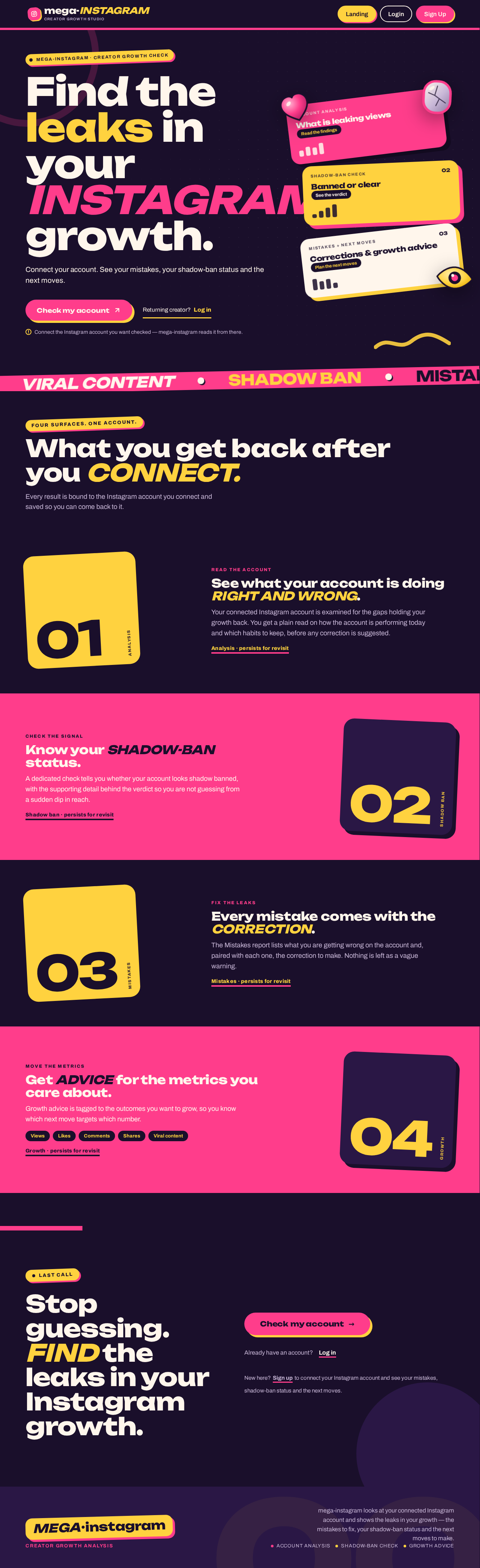
Find the leaks in your Instagram growth.
Connect your account. See your mistakes, your shadow-ban status and the next moves.
Connect the Instagram account you want checked — mega-instagram reads it from there.
What you get back after you connect.
Every result is bound to the Instagram account you connect and saved so you can come back to it.
See what your account is doing right and wrong.
Your connected Instagram account is examined for the gaps holding your growth back. You get a plain read on how the account is performing today and which habits to keep, before any correction is suggested.
Analysis · persists for revisitKnow your shadow-ban status.
A dedicated check tells you whether your account looks shadow banned, with the supporting detail behind the verdict so you are not guessing from a sudden dip in reach.
Shadow ban · persists for revisitEvery mistake comes with the correction.
The Mistakes report lists what you are getting wrong on the account and, paired with each one, the correction to make. Nothing is left as a vague warning.
Mistakes · persists for revisitGet advice for the metrics you care about.
Growth advice is tagged to the outcomes you want to grow, so you know which next move targets which number.
Growth · persists for revisitLast call
Stop guessing. Find the leaks in your Instagram growth.
Already have an account?Log in
New here? Sign up to connect your Instagram account and see your mistakes, shadow-ban status and the next moves.
No comments yet. Be the first!