mega-fukly
 aman pro
build fukly futured trading journal app...like trading zella app.the appp name is OPTIX

Comments (0)
Sign in to leave a comment
System Requirements
System Requirements Document for mega-fukly
Introduction
The product, named OPTIX, is a future-facing trading journal app designed for tech-savvy traders. It is inspired by the Trading Zella app and aims to provide a comprehensive platform for traders to record, analyze, and review their trading activities. The app will leverage advanced data visualization techniques to offer an immersive user experience.
System Overview
OPTIX is a trading journal application that allows traders to document their trading activities, analyze performance, and gain insights through data-driven visualizations. The app is designed to be comparable in purpose to the Trading Zella app but with a unique focus on futuristic aesthetics and user experience. The system will include several key pages and functionalities to support the trader's journey from enrollment to performance analysis.
Product Interpretation and Delivery Boundary
OPTIX will be delivered as a custom application with app-owned identity management. Traders will need to complete self-service enrollment to create durable journal records and verify their identity to access existing records. The app will feature a series of custom pages, each serving a specific role in the trader's journey. The delivery will focus on providing a seamless and secure experience for traders, with a strong emphasis on data visualization and user interaction.
Page Content and Component Coverage
Landing
- Purpose: Introduce OPTIX as a trading journal for traders.
- Components:
- Overview of app features and benefits.
- Call-to-action for enrollment or login.
- Generative data visualization as a hero element.
Login
- Purpose: Allow returning traders to verify their identity and access their journal.
- Components:
- Username and password fields.
- "Forgot Password" recovery option.
- Login button.
Dashboard
- Purpose: Serve as a central hub summarizing journal activity.
- Components:
- Overview of recent trading activities.
- Quick links to Journal, Journal Entry, and Performance pages.
- Summary of key performance metrics.
Journal
- Purpose: Provide an overview of the trader's journal records.
- Components:
- List of past trades with filters and search functionality.
- Option to view detailed entries.
- Button to create a new journal entry.
Journal Entry
- Purpose: Allow traders to record and maintain a trading activity entry.
- Components:
- Form fields for trade details (e.g., date, instrument, strategy).
- Save and cancel buttons.
- Data visualization of trade performance.
Performance
- Purpose: Analyze and review recorded trading performance.
- Components:
- Charts and graphs showing performance trends.
- Filters for different timeframes and metrics.
- Insights and recommendations based on trading data.
Functional Requirements
-
As a Trader, I should be able to enroll in OPTIX to create durable journal records.
- Provenance: required_inference
- Lifecycle: Initiation through self-service enrollment; observable result is access to journal creation.
- Acceptance: Successful enrollment allows journal access.
-
As a Trader, I should be able to log in to access my existing journal records.
- Provenance: required_inference
- Lifecycle: Initiation through login; observable result is access to existing records.
- Acceptance: Successful login grants access to the Dashboard.
-
As a Trader, I should be able to view an overview of my trading activities on the Dashboard.
- Provenance: explicit
- Lifecycle: Access through login; observable result is a summary of activities.
- Acceptance: Dashboard displays recent activities and performance metrics.
-
As a Trader, I should be able to browse and search my journal records.
- Provenance: explicit
- Lifecycle: Access through the Journal page; observable result is a list of records.
- Acceptance: Journal page displays records with search and filter options.
-
As a Trader, I should be able to create and edit a journal entry.
- Provenance: explicit
- Lifecycle: Access through the Journal Entry page; observable result is a saved entry.
- Acceptance: Entry is saved and visible in the Journal.
-
As a Trader, I should be able to analyze my trading performance.
- Provenance: explicit
- Lifecycle: Access through the Performance page; observable result is performance insights.
- Acceptance: Performance page displays charts and insights.
User Personas
- Trader: The primary user of OPTIX, responsible for recording and reviewing their trading activities. The Trader interacts with all pages and functionalities of the app, from enrollment to performance analysis.
Core User Flows
-
Enrollment Flow
- Trader accesses the Landing page.
- Trader selects "Enroll" and completes the enrollment form.
- Trader gains access to the Dashboard upon successful enrollment.
-
Login Flow
- Trader accesses the Login page.
- Trader enters credentials and logs in.
- Trader is redirected to the Dashboard upon successful login.
-
Journal Navigation Flow
- Trader accesses the Dashboard.
- Trader selects "Journal" to view past records.
- Trader browses, searches, and selects entries for detailed view.
-
Journal Entry Creation Flow
- Trader accesses the Journal page.
- Trader selects "New Entry" to create a journal entry.
- Trader fills out the form and saves the entry.
-
Performance Analysis Flow
- Trader accesses the Dashboard.
- Trader selects "Performance" to view analysis.
- Trader reviews charts and insights on the Performance page.
Visuals Colors and Theme
- Muse: Refik Anadol
- Palette:
- Background: #000000
- Surface: #121212
- Text: #FFFFFF
- Primary: #00FFFF
- Accent: #FF00FF
- Muted: #333333
- Typography:
- Headings: Space Grotesk — Bold, uppercase, tight tracking
- Body: IBM Plex Sans
- Scale: 1.25 modular, 64/48/32/24/16
- Shape Language: Full-bleed generative canvases with minimal overlay UI
- Layout: Sparse yet impactful, focusing on large data visuals and minimalistic UI elements
- Motion: Continuous slow generative flow, data-driven transitions
Signature Design Concept
The public entry for OPTIX will feature a full-bleed generative canvas with a slow morphing data visualization as the central element. Electric cyan and magenta glows will highlight key data points against a deep black background, creating an immersive and futuristic atmosphere. Large, bold typographic headers in Space Grotesk will provide clear navigation cues.
Interaction Model & Motion Direction
- Interaction Model: Animated
- Motion Tempo: Cinematic
- Hero Dimensionality: webgl
- Landing Hero Motion Brief: The focal subject is a generative data visualization that transforms in response to user interactions. The visualization uses electric cyan and magenta glows to highlight key data points, creating an immersive experience. The first frame presents a static overview of trading data, transitioning smoothly into dynamic visualizations. A reduced-motion state will simplify transitions for accessibility.
Non-Functional Requirements
- Performance: The app must load pages within 2 seconds to ensure a smooth user experience.
- Security: User data must be encrypted both in transit and at rest to protect sensitive trading information.
- Scalability: The app must support concurrent access by up to 10,000 users without degradation in performance.
Tech Stack
- Frontend: React
- Backend: Python/FastAPI
- Storage: PostgreSQL
- Deployment: Docker/docker-compose, Kubernetes (if required for scaling)
Assumptions and Constraints
- Assumption: Traders are familiar with basic trading concepts and terminology.
- Constraint: The app must adhere to the dark mode aesthetic as specified in the creative direction.
Glossary
- Trader: A user who engages in buying and selling financial instruments and uses OPTIX to document and analyze their trades.
- Journal Entry: A record of a specific trading activity, including details such as date, instrument, and strategy.
- Dashboard: The main interface where traders can view an overview of their trading activities and access different functionalities of the app.
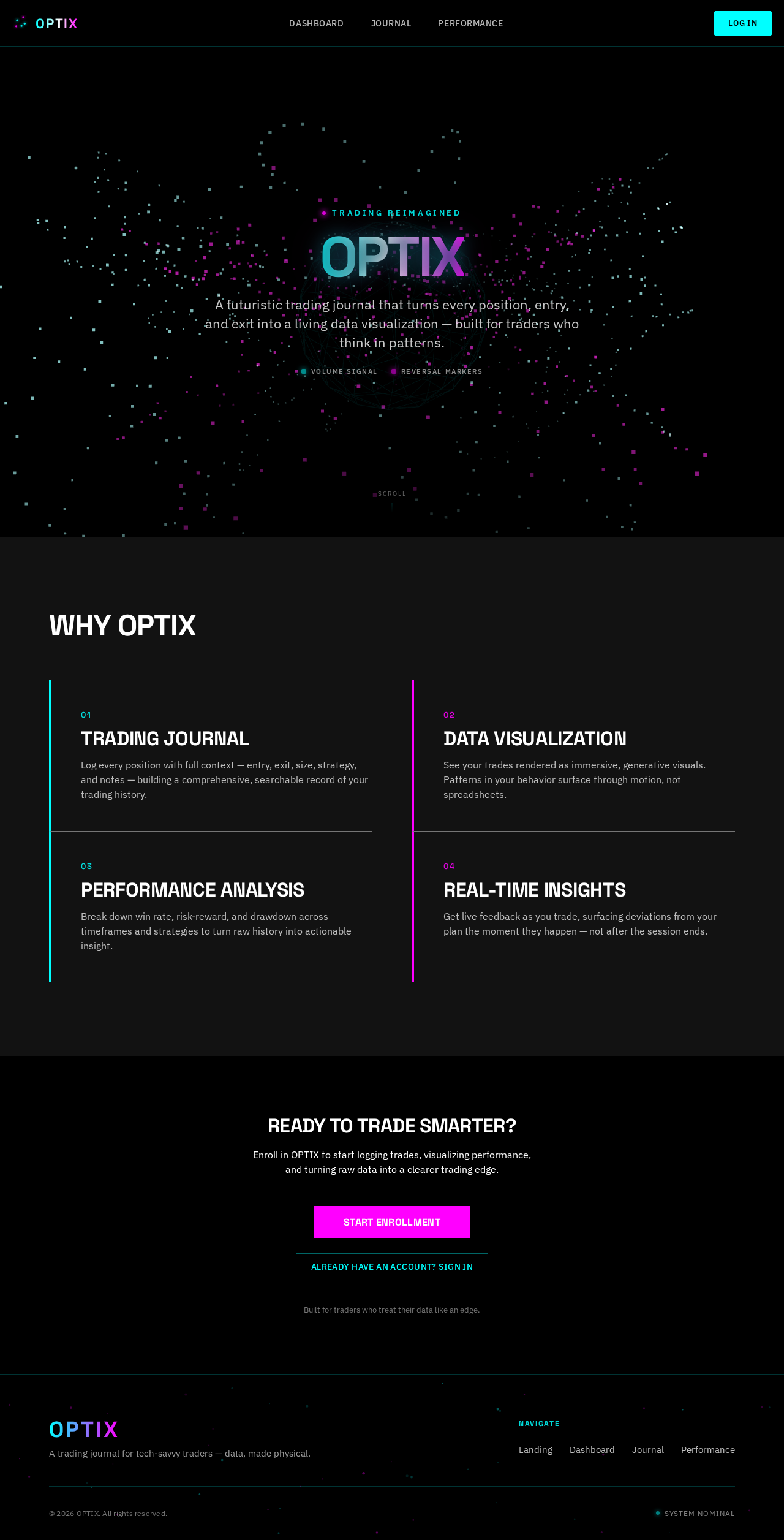
OPTIX
A futuristic trading journal that turns every position, entry, and exit into a living data visualization — built for traders who think in patterns.
Why OPTIX
Trading Journal
Log every position with full context — entry, exit, size, strategy, and notes — building a comprehensive, searchable record of your trading history.
Data Visualization
See your trades rendered as immersive, generative visuals. Patterns in your behavior surface through motion, not spreadsheets.
Performance Analysis
Break down win rate, risk-reward, and drawdown across timeframes and strategies to turn raw history into actionable insight.
Real-Time Insights
Get live feedback as you trade, surfacing deviations from your plan the moment they happen — not after the session ends.
Ready to Trade Smarter?
Enroll in OPTIX to start logging trades, visualizing performance, and turning raw data into a clearer trading edge.
Built for traders who treat their data like an edge.
OPTIX
A futuristic trading journal that turns every position, entry, and exit into a living data visualization — built for traders who think in patterns.
Why OPTIX
Trading Journal
Log every position with full context — entry, exit, size, strategy, and notes — building a comprehensive, searchable record of your trading history.
Data Visualization
See your trades rendered as immersive, generative visuals. Patterns in your behavior surface through motion, not spreadsheets.
Performance Analysis
Break down win rate, risk-reward, and drawdown across timeframes and strategies to turn raw history into actionable insight.
Real-Time Insights
Get live feedback as you trade, surfacing deviations from your plan the moment they happen — not after the session ends.
Ready to Trade Smarter?
Enroll in OPTIX to start logging trades, visualizing performance, and turning raw data into a clearer trading edge.
Built for traders who treat their data like an edge.
No comments yet. Be the first!