medical-laboratory
 ABDULRASHEED ISHAQ RABIU
Build a fully functional medical laboratory management system


Comments (0)
Sign in to leave a comment
System Requirements
System Requirements Document for medical-laboratory
1. Introduction
medical-laboratory is a fully functional medical laboratory management system. It is the operational record for a working clinical laboratory: it manages patient records for laboratory testing, manages test orders from creation through completion, manages specimen collection and tracking, records and reports laboratory test results, maintains a catalog of available laboratory tests, and manages laboratory staff and their access to the system.
The product is built for the people who run and depend on a laboratory bench: Laboratory Technicians who handle specimens and enter results, Laboratory Managers who oversee operations, the test catalog, and staff access, and Ordering Clinicians who request tests and read finalized reports to make clinical decisions. The system is accountable, calm, precise, and immediately operable — a working instrument, not a promotional surface.
Access is application-owned. An anonymous visitor reaches the Landing page, first-time staff enroll through Sign Up, and returning staff verify identity through Login before reaching protected laboratory records. A Laboratory Manager role governs staff accounts and the test catalog.
2. System Overview
2a. Product Interpretation and Delivery Boundary
medical-laboratory is delivered as a first-party web application with a React frontend, a shared FastAPI backend, and a MariaDB database for application-owned persistent data. All laboratory records — patients, orders, specimens, results, reports, the test catalog, and staff accounts — are owned and persisted by the application itself; there is no external provider or headless delivery surface.
The public boundary is the Landing page, which explains the system, its users, and its capabilities before any identity is established. Login and Sign Up are the two anonymous identity-access surfaces: Sign Up is self-service first-use enrollment for staff who independently begin using the system, and Login is returning verification. Every other destination — Patients, Test Orders, Specimens, Results, Reports, Test Catalog, and Staff — is protected and requires an established session. Staff account management by managers governs access thereafter.
Access is differentiated by role where the workflow requires it: Patients, Specimens, Results, Test Catalog, and Staff are role-restricted; Test Orders and Reports are available to any signed-in staff member. The system does not add adjacent account-management capabilities beyond enrollment, verification, and manager-governed staff access.
All accepted behavior in this document is current. No future-horizon capabilities are defined.
2b. Source Content Inventory
Not applicable — no reference directive supplies a content_source.
2c. Page Content and Component Coverage
Landing
- Information/state: Anonymous public entry. Explains the laboratory management system, the three staff roles it serves, and its capabilities (patients, orders, specimens, results, reports, test catalog, staff access). No protected data is shown.
- Primary actions: Navigate to Sign Up (first-use enrollment); navigate to Login (returning verification).
- Supporting actions: Read capability descriptions; follow the workflow explanation (identify → collect → process → verify → report).
- Domain entities: None persisted; presents the workflow stages ORDER, COLLECT, ANALYZE, VERIFY as a diagrammatic routing sheet.
- Component responsibilities: Flat asymmetric workboard hero with oversized two-line headline, orange rule, and anchored sign-in control; specimen-routing sheet divided into four operational stations, each with a mono accession code, tube silhouette, and visible state marker; deep-green completion strip at the far edge.
- States: Loading (static content, no data fetch); empty (not applicable); success (renders immediately); error (not applicable); recovery (links to Login/Sign Up always available).
Login
- Information/state: Anonymous returning-verification surface. Collects credentials for an existing staff account.
- Primary actions: Submit credentials to establish a session and proceed to protected laboratory records.
- Supporting actions: Navigate to Sign Up if the visitor has no account; return to Landing.
- Domain entities: Staff account (identity), session.
- Component responsibilities: Credential form with labeled fields; submit control with concise text label; inline error region.
- States: Loading (submit in progress, control disabled); empty (blank form); success (session established, redirect to protected destination); error (invalid credentials shown inline, form retained for retry); recovery (retry submission or navigate to Sign Up).
Sign Up
- Information/state: Anonymous first-use enrollment surface. Collects the information needed to establish a staff account.
- Primary actions: Submit enrollment to create a staff account and establish a session.
- Supporting actions: Navigate to Login if already enrolled; return to Landing.
- Domain entities: Staff account (identity, role assignment governed by manager thereafter).
- Component responsibilities: Enrollment form with labeled fields; submit control with concise text label; inline validation and error region.
- States: Loading (submit in progress); empty (blank form); success (account created, session established, redirect to protected destination); error (validation or duplicate-account error shown inline, entered values retained); recovery (correct and resubmit, or navigate to Login).
Patients
- Information/state: Role-restricted register of patient records used for laboratory testing. Lists patients with identifying details and links to their orders and reports.
- Primary actions: Register a new patient record; open an existing patient record to view and maintain its details.
- Supporting actions: Search/filter the patient list; from a patient record, start a test order.
- Domain entities: Patient (identity details, contact details, record history), linked Test Orders, linked Reports.
- Component responsibilities: Patient table with pinned identity column and aligned values; patient detail panel; registration form; search control.
- States: Loading (table skeleton); empty (no patients registered — prompt to register the first); success (record saved, list refreshed); error (validation failure on save, shown inline with values retained); recovery (retry save or cancel).
Test Orders
- Information/state: Order workspace for creating test orders for a patient and tracking each order's status through the laboratory workflow. Shows order identity, patient, ordered tests, and current status.
- Primary actions: Create a test order for a patient selecting tests from the catalog; advance an order's status through the laboratory workflow.
- Supporting actions: Filter orders by status; open an order to view its linked specimen and results.
- Domain entities: Test Order (patient reference, ordered tests, status, timestamps), Test Catalog entries, linked Specimen, linked Results.
- Component responsibilities: Order table with accession block per row (two-line mono identifier, specimen-type symbol, vertical state bar); order creation form with catalog test selection; status control with concise text labels.
- States: Loading (table skeleton); empty (no orders — prompt to create one); success (order created or status advanced, row updated); error (invalid selection or status transition rejected, shown inline); recovery (correct and retry).
Specimens
- Information/state: Role-restricted specimen workspace for recording specimen collection and updating specimen status as it moves through the laboratory. Shows specimen identity, linked order, collection time, and current status.
- Primary actions: Record specimen collection against an order; update specimen status as it moves through the laboratory.
- Supporting actions: Filter specimens by status; open a specimen to view its linked order.
- Domain entities: Specimen (accession identifier, specimen type, linked order, collection time, status).
- Component responsibilities: Specimen table with accession block per row and aligned collection times; collection recording form; status control with concise text labels and left-edge signal bar.
- States: Loading (table skeleton); empty (no specimens awaiting collection — prompt to record one); success (collection recorded or status updated); error (missing order link or invalid transition, shown inline); recovery (correct and retry).
Results
- Information/state: Role-restricted clinical worksheet for entering test results against an order and finalizing them so they can be reported. Ruled layout: analyte names on the left, large tabular values in the center, reference ranges as quiet mono intervals, abnormal values flagged by an orange side bracket.
- Primary actions: Enter result values against an order's tests; finalize results so they become reportable.
- Supporting actions: Open the linked order and specimen for context; review abnormal flags before finalizing.
- Domain entities: Result (linked order, analyte, value, reference range, abnormal flag, finalization state, timestamps).
- Component responsibilities: Ruled worksheet grid; value entry fields; reference-range column; abnormal side bracket; finalize control with concise text label and confirmation.
- States: Loading (worksheet skeleton); empty (no results pending entry); success (values saved or results finalized, state marker updated); error (invalid value or finalization blocked by incomplete entry, shown inline); recovery (correct entry and retry finalization).
Reports
- Information/state: Report viewer for viewing and searching finalized test reports for a patient or order. Shows report identity, patient, order, finalized results, and timestamps.
- Primary actions: Search finalized reports by patient or order; open a report to view its finalized results.
- Supporting actions: Filter by date or status; return to the linked order.
- Domain entities: Report (linked order, patient, finalized results, finalization timestamp).
- Component responsibilities: Search and filter controls; report list with accession block per row; report detail view with ruled result layout and mono timestamps.
- States: Loading (list skeleton); empty (no finalized reports match — clear the search); success (report rendered); error (search failure shown inline with retry); recovery (adjust query and retry).
Test Catalog
- Information/state: Role-restricted catalog of available laboratory tests, including their details (test name, specimen type, reference ranges, and other defining details).
- Primary actions: Add a test to the catalog; edit an existing test's details.
- Supporting actions: Search/filter the catalog; review which tests are available for ordering.
- Domain entities: Test Catalog entry (name, specimen type, reference ranges, details).
- Component responsibilities: Catalog table with aligned columns; add/edit form; search control.
- States: Loading (table skeleton); empty (no tests defined — prompt to add the first); success (entry saved, list refreshed); error (validation failure shown inline with values retained); recovery (correct and retry).
Staff
- Information/state: Role-restricted staff management surface for managing laboratory staff accounts and their access to the system. Lists staff accounts with role and access state.
- Primary actions: Create a staff account; update a staff account's role and access.
- Supporting actions: Search/filter staff; review current access assignments.
- Domain entities: Staff account (identity, role, access state).
- Component responsibilities: Staff table with aligned role and access columns; account form; role/access control with concise text labels.
- States: Loading (table skeleton); empty (no staff beyond the manager — prompt to add); success (account created or access updated); error (validation failure or duplicate account shown inline); recovery (correct and retry).
3. Functional Requirements
FR-1 — Manage patient records (explicit) As a Laboratory Technician or Laboratory Manager, I should register and maintain patient records used for laboratory testing, so that every order, specimen, and result is tied to the correct patient.
- Trigger/input: staff opens Patients and submits a new or edited patient record.
- Observable result: the patient record is persisted and appears in the patient register, available for order creation.
- Access: role-restricted (Laboratory Technician, Laboratory Manager).
- Failure/recovery: validation errors are shown inline with entered values retained; the staff member corrects and resubmits.
- Continuation: from the saved record, the staff member can start a test order.
FR-2 — Create test orders (explicit) As an Ordering Clinician, Laboratory Technician, or Laboratory Manager, I should create a test order for a patient by selecting tests from the catalog, so that the laboratory has an authoritative request to fulfill.
- Trigger/input: staff selects a patient and one or more catalog tests and submits the order.
- Observable result: a test order exists with a status at the start of the laboratory workflow and is visible in Test Orders.
- Access: login.
- Failure/recovery: invalid or missing selection is rejected inline; the staff member corrects and resubmits.
- Continuation: the order proceeds to specimen collection.
FR-3 — Track test orders through completion (explicit) As a Laboratory Technician or Laboratory Manager, I should track and advance each test order's status through the laboratory workflow, so that no order is lost between creation and completion.
- Trigger/input: staff opens an order and advances its status, or filters the order list by status.
- Observable result: the order's status is updated and reflected in the order list and its accession block state bar.
- Access: login.
- Failure/recovery: an invalid status transition is rejected with an inline message; the staff member selects a valid transition.
- Continuation: the order continues to the next workflow stage until results are finalized.
FR-4 — Record specimen collection (explicit) As a Laboratory Technician, I should record specimen collection against an order, so that the laboratory knows which specimen exists and when it was collected.
- Trigger/input: technician selects an order and records the collected specimen with its type and collection time.
- Observable result: a specimen record exists, linked to the order, with a collection timestamp.
- Access: role-restricted (Laboratory Technician).
- Failure/recovery: a missing order link or invalid input is rejected inline; the technician corrects and retries.
- Continuation: the specimen proceeds to analysis.
FR-5 — Track specimen status (explicit) As a Laboratory Technician, I should update specimen status as it moves through the laboratory, so that the specimen's location in the workflow is always visible.
- Trigger/input: technician updates the specimen's status.
- Observable result: the specimen's status and left-edge signal bar are updated in the specimen list.
- Access: role-restricted (Laboratory Technician).
- Failure/recovery: an invalid transition is rejected inline; the technician selects a valid status.
- Continuation: the specimen reaches analysis and its results become enterable.
FR-6 — Enter test results (explicit) As a Laboratory Technician, I should enter test result values against an order's tests, so that the laboratory's measurements are recorded against the correct order.
- Trigger/input: technician opens Results and enters values for each analyte, with reference ranges shown.
- Observable result: result values are persisted against the order; abnormal values are flagged.
- Access: role-restricted (Laboratory Technician).
- Failure/recovery: invalid values are rejected inline; the technician corrects and resubmits.
- Continuation: the technician reviews the worksheet and proceeds to finalize.
FR-7 — Finalize results for reporting (explicit) As a Laboratory Technician, I should finalize entered results so that they can be reported.
- Trigger/input: technician confirms finalization on a completed worksheet.
- Observable result: the results are marked finalized and become available in Reports.
- Access: role-restricted (Laboratory Technician).
- Failure/recovery: finalization is blocked when entry is incomplete, with the missing items identified inline; the technician completes entry and retries.
- Continuation: the finalized results appear as a report.
FR-8 — View and search finalized reports (explicit) As an Ordering Clinician, Laboratory Manager, or Laboratory Technician, I should view and search finalized test reports for a patient or order, so that I can act on the laboratory's findings.
- Trigger/input: staff searches by patient or order, or opens a report from the list.
- Observable result: the matching finalized report is displayed with its results and timestamps.
- Access: login.
- Failure/recovery: a failed search is shown inline with a retry; an empty result set prompts the staff member to adjust the query.
- Continuation: the staff member returns to the linked order or performs another search.
FR-9 — Maintain the test catalog (explicit) As a Laboratory Manager, I should add and edit the catalog of available laboratory tests, including their details, so that orders can be placed against accurate test definitions.
- Trigger/input: manager submits a new or edited catalog entry.
- Observable result: the catalog entry is persisted and available for order creation.
- Access: role-restricted (Laboratory Manager).
- Failure/recovery: validation errors are shown inline with values retained; the manager corrects and resubmits.
- Continuation: the updated catalog is available in Test Orders.
FR-10 — Manage staff accounts and access (explicit) As a Laboratory Manager, I should manage laboratory staff accounts and their access to the system, so that the right people can perform the right laboratory work.
- Trigger/input: manager creates a staff account or updates a staff account's role and access.
- Observable result: the staff account and its access state are persisted and reflected in the Staff list.
- Access: role-restricted (Laboratory Manager).
- Failure/recovery: validation or duplicate-account errors are shown inline; the manager corrects and retries.
- Continuation: the affected staff member's access takes effect at their next verification.
FR-11 — Anonymous entry to Landing (required_inference) As an anonymous visitor, I should reach the Landing page before any identity establishment, so that I can understand the system and choose to enroll or sign in.
- Trigger/input: visitor opens the application.
- Observable result: the Landing page renders with its capability explanation and links to Sign Up and Login.
- Access: none.
- Failure/recovery: not applicable; navigation controls remain available.
- Continuation: the visitor proceeds to Sign Up or Login.
FR-12 — First-use enrollment through Sign Up (required_inference) As a first-time staff member, I should enroll through Sign Up to establish a staff account, so that I can begin using the system.
- Trigger/input: visitor submits the enrollment form.
- Observable result: a staff account is created and a session is established.
- Access: none.
- Failure/recovery: validation or duplicate-account errors are shown inline with values retained; the visitor corrects and resubmits or navigates to Login.
- Continuation: the staff member reaches protected laboratory records.
FR-13 — Returning verification through Login (required_inference) As a returning staff member, I should verify my identity through Login before accessing protected laboratory records, so that laboratory data remains bound to the correct account.
- Trigger/input: visitor submits credentials.
- Observable result: a session is established and the staff member reaches protected destinations.
- Access: none.
- Failure/recovery: invalid credentials are shown inline and the form is retained for retry; the visitor may navigate to Sign Up.
- Continuation: the staff member proceeds to their laboratory work.
FR-14 — Manager-governed role assignment (required_inference) As a Laboratory Manager, I should assign and update staff roles and access so that role-restricted destinations are available only to the appropriate staff.
- Trigger/input: manager updates a staff account's role or access in Staff.
- Observable result: the staff account's access state is persisted and enforced at the restricted destinations.
- Access: role-restricted (Laboratory Manager).
- Failure/recovery: invalid updates are rejected inline; the manager corrects and retries.
- Continuation: the affected staff member's next session reflects the updated access.
4. User Personas
Laboratory Technician
- Product context: Works at the bench, handling the physical specimen and the digital record side by side. Spends the day in Specimens and Results, with Test Orders as the queue that tells them what to do next.
- Primary goal: Move each specimen from collection through analysis to finalized results without losing track of any order.
- Distinct accepted responsibilities: Records specimen collection against an order; updates specimen status as it moves through the laboratory; enters test result values against an order's tests; finalizes results so they can be reported; tracks orders through the workflow; registers and maintains patient records; views finalized reports.
- Relevant inputs or decisions: Specimen type and collection time; result values against reference ranges; whether a worksheet is complete enough to finalize; whether an abnormal value needs review before finalization.
- Interactions with other accepted participants: Receives orders created by Ordering Clinicians and Laboratory Managers; produces finalized results that Ordering Clinicians read in Reports; works within the test definitions maintained by the Laboratory Manager.
- Observable success: Every collected specimen has a current status, every order reaches a finalized result, and no result is left unfinalized at the end of the day.
Laboratory Manager
- Product context: Oversees laboratory operations from a supervisory position. Reviews orders and results, maintains the test catalog, and governs staff access so the lab runs reliably.
- Primary goal: Keep the laboratory's definitions accurate and its staff correctly provisioned, while monitoring that orders and results move through the workflow.
- Distinct accepted responsibilities: Adds and edits test catalog entries including their details; creates staff accounts and updates their roles and access; reviews test orders and results; views finalized reports; registers and maintains patient records; creates test orders.
- Relevant inputs or decisions: Test definitions (name, specimen type, reference ranges, details); staff role and access assignments; whether an order or result needs attention.
- Interactions with other accepted participants: Provisions Laboratory Technicians and Ordering Clinicians with the access they need; defines the catalog that both technicians and clinicians order against; reviews the results technicians finalize.
- Observable success: The catalog reflects the tests the laboratory actually offers, every staff member has the access their work requires, and orders and results are visibly progressing.
Ordering Clinician
- Product context: Requests laboratory tests for patients and reads the resulting reports to make clinical decisions. Needs timely access to finalized results.
- Primary goal: Place the right test orders for a patient and read finalized reports without delay.
- Distinct accepted responsibilities: Creates test orders for a patient by selecting tests from the catalog; tracks order status; views and searches finalized reports for a patient or order.
- Relevant inputs or decisions: Which patient and which catalog tests to order; which report to retrieve for a patient or order.
- Interactions with other accepted participants: Hands orders to the laboratory, where Laboratory Technicians collect specimens and enter results; depends on the Laboratory Manager's catalog for available tests; reads the finalized results technicians produce.
- Observable success: The order exists with the correct tests, and the finalized report is retrievable by patient or order when the clinician needs it.
5. Core User Flows
Flow A — First-time staff member enrolls and begins work (Laboratory Technician)
- An anonymous visitor opens the application and lands on Landing, which explains the system, its users, and its capabilities.
- The visitor selects the Sign Up control anchored below the headline.
- On Sign Up, the visitor enters the enrollment information and submits.
- The system creates the staff account and establishes a session; the visitor is redirected to protected laboratory records.
- If validation fails or the account already exists, an inline error is shown with entered values retained; the visitor corrects and resubmits, or navigates to Login instead.
- The new Laboratory Technician continues to Specimens or Results to begin bench work.
Flow B — Returning staff member verifies identity (any persona)
- A returning staff member opens the application and selects the sign-in control on Landing.
- On Login, the staff member enters credentials and submits.
- The system verifies the credentials and establishes a session, then routes the staff member to protected laboratory records.
- If credentials are invalid, an inline error is shown and the form is retained; the staff member retries or navigates to Sign Up.
- The staff member proceeds to the destination their role permits.
Flow C — Register a patient (Laboratory Technician or Laboratory Manager)
- The staff member opens Patients.
- The staff member selects the control to register a new patient and enters the patient's details.
- The staff member submits; the system validates and persists the record.
- On validation failure, inline errors appear with values retained; the staff member corrects and resubmits.
- On success, the patient appears in the register and is available for order creation.
Flow D — Ordering Clinician places a test order
- The Ordering Clinician opens Test Orders.
- The clinician selects the patient and one or more tests from the catalog, then submits the order.
- The system creates the order at the start of the laboratory workflow and shows it in the order list with its accession block and state bar.
- If the selection is invalid or missing, an inline error is shown; the clinician corrects and resubmits.
- The clinician can filter the order list by status to track progress; the order is now available to the laboratory for specimen collection.
Flow E — Laboratory Technician collects and tracks a specimen
- The Laboratory Technician opens Specimens and finds the order awaiting collection.
- The technician records the specimen collection with its type and collection time against the order.
- The system creates the specimen record linked to the order with a collection timestamp.
- If the order link or input is invalid, an inline error is shown; the technician corrects and retries.
- As the specimen moves through the laboratory, the technician updates its status; the specimen list reflects the new status and signal bar.
- An invalid transition is rejected inline; the technician selects a valid status and continues.
Flow F — Laboratory Technician enters and finalizes results
- The Laboratory Technician opens Results for an order whose specimen has reached analysis.
- The technician enters result values for each analyte on the ruled worksheet, with reference ranges shown and abnormal values flagged by an orange side bracket.
- The technician reviews the worksheet and confirms finalization.
- If entry is incomplete, finalization is blocked and the missing items are identified inline; the technician completes entry and retries.
- On success, the results are marked finalized and become available in Reports.
Flow G — Ordering Clinician reads a finalized report
- The Ordering Clinician opens Reports.
- The clinician searches by patient or order, or opens a report from the list.
- The system displays the matching finalized report with its results and timestamps.
- If the search fails, an inline error is shown with a retry; if no reports match, the clinician adjusts the query.
- The clinician reads the findings and returns to the linked order or performs another search.
Flow H — Laboratory Manager maintains the test catalog
- The Laboratory Manager opens Test Catalog.
- The manager adds a new test or edits an existing entry, entering its details including specimen type and reference ranges.
- The manager submits; the system validates and persists the entry.
- On validation failure, inline errors appear with values retained; the manager corrects and resubmits.
- On success, the updated catalog is available for order creation in Test Orders.
Flow I — Laboratory Manager manages staff access
- The Laboratory Manager opens Staff.
- The manager creates a staff account or updates an existing account's role and access.
- The manager submits; the system validates and persists the account and access state.
- On validation failure or duplicate account, inline errors appear; the manager corrects and retries.
- On success, the Staff list reflects the updated access, and the affected staff member's access takes effect at their next verification.
Flow J — Laboratory Manager reviews orders and results
- The Laboratory Manager opens Test Orders and filters by status to see what is awaiting collection, in analysis, or needing verification.
- The manager opens an order to review its linked specimen and results.
- The manager opens Reports to review finalized results for a patient or order.
- If a search fails or returns nothing, the manager adjusts the query and retries.
6. Visuals Colors and Theme
Muse: Dieter Rams. Headline: Functional clarity for the clinical workflow.
The visual identity makes the laboratory workflow legible at a glance: identify, collect, process, verify, report. It is accountable, calm, precise, and immediately operable — never promotional or futuristic.
Color tokens (light mode)
| Role | Hex | Usage |
|---|---|---|
| Background | #E9E5DD | Warm laboratory-paper ground, dominant field (~65%) |
| Surface | #F8F5EF | Pale panels for tables, forms, drawers, reports (~25%) |
| Text | #171916 | Charcoal for all primary text, rules, and navigation |
| Primary | #D75A18 | Burnt orange operational signal: urgent queues, overdue collection, primary actions, exceptions — never a decorative wash |
| Accent | #216B4D | Deep specimen green for completed, verified, and in-range states |
| Muted | #77746D | Secondary text, quiet rules, reference-range intervals |
Quiet semantic tints derived from these colors are permitted for status badges only, always retaining dark text and readable contrast. Status is never communicated by color alone: every status carries a left-edge signal bar, a concise label, and an icon.
Typography
- Headings: IBM Plex Sans Condensed — semi-bold, tight tracking, sentence case. Headline scale
clamp(48px, 7vw, 88px)on the landing display; 32px page title; 25px section title. - Body: IBM Plex Sans — 16px body, 20px field label and table emphasis.
- Mono: IBM Plex Mono at 12–14px for accession numbers, timestamps, reference ranges, section labels, and system labels; uppercase with measured letterspacing for labels and specimen identifiers.
- Scale: a practical 1.25 scale — 16 body / 20 field label and table emphasis / 25 section title / 32 page title /
clamp(48px, 7vw, 88px)landing display.
Shape and layout
- Restrained 6px radius on working rounded rectangles; 1px charcoal or muted-grey rules; square table cells; tactile control affordances.
- Circular forms reserved for specimen tube caps, countdown rings, and compact instrument indicators.
- Fixed left rail as a laboratory bench index: numbered workflow modules for Patients, Orders, Specimens, Results, Reports, Test Catalog, and Staff. The active module is marked by a 4px burnt-orange rule and its queue count in IBM Plex Mono.
- Protected screens use a dense but breathable 12-column desktop grid, an 8-column tablet grid, and a single-column mobile flow.
- Page headers pair a large title with a right-aligned queue count; tables align labels, accession IDs, collection times, and status values on durable columns.
- At 375px, table regions become horizontally scrollable with pinned identity columns and full-width action rows rather than clipped text.
Imagery
Purposeful diagrammatic visuals only: clean specimen tube silhouettes, accession-label patterns, sample route maps, test-panel diagrams, and calibrated instrument line drawings. No stock clinicians, glossy medical 3D imagery, abstract blobs, decorative DNA helices, or generic dashboard mockups.
7. Signature Design Concept
The Landing page is a flat, asymmetric laboratory workboard on warm paper. On the left, an oversized two-line headline — "THE LAB / IN MOTION." — occupies roughly seven of twelve columns, with an orange horizontal rule passing beneath it and a compact sign-in control anchored below. On the right, a tall pale specimen-routing sheet is divided by black rules into four operational stations: ORDER, COLLECT, ANALYZE, VERIFY. Each station contains a large mono accession code, a tube silhouette, and a visible state marker; the third station carries the single burnt-orange active bar. A narrow deep-green completion strip runs vertically at the far edge.
The composition stays flat and diagrammatic: no centered SaaS copy stack, no blue button, no decorative gradient. The routing sheet is the product's defining state made visible — a specimen moving through the laboratory — and it recomposes only accepted workflow stages and statuses.
8. Interaction Model & Motion Direction
Interaction Model: Animated Motion Tempo: restrained Hero Dimensionality: flat
Landing Hero Motion Brief
- Focal subject: The specimen-routing sheet on the right — four ruled stations (ORDER, COLLECT, ANALYZE, VERIFY), each with a mono accession code, tube silhouette, and state marker.
- Input → transformation → outcome thesis: On load, the routing sheet composes in place; the active station's burnt-orange bar fills once to mark the current stage, and the deep-green completion strip settles at the far edge. The transformation communicates a specimen advancing through discrete collection-to-verification stages — the same stages the product actually tracks — and resolves to a static, readable board.
- Motion vocabulary: Fast, mechanical 140ms state changes; status bars fill once; no bounce; no parallax; no scroll-linked depth.
- Composed first frame: Headline and orange rule fully rendered on the left; routing sheet fully rendered on the right with the third station's orange bar at rest; completion strip visible. The first frame is already the finished, readable composition.
- Reduced-motion state: All transitions disabled; the routing sheet renders its completed static state steps with the active station's bar and completion strip shown at rest. Every label, accession code, and control remains fully readable and operable.
9. Non-Functional Requirements
- NFR-1 — Persistent application-owned state (explicit via planning scope): Patient records, test orders, specimens, results, reports, test catalog entries, and staff accounts persist in the application's MariaDB database across sessions and restarts.
- NFR-2 — Identity continuity (required_inference): A session established through Login or Sign Up binds subsequent laboratory actions to the correct staff account; protected destinations are unreachable without an established session.
- NFR-3 — Role-restricted access (required_inference): Patients, Specimens, Results, Test Catalog, and Staff are available only to the roles named in their page coverage; Test Orders and Reports are available to any signed-in staff member. Access is enforced by the backend, not only by the interface.
- NFR-4 — Status legibility (explicit via creative direction): Every order, specimen, and result status is communicated by a left-edge signal bar, a concise text label, and an icon — never by color alone.
- NFR-5 — Readable at every viewport (explicit via creative direction): Headlines, labels, numbers, and controls remain entirely inside the viewport and their container at 375px, 768px, and 1280px, wrapping or scaling to fit; no element covers readable text or controls. Table regions scroll horizontally with pinned identity columns rather than clipping text.
- NFR-6 — Reduced motion (explicit via creative direction): With
prefers-reduced-motion, transitions are disabled and completed static state steps are rendered; all content remains usable. - NFR-7 — Clinical reading comfort (explicit via creative direction): Body copy is never dense all-caps, and condensed type is never used below 16px for clinical reading.
- NFR-8 — Concise labeled actions (explicit via creative direction): Critical actions carry concise text labels; icon-only actions are not used for critical operations.
10. Tech Stack
- Frontend: React application UI.
- Backend: Shared FastAPI process for application APIs and domain modules — patients, orders, specimens, results, reports, test catalog, staff, and identity.
- Database: MariaDB for application-owned persistent data.
- Infrastructure:
docker-compose.ymlwith the three provisioned services —frontend,backend, anddatabase— connected as a single application stack. No additional services are required for the accepted workflows.
11. Assumptions and Constraints
- A-1 (required_inference): Staff accounts are application-owned; Sign Up is self-service first-use enrollment, and manager-governed Staff management governs access thereafter.
- A-2 (required_inference): The Laboratory Manager role is the authority for staff accounts and the test catalog; the Laboratory Technician role is the authority for specimen collection, specimen status, and result entry and finalization.
- A-3 (required_inference): Test Orders and Reports are available to any signed-in staff member; Patients, Specimens, Results, Test Catalog, and Staff are role-restricted as stated in their page coverage.
- A-4 (required_inference): A test order references a patient and one or more catalog tests; a specimen references an order; results reference an order; a report references finalized results.
- A-5 (required_inference): Finalized results are immutable for reporting purposes; corrections require a new entry rather than editing a finalized report.
- A-6 (explicit via creative direction): The visual identity follows the Dieter Rams–inspired direction in Sections 6–8; the generic indigo/blue-on-white SaaS template is forbidden.
- A-7 (explicit via planning scope): All accepted behavior is current; no future-horizon capabilities are defined.
12. Glossary
- Accession code / accession block: The two-line mono identifier that begins every order, specimen, and result row, paired with a specimen-type symbol and a vertical state bar.
- Analyte: A single substance or measurement within a test, entered as a value on the Results worksheet with its reference range.
- Finalized result: A result that has been confirmed on the Results worksheet and is therefore available in Reports.
- Order (test order): A request for one or more catalog tests for a patient, tracked from creation through completion.
- Reference range: The quiet mono interval printed beside an analyte value, against which the value is judged.
- Report: The viewable, searchable record of a patient's or order's finalized results.
- Specimen: The collected sample linked to an order, with a type, collection time, and status.
- Specimen-routing sheet: The Landing hero's diagrammatic four-station board (ORDER, COLLECT, ANALYZE, VERIFY).
- Test catalog: The maintained list of available laboratory tests and their details.
- Workflow stage: One of the discrete steps a specimen or order passes through — order, collect, analyze, verify.
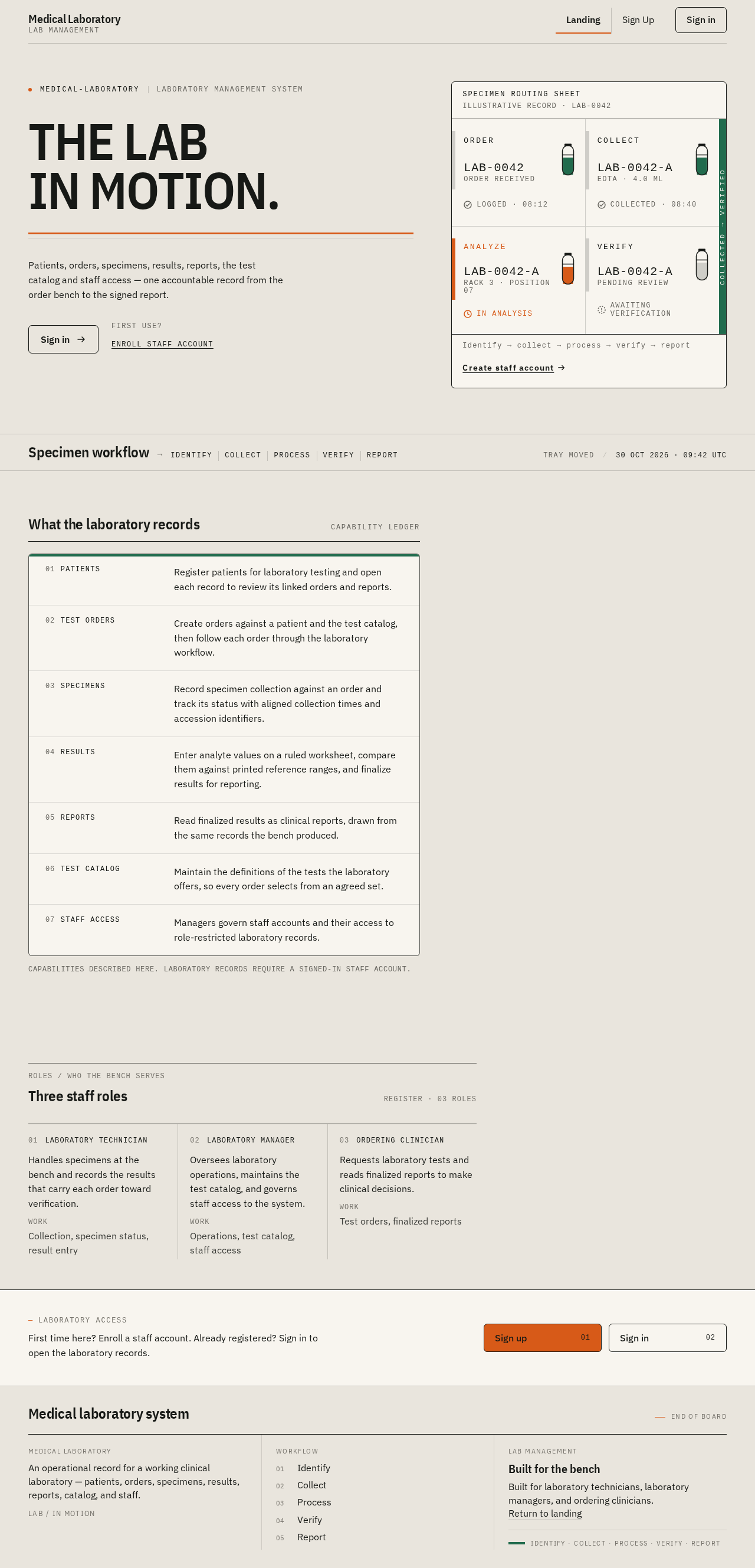
THE LABIN MOTION.
Patients, orders, specimens, results, reports, the test catalog and staff access — one accountable record from the order bench to the signed report.
First use? Enroll staff account
- ORDER
LAB-0042Order received
Logged · 08:12 - COLLECT
LAB-0042-AEDTA · 4.0 mL
Collected · 08:40 - ANALYZE
LAB-0042-ARack 3 · Position 07
In analysis - VERIFY
LAB-0042-APending review
Awaiting verification
Specimen workflow
- identify
- collect
- process
- verify
- report
Tray moved
What the laboratory records
Capability ledger- Patients
- Register patients for laboratory testing and open each record to review its linked orders and reports.
- Test Orders
- Create orders against a patient and the test catalog, then follow each order through the laboratory workflow.
- Specimens
- Record specimen collection against an order and track its status with aligned collection times and accession identifiers.
- Results
- Enter analyte values on a ruled worksheet, compare them against printed reference ranges, and finalize results for reporting.
- Reports
- Read finalized results as clinical reports, drawn from the same records the bench produced.
- Test Catalog
- Maintain the definitions of the tests the laboratory offers, so every order selects from an agreed set.
- Staff Access
- Managers govern staff accounts and their access to role-restricted laboratory records.
Capabilities described here. Laboratory records require a signed-in staff account.
Three staff roles
Register · 03 roles- Laboratory Technician
Handles specimens at the bench and records the results that carry each order toward verification.
WorkCollection, specimen status, result entry - Laboratory Manager
Oversees laboratory operations, maintains the test catalog, and governs staff access to the system.
WorkOperations, test catalog, staff access - Ordering Clinician
Requests laboratory tests and reads finalized reports to make clinical decisions.
WorkTest orders, finalized reports
THE LABIN MOTION.
Patients, orders, specimens, results, reports, the test catalog and staff access — one accountable record from the order bench to the signed report.
First use? Enroll staff account
- ORDER
LAB-0042Order received
Logged · 08:12 - COLLECT
LAB-0042-AEDTA · 4.0 mL
Collected · 08:40 - ANALYZE
LAB-0042-ARack 3 · Position 07
In analysis - VERIFY
LAB-0042-APending review
Awaiting verification
Specimen workflow
- identify
- collect
- process
- verify
- report
Tray moved
What the laboratory records
Capability ledger- Patients
- Register patients for laboratory testing and open each record to review its linked orders and reports.
- Test Orders
- Create orders against a patient and the test catalog, then follow each order through the laboratory workflow.
- Specimens
- Record specimen collection against an order and track its status with aligned collection times and accession identifiers.
- Results
- Enter analyte values on a ruled worksheet, compare them against printed reference ranges, and finalize results for reporting.
- Reports
- Read finalized results as clinical reports, drawn from the same records the bench produced.
- Test Catalog
- Maintain the definitions of the tests the laboratory offers, so every order selects from an agreed set.
- Staff Access
- Managers govern staff accounts and their access to role-restricted laboratory records.
Capabilities described here. Laboratory records require a signed-in staff account.
Three staff roles
Register · 03 roles- Laboratory Technician
Handles specimens at the bench and records the results that carry each order toward verification.
WorkCollection, specimen status, result entry - Laboratory Manager
Oversees laboratory operations, maintains the test catalog, and governs staff access to the system.
WorkOperations, test catalog, staff access - Ordering Clinician
Requests laboratory tests and reads finalized reports to make clinical decisions.
WorkTest orders, finalized reports
No comments yet. Be the first!