Page 1 of 19
System Requirements Document for mcqs-study-material
1. Introduction
mcqs-study-material is an AI-powered platform that leverages Natural Language Processing (NLP) to instantly generate high-quality Multiple Choice Questions (MCQs) from study material, notes, or topics. The product exists to serve two distinct audiences with one transformation engine: students who need fast revision practice, and educators who need ready-to-use question sets for assessment creation.
The product intent is a single, legible act of transformation — dense source content in, crisp well-formed questions out. The platform accepts study material, notes, or a topic as input, runs NLP generation over that input, and presents the resulting MCQs in a form each audience can immediately use: a fast revision surface for students, and an assessment-building surface for educators.
The audience is the closed set of two active human personas: Student and Educator.
Page 2 of 19
2. System Overview
mcqs-study-material is delivered as a first-party custom web application with five destinations: Landing, Content, Generator, Revision, and Assessments. All five are application-owned custom pages and all five are reachable without an access requirement — the platform does not gate any accepted destination behind identity establishment, and no account, sign-in, or permission model is part of the accepted scope.
The current delivery covers:
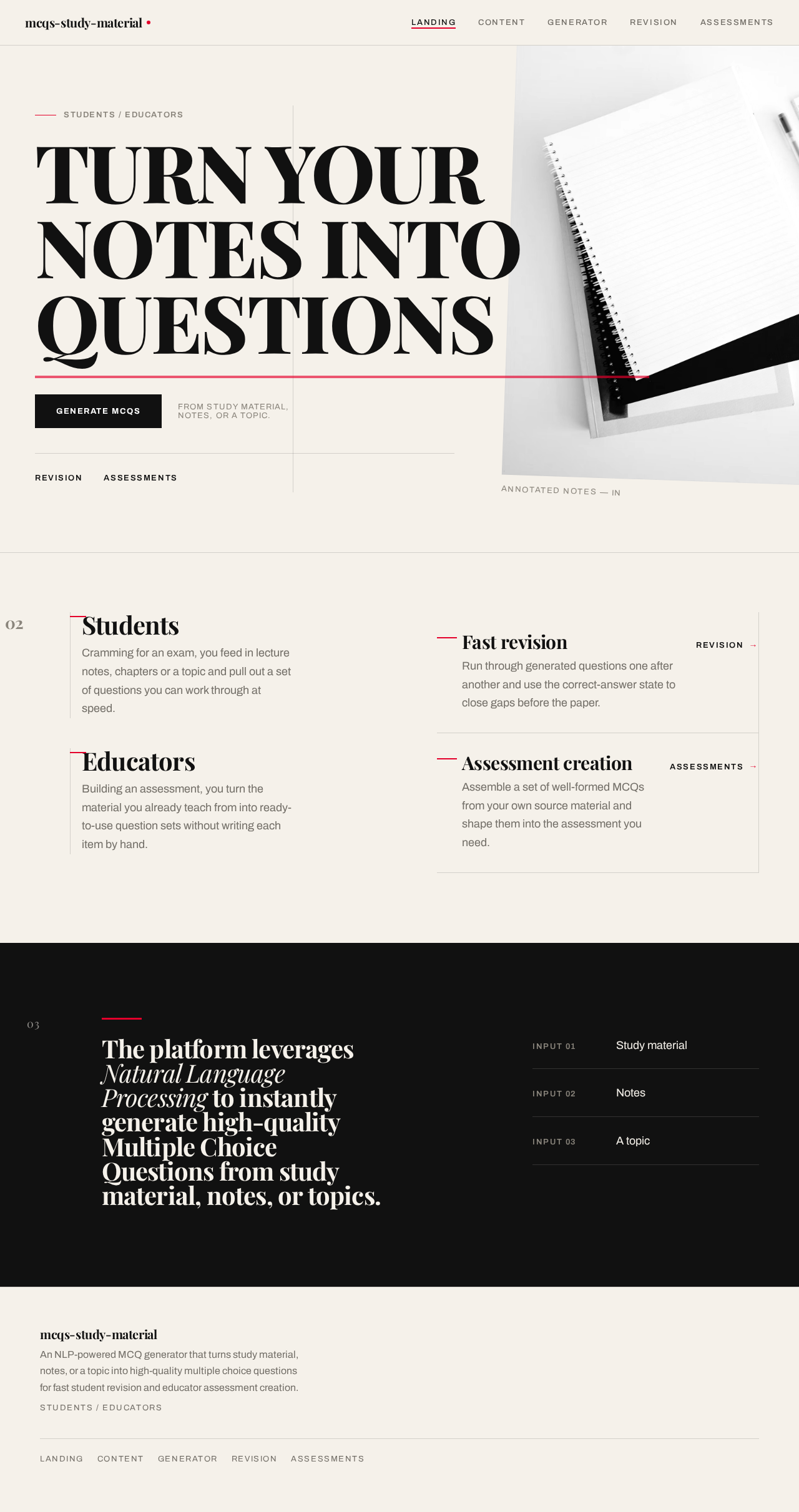
- An anonymous public entry surface (Landing) that explains the NLP MCQ generator, names its student and educator audiences, and states its revision and assessment uses.
- A content intake surface (Content) that collects study material, notes, or a topic supplied for generation.
- A generation surface (Generator) that runs instant NLP generation of high-quality MCQs from the supplied content.
- A student-facing presentation surface (Revision) that presents generated MCQs for fast revision.
- An educator-facing presentation surface (Assessments) that presents generated MCQs for assessment creation.
Actors are the two accepted human personas (Student, Educator) plus the NLP generation engine, which is a system actor performing the transformation and is not a persona. There are no provider-owned surfaces, no external destinations, and no outbound-only recipients in the accepted scope.
Narrow exclusions: the accepted scope contains no account creation, sign-in, role-based permission control, differentiated visibility over shared state, payment, or administrative module. No such capability is required by the source, and none is added here.
Page 3 of 19
2a. Product Interpretation and Delivery Boundary
Delivery ownership. Every accepted destination is a first-party custom page owned by the application. The NLP generation capability is executed by the platform's own generation engine as a system process behind the Generator page; the human interaction with generation — supplying content, triggering generation, and reading the resulting questions — is owned by first-party pages, not by a background process alone.
Access ownership. All five destinations are anonymously reachable. The accepted journeys do not require a human to privately own or resume durable actor-specific state, and no commitment, decision, entitlement, or value transfer must remain bound to a particular participant across sessions. Consequently no application-owned identity, first-use identity establishment, or returning verification is introduced. The Landing page is the anonymous public entry surface; Content, Generator, Revision, and Assessments are likewise reachable without an access requirement, consistent with the supplied page and access contract.
Current versus future boundary. Everything described in this document is current. No future-horizon requirements were accepted; nothing is deferred, and no future section is populated.
Audience split. The two personas share the same intake and generation capability and diverge at the point of use: Revision is the student's working context for fast revision, and Assessments is the educator's working context for assembling assessment material. These are materially distinct working contexts with distinct completion outcomes, which is why they are separate destinations rather than one shared results page.
2c. Page Content and Component Coverage
Page 4 of 19
Landing
- Information and state: The product's core promise — turning notes into questions — stated as the primary headline. The two audiences (students, educators) named explicitly. The two uses (fast revision, assessment creation) stated. The NLP premise stated as the mechanism. No personalized or session state; the page is identical for every visitor.
- Primary action: Enter the generation flow by proceeding to Content to supply study material, notes, or a topic.
- Supporting actions: Navigate to Revision to understand the student revision use; navigate to Assessments to understand the educator assessment use.
- Domain entities: None persisted. The page references the product's two audiences and two uses as content.
- Component responsibilities: Oversized editorial headline block carrying the promise; audience label treatment naming students and educators; a primary call-to-action control that enters the generation flow; a supporting statement of the NLP mechanism; navigation into the other destinations.
- States: Loading — static content, no loading state required. Empty — not applicable; the page always carries its full content. Success — the visitor understands the promise and the two audiences and proceeds. Error — not applicable; no data dependency. Recovery — not applicable.
Content
- Information and state: The intake surface for the source content that generation will consume. It holds the currently supplied study material, notes, or topic, and reflects whether usable input is present.
- Primary action: Supply study material, notes, or a topic as input for MCQ generation, then proceed to generation.
- Supporting actions: Replace or clear the supplied input; return to Landing.
- Domain entities: Source content — the study material, notes, or topic supplied by the Student or Educator. This is the input artefact that the generation engine consumes.
- Component responsibilities: An input region that accepts supplied study material or notes; an input region that accepts a topic; a control that confirms the supplied content and advances to generation; a control that clears or replaces the supplied content; a state indicator showing whether usable input is present.
- States: Loading — while supplied content is being accepted or prepared for generation. Empty — no content supplied yet; the page prompts for study material, notes, or a topic. Success — usable input is present and the user can proceed to generation. Error — supplied content is unusable or absent when the user attempts to proceed; the page states that content is required and keeps the supplied input intact. Recovery — the user supplies or corrects the content and proceeds again.
Generator
- Information and state: The generation surface. It holds the supplied source content as the generation input and the resulting set of generated MCQs as the generation output. It reflects generation progress and the completion or failure of the generation run.
- Primary action: Run instant NLP generation of high-quality MCQs from the supplied content.
- Supporting actions: Re-run generation on the same supplied content; return to Content to change the supplied content; proceed to Revision or Assessments to use the generated questions.
- Domain entities: Source content (input, carried from Content); generated MCQ (output) — a question with its answer options and its correct answer; generation run — the single act of producing a question set from supplied content.
- Component responsibilities: A source-material panel presenting the supplied content alongside the generation act; a generation trigger control; a generated-question column presenting the produced MCQs; a per-question presentation of the question text, its options, and its correct answer; a generation status indicator covering in-progress, complete, and failed runs.
- States: Loading — generation is running; the surface indicates that questions are being produced from the supplied content. Empty — no generation has been run yet for the supplied content; the surface invites the user to generate. Success — a set of high-quality MCQs has been produced and is presented for use. Error — generation fails or produces no usable questions; the surface states the failure, preserves the supplied content, and offers a re-run. Recovery — the user re-runs generation, or returns to Content to supply different content, and generation proceeds again.
Page 5 of 19
Revision
- Information and state: The student's working context for fast revision. It presents the generated MCQs as a set of practice questions and reflects the student's progress through them and the correctness of their answers.
- Primary action: Work through the generated MCQs to revise quickly.
- Supporting actions: Select an answer option on a question; move to the next question; review the correct answer for a question; return to Generator to produce a further set.
- Domain entities: Generated MCQ (question text, answer options, correct answer); the student's selected answer per question; revision progress through the question set.
- Component responsibilities: A numbered presentation of each generated MCQ; a set of selectable answer options per question; a correct-answer indication per question; a progress indicator across the question set; a control to advance to the next question; a control to return to generation for a further set.
- States: Loading — the generated question set is being presented. Empty — no generated MCQs are available to revise; the surface directs the student to generate a set. Success — the student works through the questions and sees the correct answer for each. Error — the question set cannot be presented; the surface states the failure and offers a return to generation. Recovery — the student returns to Generator to produce a set and resumes revision.
Assessments
- Information and state: The educator's working context for assessment creation. It presents the generated MCQs as a question set suitable for an assessment and reflects the set's composition and each question's correct answer.
- Primary action: Use the generated MCQs to create assessment material.
- Supporting actions: Review each generated question with its options and correct answer; return to Generator to produce a further set; return to Content to supply different source material.
- Domain entities: Generated MCQ (question text, answer options, correct answer); the assembled question set for assessment use.
- Component responsibilities: A numbered presentation of each generated MCQ with its options; a correct-answer indication per question; a set-level view of the questions available for assessment use; a control to return to generation for a further set; a control to return to content intake.
- States: Loading — the generated question set is being presented. Empty — no generated MCQs are available for assessment use; the surface directs the educator to generate a set. Success — the educator has a ready-to-use set of high-quality MCQs for their assessment. Error — the question set cannot be presented; the surface states the failure and offers a return to generation. Recovery — the educator returns to Generator or Content and produces a usable set.
Page 6 of 19
3. Functional Requirements
FR-1 — NLP-powered MCQ generation. As a Student or Educator, I should have the platform leverage Natural Language Processing to instantly generate high-quality Multiple Choice Questions, so that I obtain usable questions without authoring them myself. (provenance: explicit)
- Trigger/input: a generation request made against supplied source content.
- Observable result: a set of high-quality MCQs is produced and presented.
- Access state: no access requirement; reachable anonymously.
- Failure/recovery: if generation fails or yields no usable questions, the failure is stated, the supplied content is preserved, and generation can be re-run.
- Continuation: the produced questions are available for revision or assessment use.
FR-2 — Generation from study material, notes, or topics. As a Student or Educator, I should be able to have MCQs generated from study material, notes, or topics supplied to the platform, so that generation works from whatever source form I have. (provenance: explicit)
- Trigger/input: study material, notes, or a topic supplied to the platform.
- Observable result: the supplied source form is accepted as generation input and questions are produced from it.
- Access state: no access requirement.
- Failure/recovery: if the supplied content is unusable or absent, the platform states that content is required and preserves what was supplied.
- Continuation: the user supplies or corrects content and proceeds to generation.
FR-3 — Fast revision for students. As a Student, I should be able to use the generated MCQs for fast revision, so that I can revise efficiently in the time I have. (provenance: explicit)
- Trigger/input: a generated set of MCQs available to the student.
- Observable result: the student works through the questions, selects answers, and sees the correct answer for each.
- Access state: no access requirement.
- Failure/recovery: if no generated set is available, the student is directed to generate one; if the set cannot be presented, the failure is stated and the student can return to generation.
- Continuation: the student returns to generation to produce a further set and resumes revision.
FR-4 — Assessment creation for educators. As an Educator, I should be able to use the generated MCQs to aid assessment creation, so that I obtain ready-to-use question sets for my assessments. (provenance: explicit)
- Trigger/input: a generated set of MCQs available to the educator.
- Observable result: the educator has a set of high-quality MCQs suitable for use in an assessment.
- Access state: no access requirement.
- Failure/recovery: if no generated set is available, the educator is directed to generate one; if the set cannot be presented, the failure is stated and the educator can return to generation.
- Continuation: the educator returns to generation or content intake to produce a further set.
FR-5 — Supplying source content as generation input. As a Student or Educator, I should be able to provide study material, notes, or a topic as input for MCQ generation, so that generation has content to work from. (provenance: required_inference)
- Trigger/input: the user supplies study material, notes, or a topic on the content intake surface.
- Observable result: the supplied content is held as the generation input and the user can proceed to generation.
- Access state: no access requirement.
- Failure/recovery: if the user attempts to proceed without usable content, the platform states that content is required and keeps the supplied input intact.
- Continuation: the user proceeds to generation with the supplied content.
FR-6 — Instant generation of high-quality MCQs from supplied content. As a Student or Educator, I should have high-quality MCQs generated instantly from the study material, notes, or topic I supplied, so that I get usable questions without waiting or reworking them. (provenance: required_inference)
- Trigger/input: a generation request made against the supplied content.
- Observable result: a set of high-quality MCQs — each with a question, answer options, and a correct answer — is produced and presented.
- Access state: no access requirement.
- Failure/recovery: if generation fails or produces no usable questions, the failure is stated, the supplied content is preserved, and the user can re-run generation.
- Continuation: the produced questions are carried into revision or assessment use.
Page 7 of 19
4. User Personas
Student
Product context. The Student arrives with study material, notes, or a topic and a limited amount of time. Their relationship to the product is transactional and repeated: supply content, get questions, work through them, move on. They are not building anything durable — they are practising.
Primary goal. Fast revision. The Student's success is measured by how quickly they obtain usable practice questions and how efficiently they can work through them.
Distinct accepted responsibilities. The Student supplies study material, notes, or a topic as generation input; triggers instant NLP generation; and works through the generated MCQs on the revision surface, selecting answers and seeing the correct answer for each question. Their responsibility ends at having revised — they do not assemble or curate a set for anyone else.
Relevant inputs and decisions. The Student decides what content to supply (their own notes, a passage of study material, or simply a topic), decides when to generate, and decides how far through the generated set to work.
Interactions with other accepted participants. The Student shares the content intake and generation capability with the Educator but does not interact with the Educator. The Student's interaction with the generation engine is indirect: they supply content and receive questions.
Observable success. The Student has a set of generated MCQs in front of them and has worked through them, seeing the correct answer for each question. Their continuation is to generate a further set when they need more practice.
Page 8 of 19
Educator
Product context. The Educator arrives with source material for a subject they teach and a need for assessment material. Their relationship to the product is productive and outcome-oriented: they need a set of questions that is good enough to put in front of students.
Primary goal. Assessment creation. The Educator's success is measured by whether the generated MCQs are ready to use in an assessment without rework.
Distinct accepted responsibilities. The Educator supplies study material, notes, or a topic as generation input; triggers instant NLP generation; and reviews the generated MCQs on the assessment surface as a question set, examining each question with its options and correct answer. Their responsibility ends at having a ready-to-use set — they are not practising, they are assembling.
Relevant inputs and decisions. The Educator decides what source material to supply, decides when to generate, and decides whether the resulting set is suitable for their assessment or whether to generate again from different content.
Interactions with other accepted participants. The Educator shares the content intake and generation capability with the Student but does not interact with the Student. The Educator's interaction with the generation engine is indirect: they supply content and receive questions.
Observable success. The Educator has a set of high-quality MCQs with correct answers marked, suitable for use in an assessment. Their continuation is to return to generation or content intake to produce a further set.
What makes this role different from the Student. The Student's working context is practice — they consume questions one at a time and check themselves. The Educator's working context is composition — they survey the whole set, verify each question and its correct answer, and judge the set's fitness for an assessment. This difference in working context and completion outcome is why revision and assessment use are separate destinations rather than one shared results view.
Page 9 of 19
5. Core User Flows
Flow 1 — Student revises quickly from their own notes
- The Student arrives at Landing with no access requirement and reads the product's promise: notes in, questions out, for fast revision.
- The Student proceeds to Content.
- On Content, the Student supplies their study material or notes as generation input. The surface reflects that usable input is present.
- The Student proceeds to Generator. The supplied content is carried forward as the generation input.
- On Generator, the Student triggers instant NLP generation. The surface indicates that generation is running.
- The generation engine produces a set of high-quality MCQs from the supplied content. Each question carries its answer options and its correct answer.
- Generator presents the produced questions in the generated-question column alongside the supplied source material, so the transformation from notes to questions is visible.
- The Student proceeds to Revision.
- On Revision, the Student works through the numbered questions, selecting an answer option on each and seeing the correct answer indicated for that question. The progress indicator advances as they move through the set.
- Observable result: the Student has revised against a set of generated questions and knows the correct answer for each.
- Continuation: the Student returns to Generator to produce a further set from the same content, or to Content to supply different material.
Failure and recovery. If the Student attempts to proceed from Content without usable content, the surface states that content is required and keeps whatever was supplied intact; the Student supplies content and proceeds. If generation fails or yields no usable questions, Generator states the failure, preserves the supplied content, and offers a re-run; the Student re-runs generation. If no generated set is available when the Student reaches Revision, the surface directs them back to generation.
Page 10 of 19
Flow 2 — Student revises from a topic alone
- The Student arrives at Landing and proceeds to Content.
- On Content, the Student supplies a topic rather than study material or notes. The surface reflects that usable input is present.
- The Student proceeds to Generator and triggers instant NLP generation.
- The generation engine produces a set of high-quality MCQs from the supplied topic.
- Generator presents the produced questions.
- The Student proceeds to Revision and works through the questions, selecting answers and seeing the correct answer for each.
- Observable result: the Student has a usable practice set derived from a topic alone.
- Continuation: the Student generates a further set when they need more practice.
Page 11 of 19
Flow 3 — Educator builds an assessment question set
- The Educator arrives at Landing with no access requirement and reads the product's promise, including its use for assessment creation.
- The Educator proceeds to Content.
- On Content, the Educator supplies the study material or notes for the subject they are assessing. The surface reflects that usable input is present.
- The Educator proceeds to Generator. The supplied content is carried forward as the generation input.
- On Generator, the Educator triggers instant NLP generation. The surface indicates that generation is running.
- The generation engine produces a set of high-quality MCQs from the supplied content, each with its options and correct answer.
- Generator presents the produced questions in the generated-question column beside the supplied source material.
- The Educator proceeds to Assessments.
- On Assessments, the Educator reviews the generated MCQs as a question set, examining each question with its options and its correct answer, and judging the set's fitness for their assessment.
- Observable result: the Educator has a ready-to-use set of high-quality MCQs for their assessment.
- Continuation: if the set is not suitable, the Educator returns to Generator to re-run generation or to Content to supply different source material.
Failure and recovery. If the Educator attempts to proceed from Content without usable content, the surface states that content is required and preserves the supplied input. If generation fails or produces no usable questions, Generator states the failure, preserves the supplied content, and offers a re-run. If no generated set is available when the Educator reaches Assessments, the surface directs them back to generation.
Flow 4 — Re-running generation on the same source content
- From Generator, with source content already supplied and a generated set already presented, the Student or Educator triggers generation again on the same content.
- The surface indicates that generation is running and preserves the supplied content.
- The generation engine produces a further set of MCQs from the same content.
- Generator presents the newly produced questions.
- Observable result: the user has a further set of questions from the same source content.
- Continuation: the user proceeds to Revision or Assessments to use the new set.
Page 12 of 19
6. Visuals Colors and Theme
The creative direction is authoritative for this section. Muse: Tobias van Schneider. Headline: Editorial swagger for an engine that turns notes into questions.
The register is confident and intelligent rather than cute or clinical — a study tool that reads like a sharp editorial product, not a dashboard. Content is the hero: enormous type, black-and-white discipline, one hot accent.
Colour tokens — light mode
| Role | Hex | Usage |
|---|
| Background (paper) | #F5F1EA | Dominant ground, ~70% of surface. Never pure white. |
| Surface (card) | #FFFFFF | Reserved for MCQ question cards only, ~8%. Questions read as physical artefacts laid on paper. |
| Text / ink | #111111 | All type; primary button fill; hairline rules. ~20%. |
| Accent | #E4002B | Single hot accent, ~2%. Correct-answer states, the generate action, the active option border, the underline on key headline words. |
| Muted | #8A857C | Metadata, labels, secondary copy. |
Red must feel scarce and therefore loud. No second accent colour exists anywhere in the system.
Typography
- Headings — Playfair Display. Oversized high-contrast serif, weight 700–900, tight leading 0.92–0.98, tracking -0.02em, sentence case with occasional all-caps kickers. Headlines are the composition, not a label on top of it; they span the viewport and break across lines deliberately.
- Body — Archivo. 18px with 1.65 leading for reading MCQs. Labels at 13px uppercase with 0.12em tracking.
- Type scale — 1.333 modular: 128 / 96 / 64 / 40 / 24 / 18 / 16. Mobile display starts at 56px; desktop reaches 128px via
clamp(56px, 11vw, 128px).
Page 13 of 19
Shape language
Sharp corners everywhere — zero border-radius on cards, buttons, inputs, and images. Structure comes from hairlines (1px #111111 at 15% opacity) and full-bleed colour blocks, not from softness. The single exception is the circular option marker on each MCQ: a 28px outlined circle that fills red when selected, giving the question list a rhythmic, exam-paper cadence.
Layout
Asymmetric editorial grid: a 12-column frame where content deliberately occupies columns 1–7 or 6–12 rather than centring. The generator workspace is a two-panel split — source material on the left (columns 1–5, sticky), generated questions on the right (columns 6–12, scrolling) — so the act of transformation is visible in the layout itself. Section transitions are marked by full-bleed horizontal rules and a numbered index (01 / 02 / 03) in the left margin. On mobile everything collapses to a single column, with the source panel becoming a collapsible summary bar pinned above the question list.
Imagery
Typography and the product's own output are the imagery. Where a photograph is needed, use high-contrast monochrome editorial shots — a student's marked-up notebook, a stack of printed exam papers, a hand annotating a page — cropped hard and bled off the edge, never centred or framed politely. No stock people smiling at laptops, no gradient blobs, no 3D renders, no illustrations of robots or brains. Decorative elements are limited to oversized question-mark glyphs and numbered rules.
Page 14 of 19
Avoid
Blue or indigo anywhere (no #2563EB, #4F46E5, #3B82F6 or neighbours, and no blue-on-white SaaS palette); centred hero stacks of headline + subtext + pill button; gradient blobs, soft glows, glassmorphism and frosted panels; rounded card grids with hover-lift shadows and identical tiles; Inter, Roboto, Poppins, system-ui or any neutral geometric sans for headings or body; stock photography of smiling students at laptops and any illustration of robots, brains or humanoid AI; more than one accent colour; cheerful pastel or candy palettes.
Page 15 of 19
7. Signature Design Concept
The exam paper on the desk.
The public entry is a full-viewport editorial composition on warm paper (#F5F1EA). An oversized Playfair Display headline — TURN YOUR NOTES INTO QUESTIONS — is set at clamp(56px, 11vw, 128px), ragged-right, occupying columns 1–9 and breaking across three lines so it physically spans the viewport. Beneath the last line, a single red (#E4002B) horizontal rule draws the width of the headline block. To its right, bleeding off the right edge, a monochrome cropped photograph of an annotated notebook page sits rotated 2 degrees, partially cut by the viewport. The primary CTA is a solid #111111 rectangle with white uppercase 13px tracked text — GENERATE MCQs — pinned flush-left beneath the rule. No centred stack, no subheading paragraph, no gradient. A thin vertical hairline runs the full hero height at column 5, and the words STUDENTS / EDUCATORS sit in the left margin as a 90-degree rotated 13px uppercase label. Nothing is centred; the eye travels left-to-right from type into image.
The concept carries through the product: the Generator workspace is the same composition in working form — source material sticky on the left, generated questions scrolling on the right, so the transformation the headline promises is legible in the layout itself. Each generated MCQ is a pure white card on the warm paper ground, numbered with an oversized Playfair numeral in the left margin and separated by 1px hairlines, reading like a well-set exam paper rather than a card grid. Each option carries a 28px outlined circle that fills solid red on selection, and the correct answer is shown as a red rule running the full width of that option row.
This concept recomposes only accepted content, states, and controls: the headline states the accepted promise, the CTA enters the accepted generation flow, the margin label names the two accepted personas, and the question cards present the accepted generated MCQ entity.
Page 16 of 19
8. Interaction Model & Motion Direction
Interaction Model: Static
Motion Tempo: restrained
Hero Dimensionality: flat
Landing Hero Motion Brief
- Focal subject: the oversized Playfair Display headline TURN YOUR NOTES INTO QUESTIONS and the single red rule drawn beneath its full width — the type is the hero image, not a caption on one.
- Input → transformation → outcome thesis: the visitor's arrival is the input; the headline lines rise and settle into place as the composition assembles; the outcome is a visitor who has read the promise and the two audience names and reaches the GENERATE MCQs control. The transformation shown is the product's own — notes becoming questions — expressed through type arriving rather than through any invented animation.
- Motion vocabulary: type reveals on scroll — headline lines rise 24px and fade over 500ms with a slow ease-out, staggered 80ms per line. Slow crossfades between question states. A red underline draws left-to-right on hover over nav items. No bounce, no spring, no particles.
- Composed first frame: warm paper ground; the headline's first line already settled at full size spanning columns 1–9; the red rule not yet drawn; the monochrome notebook photograph already in place, rotated 2 degrees and bleeding off the right edge; the vertical hairline at column 5; the rotated STUDENTS / EDUCATORS margin label; the solid
#111111 CTA flush-left beneath where the rule will appear.
- Reduced-motion state: everything collapses to instant state changes. Headline lines appear fully in place with no rise or fade, the red rule is drawn immediately, crossfades become instant swaps, and the nav underline appears on hover without drawing. All readable text and controls remain whole and inside the viewport at 375px, 768px, and 1280px.
MCQ option selection is an instant 120ms background fill with the circle marker scaling from 0.85 to 1 — functional, not playful. Under reduced motion this too becomes an instant state change.
Page 17 of 19
9. Non-Functional Requirements
NFR-1 — Instant generation. MCQ generation must complete instantly from the user's perspective, so that the platform's stated promise of instant generation holds. (provenance: explicit — "instantly generate") Rationale: the source states instant generation as the product's defining characteristic; a slow generation path would contradict the accepted requirement.
NFR-2 — High-quality output. Generated MCQs must be high quality, meaning each question is well-formed with a clear question, answer options, and a correct answer, and is suitable for the stated uses of fast revision and assessment creation. (provenance: explicit — "high-quality Multiple Choice Questions") Rationale: quality is the accepted differentiator; questions that are not usable for revision or assessment fail the accepted outcome.
NFR-3 — NLP-based generation. Generation must be performed by Natural Language Processing over the supplied study material, notes, or topic. (provenance: explicit — "leveraging Natural Language Processing (NLP)") Rationale: the source names NLP as the mechanism; substituting a non-NLP generation approach would contradict the accepted requirement.
NFR-4 — Source-form flexibility. The platform must accept study material, notes, or a topic as generation input, covering all three named source forms. (provenance: explicit) Rationale: the source names all three forms; supporting only one would narrow the accepted capability.
NFR-5 — Readable text and controls at every viewport. Headlines, wordmarks, labels, numbers, card text, and controls must stay entirely inside the viewport and their container at 375px, 768px, and 1280px, wrapping or scaling (for example font-size: clamp(...) with its mobile size) to fit, with no other element covering any part of them. (provenance: explicit — creative direction) Rationale: the direction's oversized type and edge-bled imagery create real overflow risk; readable text and controls take precedence over the bleed gesture, which is carried by imagery and decoration instead.
NFR-6 — Reduced-motion support. With prefers-reduced-motion, all motion stops and shows whole items; moving or scrollable content wraps into rows or sits in a horizontally scrollable row (overflow-x: auto) whose further items are reached by scrolling. (provenance: explicit — creative direction) Rationale: the direction specifies a reduced-motion collapse to instant state changes.
NFR-7 — No blue or indigo. No blue or indigo may appear anywhere in the interface, and no blue-on-white SaaS palette may be used. (provenance: explicit — creative direction "Avoid") Rationale: the direction names this as a hard exclusion and the generic indigo/blue-on-white SaaS template is forbidden for this project.
NFR-8 — Single accent colour. Red (#E4002B) is the only hot colour and must stay scarce; no second accent colour may be introduced. (provenance: explicit — creative direction) Rationale: the direction fixes the palette proportion at roughly 70% paper, 20% ink, 8% white cards, 2% red.
NFR-9 — Prescribed typefaces. Playfair Display must be used for headings and Archivo for body text; Inter, Roboto, Poppins, system-ui, and neutral geometric sans faces are excluded for both. (provenance: explicit — creative direction) Rationale: the direction names the typefaces and excludes the alternatives.
NFR-10 — Zero border-radius. Cards, buttons, inputs, and images must have zero border-radius, with the circular MCQ option marker as the single exception. (provenance: explicit — creative direction) Rationale: the direction's shape language depends on sharp corners and hairlines.
Page 18 of 19
10. Tech Stack
- Frontend: React — the delivery shape is a custom web UI with five first-party pages, and the direction's asymmetric editorial grid, sticky two-panel generator workspace, and restrained scroll-reveal motion are all standard React-renderable patterns. (provenance: required_inference — delivery shape is
custom_ui: true; no framework was named by the user)
- Backend: Python with FastAPI — the platform's defining capability is NLP-based generation, and Python is the ecosystem in which NLP generation is performed. FastAPI exposes the generation endpoint that the Generator page calls. (provenance: required_inference —
requires_backend_integration: true; no backend technology was named by the user)
- NLP generation: a Python NLP generation component invoked by the backend to produce MCQs from supplied study material, notes, or topics. (provenance: explicit — the source names NLP as the mechanism; the specific library is not specified by the user and is left to implementation)
- Storage: no persistent storage is required by the accepted scope. Source content and generated questions are held for the duration of the user's session; no durable actor-specific state, history, or account record is part of the accepted requirements. (provenance: required_inference — derived from the absence of any accepted persistence, identity, or resume requirement)
- Containerization: Docker with docker-compose for local development and single-host deployment of the frontend and backend services. (provenance: basic_default — not specified by the user)
- Orchestration: Kubernetes is not required. The accepted scope has no stated scale, multi-region, or high-availability deployment requirement that would justify it. (provenance: basic_default — not specified by the user)
11. Assumptions and Constraints
Assumptions
- A-1. The platform is delivered as a web application. The creative direction specifies viewport breakpoints at 375px, 768px, and 1280px and a mobile collapse behaviour, which is web delivery. (provenance: required_inference)
- A-2. Source content and generated questions are held for the duration of the user's session and are not persisted across sessions. No accepted requirement asks for saved history, saved sets, or resumption, and no identity is established that could bind such state to a participant. (provenance: required_inference)
- A-3. The NLP generation component is a first-party backend capability of the platform. The source states that the platform leverages NLP; it does not name an external NLP provider, so no provider-owned surface is introduced. (provenance: required_inference)
- A-4. "High-quality" is interpreted as each generated MCQ being well-formed — a clear question, answer options, and a correct answer — and usable for the stated purposes of fast revision and assessment creation. The source does not define a numeric quality threshold. (provenance: required_inference)
- A-5. The specific NLP library or model used for generation is an implementation choice. The source names NLP as the mechanism but does not name a specific technology. (provenance: required_inference)
Constraints
- C-1. All five destinations — Landing, Content, Generator, Revision, and Assessments — are application-owned custom pages and are reachable without an access requirement. No account, sign-in, or permission model is introduced. (provenance: explicit — supplied page and access contract)
- C-2. The active human persona set is closed at exactly two: Student and Educator. No additional persona is created. (provenance: explicit — supplied persona contract)
- C-3. No blue or indigo appears anywhere in the interface, and the generic indigo/blue-on-white SaaS template is forbidden. (provenance: explicit — creative direction)
- C-4. Red (
#E4002B) is the only accent colour and must remain scarce. (provenance: explicit — creative direction)
- C-5. Headings use Playfair Display; body uses Archivo. Inter, Roboto, Poppins, and system-ui are excluded. (provenance: explicit — creative direction)
- C-6. Border-radius is zero on cards, buttons, inputs, and images, with the circular MCQ option marker as the sole exception. (provenance: explicit — creative direction)
- C-7. Readable text and controls stay whole and inside the viewport and their container at 375px, 768px, and 1280px. Where the direction asks for a bleed or crop, the gesture is carried by imagery or decoration, never by readable text or a control. (provenance: explicit — creative direction)
- C-8. No stock photography of smiling students at laptops, and no illustration of robots, brains, or humanoid AI. (provenance: explicit — creative direction)
- C-9. No gradient blobs, soft glows, glassmorphism, or frosted panels; no rounded card grids with hover-lift shadows. (provenance: explicit — creative direction)
Page 19 of 19
12. Glossary
- MCQ (Multiple Choice Question): A question with a set of answer options and one correct answer. The platform's unit of output.
- NLP (Natural Language Processing): The mechanism by which the platform generates MCQs from supplied study material, notes, or topics.
- Source content: The study material, notes, or topic supplied by a Student or Educator as input for MCQ generation.
- Generation run: A single act of producing a set of MCQs from supplied source content.
- Generated question set: The collection of MCQs produced by one generation run.
- Revision: The student-facing use of generated MCQs for fast practice, owned by the Revision page.
- Assessment creation: The educator-facing use of generated MCQs to produce ready-to-use question sets for assessments, owned by the Assessments page.
- Paper ground: The warm off-white background colour
#F5F1EA that dominates the interface.
- Ink: The near-black
#111111 used for all type, primary button fills, and hairline rules.
- Hairline: A 1px rule at
#111111 with 15% opacity, used for structure in place of borders or shadows.
- Option marker: The 28px outlined circle beside each MCQ answer option, which fills solid red when selected — the single exception to the zero border-radius rule.
 Harshal Suryavanshi

No comments yet. Be the first!