mars-bullpen
https://app.bullpen.fi/


Comments (0)
Sign in to leave a comment
System Requirements
System Requirements Document for Bullpen
1. Introduction
Bullpen is a non-custodial trading terminal for onchain markets. The product aggregates liquidity across multiple venues and chains so that a trader can reach perpetual futures, major spot markets, and long-tail Solana tokens through a single interface, trading directly from a wallet the trader controls. Bullpen never takes custody of funds; orders execute from the trader's own wallet, whether embedded or external.
The audience is the crypto-native onchain trader who wants speed, control, and a sense of advanced technology in one data-dense workspace rather than juggling several venue front-ends. The product intent is a unified, best-execution terminal: orders are automatically routed to the optimal venue for each asset type — perpetuals on Hyperliquid's onchain orderbook, spot via Hyperliquid (and UNIT) for listed assets, and long-tail Solana tokens via Jupiter Ultra.
This document is the System Requirements Document for the Bullpen website, which must match the referenced application at https://app.bullpen.fi/ exactly in structure, features, and visual character. Because that application returned HTTP 403 Forbidden during verification, its precise interface structure, feature layout, and visual design are recorded as unverified; the requirements below are grounded in the verified documentation source and the accepted planning scope, and any detail attributed to the application interface itself is marked as unverified where it would otherwise be asserted as fact.
2. System Overview
2a. Product Interpretation and Delivery Boundary
Bullpen is delivered as a first-party web application with custom UI. The current delivery comprises three application-owned surfaces in a fixed order: a public Landing entry, the Terminal where markets are viewed in one interface, and Trade where an order is placed from the terminal interface. All three surfaces are reachable without an application account (access_requirement: none); identity and custody live with the trader's wallet, not with an application login. This is consistent with the non-custodial model: the product never holds funds, and trading occurs directly from the trader's wallet (embedded or external).
The application is served by a shared FastAPI backend that hosts the application APIs and domain modules, a React frontend for the interface, and a MariaDB database for application-owned persistent data. The backend is the single process for feature APIs; no separate service is introduced for the terminal's data or order surfaces. Market data and order execution are owned by external venues (Hyperliquid, UNIT, Jupiter Ultra) and by the trader's wallet; the application orchestrates and presents them but does not custody assets.
Current scope covers perpetuals, major spot, and long-tail Solana spot in one interface. Prediction markets are described in the source as "soon" and are therefore a future horizon, not current scope. The exact visual and structural fidelity to https://app.bullpen.fi/ is a binding constraint, but the reference's concrete layout could not be verified (HTTP 403); the creative direction in Sections 6–8 supplies the concrete visual system, and any divergence from the live reference must be reconciled against it when the reference becomes accessible.
2b. Source Content Inventory
The following verified facts are drawn from the authoritative content source https://app.bullpen.fi/ (unverified — HTTP 403 Forbidden; no interface content could be extracted) and the supplemental documentation source https://docs.bullpen.fi/about-bullpen/what-is-bullpen (verified).
Product description (verified, documentation source)
- Bullpen is a non-custodial trading terminal for onchain markets.
- It aggregates liquidity across multiple venues and chains to enable trading of perpetuals, spot, and soon prediction markets via a single interface.
Core principles (verified, documentation source)
- Self-Custody: Bullpen never takes custody of funds; trading occurs directly from the user's wallet (embedded or external).
- Best Execution: Orders are automatically routed to optimal venues — perpetuals on Hyperliquid's onchain orderbook; spot via Hyperliquid for listed assets or Jupiter Ultra for Solana tokens.
- Unified Experience: Single interface for multiple markets and chains.
Supported markets (verified, documentation source)
| Market type | Execution venue | Assets |
|---|---|---|
| Perpetuals | Hyperliquid | All HL perp markets |
| Spot (Major) | Hyperliquid / UNIT | BTC, ETH, SOL, HYPE, and other HL-listed spot |
| Spot (Long-tail) | Jupiter Ultra | Any Solana SPL token |
Team (verified, documentation source)
- Build team includes experience across Hyperliquid, Galaxy, Deribit, Paxos, and Kraken; co-founded by Ansem.
Application interface (unverified, https://app.bullpen.fi/)
- Structure reference: unverified (HTTP 403 Forbidden; structure cannot be determined).
- Feature reference: unverified (features not accessible).
- Visual inspiration: unverified (visual design not viewable).
- Content source: unverified (cannot extract content from application UI).
2c. Page Content and Component Coverage
Landing
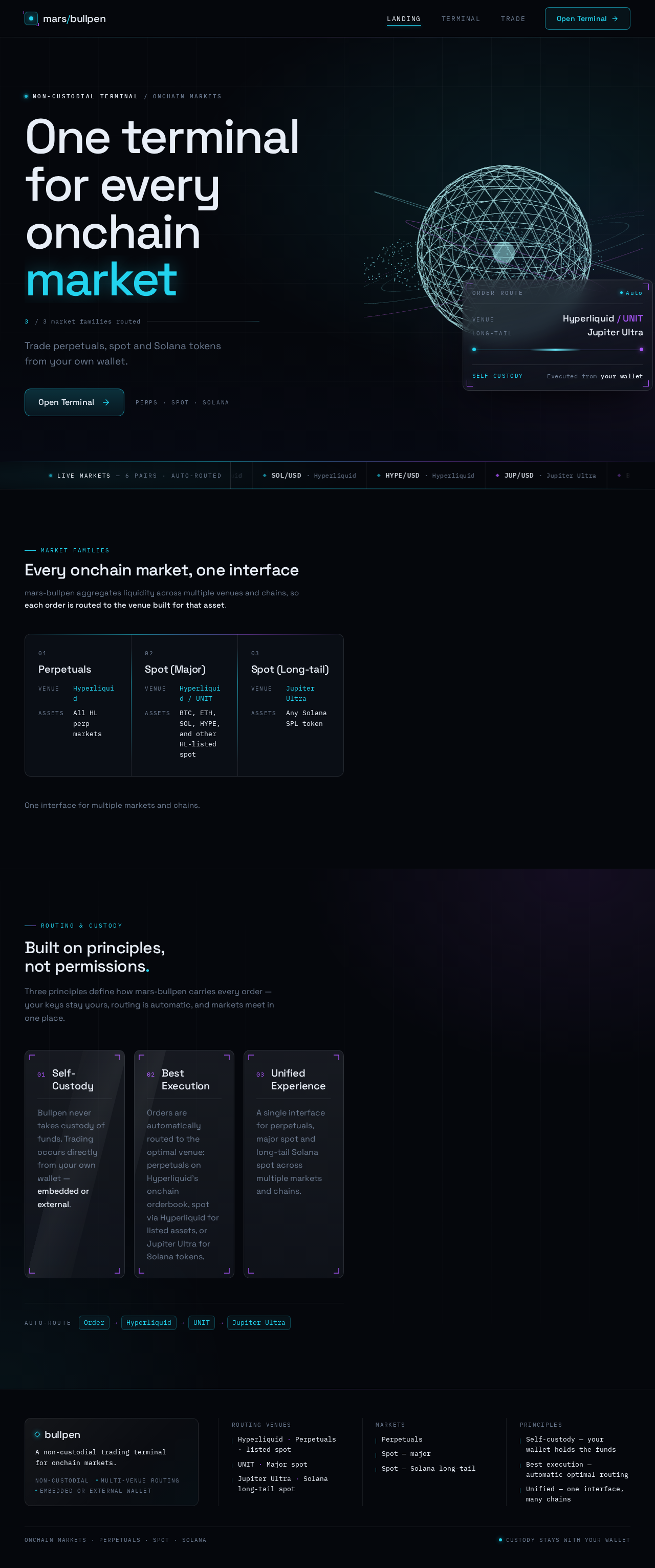
- Information and state: Public entry surface. Presents the product as a non-custodial terminal for onchain markets, the three market families (perpetuals, major spot, long-tail Solana spot), the self-custody principle, best-execution routing, and the unified-experience promise. Hero copy: headline "One terminal for every onchain market"; subline "Trade perpetuals, spot and Solana tokens from your own wallet."; call to action "Open Terminal". A full-width ticker tape of live market pairs runs under the hero at 13px mono.
- Primary action: "Open Terminal" — continues the trader to the Terminal.
- Supporting actions: Read the market-family and routing explanations; observe the live ticker tape.
- Domain entities: Market family (perpetuals, major spot, long-tail spot); venue (Hyperliquid, UNIT, Jupiter Ultra); market pair (ticker items).
- Component responsibilities: Hero with oversized flush-left headline, uppercase 11px mono label above it, subline, and CTA under the headline (not centred); WebGL/R3F glowing cyan liquidity form behind a floating glass order panel at the right; full-width ticker tape; HUD brackets in violet on panel corners.
- States: Loading — hero and ticker render with a static frame while live pairs resolve. Empty — if no live pairs are available, the ticker shows a static placeholder row rather than collapsing. Success — hero and ticker fully rendered. Error — if live pair data fails, the ticker degrades to a static list and the CTA remains usable. Recovery — retry of pair data on next load; reduced-motion shows a static frame.
Terminal
- Information and state: The unified market view. Left market rail listing perpetual futures, major spot, and long-tail Solana tokens; centre chart panel; right order panel, in a fixed desktop grid that stacks in the same order on mobile. Market rows carry a thin cyan left rule that grows on hover. Data rows use IBM Plex Mono at 13px.
- Primary action: Select a market and proceed to place a trade (Trade).
- Supporting actions: Switch market family; inspect a market's chart; read live prices and routing venue.
- Domain entities: Market (type, asset, venue); price/chart series; order panel draft.
- Component responsibilities: Market rail with family grouping and hover rule; chart panel with a chart line that draws once; order panel with HUD brackets; venue indicator showing the routing destination (Hyperliquid, UNIT, Jupiter Ultra).
- States: Loading — panels render with skeleton rows and numbers count on load. Empty — a market family with no available markets shows an explicit empty row. Success — markets and chart populated. Error — a failed market feed shows an inline error on the affected panel while other panels remain usable. Recovery — retry per panel; reduced-motion shows a static frame.
Trade
- Information and state: The order placement surface reached from the Terminal. Shows the selected market, the routing venue, order inputs, and the wallet connection state (embedded or external). Non-custodial: the order executes from the trader's wallet.
- Primary action: Submit the order for automatic routing to the optimal venue.
- Supporting actions: Connect or select a wallet (embedded or external); review the routing venue before submission; return to the Terminal.
- Domain entities: Order (market, side, size, venue); wallet connection; execution result.
- Component responsibilities: Order form with mono data rows; venue/routing indicator; wallet connection control; submission and result feedback.
- States: Loading — submission in progress with a determinate progress indicator. Empty — no market selected prompts return to the Terminal. Success — order accepted and routed, with the venue shown. Error — rejected order or wallet failure shows the reason and preserves inputs. Recovery — retry submission without re-entering inputs; reduced-motion shows a static frame.
3. Functional Requirements
FR-1 — Match the reference application. As a Trader, I should see a website that matches https://app.bullpen.fi/ exactly, so that the product I use is the Bullpen terminal I expect. (explicit; constraint)
- Trigger: opening the site. Observable result: the delivered interface reproduces the reference's structure, features, and visual character. Access: public. Failure/recovery: where the reference is unverifiable (HTTP 403), fidelity is reconciled against the creative direction and re-checked when the reference becomes accessible. Continuation: the trader proceeds to the Terminal.
FR-2 — Non-custodial trading. As a Trader, I should trade directly from my own wallet (embedded or external) so that Bullpen never takes custody of my funds. (explicit; constraint)
- Trigger: connecting a wallet and submitting an order. Observable result: the order executes from the trader's wallet; the application holds no funds. Access: public surfaces; wallet-owned identity. Failure/recovery: a wallet connection or signature failure is surfaced and the order is not sent. Continuation: retry from the same order inputs.
FR-3 — One interface for all market families. As a Trader, I should see perpetual futures, spot, and long-tail Solana tokens in one interface, so that I do not switch between venue front-ends. (explicit)
- Trigger: opening the Terminal. Observable result: the market rail lists all three families together. Access: public. Failure/recovery: a family whose feed fails shows an inline error while other families remain usable. Continuation: select another market.
FR-4 — Automatic best-execution routing. As a Trader, I should have my orders automatically routed to the optimal venue, so that I get best execution without choosing a venue myself. (explicit)
- Trigger: order submission. Observable result: perpetuals route to Hyperliquid's onchain orderbook; major spot routes via Hyperliquid (or UNIT) for listed assets; long-tail Solana tokens route via Jupiter Ultra. Access: public. Failure/recovery: an unroutable order is rejected with the reason shown. Continuation: adjust and resubmit.
FR-5 — Public entry to the terminal. As a Trader, I should open the public entry and continue to the terminal, so that I can begin trading from a clear starting point. (required_inference)
- Trigger: visiting the Landing. Observable result: the hero explains the non-custodial terminal and its markets; "Open Terminal" continues to the Terminal. Access: public, no account. Failure/recovery: if live ticker data fails, the CTA remains usable. Continuation: Terminal.
FR-6 — View markets in the terminal. As a Trader, I should view perpetual futures, spot, and long-tail Solana token markets in one interface, so that I can compare and choose what to trade. (required_inference)
- Trigger: opening the Terminal. Observable result: market rail, chart panel, and order panel render in the fixed grid. Access: public. Failure/recovery: per-panel retry. Continuation: select a market.
FR-7 — Place a trade from the terminal. As a Trader, I should place a trade from the terminal interface, so that I can act on the market I am viewing. (required_inference)
- Trigger: selecting a market and submitting an order on Trade. Observable result: the order is routed and its result is shown with the venue. Access: public; wallet-owned execution. Failure/recovery: rejection or wallet failure preserves inputs for retry. Continuation: return to the Terminal.
4. User Personas
Trader
- Product context: A crypto-native onchain trader who works across perpetual futures, major spot, and long-tail Solana tokens. They keep their own wallet (embedded or external) and expect to trade from it without handing custody to a platform.
- Primary goal: Reach the best venue for any asset from a single terminal, quickly and with full control of funds.
- Distinct accepted responsibilities: Reads market data across all three families in one interface; selects a market; places an order that is automatically routed to the optimal venue; retains custody throughout.
- Relevant inputs or decisions: Which market family and asset to trade; order side and size; whether to use an embedded or external wallet; confirmation of the routed venue.
- Interactions with other accepted participants: Interacts with external venues (Hyperliquid, UNIT, Jupiter Ultra) that execute routed orders, and with their own wallet, which signs and funds the trade. No other human persona is accepted.
- Observable success: The order executes from their wallet at the routed venue, and the terminal shows the result without the platform ever holding funds.
5. Core User Flows
Flow A — Enter from the public landing.
- The Trader opens the Landing (public, no account).
- The hero presents "One terminal for every onchain market" with the subline "Trade perpetuals, spot and Solana tokens from your own wallet." and the "Open Terminal" CTA under the headline.
- The Trader reads the market-family and routing explanations and observes the live ticker tape of market pairs.
- The Trader activates "Open Terminal" and arrives at the Terminal.
- Failure/recovery: if live pair data fails, the ticker degrades to a static list and the CTA remains usable; the Trader can still continue.
Flow B — View markets in the Terminal.
- The Trader opens the Terminal.
- The left market rail lists perpetual futures, major spot, and long-tail Solana tokens; the centre chart panel and right order panel render in the fixed grid (stacked in the same order on mobile).
- The Trader hovers a market row; its thin cyan left rule grows.
- The Trader selects a market; the chart line draws once and the order panel reflects the selection with its routing venue.
- Failure/recovery: a failed feed shows an inline error on the affected panel; the Trader retries that panel while others remain usable.
- Continuation: the Trader proceeds to Trade.
Flow C — Place a trade.
- From the Terminal, the Trader proceeds to Trade with the selected market.
- The Trader connects or selects a wallet (embedded or external) and reviews the routing venue shown for the asset type.
- The Trader enters order inputs and submits.
- The order is automatically routed — perpetuals to Hyperliquid, major spot via Hyperliquid/UNIT, long-tail Solana tokens via Jupiter Ultra — and executes from the Trader's wallet.
- The Trader sees the result with the venue; Bullpen has taken no custody of funds.
- Failure/recovery: a rejected order or wallet failure shows the reason and preserves inputs; the Trader retries without re-entering them.
- Continuation: the Trader returns to the Terminal to view updated markets.
6. Visuals Colors and Theme
The creative direction is authoritative: cinematic future tech for an onchain trading terminal, after the muse Gleb Kuznetsov — dark grounds, luminous data, motion-first panels.
Mode: Dark only. No white or near-white ground.
Colour tokens (exact hex, by role):
- Background:
#05070C(deep near-black ground, ~70% of each screen) - Surface:
#0C1119(glass panels at 6% white opacity) - Text:
#E8EEF7 - Primary:
#22D3EE(cyan — live data and buy actions) - Accent:
#A855F7(violet — routes and highlights, HUD brackets) - Muted:
#6B7A90(labels only)
Typography:
- Headings: Space Grotesk, medium weight, tight tracking, sentence case for headings, uppercase micro-labels.
- Body: Space Grotesk.
- Data rows: IBM Plex Mono at 13px.
- Scale: 1.25 modular — 64 / 48 / 32 / 20 / 16 px. Hero headline 64px to 96px, flush left.
Shape language: Thin luminous 1px strokes, glass panels at 6% white opacity, 12px radii, radial gauge rings, hairline dividers, small violet HUD brackets on panel corners.
Layout: Full-bleed dark terminal frame. Left market rail, centre chart panel, right order panel in a fixed desktop grid; panels stack in the same order on mobile.
Imagery style: Abstract 3D liquidity forms, glowing particle fields, HUD-style chart overlays. No flat clip art, no stock people, no gradient-blob hero, no cheerful illustration.
Forbidden: White or near-white ground; blue-indigo button on white; grid of identical hover-lift cards; Inter, Roboto, or system-ui fonts; the generic indigo/blue-on-white SaaS template.
Readability: Headlines, wordmarks, labels, numbers, card text, and controls stay whole inside the viewport and their container at 375px, 768px, and 1280px, wrapping or scaling (e.g. clamp()) to fit; no element covers them. Ticker and scrollable rows may cross the edge by design and must let every item become fully readable as it passes.
7. Signature Design Concept
The public entry is a full-bleed dark terminal scene. A glowing cyan 3D liquidity form sits behind a floating glass order panel at the right of the hero, overlapping it. An uppercase 11px mono label sits above an oversized Space Grotesk headline (64px–96px) flush left, with the subline and the "Open Terminal" CTA stacked under the headline — not centred. Panel corners carry small violet HUD brackets. A full-width ticker tape of live market pairs runs under the hero at 13px mono, and market rows use a thin cyan left rule that grows on hover. The composition recomposes only accepted content — the headline, subline, CTA, market families, routing venues, and live pairs — and introduces no new behaviour.
8. Interaction Model & Motion Direction
Interaction Model: Animated Motion Tempo: cinematic Hero Dimensionality: webgl
Landing Hero Motion Brief
- Focal subject: The glowing cyan 3D liquidity form behind the floating glass order panel at the right of the hero.
- Input → transformation → outcome thesis: As the page loads, the liquidity form resolves from a particle field into a luminous structure; slow light sweeps cross the glass panel; the headline and numbers count on; the ticker tape begins to run. The outcome is a composed, live-feeling terminal scene that invites "Open Terminal".
- Motion vocabulary: Slow light sweeps across panels, numbers counting on load, chart lines drawing once, scroll-linked panel depth, particle drift.
- Composed first frame: Dark ground
#05070C, flush-left mono label above the 64–96px headline, subline and CTA beneath, cyan liquidity form and glass order panel at right, ticker tape beneath the hero. - Reduced-motion state: A static frame — the liquidity form rendered still, no sweeps or counting, ticker items wrapped or horizontally scrollable so each is fully readable.
Landing Hero 3D Scene Brief — DIRECTION-DERIVED A single crafted real-time WebGL/R3F subject: an abstract glowing cyan liquidity form (particle field resolving into a luminous volume) that shows the product's defining state — aggregated, flowing onchain liquidity — behind a floating glass order panel. It is immersive but must never cover the headline, subline, CTA, or ticker text; decoration may bleed off the right edge while readable content stays whole.
9. Non-Functional Requirements
- Non-custodial integrity (explicit): The application must never take custody of funds; all trading executes from the trader's wallet (embedded or external). Rationale: core product principle.
- Reference fidelity (explicit): The delivered website must match
https://app.bullpen.fi/exactly. Rationale: binding user constraint. Constraint: the reference is unverified (HTTP 403); fidelity is reconciled against the creative direction until the reference is accessible. - Unified experience (explicit): A single interface must serve multiple markets and chains. Rationale: core product principle.
- Best execution (explicit): Orders must be automatically routed to the optimal venue per asset type. Rationale: core product principle.
- Readability across viewports (explicit, creative direction): Readable text and controls must remain whole at 375px, 768px, and 1280px; reduced-motion must provide a usable static arrangement.
- Accessibility (required_inference):
prefers-reduced-motionmust be honored with a static, fully usable frame; contrast must meet accessible levels against the dark ground.
10. Tech Stack
- Frontend: React application UI (custom UI), with WebGL/R3F for the hero subject per the creative direction.
- Backend: Shared FastAPI process hosting application APIs and domain modules (market data aggregation, routing orchestration, order submission).
- Database: MariaDB for application-owned persistent data.
- External venues (provider-owned): Hyperliquid (perpetuals and listed spot), UNIT (spot), Jupiter Ultra (long-tail Solana SPL tokens).
- Wallet: Embedded or external wallet integration for self-custody execution.
- Deployment: Docker/docker-compose for the backend, database, and frontend services.
11. Assumptions and Constraints
- Assumption (unverified): The concrete structure, features, and visual design of
https://app.bullpen.fi/could not be verified (HTTP 403); the creative direction supplies the concrete visual system until the reference is accessible. - Constraint (explicit): The website must match the reference exactly.
- Constraint (explicit): The product is non-custodial; Bullpen never takes custody of funds.
- Constraint (explicit): Prediction markets are "soon" and are out of current scope.
- Assumption (required_inference): All three surfaces are publicly reachable without an application account; identity and custody are wallet-owned.
- Assumption (required_inference): The shared FastAPI backend serves all feature APIs; no separate service is introduced for market data or orders.
12. Glossary
- Non-custodial: A model in which the platform never holds user funds; trading occurs directly from the user's wallet.
- Perpetuals (perps): Perpetual futures contracts, executed on Hyperliquid's onchain orderbook.
- Spot (Major): Listed spot assets (BTC, ETH, SOL, HYPE, and other HL-listed spot), executed via Hyperliquid or UNIT.
- Spot (Long-tail): Any Solana SPL token, executed via Jupiter Ultra.
- Best execution: Automatic routing of each order to the optimal venue for its asset type.
- Embedded wallet: A wallet provisioned within the product experience, still controlled by the trader.
- External wallet: A trader-supplied wallet connected to the terminal.
- HUD brackets: Small violet corner marks on panels, part of the visual language.
- Ticker tape: A full-width running strip of live market pairs at 13px mono.
Non-custodial terminal/ Onchain markets
One terminalfor every onchainmarket
Trade perpetuals, spot and Solana tokens from your own wallet.
Every onchain market, one interface
mars-bullpen aggregates liquidity across multiple venues and chains, so each order is routed to the venue built for that asset.
- 01
Perpetuals
- Venue
- Hyperliquid
- Assets
- All HL perp markets
- 02
Spot (Major)
- Venue
- Hyperliquid / UNIT
- Assets
- BTC, ETH, SOL, HYPE, and other HL-listed spot
- 03
Spot (Long-tail)
- Venue
- Jupiter Ultra
- Assets
- Any Solana SPL token
One interface for multiple markets and chains.
Routing & custody
Built on principles, not permissions.
Three principles define how mars-bullpen carries every order — your keys stay yours, routing is automatic, and markets meet in one place.
- 01
Self-Custody
Bullpen never takes custody of funds. Trading occurs directly from your own wallet — embedded or external.
- 02
Best Execution
Orders are automatically routed to the optimal venue: perpetuals on Hyperliquid’s onchain orderbook, spot via Hyperliquid for listed assets, or Jupiter Ultra for Solana tokens.
- 03
Unified Experience
A single interface for perpetuals, major spot and long-tail Solana spot across multiple markets and chains.
- Order
- Hyperliquid
- UNIT
- Jupiter Ultra
No comments yet. Be the first!