mars-assistant
 Haider Ali
Create a personal AI assistant app that helps me with gaming tips, daily schedules, and can chat in Hindi/English."

Comments (0)
Sign in to leave a comment
System Requirements
System Requirements Document (SRD) for mars-assistant
1. Introduction
The mars-assistant is a personal AI assistant designed to cater to the unique needs of Haider Ali, based in India. This assistant focuses on providing specialized gaming tips for Garena Free Fire, including sensitivity settings and headshot tips, while also managing daily schedules and offering bilingual support in Hindi and English. The project aims to deliver a seamless, user-friendly experience that combines gaming expertise with productivity tools.
2. System Overview
The mars-assistant is a mobile-first AI application that integrates advanced gaming insights with personal scheduling features. It is tailored specifically for Garena Free Fire players, offering actionable tips to improve gameplay, such as optimized sensitivity settings and headshot techniques. Additionally, the assistant provides daily task management, reminders, and calendar integration to help users organize their day effectively. The app supports bilingual interaction in Hindi and English, ensuring accessibility for a diverse user base in India.
Key Features:
- Specialized gaming tips for Garena Free Fire.
- Daily scheduling and task management.
- Bilingual chat support (Hindi/English).
- Intuitive and interactive user interface.
3. Functional Requirements
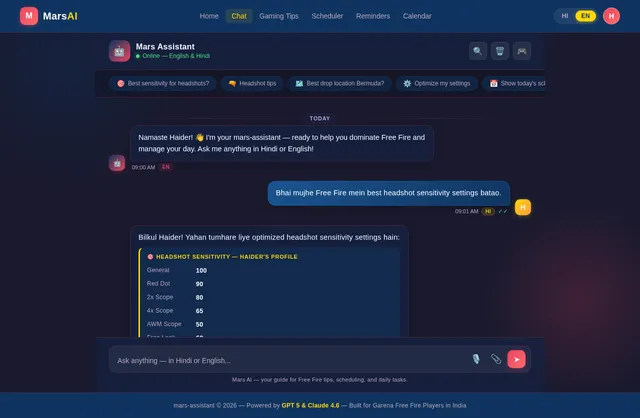
- As a User, I should be able to receive Garena Free Fire sensitivity settings tailored to my gameplay style.
- As a User, I should be able to get headshot tips and strategies for Garena Free Fire.
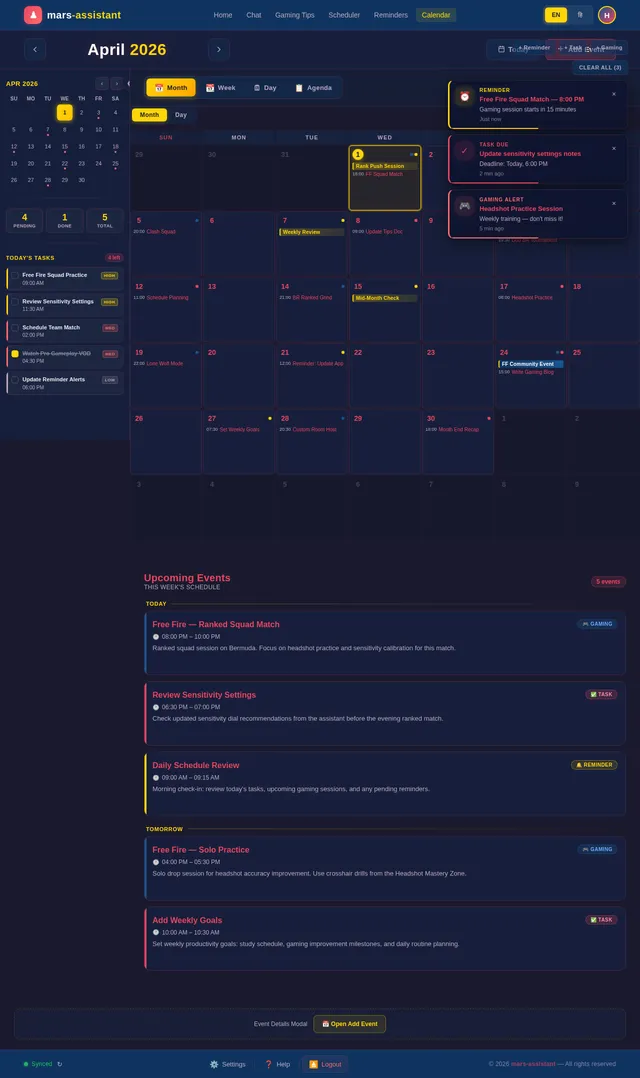
- As a User, I should be able to manage my daily schedule, including adding, editing, and deleting tasks.
- As a User, I should be able to receive reminders for my tasks and gaming sessions.
- As a User, I should be able to chat with the assistant in both Hindi and English.
- As a User, I should be able to integrate my calendar with the assistant for better scheduling.
- As a User, I should be able to ask general gaming tips and strategies for Garena Free Fire.
4. User Personas
1. Gamer
- Description: A dedicated Garena Free Fire player looking to improve their skills.
- Needs: Sensitivity settings, headshot tips, and advanced strategies.
- Pain Points: Difficulty in mastering gameplay mechanics and optimizing settings.
2. Productivity Seeker
- Description: A user who wants to manage their daily tasks and schedules efficiently.
- Needs: Task management, reminders, and calendar integration.
- Pain Points: Forgetting tasks or struggling to balance gaming with daily responsibilities.
3. Bilingual User
- Description: A user who prefers interacting in Hindi or English.
- Needs: Seamless bilingual support for communication.
- Pain Points: Lack of accessibility in apps that only support one language.
5. Visuals Colors and Theme
Color Palette
- Background: #1A1A2E (Deep Midnight Blue)
- Surface: #16213E (Dark Navy)
- Text: #E94560 (Vivid Coral Red)
- Accent: #0F3460 (Steel Blue)
- Muted Tones: #53354A (Muted Plum)
The color palette reflects a bold, gaming-inspired aesthetic with dark tones and vibrant accents, creating an immersive experience for users.
6. Signature Design Concept
Interactive Gaming Hub Landing Page
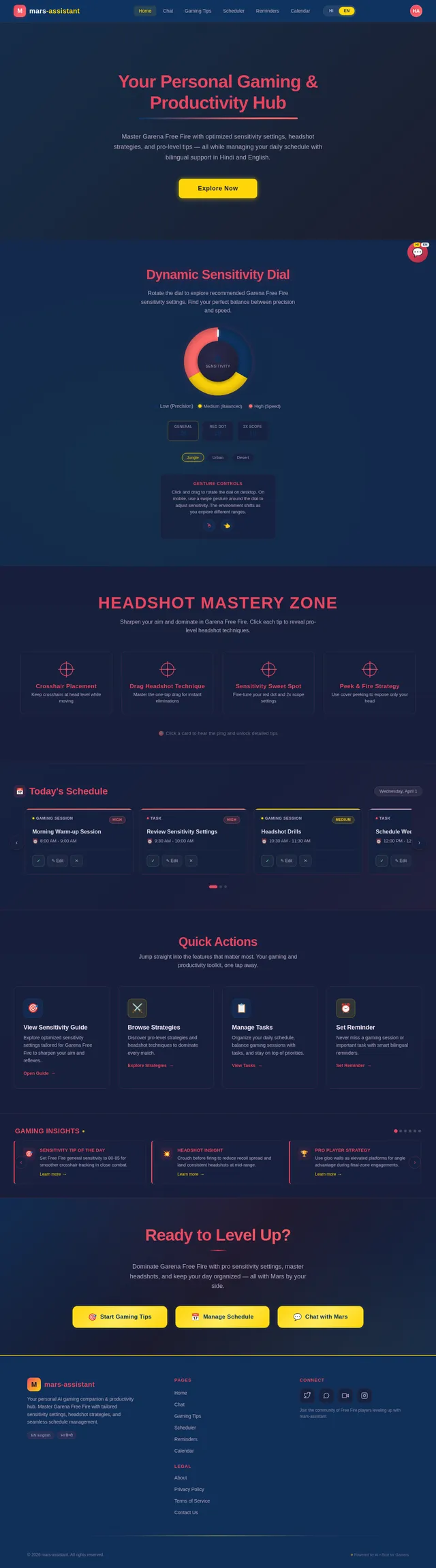
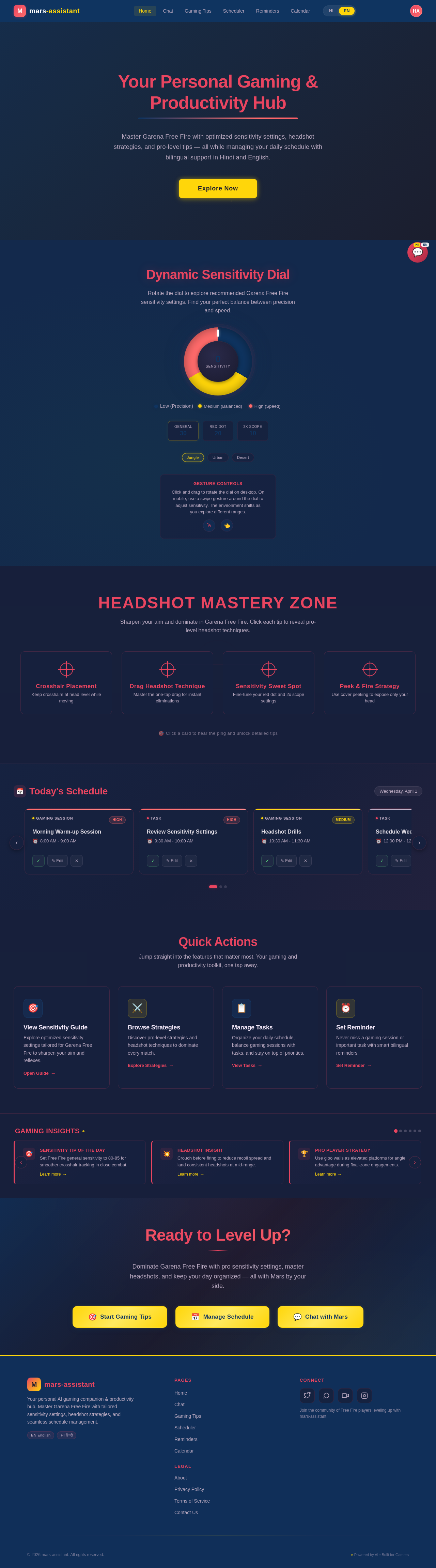
The homepage of the mars-assistant will feature an interactive gaming hub designed to captivate users instantly. The design will include:
- Dynamic Sensitivity Dial: A 3D, interactive sensitivity dial that users can rotate to explore recommended settings for Garena Free Fire. As the dial moves, the background will shift to reflect different in-game environments (e.g., jungle, urban, desert).
- Headshot Mastery Zone: A clickable section with animated crosshairs that zoom in and out, offering quick tips for improving headshot accuracy.
- Bilingual Chat Bubble: A floating chat bubble that animates with subtle pulses, inviting users to start a conversation in Hindi or English.
- Daily Scheduler Carousel: A horizontal scrolling carousel displaying the user’s daily tasks and gaming sessions, with smooth transitions and color-coded priority levels.
- Micro-Interactions: Hover effects, button animations, and subtle sound effects (e.g., a "ping" sound when selecting a tip) to enhance user engagement.
This design will make the app feel alive and interactive, creating a memorable first impression for users.
7. Non-Functional Requirements
- The system should respond to user queries within 2 seconds.
- The app must support Hindi and English languages seamlessly.
- The system should ensure data security and comply with GDPR and Indian IT laws.
- The app should function optimally on devices with Android 8.0 and above.
- The system should handle up to 10,000 concurrent users without performance degradation.
8. Tech Stack
Frontend
- React Native for mobile app development.
Backend
- Python with FastAPI for API development.
Database
- MySQL for structured data (e.g., tasks, schedules).
- MongoDB for unstructured data (e.g., chat history).
AI Models
- GPT 5.4 for user-friendly responses.
- Claude 4.6 Opas for gaming tips and coding assistance.
- Google Nano Banana for image generation (e.g., visualizing sensitivity settings).
AI Tools
- Langchain for conversational AI workflows.
- Litellm for LLM routing.
Orchestration
- Docker and docker-compose for local development.
- Kubernetes for server-side orchestration.
9. Assumptions and Constraints
Assumptions
- Users will primarily access the app on Android devices.
- The target audience is familiar with Garena Free Fire gameplay mechanics.
- Users will prefer a dark-themed interface for better gaming immersion.
Constraints
- Limited to Hindi and English for bilingual support.
- Requires an active internet connection for real-time AI responses.
- Initial launch will focus on Android, with iOS support planned for future updates.
10. Glossary
- Garena Free Fire: A popular battle royale game.
- Sensitivity Settings: In-game controls that determine the responsiveness of the player's movements.
- Headshot Tips: Strategies to improve accuracy and aim for headshots in the game.
- Bilingual Support: The ability to interact in two languages, Hindi and English.
- AI Models: Advanced machine learning models used to generate responses and insights.
Your Personal Gaming & Productivity Hub
Master Garena Free Fire with optimized sensitivity settings, headshot strategies, and pro-level tips — all while managing your daily schedule with bilingual support in Hindi and English.
Dynamic Sensitivity Dial
Rotate the dial to explore recommended Garena Free Fire sensitivity settings. Find your perfect balance between precision and speed.
Click and drag to rotate the dial on desktop. On mobile, use a swipe gesture around the dial to adjust sensitivity. The environment shifts as you explore different ranges.
Headshot Mastery Zone
Sharpen your aim and dominate in Garena Free Fire. Click each tip to reveal pro-level headshot techniques.
Crosshair Placement
Keep crosshairs at head level while moving
Always position your crosshair at head height as you navigate the map. Pre-aim common angles where enemies peek. This reduces the flick distance needed for a headshot in Free Fire.
Drag Headshot Technique
Master the one-tap drag for instant eliminations
Tap the fire button and quickly drag upward toward the enemy head. Practice in training mode to build muscle memory. Adjust your drag speed sensitivity between 70-85 for optimal control.
Sensitivity Sweet Spot
Fine-tune your red dot and 2x scope settings
For headshots, set Red Dot sensitivity to 80-90 and 2x Scope to 75-85. Free look sensitivity at 60-70 helps with quick scans. Always test in Clash Squad before ranked matches.
Peek & Fire Strategy
Use cover peeking to expose only your head
Lean peek from behind cover to minimize your hitbox while keeping your crosshair on target. Quick-peek and shoot in bursts. Combine with crouch shots to make your head harder to hit in return.
Today's Schedule
Saturday, July 11Morning Warm-up Session
Review Sensitivity Settings
Headshot Drills
Schedule Weekly Tasks
Squad Ranked Matches
Review Game Replays
Quick Actions
Jump straight into the features that matter most. Your gaming and productivity toolkit, one tap away.
Gaming Insights
Set Free Fire general sensitivity to 80-85 for smoother crosshair tracking in close combat.
Learn more→Crouch before firing to reduce recoil spread and land consistent headshots at mid-range.
Learn more→Use gloo walls as elevated platforms for angle advantage during final-zone engagements.
Learn more→Keep red dot sensitivity between 70-80 for optimal one-tap accuracy with ARs in Free Fire.
Learn more→Master the drag headshot by swiping up while tapping fire for instant eliminations.
Learn more→Rotate early to safe zone edges in Bermuda for better loot and fewer third-party fights.
Learn more→Ready to Level Up?
Dominate Garena Free Fire with pro sensitivity settings, master headshots, and keep your day organized — all with Mars by your side.
No comments yet. Be the first!