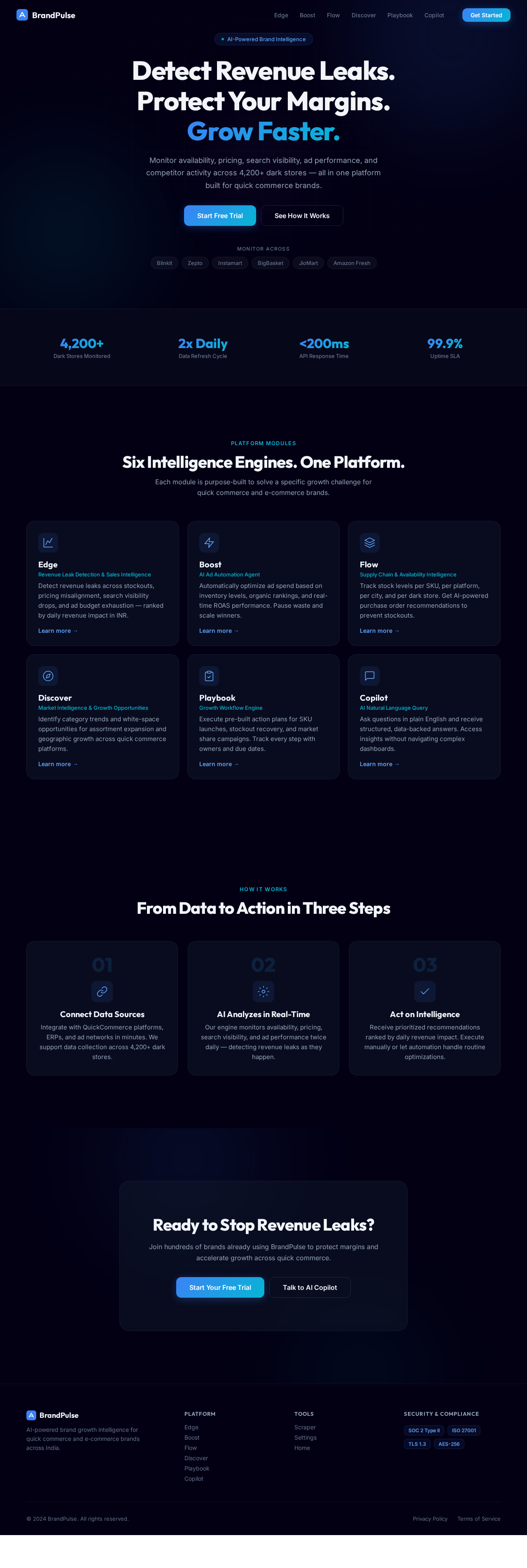
As a frontend developer, implement the CTASection section for the Landing page. Build the `<section className='ln-cta'>` with an animated background containing two decorative orbs (`ln-cta__orb--1`, `ln-cta__orb--2`) rendered via `ln-cta__bg` div. The inner content includes an `h2` headline ('Ready to Stop Revenue Leaks?'), a subtitle paragraph, and a two-button CTA row in `ln-cta__actions`: a primary `ln-btn ln-btn--primary ln-btn--lg` linking to `/Landing` ('Start Your Free Trial') and an outline `ln-btn ln-btn--outline ln-btn--lg` linking to `/Copilot` ('Talk to AI Copilot'). Apply CTASection.css for orb animations and button styles. No state or API calls required.
As a frontend developer, implement the Navbar section for the Landing page. Build `<nav className='ln-nav'>` with two state hooks: `menuOpen` (boolean, toggled by hamburger button click) and `scrolled` (boolean, set true when `window.scrollY > 20` via a `useEffect` scroll listener that cleans up on unmount). Apply `ln-nav--scrolled` class conditionally. Render a logo link (`/Landing`) with an SVG using linear gradient id `nlg` (`#3b82f6` → `#06b6d4`). Render a hamburger `<button className='ln-nav__burger'>` with three `<span>` children and `ln-nav__burger--open` conditional class. Render a `ln-nav__panel` (conditionally `ln-nav__panel--open`) containing a `links` array of 6 nav items (Edge, Boost, Flow, Discover, Playbook, Copilot) mapped to `ln-nav__link` anchors that close the menu on click, plus a 'Get Started' `ln-btn--primary ln-btn--sm` button linking to `/Landing`. Apply Navbar.css for sticky/scroll and mobile panel styles. Note: this Navbar component may already exist from a previous page — reuse if available.
As a frontend developer, implement the ProfileSettings section for the Settings page. Build the ProfileSettings component with useState hooks managing name, email, company, role, isPublic, avatar, feedback, saving, and errors state. Implement the avatar upload flow using useRef for fileInputRef, handleAvatarClick triggering file input click, and handleAvatarChange reading the file via FileReader.readAsDataURL to set base64 avatar state. Implement getInitials() to derive 1-2 character initials from the name field. Build the validate() function checking required fields and email regex pattern. Implement handleSave with 800ms simulated async delay, setSaving state, and feedback message auto-dismiss after 4000ms. Render the ps-root section with ps-avatar-row (clickable avatar wrap with keyboard accessibility via onKeyDown), form fields for name/email bound to state with inline error display from errors object, company and role dropdowns populated from COMPANIES and ROLES constant arrays (10 companies, 8 roles), a public profile toggle for isPublic, and a Save button with disabled/loading state during saving. Apply ProfileSettings.css styles throughout.
As a frontend developer, implement the SecuritySettings section for the Settings page. Import lucide-react icons: Shield, Key, Smartphone, Monitor, Laptop, Globe, Eye, EyeOff, Copy, Check, AlertTriangle, Clock, MapPin, RefreshCw, ChevronRight, X, ShieldCheck, ShieldAlert, Info. Manage state hooks: showCurrentPw/showNewPw/showConfirmPw (password visibility toggles), currentPassword/newPassword/confirmPassword, twoFactorEnabled (default true), showBackupCodes, sessions (initialized from activeSessions array with 3 entries: MacBook Pro current session, iPhone 15 Pro, Windows Desktop), confirmRevoke, toast, and copiedIndex for backup code copy tracking. Implement getPasswordStrength() scoring function checking length >= 8/12, uppercase, lowercase, digits, special chars returning level ('weak'/'fair'/'strong'), numeric score, and label. Render password change form with eye-toggle inputs and live strength meter. Build 2FA toggle section with showBackupCodes accordion revealing backupCodesList (8 codes), copy-to-clipboard per code with copiedIndex check-icon feedback. Render active sessions list from sessions state with device icons (Laptop/Smartphone/Monitor by type), ip, location, lastActive, 'Current' badge, and per-session revoke button triggering confirmRevoke modal. Render loginHistoryData table (5 rows) with success/failed status badges. Show toast notifications. Apply SecuritySettings.css styles.
As a frontend developer, implement the ComplianceSettings section for the Settings page. Import framer-motion's motion and AnimatePresence for animated accordion/expand interactions. Define inline SVG icon sub-components: IconShield (24x24 path shield), IconCheckCircle (14x14 check), IconClock (14x14 circle with polyline), IconChevronDown (18x18 chevron), IconLock (16x16 rect+path), IconFileText (16x16 file), IconExternalLink (13x13 path+polyline+line), IconArrowRight (20x20 line+polyline), IconGlobe (16x16 circle with lines). Build compliance cards/panels for data governance frameworks (GDPR, PDPA, or similar), using AnimatePresence for accordion expand/collapse animations on detail sections. Render status badges using IconCheckCircle (compliant) or IconClock (pending) states. Include external link affordances with IconExternalLink for policy documents. Implement IconChevronDown rotation animation on accordion toggle. Apply ComplianceSettings.css styles.
As a frontend developer, implement the DataSourcesSettings section for the Settings page. Import lucide-react icons: Settings, RefreshCw, Eye, EyeOff, CheckCircle, XCircle, Zap, Database, Radio, Clock, Globe, TrendingUp. Define SYNC_OPTIONS array (Twice Daily, Hourly, Daily, Manual) and DATA_SOURCES array of 6 platform objects (Blinkit, Zepto, Instamart, BigBasket, JioMart, Amazon Fresh) each with id, name, category, iconClass, iconLetter, status ('active'/'pending'), lastSync string, records count, apiKey string, glowColor, and glowPos radial gradient config. Manage per-card state for apiKey visibility using Eye/EyeOff toggles (EyeOff default). Render data source cards with ds-card__icon-wrap using iconClass for branded color, radial glow positioned via glowPos inline style, status badge (CheckCircle green for active, XCircle/yellow for pending), lastSync, records formatted with toLocaleString, masked apiKey input with copy affordance. Render sync frequency selector per card using SYNC_OPTIONS. Include RefreshCw manual sync trigger button with spin animation. Apply DataSourcesSettings.css styles.
As a frontend developer, implement the PermissionsSettings section for the Settings page. Manage state: inviteEmail, inviteRole (default 'Brand Manager'), and teamMembers array (3 initial members: Sarah Chen online/Brand Manager, Rajesh Kumar offline/Supply Chain Manager, Maya Patel online/Data Analyst — each with id, name, email, role, avatar initials string, avatarGradient class, lastActivity, status). Define roles array ['Brand Manager', 'Supply Chain Manager', 'Data Analyst', 'Security Officer'] and currentUserRole = 'Account Owner'. Implement handleInvite() that appends a new member derived from inviteEmail (name from pre-@ portion, initials from first 2 chars, status 'pending', avatarGradient cycling mod 3) then resets form. Implement handleRevoke(memberId) filtering member from teamMembers. Render invite form with email input, role select, and Invite button. Render team member list with avatar circle (ps-member-avatar--N gradient classes), status dot (online/offline/pending), role badge via getBadgeClass() switch returning ps-badge--owner/brand-manager/supply-chain/data-analyst/security-officer classes, lastActivity, and Revoke button (hidden for Account Owner). Render permissionMatrix table (6 features: Edge, Boost, Flow, Discover, Playbook, Copilot × 4 roles) with checkmark/dash cells. Apply PermissionsSettings.css styles.
As a frontend developer, implement the DangerZoneSettings section for the Settings page. Manage state: activeModal (null | 'deactivate' | 'export' | 'deleteHistory' | 'deleteWorkspace'), confirmText, toast (string | null), and processing (boolean). Implement showToast(message) via useCallback setting toast with auto-clear via setTimeout(TOAST_DURATION=4200ms); also guard via useEffect on toast change. Define openModal(type) setting activeModal + resetting confirmText; closeModal() clearing both. Implement async handleConfirm(actionType) with 800ms simulated delay (setProcessing true/false), calls closeModal(), then showToast from messages map: deactivate→account deactivated logout message, export→email download link message, deleteHistory→permanent delete confirm, deleteWorkspace→redirect message. Implement handleOverlayClick for backdrop dismiss. Define confirmationTokens map (deactivate→'DEACTIVATE', deleteHistory→'DELETE ALL ANALYTICS', deleteWorkspace→'DELETE WORKSPACE'). Implement isConfirmEnabled(type) returning true for 'export' or when confirmText matches token. Render 4 action rows from actions array each with title, desc, optional badge, dzs-btn--danger trigger button, and inline SVG modal icon. Render confirmation modal overlay with input requiring typed token match to enable confirm button, processing spinner, and close (X) button. Render toast notification fixed-position. Apply DangerZoneSettings.css styles.
As a frontend developer, implement the ScraperSourcesGrid section for the Scraper page. Build an interactive grid of 5 data source cards (Desktop Web, Mobile Web, QuickCommerce Websites, Dark Store APIs, Competitor Feeds) using the sourceData array with lucide-react icons (Monitor, Smartphone, ShoppingCart, Database, TrendingUp). Each card displays skuCount, frequency, storeCount, lastUpdate, and a stale badge. Implement useState for activeSources toggle map (competitor-feeds starts disabled) and mousePositions map for per-card spotlight hover effect via handleMouseMove/handleMouseLeave callbacks. The section header shows activeCount/totalCount and totalSKUs='417,200'. Cards use useCallback-optimized toggleSource to flip the activeSources boolean. Apply .ssg, .ssg__inner, .ssg__header, .ssg__label, .ssg__label-dot CSS structure from ScraperSourcesGrid.css.
As a frontend developer, implement the ScraperMonitoringDashboard section for the Scraper page. Render 4 metric cards from the metrics array (Records/Hour, Success Rate, Avg Latency, Active Sources) with change indicators and up/down icons. Build a multi-line SVG/canvas ingestion throughput chart using chartSources array (Blinkit #f59e0b, Zepto #a855f7, Instamart #f472b6, BigBasket #22c55e) across 10 hourly ticks in hours array. Render a coverageCities table (10 rows: Mumbai, Delhi, Bangalore, etc.) with healthy/stale/missing counts and a status badge column. Implement alertsData list (3 items: warn/info types) with timestamps. Use useState for any tab or filter interactions. Apply ScraperMonitoringDashboard.css classes throughout.
As a frontend developer, implement the ScraperDataValidation section for the Scraper page. Render an 8-row validationRules table with columns: name, checkType badge (schema/range/unique), status badge (Pass green / Fail red via CheckCircle/XCircle lucide icons), and lastChecked timestamp. Build collapsible errorGroups accordion (missing-fields 142 errors medium, type-mismatch 89 errors high, outlier-detection 17 errors low) using useState for expand/collapse; each group shows a severityPercent progress bar and drills into per-field error rows with field name, desc, and source. Include filter controls using ShieldCheck, AlertTriangle, Clock, FileDown, Settings, Play, ChevronDown, AlertCircle, Tag, Database, Hash, Binary, Server, Filter, Info lucide icons. Apply ScraperDataValidation.css.
As a frontend developer, implement the ScraperIntegrationGuide section for the Scraper page. Build a steps accordion using useState openStep (single-open) toggled via toggleStep callback. Each step object has title, summary, desc, codeLang label, codeText string, and codeLines array of [text, tokenType] tuples for syntax-highlighted code blocks (token types: cmt, plain, str, num, kw, pl). Steps include: API Credentials Setup (env vars with MARKET_INTEL_API_KEY/SECRET/BASE_URL), Webhook Configuration (POST payload with X-MI-Signature header and JSON body). Implement handleCopy using navigator.clipboard.writeText with copiedIndex useState to show 2-second copy-success state per step. Apply ScraperIntegrationGuide.css classes.
As a frontend developer, implement the ScraperComplianceStatus section for the Scraper page. Render 4 encryptionItems cards (TLS 1.3, AES-256, End-to-End Encryption, Key Rotation) each with label, desc, and tag badge. Build a 6-row retentionItems table (User Account Data, Scraped Product Data, Analytics & Reports, Audit Logs, Raw Scraping Logs, System Metrics) with type and retention period columns. Render an 8-row logEntries audit log table with timestamp, HTTP method badge (GET/POST/PUT/DELETE/color-coded), endpoint path, statusCode (429 renders as error), and duration. Build initialComplianceItems checklist (10 items: GDPR/PDPB standards) with verified boolean toggleable via useState, rendering Check/X lucide icons. Include the ShieldSVG animated SVG component with delay prop for the decorative shield graphic. Apply ScraperComplianceStatus.css.
As a frontend developer, implement the EdgeHero section for the Edge page. Build the `ed-hero` section component with cursor-reactive glow using `useState({ x, y })` and `glowActive` state, tracked via `handleMouseMove`, `handleMouseEnter`, and `handleMouseLeave` callbacks (all memoized with `useCallback`). Render three animated orbs (`ed-hero__orb--1/2/3`) and a CSS grid background layer. The glow `div` is conditionally given `ed-hero__glow--active` class and positioned via inline `left`/`top` style from cursor coordinates. Content includes a badge with a pulsing dot, an H1 title with `ed-hero__title-accent` gradient span, a subtitle paragraph, two CTAs (`ed-hero__cta-primary` with SVG arrow and `ed-hero__cta-secondary`), and a stats bar showing '4,200+ Dark Stores Monitored', '2x Daily Data Refresh Cycle', plus additional stats with dividers. Import and apply `EdgeHero.css` (8865 chars of styling).
As a frontend developer, implement the CopilotHero section for the Copilot page. This section renders a full-bleed hero with an animated background featuring three CSS orb elements (co-hero__orb--1/2/3) and a grid overlay (co-hero__grid). Uses useState for `query` and `isFocused` state. Includes a Sparkles icon badge labeled 'AI Query Engine', a headline with a gradient accent span, and a subtitle. The core interaction is a search form with a Search icon, a controlled text input bound to `query`, and a submit button that scrolls to `.co-slot-copilotchatinterface` on submit via `querySelector`. Below the form, four `examplePrompts` are rendered as clickable buttons that populate the input via `handlePromptClick`. The search inner container applies `co-hero__search-inner--focused` class on focus. Import from `lucide-react`: Search, Sparkles. Style from CopilotHero.css (10570 chars).
As a frontend developer, implement the BoostHero section for the Boost page. This section uses a `sectionRef` and `useState` for mouse position tracking via `handleMouseMove` callback. Three parallax orbs (`bh-hero__orb--1`, `--2`, `--3`) respond to mouse movement with opposing translate transforms computed from normalized mousePos (x, y). Uses `framer-motion` for staggered entrance animations: badge fades in at delay 0.15s, h1 title at 0.28s, subtitle paragraph at 0.42s, and CTA buttons at 0.56s — all with `opacity: 0, y: 32` initial and cubic-ease `[0.4, 0, 0.2, 1]`. Renders a gradient background layer, animated badge with dot indicator reading 'AI Ad Automation Agent', h1 with accent span 'Maximize Every Rupee.', subtitle copy about inventory-sync ad automation, and two CTA buttons ('Start Automation' with arrow SVG, secondary link). Implement full CSS from BoostHero.css (6602 chars) including orb positioning, gradient layers, and button styles.
As a frontend developer, implement the BoostOverview section for the Boost page. Renders a 4-card stats grid using a `stats` array with entries for Active Campaigns (24), ROAS Improvement (+32.5%), Budget Saved (₹4.82L), and Automation Success Rate (94.7%) — each with a `lucide-react` icon (Megaphone, TrendingUp, IndianRupee, Zap). Each `StatCard` component tracks per-card mouse position via `useState({ x: 50, y: 50 })` and computes CSS perspective tilt (`rotateX`/`rotateY` at 0.04deg scale) applied inline. Cards expose `--mouse-x` and `--mouse-y` CSS custom properties for radial-gradient shine effects. Each card has an `accentClass` and `iconClass` variant, a numeric value, label, and trend badge with `trendType` (up/neutral) modifier class. Implement full CSS from BoostOverview.css (4693 chars) including card glass styling, accent strips, and tilt perspective setup.
As a frontend developer, implement the BoostThresholds section for the Boost page. Manages six state hooks: `autoPauseEnabled`, `organicRankProtectionEnabled`, `stockThreshold`, `pauseSpendThreshold`, `rankProtectionThreshold`, and `feedbackMessage`/`feedbackType`. Renders two threshold cards in a `bt-thresholds-grid`: (1) 'Auto-Pause at Stock Level' with a toggle switch (`bt-toggle-switch` with `bt-toggle-knob`) that conditionally reveals a numeric input for stock units and a secondary pause-spend threshold input; (2) 'Organic Rank Protection' with its own toggle that reveals a rank protection threshold input. `handleSaveSettings` validates required fields when toggles are on, sets `feedbackType` to 'error' or 'success', displays `feedbackMessage` with 3-second auto-clear via `setTimeout`. Save button triggers validation. Implement full CSS from BoostThresholds.css (7038 chars) including toggle animation, conditional input reveal, and feedback message styling.
As a frontend developer, implement the BoostCampaigns section for the Boost page. Uses `useState` to manage a `campaigns` array of 6 campaign objects with fields: id, name, platform (Blinkit, Zepto, Instamart, BigBasket, JioMart, Amazon Fresh), spend (number), roas (float), status ('active' | 'paused' | 'optimizing'), and budgetSpent (percentage). Renders each as a `bc-card` in a `bc-grid`. Each card shows campaign name, platform, a status badge via `getStatusBadgeClass()` mapping to `bc-badge--active`, `bc-badge--paused`, `bc-badge--optimizing`. Spend is formatted by `formatSpend()` helper (₹L / ₹K notation). ROAS is colored via `getROASClass()` — green for ≥3, warning for <3. Cards include a budget progress bar using `budgetSpent` percentage. Implement full CSS from BoostCampaigns.css (7705 chars) including card layout, badge variants, progress bar, and metric value color states.
As a frontend developer, implement the BoostMetrics section for the Boost page. Registers Chart.js modules (CategoryScale, LinearScale, PointElement, LineElement, ArcElement, Tooltip, Legend, Filler) and renders two charts: a `Line` chart for ROAS trend data and a `Pie` chart for budget allocation. Time range tabs ('Today', '7D', '30D', '90D') switch `ROAS_DATA` datasets. Four delta cards (`DELTA_META` array) show Avg ROAS (6.2x), Total Spend (₹4,82,600), Attributed Revenue (₹29,92,120), and Active Keywords (1,842) with directional delta badges and inline SVG icon map (`ICON_MAP`). A keyword performance table renders `KEYWORDS` array (7 rows) with per-row ROAS colored by `roasClass()` (high/mid/low), rank styled by `rankClass()` (top/good/avg), bid status chip, and trend arrow. Uses `framer-motion` `AnimatePresence` for tab-switch transitions. Implement full CSS from BoostMetrics.css (9110 chars) including chart container sizing, delta card layout, keyword table rows, and range tab active states.
As a frontend developer, implement the BoostROASOptimization section for the Boost page. Manages `INITIAL_SUGGESTIONS` array of 6 AI suggestion cards with fields: id, category, reasoning, confidence (85–97), metric string, and impact ('high'|'medium'). `CATEGORY_ICONS` maps category names to lucide-react icons (TrendingUp, Shield, RefreshCw, AlertTriangle, Search). Each card renders a `ConfidenceRing` SVG component: an animated SVG circle (`r=16`, circumference-based stroke-dashoffset) that counts up from 0 to `value` after 200ms timeout, with `strokeColor` conditional on value ≥90 (green), ≥80 (blue), or <80 (yellow). Cards support Accept (`Check`) and Dismiss (`X`) actions. A search input filters suggestions. Uses `useCallback` for performance. A refresh button (`RefreshCw`) reloads suggestions. Lucide icons (Sparkles, Zap) used in header. Implement full CSS from BoostROASOptimization.css (9593 chars) including confidence ring animation, card impact variant styles, and search input styling.
As a frontend developer, implement the BoostCTA section for the Boost page. Uses `IntersectionObserver` (threshold 0.25) on `cardRef` to set `visible` state true on entry, then disconnects. Three decorative orbs (`bcta__orb--1/2/3`) render in a `bcta__bg` layer. The `bcta__card` gains `bcta__card--visible` class on intersection. Renders 4 `AnimatedStat` components from `STATS` array: 24% Margin Improvement, 35% Wasted Ad Spend Eliminated, 12 hrs Time Saved Per Week, 2.8x ROAS Uplift. Each `AnimatedStat` uses `requestAnimationFrame` animation loop over 1600ms duration with cubic ease-out (`1 - Math.pow(1 - progress, 3)`), updating `current` state with `toFixed(decimals)` precision — animation only triggers when `visible` prop is true. Card also contains headline with `bcta__headline-accent` span, subheadline paragraph, and two CTA buttons. Implement full CSS from BoostCTA.css (7506 chars) including orb backgrounds, card reveal transition, stat value accent styling, and button layout.
As a frontend developer, implement the FlowHero section for the Flow page. This hero section renders a full-viewport dark background with three layered background glow orbs (flh-glow--1/2/3), a CSS data-grid overlay (flh-data-lines), and 15+ animated floating particles (flh-particle--1 through flh-particle--15) in cyan, light, and violet variants with keyframe CSS animations. The hero content includes a headline, subheadline, and a stats row built from the `stats` array (3 items: '4,200+ Dark stores monitored', '2x daily Stock level refresh cycles', '100% SKU-level visibility') each with inline SVG icons and icon color classes (flh-stat-icon--blue, flh-stat-icon--cyan). A platform pills row renders the `platforms` array ['Blinkit', 'Zepto', 'Instamart', 'BigBasket', 'JioMart', 'Amazon Fresh'] as styled badges. All animations are pure CSS (no framer-motion). Import FlowHero.css for all styles.
As a frontend developer, implement the PlaybookScenarioSelector section for the Playbook page. Build a 6-card scenario grid using React useState to track `visibleCards` (a Set) populated via IntersectionObserver with `data-card-id` attributes on each card element. Each scenario card (New SKU Launch, Stockout Recovery, Market Share Attack, Category Expansion, Platform Adoption, Seasonal Campaign) has an icon, accent color (e.g. `#3b82f6`), duration badge, complexity indicator (1–3 dots), and description. Implement `handleCardHover` to compute mouse position as percentages and set CSS custom properties `--mx` / `--my` for spotlight/radial gradient hover effects. Wire up a `handleStartPlaybook` handler (currently truncated) for CTA interaction. Apply scroll-in animation classes based on the `visibleCards` Set state.
As a frontend developer, implement the PlaybookWorkflowTimeline section for the Playbook page. Build an animated step-by-step workflow timeline using `framer-motion` (`motion`, `AnimatePresence`) and `lucide-react` icons (`ChevronDown`, `Calendar`, `CheckCircle2`). Render the `playbookData` object (New SKU Launch playbook with 4+ numbered steps) where each step has: owner avatar with initials and accent color, due date, status badge mapped via `STATUS_LABELS` (completed/in_progress/not_started), and an expandable subtask list toggled via `useState`. Use `AnimatePresence` for smooth collapse/expand of subtask panels. Style completed steps with distinct visual treatment (e.g. strikethrough or muted color) vs in-progress steps.
As a frontend developer, implement the PlaybookStepDetails section for the Playbook page. Build an expandable step detail panel using `framer-motion` (`motion`, `AnimatePresence`) with `panelVariants` (collapsed/expanded/exit states using height animation at 0.45s ease). Manage state for: `expanded` toggle, `step` (demoStep with stepNumber, title, status, description), `assignee`, `dueDate`, `notes`, `actions` (checklist items with `done` boolean), and `saved` flag. Implement `toggleAction` callback (via `useCallback`) to flip action `done` state. Render: 4 metric cards with `tone` styling (positive=green, warning=amber), 4 dashboard quick-link buttons (Edge/Boost/Flow/Discover with corresponding `lucide-react` icons: `Zap`, `TrendingUp`, `Truck`, `Compass`), editable assignee/dueDate/notes fields with a save state indicator, and animated action checklist with `Check` icon from lucide-react. Use `useRef` with `cardRefs` array for panel DOM measurements.
As a frontend developer, implement the PlaybookProgressTracking section for the Playbook page. Build an animated progress dashboard with: (1) an SVG circular gauge using `CIRCUMFERENCE = 2 * Math.PI * 72` and `dashOffset` state animating to `TARGET_PERCENT = 62.5%` over 1400ms with cubic ease-out using `requestAnimationFrame`, incrementing `displayPercent` counter in sync; (2) four step-count stat bars (total/completed/inprogress/notstarted) sequenced with `setTimeout` delays (200ms, 500ms, 800ms, 1100ms) animating `barWidths` state; (3) a team member list showing 5 members (Priya Sharma, Arjun Mehta, Rohan Iyer, Neha Kapoor, Vikram Das) with avatar initials, color classes (blue/cyan/violet/pink/amber), role, and completed/total step counts. All animations triggered by `IntersectionObserver` on `sectionRef` at 0.25 threshold, firing once via `setAnimated(true)` and `observer.disconnect()`.
As a frontend developer, implement the PlaybookCTA section for the Playbook page. Build a full-width CTA section using `framer-motion` (`motion`, `useInView`) with `sectionRef` observed via `useInView({ once: true, margin: '-100px' })`. Implement interactive cursor glow effect: track `mousePos` (x/y as percentages) via `handleMouseMove` (using `getBoundingClientRect`), `isHovering` state via `handleMouseEnter`/`handleMouseLeave` callbacks (`useCallback`), and apply CSS custom properties `--mx`/`--my` to the section element. Toggle `pbcta__cursor-glow--active` class on `glowRef` div based on hover state. Render staggered `motion` animations for overline ('Ready to Execute'), h2 headline with accent span ('Action'), and subheadline paragraph — all using `isInView` as animate condition with delays (0.1s, 0.25s, 0.35s). Include 3 stat items (12+ Scenarios, 60s Setup Time, 4200+ Dark Stores) and a decorative `pbcta__bg-stripe` div.
As a frontend developer, implement the DiscoverHero section for the Discover page. Build the `dh-hero` section with an animated background composed of three CSS orb elements (`dh-hero__orb--1/2/3`) and a `dh-hero__grid` overlay. Render the hero content block including a `dh-hero__badge` with an animated badge-dot and 'Market Intelligence Engine' label, an H1 with `dh-hero__title-accent` gradient span ('Discover Growth. Seize Opportunities.'), a subtitle paragraph, and a CTA row with a primary anchor link (`#explore`) and a smooth-scroll 'Learn More' link that calls `handleScrollDown` using `window.scrollBy({ top: window.innerHeight * 0.8, behavior: 'smooth' })` with a custom SVG arrow chevron. Wire up all CSS classes from DiscoverHero.css (5047 chars) including orb animations, grid pattern, and badge pulse effect.
As a Backend Developer, implement authentication middleware for FastAPI using JWT tokens. Set up token generation, validation, refresh token rotation, and role-based access control (RBAC) for personas: Brand Manager, Supply Chain Manager, Data Analyst, Security Officer. Protect all API routes with dependency injection auth guards. Store session data and token blacklists in Redis or DB. Note: basic login endpoint is already done — this task covers middleware wiring, RBAC enforcement, and token refresh logic only.
As a Backend Developer, design and implement all MySQL database models using SQLAlchemy ORM and Alembic for migrations. Core models: User (id, name, email, password_hash, role, company, avatar, isPublic, twoFactorEnabled), Brand (id, name, tenantId for multi-tenancy), DataSource (id, brandId, platform, apiKey, syncFrequency, status, lastSync), SKU (id, brandId, name, category), StockLevel (id, skuId, storeId, quantity, threshold, doi, timestamp), DarkStore (id, name, city, region, platform, skuCount, stockHealth, status), Campaign (id, brandId, platform, name, spend, roas, status, budgetSpent), RevenueLeakEvent (id, brandId, leakType, amount, skuId, platform, severity, timestamp), PlaybookRun (id, brandId, scenarioId, status, createdAt), PlaybookStep (id, playbookRunId, stepNumber, owner, dueDate, status, notes), TeamMember (id, userId, brandId, role, status), AuditLog (id, userId, action, endpoint, statusCode, duration, timestamp). Include seed data for demo brands. Supports multi-tenancy with data isolation per SRD NFR.
As a DevOps Engineer, configure TLS 1.3 for all data in transit and AES-256 encryption for data at rest across the platform. Set up: SSL/TLS termination at the load balancer (NGINX or AWS ALB) with TLS 1.3 enforced; database encryption at rest (MySQL encrypted tablespaces or AWS RDS encryption); secrets management via AWS Secrets Manager or Vault for API keys and DB credentials; environment-specific .env files excluded from version control; ensure all inter-service communication within k8s uses mTLS or encrypted channels. Document encryption key rotation procedures.
As a frontend developer, implement the FeaturesSection section for the Landing page. Build a feature card grid using a static `features` array of 5 objects (Edge, Boost, Flow, Discover, Playbook), each with `name`, `tagline`, `description`, `href`, and an inline SVG `icon`. Render each as a card (`ln-feature-card` or equivalent class) with the SVG icon, name, tagline, and description, linking via `href` to the respective sub-pages (`/Edge`, `/Boost`, `/Flow`, `/Discover`, `/Playbook`). Apply FeaturesSection.css for card layout and hover states. No state hooks or API calls required.
Depends on:#6
Waiting for dependencies
As a frontend developer, implement the Footer section for the Landing page. Build `<footer className='ln-footer'>` with a four-column `ln-footer__grid`: (1) brand column with SVG logo (linear gradient `#3b82f6` → `#06b6d4`, gradient id `flg`) and tagline; (2) Platform column linking to `/Edge`, `/Boost`, `/Flow`, `/Discover`, `/Playbook`, `/Copilot`; (3) Tools column linking to `/Scraper`, `/Settings`, `/Landing`; (4) Security & Compliance column displaying four `ln-footer__badge` spans (SOC 2 Type II, ISO 27001, TLS 1.3, AES-256). Include `ln-footer__bottom` bar with copyright text and Privacy Policy / Terms of Service links. Apply Footer.css. Note: this Footer component may already exist from a previous page — reuse if available. No state or API calls required.
Depends on:#6
Waiting for dependencies
As a frontend developer, implement the HeroSection section for the Landing page. Build `<section className='ln-hero'>` with a decorative background containing three orbs (`ln-hero__orb--1/2/3`) and a CSS grid overlay (`ln-hero__grid`). The content area includes: a badge div with an animated `ln-hero__badge-dot` and 'AI-Powered Brand Intelligence' text; an `h1` with three lines ending in a gradient `<span className='ln-hero__title-accent'>Grow Faster.</span>`; a subtitle paragraph; a two-button CTA row (`ln-btn--primary` → `/Landing`, `ln-btn--outline` → `#how-it-works`); and a platforms row rendering a static `platforms` array (['Blinkit', 'Zepto', 'Instamart', 'BigBasket', 'JioMart', 'Amazon Fresh']) as `ln-hero__platform` spans via `.map()`. Apply HeroSection.css for orb animations and gradient text. No state or API calls required.
Depends on:#6
Waiting for dependencies
As a frontend developer, implement the HowItWorksSection section for the Landing page. Build `<section className='ln-how' id='how-it-works'>` (anchored for hero CTA scroll). Render a static `steps` array of 3 objects (01 Connect Data Sources, 02 AI Analyzes in Real-Time, 03 Act on Intelligence), each with `num`, `title`, `desc`, and an inline SVG `icon`. Map over steps to render `ln-how__step` cards showing the step number (`ln-how__step-num`), icon div, `h3` title, and `p` description. Include a section header with `ln-how__label` ('How It Works') and `ln-how__title`. Apply HowItWorksSection.css. No state or API calls required.
Depends on:#6
Waiting for dependencies
As a frontend developer, implement the StatsSection section for the Landing page. Build `<section className='ln-stats'>` with a static `stats` array of 4 objects ({ value, label }): '4,200+' Dark Stores Monitored, '2x Daily' Data Refresh Cycle, '<200ms' API Response Time, '99.9%' Uptime SLA. Map over the array to render `ln-stats__item` divs each containing a `ln-stats__value` span and `ln-stats__label` span inside `ln-stats__inner`. Apply StatsSection.css for grid/flex layout and value typography. No state hooks or API calls required.
Depends on:#6
Waiting for dependencies
As a frontend developer, implement the DailyBriefing section for the Edge page. Build a card component using `useState` for `refreshing`, `score` (default 87), `status` ('healthy'/'warning'/'critical'), `lastUpdate`, `glowStyle`, and `tiltStyle`. Use a `cardRef` for 3D tilt effect computed in `handleMouseMove` (max 4deg rotateX/Y via perspective(1200px)), reset in `handleMouseLeave`. The `handleRefresh` callback (debounced with `refreshing` guard) waits 900ms, picks a random score from `simulatedScores`, updates status thresholds (>=85 healthy, >=70 warning, else critical), and formats an IST timestamp via `toLocaleString('en-IN')`. Render an SVG score ring using `radius=80`, `circumference`, and a computed `offset` dasharray; arc color changes by status (green/yellow/red). Display four metric rows (Availability %, Pricing Alignment %, SOV Rank, Ad Efficiency) with direction arrows. Use `framer-motion` `motion` and `AnimatePresence` for animated transitions. Import `DailyBriefing.css` (8320 chars).
Depends on:#19
Waiting for dependencies
As a frontend developer, implement the RankedLeaks section for the Edge page. Render a ranked table/list of revenue leak rows from the `LEAK_ROWS` constant array (5+ entries) each containing: `leakType`, `sku`, `amount` (INR/day), `impact` ('critical'/'high'), `trend` ('up'/'steady'), `trendPct`, `platform`, `diagnosis`, and `actions` array (each with `label` and `href`). Implement expand/collapse per row using local `useState` — clicking a row reveals the `diagnosis` text and action buttons as anchor tags routing to `/Flow`, `/Playbook`, `/Boost`, `/Discover`, `/Edge`. Display impact badges with color coding (critical=red, high=amber). Format `amount` as INR currency. Show trend indicators with percentage. Import and apply `RankedLeaks.css` (13644 chars).
Depends on:#19
Waiting for dependencies
As a frontend developer, implement the LeakDiagnostics section for the Edge page. Build a tab/accordion interface using `useState` for the active category, driven by the `leakCategories` array (stockouts, listing-suppression, pricing-misalignment, and more entries). Each category has: `id`, `title`, `severity` ('critical'/'warning'), `badge`, `currentValue`, `unit`, `threshold`, `trend`, `trendLabel`, `barPct` for an animated progress bar, `diagnosis` plain-English text, `detailMetrics` array (label/value/note tuples), and `actions` string array. Use `framer-motion` `motion` and `AnimatePresence` for smooth panel transitions when switching active category. Render severity badges (Critical=red, Warning=amber), an animated fill bar using `barPct`, a 4-column detail metrics grid, and a bulleted actions list. Import `LeakDiagnostics.css` (8932 chars).
Depends on:#19
Waiting for dependencies
As a frontend developer, implement the MetricMonitoring section for the Edge page. Register Chart.js modules (`CategoryScale`, `LinearScale`, `PointElement`, `LineElement`, `Filler`) and render five `MetricCard` components driven by the `METRICS` array: Availability (cyan, 94.2%), Pricing Alignment (blue, 97.8%), Search Visibility (purple, 68.5%), Ad Performance/ROAS (pink, 4.7x), and Competitor Activity (amber, index 82). Each card uses the shared `sparklineOptions(colorHex)` factory for a `<Line>` chart with 15 data points, `easeOutQuart` 1400ms animation, no axes/tooltips, tension 0.4. Implement a `useAnimatedCounter(target, shouldAnimate, decimals)` custom hook using `useRef` for the animation frame and `useState` for the display value. Cards show value, unit, change delta with direction arrow, `subLabel`, and `subValue`. Import both `MetricCard.css` and `MetricMonitoring.css` (7084 chars total).
Depends on:#19
Waiting for dependencies
As a frontend developer, implement the ActionPanel section for the Edge page. Build an action management panel using `useState`, `useCallback`, and `useMemo`. Render action items filterable/sortable by category, each with a category icon from `CATEGORY_ICONS` map (keys: ad_budget, stockout, listing, pricing, search — each an inline SVG). Support owner assignment via a dropdown bound to the `OWNERS` array ('Priya Sharma', 'Arjun Mehta', 'Vikram Rao', 'Neha Gupta', 'Unassigned'). Include three icon components: `CheckIcon`, `UserIcon`, `CalendarIcon` (each a 14x14 SVG). Use `framer-motion` `motion` and `AnimatePresence` for list entry/exit animations. Actions support mark-complete toggling (visual state change), due-date display via `CalendarIcon`, and owner display via `UserIcon`. Import `ActionPanel.css` (10009 chars).
Depends on:#19
Waiting for dependencies
As a frontend developer, implement the CopilotChatInterface section for the Copilot page. This is the most complex section: a fully interactive AI chat UI using useState for messages array, input text, loading state, and useRef for scroll container and input field. Uses `framer-motion` (motion, AnimatePresence) for message entry animations. Renders `initialMessages` with seeded conversation: a user message and an AI response that includes a `metrics` array (4 metric cards with tone variants: danger/warning/success), a `chartData` object powering a `Bar` chart from `react-chartjs-2` with ChartJS registered scales (CategoryScale, LinearScale, BarElement, Title, Tooltip, Legend, Filler), and `metadata` (confidence, sources, time). The chat input form allows new message submission, appending user messages and a simulated AI response to the messages array. Metric cards styled by tone class. Chart options include custom tooltip callbacks formatting values as '₹X/day'. useEffect auto-scrolls to bottom on new messages. Import: framer-motion, react-chartjs-2, chart.js. Style from CopilotChatInterface.css (11064 chars).
Depends on:#25
Waiting for dependencies
As a frontend developer, implement the CopilotQueryExamples section for the Copilot page. Renders a grid of four query example cards driven by the `queryExamples` array (ids: revenue-leaks, stockout-risks, roas-keywords, competitor-pricing), each with an inline SVG icon, query text, responseType label, and a category badge with a `categoryClass` variant (revenue/supply/ads/competitor). Uses useState for `selectedId` to toggle an active/selected state on card click via `handleCardClick` (toggle pattern: prev === id ? null : id). Implements a mouse-move CSS custom property glow effect via `handleCardMouseMove` that sets `--cqe-glow-x` and `--cqe-glow-y` on the card element based on pointer position within the card bounds. useCallback is used for both handlers. Section has a header with a dot-label ('Try Asking'), h2 heading ('Example Queries'), and subheading. Style from CopilotQueryExamples.css (7233 chars).
Depends on:#25
Waiting for dependencies
As a frontend developer, implement the CopilotCapabilities section for the Copilot page. Renders a capabilities grid from a `capabilities` array of 6 items (ids: revenue-leak, inventory-insights, ad-campaign, market-trends, playbook, custom-queries), each with a lucide-react icon (TrendingDown, Package, BarChart3, LineChart, Play, MessageSquare), title, description, metricValue, metricLabel, and per-item accent gradient and iconColor/iconBg CSS values applied as inline styles. Each card features a colored icon container styled with `iconBg` background and `iconColor` text, an accent bar rendered using the `accent` gradient string, and metric display. Uses useRef and useCallback — likely for a mouse-move tilt or glow effect on cards similar to other sections. Imports all six icons from lucide-react. Style from CopilotCapabilities.css (7259 chars).
Depends on:#25
Waiting for dependencies
As a frontend developer, implement the CopilotCTA section for the Copilot page. Uses useState for `visible` (intersection-observer reveal) and `mousePos` ({x, y} normalized 0–1). useRef for `sectionRef` (mouse tracking) and `revealRef` (IntersectionObserver target). An IntersectionObserver on `revealRef` at threshold 0.2 sets `visible` to true and disconnects on first intersection, adding `co-cta--visible` to the content div for CSS transition reveal. A `handleMouseMove` on the section computes normalized pointer position and updates `mousePos`, which drives a spotlight div via CSS custom properties `--mx` and `--my` as percentage strings. Renders a `trustItems` array (2 items: response time '< 2.3s' and AES-256 encryption) each with an inline SVG icon, label, and value. Renders `complianceBadges` array (SOC 2 Type II, ISO 27001, GDPR Ready) as badge elements. CTA actions include a primary button linking to /Copilot with a play-triangle SVG icon. Background includes `co-cta__spotlight` and `co-cta__grid` decorative divs. Style from CopilotCTA.css (5397 chars).
Depends on:#25
Waiting for dependencies
As a frontend developer, implement the StockLevelsDashboard section for the Flow page. This section uses `useState` and `useEffect` to manage multi-filter state across PLATFORMS (6 options) and CITIES (7 options) arrays. STOCK_DATA contains 15 hardcoded SKU entries with fields: sku, category, stock, threshold, doi, platforms[], city, and store. A `getStatus(stock, threshold)` helper derives status ('out', 'critical', 'low', 'ok') for color-coding rows. The UI renders a tabbed platform filter bar, a city multi-select filter, a sortable data table with columns for SKU, category, stock quantity, threshold, DOI (days of inventory), platforms (pill badges), city, store, and status badge. useEffect applies combined filters reactively. Rows with doi < 1 or stock === 0 receive critical visual treatment. Import StockLevelsDashboard.css for all styles.
Depends on:#37
Waiting for dependencies
As a frontend developer, implement the StockoutHeatmap section for the Flow page. This section uses `useState` (selectedCell, hoveredCell, tooltipPos, legendFilter) and `useCallback` for event handlers. The heatmap is an 8×8 grid of cells generated by `generateCell(doi, storeIdx, skuIdx)` mapping DOI values to statuses: 'stockout' (doi=0), 'critical' (≤2), 'low' (≤6), 'warning' (≤14), 'healthy' (>14). Cell data includes currentStock, safetyThreshold, demandForecast, and lastRestock. Row headers are the `stores` array (8 dark stores across Mumbai, Delhi, Bangalore etc.) and column headers are the `skus` array (8 SKUs like 'Maggi 420g', 'Surf Excel 1kg'). `handleCellClick` sets selectedCell for a detail panel; `handleCellEnter`/`handleCellLeave` manage tooltip position. `legendFilter` (from `statusOrder` array) filters cell highlighting. Uses `framer-motion` `motion` and `AnimatePresence` for cell selection and tooltip animations. `getStatusLabel` maps status keys to display strings. Import StockoutHeatmap.css.
Depends on:#37
Waiting for dependencies
As a frontend developer, implement the PORecommendations section for the Flow page. This section uses `useState`, `useEffect`, `useRef`, and `useCallback` to manage 8 purchase order recommendation cards from INITIAL_POS array. Each PO item has: id, sku, product, store, recommendedQty, currentStock, demand7d, demand30d, eta, supplier, confidence (%), and urgency (from frozen URGENCY enum: CRITICAL/HIGH/MEDIUM/LOW). The `ConfidenceRing` sub-component renders an SVG animated ring using `RING_CIRCUMFERENCE = 2 * Math.PI * 17` — the ring stroke-dashoffset animates via a `useRef` tied to the confidence score on mount. Cards display urgency badge, product name, SKU, store, recommended quantity, current stock, 7-day and 30-day demand metrics, ETA date, supplier name, and the ConfidenceRing. Urgency filter buttons (CRITICAL/HIGH/MEDIUM/LOW) filter the visible PO list. Action buttons per card (e.g. 'Approve', 'Modify') are rendered with callback handlers. Import PORecommendations.css.
Depends on:#37
Waiting for dependencies
As a frontend developer, implement the DarkStoreSelector section for the Flow page. This section uses `useState` for `activeFilter` ('all'|'critical'|'warned'|'healthy') and `selectedId` (toggled on card click via `handleCardClick` which toggles deselect if same id). ALL_STORES contains 12 dark store objects with fields: id, name, city, region, platform, skuCount, stockHealth (0–100 integer), and status. FILTER_OPTIONS (4 items) drives a pill-tab filter bar; counts for criticalCount, warnedCount, healthyCount are derived inline. The filtered store list renders as a responsive card grid — each card shows store name, city, platform, SKU count, a stock health percentage bar (colored by status), and a status badge. Selected card receives a highlighted ring state. A header area shows summary count badges. Import DarkStoreSelector.css.
Depends on:#37
Waiting for dependencies
As a frontend developer, implement the InventoryAlerts section for the Flow page. This section uses `useState`, `useCallback`, `useRef`, and `useEffect` to manage INITIAL_ALERTS (7 alerts). Each alert has: id, type (from ALERT_TYPES map with label and icon key), severity ('critical'|'warning'|'info'), skus[], desc, timestamp, and actions[]. SEVERITY_ORDER object (critical:0, warning:1, info:2) is used for sorting. ALERT_TYPES maps 7 type keys ('stockout_imminent', 'shelf_exhaustion', 'high_returns', 'supplier_delay', 'demand_spike', 'competitor_stockout', 'price_change') to label+icon pairs. The UI renders a severity filter tab bar, and a list of alert cards using `framer-motion` `motion` and `AnimatePresence` for mount/unmount animations. Each card shows severity badge, alert type label with icon, affected SKUs as pills, description text, timestamp, and action buttons (e.g. 'Review PO', 'Pause Ad Spend', 'Escalate', 'Boost Bids', 'Investigate', 'Adjust Price', 'Reallocate Space'). Alert dismissal removes from displayed list using useCallback. Import InventoryAlerts.css.
Depends on:#37
Waiting for dependencies
As a frontend developer, implement the TrendOverview section for the Discover page. Render an interactive trend card carousel/grid using the `trendData` array (6 entries: Protein & Nutrition, Ready-to-Eat Meals, Plant-Based Dairy, Carbonated Beverages, Premium Chocolates, Breakfast Cereals) with `useState`, `useRef`, `useEffect`, and `useCallback` hooks. Each card displays: a category badge mapped via `badgeClassMap` (blue/cyan/violet/pink variants), direction indicator (up/down arrow), growth percentage, weekly volume in INR, and an SVG sparkline chart generated by `generateSparklinePath(points, width, height, paddingTop, paddingBottom)` which computes both a `line` path and filled `area` path with gradient. Include the `TrendArrow` sub-component (visible in truncated JSX) for directional indicators. Wire CSS from TrendOverview.css (5997 chars) including badge color variants and sparkline gradient fills.
Depends on:#48
Waiting for dependencies
As a frontend developer, implement the CategoryExplorer section for the Discover page — the most complex section. Use `useState` and `useMemo` hooks with a `CATEGORIES` dataset (at minimum Beverages and Snacks & Confectionery entries visible, each with subcategoryList, competitors, pricingTrend/pricingLabels, and geoOpportunities arrays). Integrate `react-chartjs-2` `Line` chart component with ChartJS registered scales (CategoryScale, LinearScale, PointElement, LineElement, Title, Tooltip, Filler, Legend) to render pricing trend charts. Implement a `Search` input (lucide-react) for filtering categories, category card grid with iconClass-based emoji icons, SKU saturation bars, growth badges using `TrendingUp`/`TrendingDown` lucide icons, subcategory drill-down panels with `ChevronDown` accordions, competitor market share visualization, geo opportunity cards with `MapPin` icons and opportunity scores, and tabs using `Layers`, `Users`, `LineChart`, `BarChart3`, `Package`, `ArrowRight` lucide icons. Wire all CSS from CategoryExplorer.css (13546 chars) including per-category color theming (beverages, snacks iconClass variants) and competitor colorClass (c1–c5) styles.
Depends on:#48
Waiting for dependencies
As a frontend developer, implement the OpportunityCards section for the Discover page. Render 5 opportunity cards from the `OPPORTUNITIES` array (Organic Juices Category Entry, Private Label Threat Response, Premium Biscuit SKU Expansion, Dark Store Coverage Tier-2 Cities, Health Snacks Assortment Gap), each with accent class variants (`oc-card--blue`, `oc-card--violet`, `oc-card--cyan`, `oc-card--pink`), badge labels (Highest Impact, Urgent, High Impact, Expansion, Growth), marketGap text, metricValue/metricLabel, geography, category tag, projected impact in INR/month, and a `ConfidenceGauge` SVG component. The `ConfidenceGauge` uses `GAUGE_RADIUS=21`, `GAUGE_CIRCUMFERENCE=2*PI*21`, computing `strokeDashoffset` and animating via CSS custom property `--gauge-offset` with a `stroke` color prop. Wire CSS from OpportunityCards.css (9030 chars) including accent color theming per card variant and gauge animation.
Depends on:#48
Waiting for dependencies
As a frontend developer, implement the CopilotCTA section for the Discover page. Use `useState` (`visible`, `mousePos`), `useRef` (`sectionRef`, `revealRef`), `useEffect`, and `useCallback` hooks. Implement an `IntersectionObserver` on `revealRef` (threshold 0.2) to toggle `visible` state and trigger the `co-cta--visible` CSS class for reveal animation. Implement `handleMouseMove` on the section to track normalized cursor position (x/y as 0–1 ratios relative to `getBoundingClientRect`) and update `mousePos`, which drives a CSS spotlight overlay via `--mx`/`--my` custom properties. Render a `co-cta__spotlight` div and `co-cta__grid` background, headline with `co-cta__headline-accent` span, subtext about querying 4,200+ dark stores via Copilot, two `trustItems` metric cards with inline SVG icons (clock, shield) for '< 2.3s' response and 'AES-256' encryption, three `complianceBadges` (SOC 2 Type II, ISO 27001, GDPR Ready), and a primary CTA button linking to `/Copilot` with a play-triangle SVG icon. Wire CSS from CopilotCTA.css (5398 chars) including spotlight radial gradient animation and content reveal transitions. Note: this CTA pattern (linking to Copilot page) may already exist on other pages — reuse the co-cta component if previously built.
Depends on:#48
Waiting for dependencies
As a Backend Developer, implement FastAPI endpoints for the Edge module: GET /api/edge/leaks (ranked list of active revenue leaks with amount in INR/day, type, sku, platform, severity, diagnosis, suggested actions), GET /api/edge/daily-briefing (brand health score, availability %, pricing alignment %, SOV rank, ad efficiency metrics), GET /api/edge/metrics (availability, pricing alignment, search visibility, ad ROAS, competitor activity sparkline data), GET /api/edge/actions (action panel items with category, owner, due date, status). Support filtering by platform, severity, and category. API latency must be under 200ms per SRD NFR. Used by: RankedLeaks, DailyBriefing, MetricMonitoring, LeakDiagnostics, ActionPanel sections.
Depends on:#53
Waiting for dependencies
As a Backend Developer, implement FastAPI endpoints for the Boost module: GET /api/boost/campaigns (list campaigns with name, platform, spend, ROAS, status, budgetSpent), GET /api/boost/metrics (ROAS trend by time range, budget allocation pie data, delta cards, keyword performance table), GET /api/boost/roas-suggestions (AI suggestions list with confidence, category, reasoning, impact), POST /api/boost/thresholds (save auto-pause stock level and organic rank protection thresholds), PUT /api/boost/campaigns/{id}/status (pause/activate campaign), POST /api/boost/roas-suggestions/{id}/accept and /dismiss. Enforce thresholds logic server-side. Used by: BoostCampaigns, BoostMetrics, BoostROASOptimization, BoostThresholds sections.
Depends on:#53
Waiting for dependencies
As a Backend Developer, implement FastAPI endpoints for the Flow module: GET /api/flow/stock-levels (SKU stock data per platform, city, store with doi, threshold, status), GET /api/flow/dark-stores (list of dark stores with stockHealth, status, city, platform, skuCount), GET /api/flow/heatmap (8x8 matrix of DOI values per store/SKU for stockout heatmap), GET /api/flow/po-recommendations (purchase order recommendations with confidence, urgency, demand forecasts), GET /api/flow/alerts (inventory alerts with severity, type, affected SKUs, actions), POST /api/flow/po-recommendations/{id}/approve and /modify. Must support filtering by platform, city, urgency. Used by: StockLevelsDashboard, DarkStoreSelector, StockoutHeatmap, PORecommendations, InventoryAlerts sections.
Depends on:#53
Waiting for dependencies
As a Backend Developer, implement FastAPI endpoints for the Discover module: GET /api/discover/trends (trend data per category with growth %, weekly volume, sparkline points, direction), GET /api/discover/categories (category list with subcategories, competitors, pricingTrend data, geoOpportunities, SKU saturation), GET /api/discover/opportunities (ranked opportunity cards with marketGap, projected impact INR/month, confidence score, geography). Support search/filter on categories. Used by: TrendOverview, CategoryExplorer, OpportunityCards sections.
Depends on:#53
Waiting for dependencies
As a Backend Developer, implement FastAPI endpoints for the Playbook module: GET /api/playbook/scenarios (list of pre-built scenario cards with title, icon, duration, complexity, description), GET /api/playbook/{id}/steps (workflow timeline steps with owner, due date, status, subtasks), GET /api/playbook/{id}/progress (circular gauge percent, step counts by status, team member progress), PUT /api/playbook/{id}/steps/{stepId} (update assignee, dueDate, notes, action checklist done state), POST /api/playbook/{id}/start (initiate a playbook run). Used by: PlaybookScenarioSelector, PlaybookWorkflowTimeline, PlaybookProgressTracking, PlaybookStepDetails sections.
Depends on:#53
Waiting for dependencies
As a Backend Developer, implement FastAPI endpoints for the Copilot AI module: POST /api/copilot/query (accept plain-English question, return structured AI response with metrics array, chartData, metadata including confidence score, sources, response time). Response latency must be under 8 seconds per SRD NFR. Integrate with an LLM (e.g. OpenAI or internal model) for natural language understanding. GET /api/copilot/examples (return example query prompts). The endpoint must stream or return full structured JSON with metric tone variants (danger/warning/success) and bar chart data. Used by: CopilotChatInterface, CopilotHero, CopilotQueryExamples sections.
Depends on:#53
Waiting for dependencies
As a Backend Developer, implement FastAPI endpoints for the Settings module: GET/PUT /api/settings/profile (name, email, company, role, avatar, isPublic), GET/PUT /api/settings/security (password change, 2FA toggle, backup codes, session management), GET /api/settings/sessions (active sessions list), DELETE /api/settings/sessions/{id} (revoke session), GET/PUT /api/settings/data-sources (platform API key management, sync frequency), GET /api/settings/permissions (team members list, permission matrix), POST /api/settings/permissions/invite (invite team member by email and role), DELETE /api/settings/permissions/{memberId} (revoke access), GET /api/settings/compliance (compliance status items), POST /api/settings/danger/export, /deactivate, /delete-history, /delete-workspace. Used by: ProfileSettings, SecuritySettings, DataSourcesSettings, PermissionsSettings, ComplianceSettings, DangerZoneSettings sections.
Depends on:#53
Waiting for dependencies
As a Backend Developer, implement FastAPI endpoints for the Scraper module: GET /api/scraper/sources (list data sources with status, lastSync, records count, frequency), PUT /api/scraper/sources/{id}/toggle (enable/disable source), GET /api/scraper/monitoring (metrics: records/hour, success rate, latency, active sources; chart data per source; city coverage table; alerts list), GET /api/scraper/validation (validation rules table with status and lastChecked; error groups with severity and per-field breakdowns), GET /api/scraper/compliance (encryption items, retention policy table, audit log entries, compliance checklist), GET /api/scraper/integration-guide (step data with code examples). Trigger scraper jobs via POST /api/scraper/run. Used by: ScraperSourcesGrid, ScraperMonitoringDashboard, ScraperDataValidation, ScraperComplianceStatus, ScraperIntegrationGuide sections.
Depends on:#53
Waiting for dependencies
As a Data Engineer, implement the background scraper engine that collects data twice daily from QuickCommerce platforms (Blinkit, Zepto, Instamart, BigBasket, JioMart, Amazon Fresh) across 4,200+ dark stores. Use Python with Playwright or Scrapy for web scraping. Implement: parallel scraping workers per platform, rate limiting and retry logic, SKU availability and pricing data extraction, store-level stock level capture, data normalization and deduplication pipeline, storage to MySQL via SQLAlchemy, scrape job scheduling via APScheduler or Celery beat (twice daily). Integrate with ScraperMonitoringDashboard metrics (records/hour, success rate, latency). Handle anti-bot measures with rotating user agents and proxy support. All data encrypted at rest per AES-256 requirement.
Depends on:#62
Waiting for dependencies
As an AI Engineer, implement the Boost ad automation engine: (1) Inventory-sync ad pausing — monitor stock levels and auto-pause/reduce ad spend when inventory falls below configured threshold; (2) Organic rank protection — reduce or eliminate sponsored spend on keywords where the SKU already ranks top-2 organically; (3) Peak-hour bid optimization — adjust bids based on configured peak consumption hour schedules; (4) Keyword discovery and ROAS-based budget reallocation — analyze live ROAS data to auto-increase bids on high-performing keywords and reallocate budgets. Expose automation decisions via /api/boost/ endpoints. Integrate with campaign data from DB. Schedule automation evaluation on a configurable interval.
Depends on:#53#62
Waiting for dependencies
As a Frontend Developer, set up global state management for the React frontend. Implement React Context or Redux Toolkit store covering: authenticated user session (JWT token, user role, profile), active brand/tenant context, global theme preferences, and notification/toast state. Create custom hooks (useAuth, useBrand, useToast) for consuming global state across all pages. Set up Axios (or fetch) interceptors to attach JWT Bearer tokens to all API requests and handle 401 token refresh flows. Create a centralized API client module that all page-level hooks import. This is a prerequisite for all frontend pages that call backend APIs.
Depends on:#53
Waiting for dependencies
As a DevOps Engineer, set up a CI/CD pipeline (GitHub Actions or GitLab CI) for automated build, test, and deployment: (1) Frontend pipeline: install deps, run lint, build React app, run unit tests, build Docker image, push to registry; (2) Backend pipeline: install Python deps, run linting (ruff/flake8), run pytest suite, build Docker image, push to registry; (3) Deploy stage: run Alembic migrations, rolling deploy to k8s cluster via kubectl/helm, smoke test health endpoints; (4) Environment promotion: dev → staging → production with manual approval gates. Configure branch protection rules. Set up secrets injection from Secrets Manager into pipelines.
Depends on:#68
Waiting for dependencies
As a Backend Developer, implement data ingestion integrations per SRD constraints: (1) Google Sheets integration — POST /api/integrations/google-sheets/connect (OAuth2 flow for Google API), POST /api/integrations/google-sheets/import (read sheet data and ingest into SKU/StockLevel tables), GET /api/integrations/google-sheets/status; (2) ERP integration — generic REST or webhook endpoint POST /api/integrations/erp/ingest (accept JSON payload of inventory/sales data from external ERP systems), with schema validation and normalization into DB models. Include field mapping configuration per brand. Store integration configs in DataSource table.
Depends on:#62#53
Waiting for dependencies
As an AI Engineer, implement the AI-powered revenue leak detection pipeline: ingest stock levels, pricing, search rank, and ad performance data; apply rule-based and ML anomaly detection to identify stockouts, listing suppression, pricing misalignment, ad budget exhaustion, share-of-search rank drops, visibility loss, and return rate spikes; quantify each leak in INR/day; generate plain-English diagnosis text and suggested next actions per leak type. Expose results via the /api/edge/leaks endpoint. Use scikit-learn or statistical thresholds for anomaly detection. Schedule detection runs after each scraper cycle. Store detected leaks in RevenueLeakEvent table.
Depends on:#63#62
Waiting for dependencies
As an AI Engineer, implement the AI-powered demand forecasting engine for the Flow module. Use time-series models (Prophet or LSTM) trained on historical stock movement and sales velocity data to generate: per-SKU demand forecasts (7-day and 30-day), purchase order quantity recommendations with confidence scores, stockout risk predictions per dark store, and DOI (Days of Inventory) calculations. Persist forecasts to DB and expose via /api/flow/po-recommendations and /api/flow/heatmap endpoints. Schedule forecast refresh after each scraper cycle.
Depends on:#63#62
Waiting for dependencies
As a Tech Lead, verify the end-to-end integration between the Boost frontend sections (BoostCampaigns, BoostMetrics, BoostROASOptimization, BoostThresholds) and the Boost backend API (/api/boost/*). Ensure campaign data, ROAS trend charts, AI suggestions, and threshold settings all flow correctly between frontend and backend. Verify that accepting/dismissing AI suggestions updates state, that saving thresholds persists correctly, and that time-range tab switching fetches correct ROAS datasets. Validate the automation engine decisions surface in campaign status badges. Note: depends on frontend section tasks (IDs: faf158b2, a56863ac, 81eb61cf, 8f565266) and backend tasks (backend-boost-api, backend-boost-automation-engine).
Depends on:#55#66#67
Waiting for dependencies
As a Tech Lead, verify the end-to-end integration between the Discover frontend sections (TrendOverview, CategoryExplorer, OpportunityCards) and the Discover backend API (/api/discover/*). Ensure trend sparklines render correctly from API data points, category explorer search/filter works against live category data, pricing trend Line charts load ChartJS datasets from API, and opportunity card confidence gauge scores match API confidence values. Verify geo opportunity data and competitor market share display correctly. Note: depends on frontend section tasks (IDs: 22c7bf12, 700c2a7b, a6303a0b) and backend task (backend-discover-api).
Depends on:#67#57
Waiting for dependencies
As a Tech Lead, verify the end-to-end integration between the Playbook frontend sections (PlaybookScenarioSelector, PlaybookWorkflowTimeline, PlaybookProgressTracking, PlaybookStepDetails) and the Playbook backend API (/api/playbook/*). Ensure scenario cards load from API, clicking Start Playbook triggers POST /api/playbook/{id}/start and loads the workflow timeline, step status updates persist via PUT endpoint, progress gauge reflects actual completed/in-progress step counts from API, and team member progress data renders correctly. Note: depends on frontend section tasks (IDs: 1e03e979, c2773b76, 67f81406, be062af5) and backend task (backend-playbook-api).
Depends on:#58#67
Waiting for dependencies
As a Tech Lead, verify the end-to-end integration between the Copilot frontend sections (CopilotHero, CopilotChatInterface, CopilotQueryExamples, CopilotCapabilities) and the Copilot NLP API (/api/copilot/*). Ensure chat message submission POSTs to /api/copilot/query and renders structured AI response with metric tone cards (danger/warning/success) and bar chart data via react-chartjs-2. Verify example prompt clicks populate the hero search input and submit to the API. Confirm query response time is under 8 seconds. Verify auto-scroll behavior on new messages. Note: depends on frontend section tasks (IDs: 31242fa4, e10439cc, 7300e255, 1fb98ea1, d614f95f) and backend task (backend-copilot-api).
Depends on:#59#67
Waiting for dependencies
As a Tech Lead, verify the end-to-end integration between the Settings frontend sections (ProfileSettings, SecuritySettings, DataSourcesSettings, PermissionsSettings, ComplianceSettings, DangerZoneSettings) and the Settings backend API (/api/settings/*). Ensure profile save calls PUT and reflects updated values, password change validates strength and POSTs correctly, session revoke removes from the active sessions list, team member invite POSTs and appears in the member list, data source API key masking/reveal works with live keys from API, and danger zone actions trigger correct backend operations with confirmation token validation. Note: depends on frontend section tasks (IDs: 735c55c6, 2b194988, b0b7ef26, e4d69d13, 1ab5d033, b9733001) and backend task (backend-settings-api).
Depends on:#67#60
Waiting for dependencies
As a Tech Lead, verify the end-to-end integration between the Scraper frontend sections (ScraperSourcesGrid, ScraperMonitoringDashboard, ScraperDataValidation, ScraperComplianceStatus, ScraperIntegrationGuide) and the Scraper backend API (/api/scraper/*). Ensure source toggle calls PUT and updates card status, monitoring dashboard metrics and city coverage table load from live API data, validation rules and error groups reflect actual scraper run results, audit log table renders real log entries, compliance checklist items match DB state, and triggering a scraper run via POST /api/scraper/run is reflected in monitoring metrics. Note: depends on frontend section tasks (IDs: 87aaa8f5, 201cd5a4, 1d5a6e99, 46e5f956, 3cc6f532) and backend tasks (backend-scraper-api, backend-scraper-engine).
Depends on:#67#63#61
Waiting for dependencies
As a Tech Lead, verify the end-to-end integration between the Edge frontend sections (RankedLeaks, DailyBriefing, MetricMonitoring, LeakDiagnostics, ActionPanel) and the Edge backend API (/api/edge/*). Ensure revenue leak data flows correctly from the AI detection engine through the API to the ranked list UI, daily briefing score ring, sparkline metric charts, and action panel. Verify INR formatting, severity badge mapping, and action href routing (/Flow, /Playbook, /Boost, /Discover, /Edge) work end-to-end. Confirm API response latency is under 200ms. Note: depends on frontend section tasks (IDs: 0e3c2d66, 36af6c1c, d822391b, e65752a7, ebc5da92) and backend task (backend-revenue-leaks-api).
Depends on:#54#64#67
Waiting for dependencies
As a Tech Lead, verify the end-to-end integration between the Flow frontend sections (StockLevelsDashboard, DarkStoreSelector, StockoutHeatmap, PORecommendations, InventoryAlerts) and the Flow backend API (/api/flow/*). Ensure real-time stock data populates the heatmap cells with correct DOI-to-status mapping, PO recommendations display confidence rings from API confidence scores, dark store cards reflect live stockHealth values, and alert cards render correct severity and action buttons. Confirm PO approve/modify actions call the correct API endpoints. Note: depends on frontend section tasks (IDs: cd26f964, 401da532, 0095eb7e, bc51f854, ae20e141) and backend tasks (backend-flow-api, backend-ai-demand-forecast).
Depends on:#67#56#65
Waiting for dependencies



No comments yet. Be the first!