marine-idea
 Het Shah
i wanted to build a health care chatbot


Comments (0)
Sign in to leave a comment
Project Tasks39
Implement CTASection for Landing
As a frontend developer, implement the CTASection for the Landing page. Build the `ln-cta` section containing a decorative background glow (`ln-cta__glow`), a centered content container (`ln-cta__container`) with a headline 'Ready to Dive Into Better Health?', a supporting subtitle paragraph, and a primary CTA anchor button ('Start Chatting Now') linking to `/Chatbot` that includes an inline SVG arrow icon (24x24 viewBox, stroke-based arrow path). Also implement the decorative bottom wave graphic (`ln-cta__waves` containing an SVG path with a wavy `d` attribute rendered via `preserveAspectRatio="none"`). This is a static, non-interactive section (no state hooks); focus on faithful visual reproduction using the provided CSS (1890 chars) including the glow gradient and wave styling.
Implement Navbar for Landing
As a frontend developer, implement the Navbar component for the Landing page (this shared layout component may be reused across other pages such as Chatbot and Settings). Build the `ln-nav` element using `useState` hooks for `menuOpen` (mobile hamburger toggle) and `scrolled` (scroll-position tracking), with a `useEffect` that attaches a passive `scroll` event listener to toggle the `ln-nav--scrolled`/`ln-nav--hero` class when `window.scrollY > 60`, cleaning up the listener on unmount. Render the brand logo (🌊 Marine Idea) linking to `/Landing`, an animated hamburger button (`ln-nav__hamburger`) that toggles `menuOpen` via `onClick`, and a links container (`ln-nav__links`) that conditionally applies `ln-nav__links--open` for mobile — containing Home (active), Chatbot, Settings links plus a 'Start Chatting' CTA button linking to `/Chatbot`. Styled by the 4104-char CSS file including responsive/mobile menu states. This is the foundational shared layout component that other sections on this page rely on visually.
Implement Navbar for Chatbot
As a frontend developer, implement the Navbar section for the Chatbot page (this component may already exist from the Landing page implementation and can be reused): a fixed navigation bar using useState for menuOpen and scrolled, with a useEffect passive scroll listener that toggles between 'ln-nav--scrolled' and 'ln-nav--hero' classes once window.scrollY exceeds 60px. Displays the "Marine Idea" logo/wordmark with a wave emoji, a hamburger toggle button for mobile that animates between open/closed states, and nav links to Home (/Landing), Chatbot (/Chatbot, marked active on this page), Settings (/Settings), plus a "Start Chatting" CTA button linking to /Chatbot. Styled via Navbar.css.
Design MongoDB Data Models
As a Data Engineer, design and implement MongoDB schemas/collections for User profiles, Chat sessions/messages, and User preferences (notifications, chatbot tone, data sharing, chat history retention) per the SRD's tech stack (MongoDB) and functional requirements. Include appropriate indexes for efficient querying, retention-policy fields (retentionDays, storage usage), and seed sample data for local development and testing.
Integrate LiteLLM AI Routing
As an AI Engineer, integrate Litellm as the LLM routing layer to GPT 5.4 for processing user health questions, including prompt engineering for accurate and concise health-info responses, safety guardrails to avoid providing personalized medical advice per SRD constraints, response formatting, and error/timeout handling for the chat pipeline.
Setup CI/CD Pipeline
As a DevOps Engineer, configure an automated CI/CD pipeline (build, lint, test, containerize) for the frontend and backend services that deploys to the existing Kubernetes cluster using the already-created deployment charts/scripts, triggered on merges to the main branch.
Create Frontend API Client
As a Frontend Developer, build a shared HTTP client utility (fetch/axios wrapper) with base URL configuration, auth token attachment, standardized error handling, and loading-state helpers, to replace the simulated setTimeout placeholders in InputForm, ProfileForm, DataExportOption, and preference sections once real backend endpoints are available.
Setup Global Theme Tokens
As a Frontend Developer, define shared CSS custom properties (colors, typography, spacing) based on the SRD's Visuals Colors and Theme palette (primary, primary_light, secondary, accent, highlight, bg, surface, text, text_muted, border) and a base design-system stylesheet imported across the Landing, Chatbot, and Settings pages to ensure visual consistency.
Implement FeaturesSection for Landing
As a frontend developer, implement the FeaturesSection for the Landing page. Build the `ln-features` section (id="features" for anchor navigation from HeroSection's 'Learn More' link) containing a header block with title 'Your Health, Our Priority' and subtitle, plus a `ln-features__grid` that maps over a local `features` array of 4 objects (icon as inline SVG, title, description) — covering Instant Health Answers, 24/7 Availability, Trusted Information, and Natural Conversation. Each feature renders as an `ln-features__card` with an icon wrapper (`ln-features__icon`), card title (`ln-features__card-title`), and description (`ln-features__card-desc`). Use React's `.map()` with `key={index}` to render cards, matching the CSS grid layout (2259 chars of CSS).
Implement Footer for Landing
As a frontend developer, implement the Footer component for the Landing page (this shared layout component may already exist from other pages if built earlier — reuse if present). Build the `ln-footer` element with a brand column (`ln-footer__brand`) containing a logo link to `/Landing` with a 🌊 emoji icon and 'Marine Idea' text plus a description paragraph, a 'Quick Links' column linking to `/Landing`, `/Chatbot`, and `/Settings`, and a 'Resources' column linking to Health FAQ (`/Chatbot`), Preferences (`/Settings`), and About Us (`/Landing`). Include the bottom bar (`ln-footer__bottom`) with the copyright/disclaimer text about not being a substitute for professional medical advice. Static component, no state/hooks, styled via the 1567-char CSS file.
Implement HeroSection for Landing
As a frontend developer, implement the HeroSection for the Landing page, the primary above-the-fold banner. Build the `ln-hero` section with a decorative light-ray background (`ln-hero__rays`), an animated bubble field (`ln-hero__bubbles` containing 10 individually styled `ln-hero__bubble` divs for a floating underwater effect), and a content block (`ln-hero__content`) with an 'AI-Powered Health Companion' badge (with pulsing dot indicator), the main headline 'Navigate Your Health Journey' (with line break), a subtitle, and two CTAs — a primary 'Start Chatting' button linking to `/Chatbot` with an inline SVG arrow icon, and a secondary 'Learn More' anchor linking to `#features` (anchor-scrolls into FeaturesSection). Also implement the 'Scroll to explore' indicator with a downward SVG chevron, and a layered wave graphic footer (`ln-hero__waves`) composed of 3 stacked SVG wave paths (`ln-hero__wave--1/2/3`) for a parallax ocean effect. This is a visually complex, animation-heavy static section (no state) styled by the largest CSS file in this batch (6983 chars).
Implement HowItWorksSection for Landing
As a frontend developer, implement the HowItWorksSection for the Landing page. Build the `ln-how` section with a header ('How It Works' title + subtitle) and a `ln-how__steps` block that maps over a local `steps` array of 3 objects (number, title, description, icon as inline SVG) — 'Ask Your Question', 'Get Expert Insights', and 'Continue the Conversation' — describing the chatbot Q&A flow described in the SRD's Core User Flows. Each step renders as an `ln-how__step` card showing the step number (`ln-how__step-number`), icon (`ln-how__step-icon`), title, and description, rendered via `.map()` with `key={index}`. Static content section styled by the 2574-char CSS file.
Implement ChatbotHeader for Chatbot
As a frontend developer, implement the ChatbotHeader section for the Chatbot page: a sticky header built with framer-motion's motion.header that fades and slides in on mount (opacity 0→1, y -12→0, 0.45s duration with a [0.4,0,0.2,1] easing curve). Includes a brand block with an animated wave-pulse SVG icon plus the title "Marine Idea Chatbot" and subtitle "AI Health Companion". A center session-info panel (staggered motion.div fade+scale-in, 0.35s duration, 0.15s delay) shows a live message count via useState(messageCount) with a message-bubble SVG icon, and a session start time via useState(sessionTime) computed once at mount from the current Date (formatted HH:MM) with a clock SVG icon, separated by a vertical divider. The right side hosts quick actions and an online/status indicator with a pulsing status dot. Styled via ChatbotHeader.css.
Implement MessageThread for Chatbot
As a frontend developer, implement the MessageThread section for the Chatbot page: displays the scrollable conversation using useState for a demoMessages array (id, sender 'user'|'bot', text, time) and useRef for scrollRef/bottomRef. A useEffect auto-scrolls to bottomRef (behavior: 'smooth') whenever messages change. Each message renders as a bubble styled differently for user vs bot, animated in via framer-motion's AnimatePresence. When the messages array is empty, an empty-state is rendered instead: animated concentric icon rings around a chat SVG icon, an "Start Your Health Conversation" title, a descriptive subtitle, and quick example tip chips (e.g. "What are flu symptoms?", "Healthy meal ideas"). Seeded sample conversation demonstrates an allergy symptoms Q&A exchange. Styled via MessageThread.css.
Implement TypingIndicator for Chatbot
As a frontend developer, implement the TypingIndicator section for the Chatbot page: a lightweight indicator shown while the bot composes a reply. Renders an avatar using the lucide-react Waves icon alongside a message bubble (framer-motion motion.div fade/slide/scale-in, 0.35s easeOut) containing the label "marine-idea is thinking" and three animated dots. Each dot uses framer-motion custom variants (dotVariants) with an infinite bounce animation (y: 0 → -8 → 0, 0.9s duration, staggered 0.15s delay per index) to simulate a thinking/typing effect. Includes role="status", aria-live="polite", and an aria-label for accessibility. Styled via TypingIndicator.css.
Implement InputForm for Chatbot
As a frontend developer, implement the InputForm section for the Chatbot page: the message composer using useState for message, isFocused, isSubmitting, and validationError, plus useRef (textareaRef) for the textarea element. Implements auto-resize behavior (autoResize callback capped at 120px height, triggered via useEffect on message change), a character limit (MAX_CHARS=500) with a near-limit warning threshold (WARN_THRESHOLD=400), and input validation (validate callback rejecting messages over 500 chars or whitespace-only content). handleSubmit trims and validates the message, sets isSubmitting, and simulates an async send via a setTimeout(800ms) placeholder before clearing the field (to be wired to a real API call later). Supports Enter-to-submit / Shift+Enter-for-newline via handleKeyDown, focus/blur handling with an animated focus-glow ring, and dynamic row classNames for focused/error states. Styled via InputForm.css.
Implement Footer for Chatbot
As a frontend developer, implement the Footer section for the Chatbot page (this component may already exist from the Landing page implementation and can be reused): a static footer with a brand block (logo, wave emoji, and a tagline describing the AI-powered health companion), a "Quick Links" column (Home, Chatbot, Settings), a "Resources" column (Health FAQ, Preferences, About Us), and a bottom bar with copyright text and a disclaimer that the chatbot is not a substitute for professional medical advice. Purely presentational with no interactive state. Styled via Footer.css.
Implement SettingsNav for Settings
As a frontend developer, implement the SettingsNav section for the Settings page — a sidebar navigation using framer-motion (motion, AnimatePresence) and a useState 'activeId' (default 'profile') to track the selected category. Render a CATEGORIES array (profile, preferences, privacy, account) each with a label and an inline SVG icon from ICON_MAP (user, sliders, shield, settings icons). Each category renders as an anchor link (href=`#${cat.id}`) with an 'sn-nav__item--active' class applied when isActive, and should update activeId on click/scroll to visually highlight the current section. Include the 'sn-nav__header' title block with a decorative dot and 'Settings' label. Ensure smooth active-state transitions and anchor-based scrolling to the corresponding content sections (ProfileForm, preference sections, privacy sections, AccountDangerZone).
Implement SettingsHeader for Settings
As a frontend developer, implement the SettingsHeader section for the Settings page. Use framer-motion's motion.header with initial={{ opacity: 0, y: -12 }}, animate={{ opacity: 1, y: 0 }}, and transition={{ duration: 0.5, ease: 'easeOut' }} to fade-and-slide the header into view. Render the 'Settings' title (sh-title), a description paragraph explaining that users can manage profile, preferences, and account settings for the Marine Idea health chatbot, and a decorative accent element (sh-accent). Ensure the entrance animation plays once on page load and the header is positioned above the settings content grid.
Implement ProfileForm for Settings
As a frontend developer, implement the ProfileForm section for the Settings page. Build a profile editing card with useState hooks for avatarPreview, isDragging, name (default 'Sarah Johnson'), email (default 'sarah.johnson@email.com'), bio, isSaving, and saveSuccess. Implement a cursor-reactive avatar tilt effect using framer-motion's useMotionValue/useTransform (mx, my mapped to rotateX/rotateY between -10 and 10 degrees) driven by handleAvatarMouseMove and reset via handleAvatarMouseLeave. Support avatar image upload via drag-and-drop (handleDragOver/handleDragLeave/handleDrop) and file input (handleFileChange), using FileReader.readAsDataURL in processFile to preview images, falling back to computed initials (from the name) when no avatar is set. Implement handleSave as an async function that sets isSaving, awaits a simulated 1100ms delay, then sets saveSuccess true for 2.6s (showing a success state with FiCheck icon), and handleReset to restore default name/email/bio and clear the avatar. Use react-icons/fi (FiCamera, FiLoader, FiCheck) for visual feedback states.
Implement ChatbotTonePreference for Settings
As a frontend developer, implement the ChatbotTonePreference section for the Settings page. Use a useState 'selected' hook (default 'professional') to track the chosen response tone from a toneOptions array with four options: friendly (🐬, warm/encouraging), professional (🐋, clinical/precise), concise (🐠, short/direct), and detailed (🐢, in-depth/educational) — each with a label, hint, icon, cssClass, and a live preview text string. Render selectable option cards using framer-motion (motion.div, AnimatePresence) that highlight the active tone, and dynamically display a preview response block styled with the selected option's cssClass (e.g., 'professional') showing the corresponding sample chatbot reply text. Ensure clicking an option updates 'selected' and the preview text/styling updates accordingly, reflecting how tone choice affects the assistant's language, detail level, and feel.
Implement ChatHistoryPreference for Settings
As a frontend developer, implement the ChatHistoryPreference section for the Settings page. Use useState for historyEnabled (default true) and clearRequested, with handleToggle switching history saving on/off via an accessible role='switch' button (chp-toggle-track) animated with framer-motion's motion.span (spring transition, x: 24/2) for the knob position. Compute storageStats (usedMB: 16.4, limitMB: 50, savedQuestions: 248, retentionDays: 90) and derive percentUsed via useMemo, rendering an SVG circular gauge (radius 30, circumference-based strokeDasharray/strokeDashoffset with motion.circle animation) to visualize storage usage. Implement handleClearClick to toggle a 'clearRequested' confirmation state for clearing saved chat history. Display saved question count and retention period alongside the gauge, and ensure the toggle state and gauge visually stay in sync.
Implement NotificationPreference for Settings
As a frontend developer, implement the NotificationPreference section for the Settings page. Render a NOTIFICATION_OPTIONS list (chatbotAlerts, healthUpdates, emailNotifications, soundAlert) each with a label, description, and inline SVG icon. Build a reusable ToggleSwitch subcomponent with a ripple click effect: a useState 'ripple' boolean triggers a framer-motion AnimatePresence span (expanding width/height 0→56 with fading opacity over 0.4s) on click via handleClick, which calls the parent onToggle callback and resets ripple after 400ms via setTimeout. Support keyboard accessibility (Enter/Space triggers toggle) with role='switch' and aria-checked. Use a springTransition (stiffness 520, damping 32, mass 1.1) for smooth toggle animations. Wire each NOTIFICATION_OPTIONS item to its own enabled/disabled state managed at the section level.
Implement DataSharingPreference for Settings
As a frontend developer, implement the DataSharingPreference section for the Settings page. Use a useState 'preferences' array seeded with two entries — 'analytics' (Share Analytics Data, enabled: true, TrendingUp icon) and 'improvement' (Contribute to Model Improvement, enabled: false, Sparkles icon) from lucide-react — plus a Shield header icon and Info footnote icon. Implement togglePreference(id) to flip the 'enabled' flag for the matching preference via array mapping. Render each preference as a row with icon, label, consent description, and an animated toggle switch (ds-switch) using framer-motion's motion.span with layout and spring transition for the knob. Include a footnote clarifying that individual health questions are never sold to third parties and only anonymized/aggregated data sharing is affected.
Implement DataExportOption for Settings
As a frontend developer, implement the DataExportOption section for the Settings page. Use a useState 'exportState' state machine ('idle' → 'preparing' → 'complete' → back to 'idle' after 3s) and 'format' (JSON/CSV) to drive an export flow. Implement handleExport via useCallback: on trigger (only when idle), set 'preparing', then after a simulated 1500ms setTimeout, construct a payload object (exported_at, format, profile, preferences, chat_history sample entries), serialize to JSON.stringify or a CSV string depending on format, create a Blob with the correct MIME type, generate an object URL, and programmatically trigger a download via a temporary anchor element, then set exportState to 'complete' before reverting to 'idle'. Render EXPORT_DATA_CATEGORIES (Chat history, Profile info, Preferences, Account data) with lucide-react icons (MessageSquareText, UserCircle2, SlidersHorizontal, ShieldCheck), a format toggle (JSON/CSV), a decorative SVG background, and a dynamic button label ('Export My Data' / 'Preparing export…' / 'Download started') using Loader2/CheckCircle2 icons and framer-motion AnimatePresence for state transitions.
Implement AccountDangerZone for Settings
As a frontend developer, implement the AccountDangerZone section for the Settings page. Manage useState for showDeleteDialog, showLogoutDialog, confirmInput, and loggedOut. Implement account deletion safeguards: openDeleteDialog resets confirmInput and opens a confirmation modal requiring the user to type the exact phrase 'delete my account' (DELETE_CONFIRM_TEXT) into a text field; isDeleteConfirmed is computed by trim/lowercase-comparing confirmInput to DELETE_CONFIRM_TEXT, and the destructive handleDelete action is disabled until this matches. Implement a separate sign-out flow via openLogoutDialog/closeLogoutDialog/handleLogout that sets loggedOut true and closes the dialog. Use framer-motion (motion, AnimatePresence) to animate dialog open/close transitions. Render a warning banner recommending users export their data before making permanent changes, and structured action rows for 'Sign Out' and account deletion, each with icons, labels, and descriptions, styled to convey destructive/irreversible actions.
Build Chat Q&A API
As a Backend Developer, implement FastAPI endpoints (POST /api/chat/messages) to receive user health questions, route them through the LiteLLM/GPT 5.4 integration, persist the conversation to MongoDB, and return AI-generated responses with timestamps. Also implement GET /api/chat/messages to retrieve the current session's message thread. Supports the Chatbot page's InputForm, MessageThread, QuickSuggestions, and TypingIndicator frontend sections (missing dependency to be linked later).
Build Chat History API
As a Backend Developer, implement FastAPI endpoints to retrieve chat history storage statistics (used storage MB, saved question count, retention days), toggle history-saving on/off, and clear saved chat history for a user. Supports the Settings page's ChatHistoryPreference frontend section (missing dependency to be linked later).
Build User Profile API
As a Backend Developer, implement FastAPI GET/PUT endpoints for user profile data (name, email, bio, avatar image upload/storage) with validation, plus reset-to-default support. Supports the Settings page's ProfileForm frontend section (missing dependency to be linked later).
Build User Preferences API
As a Backend Developer, implement FastAPI GET/PUT endpoints to persist user preference settings: notification preferences (chatbotAlerts, healthUpdates, emailNotifications, soundAlert), chatbot response tone (friendly/professional/concise/detailed), and data sharing consent (analytics, model improvement). Supports the Settings page's NotificationPreference, ChatbotTonePreference, and DataSharingPreference frontend sections (missing dependency to be linked later).
Build Data Export API
As a Backend Developer, implement a FastAPI endpoint that compiles a user's profile, preferences, and chat history sample into an export payload, supporting both JSON and CSV output formats, for the Settings page's DataExportOption frontend section (missing dependency to be linked later).
Build Account Management API
As a Backend Developer, implement FastAPI endpoints for user logout and permanent account deletion (with cascading removal of profile, preferences, and chat history data), for the Settings page's AccountDangerZone frontend section (missing dependency to be linked later).
Implement QuickSuggestions for Chatbot
As a frontend developer, implement the QuickSuggestions section for the Chatbot page: a horizontally draggable chip carousel of example health questions drawn from SUGGESTION_POOL (10 prompts), displaying VISIBLE_COUNT=6 at a time via useState(suggestions). Uses useRef for containerRef/trackRef and a recalcConstraint callback (recomputed on a window 'resize' listener) to determine drag boundaries (dragConstraint) for the framer-motion draggable track. Clicking a chip (handleChipClick) sets activeChip state for a brief highlight (cleared after 900ms via activeTimeoutRef/setTimeout), dispatches a custom 'ch:quick-suggestion' window CustomEvent carrying the suggestion text, and also directly sets the value of the InputForm's textarea (queried via the [data-chat-input] attribute) using the native input value setter, dispatching an 'input' event so React state updates, then focuses it. Includes a Shuffle button (lucide-react Shuffle icon) that reshuffles SUGGESTION_POOL via a Fisher-Yates shuffleArray utility, plus a Sparkles icon accent. Styled via QuickSuggestions.css.
Integrate Chatbot Q&A Flow
As a Tech Lead, verify the end-to-end integration between the Chatbot frontend implementation (InputForm, MessageThread, TypingIndicator) and the Chat Q&A backend API. Ensure user questions are sent correctly, AI responses render in the message thread, typing indicators reflect real request state, and errors are handled gracefully.
Integrate Chat History Settings
As a Tech Lead, verify the end-to-end integration between the ChatHistoryPreference frontend implementation and the Chat History backend API. Ensure storage stats display accurately, the history toggle persists, and the clear-history action correctly removes data.
Integrate Profile Settings
As a Tech Lead, verify the end-to-end integration between the ProfileForm frontend implementation and the User Profile backend API. Ensure profile data loads correctly, saves persist to the database, avatar uploads work, and success/error states display properly.
Integrate Preferences Backend Sync
As a Tech Lead, verify the end-to-end integration between the NotificationPreference, ChatbotTonePreference, and DataSharingPreference frontend sections and the User Preferences backend API. Ensure toggles/selections persist correctly and reload with saved values on page refresh.
Integrate Data Export Flow
As a Tech Lead, verify the end-to-end integration between the DataExportOption frontend implementation and the Data Export backend API. Ensure exported JSON/CSV files contain accurate profile, preference, and chat history data.
Integrate Account Management Flow
As a Tech Lead, verify the end-to-end integration between the AccountDangerZone frontend implementation and the Account Management backend API. Ensure sign-out and account deletion actions correctly call the backend and reflect the resulting state in the UI.
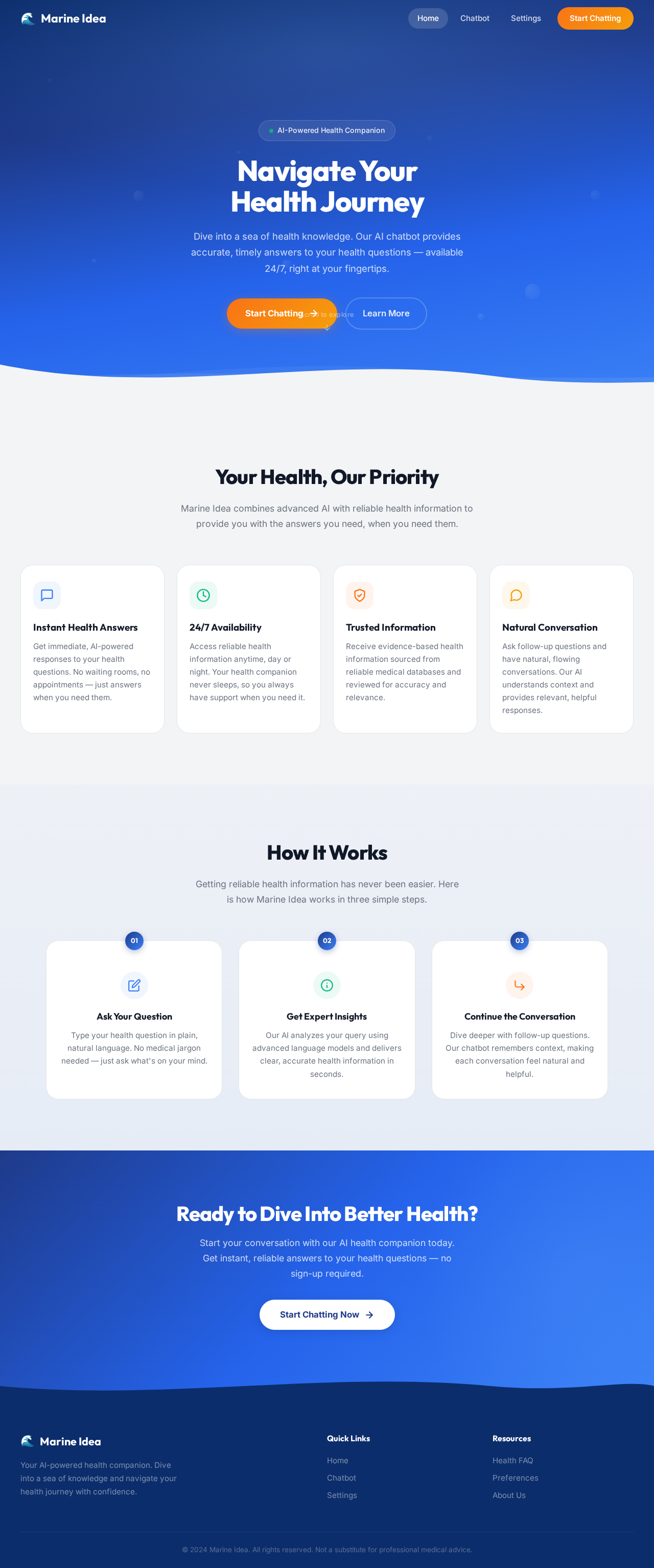
Navigate Your
Health Journey
Dive into a sea of health knowledge. Our AI chatbot provides accurate, timely answers to your health questions — available 24/7, right at your fingertips.
Your Health, Our Priority
Marine Idea combines advanced AI with reliable health information to provide you with the answers you need, when you need them.
Instant Health Answers
Get immediate, AI-powered responses to your health questions. No waiting rooms, no appointments — just answers when you need them.
24/7 Availability
Access reliable health information anytime, day or night. Your health companion never sleeps, so you always have support when you need it.
Trusted Information
Receive evidence-based health information sourced from reliable medical databases and reviewed for accuracy and relevance.
Natural Conversation
Ask follow-up questions and have natural, flowing conversations. Our AI understands context and provides relevant, helpful responses.
How It Works
Getting reliable health information has never been easier. Here is how Marine Idea works in three simple steps.
Ask Your Question
Type your health question in plain, natural language. No medical jargon needed — just ask what's on your mind.
Get Expert Insights
Our AI analyzes your query using advanced language models and delivers clear, accurate health information in seconds.
Continue the Conversation
Dive deeper with follow-up questions. Our chatbot remembers context, making each conversation feel natural and helpful.
Ready to Dive Into Better Health?
Start your conversation with our AI health companion today. Get instant, reliable answers to your health questions — no sign-up required.
Start Chatting Now
No comments yet. Be the first!