Page 1 of 8
Smart Complaint Management System
Introduction
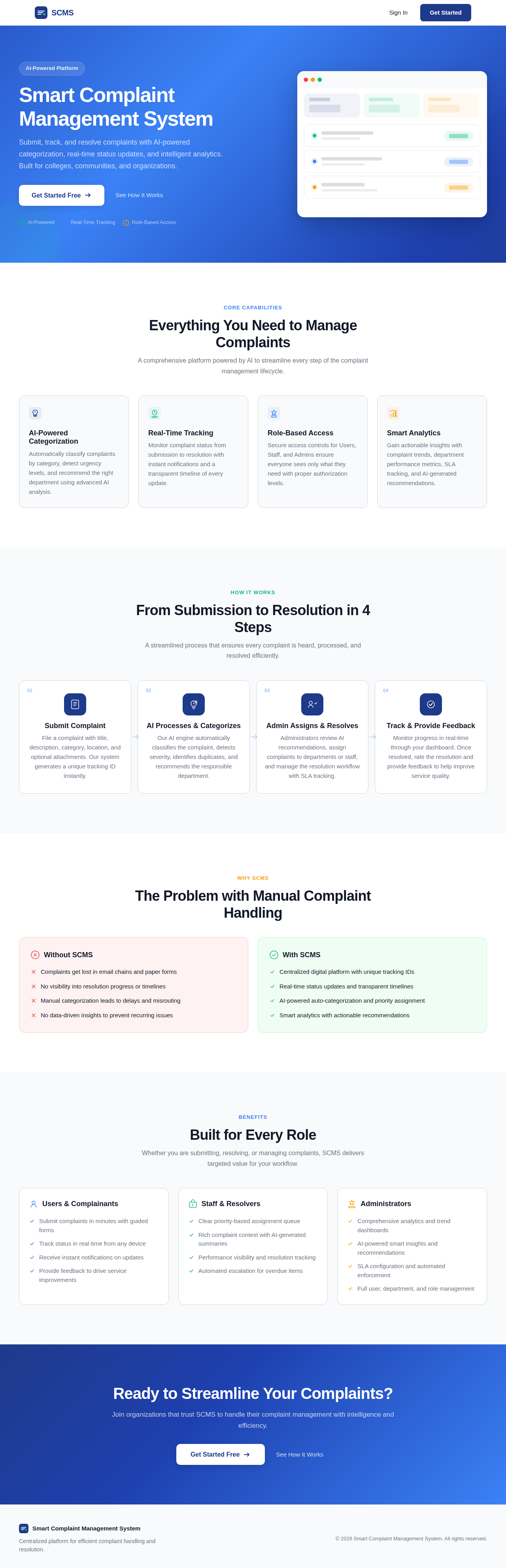
The Smart Complaint Management System is a production-quality full-stack web application designed for colleges, universities, residential communities, companies, or government offices. It serves as a centralized platform where users can submit complaints, automatically categorize and prioritize them, track progress in real-time, and allow administrators to efficiently assign, resolve, and analyze complaints.
System Overview
Page 2 of 8
Product Interpretation and Delivery Boundary
-
Domain Descriptors:
- Complaint Management: Centralized platform for complaint submission, tracking, and resolution.
- AI-Powered Processing: Automated categorization and prioritization of complaints.
-
What is being built:
- A full-stack web application with a modern, responsive dashboard interface.
- AI-powered features for complaint classification and prioritization.
- Role-based access control for Users, Staff, and Admins.
- Smart analytics and a dedicated "Complaint Intelligence" section.
-
Excluded Assumptions:
- Generic CRM features
- E-commerce transaction processing
-
Access:
- Application-owned identity with persistent user sessions.
-
Behavior Contracts:
- Submit Complaint: Users submit complaints with details like title, description, category, location, and optional attachments.
- AI Complaint Processing: System automatically categorizes complaints and assigns priority.
- Assign Complaint: Admins assign complaints to departments or staff.
- Resolve Complaint: Staff resolve complaints and update statuses.
- User Authentication: Secure login, registration, and role management.
- Send Notifications: System notifies users and staff of relevant events.
- Display Admin Dashboard: Admins view complaint stats and analytics.
- Generate Smart Analytics: System provides insights and recommendations.
- Search and Filter Complaints: Users search and filter complaints.
- Submit Feedback: Users provide feedback post-resolution.
- Manage Complaints Lifecycle: Admins manage complaint statuses and assignments.
- Enforce SLA Rules: System escalates unresolved complaints.
- Maintain Audit Logs: System logs significant actions.
- Implement Security Measures: System enforces security policies.
- Ensure Input Validation and Secure Uploads: System validates inputs and secures uploads.
- Handle API Errors: System logs and notifies users of API errors.
- Optimize Database Indexes: System optimizes database performance.
Page 3 of 8
Page Content and Component Coverage
- Landing Page: Initial entry point for users to access the system.
- Login/Register: Authenticate users and manage access.
- User Dashboard: Users track their complaints and view status updates.
- Submit Complaint: Users submit new complaints with detailed information.
- My Complaints: Users view and manage their submitted complaints.
- Complaint Details: View detailed information about a specific complaint.
- Staff Dashboard: Staff manage assigned complaints and update progress.
- Assigned Complaints: Staff view and manage their assigned complaints.
- Admin Dashboard: Admins manage complaints, users, and view analytics.
- All Complaints: Admins view and manage all complaints in the system.
- Departments: Manage departments involved in complaint resolution.
- Users & Roles: Manage user accounts and their roles.
- Analytics: Provide insights and recommendations based on complaint data.
- Notifications: Manage notifications for users and staff.
- Profile/Settings: Users manage their profile and application settings.
Page 4 of 8
Functional Requirements as Story Points
- As a User/Complainant, I should be able to submit a complaint with a title, description, category, location, and optional attachment.
explicit
- As a System, I should automatically categorize and prioritize complaints upon submission.
explicit
- As an Admin, I should be able to assign complaints to departments or individual staff.
explicit
- As a Staff/Resolver, I should be able to update the status of assigned complaints.
explicit
- As any User, I should be able to log in, register, reset my password, and manage my role.
explicit
- As a System, I should notify users and staff of complaint status changes and assignments.
explicit
- As an Admin, I should be able to view complaint statistics and analytics on the Admin Dashboard.
explicit
- As a System, I should generate smart analytics and provide actionable recommendations.
explicit
- As any authenticated user, I should be able to search and filter complaints by various criteria.
explicit
- As a User/Complainant, I should be able to submit feedback after a complaint is resolved.
explicit
- As an Admin, I should be able to manage the lifecycle of complaints, including status updates and assignments.
explicit
- As a System, I should enforce SLA rules and escalate unresolved complaints.
explicit
- As a System, I should maintain audit logs of significant actions.
explicit
- As a System, I should implement security measures and alert on breaches.
explicit
- As a System, I should validate user inputs and securely upload files.
explicit
- As a System, I should handle API errors and notify users appropriately.
explicit
- As a System, I should optimize database indexes for performance.
explicit
User Personas
- User/Complainant: Submits complaints and tracks their status.
- Staff/Resolver: Receives and resolves assigned complaints.
- Admin: Manages users, departments, complaints, and analytics.
Page 5 of 8
Core User Flows
-
User/Complainant Flow:
- Access the Landing Page.
- Log in via the Login/Register page.
- Navigate to the User Dashboard.
- Submit a complaint via the Submit Complaint page.
- Track complaint status on the My Complaints page.
- View detailed complaint information on the Complaint Details page.
- Provide feedback after resolution.
-
Staff/Resolver Flow:
- Log in via the Login/Register page.
- Access the Staff Dashboard.
- Manage assigned complaints on the Assigned Complaints page.
- Update complaint status and resolve issues.
-
Admin Flow:
- Log in via the Login/Register page.
- Access the Admin Dashboard.
- Manage all complaints on the All Complaints page.
- Assign complaints to departments or staff.
- View analytics and insights on the Analytics page.
- Manage departments and user roles.
Page 6 of 8
Visuals Colors and Theme
- Primary: #1E3A8A (Indigo)
- Primary Light: #3B82F6 (Light Blue)
- Secondary: #10B981 (Green)
- Accent: #F59E0B (Amber)
- Highlight: #EF4444 (Red)
- Background: #F9FAFB (Light Gray)
- Surface: #FFFFFF (White)
- Text: #111827 (Dark Gray)
- Text Muted: #6B7280 (Gray)
- Border: #D1D5DB (Light Gray)
Signature Design Concept
The design concept for the Smart Complaint Management System focuses on a clean, modern, and professional interface. The User Dashboard will feature a sidebar navigation with dashboard cards displaying complaint statistics. Data tables with pagination will be used for complaint listings, and status badges will indicate the priority and status of complaints. The interface will be responsive, ensuring usability on both desktop and mobile devices. Accessible forms and keyboard navigation will be implemented to enhance user experience.
Page 7 of 8
Interaction Model & Motion Direction
The interaction model for the Smart Complaint Management System will be "animated," featuring moderate scroll-triggered reveals and hover transitions. The design will incorporate spring physics on interactive elements to provide a polished user experience. Internal pages will prioritize clarity and task completion, with minimal motion to maintain focus on data and actions.
Non-Functional Requirements
- Authentication: User authentication and role-based access control are required for secure access.
explicit
- UI Requirements: Ensure a modern, responsive, and accessible interface.
explicit
- Technical Requirements: Define the tech stack and database schema.
explicit
Tech Stack
- Frontend: React + TypeScript + Tailwind CSS + shadcn/ui
- Backend: Supabase
- Database: PostgreSQL
- Authentication: Supabase Auth
- File Storage: Supabase Storage
- Charts: Recharts
- AI Integration: LLM API for classification, summarization, duplicate detection, and priority recommendation
Page 8 of 8
Assumptions and Constraints
- The application will be modular, maintainable, and ready for deployment.
- Realistic seed/demo data will be generated for demonstration purposes.
- The application will not include generic CRM features or e-commerce transaction processing.
Glossary
- AI: Artificial Intelligence
- CRUD: Create, Read, Update, Delete
- SLA: Service Level Agreement
- UI: User Interface
- UX: User Experience


No comments yet. Be the first!