marine-calculator
 Diya Trivedi
build a simple single page design of calculator

Comments (0)
Sign in to leave a comment
System Requirements
System Requirements Document for marine-calculator
1. Introduction
marine-calculator is a simple calculator delivered as a single page. The product intent is narrow and complete: a person opens one page, enters numbers and arithmetic operators, sees the current input/expression and the computed result, and can clear the calculator to start a new calculation. There is no account, no navigation, no saved history, and no second screen.
The audience is anyone who needs quick everyday arithmetic — students, shoppers, freelancers, kitchen-table budgeters — and who wants a calm, legible instrument rather than a consumer-electronics keypad. The design register is warm editorial: a cream paper page, ink type, a single rust operational accent, and a calculator card that reads like a well-set page in a good book.
This document is the System Requirements Document for the product; it specifies the single page, its behavior, its visual system, and the delivery boundary.
2. System Overview
2a. Product Interpretation and Delivery Boundary
The product is one anonymous, publicly reachable page named Calculator. It is the whole product: the page hosts the display zone (running expression and result), the keypad (digits, operators, equals, clear), and the small decorative marks that give the card its printed feel.
Delivery is first-party custom UI. The page requires no identity, no sign-in, no session continuity, and no persisted user state; a calculation lives only in the page while it is open. Because no accepted behavior creates a durable relationship, entitlement, or value transfer bound to a person, application-owned identity is not introduced. There is no account creation, no login, no profile, and no history feature.
The page is served by the React frontend. Evaluation of entered arithmetic is a page-local interaction; the shared FastAPI backend and MariaDB remain provisioned infrastructure and are not required to carry calculator state or results. Nothing in the accepted requirements asks the backend to store calculations, and the provisioned database alone does not justify domain entities or persistence.
Current scope is exactly the single Calculator page and its arithmetic entry, display, evaluation, and clear behavior. Nothing beyond that is current.
Removed from scope
- Multi-page navigation or any second destination (also: routes, sidebar, menu)
- User accounts, sign-in, profiles, or saved calculation history (also: authentication, persistence of calculations)
- Scientific, programmer, unit-conversion, or marine-domain calculation modes (also: advanced functions, memory keys)
- Dark mode variant (also: theme toggle)
2b. Source Content Inventory
Not applicable — no reference directive declares content_source.
2c. Page Content and Component Coverage
Calculator
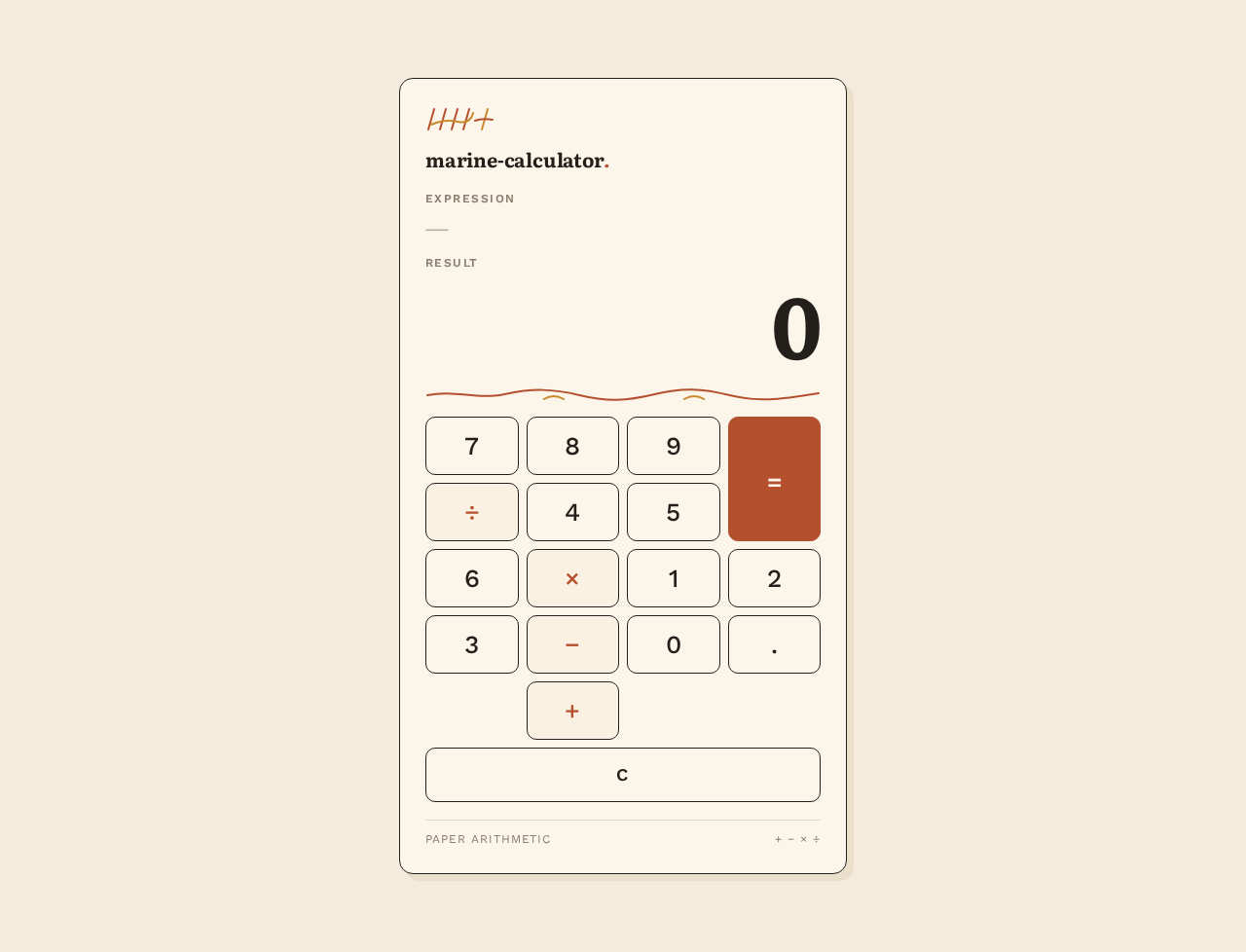
The single page of the product, anonymously reachable, with no identity requirement. It is a centred single column: cream paper ground across the viewport, one lifted-paper calculator card (max-width 460px on desktop, edge-to-edge with 16px side padding at 375px), generous cream margins around it (at least 64px vertical breathing room at 1280px).
Information and state
- Wordmark: "marine-calculator" set in Literata 600–700 at 20px, tight tracking (-0.01em), ink.
- Decorative tally-mark illustration: a small hand-drawn ink illustration (abacus or stack of tally marks, 2px stroke, rust and mustard) in the card's top-left margin. Decoration only; never overlaps readable text or keys.
- Expression zone: uppercase Work Sans label
EXPRESSION(12px, 600, +0.12em tracking, muted) above the running expression in Literata 400, muted ink,clamp(18px, 2.4vw, 24px). Empty state shows a muted placeholder dash or zero-length expression line that holds its height so the layout does not jump. - Result zone: uppercase Work Sans label
RESULTabove the result numeral in Literata 600–700, ink, right-aligned like a ledger figure,clamp(44px, 9vw, 88px). Initial state displays0. The result never wraps out of its container; at 375px it drops to 44px. - Wavy divider rule: hand-drawn SVG path, 2px stroke, rust and mustard, separating the display zone from the keypad.
- Keypad: 4-column grid with 8pt gutters. Digits 0–9 in a 3×4 block on the left; operators (
÷,×,−,+) stacked in a rust-tinted right column as rust type on cream; equals as a tall solid rust block spanning two rows with cream Literata type; a full-widthCkey beneath in ink outline. Keys are 10px-radius rectangles with 1px ink borders on cream, no gloss, no pills, at least 56px tall at 375px. Keypad numerals in Work Sans 500,clamp(20px, 2.6vw, 26px). - Error state: when an expression cannot be evaluated (for example division by zero), the result zone shows a short plain-language message in place of the numeral, the expression remains visible, and the calculator stays usable — entering a digit or pressing
Creturns to normal entry.
Primary actions
- Press a digit key to append it to the current number in the expression.
- Press an operator key to place that operator in the expression.
- Press
=to evaluate the expression and show the result. - Press
Cto clear the expression and result and return to the initial0state.
Supporting actions and states
- Key press feedback: keys press down 1px with a 120ms ease-out and a mustard tint on
:active. - New result appearance: fades in over 180ms with a 4px upward drift.
- Focus state: visible focus ring in rust (never blue or indigo) on every key, reachable by keyboard.
- Reduced motion: all transitions instant; static layout unchanged.
Domain entities
- Expression: the ordered sequence of entered digits and operators currently shown in the expression zone.
- Result: the numeric outcome of evaluating the expression, or an error message when evaluation is not possible.
Component responsibilities
- Display zone renders the expression and result labels and values, right-aligns the result, and owns the error message presentation.
- Keypad renders digit, operator, equals, and clear keys, dispatches entry actions, and owns press feedback.
- Evaluation logic computes the result from the expression and reports an error when the expression is not evaluable.
- Page shell provides the cream ground, the centred card, the wordmark, the tally illustration, and the wavy rule.
States
- Loading: not applicable — the page is static markup with no remote data.
- Empty/initial: result
0, expression empty. - Entry: expression grows as digits and operators are pressed; result shows the last computed value or
0. - Success:
=produces a result that fades in and is displayed right-aligned. - Error: unevaluable expression shows a plain-language message; entry or
Crecovers. - Recovery:
Calways returns the page to the initial state.
3. Functional Requirements
FR-1 — Single-page calculator delivery (explicit) As a Calculator User, I should get the whole calculator on one page, so that I can do arithmetic without navigating anywhere.
- Trigger: opening the product.
- Observable result: one page renders the display zone and keypad; there is no navigation, menu, or second destination.
- Access: anonymous, no identity required.
- Failure/recovery: if the page fails to render, reloading restores the same single page; no partial second screen exists.
- Continuation: the user proceeds directly to entry (FR-2).
FR-2 — Enter numbers and arithmetic operators (explicit) As a Calculator User, I should enter numbers and arithmetic operators, so that I can build the calculation I want.
- Trigger: pressing digit keys and operator keys.
- Input: digits 0–9 and the operators
÷,×,−,+. - Observable result: the running expression in the expression zone updates to show the entered digits and operators in order.
- Access: anonymous.
- Failure/recovery: an operator pressed with no preceding number is ignored or replaced by the newly pressed operator so the expression stays well-formed; the user can continue entering.
- Continuation: the user presses
=(FR-4) orC(FR-5).
FR-3 — See the current input/expression and the computed result (explicit) As a Calculator User, I should see both the current expression and the computed result, so that I can check what I entered and read the answer.
- Trigger: any entry or evaluation.
- Observable result: the expression zone shows the running expression in muted Literata; the result zone shows the computed result right-aligned in oversized Literata ink numerals, labelled
EXPRESSIONandRESULT. - Access: anonymous.
- Failure/recovery: when the expression cannot be evaluated, the result zone shows a plain-language message while the expression stays visible; entering a digit or pressing
Crecovers. - Continuation: the user reads the result or continues entering.
FR-4 — Evaluate the expression (explicit)
As a Calculator User, I should press = to compute the result of my expression, so that I get the answer.
- Trigger: pressing the equals key.
- Observable result: the result zone updates to the evaluated value, fading in over 180ms with a 4px upward drift (instant under reduced motion).
- Access: anonymous.
- Failure/recovery: an unevaluable expression (for example division by zero) shows a plain-language error in the result zone instead of a numeral; the calculator remains usable.
- Continuation: the user may continue entering, evaluate again, or clear (FR-5).
FR-5 — Clear the calculator (explicit) As a Calculator User, I should clear the calculator, so that I can start a new calculation.
- Trigger: pressing the
Ckey. - Observable result: the expression zone empties and the result zone returns to
0. - Access: anonymous.
- Failure/recovery:
Calso clears an error state, returning the page to the initial state. - Continuation: the user begins a new calculation with FR-2.
4. User Personas
Calculator User
Product context. A person who needs quick everyday arithmetic — a student checking homework, a shopper totalling a basket, a freelancer adding up hours, a household budgeter at the kitchen table. They arrive at the page with a number in mind and no patience for setup. The product is a single page with no account, no onboarding, and no navigation; the calculator card is the entire experience.
Primary goal. Get a correct arithmetic answer quickly and legibly, and be able to start over cleanly.
Distinct accepted responsibilities.
- Enters digits and arithmetic operators to build an expression (FR-2).
- Reads the running expression and the computed result together (FR-3).
- Presses
=to evaluate (FR-4). - Presses
Cto clear and start a new calculation (FR-5).
Relevant inputs and decisions. Which digits and operators to enter, when the expression is complete enough to evaluate, and whether to continue from the result or clear and start fresh.
Interactions with other accepted participants. None. The Calculator User is the only active human participant; there is no counterparty, recipient, or approver. Evaluation is page-local and produces no state for anyone else.
Observable success. The result numeral appears right-aligned in the result zone, set in oversized Literata, matching the entered expression; C returns the page to 0 and an empty expression.
What makes this role distinct. The work is a single continuous, private, ephemeral interaction with one instrument — no identity, no handoff, no durable record. The persona's value is speed and legibility, not collaboration or persistence.
5. Core User Flows
Flow A — Perform a calculation
- Start. The Calculator User opens the product. The Calculator page renders on the cream paper ground: wordmark, tally illustration,
EXPRESSIONlabel with an empty expression,RESULTlabel with0, the wavy rule, and the keypad. No sign-in is requested. - Enter the first number. The user presses digit keys. Each press depresses the key 1px with a mustard tint, and the digits appear in order in the expression zone in muted Literata.
- Choose an operator. The user presses an operator key (
÷,×,−,+) in the rust-tinted right column. The operator appears in the expression after the entered number. - Enter the second number. The user presses further digit keys; the expression grows to show the full calculation.
- Evaluate. The user presses the solid rust equals key. The result zone updates to the computed value, right-aligned in oversized Literata ink, fading in over 180ms with a 4px upward drift (instant under reduced motion). The expression remains visible above it.
- Continue or finish. The user reads the answer. They may continue entering to build a longer expression, press
=again, or pressCto clear (Flow B). Closing the page ends the calculation; nothing is saved.
Failure and recovery. If the expression cannot be evaluated (for example division by zero), the result zone shows a short plain-language message instead of a numeral, the expression stays visible, and the calculator remains usable. Pressing a digit or C returns the page to normal entry.
Flow B — Clear and start a new calculation
- Start. The Calculator User is on the Calculator page with an expression and/or result displayed, or with an error message showing.
- Clear. The user presses the full-width ink-outline
Ckey beneath the keypad. - Observe. The expression zone empties and the result zone returns to
0; any error message is removed. - Continue. The user begins a new calculation by following Flow A from step 2.
6. Visuals Colors and Theme
Muse and headline. Warm editorial arithmetic after Frank Chimero — a calculator that feels like a well-set page in a good book, not a piece of consumer electronics.
Mode. Light only. The page is paper cream throughout; there is no dark mode variant.
Colour tokens (exact hex, by role)
| Role | Hex | Use |
|---|---|---|
| Background | #F4EBDD | Cream paper ground across the whole page |
| Surface | #FBF5EA | Calculator card |
| Text | #231F1A | Ink — all numerals, reading text, key borders, hairline |
| Primary | #B5502F | Rust — equals key fill, operator type, focus ring, tally stroke |
| Accent | #C98A2E | Mustard — hand-drawn rule flourishes, active-press tint, tally stroke |
| Muted | #8A7E6E | Labels, hairline rules, secondary metadata, running expression |
No blue or indigo anywhere. No gradients, no glass, no frosted panels.
Typography
- Headings and result display: Literata, 600–700 weight, tracking -0.01em, true old-style feel. Running expression uses Literata 400 in muted ink.
- Body and keypad: Work Sans, 500 for keypad numerals, 600 for uppercase small-caps-style labels with +0.12em tracking (
EXPRESSION,RESULT), 400/500 for body. - Scale: 1.25 modular with a display jump — result display
clamp(44px, 9vw, 88px); expression lineclamp(18px, 2.4vw, 24px); wordmark 20px; keypad numeralsclamp(20px, 2.6vw, 26px); labels 12px uppercase; body 16px/1.6.
Shape language. Soft printed-paper geometry: the calculator card has a 14px radius, a 1px ink hairline, and no drop shadow — depth comes from a single offset cream shadow line, like a page lifted off another page. Keys are 10px-radius rectangles with 1px ink borders on cream, no gloss, no pills. One hand-drawn wavy SVG rule (2px stroke, rust and mustard) separates display from keypad. Corners stay consistent; nothing is a blob.
Spacing rhythm. Single centred column, max-width 460px on desktop, at least 64px vertical breathing room at 1280px; keypad grid with 8pt gutters; at 375px the card goes edge-to-edge with 16px side padding and keys at least 56px tall.
Imagery style. No photography. The only visuals are a small hand-drawn ink illustration (abacus or stack of tally marks, 2px stroke, rust and mustard) in the card's top-left margin and the wavy divider rule. Decoration only; never overlapping readable text or keys.
7. Signature Design Concept
The public entry is the product: a single cream page with one lifted-paper calculator card centred in it, no hero image and no marketing copy above the fold. The dominant element is the oversized Literata result numeral, right-aligned in ink on the cream card at clamp(44px, 9vw, 88px) — a number set in a book, not a digital readout. Above it the running expression sits small and muted beneath the EXPRESSION label; below it the hand-drawn wavy ink rule, then the bordered cream keypad with exactly one filled block: the solid rust equals key spanning two rows with cream Literata type. A tiny rust-and-mustard tally-mark illustration sits in the card's top-left margin. The composition is quiet and printed, with the whole viewport as paper and the calculator as the only object on the page.
8. Interaction Model & Motion Direction
Interaction Model: Static Motion Tempo: restrained Hero Dimensionality: flat
Landing Hero Motion Brief
- Focal subject. The oversized Literata result numeral, right-aligned on the cream card, with the muted running expression above it and the single rust equals block below the wavy rule.
- Input → transformation → outcome thesis. A key press (input) depresses the key 1px with a mustard tint over 120ms ease-out and appends to the expression; pressing
=(transformation) evaluates the expression; the new result (outcome) fades in over 180ms with a 4px upward drift and settles right-aligned in ink. No other motion occurs. - Motion vocabulary. Restrained and page-like: 1px key depression at 120ms ease-out, mustard
:activetint, 180ms result fade with 4px upward drift. No bounces, no particles, no looping animation, no spring. - Composed first frame. Cream paper fills the viewport; the calculator card sits centred with its offset cream shadow line and 1px ink hairline; the tally illustration rests in the top-left margin;
EXPRESSIONlabel with an empty expression line,RESULTlabel with0in oversized Literata; the wavy rust-and-mustard rule; the bordered keypad with the solid rust equals block as the only filled element. - Reduced-motion state. With
prefers-reduced-motion, all transitions are instant and the static layout is unchanged; the first frame is identical and fully usable.
9. Non-Functional Requirements
- Single-page constraint (explicit): the product is exactly one page; no additional routes, navigation, or destinations may be introduced.
- Simplicity (explicit): the design must remain a simple single page; no adjacent calculator modes, history, accounts, or settings.
- Readability at every viewport (explicit, from design direction): headlines, wordmarks, labels, numbers, cards' text and controls stay entirely inside the viewport and their container at 375px, 768px, and 1280px, wrapping or scaling via
clamp(...); no element covers any part of them. The result display drops to 44px at 375px so it never wraps out of its container. - Accessibility (required_inference, from design direction): every key is keyboard reachable with a visible rust focus ring (never blue or indigo); labels are real text, not images; the result and expression are exposed as readable text.
- Reduced motion (explicit, from design direction): under
prefers-reduced-motion, all transitions are instant and the static layout is unchanged. - No dark mode (explicit, from design direction): the page is paper cream throughout.
- No persistence (required_inference): calculations are ephemeral page state; nothing is written to the database or backend.
- Performance (required_inference): the page is static markup with no remote data fetch; it renders without a loading state.
10. Tech Stack
- Frontend: React application UI — the single Calculator page, its display zone, keypad, evaluation logic, and the visual system above.
- Backend: shared FastAPI process for application APIs and domain modules. Provisioned and available; the accepted calculator behavior does not require it to store or compute calculations.
- Database: MariaDB for application-owned persistent data. Provisioned; no calculator domain entities or persistence are introduced by the accepted requirements.
- Containerization: Docker / docker-compose with the
frontend,backend, anddatabaseservices as the runnable inventory. - Typography: Literata and Work Sans loaded as web fonts.
11. Assumptions and Constraints
- A-1 (assumption): Arithmetic evaluation happens in the page (client-side); the backend is not required for calculation.
- A-2 (assumption): The calculator supports the four basic operations (
÷,×,−,+) with digits 0–9, as implied by "calculator"; no scientific, memory, percentage, or unit-conversion functions are included. - A-3 (assumption): Calculations are ephemeral; no history, saved results, or user state persists across page loads.
- A-4 (constraint, explicit): The product is a single page; no second destination may be added.
- A-5 (constraint, explicit): The design must remain simple; adjacent calculator features are out of scope.
- A-6 (constraint, from design direction): No blue or indigo, no glassmorphism, no gradients, no glossy or 3D keys, no drop-shadow blur stacks, no photography, no dark mode.
- A-7 (constraint, from design direction): Motion stays under 200ms and linear/ease-out; no bouncy or springy key animations.
12. Glossary
- Calculator page: the single, anonymously reachable page that is the entire product.
- Expression: the ordered sequence of entered digits and operators shown in the expression zone.
- Result: the numeric outcome of evaluating the expression, or a plain-language error message when evaluation is not possible.
- Display zone: the labelled
EXPRESSIONandRESULTarea at the top of the calculator card. - Keypad: the 4-column grid of digit, operator, equals, and clear keys below the wavy rule.
- Equals key: the single solid rust block spanning two keypad rows that evaluates the expression.
- Clear key (
C): the full-width ink-outline key that resets the calculator to its initial state. - Wavy rule: the hand-drawn 2px SVG divider in rust and mustard between the display zone and the keypad.
- Tally illustration: the small hand-drawn ink abacus or tally-mark mark in the card's top-left margin, decoration only.
- Lifted-paper card: the calculator surface with a 14px radius, 1px ink hairline, and a single offset cream shadow line instead of a blur shadow.
marine-calculator.
No comments yet. Be the first!