mango-calculator
build a calculator with single page design and minimal design

Comments (0)
Sign in to leave a comment
Project Tasks3
Implement CalculatorContainer for Calculator
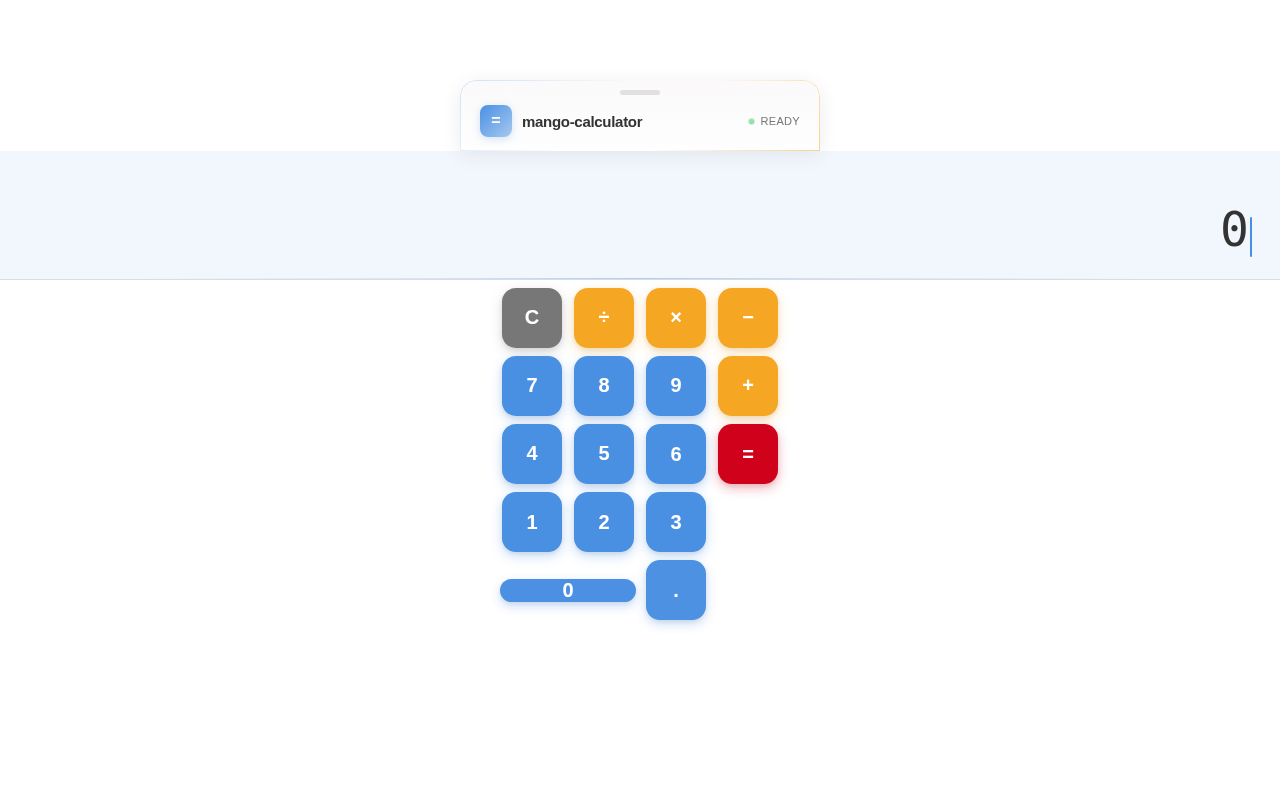
As a frontend developer, implement the CalculatorContainer section for the Calculator page. This component is the main wrapper that enables draggable calculator functionality using framer-motion's drag prop with dragConstraints ({top: -200, left: -300, right: 300, bottom: 200}), dragElastic: 0.08, and dragTransition with bounceStiffness/bounceDamping. Implements a magnetic tilt effect using useMotionValue for mouseX/mouseY, useSpring transforms (stiffness: 200, damping: 30), and useTransform to map mouse position to rotateX/rotateY range of ±3 degrees, disabled when isDragging. Uses useState for isDragging and timePhase, with a useEffect that calls getPhase() every 60 seconds to determine 'morning'/'afternoon'/'evening' based on hour. Uses useMemo to compute ambientGradient — a linear-gradient that changes based on timePhase (blue tint for morning, orange tint for afternoon/evening). The cc-card element has spring entrance animation (opacity: 0→1, y: 30→0, scale: 0.96→1, stiffness: 260, damping: 22) and whileTap scale: 0.985. Renders an ambient glow div and slots for CalculatorDisplay and CalculatorKeypad children.
Implement CalculatorDisplay for Calculator
As a frontend developer, implement the CalculatorDisplay section for the Calculator page. This component manages full arithmetic state with useState hooks: displayValue ('0'), previousValue (null), operation (null), waitingForOperand (false), and history (''). Implements a global keydown event listener via useEffect supporting: digit keys 0-9 → inputDigit(), '.' → inputDecimal(), operators +/-/*/÷ via opMap → performOperation(), Enter/= → performOperation('='), Escape → clearAll(), Backspace → handleBackspace(). Core functions: inputDigit (replaces or appends digit based on waitingForOperand), inputDecimal (prevents duplicate dots), handleBackspace (slices last char or resets to '0'), clearAll (resets all state), calculate (performs +/−/×/÷ with division-by-zero 'Error' guard), formatNumber (uses toLocaleString with decimal preservation), performOperation (chained calculation logic updating previousValue/operation/waitingForOperand). Uses AnimatePresence and motion.div for animated display value transitions. Renders history line showing previous expression and current displayValue with font scaling based on character length.
Implement CalculatorKeypad for Calculator
As a frontend developer, implement the CalculatorKeypad section for the Calculator page. Defines BUTTONS array of 17 entries with label, type ('number'/'operation'/'equals'/'clear'), and colSpan flag for the '0' button. Uses useState for pressedKey (cleared after 150ms timeout in handlePress). getButtonClass maps type to CSS classes: ck-btn--number, ck-btn--operation, ck-btn--equals, ck-btn--clear. Renders a motion.div ck-grid with containerVariants (staggerChildren: 0.03, delayChildren: 0.1) for staggered button entrance. Each button is wrapped in motion.div with buttonVariants (opacity/y/scale spring entrance: stiffness 300, damping 20). Individual motion.button elements use springTransition (stiffness: 400, damping: 15) for whileHover (scale: 1.06) and whileTap (scale: 0.92) animations. Includes aria-label attributes mapping symbols to readable names (×→multiply, ÷→divide, −→subtract, =→equals, C→clear). Zero button receives ck-btn-wrapper--zero and ck-btn--zero classes for col-span layout.
No comments yet. Be the first!