mango-application
 Diya Trivedi
start project create a new application to create to do application


Comments (0)
Sign in to leave a comment
System Requirements
Mango-Application
Introduction
The Mango-Application is a personal to-do list application designed to help users manage their tasks efficiently. This document outlines the system requirements for the Mango-Application, ensuring it meets the needs of its users.
System Overview
The Mango-Application is a simple, user-friendly application focused on creating and managing to-do lists. It is designed for personal use, allowing users to easily add, edit, and delete tasks. The application aims to provide a straightforward interface for task management without unnecessary complexity.
Functional Requirements
- Users should be able to create a new to-do list.
- Users should be able to add tasks to their to-do list.
- Users should be able to edit existing tasks in their to-do list.
- Users should be able to delete tasks from their to-do list.
- Users should be able to mark tasks as completed.
User Personas
- User: An individual looking to manage personal tasks and to-do lists efficiently.
Core User Flows
- User opens the application -> creates a new to-do list -> adds tasks -> edits tasks as needed -> marks tasks as completed -> deletes tasks when no longer needed.
Visuals Colors and Theme
- primary: #4A90E2 (a calming blue)
- primary_light: #B3D4FC (a lighter blue for hover states)
- secondary: #F5A623 (a warm orange for emphasis)
- accent: #50E3C2 (a vibrant mint for CTAs)
- highlight: #F8E71C (a bright yellow for notifications)
- bg: #FFFFFF (a clean white background)
- surface: rgba(250, 250, 250, 0.8) (a light grey for panels)
- text: #333333 (a dark grey for primary text)
- text_muted: #777777 (a softer grey for secondary text)
- border: rgba(200, 200, 200, 0.5) (a subtle grey for borders)
Signature Design Concept
The Mango-Application will feature an interactive "Task Garden" homepage. Users will see their tasks represented as plants in a virtual garden. Each task starts as a seedling and grows as the user progresses through their list. Completing tasks will cause the plants to bloom, providing a visual representation of productivity. Users can click on plants to view task details or drag them to rearrange priorities. This concept will use framer-motion for smooth animations and transitions.
Interaction Model & Motion Direction
The landing page will utilize an "animated" interaction model. This will include scroll-triggered reveals, hover transitions, and spring physics on interactive elements, providing a polished and engaging user experience.
Non-Functional Requirements
- The application should load quickly and perform efficiently on standard personal devices.
- The user interface should be intuitive and easy to navigate.
- The application should be accessible to users with varying levels of technical expertise.
Tech Stack
- Frontend: React for Web
- Backend: FastAPI
- Database: MySQL or MariaDB, using alembic for migrations
Assumptions and Constraints
- The application is intended for personal use and does not require multi-user support.
- The application will be developed with a focus on simplicity and ease of use.
Glossary
- To-Do List: A list of tasks that a user intends to complete.
- Task: An individual item on a to-do list that requires action.
- User: The individual using the Mango-Application to manage personal tasks.
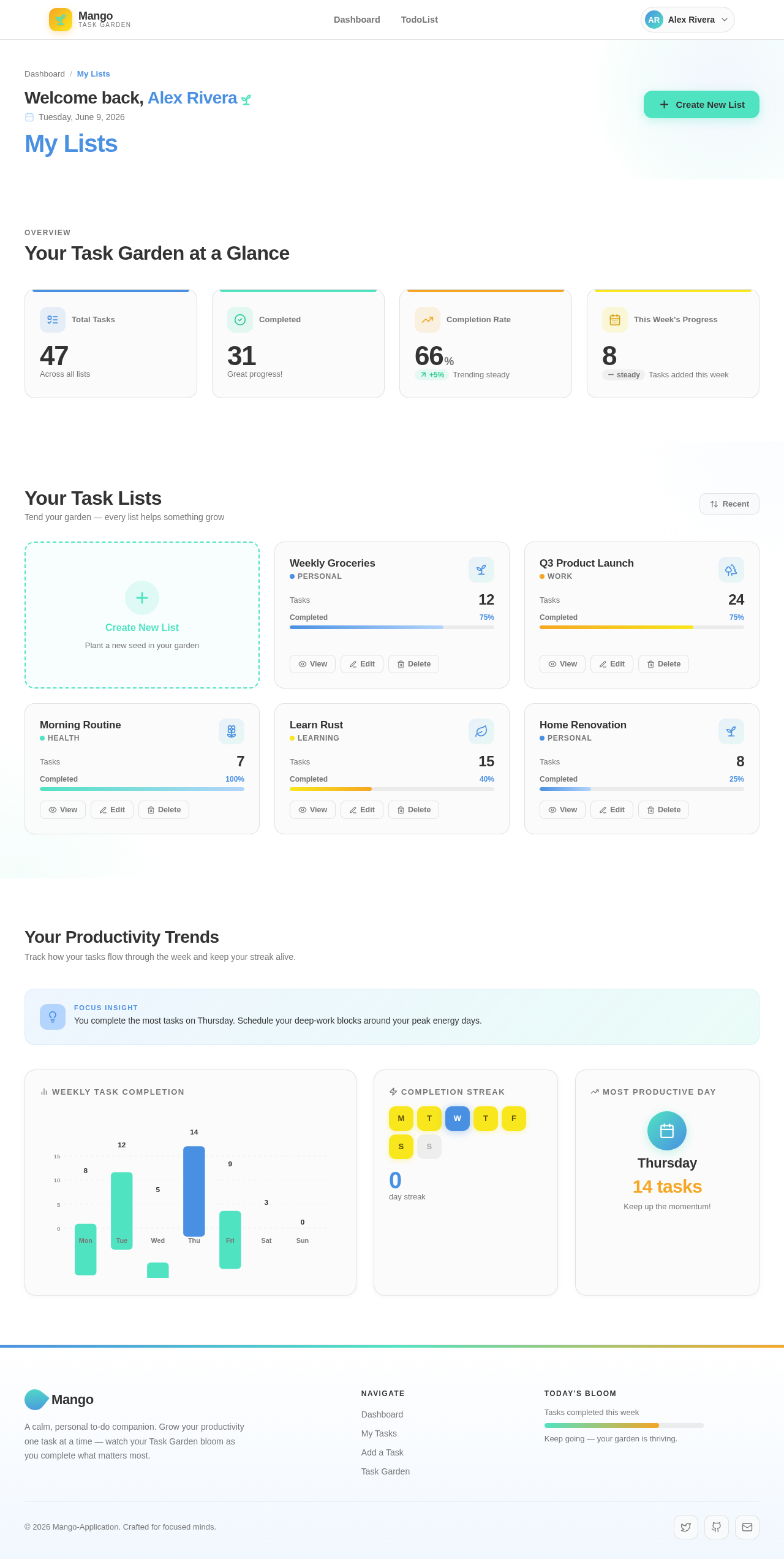
Welcome back, Alex Rivera
Saturday, July 11, 2026
My Lists
Overview
Your Task Garden at a Glance
Your Task Lists
Tend your garden — every list helps something grow
Create New List
Plant a new seed in your garden
Weekly Groceries
PersonalQ3 Product Launch
WorkMorning Routine
HealthLearn Rust
LearningHome Renovation
PersonalYour Productivity Trends
Track how your tasks flow through the week and keep your streak alive.
No comments yet. Be the first!