mammoth-start
 Diya Trivedi
start a project to build a simple single page design of calculator

Comments (0)
Sign in to leave a comment
System Requirements
System Requirements Document for mammoth-start
1. Introduction
mammoth-start is a simple, single-page calculator design. The product intent is a small, self-contained arithmetic utility presented as one page: a visitor opens the page, enters numbers and operations, and sees the computed result. The design is deliberately simple and confined to a single page.
The audience is anyone who needs quick arithmetic — students, shoppers, freelancers, and curious tinkerers — arriving casually and expecting fast, legible, unambiguous numeric entry. The page is a public, anonymous utility: no account, no sign-in, no saved history is required by the source.
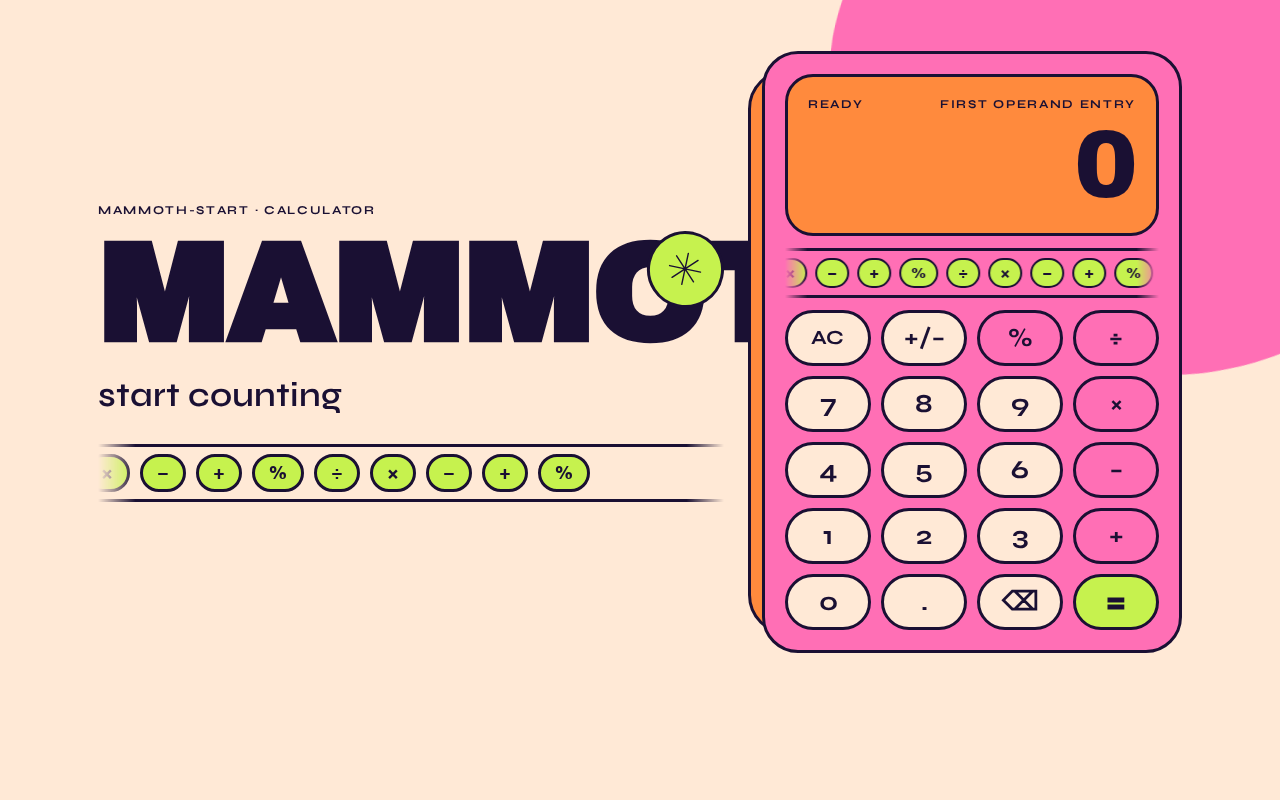
The visual intent is a colour-saturated poster rather than a conventional utility widget: a hot-pink calculator card on a warm apricot ground, oversized Archivo Black numerals, and a lime accent reserved for the equals key and the live operator chip.
2. System Overview
mammoth-start is delivered as a single custom page, Calculator, which is the anonymous public entry surface and the only page in the product. The page owns number entry, operator selection, computation, and display of the result.
Actors
- Calculator User (active human persona): opens the Calculator page and performs arithmetic entry to obtain a computed result.
- No other human personas exist in the current product. There are no system, provider, or external actors with user-facing responsibilities; computation is performed within the page itself.
Accepted behavior
- A simple single-page calculator design.
- The calculator is presented on one page.
- Number and operation entry with a displayed computed result.
Narrow exclusions
- No additional pages, routes, or navigable destinations beyond the single Calculator page.
- No accounts, authentication, profiles, or persistence of calculations.
- No scientific, graphing, programmer, or unit-conversion modes; no history log; no memory registers — none are stated in the source.
2a. Product Interpretation and Delivery Boundary
The product is a first-party, browser-delivered single page. Access is anonymous and public: the Calculator page is reachable without identity establishment, and no protected state exists, so no sign-in, invitation, or provisioning flow is part of the product. All arithmetic state is transient within the page session; nothing is stored or resumed across visits.
The current delivery horizon contains only the single-page calculator described above. Nothing in the source establishes future features; no future section is therefore required, and no adjacent calculator capabilities are in scope.
2b. Source Content Inventory
Not applicable — no reference directive supplies a content_source.
2c. Page Content and Component Coverage
Calculator
The single page of the product, and the anonymous public entry. It presents the calculator as a poster-like object and owns all arithmetic interaction.
Information and state
- Current display value: the number being entered, or the most recent computed result.
- Pending operation state: the selected operator (÷, ×, −, +, %) shown as a live operator chip.
- Entry state: whether the user is entering the first operand, the second operand, or viewing a completed result.
Primary actions
- Digit keys 0–9 to enter numbers.
- Decimal point key to enter fractional values.
- Operator keys ÷, ×, −, +, % to select an operation.
- Equals key to compute and display the result.
- Clear key to reset the current entry and pending operation.
Supporting actions and elements
- Oversized wordmark "MAMMOTH" with the line "start counting" beneath it.
- Lime sticker circle with a hand-drawn asterisk overlapping the wordmark's final letter (decoration only).
- Operator chip rail above the keypad, marqueeing slowly and reflecting the live operator.
- Decorative hot-pink blob bleeding off the top-right, and a tangerine colour block offset behind the card (decoration only, never covering digits, labels, or keys).
Domain entities
- Operand (numeric value entered by the user).
- Operator (one of ÷, ×, −, +, %).
- Result (computed numeric value shown in the display).
Component responsibilities
- Display: shows the current value or result in Archivo Black with tabular figures at
clamp(64px, 18vw, 176px); scales or wraps so no digit leaves the card at 375px, 768px, or 1280px. - Operator chip rail: lime pills for ÷ × − + %; marquee at 30s; wraps into a static row under
prefers-reduced-motion; indicates the live operator. - Keypad: 4×5 grid of pill keys with 28–40px radii; keys ≥56px tall with 10px gutters on mobile; press animation scale-to-0.94 over 90ms with slight overshoot.
- Equals key: lime surface with plum type (never white); one-shot lime flash on activation.
- Calculator shell: hot-pink card, max-width 420px on desktop, full-bleed within 16px gutters on mobile, 3px plum outline, 14px offset tangerine colour-block shadow.
States
- Loading: not applicable — the page is static markup with client-side arithmetic; no asynchronous data.
- Empty / initial: display shows
0; no operator chip active; keypad ready. - Success: entered expression computes and the result appears in the display with a 120ms clip-up reveal.
- Error / recovery: division by zero or an unparseable entry shows an error indication in the display; the Clear key resets to the initial
0state so the user can continue. (Required inference: a visible, recoverable error state is indispensable for a usable calculator.) - Reduced motion: all animation collapses to a static arrangement; the chip rail wraps into a row.
3. Functional Requirements
FR-1 — Single-page calculator presentation (explicit) As a Calculator User, I should see the calculator presented on one page, so that I can perform arithmetic without navigating anywhere.
- Trigger: the user opens the product.
- Observable result: the Calculator page renders with the wordmark, the calculator card, the display, and the keypad.
- Access: anonymous, public.
- Failure/recovery: if the page fails to render, reloading restores the same single page; there is no alternate destination.
- Continuation: the user proceeds to enter digits.
FR-2 — Simple design (explicit) As a Calculator User, I should encounter a simple design, so that the calculator is immediately understandable and fast to use.
- Observable result: a single card with one display and one keypad; no menus, tabs, or secondary panels.
- Continuation: the user can begin entry without instruction.
FR-3 — Digit entry (required_inference) As a Calculator User, I should press digit keys 0–9 to enter a number, so that I can build the operand I want to calculate.
- Trigger: pressing a digit key.
- Observable result: the digit appears in the display, appended to the current entry; the display updates with a 120ms clip-up reveal.
- Access: anonymous.
- Failure/recovery: pressing Clear resets the entry to
0. - Continuation: the user presses an operator or Equals.
FR-4 — Decimal entry (required_inference) As a Calculator User, I should press the decimal point key to enter fractional values, so that I can calculate with non-integers.
- Trigger: pressing the decimal key.
- Observable result: a decimal point is added to the current entry; a second decimal point in the same entry is ignored.
- Continuation: the user continues entering digits or selects an operator.
FR-5 — Operator selection (required_inference) As a Calculator User, I should select an operator (÷, ×, −, +, %), so that I can specify the operation to perform.
- Trigger: pressing an operator key.
- Observable result: the operator chip rail shows the selected operator as the live operator; the display is ready for the second operand.
- Failure/recovery: selecting a different operator replaces the pending operator.
- Continuation: the user enters the second operand.
FR-6 — Compute and display result (required_inference) As a Calculator User, I should press the equals key to compute the result, so that I see the answer to my arithmetic.
- Trigger: pressing Equals with a pending operation and a second operand.
- Observable result: the computed result replaces the display value with a clip-up reveal; the equals key performs a one-shot lime flash.
- Failure/recovery: division by zero shows an error indication in the display; Clear returns the calculator to
0. - Continuation: the user may start a new calculation or chain from the result.
FR-7 — Clear and reset (required_inference) As a Calculator User, I should press the Clear key to reset the calculator, so that I can start over after a mistake or a completed calculation.
- Trigger: pressing Clear.
- Observable result: the display returns to
0; the pending operator and live operator chip are cleared. - Continuation: the user begins a new entry.
FR-8 — Live operator indication (required_inference) As a Calculator User, I should see the currently selected operator highlighted in the chip rail, so that I know which operation is pending.
- Observable result: the selected operator's chip is visually distinguished as the live operator.
- Continuation: the user completes the calculation with Equals.
4. User Personas
Calculator User
Product context. A casual, everyday user — a student checking a sum, a shopper totalling a basket, a freelancer working out a rate, or a curious tinkerer — who arrives at the page with a quick arithmetic need and no intention of creating an account or returning to saved work.
Primary goal. Enter numbers and an operation and see the correct computed result quickly and unambiguously.
Distinct accepted responsibilities.
- Opens the single Calculator page (the anonymous public entry).
- Enters digits and decimal values via the keypad.
- Selects an operator from ÷, ×, −, +, %.
- Presses Equals to compute and read the result.
- Presses Clear to reset after a mistake or to start a new calculation.
Relevant inputs and decisions. Which digits to enter, which operator applies, and whether to continue from a result or clear and start again. The user decides when a calculation is complete.
Interactions with other participants. None — the Calculator User is the only active human participant, and computation happens within the page. There is no counterparty, recipient, or beneficiary whose state changes.
Observable success. The display shows the entered digits as they are pressed, the live operator chip reflects the selected operation, and the computed result appears in the oversized display. A mistake is recoverable via Clear, and the calculator remains usable at 375px, 768px, and 1280px with all digits, labels, and keys fully visible.
What makes this role distinct. The role is defined by direct, transient numeric manipulation with immediate visual feedback — there is no data to manage, no other party to coordinate with, and no state that outlives the page session.
5. Core User Flows
Flow A — Perform a basic calculation
- The Calculator User opens the product in a browser. The Calculator page loads anonymously; the display shows
0and no operator chip is active. - The user presses digit keys to enter the first operand. Each digit appears in the display with a 120ms clip-up reveal.
- The user presses an operator key (for example ×). The operator chip rail shows × as the live operator, and the display is ready for the second operand.
- The user presses digit keys to enter the second operand; the digits appear in the display.
- The user presses Equals. The equals key performs a one-shot lime flash, and the computed result replaces the display value with a clip-up reveal.
- The user reads the result. To continue, the user may enter a new operator to chain from the result, or press Clear to return to
0and start again.
Flow B — Recover from a mistake or an invalid operation
- The user is mid-entry or has just pressed Equals.
- If the user entered a wrong digit, they press Clear; the display returns to
0and the pending operator and live operator chip are cleared. - If the user pressed Equals on a division by zero, the display shows an error indication.
- The user presses Clear; the calculator returns to the initial
0state with no pending operator. - The user re-enters the calculation from step 2 of Flow A.
Flow C — Enter a fractional value
- The user enters the integer part with digit keys.
- The user presses the decimal point key; a decimal point is added to the current entry. A second decimal point in the same entry is ignored.
- The user enters the fractional digits.
- The user selects an operator and completes the calculation as in Flow A, steps 3–6.
Flow D — Use the calculator on a small screen
- The user opens the page at 375px width. The wordmark shrinks to a single line above the card, and the calculator card is full-bleed within 16px gutters.
- The keypad keys remain ≥56px tall with 10px gutters; the display numeral scales via
clampso no digit leaves the card. - The user performs entry and computation as in Flow A.
- If the user has
prefers-reduced-motionenabled, the chip rail wraps into a static row and all animation collapses to a static arrangement; entry and computation behave identically.
6. Visuals Colors and Theme
Muse and headline. Jessica Walsh — Arithmetic with swagger: a calculator that feels like a colour-saturated poster.
Mode. Light mode only.
Colour tokens (exact hex by role)
- Background (page ground):
#FFE9D6(warm apricot-cream) - Surface (calculator shell):
#FF6FB5(hot pink) - Text / ink:
#1A1033(near-black plum) - Primary:
#FF6FB5(hot pink) - Accent:
#C6F24E(lime) — reserved exclusively for the equals key and the live operator chip - Secondary flat block:
#FF8A3D(tangerine) — only as a flat colour block behind the display and as the offset shadow behind the card - Muted:
#7A6A85
Contrast rules. Text on pink is plum at ≥7:1; text on cream is plum at ≥12:1; the lime equals key uses plum type, never white. No violet, no blue, no gradients.
Typography
- Headings and result numeral: Archivo Black, all-caps, tracking −0.02em; numerals use tabular figures.
- Body and key labels: Syne (medium/semibold), generous line-height, slightly loose tracking on small-caps labels.
- Type scale: display numeral
clamp(64px, 18vw, 176px); wordmarkclamp(28px, 6vw, 56px)(hero wordmarkclamp(56px, 12vw, 140px)); key labelsclamp(20px, 4.5vw, 28px); bodyclamp(15px, 1.6vw, 17px); micro-label 12px uppercase with +0.14em tracking. 1.25 rhythm between steps. - Inter, Roboto, Poppins, and system-ui are excluded from the type system.
Shape language. Fat rounded rectangles and pill keys with 28–40px radii; one oversized organic blob bleeding off the top-right; hard flat colour fields with no gradients; sticker-like circular operator chips overlapping the display's bottom edge by 12px; a chunky 3px plum outline on the calculator shell instead of a shadow.
Layout. Asymmetric two-zone composition on desktop: left column with the oversized wordmark, the one-line promise "start counting", and the operator chip rail; right column with the calculator as a single tall pink card (max-width 420px) with display on top and a 4×5 keypad beneath. On tablet the zones stack with the wordmark above the card. On mobile (375px) the calculator becomes the page: wordmark shrinks to a single line above the card, keys stay ≥56px tall with 10px gutters, and the display numeral scales via clamp so no digit leaves the card. Nothing overlaps readable text or any key at any width.
Imagery style. No photography. Typographic and geometric only: a single oversized flat hot-pink blob on the apricot ground bleeding off the top-right; a lime sticker circle with a hand-drawn asterisk near the wordmark; a tangerine rectangle peeking 14px from behind the calculator card as an offset colour-block shadow. All decoration sits behind or beside content and never covers digits, labels, or keys.
7. Signature Design Concept
The first screen is a colour-blocked poster, not a SaaS hero. A hot-pink calculator card (max-width 420px on desktop, full-bleed within 16px gutters on mobile) is anchored to the right third of the viewport, outlined in 3px plum ink, sitting on a warm apricot ground. To its left, an Archivo Black wordmark MAMMOTH set at clamp(56px, 12vw, 140px) runs edge-to-edge in plum, with the line "start counting" in Syne beneath it and a lime equals-sticker circle overlapping the wordmark's final letter. A giant hot-pink blob bleeds off the top-right corner behind the card; a tangerine block peeks out 14px to the card's left. There is no centred headline, no subtext stack, and no blue button — the calculator itself is the hero, presented like a printed poster object.
The signature moves are: the oversized Archivo Black wordmark with its lime asterisk sticker; the calculator as a single fat pink card with a 3px plum outline and a 14px offset tangerine colour-block shadow; the display numeral in Archivo Black at clamp(64px, 18vw, 176px) with tabular figures as the loudest element on the page; the slow marquee rail of lime operator chips (÷ × − + %) above the keypad acting as both decoration and live operator indicator; and the giant hot-pink blob drifting behind the card.
8. Interaction Model & Motion Direction
Interaction Model: Animated Motion Tempo: expressive Hero Dimensionality: layered_2d
Landing Hero Motion Brief
- Focal subject. The calculator card itself — a hot-pink, plum-outlined printed object on the apricot ground, with the oversized MAMMOTH wordmark and lime asterisk sticker to its left.
- Input → transformation → outcome thesis. A key press (input) scales the key to 0.94 over 90ms and snaps back with a small overshoot, while the display numeral swaps with a 120ms clip-up reveal (transformation), so the computed result lands as the loudest, most confident element on the page (outcome). The equals key adds a one-shot lime flash to mark completion.
- Motion vocabulary. 90ms key press with overshoot; one-shot lime flash on Equals; 120ms clip-up reveal for the result numeral; 24s drift loop on the background blob; 30s marquee on the operator chip rail.
- Composed first frame. The wordmark, "start counting", the lime asterisk sticker, and the calculator card with display showing
0are all fully composed and legible; the blob sits behind the card at the top-right; the chip rail is mid-marquee above the keypad. - Reduced-motion state. Under
prefers-reduced-motion, everything collapses to a static arrangement: the blob stops drifting, the chip rail wraps into a static row instead of scrolling, and key presses and result swaps occur without animation. All content remains fully readable and every key remains usable.
9. Non-Functional Requirements
- NFR-1 — Single page (explicit). The product consists of exactly one page, Calculator. No additional routes, tabs, or navigable destinations may be introduced.
- NFR-2 — Simplicity (explicit). The design must remain simple: one display, one keypad, no secondary panels or menus.
- NFR-3 — Readability at every viewport (explicit, from creative direction). Headlines, wordmarks, labels, numbers, card text, and controls stay entirely inside the viewport and their container at 375px, 768px, and 1280px, wrapping or scaling via
clamp(...)to fit. No element covers any part of readable text or a control. Decoration may bleed, crop, or overlap only imagery and decoration. - NFR-4 — Motion accessibility (explicit, from creative direction). Under
prefers-reduced-motion, a usable static arrangement is provided: the chip rail wraps into a row and all animation is removed. - NFR-5 — Contrast (explicit, from creative direction). Plum text on pink ≥7:1; plum text on cream ≥12:1; lime equals key uses plum type, never white.
- NFR-6 — Palette discipline (explicit, from creative direction). No blue, indigo, or violet; no gradients; no glassmorphism, frosted panels, or soft drop shadows; no neumorphic or skeuomorphic calculator chrome; no photography or 3D props.
- NFR-7 — Typography discipline (explicit, from creative direction). Archivo Black for headings and the result numeral; Syne for key labels and body; Inter, Roboto, Poppins, and system-ui are excluded.
- NFR-8 — Responsive key sizing (explicit, from creative direction). Keypad keys are ≥56px tall with 10px gutters on mobile.
- NFR-9 — No persistence (required inference). Calculations are transient within the page session; no history, accounts, or stored state are required by the source.
10. Tech Stack
- Frontend: React single-page application rendering the Calculator page. (Default — not specified by user; chosen as the minimal fit for a single interactive page.)
- Styling: CSS with custom properties for the colour tokens,
clamp()type scale, andprefers-reduced-motionmedia queries. (Default — not specified by user.) - Fonts: Archivo Black and Syne, loaded as web fonts. (Explicit, from creative direction.)
- Computation: Client-side arithmetic within the page; no backend service is required by the source. (Default — not specified by user.)
- Deployment: Static hosting of the built single page. (Default — not specified by user.)
No database, queue worker, or Kubernetes deployment is required by the accepted scope.
11. Assumptions and Constraints
Constraints (explicit)
- The design must be simple.
- The design must be a single page.
- The product is "a simple single page design of calculator".
- The page count is exactly one.
Assumptions (narrow, labeled)
- The calculator supports the four basic operations plus percent (÷, ×, −, +, %), digits 0–9, a decimal point, equals, and clear, as the minimal keypad implied by a simple calculator design. (required_inference)
- Division by zero produces a visible error indication recoverable via Clear. (required_inference)
- The page is public and anonymous; no identity, account, or session continuity is required. (required_inference, consistent with the absence of any source-stated access restriction)
- Calculations are not persisted between visits. (required_inference)
- The product name "mammoth-start" supplies the wordmark "MAMMOTH" per the creative direction.
Out of scope
- Scientific, graphing, programmer, or unit-conversion modes; calculation history; memory registers; accounts; multi-page navigation.
12. Glossary
- Calculator page — the single page of the product; the anonymous public entry that owns all arithmetic interaction.
- Calculator User — the single active human persona who enters numbers and operations and reads the computed result.
- Operand — a numeric value entered by the user as part of a calculation.
- Operator — one of ÷, ×, −, +, %, selected to specify the operation.
- Live operator chip — the lime pill in the operator chip rail that indicates the currently selected operator.
- Result — the computed numeric value shown in the display after Equals is pressed.
- Clip-up reveal — the 120ms motion in which the display numeral swaps by clipping upward rather than fading.
- Operator chip rail — the marqueeing row of lime operator pills above the keypad that acts as decoration and live operator indicator.
MAMMOTH
No comments yet. Be the first!