malam-fuel-card-system
 Zeray Kalayu Mehari
Fuel Card Management System using Angular as frornt end and Spring boot as backend. The Fuel Card Management System should address one driver with many vehicles. The whereaboust of Fule Card(with whom is currenlty the Fule card). Fuel Consumtion Dashboard.

Comments (0)
Sign in to leave a comment
System Requirements
System Requirements Document for malam-fuel-card-system
1. Introduction
The malam-fuel-card-system is designed to manage fuel cards for fleet management, allowing a single driver to be associated with multiple vehicles. It tracks the current custodian of each fuel card and provides a dashboard for monitoring fuel consumption. The system is built using Angular for the frontend and Spring Boot for the backend, ensuring a robust and efficient user experience for fleet managers and drivers.
2. System Overview
The system supports fleet management by associating one driver with multiple vehicles, managing fuel card custody, and providing a comprehensive fuel consumption dashboard. It is designed for use by fleet managers and drivers, with specific roles and access permissions. The system is built with Angular and Spring Boot, ensuring a clear and functional interface inspired by Dieter Rams' design principles.
2a. Product Interpretation and Delivery Boundary
The system is delivered as a web application with Angular as the frontend and Spring Boot as the backend. It requires user authentication and role-based access control to manage vehicle associations, fuel card custody, and fuel consumption data. The system is designed for fleet managers and drivers, with distinct roles and responsibilities. The application-owned identity ensures secure access to protected records and dashboards.
2b. Source Content Inventory
Not applicable as no content_source directive is provided.
2c. Page Content and Component Coverage
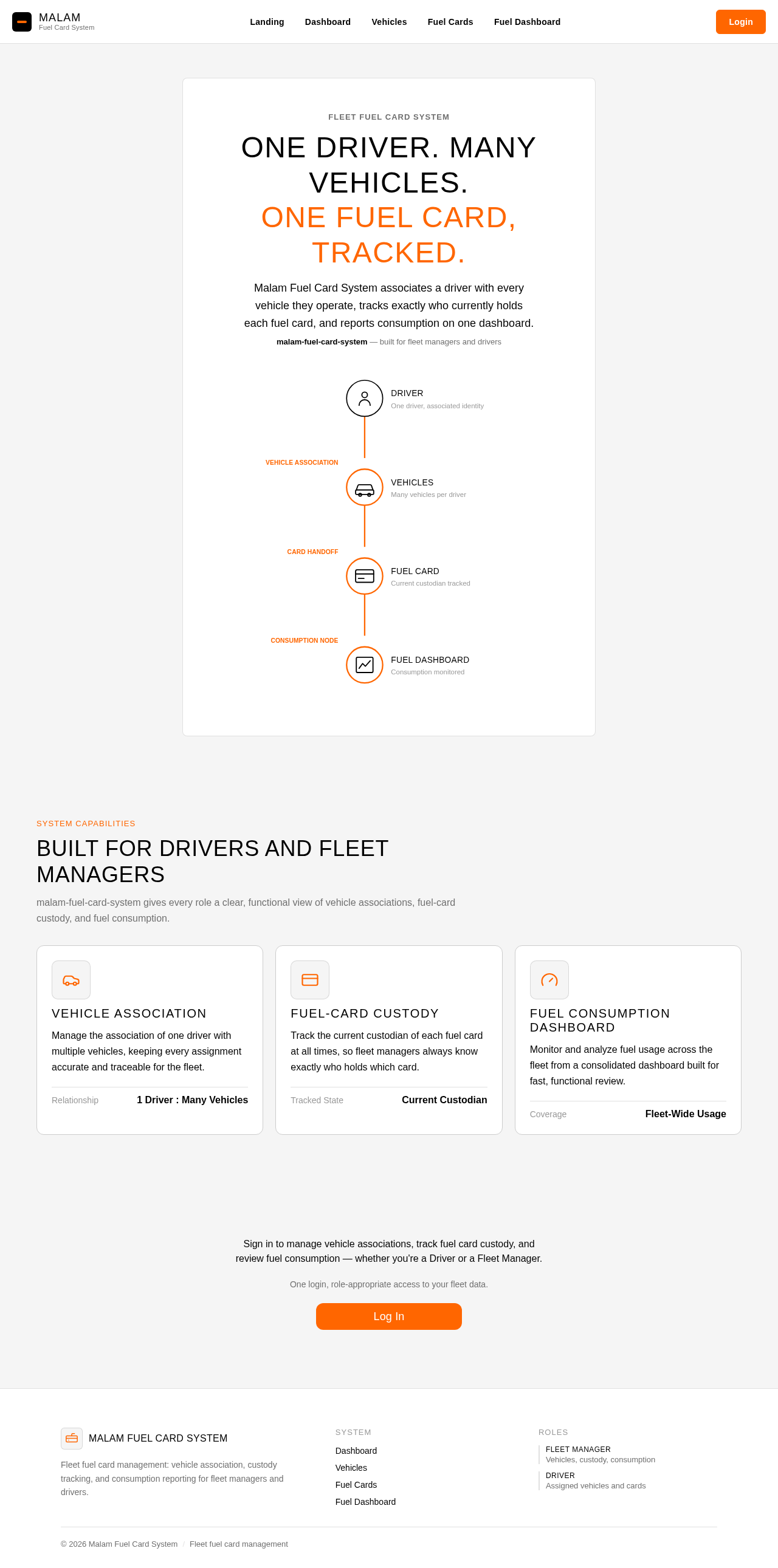
Landing
- Purpose: Public entry explaining the system, its users, vehicle and card management, custody tracking, and fuel-consumption dashboard.
- Components:
- Introduction to the system
- Overview of features
- Access to login
Login
- Purpose: Identity access surface for returning verification.
- Components:
- Username and password fields
- Login button
- Error messages for failed login attempts
Dashboard
- Purpose: Post-login overview for Fleet Managers.
- Components:
- Overview of managed vehicles
- Fuel card custody information
- Fuel consumption analysis
Vehicles
- Purpose: Management destination for maintaining Driver-to-vehicle associations.
- Components:
- List of vehicles
- Add/edit vehicle associations
- Error handling for invalid entries
Fuel Cards
- Purpose: Management destination for fuel-card records and custody status.
- Components:
- List of fuel cards
- Current custodian information
- Update custodian status
Fuel Card Details
- Purpose: Detailed view for managing individual fuel card associations.
- Components:
- Fuel card information
- Current custodian update
- Save changes button
Fuel Dashboard
- Purpose: Presentation of fuel-consumption information.
- Components:
- Fuel consumption graphs
- Historical data analysis
- Export data option
3. Functional Requirements
- As a Fleet Manager, I should be able to manage the association of one driver with multiple vehicles to ensure accurate vehicle tracking. (Provenance: explicit)
- As a Fleet Manager, I should be able to manage fuel cards and track their current custodian to ensure accountability. (Provenance: explicit)
- As a Fleet Manager, I should have access to a fuel-consumption dashboard to monitor and analyze fuel usage across the fleet. (Provenance: explicit)
- As a Driver, I should be able to view my associated vehicles and the fuel cards I am responsible for. (Provenance: required_inference)
4. User Personas
- Driver: Responsible for operating vehicles and managing fuel cards assigned to them. Can view associated vehicles and fuel cards.
- Fleet Manager: Manages the fleet, including vehicle associations, fuel card custody, and fuel consumption analysis.
5. Core User Flows
Fleet Manager
- Login: Access the system using credentials.
- Dashboard: View an overview of managed vehicles and fuel cards.
- Manage Vehicles: Navigate to the Vehicles page to add or edit vehicle associations.
- Manage Fuel Cards: Navigate to the Fuel Cards page to update custodian information.
- Analyze Fuel Consumption: Access the Fuel Dashboard to review and export fuel consumption data.
Driver
- Login: Access the system using credentials.
- View Vehicles: Navigate to the Vehicles page to see associated vehicles.
- View Fuel Cards: Navigate to the Fuel Cards page to see fuel cards in custody.
6. Visuals Colors and Theme
- Muse: Dieter Rams
- Palette:
- Background: #f5f5f5
- Surface: #ffffff
- Text: #000000
- Primary: #ff6600
- Accent: #999999
- Muted: #cccccc
- Typography:
- Headings: Work Sans, Medium weight, uppercase
- Body: Source Sans Pro
- Scale: 1.25 modular
- Shape Language: Rounded-rectangle controls, aligned label/value pairs
- Layout: Dense, ordered grid
- Motion: Instant feedback, restrained tempo
7. Signature Design Concept
A single-column hero on the Landing page featuring a diagrammatic representation of the system workflow. It uses a muted background with warm accents for key elements, ensuring clarity and focus on the system's functionality.
8. Interaction Model & Motion Direction
- Interaction Model: Static
- Motion Tempo: Restrained
- Hero Dimensionality: Flat
- Landing Hero Motion Brief: A composed single-column hero with diagrammatic elements, providing instant feedback on interaction without flourish.
9. Non-Functional Requirements
- The system must be responsive and accessible across devices.
- Ensure data security and privacy for all user information.
- Provide high availability and reliability for fleet management operations.
10. Tech Stack
- Frontend: Angular
- Backend: Spring Boot
- Database: [Default — not specified by user]
- Deployment: Docker/docker-compose
11. Assumptions and Constraints
- The system supports one driver associated with multiple vehicles.
- Angular is used for the frontend, and Spring Boot is used for the backend.
- User authentication is required for accessing protected features.
12. Glossary
- Driver: An individual responsible for operating vehicles within the fleet.
- Fleet Manager: A person responsible for managing the fleet, including vehicle and fuel card management.
- Fuel Card: A card used to purchase fuel for vehicles in the fleet.
No comments yet. Be the first!