magnix-2026
 MB Sohan
Redesign and fully implement the MAGNIX 2026 Department of Science website as a premium, cinematic Stranger Things-inspired experience. Event date: **13 October 2026**, one-day event. Remove all registration fees and prize-pool/price-pool references. First screen must be a dramatic **Upside Down gateway** asking: “DO YOU WANT TO ENTER THE UPSIDE DOWN WORLD?” with ENTER / STAY OUT buttons and a cinematic transition into the main site. Use original/licensed/generated visuals, dark black + deep/bright red, 3D effects, particles, fog, animated backgrounds, cinematic typography and responsive mobile-first layouts. Do not scrape copyrighted Google/Netflix images. Main hero: **MAGNIX 2026 — Department of Science Presents — 13 October 2026 — One Day Event — FREE ENTRY**, with live countdown. Create registration with **Technical / Non-Technical** selection, then event, then Individual/Team. Technical: Computer Science, Economics, Psychology, Mathematics, Multimedia + existing technical event. Non-Technical: BGMI, Free Fire, Photography, Treasure Hunt, Miscellaneous. Build dynamic forms with validation, eligibility rules and duplicate detection. Store registrations securely in **Google Sheets via backend/API**, never expose credentials. Generate unique Registration IDs and downloadable digital passes with QR codes. Prevent duplicate registrations and mark duplicates in Sheets. Use Image-to-Code for image-first design, Taste + Awesome Design MD for art direction, Vercel Web Design Guidelines for accessibility/UX, and Playwright for complete browser testing. Verify mobile, desktop, forms, QR passes, animations, images, console errors and horizontal overflow. Preserve existing project functionality while upgrading the visual experience substantially.


Comments (0)
Sign in to leave a comment
System Requirements
System Requirements Document for magnix-2026
1. Introduction
MAGNIX 2026 is the Department of Science's one-day science festival, held on 13 October 2026. This document specifies the redesign and full implementation of the MAGNIX 2026 website as a premium, cinematic, Stranger Things-inspired experience: a dramatic Upside Down gateway as the first screen, a full-bleed hero with a live countdown, and a trustworthy multi-step registration pipeline that stores records securely in Google Sheets through a backend API, issues unique Registration IDs, and delivers downloadable QR digital passes.
The product intent is spectacle with a trustworthy core. The audience is students and attendees (roughly 16–24) who expect a cinematic, shareable, motion-led entry experience, but who must also be able to complete a validated registration and receive a usable pass without friction. Entry is FREE; no registration fees and no prize-pool or price-pool language appear anywhere in the product.
The audience for this document is the implementation team building the site, the Department of Science staff who administer registrations, and the reviewers verifying accessibility, design, and browser-level quality.
2. System Overview
MAGNIX 2026 is delivered as a first-party web application with five pages: Landing, Registration, Pass, Registrations, and Login.
- Landing is the anonymous public entry surface. It opens on the Upside Down gateway — the question "DO YOU WANT TO ENTER THE UPSIDE DOWN WORLD?" with ENTER and STAY OUT controls — and, on ENTER, plays a cinematic transition into the main hero: MAGNIX 2026 — Department of Science Presents — 13 October 2026 — One Day Event — FREE ENTRY, with a live countdown.
- Registration owns the ordered registration journey: Technical / Non-Technical → event → Individual / Team, followed by an adaptive, validated form with eligibility rules and duplicate detection.
- Pass displays the accepted Registration ID and provides the downloadable digital pass with a QR code.
- Registrations is the organizer workspace for reviewing the registration pipeline and supporting attendee pass verification. It is role-restricted and requires organizer identity.
- Login is the returning verification surface for the organizer's protected Registrations workspace. Organizer access is provisioned through invitation or equivalent administrative onboarding.
Accepted human actors are the Prospective Participant, the Team Registrant, and the Event Organizer / Registration Administrator. The backend/API is a non-persona system actor that persists and deduplicates registration records in Google Sheets while keeping credentials private.
Current scope is the redesign and full implementation described above, including preservation of existing project functionality while the visual experience is substantially upgraded. No registration fees, prize pools, or price-pool references are part of the product.
2a. Product Interpretation and Delivery Boundary
The public site is anonymously reachable. A visitor lands on the gateway, chooses to enter or stay out, and can browse the hero, event information, and countdown without creating an account. Registration is likewise open: a prospective participant or team registrant selects a category, an event, and an individual-or-team format, completes the dynamic form, and receives a Registration ID and a downloadable QR pass. No account is required to register or to retrieve a pass.
Organizer oversight is different. The Registrations workspace exposes the registration pipeline and supports attendee pass verification, so it is protected. Organizer access is established through invitation or equivalent administrative onboarding rather than open self-signup, and returning organizers verify their identity at Login before the Registrations workspace becomes available. Login is the anonymous entry boundary for that verification; the protected workspace itself never owns the interaction that establishes access to it.
Google Sheets is the system of record for registrations, reached only through the backend/API. Credentials for that integration are never exposed to the browser or to any client. The backend also owns Registration ID generation, duplicate prevention, and duplicate marking in the Sheets records.
Everything described in this document is current scope. No future-horizon features are specified by the source.
2b. Source Content Inventory
Not applicable. No reference directive in the planning scope declares a content_source use, so no source content inventory is included.
2c. Page Content and Component Coverage
Landing
- Information and state: the Upside Down gateway question "DO YOU WANT TO ENTER THE UPSIDE DOWN WORLD?"; the main hero content MAGNIX 2026 — Department of Science Presents — 13 October 2026 — One Day Event — FREE ENTRY; a live countdown to 13 October 2026; event category information for Technical and Non-Technical tracks; entry to registration.
- Primary actions: choose ENTER to play the cinematic transition into the main site; choose STAY OUT to remain on the gateway; proceed to Registration.
- Supporting actions: scroll from the hero into event and countdown sections; revisit the gateway state.
- Domain entities: event (MAGNIX 2026, 13 October 2026, one day, free entry); event category (Technical, Non-Technical); event listing (Computer Science, Economics, Psychology, Mathematics, Multimedia, existing technical event; BGMI, Free Fire, Photography, Treasure Hunt, Miscellaneous); countdown target date.
- Component responsibilities: gateway rift scene (off-centre vertical plasma rift, fog, upward-falling particles); gateway question block; ENTER and STAY OUT controls; cinematic transition controller (camera push, blur, fog wipe); hero wordmark block; four-item ruled HUD strip (Department of Science Presents / 13 October 2026 / One Day Event / FREE ENTRY); live countdown with four tick-ringed digit blocks; event category sections; registration call-to-action.
- States: loading — gateway scene initializes with a composed static frame before motion begins; empty — not applicable, hero and event content are static; success — ENTER completes the transition and the main hero is presented with the countdown running; error — if the 3D scene or motion layer fails to initialize, the composed static gateway frame and all controls remain usable; recovery — STAY OUT dissolves the fog and dims the rift, and the visitor can choose ENTER later; reduced-motion preference collapses all loops to a static composed frame.
Registration
- Information and state: the ordered three-step journey — Technical / Non-Technical, then event, then Individual / Team; the event options available for the chosen category; the adaptive form fields for the chosen event and format; validation, eligibility, and duplicate-detection feedback; the sticky summary readout of current selections.
- Primary actions: select Technical or Non-Technical; select an event; select Individual or Team; complete and submit the dynamic form.
- Supporting actions: move back to a previous step; correct a validation or eligibility error; review the summary panel before submitting.
- Domain entities: category (Technical, Non-Technical); event (Computer Science, Economics, Psychology, Mathematics, Multimedia, existing technical event, BGMI, Free Fire, Photography, Treasure Hunt, Miscellaneous); participation format (Individual, Team); registrant details; team details; eligibility rules; duplicate record.
- Component responsibilities: vertical luminous stepper rail with pulsing active node and lit completed rail; category selector; event selector; format selector; adaptive form renderer; validation and eligibility messaging; duplicate-detection handler; sticky HUD summary panel; submission handler that calls the backend/API.
- States: loading — event options and form schema are being resolved for the selected category; empty — no category selected yet, so the event and format steps are inactive; success — the registration is accepted, a unique Registration ID is issued, and the participant is taken to Pass; error — validation failure, eligibility failure, duplicate detection, or backend/API failure each present a specific message and preserve entered data; recovery — the participant can correct the flagged field or duplicate and resubmit, or return to an earlier step without losing progress.
Pass
- Information and state: the accepted Registration ID; the participant or team identity associated with the registration; the event and category; the QR code encoding the pass; the downloadable pass artefact.
- Primary actions: download the digital pass with its QR code.
- Supporting actions: view the Registration ID in full; return to the Landing or Registration surfaces.
- Domain entities: Registration ID; registration record; QR code; digital pass artefact.
- Component responsibilities: 3:5 portrait HUD pass card with clipped corners; crimson QR code; topographic line texture; Registration ID in letter-spaced caps; download control producing a PNG with the same frame.
- States: loading — the pass and QR code are being resolved from the accepted registration; empty — no accepted registration is present in the current context, so the page directs the visitor to Registration; success — the pass renders and the download produces the PNG artefact; error — if the pass cannot be resolved, a clear message and a route back to Registration are shown; recovery — retry resolution or re-enter registration details to reach the pass again.
Registrations
- Information and state: the registration pipeline for MAGNIX 2026; individual registration records with their Registration IDs, category, event, and format; duplicate markings; the state needed to verify an attendee's pass at the event.
- Primary actions: review registration records; verify an attendee pass against the stored record.
- Supporting actions: filter or scan the pipeline; inspect a specific record's details.
- Domain entities: registration record; Registration ID; duplicate flag; category; event; participation format; pass verification result.
- Component responsibilities: registration pipeline view; record detail view; duplicate indicator; pass verification control; backend/API client that reads from Google Sheets without exposing credentials.
- States: loading — records are being fetched through the backend/API; empty — no registrations exist yet, shown as an explicit empty state; success — records render and pass verification returns a match; error — backend/API failure or an unverifiable pass is reported clearly; recovery — retry the fetch or the verification, and re-authenticate if the session has lapsed.
Login
- Information and state: the returning organizer verification surface for the protected Registrations workspace; organizer identity input; verification feedback.
- Primary actions: verify organizer identity to reach Registrations.
- Supporting actions: recover from a failed verification attempt.
- Domain entities: organizer identity; verification session.
- Component responsibilities: identity input; verification submit control; error and recovery messaging; redirect into Registrations on success.
- States: loading — verification is in progress; empty — the form is presented with no prior input; success — verification succeeds and the organizer is taken to Registrations; error — invalid or unrecognized organizer identity is reported without revealing whether an account exists; recovery — the organizer can retry, and invited organizers who have not yet completed onboarding are directed to their invitation path.
3. Functional Requirements
FR-1 — Cinematic redesign and full implementation (explicit) As a visitor, I should experience the MAGNIX 2026 Department of Science website as a premium, cinematic, Stranger Things-inspired experience, so that the event feels dramatic and memorable.
- Trigger: any visit to the site.
- Observable result: the site presents the dark, cinematic visual language described in this document across all pages.
- Continuation: the visitor can move from the gateway into the main site and on to registration.
FR-2 — One-day event on 13 October 2026 (explicit) As a visitor, I should see that MAGNIX 2026 is a one-day event on 13 October 2026, so that I know when to attend.
- Observable result: the date and one-day nature appear in the hero HUD strip and in the countdown target.
- Continuation: the countdown counts down to that date.
FR-3 — No fees and no prize-pool references (explicit) As a visitor, I should see no registration fees and no prize-pool or price-pool references anywhere, so that the free-entry message is unambiguous.
- Observable result: the hero states FREE ENTRY; no fee or prize-pool copy appears on any page.
- Constraint: this is a removal requirement and is binding across all pages and copy.
FR-4 — Upside Down gateway first screen (explicit) As a visitor, I should be asked "DO YOU WANT TO ENTER THE UPSIDE DOWN WORLD?" on the first screen, with ENTER and STAY OUT buttons, so that I choose how to enter the site.
- Trigger: first load of the Landing page.
- Observable result: the gateway question and both controls are presented on the first screen.
- Continuation: ENTER plays the cinematic transition; STAY OUT leaves the visitor on the gateway.
FR-5 — Cinematic transition into the main site (explicit) As a visitor, I should experience a cinematic transition into the main site when I choose ENTER, so that entering feels like passing through the gateway.
- Trigger: activating ENTER.
- Observable result: a camera push through the rift (scale, blur, fog wipe) resolves into the main hero.
- Failure/recovery: if the motion layer cannot run, the main hero is still reached and remains fully usable.
- Continuation: the main hero with the live countdown is presented.
FR-6 — Original, licensed, or generated visuals (explicit) As a visitor, I should see only original, licensed, or generated visuals, so that the site is legally clean and visually coherent.
- Observable result: all imagery is generated or original; no scraped Google or Netflix images, logos, or stills appear.
- Constraint: this is a hard constraint across the entire product.
FR-7 — Dark black and deep/bright red palette with cinematic treatment (explicit) As a visitor, I should experience a dark black and deep/bright red palette with 3D effects, particles, fog, animated backgrounds, and cinematic typography, so that the site feels like the Upside Down.
- Observable result: the palette, dimensional effects, particle and fog layers, animated backgrounds, and cinematic type are present.
- Continuation: the treatment persists across pages without obstructing registration.
FR-8 — Responsive mobile-first layouts (explicit) As a visitor on any device, I should get a responsive, mobile-first layout, so that the experience works on my phone as well as my desktop.
- Observable result: layouts adapt across breakpoints with no horizontal overflow at any breakpoint.
- Failure/recovery: the bleeding hero wordmark is clipped by its section, never by the page.
FR-9 — Main hero content (explicit) As a visitor, I should see MAGNIX 2026 — Department of Science Presents — 13 October 2026 — One Day Event — FREE ENTRY in the main hero, so that I immediately understand the event.
- Observable result: the wordmark and the four-item ruled HUD strip are presented in the hero.
- Continuation: the countdown sits beneath the strip.
FR-10 — Live countdown (explicit) As a visitor, I should see a live countdown to 13 October 2026, so that I feel the event approaching.
- Observable result: four tick-ringed digit blocks count down in real time, with the seconds ring glowing bright red.
- Failure/recovery: if the countdown cannot update, a static remaining-time value is shown rather than a broken display.
FR-11 — Ordered registration journey (explicit) As a prospective participant, I should register by choosing Technical / Non-Technical, then an event, then Individual / Team, so that the flow is predictable.
- Trigger: entering Registration.
- Observable result: the three steps are presented in that fixed order, with the later steps inactive until the earlier choice is made.
- Continuation: the adaptive form for the chosen event and format is presented.
FR-12 — Technical event catalog (explicit) As a prospective participant, I should choose from the Technical events Computer Science, Economics, Psychology, Mathematics, Multimedia, and the existing technical event, so that I can register for the right one.
- Observable result: exactly these Technical options are offered at the event step when Technical is selected.
FR-13 — Non-Technical event catalog (explicit) As a prospective participant, I should choose from the Non-Technical events BGMI, Free Fire, Photography, Treasure Hunt, and Miscellaneous, so that I can register for the right one.
- Observable result: exactly these Non-Technical options are offered at the event step when Non-Technical is selected.
FR-14 — Dynamic registration forms (explicit) As a prospective participant, I should complete a form that adapts to my category, event, and format, so that I only answer relevant questions.
- Observable result: the form fields change with the selected category, event, and Individual/Team choice.
- Continuation: submission is available once required fields are satisfied.
FR-15 — Validation (explicit) As a prospective participant, I should receive clear validation feedback, so that I can correct mistakes before submitting.
- Observable result: invalid or missing required input is flagged with a specific message and the submission is blocked.
- Failure/recovery: entered data is preserved so the participant can correct the flagged field and resubmit.
FR-16 — Eligibility rules (explicit) As a prospective participant, I should be told when I do not meet an event's eligibility rules, so that I understand why I cannot register for it.
- Observable result: an eligibility failure is reported specifically and the registration is not accepted.
- Continuation: the participant can choose a different event or correct the relevant detail.
FR-17 — Duplicate detection at registration (explicit) As a prospective participant, I should be prevented from creating a duplicate registration, so that the registration dataset stays clean.
- Observable result: a detected duplicate is rejected with a clear message and is not accepted as a new registration.
- Failure/recovery: the participant can correct the conflicting detail or confirm their existing registration and proceed to their pass.
FR-18 — Secure Google Sheets storage via backend/API (explicit) As an event organizer, I should have registrations stored securely in Google Sheets through the backend/API, so that the system of record is reliable.
- Observable result: accepted registrations are persisted to Google Sheets by the backend/API.
- Constraint: Google Sheets and backend credentials are never exposed to the client.
FR-19 — Unique Registration IDs (explicit) As a prospective participant, I should receive a unique Registration ID on acceptance, so that my registration is identifiable.
- Observable result: a unique Registration ID is generated and associated with the accepted registration.
- Continuation: the Registration ID is shown on the Pass page.
FR-20 — Downloadable digital pass with QR code (explicit) As a prospective participant, I should download a digital pass with a QR code, so that I can present it at the event.
- Observable result: the Pass page renders the pass and the download produces a PNG artefact with the same frame.
- Failure/recovery: if the pass cannot be resolved, a clear message and a route back to Registration are shown.
FR-21 — Duplicate marking in Sheets (explicit) As an event organizer, I should see duplicates marked in the Google Sheets records, so that I can audit the dataset.
- Observable result: duplicate registrations are marked as duplicates in the Sheets records.
- Continuation: the marking is visible in the Registrations workspace.
FR-22 — Organizer invitation-based provisioning (required_inference) As an event organizer, I should be provisioned through invitation or equivalent administrative onboarding, so that only authorized staff reach registration oversight.
- Observable result: organizer access is established through the invitation path rather than open self-signup.
- Continuation: the organizer verifies identity at Login before reaching Registrations.
FR-23 — Returning organizer verification (required_inference) As an event organizer, I should verify my identity before accessing the Registrations workspace, so that registration data stays protected.
- Trigger: opening the protected Registrations workspace without a verified session.
- Observable result: the organizer is taken to Login, verifies identity, and is then admitted to Registrations.
- Failure/recovery: a failed verification is reported without revealing whether an account exists, and the organizer can retry.
FR-24 — Registration pipeline review and pass verification (required_inference) As an event organizer, I should review the registration pipeline and verify attendee passes, so that I can run check-in at the event.
- Trigger: opening Registrations with a verified session.
- Observable result: registration records render with their Registration IDs, category, event, format, and duplicate markings, and a pass verification returns a match or no match.
- Failure/recovery: backend/API failure or an unverifiable pass is reported clearly, and the organizer can retry or re-authenticate.
FR-25 — Preserve existing project functionality (explicit) As a visitor, I should retain all existing project functionality while the visual experience is substantially upgraded, so that the redesign does not remove working behavior.
- Observable result: previously working functionality remains available after the redesign.
- Constraint: this is a hard constraint on the redesign.
FR-26 — Accessibility and UX conformance (explicit) As a visitor using assistive technology or a constrained device, I should be able to use the site, so that the cinematic experience does not exclude me.
- Observable result: the site follows the Vercel Web Design Guidelines for accessibility and UX, including keyboard reachability of the gateway controls, registration steps, and pass download.
- Failure/recovery: reduced-motion preference collapses all motion loops to a static composed frame.
FR-27 — Browser-level verification with Playwright (explicit) As a member of the implementation team, I should verify the site with Playwright across mobile and desktop, so that quality is proven rather than assumed.
- Observable result: Playwright coverage exercises mobile, desktop, forms, QR passes, animations, images, console errors, and horizontal overflow.
- Continuation: failures found are corrected before release.
4. User Personas
Prospective Participant
A student or attendee who wants to enter the MAGNIX 2026 Department of Science one-day event on 13 October 2026 with free entry. Their product context is the public site: they arrive anonymously, meet the Upside Down gateway, and decide whether to enter. Their primary goal is a confirmed, non-duplicate registration and a usable pass.
Their distinct responsibilities are the gateway decision (ENTER or STAY OUT), reading the hero and countdown to confirm the date and free entry, choosing Technical or Non-Technical, choosing an event, choosing Individual or Team, completing the adaptive validated form, and receiving a unique Registration ID plus a downloadable digital pass with a QR code. Their relevant inputs and decisions are the category, event, format, and their own registration details; their decisions are constrained by validation and eligibility rules. They interact with the Event Organizer only indirectly, through the registration record that the organizer later reviews and verifies at the event. Observable success is an accepted registration that is not flagged as a duplicate, and a pass they can download and present.
What makes this role's work different from the Team Registrant's is that the participant registers alone: the form is scoped to a single person, and the pass represents one entry.
Team Registrant
A participant registering as part of a team rather than individually. Their product context is the same public site and the same ordered journey, but their decision point is the Individual/Team step, where they select Team after choosing Technical or Non-Technical and the specific event.
Their distinct responsibilities are supplying team details in the dynamic form, satisfying the eligibility rules that apply to team entry, and passing duplicate detection for the team registration. Their relevant inputs and decisions are the team composition and identifying details required by the chosen event, plus the same category and event choices as any participant. They interact with the Event Organizer through the team registration record and the team's pass, which the organizer reviews and verifies at the event. Observable success is a team registration accepted without being flagged as a duplicate, with a Registration ID and QR digital pass for the team entry.
What makes this role's work different from the Prospective Participant's is that the registration represents more than one person, so the form, the eligibility check, and the duplicate check all operate on team-level details rather than a single registrant.
Event Organizer / Registration Administrator
Department of Science staff who own the registration pipeline. Their product context is the protected Registrations workspace, reached only after verifying identity at Login, with access provisioned through invitation or equivalent administrative onboarding.
Their distinct responsibilities are reviewing the registration pipeline, confirming that unique Registration IDs were generated, confirming that duplicate registrations were prevented and marked as duplicates in the Sheets records, and verifying attendees at the event using the QR digital passes. Their relevant inputs and decisions are the registration records themselves and the pass presented by an attendee; their decisions are whether a presented pass matches a stored record. They interact with participants through the records those participants created, and with the backend/API that persists and deduplicates registrations in Google Sheets while keeping credentials private. Observable success is a clean, deduplicated registration dataset and reliable on-site pass verification.
What makes this role's work different from the participant roles is that they never register; they audit and verify what others registered, and their access is protected rather than anonymous.
5. Core User Flows
Flow 1 — Entering through the Upside Down gateway (Prospective Participant, Team Registrant, Event Organizer)
- The visitor opens the MAGNIX 2026 site and lands on Landing. The first screen is the gateway: a full-viewport black void with an off-centre vertical rift of glowing crimson plasma, fog drifting across the lower third, and particles falling upward.
- The gateway question "DO YOU WANT TO ENTER THE UPSIDE DOWN WORLD?" is presented flush-left against the rift, with ENTER and STAY OUT on one baseline beneath it.
- The visitor chooses STAY OUT. The fog dissolves and the rift dims; the visitor remains on the gateway and can change their mind at any time.
- The visitor chooses ENTER. A 1.2s camera push plays through the rift — scale, blur, and a fog wipe — and resolves into the main hero.
- The main hero presents MAGNIX 2026 as a viewport-spanning wordmark, with the four-item ruled HUD strip Department of Science Presents / 13 October 2026 / One Day Event / FREE ENTRY beneath it, and the live countdown as four tick-ringed digit blocks.
- The visitor reads the date, the one-day nature, and the free-entry message, and watches the countdown update.
- Failure/recovery: if the 3D scene or motion layer cannot initialize, the composed static gateway frame and both controls remain usable, and ENTER still reaches the main hero. If the visitor has reduced-motion enabled, all loops collapse to a static composed frame.
- Next step: the visitor proceeds to Registration to register, or continues browsing the event categories.
Flow 2 — Individual registration (Prospective Participant)
- The participant opens Registration from the Landing page.
- Step 1 — Category: the participant selects Technical or Non-Technical. The vertical luminous stepper rail marks this step active and its node pulses.
- Step 2 — Event: the event options for the chosen
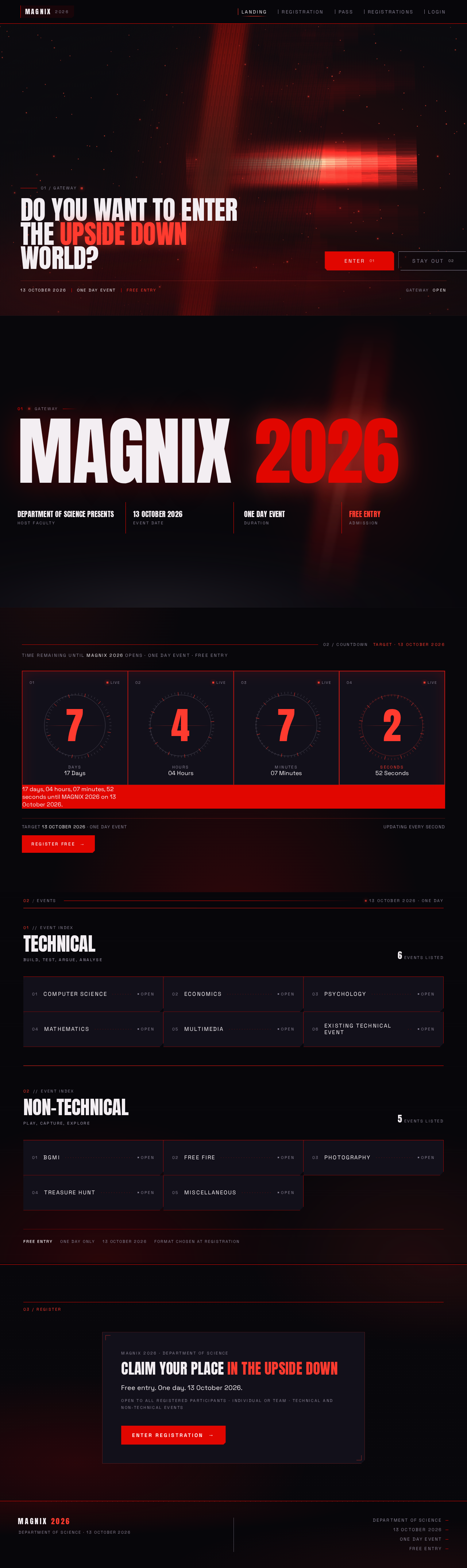
01 / Gateway
Do you want to enterthe Upside Downworld?
- 13 October 2026
- One Day Event
- Free Entry
GatewayOpen
01Gateway
MAGNIX 2026
- Department of Science PresentsHost Faculty
- 13 October 2026Event Date
- One Day EventDuration
- FREE ENTRYAdmission
Target 13 October 2026 · One day event
Updating every second02/Events
13 October 2026 · One Day
Event categories
01//EVENT INDEX
TechnicalBuild, test, argue, analyse
6Events Listed
- Computer ScienceOpen
- EconomicsOpen
- PsychologyOpen
- MathematicsOpen
- MultimediaOpen
- Existing Technical EventOpen
02//EVENT INDEX
Non-TechnicalPlay, capture, explore
5Events Listed
- BGMIOpen
- Free FireOpen
- PhotographyOpen
- Treasure HuntOpen
- MiscellaneousOpen
Free entryOne day only13 October 2026Format chosen at registration
MAGNIX 2026 · Department of Science
Claim your place in the Upside Down
Free entry. One day. 13 October 2026.
Open to all registered participants · Individual or team · Technical and Non-Technical events
01 / Gateway
Do you want to enterthe Upside Downworld?
- 13 October 2026
- One Day Event
- Free Entry
GatewayOpen
01Gateway
MAGNIX 2026
- Department of Science PresentsHost Faculty
- 13 October 2026Event Date
- One Day EventDuration
- FREE ENTRYAdmission
Target 13 October 2026 · One day event
Updating every second02/Events
13 October 2026 · One Day
Event categories
01//EVENT INDEX
TechnicalBuild, test, argue, analyse
6Events Listed
- Computer ScienceOpen
- EconomicsOpen
- PsychologyOpen
- MathematicsOpen
- MultimediaOpen
- Existing Technical EventOpen
02//EVENT INDEX
Non-TechnicalPlay, capture, explore
5Events Listed
- BGMIOpen
- Free FireOpen
- PhotographyOpen
- Treasure HuntOpen
- MiscellaneousOpen
Free entryOne day only13 October 2026Format chosen at registration
MAGNIX 2026 · Department of Science
Claim your place in the Upside Down
Free entry. One day. 13 October 2026.
Open to all registered participants · Individual or team · Technical and Non-Technical events
No comments yet. Be the first!