magnix-2026
 MB Sohan
Redesign and fully implement the MAGNIX 2026 Department of Science website as a premium, cinematic Stranger Things-inspired experience. Event date: **13 October 2026**, one-day event. Remove all registration fees and prize-pool/price-pool references. First screen must be a dramatic **Upside Down gateway** asking: “DO YOU WANT TO ENTER THE UPSIDE DOWN WORLD?” with ENTER / STAY OUT buttons and a cinematic transition into the main site. Use original/licensed/generated visuals, dark black + deep/bright red, 3D effects, particles, fog, animated backgrounds, cinematic typography and responsive mobile-first layouts. Do not scrape copyrighted Google/Netflix images. Main hero: **MAGNIX 2026 — Department of Science Presents — 13 October 2026 — One Day Event — FREE ENTRY**, with live countdown. Create registration with **Technical / Non-Technical** selection, then event, then Individual/Team. Technical: Computer Science, Economics, Psychology, Mathematics, Multimedia + existing technical event. Non-Technical: BGMI, Free Fire, Photography, Treasure Hunt, Miscellaneous. Build dynamic forms with validation, eligibility rules and duplicate detection. Store registrations securely in **Google Sheets via backend/API**, never expose credentials. Generate unique Registration IDs and downloadable digital passes with QR codes. Prevent duplicate registrations and mark duplicates in Sheets. Use Image-to-Code for image-first design, Taste + Awesome Design MD for art direction, Vercel Web Design Guidelines for accessibility/UX, and Playwright for complete browser testing. Verify mobile, desktop, forms, QR passes, animations, images, console errors and horizontal overflow. Preserve existing project functionality while upgrading the visual experience substantially.


Comments (0)
Sign in to leave a comment
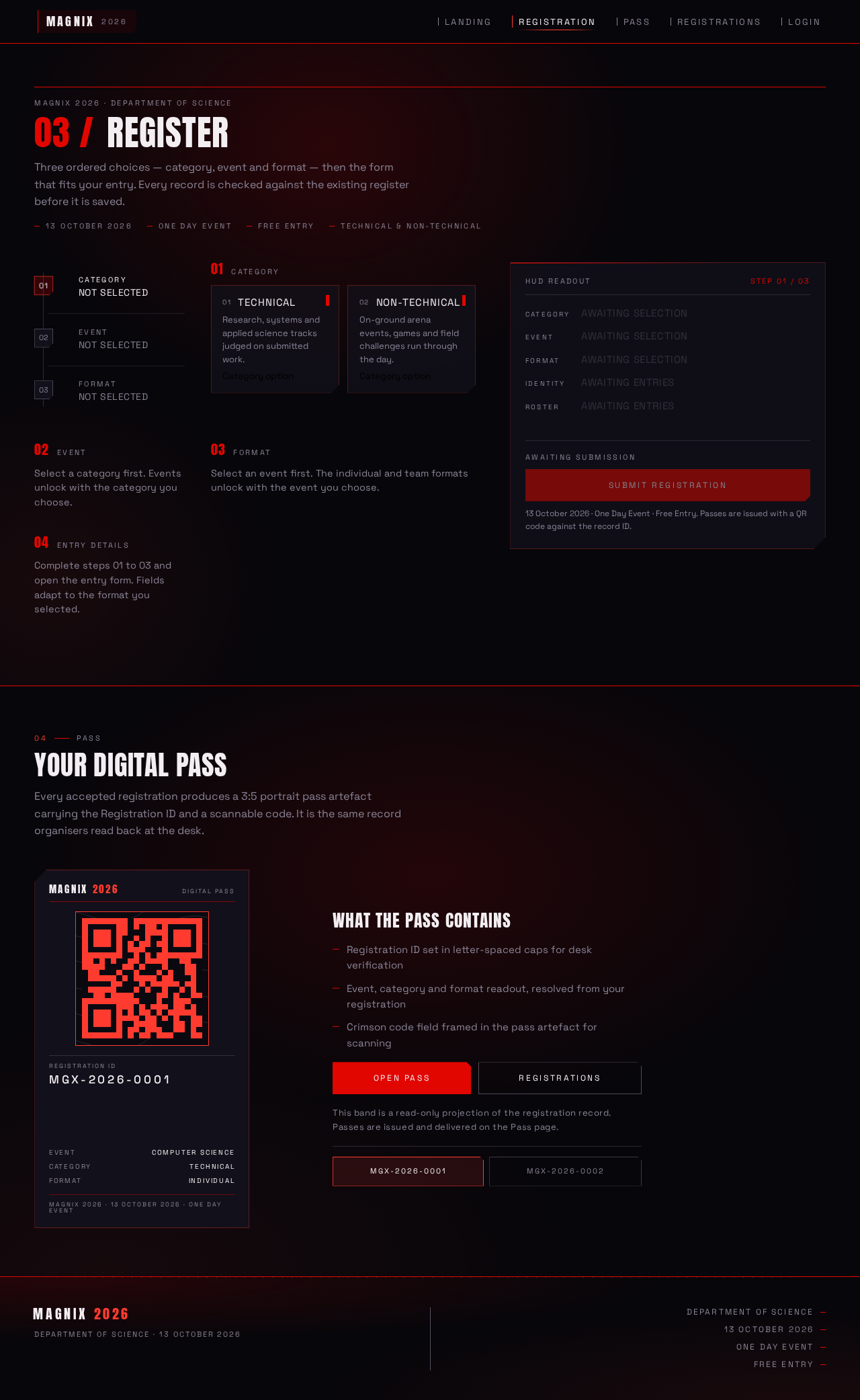
MAGNIX 2026 · Department of Science
03 /Register
Three ordered choices — category, event and format — then the form that fits your entry. Every record is checked against the existing register before it is saved.
Select a category first. Events unlock with the category you choose.
Select an event first. The individual and team formats unlock with the event you choose.
Complete steps 01 to 03 and open the entry form. Fields adapt to the format you selected.
04Pass
Your Digital Pass
Every accepted registration produces a 3:5 portrait pass artefact carrying the Registration ID and a scannable code. It is the same record organisers read back at the desk.
- Event
- Computer Science
- Category
- Technical
- Format
- Individual
Magnix 2026 · 13 October 2026 · One Day Event
What the pass contains
- Registration ID set in letter-spaced caps for desk verification
- Event, category and format readout, resolved from your registration
- Crimson code field framed in the pass artefact for scanning
This band is a read-only projection of the registration record. Passes are issued and delivered on the Pass page.
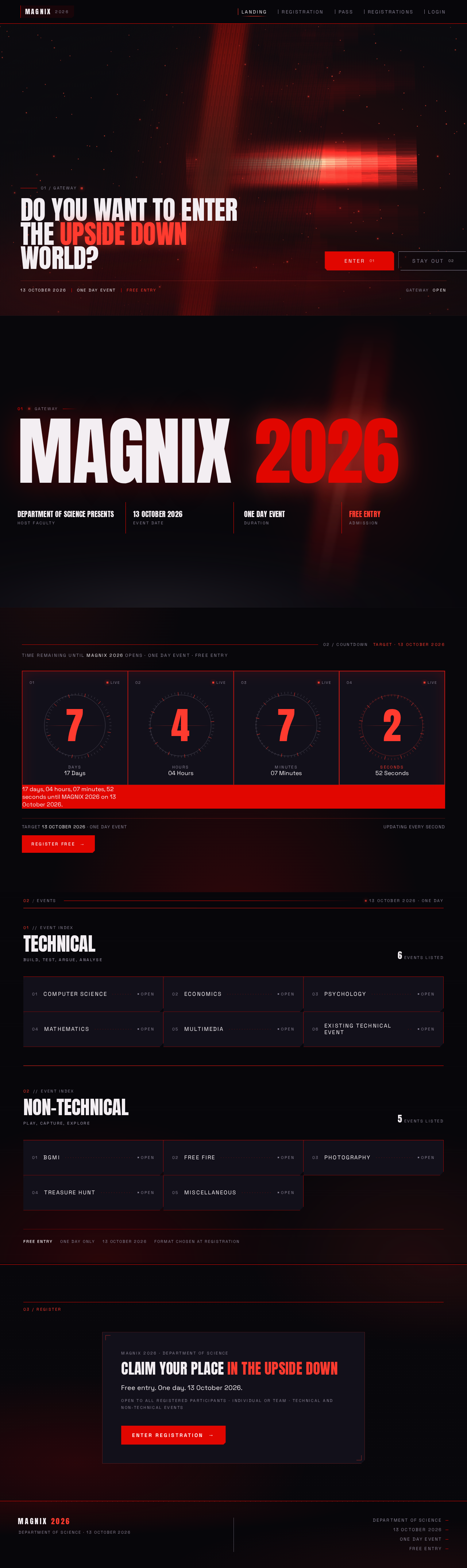
01 / Gateway
Do you want to enterthe Upside Downworld?
- 13 October 2026
- One Day Event
- Free Entry
GatewayOpen
01Gateway
MAGNIX 2026
- Department of Science PresentsHost Faculty
- 13 October 2026Event Date
- One Day EventDuration
- FREE ENTRYAdmission
Target 13 October 2026 · One day event
Updating every second02/Events
13 October 2026 · One Day
Event categories
01//EVENT INDEX
TechnicalBuild, test, argue, analyse
6Events Listed
- Computer ScienceOpen
- EconomicsOpen
- PsychologyOpen
- MathematicsOpen
- MultimediaOpen
- Existing Technical EventOpen
02//EVENT INDEX
Non-TechnicalPlay, capture, explore
5Events Listed
- BGMIOpen
- Free FireOpen
- PhotographyOpen
- Treasure HuntOpen
- MiscellaneousOpen
Free entryOne day only13 October 2026Format chosen at registration
MAGNIX 2026 · Department of Science
Claim your place in the Upside Down
Free entry. One day. 13 October 2026.
Open to all registered participants · Individual or team · Technical and Non-Technical events
No comments yet. Be the first!