magma-software
 free app
build a windows software to convert voice from a video to another language

Comments (0)
Sign in to leave a comment
System Requirements
System Requirements Document (SRD) for Magma-Software
1. Introduction
Magma-Software is an innovative Windows application designed to extract voice from videos, translate it into another language, and synthesize the translated voice while preserving the original speaker's tone and style. This software primarily focuses on translations between English and Urdu, catering to the multilingual needs of users in Pakistan and beyond. By combining cutting-edge AI technologies, Magma-Software aims to empower educators, content creators, and businesses to communicate effectively across language barriers.
2. System Overview
Magma-Software integrates advanced speech recognition, language translation, and voice synthesis technologies to deliver seamless voice-to-voice translation. The system will:
- Extract audio from video files.
- Convert speech to text using AI-powered speech recognition.
- Translate the text into the target language (English or Urdu).
- Synthesize the translated text back into speech, maintaining the original speaker's tone and style.
The software is designed to be user-friendly, efficient, and capable of handling single-use cases per video, with potential scalability for batch processing in future iterations.
3. Functional Requirements
Core Functionalities:
- As a User, I should be able to upload video files for voice extraction.
- As a User, I should be able to select the target language for translation (English or Urdu).
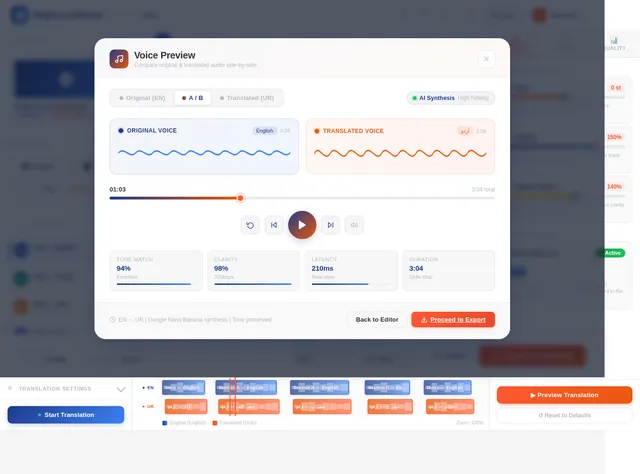
- As a User, I should be able to preview the translated voice output before saving.
- As a User, I should be able to download the translated video with the new voice embedded.
- As a User, I should be able to preserve the original speaker's tone and style during translation.
Additional Features:
- As a User, I should be able to adjust the volume and pitch of the synthesized voice.
- As a User, I should be able to view a transcription of the original and translated text.
- As a User, I should be able to process videos with varying audio qualities.
- As a User, I should be able to access a help section for troubleshooting and FAQs.
4. User Personas
1. Content Creator
- Description: Individuals creating multilingual content for platforms like YouTube, TikTok, or educational websites.
- Needs: High-quality voice translation, tone preservation, and ease of use.
2. Educator
- Description: Teachers and trainers who need to translate video lectures for students in English or Urdu.
- Needs: Accurate translations, tone preservation, and transcription for supplementary materials.
3. Business Professional
- Description: Professionals creating training or marketing videos for global audiences.
- Needs: Professional-grade voice synthesis, batch processing, and customization options.
5. Visuals Colors and Theme
Color Palette:
- Background:
#F5F5F5(Soft Gray) - Surface:
#FFFFFF(Pure White) - Text:
#333333(Deep Charcoal) - Accent:
#FF5733(Vivid Orange-Red) - Muted Tones:
#B0BEC5(Muted Blue-Gray)
Theme:
The visual theme will be clean and modern, with a focus on simplicity and accessibility. The interface will use contrasting colors for clarity and intuitive navigation.
6. Signature Design Concept
Interactive Soundwave Visualization
The homepage of Magma-Software will feature an interactive soundwave animation that dynamically reacts to user input. When a user uploads a video, the soundwave will visually represent the audio extracted from the file. As the translation process begins, the soundwave will morph into a dual-layered wave — one layer representing the original voice and the other layer showcasing the translated voice.
Key Features:
- Dynamic Animation: The soundwave will pulse and shift colors based on the selected language (e.g., orange for Urdu, blue for English).
- Micro-Interactions: Hovering over the soundwave will display tooltips with key details (e.g., audio duration, detected language).
- Tone Preservation Showcase: A slider will allow users to compare the original and synthesized voices directly within the soundwave visualization.
- User Engagement: The soundwave will subtly ripple and glow during idle states, creating a captivating visual experience.
This bold design concept will make the homepage unforgettable, engaging users from the moment they interact with the software.
7. Non-Functional Requirements
- The software must operate efficiently on Windows 10 and above.
- The system should support video files up to 2GB in size.
- The translation process should complete within 2 minutes for a 10-minute video.
- The synthesized voice must have a latency of less than 500ms for real-time previews.
- The software must provide robust error handling for unsupported file formats or corrupted videos.
8. Tech Stack
Frontend:
- React for Web-based UI (Electron for Windows application).
Backend:
- Python with FastAPI for API development.
Database:
- MySQL for structured data storage (e.g., user preferences, logs).
- MongoDB for unstructured data (e.g., transcription storage).
AI Models:
- GPT 5.4 for user-friendly responses and transcription refinement.
- Claude 4.6 Opas for academic or coding work.
- Google Nano Banana for voice synthesis and tone preservation.
AI Tools:
- Litellm for LLM routing.
- Langchain for workflow orchestration.
Local Orchestration:
- Docker and docker-compose for containerized development.
Server-Side Orchestration:
- Kubernetes for scalable deployment.
9. Assumptions and Constraints
Assumptions:
- Users will primarily translate between English and Urdu.
- The software will be used in Pakistan, with potential global adoption.
- Users will have access to stable internet for AI model integration.
Constraints:
- Limited support for languages other than English and Urdu in the initial release.
- The software will only run on Windows operating systems.
- Processing time may vary based on video quality and length.
10. Glossary
- Speech Recognition: Technology that converts spoken language into text.
- Language Translation: The process of converting text from one language to another.
- Voice Synthesis: Technology that generates human-like speech from text.
- Tone Preservation: Maintaining the original speaker's vocal characteristics during translation.
- Interactive Soundwave: A visual representation of audio data that reacts to user input.

Transform Your Videos
Across Languages
Extract, translate, and synthesize voice from your videos between English and Urdu — while preserving the original speaker’s tone, style, and emotion.
Interactive Soundwave Visualization
Watch the original and translated voices come alive. Our dual-layered soundwave morphs in real time, showing how Magma-Software preserves tone across languages.
Powerful Tools for Voice Translation
Magma-Software combines cutting-edge AI technologies to deliver seamless voice-to-voice translation while keeping every detail of the original speaker intact.
Voice Extraction
Automatically extract high-fidelity audio from any video file. Our AI-powered speech recognition accurately isolates voice tracks from background noise, supporting varying audio qualities for clean, precise transcription.
Language Translation
Seamlessly translate between English and Urdu with context-aware AI translation. Every word and phrase is carefully translated to preserve meaning, nuance, and cultural relevance across both languages.
Tone Preservation
Maintain the original speaker's unique tone, pitch, and vocal style throughout translation. Our synthesis engine replicates natural speech patterns so the translated voice sounds authentic and true to the source.
Built for People Who Communicate
Magma-Software empowers creators, educators, and professionals to break language barriers with voice translation that preserves who you are.
Content Creator
Individuals creating multilingual content for platforms like YouTube, TikTok, or educational websites who need their voice to resonate across languages.
Key Needs
- High-quality voice translation
- Tone and style preservation
- Intuitive, fast workflow
Educator
Teachers and trainers who need to translate video lectures for students in English or Urdu, making knowledge accessible without language barriers.
Key Needs
- Accurate speech-to-text translations
- Tone preservation for clarity
- Transcription for supplementary materials
Business Professional
Professionals creating training or marketing videos for global audiences who demand polished, professional-grade output every time.
Key Needs
- Professional-grade voice synthesis
- Batch processing capability
- Customization and export options
From Upload to Download in 5 Steps
Magma-Software makes voice translation effortless. Upload your video, and our AI handles extraction, translation, and synthesis automatically.
Upload Video
Import your video file in any popular format. Magma-Software handles varying audio qualities with ease.
Extract Audio
Advanced AI separates the voice track from your video, isolating speech for precise processing.
Translate Text
Speech is converted to text and translated between English and Urdu with contextual accuracy.
Synthesize Voice
The translated text is spoken back in a synthesized voice that preserves the original speaker’s tone and style.
Download Video
Preview the result and download your fully translated video with the new voice embedded seamlessly.
Your Voice, Every Language
Magma-Software preserves the original speaker's tone, pitch, and style during translation. Our AI-powered synthesis ensures your translated voice sounds authentically you — whether speaking English or Urdu.
Translate Between English & Urdu
Magma-Software focuses on delivering high-quality voice translation between English and Urdu, preserving the original speaker’s tone and style in every translation.
English
EN · ISO 639-1
Full support for English speech recognition, text translation, and voice synthesis. Ideal for content creators and educators reaching global audiences.
Urdu
UR · ISO 639-1
Complete Urdu language support with accurate speech-to-text, natural translation, and expressive voice synthesis tailored for Pakistani and South Asian audiences.
Ready to Get Started?
Upload your video and let Magma-Software translate your voice into English or Urdu while preserving the original tone and style. It only takes a few minutes.
Trusted by Creators Worldwide
See how educators, content creators, and business professionals are using Magma-Software to break language barriers.
Magma-Software has completely transformed how I produce multilingual content. I translate my English tutorials into Urdu with just a few clicks, and the tone preservation is incredibly accurate. My audience engagement has doubled since I started using it!
As a professor, I needed a reliable way to translate my lecture videos for Urdu-speaking students. Magma-Software delivers exceptional accuracy and the transcription feature saves me hours of work. The voice synthesis truly sounds like me speaking Urdu.
We use Magma-Software to localize our training and marketing videos for the Pakistani market. The quality of the translated voice is professional-grade, and the turnaround time is remarkable. It processed a 10-minute video in under two minutes!
Frequently Asked Questions
Everything you need to know about translating your videos with Magma-Software.
Don’t Let Language Be a Barrier
Translate your videos between English and Urdu in minutes — with natural voice synthesis that preserves the original speaker’s tone. It’s fast, intuitive, and professional-grade.
Learn more about how Magma-Software works
No comments yet. Be the first!