magma-python
Create a simple Python project

Comments (0)
Sign in to leave a comment
System Requirements
magma-python System Requirements Document
Introduction
The purpose of this document is to outline the system requirements for the "magma-python" project. This project involves creating a simple Python application and includes specific procedures for debugging environment configuration issues.
System Overview
The "magma-python" project is designed to be a straightforward Python application. It requires a specific environment configuration to function correctly. This document will detail the functional requirements, user personas, core user flows, and other essential aspects to ensure the successful implementation and operation of the project.
Functional Requirements
- As a Developer, I should be able to create a simple Python project.
- As a Developer, I should be able to debug environment configuration issues by running specific commands.
- As a Developer, I should be able to view the contents of the
.envfile using the commandcat .env. - As a Developer, I should be able to list and sort environment variables using the command
env | sort. - As a Developer, I should be able to check for sensitive information in environment variables using the command
env | grep -iE 'key|secret|token|api|anthropic|openai'. - As a Developer, I should be able to check parent directories and view environment files using the command
ls -la / && cat /app/.env 2>/dev/null; cat /etc/environment 2>/dev/null; printenv | grep -i key.
User Personas
- Developer: The primary user responsible for creating and maintaining the Python project. They will perform tasks such as coding, debugging, and configuring the environment.
Core User Flows
- Developer creates a Python project -> Developer configures environment -> Developer runs debugging commands -> Developer verifies environment setup.
Visuals Colors and Theme
- primary: #4A90E2 (a calm blue for a professional look)
- primary_light: #A6C8F0 (a lighter blue for hover states)
- secondary: #E94E77 (a vibrant pink for emphasis)
- accent: #F5A623 (a bright orange for call-to-action elements)
- highlight: #F8E71C (a warm yellow for notifications)
- bg: #F4F4F4 (a light grey for the background)
- surface: rgba(255, 255, 255, 0.9) (a soft white for cards and panels)
- text: #333333 (a dark grey for primary text)
- text_muted: #777777 (a muted grey for secondary text)
- border: rgba(0, 0, 0, 0.1) (a subtle black for borders)
Signature Design Concept
The homepage will feature an interactive terminal interface that mimics a real coding environment. Users can type commands into a simulated terminal window, and the interface will respond with realistic outputs. This concept will be implemented using framer-motion for smooth animations and react-icons for terminal icons. The terminal will have a retro aesthetic with a dark theme, green text, and blinking cursor, creating an engaging and immersive experience for developers.
Interaction Model & Motion Direction
- Interaction Model: Animated
- The landing page will feature scroll-triggered reveals and hover transitions. The terminal interface will have spring physics on interactive elements, providing a polished and dynamic user experience.
Non-Functional Requirements
- The system should be able to handle multiple environment configurations without performance degradation.
- The debugging commands should execute within a reasonable time frame, providing quick feedback to the developer.
Tech Stack
- Frontend: React for Web
- Backend: Python, FastAPI
- Database: MySQL or MariaDB, using Alembic for migrations
- Local Orchestration: Docker, docker-compose
Assumptions and Constraints
- The project assumes that developers have basic knowledge of Python and environment configuration.
- The system is constrained to run on environments that support Docker and Python.
Glossary
- .env file: A file used to set environment variables for a project.
- Environment Variables: Variables that are used to configure the environment in which a program runs.
- Debugging: The process of identifying and removing errors from computer hardware or software.
- Terminal Interface: A text-based interface used to interact with the computer's operating system.
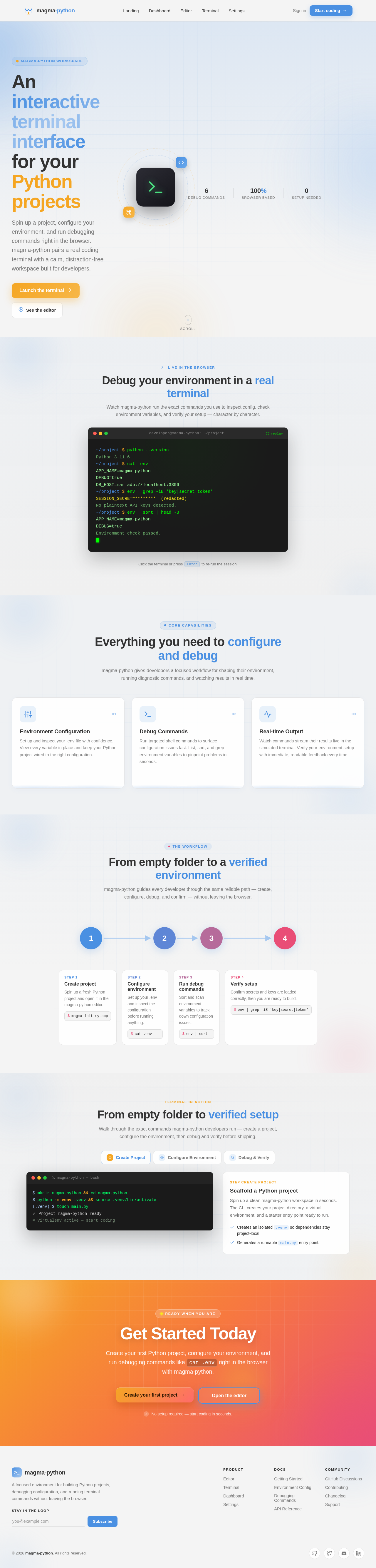
An interactive terminal interface for your Python projects
Spin up a project, configure your environment, and run debugging commands right in the browser. magma-python pairs a real coding terminal with a calm, distraction-free workspace built for developers.
Debug your environment in a real terminal
Watch magma-python run the exact commands you use to inspect config, check environment variables, and verify your setup — character by character.
Everything you need to configure and debug
magma-python gives developers a focused workflow for shaping their environment, running diagnostic commands, and watching results in real time.
Environment Configuration
Set up and inspect your .env file with confidence. View every variable in place and keep your Python project wired to the right configuration.
$cat .envDebug Commands
Run targeted shell commands to surface configuration issues fast. List, sort, and grep environment variables to pinpoint problems in seconds.
$env | sortReal-time Output
Watch commands stream their results live in the simulated terminal. Verify your environment setup with immediate, readable feedback every time.
$env | grep -iE 'key|secret'From empty folder to a verified environment
magma-python guides every developer through the same reliable path — create, configure, debug, and confirm — without leaving the browser.
Create project
Spin up a fresh Python project and open it in the magma-python editor.
$magma init my-appConfigure environment
Set up your .env and inspect the configuration before running anything.
$cat .envRun debug commands
Sort and scan environment variables to track down configuration issues.
$env | sortVerify setup
Confirm secrets and keys are loaded correctly, then you are ready to build.
$env | grep -iE 'key|secret|token'Create project
Spin up a fresh Python project and open it in the magma-python editor.
$magma init my-appConfigure environment
Set up your .env and inspect the configuration before running anything.
$cat .envRun debug commands
Sort and scan environment variables to track down configuration issues.
$env | sortVerify setup
Confirm secrets and keys are loaded correctly, then you are ready to build.
$env | grep -iE 'key|secret|token'From empty folder to verified setup
Walk through the exact commands magma-python developers run — create a project, configure the environment, then debug and verify before shipping.
Scaffold a Python project
Spin up a clean magma-python workspace in seconds. The CLI creates your project directory, a virtual environment, and a starter entry point ready to run.
- Creates an isolated
.venvso dependencies stay project-local. - Generates a runnable
main.pyentry point.
Get Started Today
Create your first Python project, configure your environment, and run debugging commands like cat .env right in the browser with magma-python.
No comments yet. Be the first!