magma-production
 Ethan Cross
Build a production-ready AI SaaS called “CloseQuote” for small residential painting contractors. Core promise: “Turn more painting estimates into approved jobs and paid deposits.” Target users: Painting contractors and small painting companies with 1–15 employees. Build a modern, clean, professional SaaS web app with responsive desktop/mobile UI. CORE WORKFLOW: 1. Contractor signs up/logs in. 2. Creates their business profile. 3. Adds customers. 4. Creates a quote with customer, project description, amount, quote PDF/link, expiry date, and deposit amount/percentage. 5. Quote gets a public customer-facing URL. 6. Contractor selects a follow-up schedule. 7. The system automatically follows up with customers by email. 8. AI generates personalized follow-up messages based on quote details, customer name, project, timing, and previous conversation. 9. Customer can view the quote, approve, decline, or ask a question. 10. AI analyzes customer replies and classifies intent such as interested, price objection, needs information, wants to delay, or not interested. 11. AI can draft a suggested response for the contractor, but the contractor must approve before sending. 12. When a quote is approved, the customer can pay the required deposit through Stripe. 13. Contractor dashboard shows quote status, follow-ups, approvals, deposits, conversion rate, and recovered revenue. MAIN PAGES: - Landing page - Sign up / Login - Onboarding - Dashboard - Quotes - Create/Edit Quote - Quote Details - Customers - Customer Details - Messages - Follow-up Automations - Analytics - Business Settings - Team Settings - Billing - Public Customer Quote Page QUOTE STATUSES: Draft, Sent, Viewed, Follow-up, Approved, Deposit Pending, Deposit Paid, Declined, Expired, Lost. AI FEATURES: - AI follow-up email generation - AI reply/intent classification - AI suggested customer responses - AI quote PDF information extraction - AI next-best-action recommendations - Conversation summaries IMPORTANT AI RULE: AI should assist and recommend, not directly change critical business states or send sensitive messages without contractor approval. Normal application logic controls authentication, authorization, quote status, payments, scheduling, and database operations. TECH STACK: - Next.js + React + TypeScript - Tailwind CSS - shadcn/ui - Supabase PostgreSQL - Supabase Auth - Supabase Storage for quote PDFs - OpenAI API for AI features - Stripe for deposits and SaaS subscriptions - Resend for email - Trigger.dev or equivalent background jobs for scheduled follow-ups - Zod for validation DATABASE: Use a multi-tenant architecture with organizations. Include tables for: organizations, profiles, organization_members, customers, quotes, quote_files, follow_up_sequences, follow_up_steps, messages, ai_interactions, payments, subscriptions. SECURITY: Use authentication and authorization with organization-level data isolation. Users must only access data belonging to their organization. Never expose API keys or payment secrets to the frontend. Use secure server-side API calls and database row-level security where appropriate. MVP PRIORITY: Focus on: Customer → Quote → AI Follow-up → Customer Response → Approval → Deposit → Revenue tracking. Do NOT build initially: Scheduling, payroll, invoicing, crew management, full CRM, mobile app, WhatsApp, SMS, Jobber/ServiceTitan integrations, complex workflow builders, or an AI chatbot. DESIGN: Premium but simple B2B SaaS aesthetic. Make the dashboard immediately understandable. Emphasize “quotes needing attention,” “AI recommendations,” “approved revenue,” and “deposits collected.” Use cards, tables, status badges, clear CTAs, empty states, loading states, error states, and responsive layouts. Seed the application with realistic demo painting-business data so the dashboard looks useful immediately. Build the application with clean, modular, maintainable code and production-ready error handling. Prioritize a working end-to-end MVP over adding unnecessary features.


Comments (0)
Sign in to leave a comment
System Requirements
System Requirements Document for magma-production
1. Introduction
CloseQuote is a production-ready AI SaaS designed for small residential painting contractors and painting companies with 1–15 employees. The core promise of the application is to "Turn more painting estimates into approved jobs and paid deposits." The product aims to provide a modern, clean, professional SaaS web app with a responsive desktop/mobile UI, empowering contractors to efficiently manage quotes, follow-ups, and customer interactions.
2. System Overview
CloseQuote is a SaaS platform that facilitates the creation and management of painting quotes, automates follow-up communications, and processes customer approvals and deposits. The system is designed to assist painting contractors in converting estimates into approved jobs and tracking revenue. The application leverages AI to generate personalized follow-up messages, classify customer responses, and suggest contractor replies, while ensuring that critical business states are not changed without contractor approval.
2a. Product Interpretation and Delivery Boundary
CloseQuote is delivered as a web application with a responsive design, accessible via desktop and mobile browsers. The application supports organization-based multi-tenancy with data isolation, ensuring that users can only access data belonging to their organization. AI features are designed to assist and recommend actions but require contractor approval for sensitive operations. The MVP focuses on core functionalities, excluding complex features like scheduling, payroll, and CRM integrations.
2b. Source Content Inventory
Not applicable as no explicit content_source directive was provided.
2c. Page Content and Component Coverage
Landing page
- Information/State: Introduction to CloseQuote, core promise, and target audience.
- Primary Actions: Navigate to Sign up / Login.
- Components: Hero section with bold color block and custom illustrations.
Sign up / Login
- Information/State: User authentication and account creation.
- Primary Actions: Sign up, Log in.
- Components: Form fields for email, password, and account creation.
Onboarding
- Information/State: Business profile setup.
- Primary Actions: Complete profile setup.
- Components: Form fields for business details, progress indicators.
Dashboard
- Information/State: Overview of quotes, AI recommendations, approvals, deposits, and revenue.
- Primary Actions: View detailed reports, manage quotes.
- Components: Cards with status badges, tables, charts.
Customers
- Information/State: List of customers.
- Primary Actions: Add new customer, view customer details.
- Components: Customer list, search/filter options.
Customer Details
- Information/State: Detailed view of a specific customer.
- Primary Actions: Edit customer information, view related quotes.
- Components: Customer profile, related quotes section.
Quotes
- Information/State: List of quotes with statuses.
- Primary Actions: Create new quote, edit existing quotes.
- Components: Quote list, status filters, action buttons.
Create/Edit Quote
- Information/State: Quote creation and editing interface.
- Primary Actions: Save quote, generate PDF/link.
- Components: Form fields for quote details, PDF generation.
Quote Details
- Information/State: Detailed view of a specific quote.
- Primary Actions: Manage follow-ups, approve/decline quote.
- Components: Quote lifecycle, status updates, follow-up actions.
Messages
- Information/State: Communication workspace for contractor-customer interactions.
- Primary Actions: Approve AI-suggested responses, send messages.
- Components: Message threads, AI suggestions, intent classification.
Follow-up Automations
- Information/State: Follow-up schedule management.
- Primary Actions: Set follow-up schedules, review AI-generated emails.
- Components: Schedule editor, email templates, AI review.
Analytics
- Information/State: Conversion and revenue performance reports.
- Primary Actions: View detailed analytics, export data.
- Components: Charts, graphs, performance metrics.
Business Settings
- Information/State: Business configuration options.
- Primary Actions: Update business settings.
- Components: Form fields for business preferences, save actions.
Team Settings
- Information/State: Organization membership and team administration.
- Primary Actions: Add/remove team members, assign roles.
- Components: Team list, role management tools.
Billing
- Information/State: SaaS subscription and billing management.
- Primary Actions: Update payment information, view billing history.
- Components: Billing details, payment methods, transaction history.
Public Customer Quote Page
- Information/State: Customer-facing quote view.
- Primary Actions: Approve/decline quote, ask questions, pay deposit.
- Components: Quote details, approval actions, payment interface.
3. Functional Requirements
- As a Contractor, I should be able to sign up and log in to access the application. (explicit)
- As a Contractor, I should be able to create my business profile during onboarding. (explicit)
- As a Contractor, I should be able to add customers to manage my client list. (explicit)
- As a Contractor, I should be able to create and edit quotes with necessary details like project description, amount, and deposit. (explicit)
- As a Contractor, I should be able to generate a public URL for each quote for customer access. (explicit)
- As a Contractor, I should be able to select a follow-up schedule for automated customer engagement. (explicit)
- As a Contractor, I should receive AI-generated personalized follow-up messages based on quote details. (explicit)
- As a Customer, I should be able to view, approve, decline, or ask questions about a quote via the public URL. (explicit)
- As a Contractor, I should receive AI analysis of customer replies to classify intent. (explicit)
- As a Contractor, I should receive AI-suggested responses for customer interactions, requiring my approval before sending. (explicit)
- As a Customer, I should be able to pay the required deposit through Stripe once a quote is approved. (explicit)
- As a Contractor, I should be able to view quote statuses, follow-ups, approvals, deposits, conversion rate, and recovered revenue on the dashboard. (explicit)
4. User Personas
- Contractor: Primary user responsible for managing the painting business, creating quotes, handling customer interactions, and tracking revenue.
- Customer: Recipient of quotes who can view, approve, decline, ask questions, and pay deposits.
5. Core User Flows
Contractor Flow
- Sign Up/Login: Contractor accesses the Sign up / Login page to create an account or log in.
- Onboarding: Completes business profile setup.
- Customer Management: Navigates to the Customers page to add or manage customers.
- Quote Creation: Creates a new quote via the Create/Edit Quote page, generating a public URL.
- Follow-up Scheduling: Sets a follow-up schedule on the Follow-up Automations page.
- AI Assistance: Receives AI-generated follow-up messages and suggested responses, approving them before sending.
- Dashboard Monitoring: Monitors quote statuses, follow-ups, approvals, and revenue on the Dashboard.
Customer Flow
- Quote Interaction: Receives a public URL to view the quote on the Public Customer Quote Page.
- Decision Making: Approves, declines, or asks questions about the quote.
- Payment Processing: Pays the required deposit through Stripe upon quote approval.
6. Visuals Colors and Theme
- Muse: Haraldur Thorleifsson
- Palette:
- Background: #FFF9E6
- Surface: #FFFFFF
- Text: #333333
- Primary: #FF6B6B
- Accent: #FFD93D
- Muted: #EAEAEA
- Typography:
- Headings: Sora, large bold weights, tight tracking, sentence case.
- Body: Outfit
- Scale: 1.5 modular, 48/32/24/18/16
- Shape Language: Chunky rounded cards and buttons with generous padding.
- Layout: Responsive grid system with clear hierarchy and emphasis on key actions.
- Imagery: Custom character illustrations depicting friendly, relatable scenarios.
7. Signature Design Concept
The landing page features a full-bleed illustration-led hero with a bold color block, showcasing large headline text overlaid on a cream background. The design employs custom character illustrations and oversized, friendly icons for navigation, emphasizing critical information with chunky, rounded dashboard cards.
8. Interaction Model & Motion Direction
- Interaction Model: Animated
- Motion Tempo: Expressive
- Hero Dimensionality: Layered_2d
- Landing Hero Motion Brief: The hero section features a custom character illustration with a bold color block. Upon page load, the illustration animates into view with a lively entrance, followed by hover effects on interactive elements. In reduced-motion mode, animations are minimized to simple fades.
9. Non-Functional Requirements
- Responsive Design: The application must be fully responsive for both desktop and mobile devices. (explicit)
- Security: Implement organization-level data isolation and secure server-side handling of API keys and payment secrets. (explicit)
- Performance: Ensure fast load times and smooth interactions across all supported devices. (required_inference)
- Scalability: Design the system to handle growth in user base and data volume. (required_inference)
10. Tech Stack
- Frontend: Next.js, React, TypeScript, Tailwind CSS, shadcn/ui
- Backend: Supabase PostgreSQL, Supabase Auth, Supabase Storage
- AI: OpenAI API
- Payments: Stripe
- Email: Resend
- Background Jobs: Trigger.dev or equivalent
- Validation: Zod
11. Assumptions and Constraints
- Assumptions:
- Contractors will have basic technical proficiency to navigate a web application.
- Customers will access quotes primarily through email links.
- Constraints:
- The application must not include features like scheduling, payroll, or CRM integrations in the MVP.
- AI features must not change critical business states without contractor approval.
12. Glossary
- Contractor: A user who manages the painting business and interacts with the CloseQuote application.
- Customer: A recipient of quotes who interacts with the public-facing quote page.
- Quote: A document detailing the painting project, including pricing and terms, sent to a customer.
- AI: Artificial Intelligence used to assist with follow-up communications and customer interaction analysis.
- MVP: Minimum Viable Product, focusing on core functionalities for initial release.
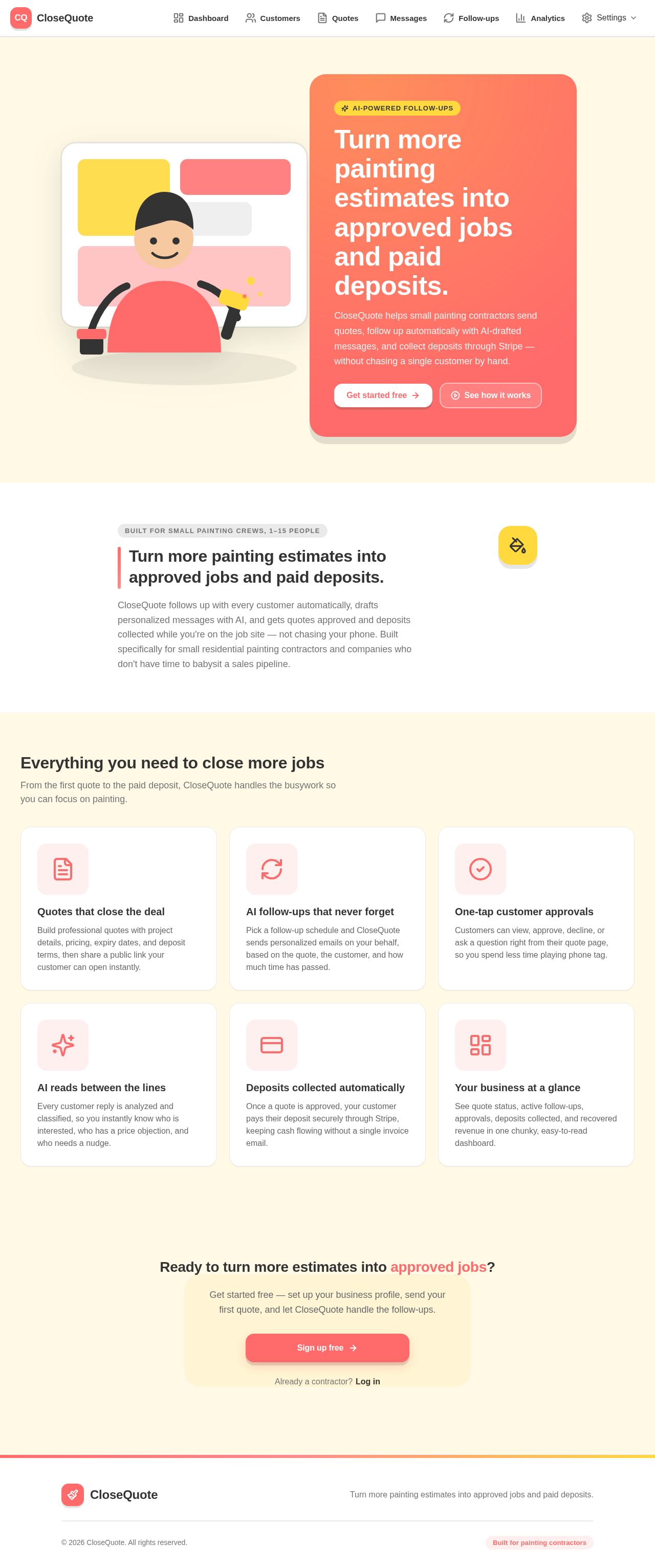
Turn more painting estimates into approved jobs and paid deposits.
CloseQuote helps small painting contractors send quotes, follow up automatically with AI-drafted messages, and collect deposits through Stripe — without chasing a single customer by hand.
Built for small painting crews, 1–15 people
Turn more painting estimates into approved jobs and paid deposits.
CloseQuote follows up with every customer automatically, drafts personalized messages with AI, and gets quotes approved and deposits collected while you're on the job site — not chasing your phone. Built specifically for small residential painting contractors and companies who don't have time to babysit a sales pipeline.
Everything you need to close more jobs
From the first quote to the paid deposit, CloseQuote handles the busywork so you can focus on painting.
Quotes that close the deal
Build professional quotes with project details, pricing, expiry dates, and deposit terms, then share a public link your customer can open instantly.
AI follow-ups that never forget
Pick a follow-up schedule and CloseQuote sends personalized emails on your behalf, based on the quote, the customer, and how much time has passed.
One-tap customer approvals
Customers can view, approve, decline, or ask a question right from their quote page, so you spend less time playing phone tag.
AI reads between the lines
Every customer reply is analyzed and classified, so you instantly know who is interested, who has a price objection, and who needs a nudge.
Deposits collected automatically
Once a quote is approved, your customer pays their deposit securely through Stripe, keeping cash flowing without a single invoice email.
Your business at a glance
See quote status, active follow-ups, approvals, deposits collected, and recovered revenue in one chunky, easy-to-read dashboard.
Ready to turn more estimates into approved jobs?
Get started free — set up your business profile, send your first quote, and let CloseQuote handle the follow-ups.
Turn more painting estimates into approved jobs and paid deposits.
CloseQuote helps small painting contractors send quotes, follow up automatically with AI-drafted messages, and collect deposits through Stripe — without chasing a single customer by hand.
Built for small painting crews, 1–15 people
Turn more painting estimates into approved jobs and paid deposits.
CloseQuote follows up with every customer automatically, drafts personalized messages with AI, and gets quotes approved and deposits collected while you're on the job site — not chasing your phone. Built specifically for small residential painting contractors and companies who don't have time to babysit a sales pipeline.
Everything you need to close more jobs
From the first quote to the paid deposit, CloseQuote handles the busywork so you can focus on painting.
Quotes that close the deal
Build professional quotes with project details, pricing, expiry dates, and deposit terms, then share a public link your customer can open instantly.
AI follow-ups that never forget
Pick a follow-up schedule and CloseQuote sends personalized emails on your behalf, based on the quote, the customer, and how much time has passed.
One-tap customer approvals
Customers can view, approve, decline, or ask a question right from their quote page, so you spend less time playing phone tag.
AI reads between the lines
Every customer reply is analyzed and classified, so you instantly know who is interested, who has a price objection, and who needs a nudge.
Deposits collected automatically
Once a quote is approved, your customer pays their deposit securely through Stripe, keeping cash flowing without a single invoice email.
Your business at a glance
See quote status, active follow-ups, approvals, deposits collected, and recovered revenue in one chunky, easy-to-read dashboard.
Ready to turn more estimates into approved jobs?
Get started free — set up your business profile, send your first quote, and let CloseQuote handle the follow-ups.
No comments yet. Be the first!