
magma-create

byAsim Vora

create portfolio website by using the glassmorphism with dummy data but including the intro the image the skills the projects the certificates the contact page got that

Intro
Intro

Comments (0)

No comments yet. Be the first!

System Requirements

System Requirement Document
Page 1 of 7

magma-create System Requirements Document

1. Introduction

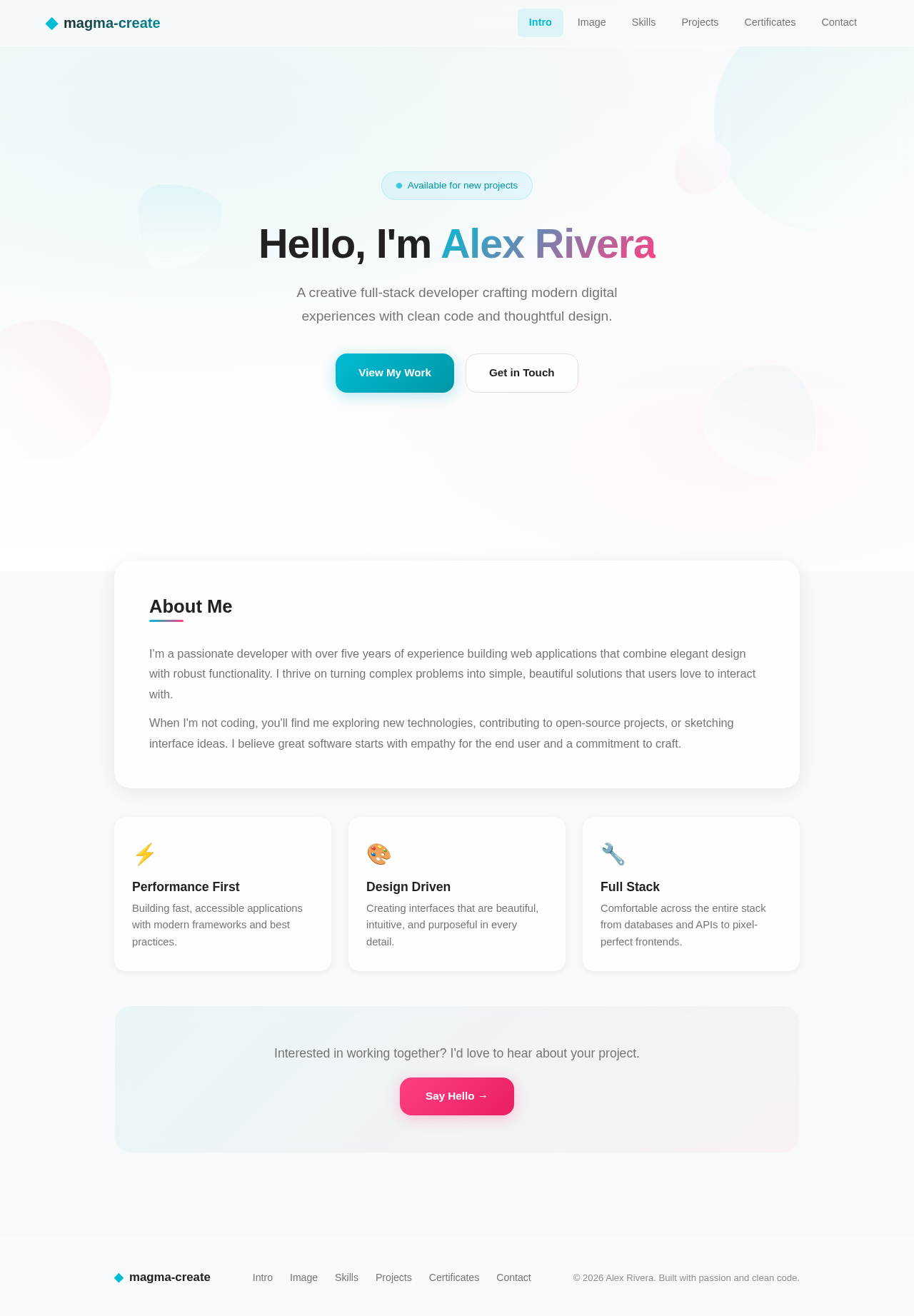
The project "magma-create" aims to develop a portfolio website utilizing a glassmorphism design. The website will include sections for an introduction, image, skills, projects, certificates, and a contact page, all using dummy data.

2. System Overview

Page 2 of 7

2a. Product Interpretation and Delivery Boundary

  • Domain Descriptor: Portfolio Website Creation

    • Source Evidence: User request for a glassmorphism design portfolio website.
    • Confidence: 1.0
  • What is being built: A multi-page portfolio website with a glassmorphism design.

  • Excluded Conventional Assumptions: No authentication or authorization modules are included as they are not required.

  • First-party Custom Pages: Intro, Image, Skills, Projects, Certificates, Contact.

  • Provider-owned Surfaces: None.

  • Access: Public access; no application-owned identity or authentication required.

  • Behavior Contracts:

    • ID: behavior-03a24393442aa838
    • Actor: Portfolio Owner
    • Trigger: Create portfolio website
    • Observable Outcome: Portfolio website created
    • State Lifetime: None
    • Identity Continuity: None
    • Audience Entry: None
    • Provenance: Explicit
    • Source References: User request

2b. Page Content and Component Coverage

Intro Page

  • Information: Welcome message, brief introduction of the portfolio owner.
  • Components: Header, introduction text, decorative glassmorphism elements.
  • States: Loading, success.
Page 3 of 7

Image Page

  • Information: Display of the portfolio owner's image.
  • Components: Image display area, caption.
  • States: Loading, success, error.

Skills Page

  • Information: List of skills with proficiency levels.
  • Components: Skill cards with glassmorphism effect, progress bars.
  • States: Loading, success.

Projects Page

  • Information: Showcase of completed projects with descriptions.
  • Components: Project cards, project descriptions, links to project details.
  • States: Loading, success.

Certificates Page

  • Information: Display of certificates earned by the portfolio owner.
  • Components: Certificate images, descriptions.
  • States: Loading, success.

Contact Page

  • Information: Contact form, contact details.
  • Components: Form fields (name, email, message), submit button.
  • States: Loading, success, error.
Page 4 of 7

3. Functional Requirements as Story Points

  • As a Portfolio Owner, I should be able to view an introduction section with a welcome message.
  • As a Portfolio Owner, I should be able to display my image on the Image page.
  • As a Portfolio Owner, I should be able to list my skills with proficiency levels.
  • As a Portfolio Owner, I should be able to showcase my completed projects with descriptions.
  • As a Portfolio Owner, I should be able to display my certificates.
  • As a Portfolio Owner, I should be able to provide contact information through a contact form.

4. User Personas

  • Portfolio Owner: Responsible for managing and updating the content of the portfolio website.
Page 5 of 7

5. Core User Flows

  1. Intro Page Flow:

    • User visits the Intro page.
    • User reads the welcome message and brief introduction.
  2. Image Page Flow:

    • User navigates to the Image page.
    • User views the displayed image of the portfolio owner.
  3. Skills Page Flow:

    • User navigates to the Skills page.
    • User views the list of skills and proficiency levels.
  4. Projects Page Flow:

    • User navigates to the Projects page.
    • User views project cards and reads project descriptions.
  5. Certificates Page Flow:

    • User navigates to the Certificates page.
    • User views the displayed certificates.
  6. Contact Page Flow:

    • User navigates to the Contact page.
    • User fills out the contact form and submits it.
Page 6 of 7

6. Visuals Colors and Theme

  • Primary: #ffffff (white)
  • Primary Light: #f0f0f0 (light grey)
  • Secondary: #e0e0e0 (grey)
  • Accent: #00bcd4 (cyan)
  • Highlight: #ff4081 (pink)
  • Background: #f8f9fa (light grey)
  • Surface: rgba(255, 255, 255, 0.8) (glassmorphism effect)
  • Text: #212121 (dark grey)
  • Text Muted: #757575 (medium grey)
  • Border: #e0e0e0 (light grey)

7. Signature Design Concept

The design concept for the "magma-create" portfolio website will leverage the glassmorphism style to create a modern and visually appealing interface. Each page will feature translucent cards with a frosted glass effect, providing a sense of depth and layering. The use of vibrant accent colors will highlight key elements such as call-to-action buttons and active states. The typography will be clean and minimalistic, ensuring readability and a professional appearance.

8. Interaction Model & Motion Direction

  • Interaction Model: Animated
  • Motion Direction: The website will feature moderate scroll-triggered reveals and hover transitions to enhance user engagement. Interactive elements will have spring physics for a polished user experience.
Page 7 of 7

9. Non-Functional Requirements

No additional non-functional requirements were inferred beyond the glassmorphism design constraint.

10. Tech Stack

  • Frontend: React for Web
  • Backend: Not applicable (static site)
  • Database: Not applicable (static site)

11. Assumptions and Constraints

  • The website will use dummy data for demonstration purposes.
  • No authentication or authorization is required.
  • The design will strictly adhere to the glassmorphism style.

12. Glossary

  • Glassmorphism: A design trend characterized by the use of translucent elements with a frosted-glass effect.
  • Portfolio Owner: The individual responsible for managing the content of the portfolio website.
Intro design preview
Accepted behavior orchestration: Portfolio website created
Intro: View welcome message and brief introduction
Image: View portfolio owner's image
Skills: View skills and proficiency levels
Projects: View project cards and descriptions
Certificates: View displayed certificates
Contact: 1. Fill out contact form
Contact: 2. Submit contact form
Contact: Submission successful
Contact: 3. Submission error
Intro design preview
Accepted behavior orchestration: Portfolio website created
Intro: View welcome message and brief introduction
Image: View portfolio owner's image
Skills: View skills and proficiency levels
Projects: View project cards and descriptions
Certificates: View displayed certificates
Contact: 1. Fill out contact form
Contact: 2. Submit contact form
Contact: Submission successful
Contact: 3. Submission error