magma-calculator
 Diya Trivedi
start a project to build a simple single page design of calculator

Comments (0)
Sign in to leave a comment
System Requirements
System Requirements Document for magma-calculator
1. Introduction
magma-calculator is a simple calculator delivered as a single-page design. The product intent is narrow and explicit: give a person a single page on which they can perform everyday arithmetic — entering numbers and operators, seeing the computed result, and clearing the entry to start again — without any surrounding application, navigation, or account machinery.
The audience is anyone doing quick arithmetic: students, desk workers, and people on phones. The design must remain simple, and the calculator must live on exactly one page.
2. System Overview
magma-calculator is a browser-delivered, single-page calculator. It has one page, Calculator, which is the anonymous public entry surface. There is no sign-in, no navigation, no secondary destination, and no persisted user data.
Actors
- Calculator user (human, active): the sole persona. Enters numbers and operators, reads the computed result, and clears the entry.
- Frontend application (system): the React application that renders the Calculator page and performs the arithmetic interaction.
- Shared backend (system): the provisioned FastAPI process, available for application APIs and domain modules. The accepted calculator behavior requires no server-side computation, so no calculator API is required by this document; the backend remains provisioned infrastructure.
- Database (system): provisioned MariaDB for application-owned persistent data. The accepted calculator behavior creates no durable application-owned records, so no domain entities are defined.
Accepted behavior
- A simple calculator (explicit).
- Delivered as a single-page design (explicit).
- The Calculator page owns number/operator entry, result display, and clearing the entry (required inference from the accepted single-page calculator scope).
Ownership and access
- The Calculator page is owned by the application, is anonymously reachable, and requires no identity. No application-owned identity, session continuity, or permission model is established, because no accepted behavior requires durable actor-specific state, a commitment, an entitlement, or a value transfer bound to a participant.
Exclusions
- No multi-page navigation, no history/tape of past calculations, no accounts, no saved calculations, no sharing, no scientific or programmer modes, and no server-side calculation service are accepted by the source.
Removed from scope
- None. The authoritative thread contains no removed concepts.
2a. Product Interpretation and Delivery Boundary
The requester asked for a simple single-page calculator design. That is the whole current product: one page, one interaction loop, no surrounding application.
Delivery ownership. The calculator is first-party custom UI rendered by the React frontend. The page is public and anonymous — a visitor opens it and immediately has a working calculator. Nothing about the accepted behavior requires the visitor to identify themselves, and no accepted behavior produces state that must survive a reload or belong to a particular person, so no identity establishment, verification, or account surface is introduced.
Current versus future. Everything in this document is current. There is no accepted future horizon, and no future capability is described or promised here.
Backend and database boundary. The shared FastAPI backend and MariaDB database are provisioned infrastructure. The accepted calculator arithmetic is an in-page interaction; this document does not require a calculator API, does not define domain entities, and does not introduce persistence. If a later requirement needs server-side behavior, it belongs in the existing shared backend rather than a new service.
2c. Page Content and Component Coverage
The page contract is exact and contains one page.
Calculator
Purpose and access. The anonymous public entry surface and the only page. It owns number and operator entry, result display, and clearing the entry.
Information and state
- Current entry: the sequence of digits, a decimal point, and operators the user has entered, shown in the display strip.
- Displayed result: the computed value shown as an oversized numeral in the display strip, with a small lime
=eyebrow label above it. - Entry state: whether the calculator is showing a fresh zero/empty entry, an in-progress entry, or a completed result awaiting the next input.
- Error state: an invalid expression (for example a malformed operator sequence or division by zero) surfaces a visible, readable error message in the display strip instead of a numeral.
Primary actions
- Press a digit key (0–9) to append that digit to the current entry.
- Press the decimal point key (
.) to begin or extend a fractional part of the current entry. - Press an operator key (
+,−,×,÷) to record the operation to apply. - Press the equals key (
=) to compute and display the result. - Press the AC key to clear the entry and return the calculator to a fresh state.
Supporting actions and content
- Wordmark: lowercase
magmawith a lime dot, top-left. - Tagline: a single line,
numbers, but nicer, beneath the wordmark. - Keyboard hints: one quiet line below the keypad describing keyboard entry.
- Keyboard input: digits,
.,+,-,*,/,Enter/=, andEscape/Deletefor clear, mirroring the on-screen keys.
Domain entities
- Entry: the in-progress input string (digits, decimal point, operators).
- Result: the numeric outcome of evaluating the entry, or an error indicator.
- No persisted entity exists; both live only in page state for the current visit.
Component responsibilities
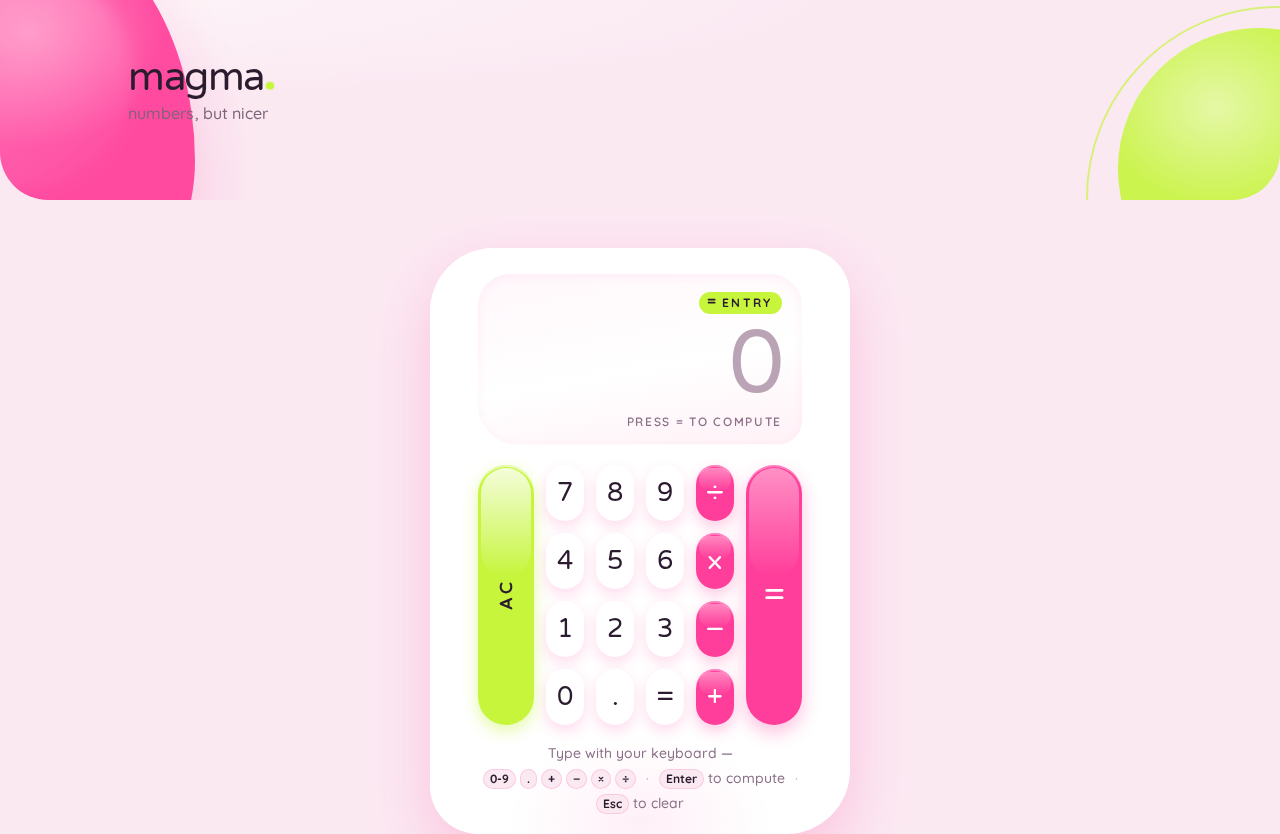
- Page shell: blush-pink ground, decorative oversized pink blob bleeding off the left edge, lime arc cropped at the bottom-right, centered single column.
- Header block: wordmark and tagline.
- Calculator body: glossy white blob-bodied container with asymmetric 48px radii and a soft pink shadow, holding the display strip and keypad.
- Display strip: lime
=eyebrow, oversized result/entry numeral in plum ink, and the error message region. - Keypad grid: 4-column grid of pill keys —
7 8 9 ÷,4 5 6 ×,1 2 3 −,0 . = +— with a full-height lime AC capsule on the left edge and a tall pink equals capsule on the right. - Keyboard hint line: static text below the pad.
States
- Loading: none required; the page renders its full calculator immediately with no data fetch.
- Empty / fresh: display shows the initial zero state; AC is available.
- In progress: display shows the entry as typed; operators and equals are available.
- Success: display shows the computed result numeral with the
=eyebrow. - Error: display shows a readable error message; the user recovers by pressing AC to clear, or by continuing to enter a valid expression.
- Recovery: AC always returns the calculator to the fresh state from any state, including error.
- Reduced motion: the background blob freezes and press scale/spring are disabled, leaving instant state colour changes.
3. Functional Requirements
FR-1 — Single-page calculator delivery (explicit) As a Calculator user I should get a simple calculator on a single page so that I can do quick arithmetic without navigating anywhere.
- Trigger: the user opens the application.
- Observable result: the Calculator page renders with a working keypad and display; there is no other page, route, or navigation control.
- Access: anonymous, no identity required.
- Failure/recovery: not applicable — the page is static content plus in-page state.
- Continuation: the user proceeds directly to entry (FR-2).
FR-2 — Number entry (required_inference) As a Calculator user I should press digit keys to build the number I want to calculate with so that the display shows exactly what I have entered.
- Trigger: the user presses a digit key
0–9(on-screen or keyboard). - Observable result: the digit is appended to the current entry and the display strip updates to show the entry.
- Access: anonymous.
- Failure/recovery: none specific; AC (FR-6) clears any unwanted entry.
- Continuation: the user presses an operator (FR-4) or equals (FR-5).
FR-3 — Decimal entry (required_inference) As a Calculator user I should press the decimal point key so that I can enter fractional values.
- Trigger: the user presses
.. - Observable result: a decimal point is added to the current entry and the display reflects it.
- Access: anonymous.
- Failure/recovery: a second decimal point in the same number is not added; the entry stays as it was.
- Continuation: the user continues entering digits or an operator.
FR-4 — Operator entry (required_inference) As a Calculator user I should press an operator key so that the calculator knows which operation to apply to my numbers.
- Trigger: the user presses
+,−,×, or÷. - Observable result: the operator is recorded in the entry and shown in the display strip.
- Access: anonymous.
- Failure/recovery: pressing an operator where one is already pending replaces the pending operator rather than producing an invalid expression.
- Continuation: the user enters the next number and presses equals (FR-5).
FR-5 — Compute and display result (required_inference) As a Calculator user I should press equals so that I see the computed result of my entry.
- Trigger: the user presses
=(on-screen or keyboardEnter/=). - Observable result: the result is computed and shown as an oversized numeral in the display strip with the lime
=eyebrow; the result animates up 8px with a 240ms spring (instant under reduced motion). - Access: anonymous.
- Failure/recovery: if the entry is not a valid expression (malformed operator sequence, division by zero), the display shows a readable error message instead of a numeral; the user recovers by pressing AC (FR-6) or entering a valid expression.
- Continuation: the user may press an operator to continue calculating from the result, or press AC to start fresh.
FR-6 — Clear the entry (required_inference) As a Calculator user I should press AC so that I can wipe the current entry and start a new calculation.
- Trigger: the user presses the lime AC key (or keyboard
Escape/Delete). - Observable result: the entry and any displayed result or error are cleared and the display returns to the fresh zero state.
- Access: anonymous.
- Failure/recovery: AC works from every state, including error, so it is always the recovery path.
- Continuation: the user begins a new entry (FR-2).
FR-7 — Keyboard operation (required_inference) As a Calculator user I should be able to use my keyboard so that I can calculate quickly without reaching for the pointer.
- Trigger: the user types digits,
.,+,-,*,/,Enter/=, orEscape/Deletewhile the page is focused. - Observable result: the same display and state changes as the corresponding on-screen keys.
- Access: anonymous.
- Failure/recovery: unrecognized keys are ignored and leave the entry unchanged.
- Continuation: the user continues with on-screen or keyboard input interchangeably.
4. User Personas
Calculator user
Product context. A person — a student, a desk worker, or someone on a phone — who needs a quick answer to an everyday arithmetic problem and opens a single web page to get it. They arrive with no account, no history, and no expectation of one; the page is the whole tool.
Primary goal. Enter a small arithmetic expression and read its result in as few taps as possible, then clear it and move on.
Distinct accepted responsibilities.
- Entering numbers, a decimal point, and operators to compose an expression.
- Committing the expression by pressing equals and reading the computed result.
- Recognizing and recovering from an invalid expression by clearing.
- Clearing the entry with AC to start a new calculation.
- Optionally driving the same actions from the keyboard.
Relevant inputs and decisions. Which digits and operator to enter; whether the value is fractional; when the expression is complete enough to evaluate; whether to continue from a result or clear and start over.
Interactions with other participants. None. The Calculator user is the only human actor; the frontend application renders and evaluates the in-page interaction, and no other persona, provider, or counterparty is affected by the calculation.
Observable success. The display strip shows the correct result numeral for the entered expression; pressing AC returns the display to a fresh state ready for the next calculation.
Constraints carried from source. The experience must remain simple and confined to a single page; there is no account, no saved history, and no navigation.
5. Core User Flows
Flow A — Perform a calculation
- Start. The Calculator user opens the application in a browser. The Calculator page renders: blush-pink ground,
magmawordmark andnumbers, but nicertagline, and the glossy white calculator body with the display strip showing the fresh zero state. - Enter the first number. The user presses digit keys (for example
1,2). Each key scales to 0.94 with a glossy flash and the display strip updates to show12. - Choose an operation. The user presses an operator key (for example
+). The operator is recorded and shown in the display strip. - Enter the second number. The user presses further digit keys (for example
8), optionally including.for a fractional part. The display reflects the full entry. - Commit. The user presses the tall pink equals capsule (or
Enter). The result is computed and slides up 8px with a 240ms spring into the display strip as an oversized numeral beneath the lime=eyebrow. - Continue or finish. The user either presses an operator to keep calculating from the result, or presses the lime AC capsule to clear. AC returns the display to the fresh zero state, ready for the next calculation.
Flow B — Recover from an invalid expression
- Start. The user has entered an expression that cannot be evaluated — for example a malformed operator sequence or a division by zero — and presses equals.
- Observe the failure. The display strip shows a readable error message in place of a numeral. No result is presented as if it were valid.
- Recover. The user presses the lime AC capsule (or
Escape/Delete). The error and entry are cleared and the display returns to the fresh zero state. - Continue. The user re-enters a valid expression following Flow A from step 2.
Flow C — Calculate from the keyboard
- Start. The Calculator page is open and focused.
- Type the expression. The user types digits,
., and operators (+,-,*,/). The display updates exactly as it would from on-screen keys. - Commit. The user presses
Enteror=. The result appears in the display strip as in Flow A step 5. - Clear. The user presses
EscapeorDeleteto clear, returning to the fresh zero state. - Continue. The user may switch freely between keyboard and on-screen keys for the next calculation.
6. Visuals Colors and Theme
The creative direction is authoritative for this section. Muse: Karim Rashid — sensual pop minimalism; the calculator as a glossy, joyful object. Headline idea: numbers, but nicer.
Mode. Light mode only.
Colour tokens (exact hex, by role)
| Role | Hex | Usage |
|---|---|---|
| Background (blush ground) | #FBE9F2 | Full-bleed page ground, ~60% of the composition |
| Surface | #FFFFFF | Glossy calculator body and white pill keys, ~25% |
| Text (deep plum ink) | #2A1B2E | Numerals, wordmark, primary labels |
| Primary (hot bubblegum pink) | #FF3D9A | Operator keys, equals capsule, main accent, ~10% |
| Accent (acid lime) | #C6F53C | AC key, = eyebrow, wordmark dot, lime arc, ~5% |
| Muted (muted plum) | #8A6F86 | Secondary labels, keyboard hint line |
Typography
- Headings and display numerals: Varela Round, medium weight, generously sized with soft tight tracking. The wordmark
magmais lowercase with a lime dot. Display numerals are large and tabular-feeling, never condensed. - Body and labels: Quicksand; labels set uppercase with wide letterspacing.
- Modular scale 1.25: 64 / 48 / 32 / 20 / 16 / 14 px. Mobile display 40px rising to desktop 64px via
clamp. Result numeralsclamp(44px, 9vw, 88px). - Forbidden families: Inter, Roboto, Arial, Helvetica, Poppins, system-ui.
Shape language. Capsules and blobs only. Every key is a pill or soft squircle with 999px / 28px radii. The calculator body is a large continuous-curve blob with border-radius: 48px and asymmetric corners. Curved section edges, glossy highlight arcs on buttons, no sharp corners anywhere. Keys carry a soft pink-tinted drop shadow rather than a border.
Spacing rhythm. A single centered column with generous breathing room: wordmark and tagline at top, the calculator as the hero object sitting slightly off-center on the blush ground with a large decorative blob behind it, and one quiet line of keyboard hints below the pad. Everything stacks to one column at 375px with the pad at full width and 56px minimum tap targets.
Imagery style. No photography. The imagery is the calculator itself as a glossy 3D-feeling object: a large soft pink blob behind it, a lime arc accent, and a subtle specular highlight sweep across the white body. Buttons carry a tiny inner highlight to read as candy-glossy plastic.
Avoid. Blue or indigo accents and near-white ground; gradient-blob SaaS hero with centred headline, subtext and blue CTA; flat rectangular keys with 1px grey borders; the forbidden font families; a grid of identical hover-lift cards; dense dashboard chrome or spreadsheet styling; sharp corners or hard 90-degree section edges; photographic or stock imagery.
7. Signature Design Concept
The calculator is the hero object.
The public entry — the Calculator page — is composed as a single glossy object floating on a blush-pink ground, not as a page with a calculator widget on it.
- Ground and bleed. A full-bleed
#FBE9F2field. One oversized bubblegum-pink (#FF3D9A) blob bleeds off the left edge; a lime (#C6F53C) arc is cropped at the bottom-right corner. Both are decoration and never overlap readable text or controls. - The body. A glossy white (
#FFFFFF) blob-bodied device, max-width 420px, centered-right on desktop and centered on mobile, with asymmetric 48px radii and a soft pink shadow. A subtle specular highlight sweeps across the body. - The display. At the top of the body, a huge Varela Round result numeral in plum ink (
#2A1B2E) atclamp(44px, 9vw, 88px), with a tiny lime=eyebrow label above it. - The keypad. Below the display, pill keys of white on blush with pink operators, framed by a full-height lime AC capsule on the left edge and a tall pink equals capsule on the right — breaking the 4-column grid into a framed composition.
- The header. A short lowercase
magmawordmark with a lime dot sits top-left, with the single tagline linenumbers, but nicerbeneath it. No centred SaaS headline, no gradient blob hero, no blue button.
Every readable element — wordmark, tagline, numerals, labels, key glyphs, hint line — stays whole inside the viewport and its container at 375px, 768px, and 1280px, wrapping or scaling with clamp to fit. The blobs and arc may be cropped and bled; text and controls may not.
8. Interaction Model & Motion Direction
Interaction Model: Animated Motion Tempo: expressive Hero Dimensionality: layered_2d
Landing Hero Motion Brief
- Focal subject. The glossy white blob-bodied calculator itself, floating over the blush ground with the pink off-edge blob and cropped lime arc behind it.
- Input → transformation → outcome thesis. A key press (input) scales the key to 0.94 and flashes a glossy highlight while the background blob continues its slow morph (transformation), and the display strip updates — a result sliding up 8px on a 240ms spring beneath the lime
=eyebrow (outcome). The motion is the tactile feedback of pressing a soft, glossy object; it never adds behavior beyond entry, result display, and clearing. - Motion vocabulary. Keys scale to 0.94 and flash a glossy highlight on press; results slide up 8px with a 240ms spring; the background blob slowly morphs its border-radius on a 12s loop; hover lifts keys 2px with a pink glow. Expressive but soft.
- Composed first frame. Blush ground filling the viewport; pink blob bleeding off the left edge; lime arc cropped bottom-right; the white calculator body centered-right (centered on mobile) with the display showing the fresh zero state and the lime
=eyebrow;magmawordmark and tagline top-left; keypad at rest with its pink-tinted shadows and inner specular highlights; the hint line quiet below. - Reduced-motion state. Under
prefers-reduced-motion, the background blob freezes at a fixed border-radius, key scale and result spring are disabled, and hover lift is removed — leaving only instant state colour changes. The calculator remains fully usable and every element remains whole and readable.
9. Non-Functional Requirements
- Single page (explicit). The product is exactly one page. No routing to additional pages, no navigation chrome, no modals that constitute a second destination.
- Simplicity (explicit). The interface presents only the display strip, the keypad, the wordmark, the tagline, and the keyboard hint line. No settings, history, modes, or secondary panels.
- Responsive integrity (creative direction). Readable text and controls stay entirely inside the viewport and their container at 375px, 768px, and 1280px. The keypad stacks to one column at 375px at full width with 56px minimum tap targets. Decoration may crop and bleed; text and controls may not.
- Accessibility of motion (creative direction).
prefers-reduced-motionfreezes the blob and disables scale/spring, leaving instant state colour changes. - Contrast and legibility (creative direction). Deep plum ink
#2A1B2Eon white#FFFFFFand on blush#FBE9F2for all numerals and labels; muted plum#8A6F86reserved for secondary labels and the hint line. - No persistence requirement. The accepted behavior produces no durable application-owned data; no storage, retention, or privacy obligation is created by the calculator itself.
- Anonymous access. The page requires no identity and establishes no session continuity.
10. Tech Stack
- Frontend: React application UI, rendering the single Calculator page. Styling implements the creative direction tokens (Varela Round, Quicksand, the exact palette, blob and pill shape language).
- Backend: shared FastAPI process for application APIs and domain modules. Provisioned and available; the accepted calculator behavior requires no calculator endpoint, so no calculator API is specified here. Any future server-side need extends this existing process rather than adding a service.
- Database: MariaDB, provisioned for application-owned persistent data. No domain entities are defined because the accepted behavior creates no durable records.
- Orchestration: docker-compose with the three provisioned services —
frontend,backend, anddatabase— with the frontend reaching the backend through the shared gateway and the backend connecting to the database. No additional services, queue workers, or ingress routes are needed for the accepted scope.
11. Assumptions and Constraints
- A-1 (explicit). The calculator is a single page; the page count is exactly one.
- A-2 (explicit). The design must remain simple.
- A-3 (required inference). The Calculator page owns number/operator entry, result display, and clearing the entry, and is the anonymous public entry.
- A-4 (required inference). Arithmetic is evaluated in the page; no server round-trip is required for a result.
- A-5 (required inference). Invalid expressions and division by zero surface a readable error in the display strip, and AC is the universal recovery path.
- A-6 (required inference). Keyboard input mirrors the on-screen keys.
- A-7 (creative direction). The palette, typography, shape language, layout, and motion in sections 6–8 are authoritative for presentation and add no product behavior.
- A-8 (default — not specified by user). No persistence, accounts, history, or sharing are included, because the source accepts none.
12. Glossary
- Calculator page — the single page of the product; the anonymous public entry that owns entry, result display, and clearing.
- Entry — the in-progress input string of digits, a decimal point, and operators shown in the display strip.
- Result — the numeric outcome of evaluating the entry, shown as an oversized numeral beneath the lime
=eyebrow. - AC — the full-height lime clear key on the left edge of the keypad that resets the calculator to its fresh state.
- Display strip — the area at the top of the calculator body holding the
=eyebrow, the entry/result numeral, and any error message. - Blob body — the glossy white calculator container with asymmetric 48px radii and a soft pink shadow.
- Reduced motion — the
prefers-reduced-motionstate in which the background blob freezes and press scale/spring are disabled.
magma
numbers, but nicer
Type with your keyboard —0-9 . + − × ÷Enter to computeEsc to clear
magma
numbers, but nicer
Type with your keyboard —0-9 . + − × ÷Enter to computeEsc to clear
No comments yet. Be the first!