magic-ai
我想做一个将用户自然语言描述的需求转为一个能让ai也能清晰看懂并且根据需求进行开发的功能

Comments (0)
Sign in to leave a comment
System Requirements
System Requirements Document for 自然语言需求转译
1. Introduction
自然语言需求转译 (project name: magic-ai) is a product that turns a person's plain-language description of what they want into a clear, structured requirement specification that an AI developer can read and build from without further questions to the author.
The product intent is a bridge between human words and machine execution. A requirement author writes a need in ordinary natural language; the system converts it into an AI-readable requirement specification; that specification is saved and can be handed to an AI developer who reads it and develops according to it.
The audience is two roles working on the same artifact: the 需求提出者 (requirement author), who expresses the need and confirms the resulting specification is buildable, and the AI 开发者 (AI developer), who reads that same specification and builds from it without needing to ask the author again.
2. System Overview
2a. Product Interpretation and Delivery Boundary
magic-ai is a first-party web application with application-owned identity. An anonymous visitor can reach the public entry surface (Landing) and the identity surfaces (Sign Up, Login). Once signed in, the 需求提出者 reaches the protected 需求输入 page to write a natural-language requirement, and the protected 需求说明 page to view, retrieve, and confirm the generated requirement specification. The AI 开发者 reads the same 需求说明 for the same requirement, behind the same login boundary.
The conversion itself is performed by the backend calling a model provider through the provisioned LiteLLM gateway. The generated specification is durable application-owned state stored in MariaDB, so the author can return to it and the AI developer can read it later. Identity continuity is required because the specification is private, author-owned, and must remain bound to the correct author and readable by the correct reader.
Current delivery covers: natural-language requirement input, conversion to an AI-readable specification, durable saving of that specification, and viewing/retrieval of it by both accepted personas. Nothing beyond this bridge is in scope: there is no code generation, no project management, no multi-document library management, no collaboration or commenting, and no permission tiers beyond the login boundary.
2c. Page Content and Component Coverage
Landing
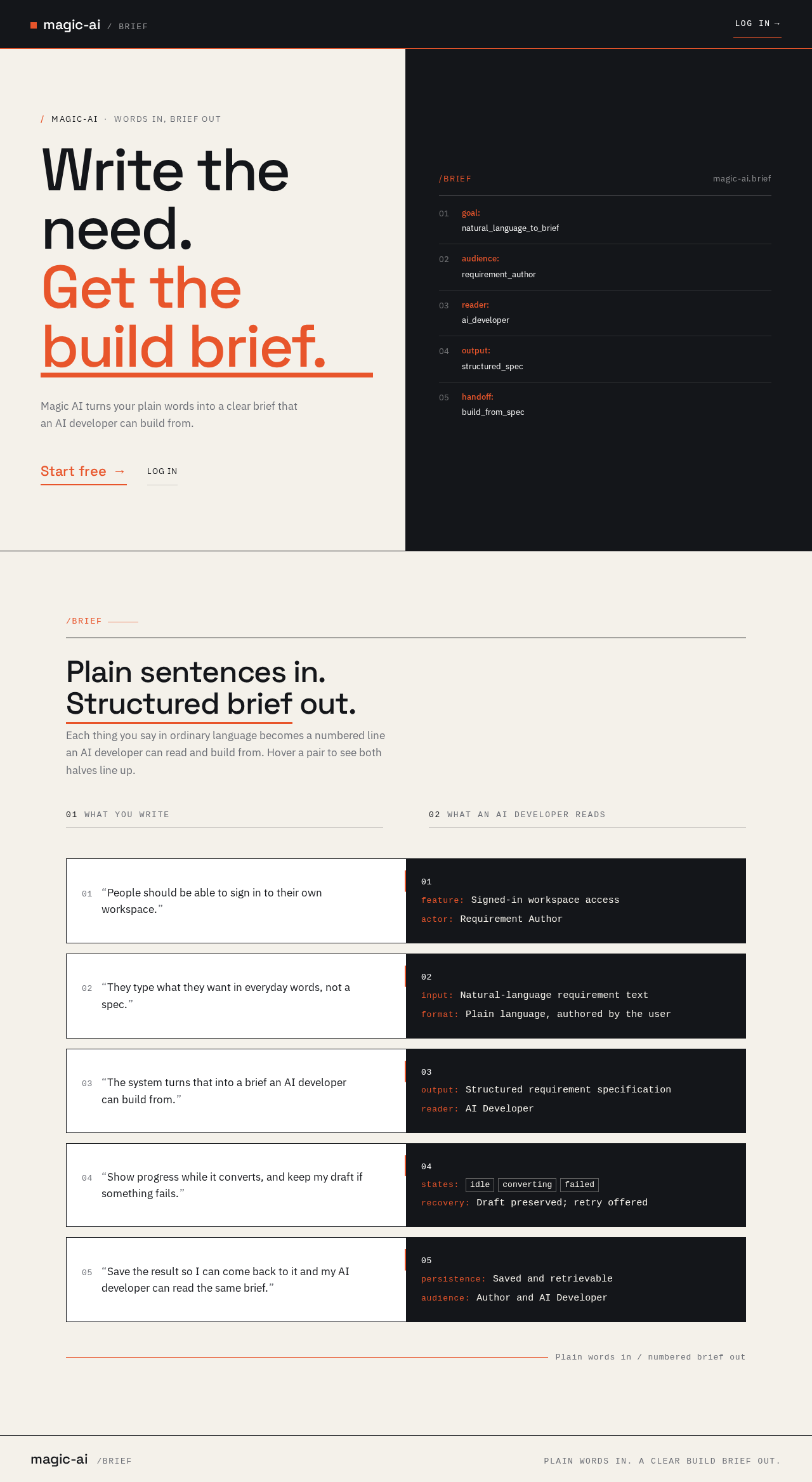
- Information/state: Public, anonymous. States the product purpose and audience: plain words in, a clear build brief out, readable by an AI developer. Carries the entry hero copy: headline "Write the need. Get the build brief."; subline "Magic AI turns your plain words into a clear brief that an AI developer can build from."; call to action "Start free".
- Primary action: "Start free" orange underline link with arrow, leading to Sign Up.
- Supporting actions: Link to Login for returning authors.
- Domain entities: None persisted; presents the product concept only.
- Component responsibilities: 50/50 split hero — warm paper left with oversized Space Grotesk headline flush left; ink panel right with a real mono brief block in white and orange keys. Below the hero, a two-column section pairing each plain sentence on the left with its numbered structured brief line on the right, linked by a thin orange rule. Section headers in mono small caps with a slash prefix (e.g.
/BRIEF). Sharp-cornered cards with 1px ink border, no shadow. - States: Loading — not applicable (static content). Empty — not applicable. Success — hero and paired section render fully at 375px, 768px, 1280px with all text and controls whole. Error — not applicable. Recovery — not applicable.
Sign Up
- Information/state: Public, anonymous. First-use identity establishment for the 需求提出者. Collects the credentials needed to create an application-owned account.
- Primary action: Submit registration to create the account and establish a session.
- Supporting actions: Navigate to Login if the visitor already has an account.
- Domain entities: Author account (identity record owned by the application).
- Component responsibilities: Registration form with labeled fields, inline validation messaging, submit control as an orange underline action consistent with the direction; sharp-cornered ink-bordered form panel.
- States: Loading — submit disabled with progress indication while the account is created. Empty — pristine form. Success — account created, session established, author continues to 需求输入. Error — invalid or already-used credentials shown inline without losing entered values. Recovery — author corrects fields and resubmits, or switches to Login.
Login
- Information/state: Public, anonymous. Returning verification for the 需求提出者.
- Primary action: Submit credentials to verify identity and establish a session.
- Supporting actions: Navigate to Sign Up for a new account.
- Domain entities: Author account.
- Component responsibilities: Credential form with labeled fields, inline error region, submit control; same sharp-cornered ink-bordered panel language.
- States: Loading — submit disabled with progress indication during verification. Empty — pristine form. Success — session established, author continues to 需求输入 or to a previously saved 需求说明. Error — incorrect credentials shown inline without revealing which field is wrong. Recovery — retry, or switch to Sign Up.
需求输入
- Information/state: Protected (login required). The author's working surface for expressing a need in natural language. Holds the current draft text and the conversion state (idle, converting, converted, failed).
- Primary action: Submit the natural-language requirement for conversion into an AI-readable specification.
- Supporting actions: Edit the draft before submitting; retry conversion after a failure; continue to 需求说明 once conversion succeeds.
- Domain entities: Requirement (author-owned), its natural-language source text, its generated specification, conversion status.
- Component responsibilities: Large natural-language text area; submit control as an orange underline action; conversion progress indicator; failure notice with retry; on success, a clear handoff into 需求说明. Mono small-caps section label with slash prefix.
- States: Loading — conversion in progress, submit disabled, draft preserved. Empty — no draft yet, guidance on what to write. Success — specification generated and saved, handoff to 需求说明. Error — conversion failed (provider or processing failure), draft preserved, retry offered. Recovery — author edits and resubmits, or retries the same draft.
需求说明
- Information/state: Protected (login required). Displays the saved, AI-readable requirement specification for a requirement, including its structured brief content. Readable by the 需求提出者 who owns it and by the AI 开发者 who builds from it.
- Primary action: 需求提出者 reads the specification and confirms it is clear enough to hand to an AI developer; AI 开发者 reads the same specification as the build source.
- Supporting actions: Retrieve a previously saved specification on return; return to 需求输入 to revise the source requirement and regenerate.
- Domain entities: Requirement, generated specification (structured brief), author ownership link, generation timestamp/status.
- Component responsibilities: Structured brief rendered in mono type with orange keys, mirroring the paired plain-sentence/brief-line language of the entry surface; sharp-cornered ink-bordered panels; clear labeling of the requirement it belongs to; navigation back to 需求输入.
- States: Loading — specification being fetched. Empty — no specification exists yet for this author, with a path to 需求输入. Success — full specification displayed and readable end to end. Error — specification could not be loaded, with retry. Recovery — retry load, or return to 需求输入.
3. Functional Requirements
FR-1 — Express a requirement in natural language (explicit) As a 需求提出者, I should be able to write my requirement in ordinary natural language on the 需求输入 page, so that I can express what I want without structuring it myself.
- Trigger/input: signed-in author types a natural-language description into the requirement text area.
- Observable result: the draft is held on the page and can be edited before submission.
- Access state: login required.
- Failure/recovery: if the author leaves before submitting, the draft remains editable on return; no conversion occurs without submission.
- Continuation: author submits the draft for conversion.
FR-2 — Convert natural language into an AI-readable requirement specification (explicit) As a 需求提出者, I should be able to submit my natural-language requirement and receive a requirement specification that an AI can clearly understand, so that the need is translated into machine-legible form.
- Trigger/input: author submits the natural-language draft on 需求输入.
- Observable result: the backend calls the model provider through the LiteLLM gateway and produces a structured requirement specification; the page shows conversion in progress, then success.
- Access state: login required.
- Failure/recovery: if conversion fails, the draft is preserved, a failure notice is shown, and the author can retry or edit and resubmit.
- Continuation: on success the author is handed off to 需求说明.
FR-3 — Use the specification as a development basis (explicit) As an AI 开发者, I should be able to read the generated requirement specification and develop according to it without asking the author again, so that the specification is a sufficient build source.
- Trigger/input: AI 开发者 opens the 需求说明 for a requirement.
- Observable result: the full structured specification is displayed and readable end to end.
- Access state: login required.
- Failure/recovery: if the specification cannot be loaded, a retry is offered.
- Continuation: AI 开发者 builds from the specification; the author may return to 需求输入 to revise and regenerate.
FR-4 — Register or log in as the requirement author (required_inference) As a 需求提出者, I should be able to create an account on Sign Up or verify my identity on Login, so that my requirement and its specification remain privately mine and resumable.
- Trigger/input: anonymous visitor submits registration or login credentials.
- Observable result: an application-owned session is established and the author reaches 需求输入 (or a previously saved 需求说明).
- Access state: anonymous entry; protected destinations become available only after identity is established.
- Failure/recovery: invalid or already-used credentials are shown inline without losing entered values; the author corrects and resubmits or switches between Sign Up and Login.
- Continuation: author proceeds to 需求输入.
FR-5 — Save the generated requirement specification (required_inference) As a 需求提出者, I should have my generated specification saved, so that I can return to it and the AI 开发者 can read the same specification later.
- Trigger/input: successful conversion on 需求输入.
- Observable result: the specification is persisted in application-owned storage bound to the author's requirement and is retrievable on 需求说明.
- Access state: login required; retrieval is scoped to the author's own requirement.
- Failure/recovery: if saving fails, the author is told the specification was not saved and can retry conversion.
- Continuation: author or AI 开发者 opens 需求说明 to read the saved specification.
4. User Personas
需求提出者 (Requirement Author)
- Product context: A person who knows what they want built but expresses it in everyday language rather than in engineering terms. They arrive at magic-ai to turn that plain description into something an AI can act on.
- Primary goal: Get a clear, AI-readable requirement specification from their own words, and be confident it is complete enough to hand off.
- Distinct accepted responsibilities: Writes the natural-language requirement on 需求输入; submits it for conversion; reads the resulting specification on 需求说明 and confirms it is clear enough for an AI developer; may return to revise the source requirement and regenerate.
- Relevant inputs/decisions: The natural-language text of the need; the decision to submit; the judgment that the generated specification is buildable.
- Interactions with other participants: Hands the saved specification to the AI 开发者, who reads the same 需求说明. The author is the sole owner of the requirement and its specification.
- Observable success: A saved specification exists on 需求说明 that the author judges clear enough for an AI developer to build from without further questions.
AI 开发者 (AI Developer)
- Product context: An AI-driven developer that builds from a written specification rather than from conversation. It needs the specification to be unambiguous and machine-legible so it can proceed without asking the author again.
- Primary goal: Read a requirement specification that is clear enough to develop from directly.
- Distinct accepted responsibilities: Opens the 需求说明 for a requirement and reads the full structured specification as its build source; develops according to it without further questions to the author.
- Relevant inputs/decisions: The structured brief content on 需求说明; the decision of what to build from it.
- Interactions with other participants: Consumes the specification produced for the 需求提出者; does not author or edit it.
- Observable success: The AI developer can build from the specification without needing clarification from the author.
5. Core User Flows
Flow A — 需求提出者: first use, write a need, obtain a specification
- Anonymous visitor lands on Landing and reads the hero: "Write the need. Get the build brief." with the subline explaining that plain words become a clear brief an AI developer can build from.
- Visitor selects the "Start free" orange underline link and arrives at Sign Up.
- On Sign Up, the visitor enters registration credentials and submits. The form shows progress; on success an application-owned session is established.
- The author arrives at 需求输入 (login required). They type their requirement in ordinary natural language into the text area.
- The author submits the draft. The page shows conversion in progress with the submit control disabled and the draft preserved; the backend calls the model provider through the LiteLLM gateway.
- On success, the specification is saved and the author is handed off to 需求说明, where the structured brief is displayed in mono type with orange keys.
- The author reads the specification and confirms it is clear enough to hand to an AI developer.
- Failure/recovery: if conversion fails, the author stays on 需求输入 with the draft intact, sees a failure notice, and either retries or edits and resubmits. If saving fails, the author is told the specification was not saved and retries conversion.
- Continuation: the author may return to 需求输入 to revise the source requirement and regenerate.
Flow B — 需求提出者: returning to a saved specification
- Returning author opens Login and submits credentials. On incorrect credentials, an inline error appears without revealing which field is wrong; the author retries or switches to Sign Up.
- On success, the author reaches 需求输入 or goes directly to a previously saved 需求说明.
- On 需求说明, the specification loads and is displayed in full. If it cannot be loaded, a retry is offered.
- The author re-reads the specification, or returns to 需求输入 to revise and regenerate.
Flow C — AI 开发者: read the specification and build
- AI 开发者 opens 需求说明 for the requirement (login required) and the saved specification loads.
- AI 开发者 reads the full structured brief end to end.
- AI 开发者 develops according to the specification without asking the author again.
- Failure/recovery: if the specification cannot be loaded, a retry is offered before proceeding.
6. Visuals Colors and Theme
Following the dual-nature craft direction after Adham Dannaway.
- Mode: Light.
- Colors (exact hex by role): background
#F4F1EA(warm paper, ~70% of surface); surface#FFFFFF; text#14161A; primary#14161A(ink panels, ~25%); accent#E8552B(orange, ~5%, actions and the code side); muted#6B6F76. - Fonts: headings Space Grotesk, Medium weight, tight tracking, large sizes, sentence case; body IBM Plex Sans; code side and small-caps labels IBM Plex Mono.
- Type scale (1.25 modular): 64 / 48 / 32 / 22 / 17 / 15, with a mono label size of 13. Hero headline scales 64px–96px with
clamp(...)and a mobile size that keeps it whole. - Shape language: sharp corners on split panels; 8-pt spacing grid; thin ink rules; one orange underline mark on key words.
- Layout: vertical split hero — paper left, ink right; below it a two-column section pairing each plain sentence with its structured brief line.
- Imagery: no photos; diagrams and code samples only; the right half shows a real brief block in mono type.
- Accessibility: all readable text and controls stay whole inside the viewport and their container at 375px, 768px, and 1280px, wrapping or scaling to fit; no element covers them.
7. Signature Design Concept
The public entry (Landing) is a 50/50 split hero that embodies the product's bridge between human words and machine code. The left half is warm paper (#F4F1EA) with an oversized Space Grotesk headline at 64px–96px, flush left: "Write the need. Get the build brief." The right half is an ink panel (#14161A) showing a real brief block in IBM Plex Mono, white text with orange (#E8552B) keys. The CTA sits under the headline as an orange underline link with an arrow — not a pill. Below the hero, a two-column section pairs each plain sentence on the left with its numbered structured brief line on the right, linked by a thin orange rule. Section headers use mono small caps with a slash prefix, like /BRIEF. Cards have sharp corners and a 1px ink border with no shadow. This recomposes only accepted content and controls: the product purpose, the entry hero copy, and the "Start free" action.
8. Interaction Model & Motion Direction
Interaction Model: Animated Motion Tempo: restrained Hero Dimensionality: layered_2d
Landing Hero Motion Brief
- Focal subject: the 50/50 split — warm paper left with the headline, ink right with the live mono brief block.
- Input → transformation → outcome thesis: as the page loads, the ink code half slides into place (160ms reveal), completing the split so the plain words on the left and the structured brief on the right read as one bridge; hovering the split mirrors the matching line across both halves.
- Motion vocabulary: restrained 160ms reveal; hover mirroring of matching lines across halves; thin orange rule linking paired lines.
- Composed first frame: paper left with the headline and orange underline CTA; ink right with the mono brief block settling into place.
- Reduced-motion state: the split renders fully in place with no slide or mirror animation; all text and controls remain whole and readable.
9. Non-Functional Requirements
- Durable state (required_inference): generated specifications are persisted in application-owned storage (MariaDB) so they survive sessions and can be retrieved by the author and read by the AI developer.
- AI conversion via gateway (explicit): model-provider calls go through the provisioned LiteLLM gateway; the backend does not call providers directly.
- Identity continuity (required_inference): application-owned accounts and sessions protect 需求输入 and 需求说明; anonymous entry is limited to Landing, Sign Up, and Login.
- Readable at all viewports (explicit, design constraint): headlines, labels, numbers, cards' text and controls stay entirely inside the viewport and their container at 375px, 768px, and 1280px.
- Reduced motion (explicit, design constraint): with
prefers-reduced-motion, a usable static arrangement is provided. - No blue/indigo accents, no rounded pill buttons, no gradient blobs or glass panels, no stock photography of people (explicit, design constraint).
10. Tech Stack
- Frontend: React application UI.
- Backend: shared FastAPI process for application APIs and domain modules (requirement intake, conversion orchestration, specification retrieval).
- Database: MariaDB for application-owned persistent data (accounts, requirements, generated specifications).
- Model gateway: LiteLLM gateway for the backend's model-provider calls.
- Gateway storage: PostgreSQL supporting LiteLLM, separate from application-owned storage.
- Deployment: docker-compose with the services above (backend, database, frontend, litellm, postgres).
11. Assumptions and Constraints
- Assumption: the AI 开发者 accesses 需求说明 through the same login boundary as the author, per the supplied page contract; no separate permission tiers are introduced.
- Assumption: conversion quality is bounded by the configured model provider behind LiteLLM; the product does not guarantee a specific specification format beyond being AI-readable and structured.
- Constraint: no code generation, project management, collaboration, or document-library features are in scope.
- Constraint: the design direction (palette, fonts, split layout, sharp corners, orange underline CTA) is authoritative for presentation.
12. Glossary
- 需求提出者 (Requirement Author): the person who writes a need in natural language and owns the resulting specification.
- AI 开发者 (AI Developer): the AI-driven builder that reads the specification and develops from it.
- 需求说明 (Requirement Specification): the structured, AI-readable brief generated from a natural-language requirement.
- 需求输入 (Requirement Input): the protected page where the author writes and submits the natural-language requirement.
- LiteLLM gateway: the provisioned model-provider gateway the backend calls for conversion.
magic-aiwords in, brief out
Write the need.Get the build brief.
Magic AI turns your plain words into a clear brief that an AI developer can build from.
- goal:
- natural_language_to_brief
- audience:
- requirement_author
- reader:
- ai_developer
- output:
- structured_spec
- handoff:
- build_from_spec
/Brief
Plain sentences in. Structured brief out.
Each thing you say in ordinary language becomes a numbered line an AI developer can read and build from. Hover a pair to see both halves line up.
People should be able to sign in to their own workspace.
featureSigned-in workspace accessactorRequirement AuthorThey type what they want in everyday words, not a spec.
inputNatural-language requirement textformatPlain language, authored by the userThe system turns that into a brief an AI developer can build from.
outputStructured requirement specificationreaderAI DeveloperShow progress while it converts, and keep my draft if something fails.
statesidleconvertingfailedrecoveryDraft preserved; retry offeredSave the result so I can come back to it and my AI developer can read the same brief.
persistenceSaved and retrievableaudienceAuthor and AI Developer
Plain words in / numbered brief out
No comments yet. Be the first!