lunar-google
 Velocitix Agency
Google Ads Budget Pacing & "Stop-the-Bleed" AlertsThe Gap: Marketing agencies frequently overspend or underspend client ad budgets because Google Ads native reporting lacks real-time budget pacing warnings. The Solution: A single-dashboard tool that tracks daily campaign spend vs. monthly targets and triggers SMS/Slack alerts before budget overruns occur. Proven Monetization: $49–$199/month per agency. Agencies gladly pay because preventing a single $1,000 ad mistake covers the software for the year build me this micro saas

Comments (0)
Sign in to leave a comment
System Requirements
System Requirements Document for lunar-google
1. Introduction
The lunar-google project aims to address the gap in Google Ads native reporting by providing a real-time budget pacing tool for marketing agencies. This micro SaaS solution will help agencies track daily campaign spend against monthly targets and trigger alerts via SMS or Slack before budget overruns occur. The tool is designed to prevent costly ad mistakes, offering a proven monetization model of $49–$199 per month per agency.
2. System Overview
The lunar-google system is a single-dashboard tool that provides real-time budget pacing alerts for Google Ads. It is designed for marketing agencies that need precise and characterful tools to manage their ad budgets effectively. The system triggers alerts via SMS or Slack to notify users before budget overruns occur, helping agencies avoid costly mistakes.
2a. Product Interpretation and Delivery Boundary
The lunar-google tool is delivered as a micro SaaS product, accessible via a web-based dashboard. It integrates with Google Ads to track campaign spending and uses third-party services for SMS and Slack notifications. The system is designed to be efficient, clear, and stand out in the SaaS market, avoiding generic templates and excessive animations.
2b. Source Content Inventory
Not applicable as no content source directive was provided.
2c. Page Content and Component Coverage
Dashboard
- Information/State
- Display of daily campaign spend vs. monthly targets
- Real-time budget pacing graph
- Primary Actions
- Set monthly budget targets
- Configure SMS/Slack alert preferences
- Supporting Actions
- View historical spending data
- Export budget reports
- Domain Entities
- Campaigns
- Budgets
- Alerts
- Components
- Budget pacing graph
- Alert configuration panel
- Historical data table
- States
- Loading: Display a spinner while data is being fetched
- Empty: Show a message when no campaigns are available
- Success: Confirmation message upon successful alert configuration
- Error: Display error messages for failed data retrieval or alert setup
- Recovery: Retry option for failed operations
3. Functional Requirements
- As a marketing agency user, I should be able to track daily campaign spend against monthly targets to monitor budget pacing. (explicit)
- As a marketing agency user, I should receive SMS/Slack alerts before budget overruns occur to prevent overspending. (explicit)
- As a marketing agency user, I should be able to set monthly budget targets to customize my spending limits. (explicit)
- As a marketing agency user, I should be able to configure alert preferences to choose between SMS and Slack notifications. (explicit)
- As a marketing agency user, I should be able to view historical spending data to analyze past campaign performance. (explicit)
- As a marketing agency user, I should be able to export budget reports for record-keeping and analysis. (explicit)
4. User Personas
- Marketing Agency User
- Responsibilities: Monitor campaign budgets, configure alerts, analyze spending data
- Outcomes: Prevent budget overruns, optimize ad spending, maintain client satisfaction
5. Core User Flows
-
Track Campaign Spend
- User logs into the dashboard.
- User views the real-time budget pacing graph.
- User checks daily spend against monthly targets.
-
Configure Alerts
- User navigates to the alert configuration panel.
- User sets monthly budget targets.
- User selects SMS or Slack for alert notifications.
- User saves the configuration.
-
Receive Alerts
- System monitors campaign spend.
- System triggers an SMS/Slack alert when nearing budget limits.
- User receives the alert and takes action to adjust spending.
-
View Historical Data
- User accesses the historical data table.
- User reviews past spending data for analysis.
-
Export Reports
- User selects the export option.
- System generates a budget report.
- User downloads the report for further analysis.
6. Visuals Colors and Theme
- Muse: Rasmus Andersson
- Palette (light mode):
- Background: #F6F3EE
- Surface: #FFFFFF
- Text: #141517
- Primary: #F4A261
- Accent: #2A9D8F
- Muted: #E9C46A
- Typography:
- Headings: Space Grotesk, Bold, uppercase
- Body: Inter Tight
- Scale: 1.333 modular
- Shape Language: Compact controls, hairline borders, tabular formatting
- Layout: 4/8-pt spacing scale, keyboard-friendly density
- Motion: Fast, functional transitions (120–200ms)
- Imagery: Interface screenshots, schematic diagrams, code snippets
7. Signature Design Concept
The public entry features a bold and composed hero with oversized text presenting a clear value proposition. A side panel displays a live budget pacing graph, and an accentuated CTA button in primary orange invites user interaction. The design emphasizes functionality and clarity, avoiding generic templates and excessive animations.
8. Interaction Model & Motion Direction
- Interaction Model: Static (direction)
- Motion Tempo: Restrained
- Hero Dimensionality: Flat
- Landing Hero Motion Brief: The hero features oversized text with a live budget pacing graph as the focal point. The primary orange accent highlights the CTA button. The motion is restrained, focusing on usability and clarity.
9. Non-Functional Requirements
- The system must integrate with Google Ads API for real-time data access. (explicit)
- The system must support SMS and Slack API for alert notifications. (explicit)
- The dashboard must load within 2 seconds for optimal user experience. (basic_default)
10. Tech Stack
- Frontend: React
- Backend: Python/FastAPI
- Notifications: Twilio (SMS), Slack API
- Hosting: Docker, Kubernetes (if required for deployment scale)
11. Assumptions and Constraints
- The system assumes users have active Google Ads accounts.
- The system assumes users have access to SMS and Slack for notifications.
- The system is constrained to operate within the Google Ads API limits.
12. Glossary
- Budget Pacing: Monitoring and managing ad spend to align with budget targets.
- SMS/Slack Alerts: Notifications sent via SMS or Slack to inform users of budget status.
- Micro SaaS: A small-scale software as a service product targeting a specific niche.
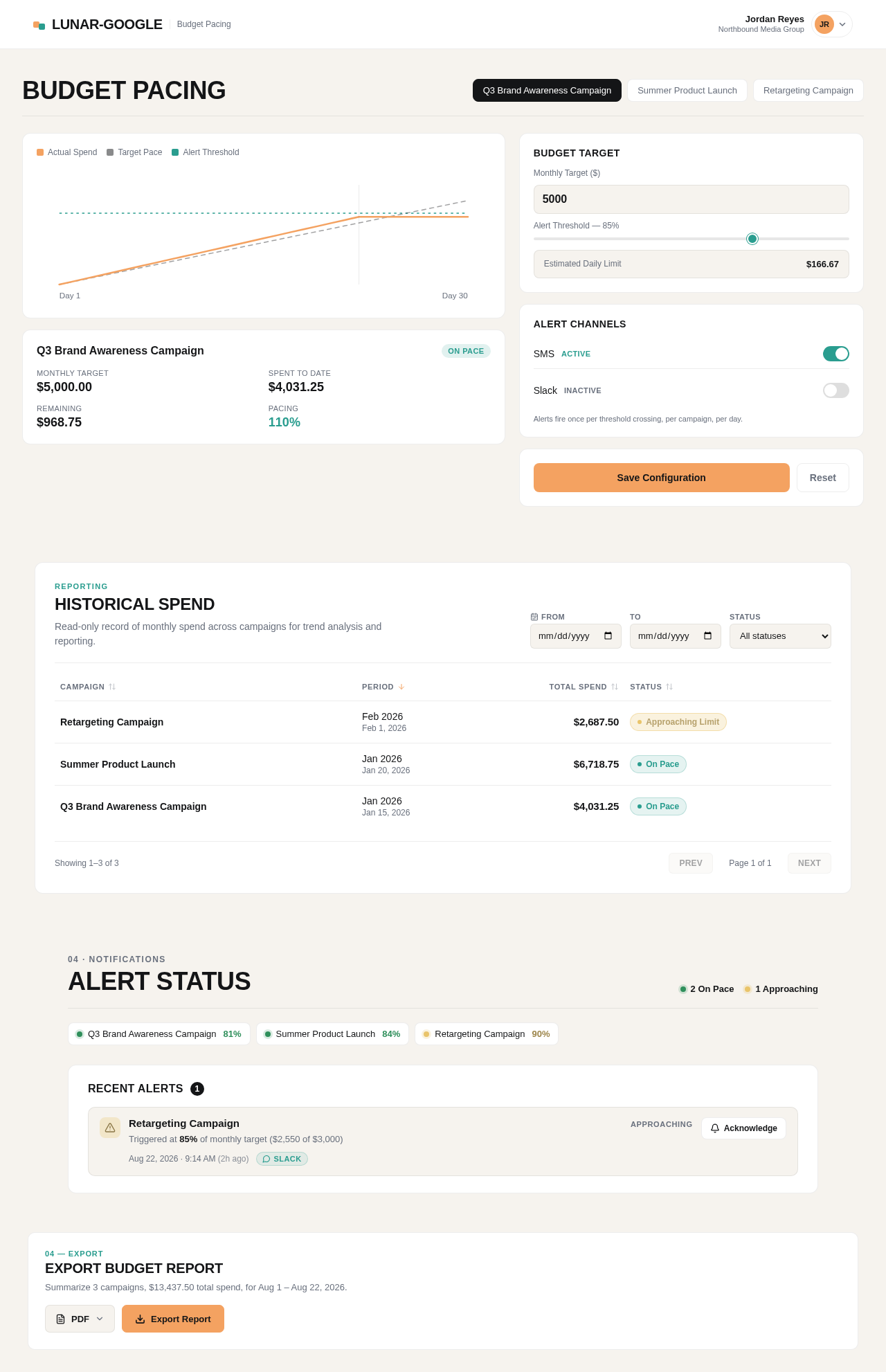
Budget Pacing
Q3 Brand Awareness Campaign
On PaceBudget Target
Alert Channels
Alerts fire once per threshold crossing, per campaign, per day.
Historical Spend
Read-only record of monthly spend across campaigns for trend analysis and reporting.
| Retargeting Campaign | Feb 2026Feb 1, 2026 | $2,687.50 | Approaching Limit |
| Summer Product Launch | Jan 2026Jan 20, 2026 | $6,718.75 | On Pace |
| Q3 Brand Awareness Campaign | Jan 2026Jan 15, 2026 | $4,031.25 | On Pace |
Alert Status
Recent Alerts
1- Retargeting CampaignApproaching
Triggered at 85% of monthly target ($2,550 of $3,000)
Export Budget Report
Summarize 3 campaigns, $13,437.50 total spend, for Aug 1 – Aug 22, 2026.
Budget Pacing
Q3 Brand Awareness Campaign
On PaceBudget Target
Alert Channels
Alerts fire once per threshold crossing, per campaign, per day.
Historical Spend
Read-only record of monthly spend across campaigns for trend analysis and reporting.
| Retargeting Campaign | Feb 2026Feb 1, 2026 | $2,687.50 | Approaching Limit |
| Summer Product Launch | Jan 2026Jan 20, 2026 | $6,718.75 | On Pace |
| Q3 Brand Awareness Campaign | Jan 2026Jan 15, 2026 | $4,031.25 | On Pace |
Alert Status
Recent Alerts
1- Retargeting CampaignApproaching
Triggered at 85% of monthly target ($2,550 of $3,000)
Export Budget Report
Summarize 3 campaigns, $13,437.50 total spend, for Aug 1 – Aug 22, 2026.
No comments yet. Be the first!