little-sprouts-kids-wear
 KEHINDE ABDULRAHEEM Lawal
from flask import Flask, render_template_string, request, redirect, url_for, flash from flask_sqlalchemy import SQLAlchemy from flask_login import LoginManager, UserMixin, login_user, login_required, logout_user from flask_wtf import FlaskForm from wtforms import StringField, FloatField, TextAreaField, PasswordField, SubmitField from wtforms.validators import DataRequired app = Flask(__name__) app.config['SECRET_KEY'] = 'little-sprouts-secret-key-change-me' app.config['SQLALCHEMY_DATABASE_URI'] = 'sqlite:///sprouts.db' db = SQLAlchemy(app) login_manager = LoginManager(app) login_manager.login_view = 'login' YOUR_WHATSAPP = "[phone]" # YOUR WHATSAPP - customers will order here # --- DATABASE --- class Product(db.Model): id = db.Column(db.Integer, primary_key=True) name = db.Column(db.String(100), nullable=False) price = db.Column(db.Float, nullable=False) description = db.Column(db.Text, nullable=False) image_url = db.Column(db.String(300), default='https://via.placeholder.com/300x300/FFB6C1/FFFFFF?text=Little+Sprouts') class Admin(UserMixin, db.Model): id = db.Column(db.Integer, primary_key=True) username = db.Column(db.String(50), unique=True, nullable=False) # This will be your phone number password = db.Column(db.String(100), nullable=False) # --- FORMS --- class ProductForm(FlaskForm): name = StringField('Product Name', validators=[DataRequired()]) price = FloatField('Price ₦', validators=[DataRequired()]) description = TextAreaField('Description', validators=[DataRequired()]) image_url = StringField('Image URL - Paste link to product photo') submit = SubmitField('Add Product') class LoginForm(FlaskForm): username = StringField('Phone Number', validators=[DataRequired()]) # Changed label password = PasswordField('Password', validators=[DataRequired()]) submit = SubmitField('Login') @login_manager.user_loader def load_user(user_id): return Admin.query.get(int(user_id)) # --- HTML TEMPLATES --- SHOP_HTML = """ <!DOCTYPE html><html><head><title>{{ store_name }}</title> <style> body{font-family:'Poppins',Arial; background:#FFF0F5; margin:0; text-align:center} .header{background:#FF69B4; color:white; padding:20px} .product{border:1px solid #FFB6C1; display:inline-block; margin:15px; padding:15px; width:260px; border-radius:15px; background:white; vertical-align:top} .product img{width:100%; border-radius:10px; height:260px; object-fit:cover} .btn{background:#FF69B4; color:white; padding:10px 15px; text-decoration:none; border-radius:8px; display:inline-block; margin-top:10px} .btn:hover{background:#FF1493} </style></head> <body> <div class="header"><h1>🌸 {{ store_name }} 🌸</h1><p>Cute clothes for your little ones</p></div> {% for p in products %} <div class="product"> <img src="{{p.image_url}}"> <h3>{{p.name}}</h3> <p><b>₦{{"{:,.2f}".format(p.price)}}</b></p> <p>{{p.description}}</p> <a href="{{url_for('order', product_id=p.id)}}" class="btn">Order on WhatsApp</a> </div> {% else %} <p>No products yet. Admin should add some!</p> {% endfor %} </body></html> """ ADMIN_HTML = """ <!DOCTYPE html><html><head><title>Admin - Little Sprouts</title> <style>body{font-family:Arial; padding:20px; background:#FFF0F5} input,textarea{width:350px; padding:10px; margin:5px; border-radius:5px; border:1px solid #ccc}</style> </head><body> <h1>Admin Panel - Little Sprouts</h1> <p>Logged in as: <b>{{current_user.username}}</b></p> <a href="{{url_for('logout')}}">Logout</a> | <a href="{{url_for('home')}}">View Shop</a> <h2>Add New Product</h2> <form method="POST">{{ form.hidden_tag() }} <p>{{form.name.label}}<br>{{form.name()}}</p> <p>{{form.price.label}}<br>{{form.price()}}</p> <p>{{form.description.label}}<br>{{form.description(rows=4)}}</p> <p>{{form.image_url.label}}<br>{{form.image_url()}}</p> <p>{{form.submit()}}</p> </form> <h2>Your Products</h2> {% for p in products %}<p><b>{{p.name}}</b> - ₦{{"{:,.2f}".format(p.price)}}</p>{% endfor %} {% for msg in get_flashed_messages() %}<p style="color:green">{{msg}}</p>{% endfor %} </body></html> """ LOGIN_HTML = """ <!DOCTYPE html><html><head><title>Admin Login</title> <style>body{font-family:Arial; text-align:center; padding-top:100px; background:#FFF0F5} input{padding:12px; margin:5px; width:250px; border-radius:5px; border:1px solid #ccc}</style> </head><body> <h1>Admin Login - Little Sprouts</h1> <p>Only Admin can access this page</p> <form method="POST">{{ form.hidden_tag() }} <p>{{form.username(placeholder="Enter Phone Number")}}</p> <p>{{form.password(placeholder="Enter Password")}}</p> <p>{{form.submit()}}</p> </form>{% for msg in get_flashed_messages() %}<p style="color:red">{{msg}}</p>{% endfor %} </body></html> """ ORDER_HTML = """ <!DOCTYPE html><html><head><title>Order {{product.name}}</title> <style>body{font-family:Arial; text-align:center; padding:50px; background:#FFF0F5} .btn{background:#25D366; color:white; padding:15px; text-decoration:none; border-radius:10px}</style> </head><body> <h1>Order: {{product.name}}</h1> <img src="{{product.image_url}}" width="250" style="border-radius:10px"><br> <h2>₦{{"{:,.2f}".format(product.price)}}</h2> <p>{{product.description}}</p> <a href="{{whatsapp_link}}" class="btn">Click to Order on WhatsApp</a> <br><br><a href="{{url_for('home')}}">← Back to Shop</a> </body></html> """ # --- ROUTES --- @app.route('/') def home(): products = Product.query.all() return render_template_string(SHOP_HTML, products=products, store_name="Little Sprouts Kids Wear") @app.route('/admin', methods=['GET', 'POST']) @login_required def admin(): form = ProductForm() products = Product.query.all() if form.validate_on_submit(): product = Product(name=form.name.data, price=form.price.data, description=form.description.data, image_url=form.image_url.data or None) db.session.add(product) db.session.commit() flash('Product Added Successfully!') return redirect(url_for('admin')) return render_template_string(ADMIN_HTML, form=form, products=products) @app.route('/order/<int:product_id>') def order(product_id): product = Product.query.get_or_404(product_id) whatsapp_msg = f"Hello Little Sprouts Kids Wear!%0A%0AI want to order:%0A*Product:* {product.name}%0A*Price:* ₦{product.price}%0A%0AMy Name and Address:" whatsapp_link = f"https://wa.me/{YOUR_WHATSAPP}?text={whatsapp_msg}" return render_template_string(ORDER_HTML, product=product, whatsapp_link=whatsapp_link) @app.route('/login', methods=['GET', 'POST']) def login(): form = LoginForm() if form.validate_on_submit(): admin = Admin.query.filter_by(username=form.username.data).first() if admin and admin.password == form.password.data: login_user(admin) return redirect(url_for('admin')) flash('Login Failed - Check phone number and password') return render_template_string(LOGIN_HTML, form=form) @app.route('/logout') @login_required def logout(): logout_user() return redirect(url_for('home')) if __name__ == '__main__': with app.app_context(): db.create_all() # CREATE YOUR ADMIN ACCOUNT ONCE if not Admin.query.first(): db.session.add(Admin(username='[phone]', password='GraceLois.com')) db.session.commit() app.run(debug=True)


Comments (0)
Sign in to leave a comment
System Requirements
System Requirements Document for little-sprouts-kids-wear
1. Introduction
The Little Sprouts Kids Wear project aims to create a vibrant and user-friendly online platform for selling children's clothing. The application is designed to provide a seamless shopping experience for parents, allowing them to browse products and place orders via WhatsApp. The platform includes an admin interface for managing products and requires user authentication for admin access.
2. System Overview
The system is a Flask-based web application that includes user authentication, product management, and WhatsApp ordering functionality. It is designed for two primary actors: the Admin, who manages the product listings, and the Customer, who browses and orders products. The application uses a SQLite database to store product and admin data. The interface is styled to be warm, engaging, and approachable, with a focus on a friendly and humorous vibe suitable for a children's clothing brand.
2a. Product Interpretation and Delivery Boundary
The application is delivered as a web-based platform accessible via standard web browsers. Admin access is protected by a login system, while customers can browse and order products without needing an account. Orders are placed through WhatsApp, leveraging the customer's existing WhatsApp application for communication. The system does not include payment processing or shipping logistics, focusing solely on product display and order initiation.
2b. Source Content Inventory
Not applicable as no content_source directive was provided.
2c. Page Content and Component Coverage
Home
- Header: Displays the store name "Little Sprouts Kids Wear" with a tagline.
- Product Listings:
- Each product is displayed in a card format with an image, name, price, and description.
- An "Order on WhatsApp" button links to the WhatsApp order page for each product.
- Empty State: Message indicating no products are available if the product list is empty.
Admin
- Header: Displays the current admin username with logout and shop view links.
- Add New Product Form:
- Fields for product name, price, description, and image URL.
- Submit button to add the product.
- Product List: Displays all products with their names and prices.
- Flash Messages: Displays success messages for product additions.
Login
- Login Form:
- Fields for phone number and password.
- Submit button to log in.
- Error Messages: Displays login failure messages.
Order
- Product Details: Displays the product image, name, price, and description.
- WhatsApp Order Button: Links to WhatsApp with a pre-filled message for ordering.
- Back Link: Returns to the home page.
3. Functional Requirements
- As an Admin, I should be able to log in using my phone number and password to access the admin panel. [explicit]
- As an Admin, I should be able to add new products with details such as name, price, description, and image URL. [explicit]
- As an Admin, I should be able to view all products I have added, along with their details. [explicit]
- As a Customer, I should be able to view a list of products with their images, names, prices, and descriptions. [explicit]
- As a Customer, I should be able to order a product via WhatsApp by clicking a button that opens WhatsApp with a pre-filled message. [explicit]
4. User Personas
- Admin: Responsible for managing product listings. Can log in, add, and view products.
- Customer: Browses products and places orders via WhatsApp. Does not require an account.
5. Core User Flows
Admin Login and Product Management
- Admin navigates to the login page.
- Admin enters phone number and password.
- On successful login, Admin is redirected to the admin panel.
- Admin adds a new product using the form and submits it.
- Admin views the list of products and receives confirmation messages for actions.
Customer Browsing and Ordering
- Customer navigates to the home page.
- Customer browses the list of available products.
- Customer selects a product to order and clicks the "Order on WhatsApp" button.
- WhatsApp opens with a pre-filled message for the selected product.
- Customer completes the order via WhatsApp.
6. Visuals Colors and Theme
- Muse: Pablo Stanley
- Palette:
- Background: #FFF0F5
- Surface: #FFFFFF
- Text: #333333
- Primary: #FF69B4
- Accent: #FFD700
- Muted: #E0E0E0
- Typography:
- Headings: Nunito, Bold
- Body: DM Sans
- Scale: 1.25 modular, 48/32/24/18/16
- Shape Language: Big rounded corners, pill buttons, soft shadows
- Layout: Generous spacing, card-based layout with playful illustrations
7. Signature Design Concept
The public entry page features a full-bleed hero section with a playful illustration of kids playing. The store name "Little Sprouts Kids Wear" is displayed in bold, rounded typography over a warm pink background. Product listings are presented in rounded card components with soft shadows, and pill-shaped buttons feature springy hover effects.
8. Interaction Model & Motion Direction
- Interaction Model: Animated
- Motion Tempo: Expressive
- Hero Dimensionality: Layered_2d
- Landing Hero Motion Brief: The hero section features a large illustration of kids playing. Upon page load, the illustration subtly animates with springy micro-interactions, drawing attention to the store name. Hover effects on buttons provide playful feedback.
9. Non-Functional Requirements
- Performance: The application should load within 3 seconds on a standard broadband connection.
- Security: Admin login credentials must be securely stored and transmitted.
- Usability: The interface should be intuitive and easy to navigate for both admins and customers.
10. Tech Stack
- Backend: Flask, Flask-SQLAlchemy, Flask-Login
- Frontend: HTML, CSS (styled with the provided theme)
- Database: SQLite
- Deployment: Docker, optional Kubernetes if required for scaling
11. Assumptions and Constraints
- The application will be accessed primarily via desktop and mobile web browsers.
- WhatsApp is assumed to be installed on the customer's device for order placement.
- The system does not handle payment processing or shipping logistics.
12. Glossary
- Admin: A user with privileges to manage product listings.
- Customer: A user who browses and orders products.
- WhatsApp Order: The process of initiating a product order via a pre-filled WhatsApp message.
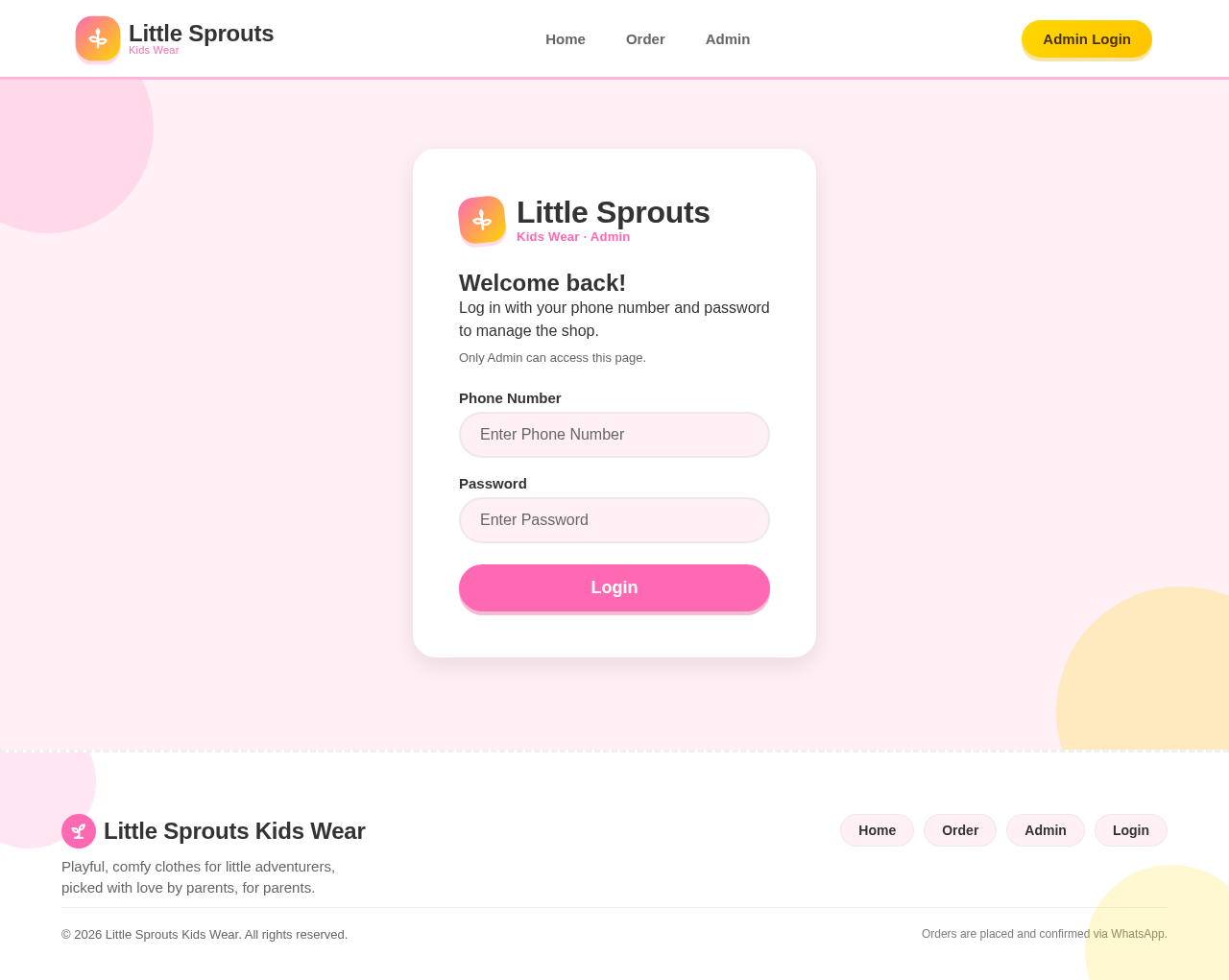
Welcome back!
Log in with your phone number and password to manage the shop.
Only Admin can access this page.
No comments yet. Be the first!