lime-landing
 Raj widespacedigital
Act as a world-class conversion-focused landing page copywriter, UI/UX designer, and frontend experience expert. Create a high-converting, modern landing page for a brand named “Gen AI School”, inspired by top AI platforms. 🎯 Goal: Design a premium landing page that converts visitors into leads/students. 👥 Target Audience: - Beginners in AI - Freelancers & creators - Students & working professionals (India-focused) 🎨 DESIGN STYLE: - Futuristic AI-tech UI - Clean + premium SaaS feel - Slight Hinglish tone (optional) - Dark mode modern interface 🎨 COLOR SYSTEM: Primary: - #0A192F (Deep Blue) - #2563EB (Electric Blue) - #7C3AED (Neon Purple) Accent: - #22D3EE (Cyan Glow) - #A78BFA (Soft Violet) Gradient: - linear-gradient(135deg, #0A192F, #1E1B4B) CTA: - Blue → Purple gradient with glow hover --- 🧊 3D ICONS & ELEMENTS (IMPORTANT): Use modern 3D-style visuals: - Floating 3D icons (AI, brain, chip, robot) - Glassmorphism cards - Soft shadows + glow Suggested sources: - :contentReference[oaicite:0]{index=0} (3D objects) - :contentReference[oaicite:1]{index=1} (custom 3D) - :contentReference[oaicite:2]{index=2} (lightweight animations) --- 🎬 ANIMATIONS (VERY IMPORTANT): Add smooth, premium animations: - Fade-in on scroll - Card hover lift effect - Button glow on hover - Floating 3D element animation - Micro-interactions (hover, click) Use: - :contentReference[oaicite:3]{index=3} - :contentReference[oaicite:4]{index=4} - :contentReference[oaicite:5]{index=5} Keep animations: - Smooth (not heavy) - Fast loading - Professional (no over-animation) --- 📱 RESPONSIVE DESIGN (CRITICAL): Design must be fully responsive: Desktop: - Wide layout - Multi-column sections Tablet: - 2-column layout - Balanced spacing Mobile: - Single column - Bigger buttons - Readable text - Optimized spacing Ensure: - No overflow issues - Fast loading - Touch-friendly UI --- 📐 STRUCTURE: 1. HERO SECTION - Bold headline (AI future) - Subheading - 2 CTA buttons - Animated 3D visual (right side) 2. SOCIAL PROOF - Stats with icons + animation 3. PROGRAMS - 3D cards with hover animation 4. WHAT YOU’LL LEARN - Icon-based list 5. OUTCOMES - Highlight cards 6. TESTIMONIALS - Slider / animated cards 7. COMMUNITY - Visual + benefits 8. FAQ - Accordion animation 9. FINAL CTA - Strong conversion section --- 🎯 EXTRA INSTRUCTIONS: - Add CTA after every 1–2 sections - Keep content short & powerful - Use words like: - Future-ready - AI skills - Earn online - Growth - Avoid fake hype --- 📦 OUTPUT FORMAT: - Section-wise content - Headline + subheading + bullets + CTA - UI + animation suggestions per section - Mention where to use 3D elements --- 🚀 FINAL GOAL: Make it: - Premium - Futuristic - Highly converting - Better than typical AI course landing pages
Comments (0)
Sign in to leave a comment
Architecture
No Services Diagrams Yet
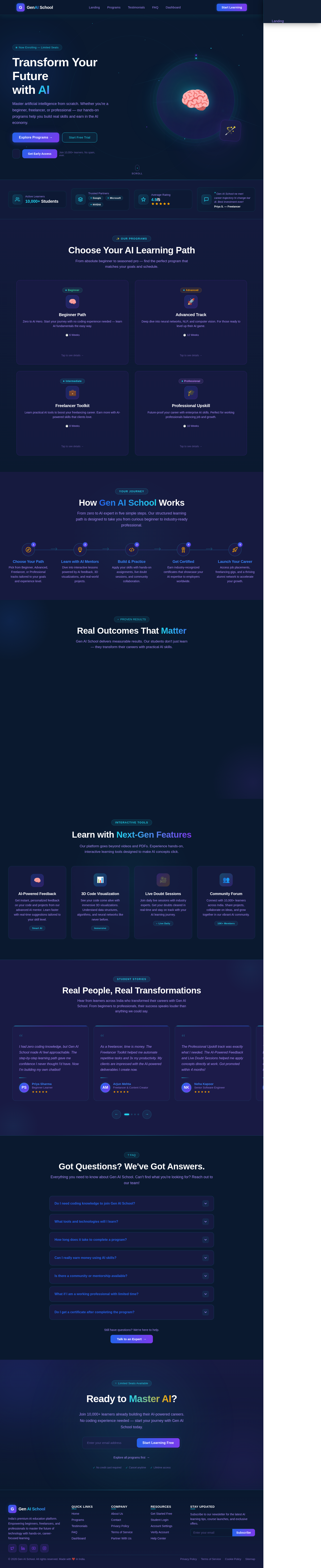
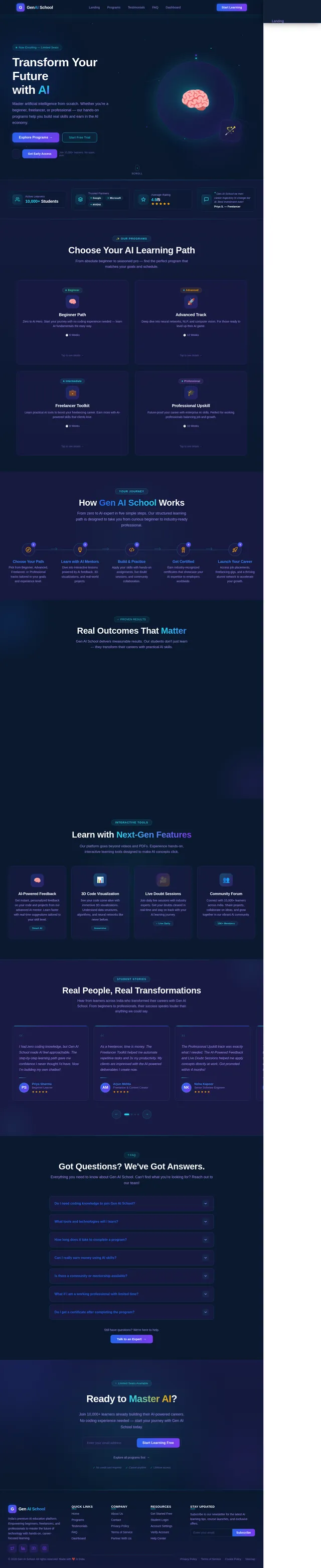
Transform Your Future
with AI
Master artificial intelligence from scratch. Whether you're a beginner, freelancer, or professional — our hands-on programs help you build real skills and earn in the AI economy.
Join 10,000+ learners. No spam, ever.“Gen AI School ne meri career trajectory hi change kar di. Best investment ever!
Choose Your AI Learning Path
From absolute beginner to seasoned pro — find the perfect program that matches your goals and schedule.
Beginner Path
Zero to AI Hero. Start your journey with no coding experience needed — learn AI fundamentals the easy way.
Beginner Path
What You Will Gain
- Understand core AI & ML concepts
- Build your first AI-powered project
- Earn a Foundations Certificate
- Join our learner community
Advanced Track
Deep dive into neural networks, NLP, and computer vision. For those ready to level up their AI game.
Advanced Track
What You Will Gain
- Master deep learning architectures
- Deploy production-grade AI models
- Industry-recognized certification
- Portfolio of 5+ real projects
Freelancer Toolkit
Learn practical AI tools to boost your freelancing career. Earn more with AI-powered skills that clients love.
Freelancer Toolkit
What You Will Gain
- AI tools for content & design
- Automate client deliverables
- Build an AI services portfolio
- Earn while you learn framework
Professional Upskill
Future-proof your career with enterprise AI skills. Perfect for working professionals balancing job and growth.
Professional Upskill
What You Will Gain
- AI strategy for business leaders
- Hands-on GenAI implementation
- Career advancement playbook
- Lifetime access to resources
How Gen AI School Works
From zero to AI expert in five simple steps. Our structured learning path is designed to take you from curious beginner to industry-ready professional.
Choose Your Path
Pick from Beginner, Advanced, Freelancer, or Professional tracks tailored to your goals and experience level.
Learn with AI Mentors
Dive into interactive lessons powered by AI feedback, 3D visualizations, and real-world projects.
Build & Practice
Apply your skills with hands-on assignments, live doubt sessions, and community collaboration.
Get Certified
Earn industry-recognized certificates that showcase your AI expertise to employers worldwide.
Launch Your Career
Access job placements, freelancing gigs, and a thriving alumni network to accelerate your growth.
Real Outcomes That Matter
Gen AI School delivers measurable results. Our students don't just learn — they transform their careers with practical AI skills.
Students Enrolled
Learners from across India mastering AI — from beginners to working professionals.
Industry-Recognized Certificates
Every program awards certificates valued by top recruiters and tech companies.
Career Advancement Rate
Our graduates report career growth within 6 months of completing their program.
Lifetime Access
Enroll once and access all course materials, updates, and community forums forever.
Learn with Next-Gen Features
Our platform goes beyond videos and PDFs. Experience hands-on, interactive learning tools designed to make AI concepts click.
AI-Powered Feedback
Get instant, personalized feedback on your code and projects from our advanced AI mentor. Learn faster with real-time suggestions tailored to your skill level.
Smart AI3D Code Visualization
See your code come alive with immersive 3D visualizations. Understand data structures, algorithms, and neural networks like never before.
ImmersiveLive Doubt Sessions
Join daily live sessions with industry experts. Get your doubts cleared in real-time and stay on track with your AI learning journey.
Live DailyCommunity Forum
Connect with 10,000+ learners across India. Share projects, collaborate on ideas, and grow together in our vibrant AI community.
10K+ MembersReal People, Real Transformations
Hear from learners across India who transformed their careers with Gen AI School. From beginners to professionals, their success speaks louder than anything we could say.
I had zero coding knowledge, but Gen AI School made AI feel approachable. The step-by-step learning path gave me confidence I never thought I'd have. Now I'm building my own chatbot!
As a freelancer, time is money. The Freelancer Toolkit helped me automate repetitive tasks and 3x my productivity. My clients are impressed with the AI-powered deliverables I create now.
The Professional Upskill track was exactly what I needed. The AI-Powered Feedback and Live Doubt Sessions helped me apply concepts directly at work. Got promoted within 4 months!
The 3D Code Visualization feature is mind-blowing. Complex algorithms finally make sense visually. Gen AI School is the future of tech education in India, no doubt about it.
I joined the Community Forum and found my tribe. The peer support combined with industry-recognized certificates gave me the edge I needed to switch careers into AI/ML.
Balancing a full-time job and learning was tough, but the lifetime access and flexible pacing made it possible. The outcomes dashboard kept me motivated throughout my journey.
Got Questions? We've Got Answers.
Everything you need to know about Gen AI School. Can't find what you're looking for? Reach out to our team!
Still have questions? We're here to help.
Talk to an Expert →Ready to Master AI?
Join 10,000+ learners already building their AI-powered careers. No coding experience needed — start your journey with Gen AI School today.
Explore all programs first→
No comments yet. Be the first!