lime-app
 Krish Goindi
Build an mobile app to boost the headphones sound and bass

Comments (0)
Sign in to leave a comment
System Requirements
System Requirements Document (SRD)
Project Name: lime-app
1. Introduction
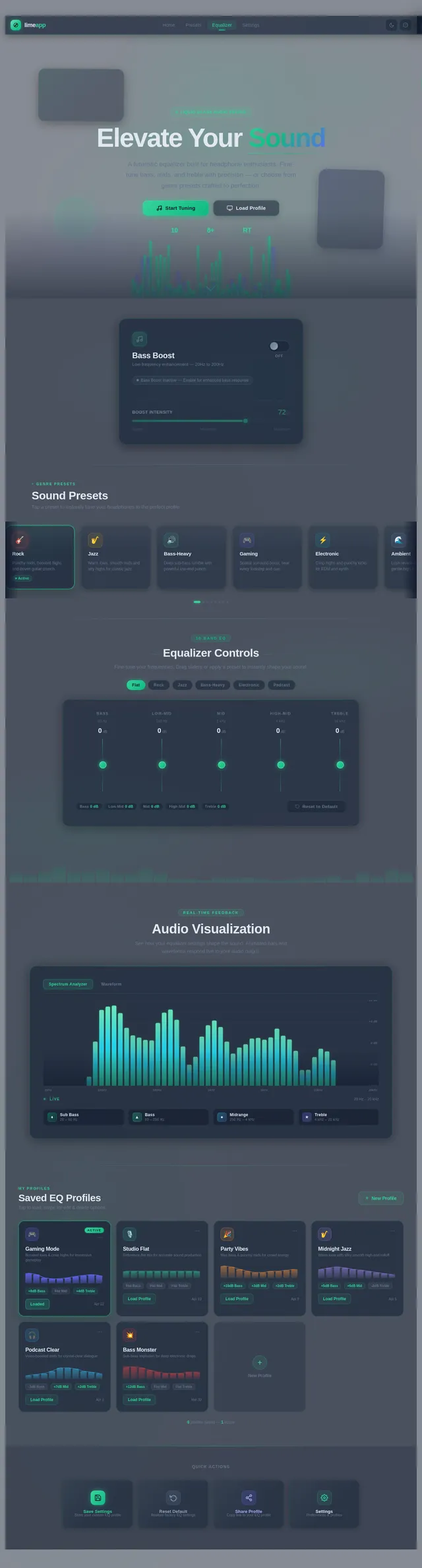
The lime-app is a mobile application designed to enhance the audio experience for headphone users by boosting sound quality and bass. This document outlines the system requirements for the development of the lime-app, which will cater to Android users in India. The app will feature genre-based presets, manual equalizer controls, and a sleek, futuristic liquid glass UI to deliver an immersive and premium user experience.
This SRD has been tailored to meet the vision of Krish Goindi, ensuring the app aligns with his creative direction and user-centric goals.
2. System Overview
The lime-app aims to provide users with a powerful yet intuitive tool to customize their headphone audio experience. The app will include:
- Genre-based presets for quick sound adjustments tailored to specific music styles.
- Manual equalizer controls for bass, treble, and mid-range frequencies.
- A Bass Boost toggle for instant enhancement of low-frequency sounds.
- A visually stunning liquid glass UI to captivate users and create a modern, high-tech aesthetic.
The app will be developed exclusively for Android devices, ensuring compatibility with the latest Android versions and optimizing performance for Indian users.
3. Functional Requirements
As story points:
- As a User, I should be able to select genre-based audio presets (e.g., rock, jazz, bass-heavy).
- As a User, I should be able to manually adjust bass, treble, and mid-range frequencies using sliders.
- As a User, I should be able to toggle a "Bass Boost" feature for instant sound enhancement.
- As a User, I should experience a visually appealing liquid glass UI across the entire app interface.
- As a User, I should be able to save my custom equalizer settings for future use.
- As a User, I should be able to reset all audio settings to default with one click.
- As a User, I should be able to preview audio changes in real-time while adjusting settings.
4. User Personas
1. Music Enthusiast
- Description: Loves listening to music and experimenting with sound settings to match different genres.
- Needs: Easy access to genre presets and manual controls for fine-tuning audio.
2. Gamer
- Description: Uses headphones for immersive gaming experiences and prefers bass-heavy sound.
- Needs: Quick bass boost toggle and customizable equalizer settings for gaming.
3. Casual Listener
- Description: Enjoys listening to music or podcasts without diving deep into technical settings.
- Needs: Simple presets and an intuitive interface for effortless sound enhancement.
5. Visuals Colors and Theme
Unique Color Palette:
The lime-app will feature a futuristic liquid glass aesthetic with the following color palette:
- Background: #0F172A (Deep Midnight Blue)
- Surface: #1E293B (Liquid Slate Gray)
- Text: #E2E8F0 (Soft Ice White)
- Accent: #34D399 (Lime Green Glow)
- Muted Tones: #64748B (Muted Steel Blue)
This palette ensures a sleek, modern look while maintaining readability and visual appeal.
6. Signature Design Concept
Liquid Glass UI
The lime-app will feature a bold and unforgettable liquid glass design aesthetic that transforms the user interface into a visually immersive experience.
Home Page Design:
- Dynamic Glass Panels: The homepage will feature floating, semi-transparent glass panels that refract light and subtly shift colors based on user interactions.
- Interactive Ripple Effects: Each touch or swipe will create ripple animations across the glass panels, mimicking the effect of water droplets on glass.
- Ambient Glow: Accent elements like buttons and sliders will emit a soft lime-green glow, creating a futuristic vibe.
Transitions and Animations:
- Liquid Flow Transitions: Navigating between sections will feel fluid, with transitions resembling liquid flowing across the screen.
- Real-Time Audio Visualization: A dynamic waveform will pulse in the background, responding to the audio being played or adjusted.
Micro-Interactions:
- Sliders will shimmer slightly when adjusted, giving the illusion of liquid movement.
- Buttons will "press down" with a glass-like distortion effect.
This design concept ensures the lime-app stands out as a premium audio customization tool, leaving users with a lasting impression of innovation and style.
7. Non-Functional Requirements
- The app must load within 2 seconds on devices with Android 10 or higher.
- The UI must maintain responsiveness across various screen sizes and resolutions.
- The app must consume minimal battery while running in the background.
- The audio adjustments must apply in real-time without noticeable latency.
- The app must adhere to accessibility standards, including high-contrast mode and screen reader compatibility.
8. Tech Stack
Frontend:
- React Native for Android app development.
Backend:
- Python with FastAPI for API development.
Database:
- MySQL for storing user settings and preferences.
AI Models (if applicable):
- GPT 5.4 for user-friendly responses in help sections.
AI Tools:
- Langchain for managing AI workflows.
Local Orchestration:
- Docker and docker-compose for development environments.
Server-Side Orchestration:
- Kubernetes for scalable deployment.
9. Assumptions and Constraints
Assumptions:
- Users will primarily use the app on Android devices running Android 10 or higher.
- The app will target users in India, with locale-specific defaults such as IST timezone and INR currency for any in-app purchases.
Constraints:
- The app must comply with Google Play Store guidelines for Android apps.
- The liquid glass UI must be optimized for performance to avoid lag or excessive battery consumption.
10. Glossary
- Liquid Glass UI: A design aesthetic featuring semi-transparent, fluid-like visual elements that mimic the appearance of glass.
- Bass Boost: A feature that enhances low-frequency sounds for a richer audio experience.
- Equalizer (EQ): A tool for adjusting the balance of audio frequencies (bass, treble, mid-range).
- Presets: Predefined audio settings optimized for specific genres or use cases.
- Micro-Interactions: Small, subtle animations or effects that enhance user experience.
This updated SRD ensures the lime-app aligns with Krish Goindi's vision while delivering a cutting-edge audio customization tool for Android users.

Elevate Your Sound
Transform your listening experience with studio-grade equalizer controls, genre-tuned presets, and real-time bass enhancement — crafted for audiophiles and casual listeners alike.
Quick Actions
Equalizer Preview
Fine-tune Bass, Mid, and Treble to shape your sound in real-time.
Genre Presets
Tap a genre to instantly shape your sound profile
Rock
Boosted mids and punchy bass for powerful guitar riffs and driving rhythms.
Jazz
Warm tones with clear highs and smooth midrange for soulful instruments.
Hip-Hop
Deep bass emphasis with crisp vocals for hard-hitting beats and flow.
Pop
Balanced and bright profile optimized for catchy melodies and vocals.
Electronic
Extended sub-bass and sparkling highs for synths, drops, and builds.
Classical
Wide dynamic range with natural staging for orchestral depth and clarity.
Gaming
Enhanced spatial audio with bass rumble for immersive gameplay and footsteps.
Podcast
Voice-optimized clarity with reduced background noise for spoken content.
Fine-Tune Your Sound
Adjust each frequency band to craft your perfect audio profile
Saved Profiles
5 profilesSwipe left on a profile to delete
Recommended For You
Based on your listening habits, our AI suggests these presets tailored to your audio preferences.
Deep Bass Immersive
Based on your bass-heavy listening habits
Enhanced sub-bass frequencies with warm mid-range for an immersive, full-body audio experience perfect for hip-hop and electronic tracks.
Spatial Gaming Pro
You frequently use gaming presets
Boosted treble clarity and wide stereo field for precise directional audio cues and enhanced in-game sound effects.
Vocal Clarity Plus
Popular among listeners like you
Refined mid-range frequencies bring vocals forward with crystal-clear dialogue, ideal for podcasts and acoustic music.
Audio Frequency Spectrum
Watch your sound come to life. The spectrum responds in real-time as you adjust your EQ settings and presets.
Unlock Full Control
Dive into the manual equalizer and fine-tune every frequency band. Shape your sound exactly the way you hear it — from deep bass rumble to crystal-clear highs.
Go to Advanced Controls
No comments yet. Be the first!