liam-bet
 richie ademola
Build a bet prediction app name liampredict


Comments (0)
Sign in to leave a comment
System Requirements
System Requirements Document for liam-bet
1. Introduction
The product, named "liampredict," is a bet prediction application designed to provide tech-savvy bettors with a futuristic and engaging interface. The app aims to deliver a sophisticated and immersive experience, leveraging cutting-edge technology to present bet predictions in a visually appealing manner.
2. System Overview
The liampredict application is a bet prediction platform that offers users the ability to view and interact with betting predictions. The application is designed for a single user persona, the Bettor, who can browse available predictions and view detailed information about each prediction. The application is delivered as a custom UI with a cinematic and futuristic design, inspired by Gleb Kuznetsov's visual language.
2a. Product Interpretation and Delivery Boundary
The application is delivered as a web-based platform with three main pages: Landing, Predictions, and Prediction Details. The Bettor can access these pages anonymously, with no account or identity verification required. The application does not include additional account management capabilities or differentiated permissions. The product name "liampredict" is a hard constraint, and the application is designed to provide a seamless and immersive experience for users seeking bet predictions.
2b. Source Content Inventory
Not applicable as there is no explicit content_source directive.
2c. Page Content and Component Coverage
Landing
- Purpose: Introduce liampredict, explain its purpose, and guide users to the prediction experience.
- Components:
- Introduction to liampredict and its features.
- Call-to-action to explore predictions.
- Background information on the app's purpose and target audience.
- States:
- Loading: Initial load of the landing page.
- Success: Display of introductory content.
- Error: Display error message if content fails to load.
Predictions
- Purpose: Allow the Bettor to browse available bet predictions.
- Components:
- List of available predictions with brief descriptions.
- Filters and sorting options for predictions.
- Navigation to Prediction Details.
- States:
- Loading: Initial load of predictions.
- Success: Display of available predictions.
- Empty: Message indicating no predictions are available.
- Error: Display error message if predictions fail to load.
Prediction Details
- Purpose: Provide detailed information about a selected prediction.
- Components:
- Detailed view of the selected prediction.
- Historical data and analysis related to the prediction.
- Call-to-action for using the prediction.
- States:
- Loading: Initial load of prediction details.
- Success: Display of detailed prediction information.
- Error: Display error message if details fail to load.
3. Functional Requirements
- As a Bettor, I should be able to access the Landing page to understand the purpose of liampredict and proceed to the prediction experience. (Provenance: required_inference)
- As a Bettor, I should be able to browse available predictions on the Predictions page to find predictions of interest. (Provenance: required_inference)
- As a Bettor, I should be able to view detailed information about a selected prediction on the Prediction Details page to make informed betting decisions. (Provenance: required_inference)
4. User Personas
- Bettor: The primary user of the application who interacts with the bet predictions. The Bettor can browse predictions, view details, and use the information for betting purposes.
5. Core User Flows
-
Landing Page Flow:
- The Bettor visits the Landing page.
- The Bettor reads the introduction and purpose of liampredict.
- The Bettor clicks on the call-to-action to explore predictions.
-
Predictions Page Flow:
- The Bettor arrives at the Predictions page.
- The Bettor browses the list of available predictions.
- The Bettor uses filters and sorting options to refine the list.
- The Bettor selects a prediction to view more details.
-
Prediction Details Page Flow:
- The Bettor views the detailed information of the selected prediction.
- The Bettor reviews historical data and analysis.
- The Bettor decides to use the prediction for betting purposes.
6. Visuals Colors and Theme
- Muse: Gleb Kuznetsov
- Palette:
- Background: #000022
- Surface: #111133
- Text: #FFFFFF
- Primary: #00FFFF
- Accent: #FF00FF
- Muted: #444466
- Typography:
- Headings: Orbitron — Uppercase, wide letterspacing, bold
- Body: Space Grotesk
- Scale: 1.5 modular, 60/40/28/18/16
- Shape Language: Full-bleed 3D scene with floating glass panels, radial layouts.
- Layout: Asymmetric layouts with floating panels and thin luminous strokes.
7. Signature Design Concept
The public entry (Landing page) will feature a full-bleed 3D holographic hero scene with floating glass panels and electric glow accents. The design will incorporate a radial layout with thin luminous strokes, creating an immersive and futuristic interface. The use of electric cyan and magenta glows will highlight key elements, enhancing the tech-savvy appeal of the app.
8. Interaction Model & Motion Direction
- Interaction Model: Animated
- Motion Tempo: Cinematic
- Hero Dimensionality: WebGL
- Landing Hero Motion Brief:
- Focal Subject: An abstract holographic object floating over a deep navy background.
- Input→Transformation→Outcome: User scrolls to reveal different angles and details of the holographic object, with light sweeps and data streams enhancing the experience.
- Motion Vocabulary: Continuous slow orbit/parallax, light sweeps, data streams.
- Composed First Frame: A static view of the holographic object with electric glows.
- Reduced-Motion State: Static image with key information highlighted.
9. Non-Functional Requirements
- The application must support a cinematic and futuristic visual design, as specified by the creative direction.
- The application must load pages and content efficiently to maintain a seamless user experience.
- The application must be accessible on modern web browsers with support for WebGL and CSS animations.
10. Tech Stack
- Frontend: React
- Backend: Python/FastAPI
- Storage: Appropriate storage solution for prediction data
- Deployment: Docker/docker-compose
11. Assumptions and Constraints
- The application is designed for anonymous access, with no user accounts or identity verification required.
- The product name "liampredict" is a fixed constraint and must be used consistently throughout the application.
- The application must adhere to the cinematic and futuristic visual design as outlined in the creative direction.
12. Glossary
- Bettor: The user persona who interacts with the bet predictions.
- Prediction: A forecast or estimation of a future event, particularly related to betting.
- Landing Page: The initial page that introduces the application and its purpose.
- Predictions Page: The page where users can browse available predictions.
- Prediction Details Page: The page providing detailed information about a selected prediction.
liampredict
liampredict
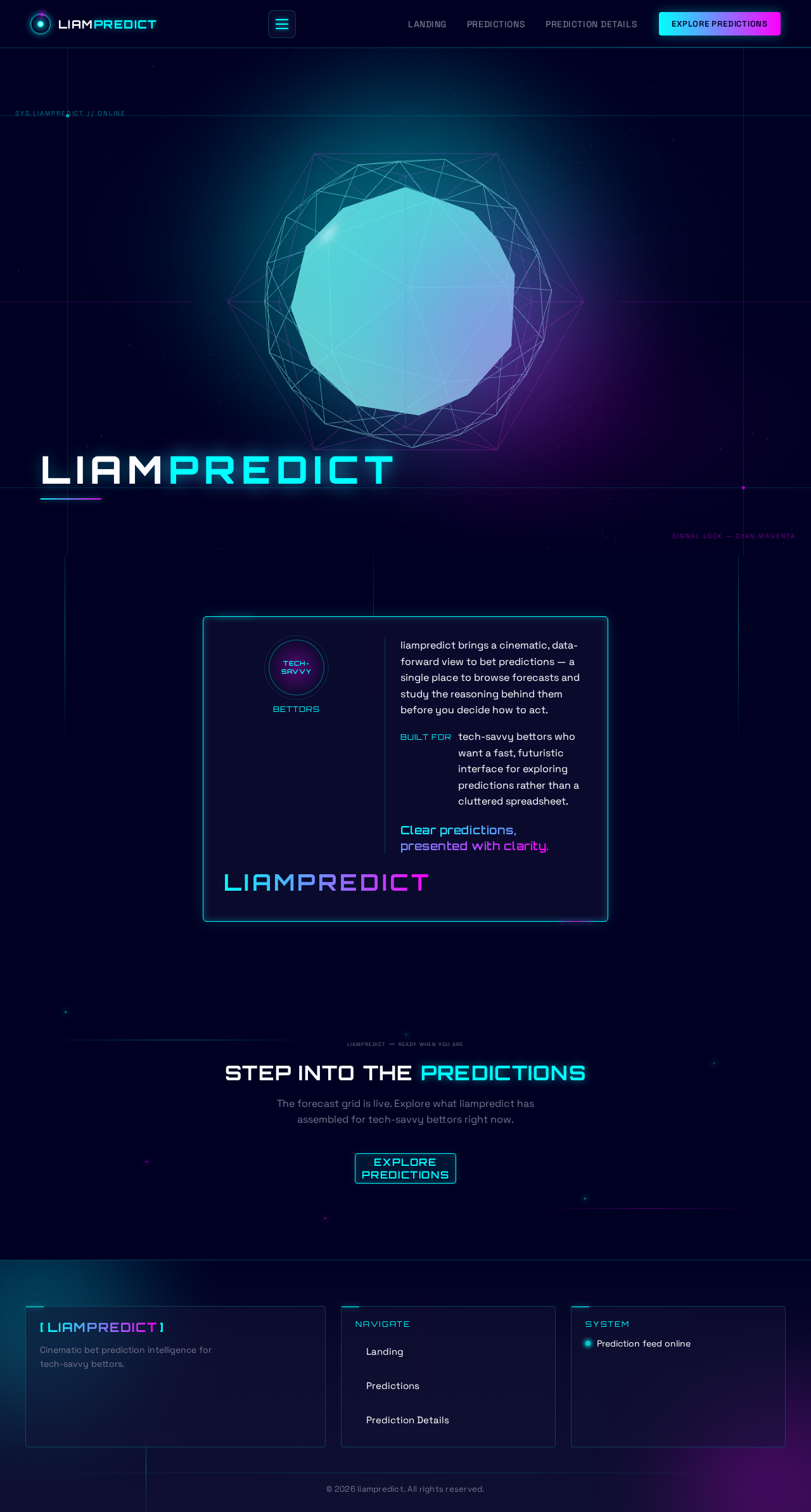
liampredict brings a cinematic, data-forward view to bet predictions — a single place to browse forecasts and study the reasoning behind them before you decide how to act.
tech-savvy bettors who want a fast, futuristic interface for exploring predictions rather than a cluttered spreadsheet.
Clear predictions, presented with clarity.
Step Into The Predictions
The forecast grid is live. Explore what liampredict has assembled for tech-savvy bettors right now.
liampredict
liampredict
liampredict brings a cinematic, data-forward view to bet predictions — a single place to browse forecasts and study the reasoning behind them before you decide how to act.
tech-savvy bettors who want a fast, futuristic interface for exploring predictions rather than a cluttered spreadsheet.
Clear predictions, presented with clarity.
Step Into The Predictions
The forecast grid is live. Explore what liampredict has assembled for tech-savvy bettors right now.
No comments yet. Be the first!