lemon-start
 Diya Trivedi
start a project to build a simple single page design of the todo application

Comments (0)
Sign in to leave a comment
System Requirements
System Requirements Document for lemon-start
1. Introduction
The lemon-start project aims to develop a simple single-page design for a todo application. This application is intended for individuals seeking a personal productivity tool that is warm, friendly, and approachable. The design will be inspired by Pablo Stanley's style, focusing on human-centric illustrations and a playful, inviting user interface.
2. System Overview
The lemon-start project will deliver a single-page todo application that allows users to manage their tasks efficiently. The application will be accessible without requiring user identity establishment, ensuring a seamless and immediate user experience. The todo application will retain the state of todo items for the active local-device session, providing continuity in task management.
2a. Product Interpretation and Delivery Boundary
The todo application is designed as a single-page interface, which serves as the public entry surface. The application will be accessible anonymously, allowing users to interact with the todo list without creating an account or logging in. The design will focus on simplicity and ease of use, with a warm and inviting aesthetic inspired by Pablo Stanley.
2b. Source Content Inventory
Not applicable as no content source directive was provided.
2c. Page Content and Component Coverage
Landing
-
Information/State
- Display of todo items
- Input field for adding new todo items
- State retention for active session
-
Primary Actions
- Add a new todo item
- Mark a todo item as complete
- Delete a todo item
-
Supporting Actions
- Edit an existing todo item
-
Domain Entities
- Todo item: includes title, completion status
-
Component Responsibilities
- Input field for new todo items
- List display of current todo items
- Interactive elements for marking, editing, and deleting items
-
States
- Loading: Initial load of the application
- Empty: No todo items present
- Success: Todo item added, edited, or deleted successfully
- Error: Failure to add, edit, or delete a todo item
- Recovery: Retry option for failed actions
3. Functional Requirements
- As a Todo User, I should be able to add a new todo item to the list, so that I can keep track of tasks I need to complete. (Provenance: explicit)
- As a Todo User, I should be able to mark a todo item as complete, so that I can visually distinguish completed tasks from pending ones. (Provenance: explicit)
- As a Todo User, I should be able to delete a todo item, so that I can remove tasks that are no longer needed. (Provenance: explicit)
- As a Todo User, I should be able to edit an existing todo item, so that I can update task details if necessary. (Provenance: explicit)
- As a Todo User, I should be able to access the todo application without logging in, so that I can start using it immediately. (Provenance: required_inference)
- As a Todo User, I should experience state retention for my todo items during an active session, so that I do not lose my task list while using the application. (Provenance: required_inference)
4. User Personas
- Todo User: An individual who uses the todo application to manage tasks on the single-page interface. Responsibilities include adding, editing, marking, and deleting todo items.
5. Core User Flows
-
Adding a Todo Item
- The Todo User opens the application.
- The user enters a task in the input field and submits it.
- The application displays the new task in the list.
- The user sees the task added successfully.
-
Marking a Todo Item as Complete
- The Todo User views the list of tasks.
- The user clicks on a checkbox or similar control next to a task.
- The application marks the task as complete, visually distinguishing it from incomplete tasks.
-
Deleting a Todo Item
- The Todo User views the list of tasks.
- The user selects a delete option for a specific task.
- The application removes the task from the list.
- The user sees the task deleted successfully.
-
Editing a Todo Item
- The Todo User views the list of tasks.
- The user selects an edit option for a specific task.
- The user modifies the task details and saves changes.
- The application updates the task in the list.
- The user sees the task updated successfully.
6. Visuals Colors and Theme
- Muse: Pablo Stanley
- Palette (light mode):
- Background: #FFFFFF
- Surface: #F8F9FA
- Text: #333333
- Primary: #FFCC00
- Accent: #FF6F61
- Muted: #D3D3D3
- Typography:
- Headings: Nunito — Bold, large sizes, friendly rounded shapes
- Body: DM Sans
- Scale: 1.333 modular, 48/32/24/18/16
- Shape Language: Big radii, pill-shaped buttons, blob and sticker shapes
- Layout: Single page with rounded cards and offset shadows, generous spacing
- Motion: Springy micro-interactions and playful hover states
7. Signature Design Concept
The landing page will feature a large, friendly illustration of a character interacting with a todo list, set against a warm yellow background. The primary call-to-action button will be in accent pink, inviting users to add their first task. Rounded cards with soft shadows will display each todo item, and pill-shaped buttons will animate playfully on hover, enhancing the user experience with a friendly and conversational tone.
8. Interaction Model & Motion Direction
- Interaction Model: Animated
- Motion Tempo: Expressive
- Hero Dimensionality: Layered_2d
- Landing Hero Motion Brief:
- Focal Subject: A character using a todo list
- Input→Transformation→Outcome: User adds a task → Task appears with a playful animation → Task is integrated into the list
- Motion Vocabulary: Springy, playful animations with gentle transitions
- Composed First Frame: Character illustration with an empty todo list and a prominent CTA button
- Reduced-Motion State: Static illustration with no animations
9. Non-Functional Requirements
- The application must load quickly to ensure a smooth user experience. (Provenance: required_inference)
- The design must be responsive to accommodate various screen sizes. (Provenance: required_inference)
10. Tech Stack
- Frontend: React
- State Management: Local state (React hooks)
- Styling: CSS-in-JS (Styled Components or Emotion)
- Build Tool: Webpack or Vite
11. Assumptions and Constraints
- The application will be a single-page design as per the explicit constraint.
- No user authentication or identity establishment is required.
- The application will retain state only for the active session on the local device.
12. Glossary
- Todo Item: A task or activity that a user wants to track and manage.
- Landing Page: The single-page interface where users interact with the todo application.
- CTA (Call to Action): A button or link that prompts the user to take a specific action, such as adding a new task.
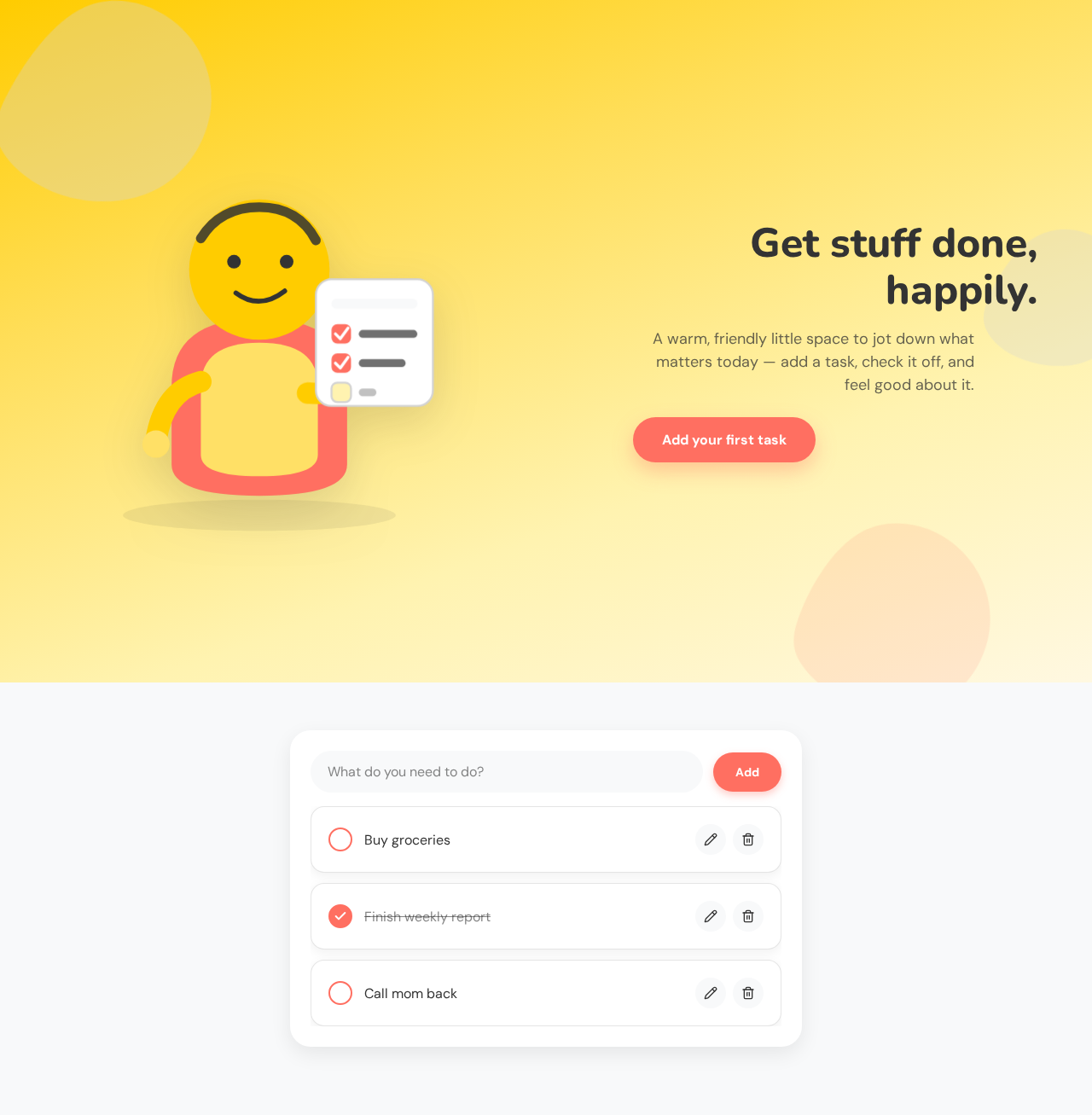
Get stuff done, happily.
A warm, friendly little space to jot down what matters today — add a task, check it off, and feel good about it.
Get stuff done, happily.
A warm, friendly little space to jot down what matters today — add a task, check it off, and feel good about it.
No comments yet. Be the first!