lemon-simple
 Diya Trivedi
start a project to build simple single page design of calculator

Comments (0)
Sign in to leave a comment
System Requirements
System Requirements Document for lemon-simple
1. Introduction
lemon-simple is a simple single-page calculator. The product intent, derived directly from the authoritative user requirement thread, is to present a working calculator as a single page design — one page, no additional pages, no navigation destinations. A visitor opens the page, enters numbers and arithmetic operations, and reads the computed result.
The audience is broad and design-aware: anyone who needs quick arithmetic and expects the tool to feel like a designed industrial object rather than a generic web form. The page must stay instantly usable while carrying a strong, confident, slightly playful point of view.
The product is deliberately minimal. It is a calculator on one page. It is not an application suite, not a multi-page tool, and not a platform.
2. System Overview
lemon-simple is delivered as a single custom page, Calculator, which is the anonymous public entry to the product. The page hosts the calculator chassis, its display panel, its keypad, and a footer metadata strip. There is no navigation, no second page, and no route beyond this one page.
Actors
- Calculator User (human, sole active persona) — opens the single page, enters numbers and operations, reads the computed result.
- The browser/client runtime executes the arithmetic and renders the display; it is a non-persona system actor, not a destination.
Accepted behavior
- A simple calculator presented on exactly one page.
- Number entry, arithmetic operations, and a displayed computed result on that page.
- The page is the anonymous public entry; no account, sign-in, or identity establishment is required or implied.
Ownership
- The Calculator page is owned by the application (first-party custom UI).
- All arithmetic evaluation happens in the client runtime supporting that page; there is no separate backend service required by the accepted requirements.
Narrow exclusions
- No additional pages, routes, or navigation destinations (explicit hard constraint).
- No account creation, sign-in, profiles, or identity continuity (not requested; not indispensable — the calculator holds no durable actor-specific state).
- No memory/history persistence, no saved calculations, no sharing, no export (not requested). The footer metadata strip is a visual label motif only and does not introduce these capabilities.
- No backend API, database, or deployment infrastructure beyond serving the single page.
2a. Product Interpretation and Delivery Boundary
The user asked for a simple single page design of a calculator. That is the whole current product: one page, one calculator, usable immediately on arrival. The page is public and anonymous — a visitor needs no account to calculate, and nothing about the accepted behavior requires the product to remember who they are between visits. The calculator's working state (current entry, pending operator, displayed result) lives for the duration of the visit on the page itself.
Everything beyond that single page is out of scope for the current delivery. There is no future-horizon requirement stated by the user; no deferred capabilities are recorded here, and none should be invented. The design direction (industrial, label-driven, hazard-striped, ink-black and safety-orange on concrete grey) is a presentation commitment layered on the same single page and adds no new behavior, page, or destination.
2b. Source Content Inventory
Not applicable — no reference directive with content_source authority was supplied.
2c. Page Content and Component Coverage
Calculator
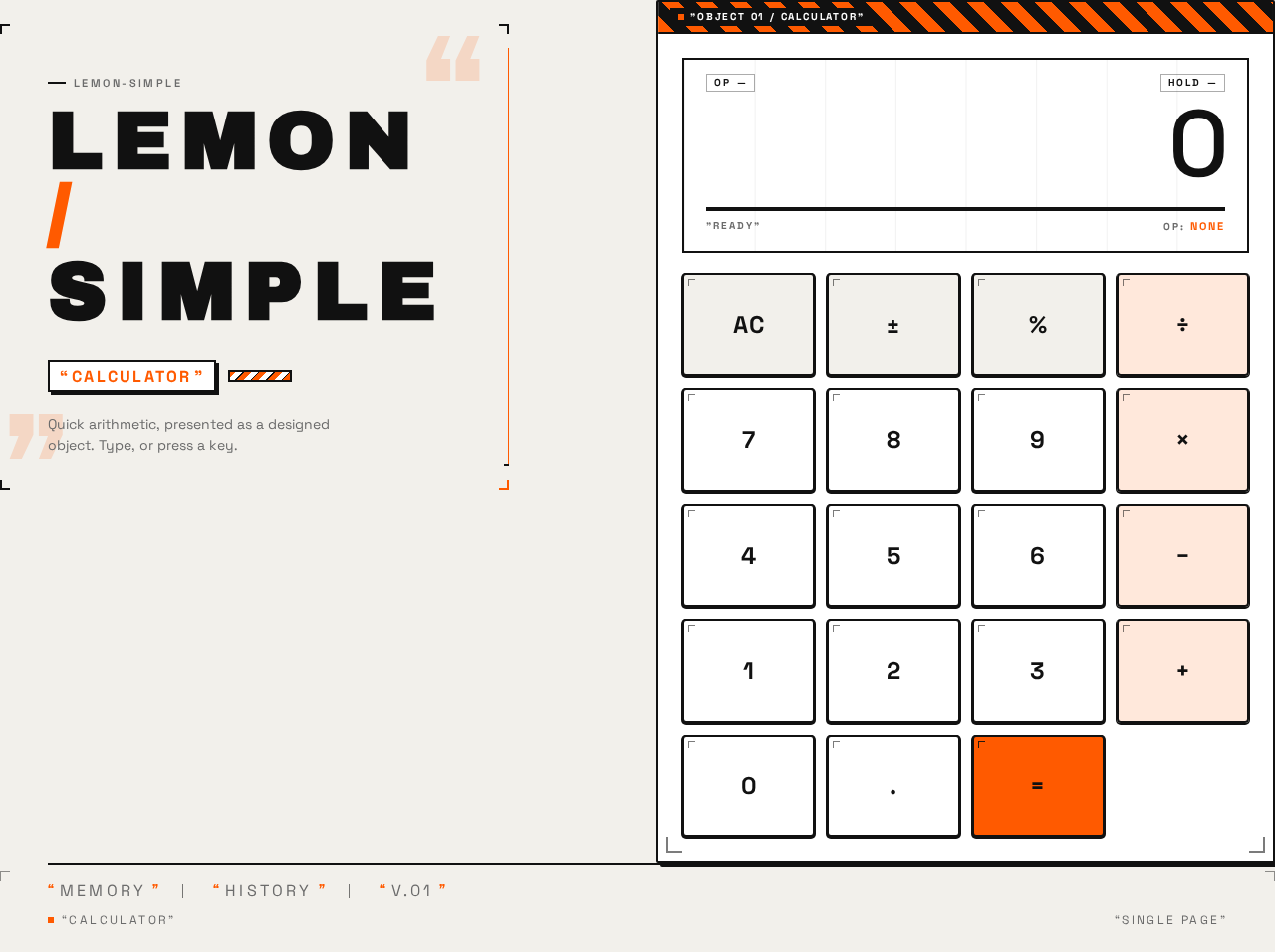
The sole page of the product. Anonymous public entry; no authentication gate. It presents the calculator as a physical industrial object on a concrete-grey field, with an editorial wordmark column and the calculator chassis.
Information and state
- Editorial header (left column at desktop, stacked above at mobile): oversized wordmark
LEMON / SIMPLEin Archivo Black, all caps, wide letterspacing; beneath it a small safety-orange tag reading"CALCULATOR"in quotation marks. - Calculator chassis: white slab, 2px black border, 1px offset shadow, topped by a 45° orange/black hazard-stripe band.
- Display panel: right-aligned tabular figures at
clamp(48px, 14vw, 120px); a thin orange underline doubles as the active-operator indicator. Shows the current entry or computed result. - Keypad: 4×5 grid of square-ish 4px-rounded keys with 1px offset shadow and a tiny corner tick; operator keys sit in a dedicated orange-tinted column; the equals key carries the safety-orange accent.
- Footer metadata strip: wide-tracked caps labels
"MEMORY""HISTORY""V.01"separated by vertical rules — decorative label motif only.
Primary actions
- Press digit keys to build the current number.
- Press an operator key (
+,−,×,÷) to select an operation; the active operator is indicated by the display underline. - Press the equals key to evaluate and display the result.
- Press the clear key to reset the current entry/calculation.
Supporting actions
- Hover/focus on a key reveals its small quoted label tag (e.g.
"+"). - Keyboard input of digits and operators mirrors key presses.
Domain entities
- Current entry (the number being typed).
- Pending operand and selected operator.
- Displayed result.
Component responsibilities
- Wordmark/tag header: identity and tone; no interaction.
- Display panel: renders current entry or result; reflects active operator.
- Keypad: captures digit, operator, equals, and clear input; provides press feedback.
- Footer strip: decorative metadata labels; no interaction.
States
- Loading: not applicable in a meaningful sense; the page renders its static chassis immediately. The one-time load animation (chassis slides up 12px, hazard stripe wipes left-to-right once) plays on first paint and is skipped under
prefers-reduced-motion. - Empty/initial: display shows
0; no operator active. - Active entry: display shows the digits typed so far.
- Operator selected: active operator indicated by the orange display underline; awaiting the second operand.
- Success: equals pressed; display shows the computed result.
- Error/recovery: division by zero or an undefined result shows a clear error indication in the display (e.g.
Error); pressing clear returns the calculator to the initial0state so the user can continue. Any malformed or incomplete expression is resolved by clear-and-re-enter.
3. Functional Requirements
FR-1 — Single-page calculator presentation (explicit) As a Calculator User, I should see a simple calculator presented on exactly one page, so that I can do arithmetic without navigating anywhere.
- Trigger: opening the product.
- Observable result: the Calculator page renders with wordmark, display, keypad, and footer strip; no navigation or links to other pages exist.
- Access: anonymous public entry; no sign-in.
- Failure/recovery: if the page fails to render, reloading the page restores the same single-page calculator.
- Continuation: the user proceeds to enter numbers.
FR-2 — Number entry (explicit) As a Calculator User, I should enter numbers using the keypad (or keyboard), so that I can build the operands of my calculation.
- Trigger: pressing digit keys.
- Observable result: the display updates to show the digits entered so far, right-aligned in tabular figures.
- Access: anonymous.
- Failure/recovery: pressing clear resets the entry to
0. - Continuation: the user selects an operator or presses equals.
FR-3 — Arithmetic operation selection (explicit)
As a Calculator User, I should select an arithmetic operation (+, −, ×, ÷), so that I can combine two numbers.
- Trigger: pressing an operator key.
- Observable result: the selected operator becomes active, indicated by the orange display underline; the first operand is retained.
- Access: anonymous.
- Failure/recovery: selecting a different operator replaces the active operator before the second operand is entered; clear resets the selection.
- Continuation: the user enters the second operand.
FR-4 — Compute and display result (explicit) As a Calculator User, I should press equals to compute and see the result, so that I get my answer on the same page.
- Trigger: pressing the equals key after entering operands and an operator.
- Observable result: the display shows the computed result in large tabular figures; the result becomes the current value for a subsequent operation.
- Access: anonymous.
- Failure/recovery: division by zero or an undefined result shows an error indication in the display; pressing clear returns to
0and the user can continue. - Continuation: the user may chain another operation from the result or clear and start again.
FR-5 — Clear/reset (required_inference) As a Calculator User, I should clear the current entry or calculation, so that I can recover from a mistake or an error and start fresh.
- Trigger: pressing the clear key.
- Observable result: the display returns to
0; no operator is active. - Access: anonymous.
- Failure/recovery: this is itself the recovery path for FR-2 and FR-4.
- Continuation: the user begins a new calculation.
FR-6 — Key press feedback (explicit, presentation) As a Calculator User, I should see immediate mechanical feedback when I press a key, so that the calculator feels responsive and physical.
- Trigger: pressing or activating a key.
- Observable result: 120–180ms press with a 2px translate and shadow collapse; operator keys flash orange for 80ms; display digits update with a quick vertical slide-fade; hover reveals a small quoted label tag.
- Access: anonymous.
- Failure/recovery: under
prefers-reduced-motion, all motion is disabled and the layout remains static and fully usable. - Continuation: normal use continues.
4. User Personas
Calculator User
Product context. A visitor who arrives at lemon-simple needing quick arithmetic. They may be design-aware and appreciate that the tool reads as a designed industrial object, but their primary need is speed and clarity: type numbers, pick an operation, get the answer. They arrive anonymously and expect to start calculating immediately.
Primary goal. Complete a calculation — enter numbers, choose an operation, and read the computed result — on one page, without navigating elsewhere or creating an account.
Distinct accepted responsibilities.
- Enter numbers via the keypad or keyboard.
- Select an arithmetic operation and see which one is active.
- Press equals to compute and read the result.
- Clear the entry or calculation to recover from a mistake or an error.
Relevant inputs and decisions. Which digits to enter; which operator to apply; when to evaluate; when to clear. The user decides when a calculation is complete and whether to chain another operation from the result.
Interactions with other participants. None — the Calculator User is the sole active human participant. The client runtime evaluates arithmetic on their behalf; there is no counterparty, recipient, or beneficiary whose state changes.
Observable success. The display shows the correct computed result in large tabular figures on the same page, with no navigation having occurred. Recovery from an error (e.g. division by zero) is immediate via clear.
What makes this role distinct. The role is defined by a single, self-contained, stateless interaction: the user is both initiator and sole beneficiary, and nothing durable is created or transferred. There is no second human role, no approval, and no handoff.
5. Core User Flows
Flow A — Perform a basic calculation
- The Calculator User opens lemon-simple. The Calculator page renders as the anonymous public entry: wordmark
LEMON / SIMPLEwith the"CALCULATOR"tag, the calculator chassis with its hazard-stripe top edge, the display showing0, and the 4×5 keypad. On load, the chassis slides up 12px and the hazard stripe wipes left-to-right once (skipped underprefers-reduced-motion). - The user presses digit keys to enter the first number. The display updates with a quick vertical slide-fade, showing the digits right-aligned in tabular figures.
- The user presses an operator key (e.g.
+). The operator becomes active, indicated by the orange display underline; the first operand is retained. - The user presses digit keys to enter the second number; the display shows it.
- The user presses equals. The display shows the computed result in large tabular figures. The result becomes the current value.
- Continuation: the user may press an operator to chain another calculation from the result, or press clear to return to
0and start fresh.
Flow B — Recover from an error
- The user is on the Calculator page with an active calculation.
- The user enters a division by zero (or an operation producing an undefined result) and presses equals.
- The display shows a clear error indication (e.g.
Error) instead of a number. - The user presses the clear key. The display returns to
0and no operator is active. - Continuation: the user begins a new calculation following Flow A.
Flow C — Correct a mistake mid-entry
- The user is on the Calculator page and has mistyped a number or selected the wrong operator.
- The user presses the clear key. The display returns to
0; any active operator is cleared. - Continuation: the user re-enters the calculation following Flow A.
6. Visuals, Colors and Theme
Muse and headline. Virgil Abloh — Remixed precision: a calculator as a labelled industrial object. The register is confident, slightly playful, and design-forward: a utilitarian calculator turned into a self-aware designed object through quoted labels, industrial references, hazard stripes, and exposed grids — without sacrificing instant usability.
Mode. Light mode only.
Color tokens (exact hex by role)
| Role | Hex | Use |
|---|---|---|
| Background | #F2F0EB | Concrete-grey paper ground |
| Surface | #FFFFFF | Calculator chassis |
| Text | #111111 | Type, key labels, display |
| Primary | #111111 | Ink black for primary elements |
| Accent | #FF5A00 | Equals key, hazard stripe, active operator, focus rings |
| Muted | #6B6B6B | Secondary metadata only |
No blue anywhere in the UI.
Typography
- Headings: Archivo Black — all caps, wide letterspacing
0.12em, heavy weight, used sparingly as label-like display. The wordmark and section labels read like industrial tags in quotation marks. - Body: Space Grotesk. Numbers in the display use Space Grotesk tabular figures at large scale.
- Scale: 1.333 modular — 56 / 42 / 32 / 24 / 18 / 16. Mobile display:
clamp(40px, 12vw, 96px)for the hero headline andclamp(48px, 14vw, 120px)for the calculator result.
Shape language. Hard-edged industrial rectangles with 2px black borders. Keys are square-ish 4px-rounded blocks with a 1px offset shadow that reads as a physical button. Hazard-stripe bands (45° orange/black) act as section dividers and frame the display. Exposed grid lines and label tags with small corner ticks. No soft blobs, no glass.
Layout. Single page, no navigation. Left-aligned editorial header at top: oversized wordmark LEMON/SIMPLE in Archivo Black with a small "CALCULATOR" tag beneath. The calculator sits as a physical object on the right two-thirds of a 12-column grid at desktop, full-width and centred at mobile. Above the keypad, a wide display panel with a hazard-stripe top edge and right-aligned tabular result. Below, a 4×5 key grid with operators in a distinct column. A thin footer strip of metadata labels ("MEMORY" "HISTORY" "V.01") in wide-tracked caps, separated by vertical rules.
Imagery. No photography. Visual interest comes from typography, hazard stripes, label tags, exposed grid ticks, and the calculator itself as a designed object. A faint concrete-paper texture may be used as a CSS background at very low opacity. Decorative quotation marks and corner registration marks frame the hero.
Readability constraint. Headlines, wordmarks, labels, numbers, and controls stay entirely inside the viewport and their container at 375px, 768px, and 1280px, wrapping or scaling (e.g. clamp(...)) to fit; no other element covers any part of them. Decoration may be cropped, bled, or overlapped as the direction asks, provided it covers no readable text or control.
Avoid. Blue or indigo anywhere; gradient-blob hero or glassmorphism; centred headline + subtext + rounded CTA button; identical hover-lift cards; Inter, Roboto, Arial, Helvetica, system-ui; soft pastel or candy colours; photography-heavy hero; playful bouncy easing or particle effects.
7. Signature Design Concept
"The object on the concrete." The first screen is not a centred SaaS hero. At desktop, a full-bleed concrete-grey field (#F2F0EB) holds an oversized, left-aligned wordmark LEMON / SIMPLE in Archivo Black at clamp(40px, 12vw, 96px), sitting above a small safety-orange "CALCULATOR" tag in quotation marks. A vertical orange rule separates this editorial left column from the object right column. To the right, the calculator chassis — a white slab with a 2px black border, 1px offset shadow, and a 45° orange/black hazard-stripe top edge — dominates the right two-thirds, its display showing a large tabular result at clamp(48px, 14vw, 120px) with a thin orange underline that doubles as the active-operator indicator. The keypad below is a 4×5 grid of labelled industrial buttons, each with a tiny corner tick and a quoted label tag revealed on hover, with operator keys in a dedicated orange-tinted column. A footer metadata strip of wide-tracked caps ("MEMORY" "HISTORY" "V.01") separated by vertical rules closes the composition. At mobile, the wordmark stacks above the calculator at full width. No gradient blobs, no centred button. The concept only recomposes the accepted content, states, and controls of the single Calculator page.
8. Interaction Model & Motion Direction
Interaction Model: Animated Motion Tempo: expressive Hero Dimensionality: flat
Landing Hero Motion Brief
- Focal subject: the calculator chassis as a physical industrial object on the concrete-grey field, with the oversized
LEMON / SIMPLEwordmark and"CALCULATOR"tag as its editorial counterweight. - Input → transformation → outcome thesis: on load, the chassis slides up 12px and the hazard stripe wipes left-to-right once, settling the object into place; thereafter, each key press produces a 120–180ms mechanical press (2px translate, shadow collapse), operator keys flash orange for 80ms, and display digits update with a quick vertical slide-fade — so the user's input reads as a physical actuation producing an immediate, legible outcome on the display.
- Motion vocabulary: snappy and mechanical — short, precise, physical; no bouncy easing, no particles.
- Composed first frame: concrete-grey field; left-aligned wordmark and orange tag; vertical orange rule; white chassis with hazard-stripe top edge and display showing
0; keypad at rest; footer strip. - Reduced-motion state: all motion disabled under
prefers-reduced-motion, leaving a static, fully usable layout — the chassis, display, and keypad render in their final positions with no load animation, press translation, flash, or slide-fade.
9. Non-Functional Requirements
- NFR-1 — Single-page constraint (explicit): The product must be a single page with no additional pages or navigation destinations. Rationale: explicit hard constraint in the authoritative user evidence.
- NFR-2 — Simplicity (explicit): The design must be a simple single-page calculator. Rationale: explicit user wording.
- NFR-3 — Immediate usability (required_inference): The calculator must be usable immediately on page load with no gate, sign-in, or setup, since the page is the anonymous public entry and holds no durable actor-specific state.
- NFR-4 — Responsive readability (explicit, design direction): Readable text and controls stay whole at 375px, 768px, and 1280px, wrapping or scaling to fit; no element covers any part of them.
- NFR-5 — Reduced motion (explicit, design direction): All motion is disabled under
prefers-reduced-motion, leaving a static, fully usable layout. - NFR-6 — Palette discipline (explicit, design direction): No blue or indigo anywhere in the UI; the palette is limited to the specified tokens.
- NFR-7 — Client-side arithmetic (required_inference): Arithmetic evaluation occurs in the client runtime supporting the single page; no backend service, database, or persistence is required by the accepted behavior.
10. Tech Stack
- Frontend: React (single-page application) rendering the Calculator page.
- Styling: CSS with the specified tokens, fonts (Archivo Black, Space Grotesk), and
clamp(...)responsive sizing. - Arithmetic: client-side JavaScript evaluation within the page.
- Storage: none required — the calculator is stateless across visits.
- Backend / deployment: none required beyond static hosting of the single page. No Docker, docker-compose, or Kubernetes is needed for the accepted requirements.
11. Assumptions and Constraints
Constraints (binding)
- The design must be a single page; no additional pages or navigation destinations (explicit).
- The product is a simple single-page calculator (explicit).
- No blue or indigo anywhere in the UI (design direction).
- Readable text and controls stay whole at 375px, 768px, and 1280px (design direction).
- All motion disabled under
prefers-reduced-motion(design direction).
Assumptions (narrow, labeled)
- [Assumption] The calculator supports the four basic arithmetic operations (
+,−,×,÷), equals, and clear, as the minimal set implied by "calculator" and the 4×5 key grid in the design direction. No scientific functions, memory storage, or history persistence are included. - [Assumption] The footer labels
"MEMORY""HISTORY""V.01"are decorative label motifs per the design direction and do not introduce memory or history capabilities. - [Assumption] Keyboard input mirrors keypad input as a usability convenience; it introduces no new capability.
- [Assumption] No identity, account, or persistence is required, since the accepted behavior creates no durable actor-specific state.
12. Glossary
- Calculator page — the sole page of lemon-simple; the anonymous public entry hosting the calculator.
- Chassis — the white slab with 2px black border and hazard-stripe top edge that frames the calculator.
- Display panel — the wide panel above the keypad showing the current entry or computed result in large tabular figures, with an orange underline indicating the active operator.
- Keypad — the 4×5 grid of industrial-style keys for digits, operators, equals, and clear.
- Hazard stripe — the 45° orange/black band used as a section divider and display frame.
- Label tag — the small quoted label (e.g.
"+") revealed on key hover, part of the industrial label motif. - Active operator — the arithmetic operation currently selected, indicated by the orange display underline.
- Calculator User — the sole active human persona; a visitor performing quick arithmetic on the single page.
lemon-simple
LemonSimple
Quick arithmetic, presented as a designed object. Type, or press a key.
lemon-simple
LemonSimple
Quick arithmetic, presented as a designed object. Type, or press a key.
No comments yet. Be the first!