lemon-phone
 Joe Holland
On an app built so that I can tilt my phone and scroll down the screen on news articles or anything with a long screen like Facebook for example and then in the infinity feet you know something's where I tilt my phone and it Scrolls down or up
Comments (0)
Sign in to leave a comment
System Requirements
System Requirements Document (SRD) for Tilt Scroll
1. Introduction
The Tilt Scroll project is an innovative application designed to revolutionize how users interact with their mobile devices by introducing tilt-based scrolling functionality. This app will allow users to scroll through content on their screens by simply tilting their phones, offering a seamless and intuitive experience. The primary goal is to create a functional prototype to test and refine the tilt-scroll mechanics, ensuring a smooth and user-friendly experience.
This document outlines the system requirements for the Tilt Scroll project, including functional and non-functional requirements, user personas, design concepts, and technical specifications. The focus is on delivering a prototype that prioritizes the core tilt-scroll functionality while remaining flexible for future enhancements.
2. System Overview
The Tilt Scroll app is a standalone application that enables users to scroll through their device screens by tilting their phones. The app will leverage the device's accelerometer and gyroscope to detect tilt angles and translate them into scrolling actions. Users will have access to a settings dashboard to customize their experience, including adjusting tilt sensitivity, scroll speed, and toggling the feature on or off.
The app will be designed with a modular architecture to allow for future updates, including potential integration with other apps or features. The prototype will focus on functionality first, ensuring the tilt-scroll mechanism works seamlessly before expanding to additional features.
3. Functional Requirements
- As a User, I should be able to enable or disable the tilt-scroll feature through a settings dashboard.
- As a User, I should be able to adjust the tilt sensitivity to control how much tilt is required to trigger scrolling.
- As a User, I should be able to adjust the scroll speed to suit my preferences.
- As a User, I should be able to reset all settings to their default values with a single click.
- As a User, I should see a movable on-screen icon that I can drag to any position on the screen.
- As a User, I should be able to use the on-screen icon to start and stop scrolling manually.
- As a User, I should be able to test the tilt-scroll functionality in real-time to ensure it meets my needs.
4. User Personas
Primary User
- Name: Everyday User
- Description: A smartphone user who frequently browses social media, reads articles, or consumes content on their device. They value convenience and are looking for innovative ways to enhance their user experience.
- Goals: Simplify scrolling, reduce hand fatigue, and improve accessibility.
- Pain Points: Struggles with repetitive scrolling motions and desires a hands-free solution.
Secondary User
- Name: Tech Enthusiast
- Description: A user who enjoys experimenting with new technologies and apps, looking for unique features that enhance their device's functionality.
- Goals: Discover innovative tools and share them with others.
- Pain Points: Frustrated by apps that lack intuitive design or fail to deliver on their promises.
5. Visuals Colors and Theme
The Tilt Scroll app will feature a clean and modern color palette to reflect its innovative and user-friendly nature. The colors are designed to be visually appealing while maintaining accessibility.
- Background: #E8F6F8 (Soft Aqua Blue)
- Surface: #FFFFFF (Pure White)
- Text: #2C3E50 (Dark Slate)
- Accent: #00BFFF (Bright Sky Blue)
- Muted Tones: #A9D0F5 (Light Blue Mist)
6. Signature Design Concept
Tilt-Responsive Interface
The Tilt Scroll app will feature a dynamic home screen that visually responds to the tilt of the device. As users tilt their phones, the background will subtly shift, creating a sense of depth and movement. This visual feedback will reinforce the tilt-scroll functionality and make the app feel alive and responsive.
The movable on-screen icon will appear as a glowing orb, which changes color based on the tilt angle. Dragging the icon will leave a faint trail, adding a playful touch. Tapping the icon will trigger a smooth animation, such as the orb "pulsing" to indicate activation or deactivation of the scroll feature.
Micro-interactions will include:
- A gentle vibration when the tilt-scroll is toggled on or off.
- A ripple effect around the orb when it is moved or tapped.
- A subtle gradient shift in the background when the app is in use, transitioning between aqua blues and whites to create a calming, immersive experience.
This design concept will make the Tilt Scroll app instantly memorable and enjoyable to use.
7. Non-Functional Requirements
- The app must operate smoothly on Android devices running Android 9.0 (Pie) or higher.
- The app should have a modular architecture to allow for future updates and feature additions.
- The app must be lightweight and optimized for minimal battery consumption.
- The app should provide a seamless user experience with no noticeable lag or performance issues.
- The app must comply with accessibility standards, including support for screen readers and high-contrast modes.
8. Tech Stack
Frontend
- React Native (for cross-platform compatibility in the future)
Backend
- Python
- FastAPI
Database
- MySQL (using Alembic for migrations)
AI Tools
- None required for the prototype phase.
Local Orchestration
- Docker
- Docker Compose
9. Assumptions and Constraints
- The app will initially target Android devices, with plans for iOS compatibility in the future.
- The tilt-scroll functionality will rely on the device's built-in accelerometer and gyroscope.
- The app will not require deep integration with the operating system, ensuring compatibility across various Android devices.
- The app will be designed to function independently as a standalone application.
10. Glossary
- Tilt-Scroll: A feature that allows users to scroll through content by tilting their device.
- Movable Icon: An on-screen element that can be dragged to any position and used to control scrolling features.
- Settings Dashboard: A user interface where users can customize app settings, such as tilt sensitivity and scroll speed.
- Prototype: An early version of the app designed to test core functionality and gather feedback for refinement.
This document outlines the core requirements and design for the Tilt Scroll app. The next step is to begin development of the prototype, focusing on the tilt-scroll functionality and basic settings. Once the prototype is ready, you’ll be able to test it and provide feedback for further refinements. Let’s get started!
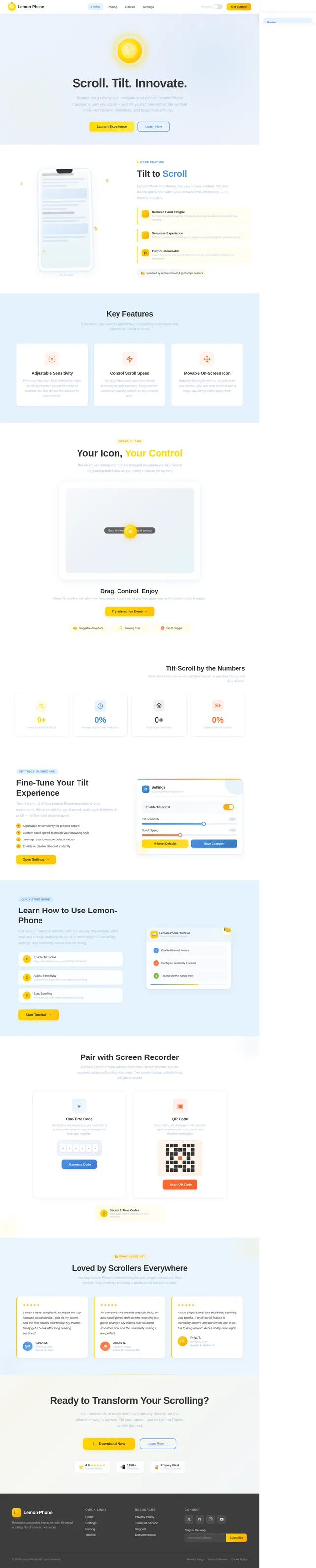
Scroll. Tilt. Innovate.
Experience a new way to navigate your device. Lemon-Phone transforms how you scroll — just tilt your phone and let the content flow. Hands-free, seamless, and delightfully intuitive.
Tilt to Scroll
Lemon-Phone transforms how you browse content. Tilt your device gently and watch your screen scroll effortlessly — no thumbs required.
Key Features
Everything you need to transform your scrolling experience with intuitive tilt-based controls.
Adjustable Sensitivity
Fine-tune how much tilt is needed to trigger scrolling. Whether you prefer subtle or dramatic tilts, find the perfect balance for your comfort.
Control Scroll Speed
Set your ideal scroll pace from gentle browsing to rapid scanning. Enjoy smooth, consistent scrolling tailored to your reading style.
Movable On-Screen Icon
Drag the glowing lemon icon anywhere on your screen. Start and stop scrolling with a single tap, always within easy reach.
Your Icon, Your Control
The on-screen lemon icon can be dragged anywhere you like. Watch the glowing trail follow as you move it across the screen.
Drag. Control. Enjoy.
Place the scrolling icon wherever feels natural. It stays out of your way while keeping full control at your fingertips.
Tilt-Scroll by the Numbers
Real metrics from real users who transformed the way they interact with their devices.
0+
Users Enabled Tilt-Scroll
0%
Average Scroll Time Reduction
0+
Auto-Scroll Sessions
0%
Battery Efficiency Gain
Fine-Tune Your Tilt Experience
Take full control of how Lemon-Phone responds to your movements. Adjust sensitivity, scroll speed, and toggle features on or off — all from one intuitive panel.
- ✓Adjustable tilt sensitivity for precise control
- ✓Custom scroll speed to match your browsing style
- ✓One-tap reset to restore default values
- ✓Enable or disable tilt-scroll instantly
Learn How to Use Lemon-Phone
Get up and running in minutes with our step-by-step tutorial. We'll walk you through enabling tilt-scroll, customizing your sensitivity settings, and mastering hands-free browsing.
Pair with Screen Recorder
Connect Lemon-Phone with the companion screen recorder app for seamless auto-scroll during recordings. Two simple pairing methods keep everything secure.
One-Time Code
Generate a unique pairing code and enter it in the screen recorder app to securely link both apps together.
QR Code
Scan a QR code displayed in the recorder app to instantly pair. Fast, visual, and effortless connection.
Secure 1-Time Codes
Each code expires after use for your protection
Loved by Scrollers Everywhere
See how Lemon-Phone is transforming the way people interact with their devices, from everyday browsing to professional content creation.
Lemon-Phone completely changed the way I browse social media. I just tilt my phone and the feed scrolls effortlessly. My thumbs finally get a break after long reading sessions!
As someone who records tutorials daily, the auto-scroll paired with screen recording is a game-changer. My videos look so much smoother now and the sensitivity settings are perfect.
I have carpal tunnel and traditional scrolling was painful. The tilt-scroll feature is incredibly intuitive and the lemon icon is so fun to drag around. Accessibility done right!
Ready to Transform Your Scrolling?
Join thousands of users who have already discovered the effortless way to browse. Tilt your phone, and let Lemon-Phone handle the rest.
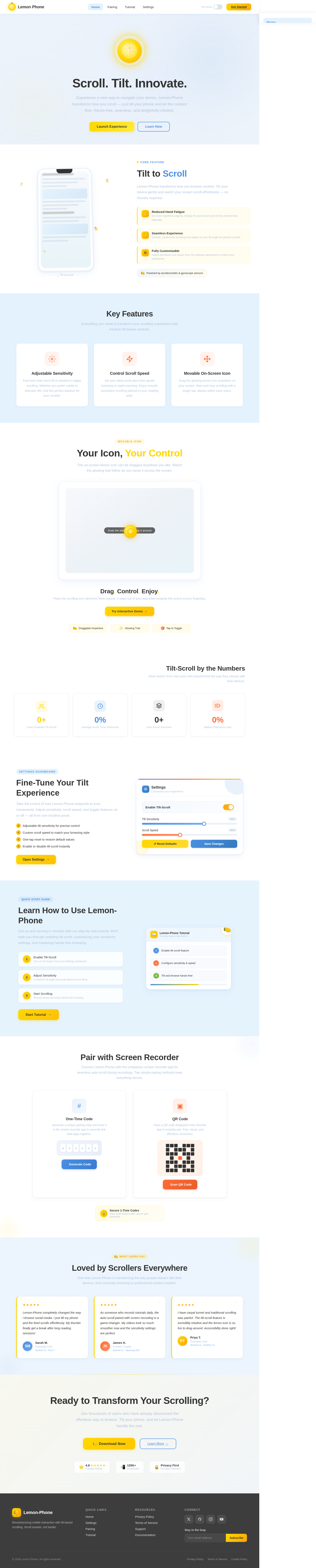
Scroll. Tilt. Innovate.
Experience a new way to navigate your device. Lemon-Phone transforms how you scroll — just tilt your phone and let the content flow. Hands-free, seamless, and delightfully intuitive.
Tilt to Scroll
Lemon-Phone transforms how you browse content. Tilt your device gently and watch your screen scroll effortlessly — no thumbs required.
Key Features
Everything you need to transform your scrolling experience with intuitive tilt-based controls.
Adjustable Sensitivity
Fine-tune how much tilt is needed to trigger scrolling. Whether you prefer subtle or dramatic tilts, find the perfect balance for your comfort.
Control Scroll Speed
Set your ideal scroll pace from gentle browsing to rapid scanning. Enjoy smooth, consistent scrolling tailored to your reading style.
Movable On-Screen Icon
Drag the glowing lemon icon anywhere on your screen. Start and stop scrolling with a single tap, always within easy reach.
Your Icon, Your Control
The on-screen lemon icon can be dragged anywhere you like. Watch the glowing trail follow as you move it across the screen.
Drag. Control. Enjoy.
Place the scrolling icon wherever feels natural. It stays out of your way while keeping full control at your fingertips.
Tilt-Scroll by the Numbers
Real metrics from real users who transformed the way they interact with their devices.
0+
Users Enabled Tilt-Scroll
0%
Average Scroll Time Reduction
0+
Auto-Scroll Sessions
0%
Battery Efficiency Gain
Fine-Tune Your Tilt Experience
Take full control of how Lemon-Phone responds to your movements. Adjust sensitivity, scroll speed, and toggle features on or off — all from one intuitive panel.
- ✓Adjustable tilt sensitivity for precise control
- ✓Custom scroll speed to match your browsing style
- ✓One-tap reset to restore default values
- ✓Enable or disable tilt-scroll instantly
Learn How to Use Lemon-Phone
Get up and running in minutes with our step-by-step tutorial. We'll walk you through enabling tilt-scroll, customizing your sensitivity settings, and mastering hands-free browsing.
Pair with Screen Recorder
Connect Lemon-Phone with the companion screen recorder app for seamless auto-scroll during recordings. Two simple pairing methods keep everything secure.
One-Time Code
Generate a unique pairing code and enter it in the screen recorder app to securely link both apps together.
QR Code
Scan a QR code displayed in the recorder app to instantly pair. Fast, visual, and effortless connection.
Secure 1-Time Codes
Each code expires after use for your protection
Loved by Scrollers Everywhere
See how Lemon-Phone is transforming the way people interact with their devices, from everyday browsing to professional content creation.
Lemon-Phone completely changed the way I browse social media. I just tilt my phone and the feed scrolls effortlessly. My thumbs finally get a break after long reading sessions!
As someone who records tutorials daily, the auto-scroll paired with screen recording is a game-changer. My videos look so much smoother now and the sensitivity settings are perfect.
I have carpal tunnel and traditional scrolling was painful. The tilt-scroll feature is incredibly intuitive and the lemon icon is so fun to drag around. Accessibility done right!
Ready to Transform Your Scrolling?
Join thousands of users who have already discovered the effortless way to browse. Tilt your phone, and let Lemon-Phone handle the rest.
No comments yet. Be the first!