lemon-chatbot
 Ritesh Kurani
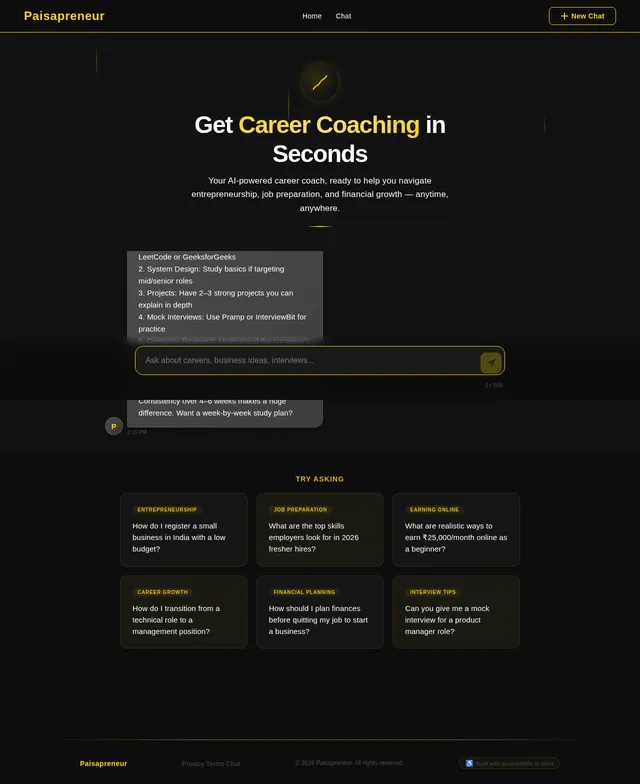
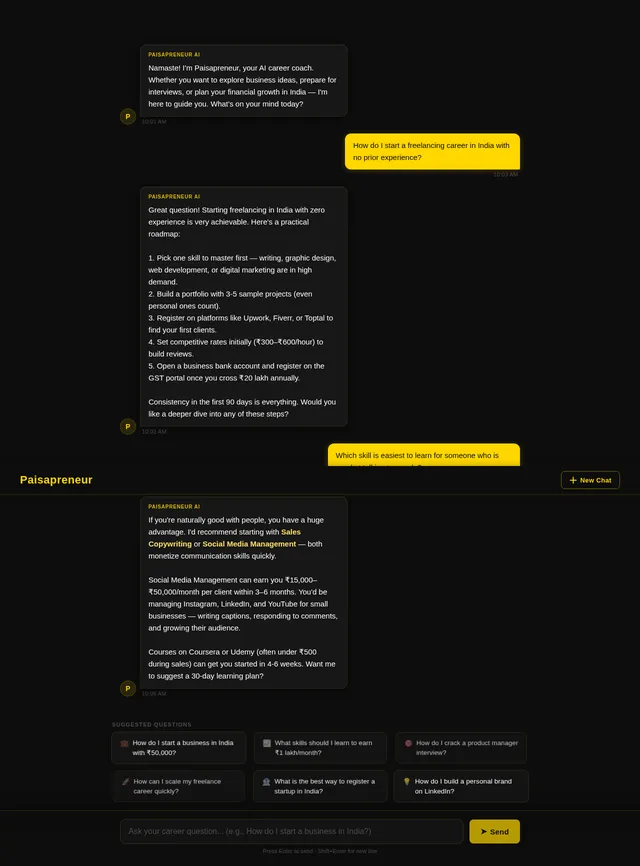
Build a mobile-first AI career coaching chatbot web app called "Paisapreneur AI Coach". Dark theme with gold (#FFD700) and black (#0D0D0D) color scheme. Features: 1) Chat interface where user types a question and gets AI coaching replies 2) Suggested quick questions at the bottom like "How to start a business in India?", "Prepare me for an accounting interview", "How to earn ₹50,000/month online" 3) A top navbar with logo text "Paisapreneur" in gold 4) User messages on right in gold bubble, AI replies on left in dark grey bubble 5) A clean "New Chat" button top right 6) Mobile responsive, works on 375px screen width. Use modern fonts, smooth animations on message appear. No login screen needed.
Comments (0)
Sign in to leave a comment
System Requirements
System Requirements Document (SRD)
Project Name: lemon-chatbot
1. Introduction
The lemon-chatbot project aims to deliver a mobile-first AI-powered career coaching chatbot web application tailored for users in India. The chatbot will provide actionable advice and coaching on career-related topics, focusing on accessibility, simplicity, and responsiveness. This document outlines the system requirements for the initial phase of development, emphasizing standalone sessions without user accounts or conversation history.
This SRD has been prepared for Ritesh Kurani, based in India, and reflects locale-specific considerations such as currency (₹), timezone (IST), and cultural relevance in career coaching topics.
2. System Overview
The lemon-chatbot system is designed to provide users with real-time AI coaching on career-related queries. The chatbot will feature a clean, intuitive interface optimized for mobile devices, ensuring seamless interaction and accessibility. Users will be able to ask questions, receive AI-generated coaching replies, and explore suggested quick questions for inspiration.
Key attributes of the system include:
- Mobile-first design, responsive to screen widths as small as 375px.
- A standalone session model where conversations are not saved or persisted.
- A premium aesthetic with a dark theme and gold accents to convey ambition and quality.
- Smooth animations for message interactions to enhance user experience.
3. Functional Requirements
User Story Points:
- As a User, I should be able to type a question in the chat interface and receive AI coaching replies.
- As a User, I should see suggested quick questions at the bottom of the chat interface for inspiration.
- As a User, I should see a top navbar with the logo text "Paisapreneur" displayed in gold.
- As a User, I should see my messages displayed on the right in gold bubbles and AI replies displayed on the left in dark grey bubbles.
- As a User, I should be able to click a "New Chat" button at the top right to start a fresh session.
- As a User, I should experience smooth animations when messages appear.
- As a User, I should be able to use the chatbot seamlessly on mobile devices with a screen width of 375px or larger.
4. User Personas
1. Career Seeker
- Description: Individuals looking for actionable advice on career growth, entrepreneurship, or job preparation.
- Goals: Obtain quick, reliable coaching on topics like starting a business, preparing for interviews, or earning income online.
- Pain Points: Lack of accessible, personalized career advice; difficulty navigating complex career paths.
2. Aspiring Entrepreneur
- Description: Users interested in starting or scaling a business in India.
- Goals: Learn about business strategies, legal requirements, and financial planning.
- Pain Points: Limited access to affordable and practical business coaching.
5. Visuals Colors and Theme
Color Palette:
- Background: #0D0D0D (Black)
- Surface: #1A1A1A (Dark Grey)
- Text: #FFFFFF (White)
- Accent: #FFD700 (Gold)
- Muted Tones: #4D4D4D (Muted Grey)
Theme Description:
The dark theme with gold accents creates a premium, ambitious aesthetic. Gold symbolizes success and wealth, while black conveys sophistication and focus. The muted tones ensure readability and balance across the interface.
6. Signature Design Concept
Concept: Interactive Gold Thread Animation
The homepage will feature a dynamic "gold thread" animation that visually connects the chatbot interface elements. When users type a question, a glowing gold thread will emerge from the input box, weaving across the screen to deliver the AI reply in a bubble. Suggested quick questions will pulse subtly in gold, inviting interaction.
Details:
- Homepage Animation: The gold thread will animate smoothly, creating a sense of connection and flow between user input and AI responses.
- Micro-Interactions: Hovering over suggested questions will cause them to glow brighter momentarily.
- Transitions: Messages will fade in with a slight bounce effect, enhancing the premium feel.
- Color Shifts: The background will subtly darken when the user starts typing, focusing attention on the chat interface.
This design ensures the chatbot feels alive and engaging, leaving a lasting impression on users.
7. Non-Functional Requirements
- Performance: The chatbot must respond to user queries within 2 seconds.
- Scalability: The system should handle up to 10,000 concurrent users without degradation.
- Accessibility: Ensure compliance with WCAG 2.1 standards for accessibility.
- Security: Protect user interactions with HTTPS encryption.
- Localization: Default language is English, with support for Indian career contexts.
8. Tech Stack
Frontend:
- React for Web
- React Native for mobile app
Backend:
- Python
- FastAPI
Database:
- MySQL or MariaDB (using Alembic for migrations)
AI Models:
- GPT 5.4 for user-friendly responses
- Claude 4.6 Opas for academic or coding work
- Gemini 3.1 Pro for friendly responses
AI Tools:
- Litellm for LLM Routing
- Langchain
Local Orchestration:
- Docker
- docker-compose
Server-Side Orchestration:
- Kubernetes
9. Assumptions and Constraints
Assumptions:
- Users will primarily access the chatbot via mobile devices.
- Each session is standalone, with no persistence or user account features in the current phase.
- The chatbot will focus on career coaching topics relevant to the Indian context.
Constraints:
- The system must be optimized for screen widths as small as 375px.
- No conversation history or save functionality is required in this phase.
10. Glossary
- AI Coaching: Automated advice and guidance provided by artificial intelligence models.
- Standalone Session: A single-use interaction where no data is saved or persisted beyond the session.
- WCAG 2.1: Web Content Accessibility Guidelines, version 2.1, for ensuring accessibility.
- Responsive Design: A design approach that ensures usability across various screen sizes and devices.
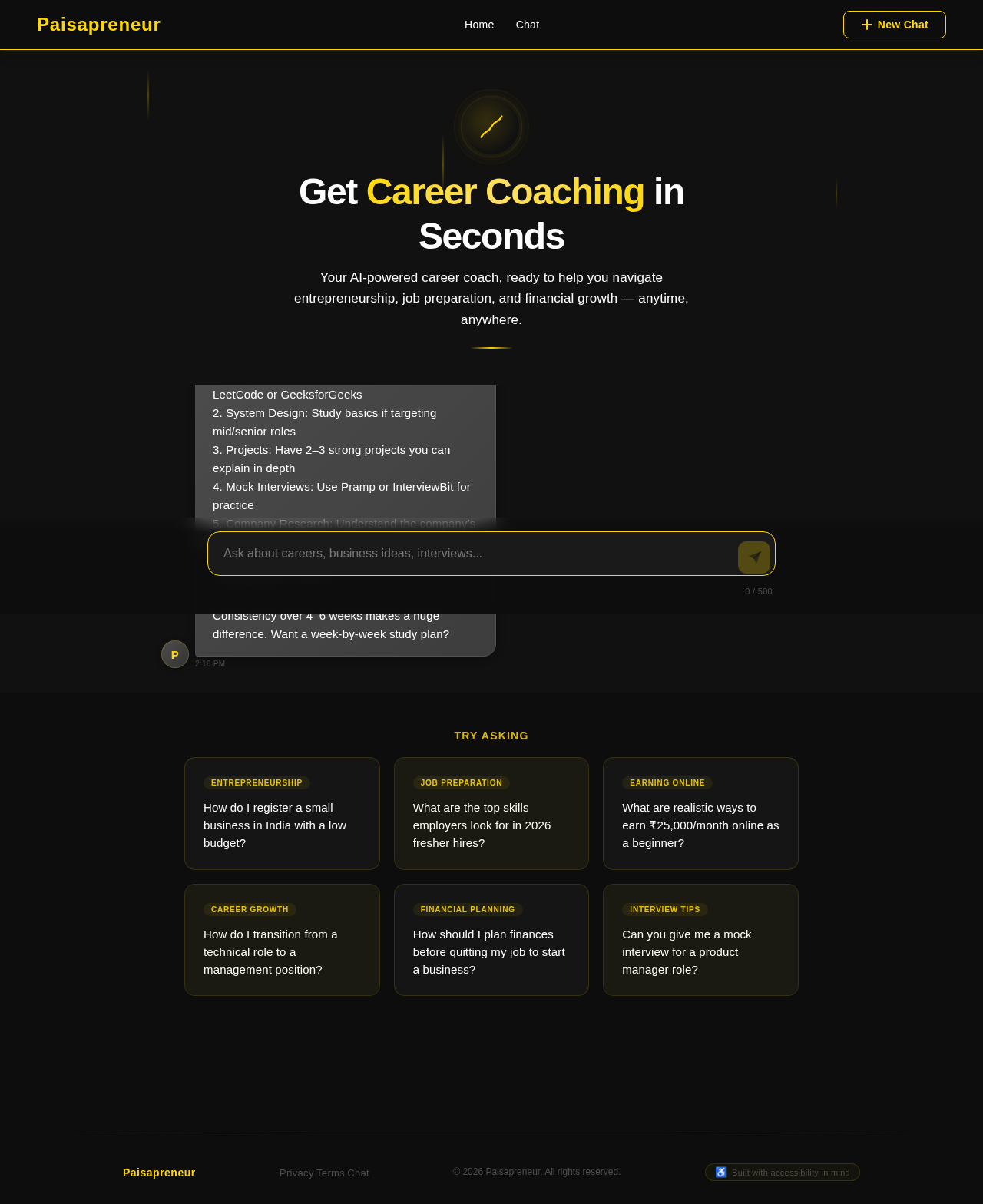
Get Career Coaching in Seconds
Your AI-powered career coach, ready to help you navigate entrepreneurship, job preparation, and financial growth — anytime, anywhere.
1. Identify a skill or service you can offer (freelancing, tutoring, reselling)
2. Register as a sole proprietor — it costs under ₹500
3. Start with digital tools: a free website, social media presence, and UPI payments
4. Keep overhead minimal by working from home initially
5. Reinvest early profits to grow gradually
Would you like me to dive deeper into any of these steps?
• Freelancing: Upwork, Fiverr, Freelancer.in
• Content Creation: YouTube, Instagram, blogging
• E-commerce: Meesho, Amazon Seller, Shopify
• Teaching: Unacademy, Vedantu, Chegg
• Micro-tasks: Swagbucks, Amazon MTurk
Your best fit depends on your skills and available time. What area interests you most?
1. DSA Practice: Solve 150–200 problems on LeetCode or GeeksforGeeks
2. System Design: Study basics if targeting mid/senior roles
3. Projects: Have 2–3 strong projects you can explain in depth
4. Mock Interviews: Use Pramp or InterviewBit for practice
5. Company Research: Understand the company’s tech stack and recent news
6. Soft Skills: Prepare your “tell me about yourself” and behavioral answers
Consistency over 4–6 weeks makes a huge difference. Want a week-by-week study plan?
Try asking
How do I register a small business in India with a low budget? →
What are the top skills employers look for in 2026 fresher hires? →
What are realistic ways to earn ₹25,000/month online as a beginner? →
How do I transition from a technical role to a management position? →
How should I plan finances before quitting my job to start a business? →
Can you give me a mock interview for a product manager role? →
No comments yet. Be the first!