lemon-app
 Omri Carmi
I want an app that starts a timer for you to see how much time you have left to reach a protected area when there is an alarm based on your location.
Comments (0)
Sign in to leave a comment
System Requirements
System Requirements Document (SRD) for Lemon-App
1. Introduction
Welcome to the System Requirements Document (SRD) for Lemon-App, a location-based timer application designed to enhance safety during emergency scenarios. This document outlines the functional and non-functional requirements, design concepts, and technical specifications for the development of Lemon-App.
The app is tailored to meet the needs of users in Israel (IL), considering local contexts such as timezone (Israel Standard Time), currency (ILS), and emergency preparedness protocols. Lemon-App aims to provide users with a reliable tool to track the time left to reach a designated protected area during alarms, ensuring safety and peace of mind. Inspired by the clarity and authority of Home Front Command, the app emphasizes simplicity, calmness, and user-friendliness.
2. System Overview
Lemon-App is a mobile application that combines real-time location tracking with time management to assist users during emergency situations. The app allows users to:
- Define a protected area as a location.
- Start a timer during an alarm based on their current location.
- Monitor the remaining time to reach safety.
- Customize notifications with options for sound, vibration, or visual alerts.
- Re-run specific functionalities for regeneration based on user-triggered actions.
The application will leverage GPS technology, intuitive user interfaces, and robust backend systems to deliver a seamless experience. It will also integrate with APIs for location services and emergency notifications, ensuring accurate and timely information. The design will prioritize clarity and calmness, avoiding stress-inducing elements while maintaining urgency where necessary.
3. Functional Requirements
User Stories:
- As a User, I should be able to set a protected area as a location.
- As a User, I should be able to start a timer during an alarm based on my current location.
- As a User, I should be able to track how much time I have left to reach the protected area.
- As a User, I should receive notifications when I am nearing the protected area or running out of time.
- As a User, I should be able to view my location on a map relative to the protected area.
- As a User, I should be able to customize the alarm settings (e.g., sound, vibration).
- As a User, I should be able to access historical data of past alarms and timers.
- As a User, I should be able to share my location and timer status with emergency contacts.
- As Admin, I should be able to pre-approve the application via an API supervisor.
- As a User, I should be able to selectively re-run specific functionalities to regenerate data or settings.
- As a User, I should be able to choose notification types (e.g., main-screen pop-ups or top-screen alerts).
- As a User, I should be able to enable or disable sound and vibration for notifications.
- As a User, I should be able to change the app language between Hebrew and English.
4. User Personas
Persona 1: Everyday User
- Description: Individuals who want to ensure their safety during emergencies, such as natural disasters or workplace safety drills.
- Goals: Quickly set a protected area and monitor time left during alarms.
- Pain Points: Lack of real-time location tracking and difficulty estimating time to safety.
Persona 2: Admin
- Description: Supervisors or emergency coordinators responsible for managing app functionality and approving API integrations.
- Goals: Ensure the app meets safety standards and integrates seamlessly with external systems.
- Pain Points: Complexity in managing API approvals and ensuring system reliability.
5. Visuals Colors and Theme
Color Palette:
- Background:
#F3F8FC(Gentle Sky Blue) - Surface:
#E6EDF2(Soft Glacier Gray) - Text:
#1A1D2E(Deep Midnight Blue) - Accent:
#FFD700(Bright Lemon Yellow) - Muted Tones:
#A3A3A3(Neutral Calm Gray)
Theme:
The Lemon-App will feature a calming yet authoritative aesthetic, inspired by Home Front Command. The colors are chosen to evoke trust, clarity, and focus during critical moments. The design will avoid stress-inducing elements, focusing instead on reassuring visuals and intuitive navigation.
6. Signature Design Concept
Concept: Emergency Pathway Visualization
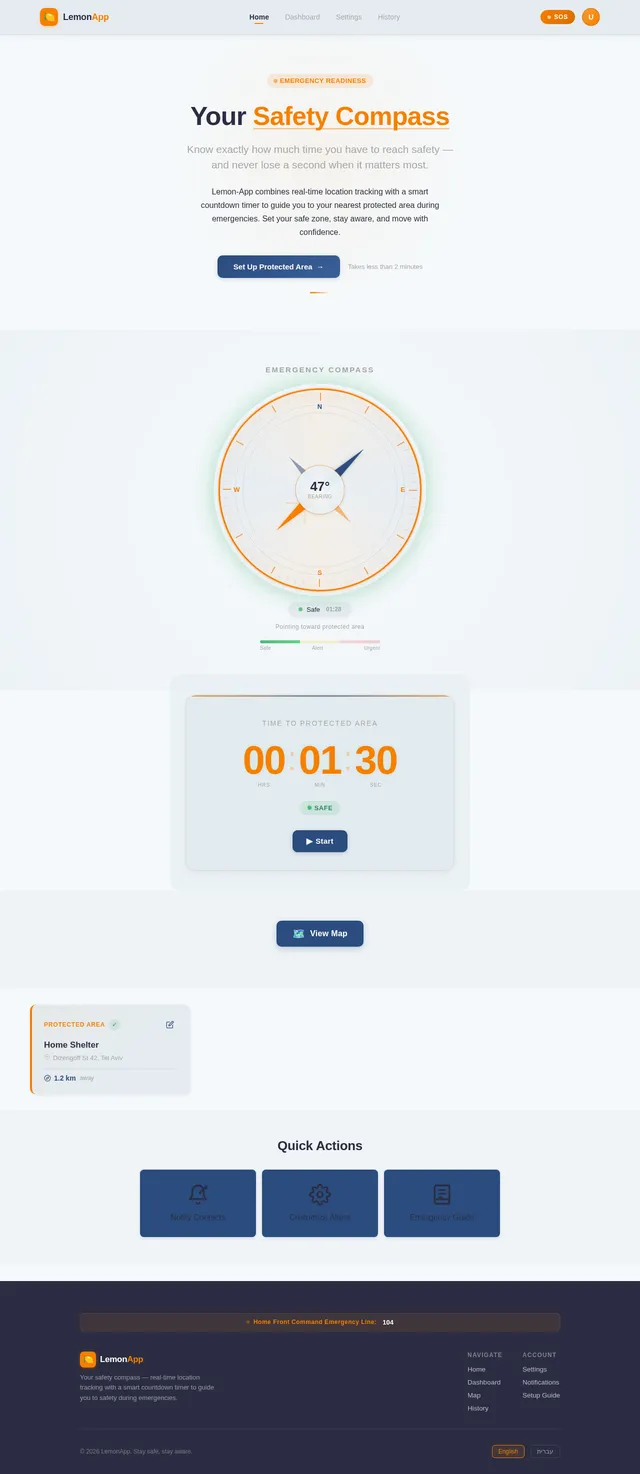
The Lemon-App homepage will feature an Emergency Pathway Visualization that dynamically guides users toward their protected area in a clear and calm manner.
Key Features:
- Dynamic Path Animation: A glowing pathway on the map shows the safest route to the protected area, updating in real-time based on the user's location.
- Timer Integration: The pathway includes a countdown timer overlay, with visual cues like soft pulsing lights as time progresses.
- Map Interface: Users can view their position relative to the protected area, with clear markers and directional arrows.
- Micro-Interactions: Gentle vibrations and soothing sound effects provide reassuring feedback as users approach safety.
- Color Transitions: The pathway transitions from blue (safe) to orange (alert) to red (urgent) based on the remaining time.
- Motivational Messages: Encouraging text like "You're almost there!" or "Stay calm, keep moving!" appears at key moments.
This design ensures the app is visually striking, functional, and emotionally supportive, leaving a lasting impression on users.
7. Non-Functional Requirements
- Performance: The app must load within 2 seconds and handle up to 10,000 concurrent users.
- Scalability: Support future expansion to integrate additional safety features.
- Reliability: Ensure 99.9% uptime for critical services like location tracking and timer functionality.
- Security: Implement end-to-end encryption for user data and location information.
- Localization: Support Hebrew and English languages for users in Israel.
- User-Triggered Regeneration: Allow selective re-run of functionalities without impacting overall system performance.
- Customizable Notifications: Enable users to choose notification types, sounds, and vibration settings.
8. Tech Stack
Frontend:
- React Native for mobile app development.
Backend:
- Python with FastAPI for API development.
Database:
- MySQL for relational data storage (using Alembic for migrations).
- MongoDB for NoSQL data storage.
AI Models:
- GPT 5.4 for user-friendly responses.
- Google Nano Banana for image generation.
AI Tools:
- Litellm for LLM routing.
- Langchain for advanced AI workflows.
Orchestration:
- Docker and docker-compose for local development.
- Kubernetes for server-side orchestration.
9. Assumptions and Constraints
Assumptions:
- Users will have access to GPS-enabled devices.
- Emergency scenarios will involve predefined protected areas.
- The app will primarily target users in Israel.
- Users will prefer a calm and clear interface inspired by Home Front Command.
Constraints:
- Real-time location tracking may be affected by poor GPS signal.
- API supervisor approval is mandatory for app deployment.
- The app must comply with local data privacy regulations.
- Selective re-run functionality must not disrupt ongoing processes.
10. Glossary
- Protected Area: A designated safe location users aim to reach during emergencies.
- API Supervisor: An administrator responsible for approving API integrations.
- GPS: Global Positioning System used for location tracking.
- Timer: A countdown mechanism indicating time left to reach safety.
- Selective Re-Run: A user-triggered feature to regenerate specific functionalities or data.
- Localization: Support for multiple languages, such as Hebrew and English.
- Customizable Notifications: User-defined settings for alerts, including sound, vibration, and visual cues.
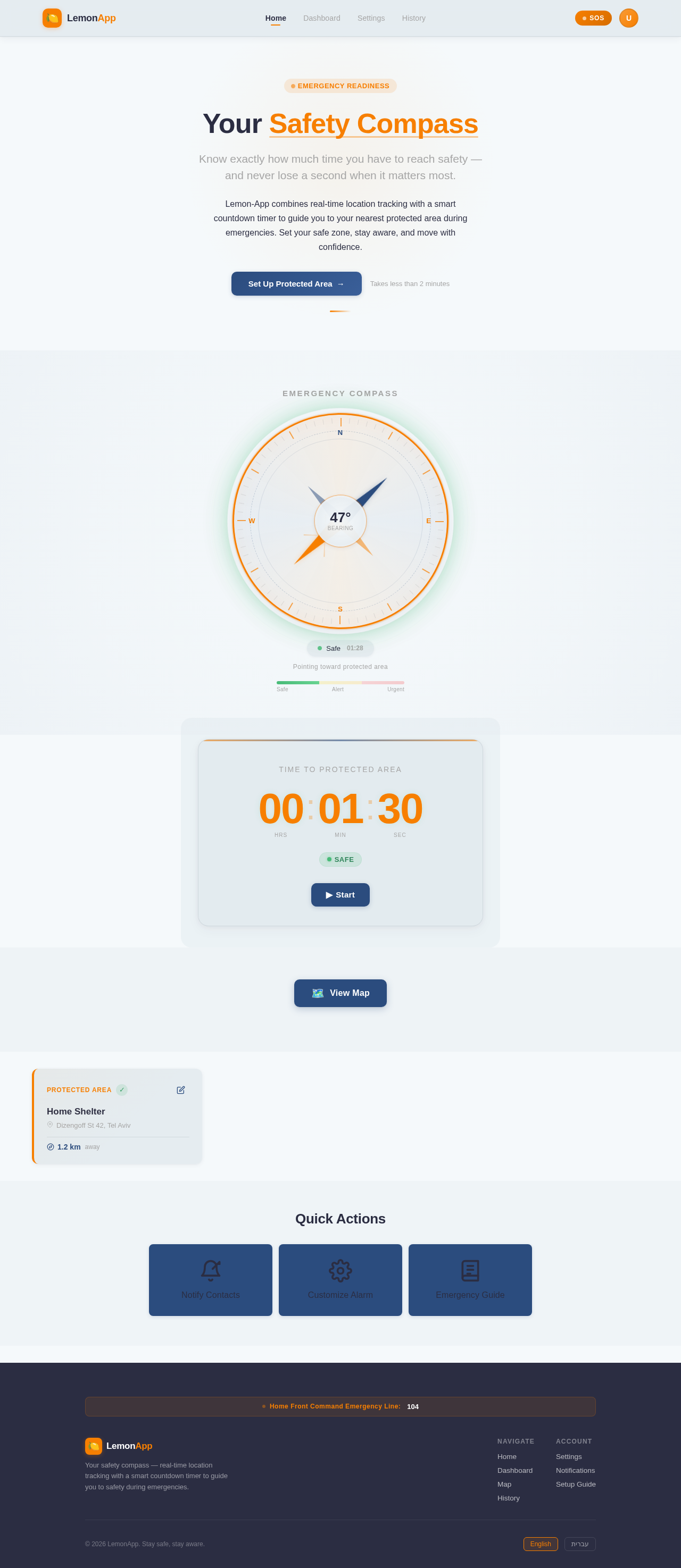
Your Safety Compass
Know exactly how much time you have to reach safety — and never lose a second when it matters most.
Lemon-App combines real-time location tracking with a smart countdown timer to guide you to your nearest protected area during emergencies. Set your safe zone, stay aware, and move with confidence.
No comments yet. Be the first!