lavanyam
 sameer jagadale
saree brand https://www.lavanyamstudio.com/

Comments (0)
Sign in to leave a comment
System Requirements
System Requirements Document for lavanyam
1. Introduction
lavanyam is an online store for a saree brand. The product intent is a working ecommerce website where customers browse sarees, choose the ones they want, and buy them through the online store — with the storefront carrying an elegant, premium ethnic-wear feel.
The audience is twofold:
- Shoppers who come to discover saree collections and purchase sarees online, treating what they buy as considered, heirloom-like style objects rather than commodity apparel.
- The Store Owner who runs the saree brand's ecommerce business, keeps the saree catalog and collections current, and oversees incoming orders so the store stays sellable.
The store is a commerce destination, not a brand showcase or a catalog-only site. The visual reference point for the premium ethnic-wear register is the Lavanyam Studio brand site, which the sources direct us to use for elegant, premium feel; that reference is an aesthetic and domain cue only, and supplies no verified page, copy, or catalogue facts of its own.
2. System Overview
lavanyam is a current-delivery web storefront with application-owned shopper identity. Anonymous visitors arrive at an editorial landing surface, move into the saree collections and individual saree pages, and — when they decide to buy — establish a shopper identity, complete a purchase, and keep a durable record of what they bought and how it is being fulfilled. The Store Owner signs in to a separate, privileged working area to maintain the saree catalog and collections and to manage the orders that arrive.
Core actors:
- Shopper (human, active): browses saree collections anonymously, selects sarees, creates an account, verifies on return, completes checkout, and reviews the retained record of purchases and their fulfilment state.
- Store Owner (human, active): verifies with the same sign-in surface, then uses privileged destinations to create and maintain saree products and collections and to review and progress customer orders.
- Storefront application and backend (system actor): serves collections and product information, holds cart and order state, records commitments, and enforces which destinations are reachable by which access state. It owns no product outcome of its own.
Accepted behavior in scope: saree collection browsing, focused viewing of a saree's details, adding sarees to a cart, self-service shopper enrollment, returning verification for both humans, completing a purchase online, retaining the shopper's purchase history, administering the saree catalog and collections, and reviewing and progressing customer orders.
Narrow exclusions: this is not a brand-showcase or catalog-only site; it does not include a physical-store, POS, marketplace-multi-vendor, or editorial-blog product. No capability is included merely because it is common to ecommerce products.
2a. Product Interpretation and Delivery Boundary
lavanyam is delivered as a first-party web application. The storefront surfaces, the shopper's cart and checkoutsurface, and the Store Owner's catalog and order working area are all custom Lavanyam interfaces — there is no third-party storefront platform, marketplace, or provider-owned admin surface in the accepted scope.
Access is deliberately split. The Landing, Shop, and Product Details surfaces describe and present the sarees and are reachable without any identity, because the brand's first impression and collection browsing are part of what anyone should be able to see before committing to anything. Sign Up and Login are the two anonymous entry points that establish and re-verify identity; neither of them can be owned by the destination it protects. Cart & Checkout, Catalog Management, and Orders carry protected state — a shopper's commitment and purchase record, or the Store Owner's authoritative catalog and order book — so they are reachable only with an established identity of the right kind. A shopper may select sarees while anonymous; the checkout commitment itself begins only after enrollment or verification, and the selection carries through that handoff.
The Store Owner's privileged access is the only differentiated control in the accepted scope. It exists because catalog and order management mutate shared product state; it is not a general role system, and no additional roles, permission tiers, or shared-state visibility rules are part of this delivery.
Nothing in the accepted scope is deferred: there is no future-horizon feature set, no provider-owned work handed off to an external party, and no headless-only delivery. The Lavanyam Studio reference is used only for the elegant, premium ethnic-wear register of the storefront; no page structure, copy, catalog item, or workflow is imported from it.
2c. Page Content and Component Coverage
Landing
- Information and state. Anonymous public entry. States the store's identity as a premium saree brand, presents a hero saree photograph and an editorial statement, exposes the collection index, and offers entry to Shop, Sign Up, and Login. No personalized or account state is shown.
- Primary actions. Enter the Shop from the hero action or the collection index; open Sign Up; open Login.
- Supporting actions. Select a collection from the numbered vertical index rail to move into Shop with that collection in context; reveal the cart entry point when a selection already exists.
- Domain entities. Collection (name, order, marker), featured saree imagery, seasonal/promotional marker text, current cart summary count.
- Component responsibilities. Split-cover hero (seven-column photograph abutting a five-column ivory typography panel, divided by a thin wine selvage rule); numbered collection index rail with the active collection marked by a 2 px vermilion bar; minimal top rule navigation; narrow far-right strip carrying rotated seasonal text; cart entry point.
- States. Loading: hero image and collection rail load as a composed frame, with the ivory typography panel visible immediately and imagery crossfading in at 500 ms. Empty: if no collection is published yet, the index rail is replaced by a single editorial statement and the Shop action remains available. Success: hero and collection index render, and the chosen action routes to Shop, Sign Up, or Login. Error: if collection data cannot be retrieved, the hero remains readable and the collection rail shows a retry affordance rather than broken entries. Recovery: retry re-requests the collection list without reloading the page.
Sign Up
- Information and state. Anonymous identity-establishment surface. Collects the minimum shopper details required to own a durable account, and shows validation state per field.
- Primary actions. Submit enrollment details to create a shopper account.
- Supporting actions. Move to Login when the visitor already has an account; return to Shop without enrolling.
- Domain entities. Shopper account (name, email, credential, creation time), pending cart selection carried through enrollment.
- Component responsibilities. Editorial form column set against the storefront's warm ivory field; restrained labeled inputs at 13–14 px metadata scale; wine full-width submit action with a 2 px wine underline as the focus/selected-state language; inline field-level error text; identity-establishment confirmation.
- States. Loading: submit action enters a busy state and stays disabled until the response returns. Empty: pristine fields with no error text. Success: account is created, identity is established, and the shopper continues to the checkout commitment with the carried selection intact. Error: duplicate account for the submitted email, invalid or missing required field, or a failed request — each shown against the responsible field with the entered values preserved. Recovery: the shopper corrects the indicated field and resubmits without re-entering the rest of the form.
Login
- Information and state. Anonymous verification surface shared by both human actors. Collects credentials and shows rejection or success state.
- Primary actions. Submit credentials to verify identity.
- Supporting actions. Move to Sign Up when no account exists; return to the storefront without verifying.
- Domain entities. Shopper account, Store Owner account, verified session, pending cart selection or intended destination.
- Component responsibilities. Credential form on the same editorial ivory field as Sign Up; wine submit action; inline rejection message that does not disclose which credential element was wrong; post-verification routing that returns a Shopper to the checkout commitment and a verified Store Owner to their privileged working area.
- States. Loading: submit action busy and disabled during verification. Empty: pristine credential fields. Success: identity is verified and the actor continues to the destination that required verification. Error: incorrect credentials, or a temporarily unavailable verification service — shown inline with the email preserved and the credential cleared. Recovery: re-submit after correction; after repeated failure the surface keeps offering the same form and the Sign Up path rather than locking the visitor out.
Shop
- Information and state. Anonymous browse destination for the saree catalog and collections. Shows the active collection, its sarees with price and availability, and collection-level editorial statements. Read-only for catalog content.
- Primary actions. Open a saree's Product Details page; add a saree to the cart directly from a listing rail.
- Supporting actions. Change the active collection from the index rail; apply collection and attribute filters; clear filters; open the cart.
- Domain entities. Collection, Saree product (name, price, imagery, availability, collection membership), filter selection, cart line item, cart total.
- Component responsibilities. Collection statement set as large Playfair Display typography; caption-and-filter bar with the active filter marked by the 2 px wine underline; uneven product rails in which one double-height campaign image interrupts each four-item rail; image-first product cards with metadata set directly beneath rather than enclosed in floating cards; hover behavior that crossfades a full drape view to a macro textile crop while the product name stays fixed.
- States. Loading: rails show reserved image windows and caption placeholders at the fixed card heights so the grid does not reflow. Empty: a collection with no published sarees, or a filter combination with no matches, shows an editorial empty statement and a clear-filters action. Success: the requested sarees render with caption, price, and availability, and cart adds confirm visibly. Error: catalog retrieval failure shows a retry action in place of the rails; a failed cart add reports the failure against the specific saree without removing it from the rail. Recovery: retry reloads catalog data; a failed add can be retried on the same card or completed from Product Details.
Product Details
- Information and state. Focused destination for a single saree. Presents the imagery, name, price, availability, product description, and textile detail the Store Owner published, plus its collection context.
- Primary actions. Add the saree to the cart, with the chosen selection confirmed on the page.
- Supporting actions. Move between product imagery, including the drape-to-macro detail crossfade; return to the originating collection in Shop; open the cart.
- Domain entities. Saree product record (name, price, description, textile and weave detail, availability, collection
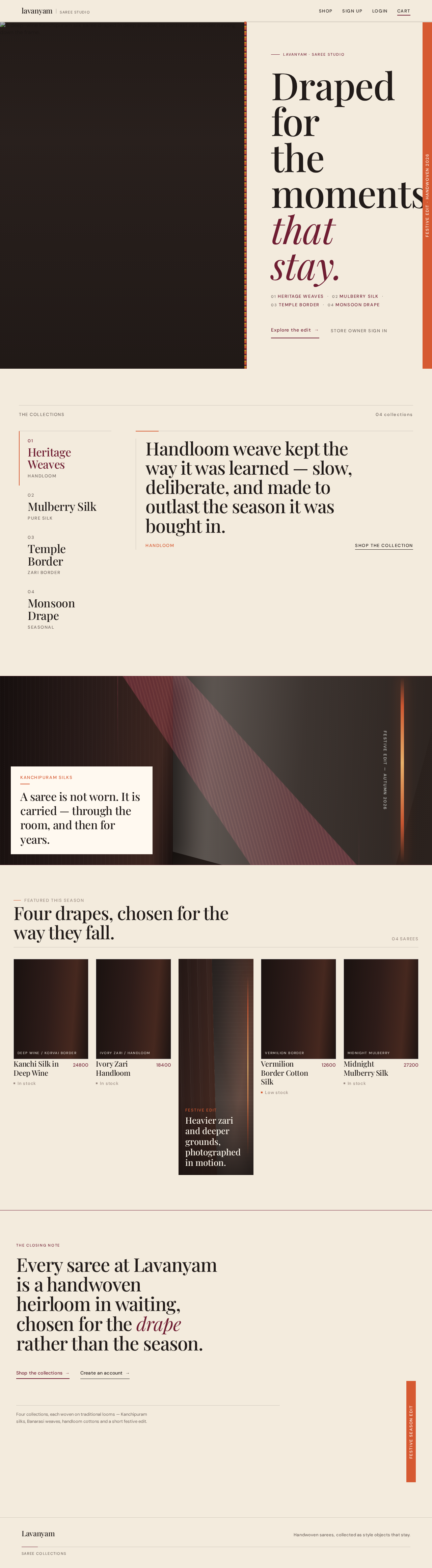

Lavanyam · Saree Studio
Draped forthe momentsthat stay.
Festive Edit · 2026
01Heritage Weaves02Mulberry Silk03Temple Border04Monsoon Drape
Handloom weave kept the way it was learned — slow, deliberate, and made to outlast the season it was bought in.
A saree is not worn. It is carried — through the room, and then for years.


Every saree at Lavanyam is a handwoven heirloom in waiting, chosen for the drape rather than the season.
Four collections, each woven on traditional looms — Kanchipuram silks, Banarasi weaves, handloom cottons and a short festive edit.
Lavanyam · Saree Studio
Draped forthe momentsthat stay.
Festive Edit · 2026
01Heritage Weaves02Mulberry Silk03Temple Border04Monsoon Drape
Handloom weave kept the way it was learned — slow, deliberate, and made to outlast the season it was bought in.
A saree is not worn. It is carried — through the room, and then for years.
Every saree at Lavanyam is a handwoven heirloom in waiting, chosen for the drape rather than the season.
Four collections, each woven on traditional looms — Kanchipuram silks, Banarasi weaves, handloom cottons and a short festive edit.
No comments yet. Be the first!