latar-belakang-mobil
 Patra Niaga
Rubah latar belakang mobil

Comments (0)
Sign in to leave a comment
System Requirements
System Requirements Document for latar-belakang-mobil
1. Introduction
latar-belakang-mobil is a focused photo-editing tool for transforming a user-provided car photo by replacing its background with a beautiful beach scene. The user uploads a car photo, the system processes it with AI, and the user reviews and downloads the result.
The product is for the single accepted active-human persona: Pengguna Pengganti Latar Belakang Mobil. The supplied black Toyota SUV photo is the visual source asset and should remain the focal subject; it is not a substitute for the user’s ability to provide a photo.
2. System Overview
The current product is a custom, application-owned web experience with four ordered pages: Landing, Upload Foto, Penggantian Latar, and Hasil. All four are accessible without an account. The user supplies a car photo, AI processing replaces its background with a beautiful beach, and the user reviews and downloads the result.
The accepted behavior is limited to uploading a car photo, processing it with the requested beach background, reviewing the result, and taking the result. No additional editing controls or capabilities are included. No other human persona, differentiated permissions, or account-management behavior is in scope.
2a. Product Interpretation and Delivery Boundary
The application owns the four-page experience and its user interactions. AI processing supports the requested background replacement; it does not introduce a separate user-facing service or destination. The user can proceed without establishing an account.
The current boundary ends at the reviewed, downloadable beach-background result. The supplied car image is used as the source visual; the generated beach result is the transformation payoff. No future requirements were specified.
2c. Page Content and Component Coverage
Landing
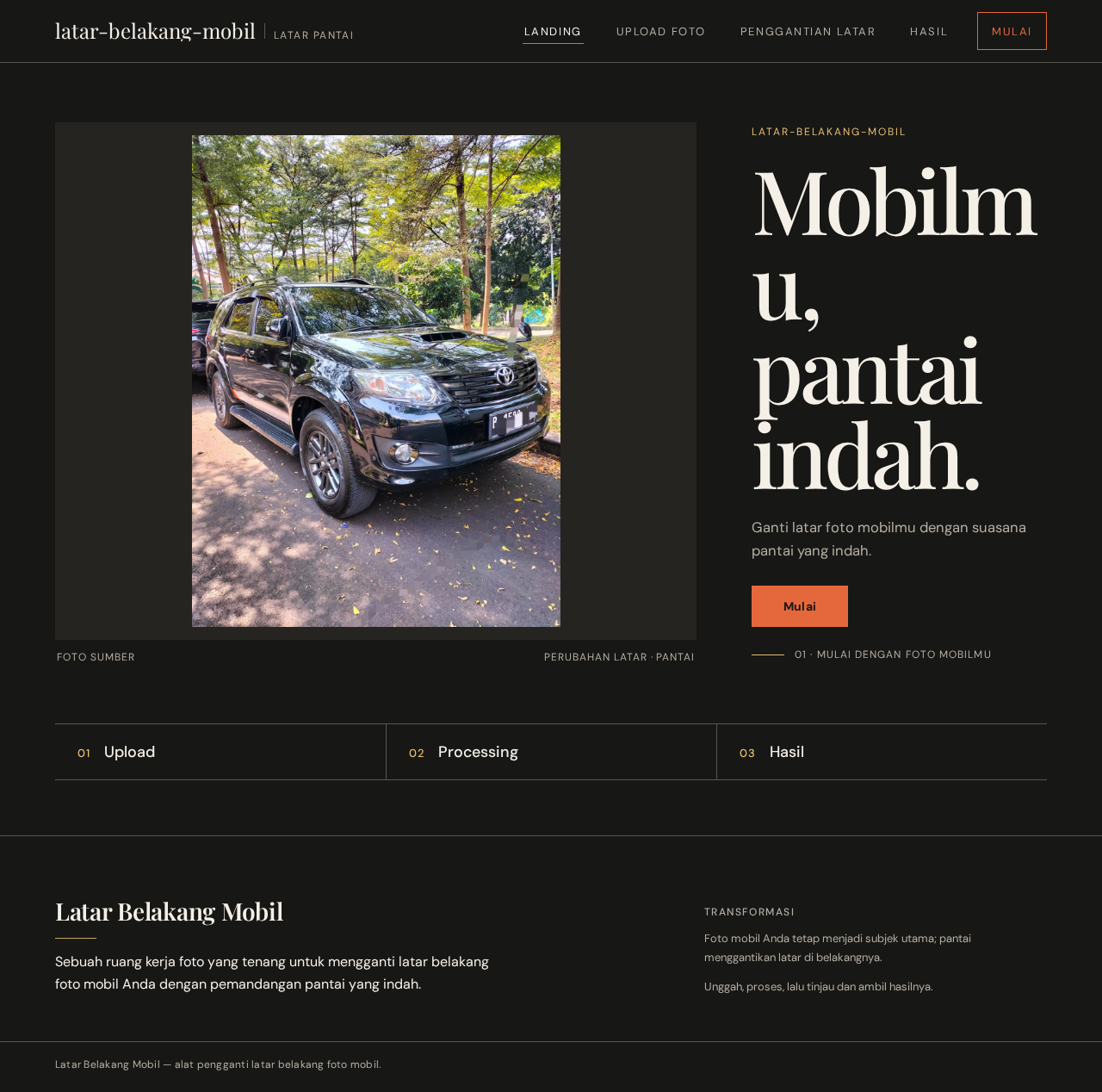
- Information and state: Introduces the car-photo background replacement and the beautiful beach transformation. Uses the supplied black Toyota SUV photo as the source image and focal subject.
- Primary action: A compact rectangular “Mulai” action starts the journey at Upload Foto.
- Supporting content: A small sand-coloured caption identifies the beach transformation. A numbered three-step rail communicates upload, processing, and result.
- Components: Dark editorial hero with a large source-photo plate and a narrow headline/action column on desktop; on mobile, headline and action precede a full-width preview that keeps the car legible. The rail uses restrained hairline dividers and becomes a readable vertical sequence on narrow screens.
- States: The source image and start action are available on initial load. If the source image cannot be displayed, retain the readable introduction and start action and provide a recoverable image-loading error. Successful start continues to Upload Foto.
- Layout constraint: At 375px, 768px, and 1280px, all text and controls remain fully within the viewport and their containers. Image crops may be editorial but must not obscure the car or readable content.
Upload Foto
- Information and state: Provides the input photo for the accepted background-replacement journey.
- Primary action: The user supplies a car photo and continues to Penggantian Latar.
- Supporting content: The upload step is identified within the numbered upload, processing, and result sequence.
- Components: A clear, rectangular, tactile photo-input control and a preview of the selected source image.
- States: Before input, show an empty upload state. While the image is being read, show a loading state. On successful input, show the selected photo and a continuation action. If the photo cannot be read or used for processing, show an actionable error and allow the user to provide a photo again. Continuing starts the accepted processing journey.
Penggantian Latar
- Information and state: Shows that the supplied car photo is being processed with AI to replace its background with a beautiful beach.
- Primary action: Processing begins after the user continues with the supplied photo; the user can observe progress and the resulting completion or failure.
- Supporting content: The processing step is identified in the numbered sequence. Progress is simple and restrained.
- Components: Source-photo context, a compact progress indication, and status text that does not imply additional editing controls.
- States: Show a processing state while AI work is underway. On success, make the result available at Hasil. On processing failure, explain that the result is not ready and provide a way to retry the same accepted replacement using the supplied photo. A successful retry continues to Hasil.
Hasil
- Information and state: Displays the generated car photo with the beautiful beach background for the user to review.
- Primary action: The user takes the result by downloading it.
- Supporting content: The result step is identified in the numbered sequence. Where the source and generated result are both available, present a deliberate horizontal before/after wipe for review; it must not cover controls or readable text.
- Components: A large result image, review presentation, and a clear download action.
- States: Show a loading state while the result is being retrieved. On success, display the result and enable download. If the result cannot be displayed or downloaded, show an actionable error and allow recovery by retrying the relevant retrieval or download action. The user can continue by taking the available result; no further product workflow is specified.
3. Functional Requirements
FR-1 — Introduce the background replacement
As a Pengguna Pengganti Latar Belakang Mobil, I should see an introduction to replacing a car-photo background with a beautiful beach, so that I can start the accepted transformation.
- Provenance:
required_inference— the Landing page is required to introduce the accepted tool and provide its start point. - Trigger and access: The user opens Landing; no account is required.
- Observable result: The page presents the supplied black Toyota SUV source image, the beach-transformation context, and the “Mulai” action.
- Failure and recovery: If the source image fails to load, the introduction and start action remain usable and the image-loading failure is recoverable.
- Continuation: Selecting “Mulai” opens Upload Foto.
FR-2 — Provide a car photo
As a Pengguna Pengganti Latar Belakang Mobil, I should provide a car photo, so that it can be used as the input to the background replacement.
- Provenance:
required_inference— a user-provided photo is necessary to execute the explicit request to change a car photo’s background. - Trigger and access: The user arrives at Upload Foto from Landing; no account is required.
- Observable result: The supplied photo is shown as the selected input and is available to the processing step.
- Failure and recovery: If the photo cannot be read or used for processing, the user sees an error and can provide a photo again.
- Continuation: The user continues to Penggantian Latar with the supplied photo.
FR-3 — Replace the photo background with a beautiful beach
As a Pengguna Pengganti Latar Belakang Mobil, I should have the background of my supplied car photo replaced with a beautiful beach using AI processing, so that I can see the requested transformation.
- Provenance: The requested background replacement and beach are
explicit; AI processing isrequired_inferenceto make the accepted transformation executable. - Trigger and access: After supplying a photo, the user continues from Upload Foto to Penggantian Latar; no account is required.
- Observable result: The system processes the photo and, on success, makes the generated beach-background result available at Hasil.
- Failure and recovery: If processing fails, the user sees that the result is not ready and can retry the same replacement using the supplied photo.
- Continuation: Successful processing leads to Hasil for review.
FR-4 — Review and take the result
As a Pengguna Pengganti Latar Belakang Mobil, I should be able to review and download the generated result, so that I can take the completed beach-background photo.
- Provenance: Result availability for review and taking is
required_inferenceto complete the accepted transformation; the requested beach result isexplicit. - Trigger and access: After successful processing, the user opens Hasil; no account is required.
- Observable result: The generated car photo with the beautiful beach background is displayed for review and can be downloaded.
- Failure and recovery: If the result cannot be retrieved or downloaded, the user sees an actionable error and can retry the relevant retrieval or download action.
- Continuation: The user completes this accepted journey by taking the available result. No further workflow is specified.
4. User Personas
Pengguna Pengganti Latar Belakang Mobil
- Product context: A user who wants to replace the background in a car photo with a beautiful beach scene.
- Primary goal: Obtain a reviewable, downloadable photo of the car against the requested beach background.
- Accepted responsibilities: Start the transformation, provide a car photo, continue to AI processing, review the generated result, and download it.
- Inputs and decisions: Supplies the source photo and chooses to start processing and take the resulting image.
- Interactions with other accepted participants: None. The accepted journey has no other human participant; AI processing is system work supporting the user’s request.
- Observable success: The car remains the subject of a generated photo with a beautiful beach background, and the user can review and download it.
- Provenance:
required_inferencepersona from Planning Scope, grounded in the explicit request to change a car-photo background to a beautiful beach.
5. Core User Flows
Journey 1 — Replace a car-photo background and take the result
- Start at Landing. The user sees the supplied black Toyota SUV photo, the beach-transformation introduction, and the “Mulai” action.
- Begin the journey. The user selects “Mulai” and arrives at Upload Foto.
- Provide the input. The user supplies a car photo. The page shows the selected photo. If it cannot be read or used, the user sees an error and can provide a photo again.
- Continue to processing. The user proceeds to Penggantian Latar with the supplied photo.
- Observe AI processing. The system processes the photo to replace its background with a beautiful beach. The user sees a restrained progress indication. If processing fails, the user sees that the result is not ready and can retry the same replacement with the supplied photo.
- Review the completed result. On success, the user reaches Hasil and sees the generated car photo with the beach background. Where both source and result are available, the user can review them with the horizontal before/after wipe.
- Take the result. The user downloads the result. If retrieval or download fails, the user sees an actionable error and can retry the relevant action.
6. Visuals Colors and Theme
The visual direction is “Editorial swagger for a car’s coastal escape”, with Tobias van Schneider as the named muse. The interface is a focused, personal, image-first editing tool: the supplied car photo is the source, and the generated beach result is the visual payoff.
Colour tokens
Use the specified dark-mode palette:
- Background:
#171716 - Surface:
#252421 - Text:
#F5F0E7 - Primary action:
#E5683D - Accent:
#E8BE70 - Muted text:
#B5AEA1
Charcoal frames large photographs; warm ivory carries readable copy; muted sand is used for secondary labels. Reserve terracotta for the main action and golden sand for small highlights or progress. Let the beach image supply natural blues and greens rather than adding blue interface accents. Maintain strong text contrast.
Typography and scale
- Headings: Playfair Display, high-contrast editorial serif with tight leading and confident scale.
- Body and controls: DM Sans, clear and practical.
- Hero headline: Responsive
clamp()scale from 52px on mobile to 112px on desktop; wrap naturally and remain fully inside the viewport. - Section titles: 36–64px.
- Body: 16–18px.
- Labels: 12–13px.
- Constrain text measure and ensure all text and controls fit their containers at 375px, 768px, and 1280px.
Shape, layout, and imagery
Use sharp editorial edges, asymmetrical image crops, thin warm-grey rules, and rectangular, tactile upload and action controls. Avoid decorative blobs, excessive rounded-card styling, repetitive hover-lift cards, glassmorphism, and gradient-blob heroes.
The Landing hero is dark and asymmetrical: on desktop, a large edge-to-edge source-car photograph occupies roughly two-thirds of the first screen, with the headline and terracotta start action in a narrow adjacent column. On mobile, stack the headline and action above a full-width preview that keeps the entire car legible. The two-line headline sits beside the source image where the desktop layout permits. Place the compact “Mulai” action directly beneath the headline, with a thin sand rule separating it from a small step label.
Use the uploaded black Toyota SUV photo as the source asset; do not replace it with unrelated stock photography or decorative gradients. The generated output should place the car in a beautiful, believable beach setting with coherent light and grounding. Imagery supports the requested transformation only.
Journey presentation
Show upload, processing, and result as a numbered three-step rail with restrained hairline dividers; collapse it into a readable vertical sequence on narrow screens. Use a deliberate horizontal before/after wipe to reveal the beach replacement, without covering readable text or controls. Keep all labels, controls, headlines, and other readable content whole and within their containers at the specified viewports.
7. Signature Design Concept
Create an editorial source-to-result reveal using only the accepted photo input, AI processing, review, and download behavior. The Landing hero pairs the supplied SUV photograph—large, legible, and framed by charcoal—with a two-line Playfair Display headline and the rectangular terracotta “Mulai” action in a narrow column. A small sand caption identifies the beach transformation, and a hairline rule separates the action from the step label.
Carry the same image-led composition through the journey: a clear photo-input surface, a focused processing state, and a result view where a horizontal before/after wipe reveals the generated beach background. Keep the wipe away from controls and readable text. On mobile, stack the headline and action above the full-width car preview and present the three numbered steps as a readable vertical sequence.
8. Interaction Model & Motion Direction
Interaction Model: Animated
Motion Tempo: restrained
Hero Dimensionality: flat
Landing Hero Motion Brief
- Focal subject: The supplied black Toyota SUV photo, with the car preserved as the focal subject.
- Input → transformation → outcome thesis: The user starts with a car photo; AI processing replaces its background with a beautiful beach; the user reviews and downloads the result.
- Motion vocabulary: Restrained, slow crossfades between source and generated result, with a simple progress indication during AI processing. Avoid bouncy transitions.
- Composed first frame: A dark, asymmetrical editorial hero with the source SUV image occupying roughly two-thirds of the desktop first screen, beside a warm-ivory headline and terracotta “Mulai” action. On mobile, place the headline and action above a full-width preview that keeps the car legible.
- Reduced-motion state: Honour
prefers-reduced-motionwith static before/after states and a usable, non-animated arrangement. Keep all text and controls fully readable and reachable.
9. Non-Functional Requirements
- Responsive readability —
explicit: Headlines, wordmarks, labels, numbers, and controls must remain fully inside the viewport and their containers at 375px, 768px, and 1280px. Wrap or scale content as needed; no other element may cover readable text or controls. - Image and control layering —
explicit: Imagery, decoration, and motion may be cropped or overlapped as directed, but must not cover readable text or controls. The before/after wipe must not obscure controls. - Reduced motion —
explicit: Honourprefers-reduced-motionwith static before/after states. The interface remains usable without motion. - Source-image fidelity —
explicit: Use the supplied black Toyota SUV photo as the source asset and preserve the car as the focal subject. Do not substitute unrelated stock photography or decorative gradients. - Beach-result presentation —
explicit: The generated output should place the car in a beautiful, believable beach setting with coherent light and grounding. - Visual contrast and legibility —
explicit: Keep text contrast strong and all readable content within its container. - No additional editing scope —
explicit: Do not imply extra editing controls or capabilities beyond uploading, processing, reviewing, and taking the result.
10. Tech Stack
- Frontend: React —
[Default — not specified by user] - Backend: Python/FastAPI —
[Default — not specified by user]; Planning Scope requires backend integration for the accepted processing workflow. - Storage: Appropriate storage for the supplied photo and generated result —
[Default — not specified by user] - Deployment: Docker/docker-compose —
[Default — not specified by user]
No specific AI provider or processing technology was named; do not treat a particular provider or model as a user requirement.
11. Assumptions and Constraints
- Accepted input: The user provides a car photo. This is a
required_inferenceneeded to execute the explicit background-replacement request. - Processing: AI processing applies the requested beautiful beach background. This is a
required_inferenceneeded to make the accepted transformation usable. - Result lifecycle: The result is made available for review and download. This is a
required_inferencefrom the accepted requirement that the result be available to review and take. - Access: All four versioned-contract pages have
access_requirement: none; no account or sign-in is required for this journey. - Scope: The current product includes only the accepted upload, processing, review, and result-taking journey. No additional editing controls or capabilities are implied.
- Future horizon: No future requirements were specified.
12. Glossary
- Source photo: The car photo supplied as input for background replacement.
- Beach result: The generated car photo with its background replaced by a beautiful beach scene.
- Before/after wipe: A horizontal visual reveal used to review the source and generated result.

latar-belakang-mobil
Mobilmu,pantai indah.
Ganti latar foto mobilmu dengan suasana pantai yang indah.
Mulai01 · Mulai dengan foto mobilmu
latar-belakang-mobil
Mobilmu,pantai indah.
Ganti latar foto mobilmu dengan suasana pantai yang indah.
Mulai01 · Mulai dengan foto mobilmu
No comments yet. Be the first!