laser-system

byLo

Make it a sexy woman with big boobs starts dancing and her boobs jiggle

LandingTroubleshootDiagnosticsLoginUserManagement
Landing

Comments (0)

No comments yet. Be the first!

System Requirements

System Requirement Document
Page 1 of 4

Laser-System

Introduction

The Laser-System project is designed to develop a sophisticated laser-based application tailored to meet specific user needs. This document outlines the system requirements necessary for the successful implementation and operation of the Laser-System.

System Overview

The Laser-System aims to provide users with advanced laser functionalities, ensuring precision, efficiency, and user-friendly interaction. The system will cater to various user personas, each with distinct roles and responsibilities, to ensure comprehensive coverage of all operational aspects.

Functional Requirements

  • As a User, I should be able to operate the laser system with precision and accuracy.
  • As an Admin, I should be able to configure system settings to optimize laser performance.
  • As a Technician, I should be able to perform maintenance checks and troubleshoot issues with the laser system.
  • As a User, I should be able to access a user-friendly interface to control laser operations.
  • As an Admin, I should be able to manage user access and permissions within the system.
Page 2 of 4

User Personas

  • User: Individuals who operate the laser system for various applications.
  • Admin: Personnel responsible for configuring and managing system settings and user access.
  • Technician: Experts tasked with maintaining the laser system and ensuring its optimal performance.

Core User Flows

  • User logs into the system -> selects laser operation mode -> configures parameters -> initiates laser operation.
  • Admin logs into the system -> navigates to settings -> configures system parameters -> manages user permissions.
  • Technician logs into the system -> accesses maintenance dashboard -> performs diagnostic checks -> resolves identified issues.

Visuals Colors and Theme

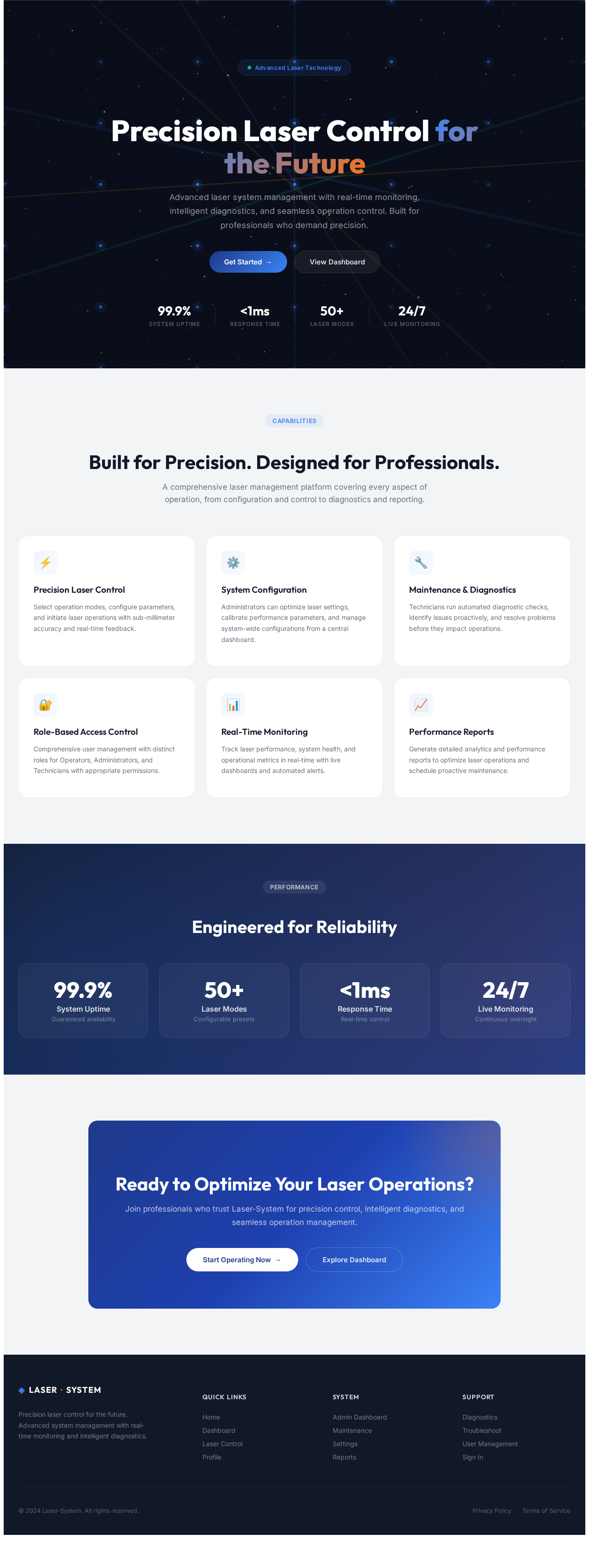
  • primary: #1E3A8A (Deep Indigo)
  • primary_light: #3B82F6 (Light Blue)
  • secondary: #F97316 (Vibrant Orange)
  • accent: #10B981 (Emerald Green)
  • highlight: #F59E0B (Amber)
  • bg: #F3F4F6 (Light Gray)
  • surface: rgba(255, 255, 255, 0.8) (White)
  • text: #111827 (Dark Gray)
  • text_muted: #6B7280 (Muted Gray)
  • border: rgba(209, 213, 219, 0.2) (Light Gray)
Page 3 of 4

Signature Design Concept

The Laser-System homepage will feature an interactive 3D laser grid using @react-three/fiber. Users can manipulate the grid by clicking and dragging, causing laser beams to dynamically adjust and create patterns. Hovering over specific points will trigger animations that demonstrate laser operations, providing an engaging and educational experience. The grid will be set against a dark, starry background to emphasize the laser's vibrant colors and create a futuristic ambiance.

Interaction Model & Motion Direction

The landing page will utilize a "parallax" interaction model, creating a layered depth effect as users scroll. Decorative elements like laser beams and particles will move at different speeds, enhancing the visual storytelling. Internal pages will adopt a "static" model to prioritize clarity and ease of navigation, ensuring users can efficiently access the information they need.

Non-Functional Requirements

  • The system must ensure high availability and reliability, with a target uptime of 99.9%.
  • The user interface should be intuitive and responsive, supporting various devices and screen sizes.
  • The system should adhere to industry-standard security protocols to protect user data and system integrity.
Page 4 of 4

Tech Stack

  • Frontend: React for Web
  • Backend: Python, FastAPI
  • Database: MySQL or MariaDB, using Alembic for migrations
  • AI Models: Not applicable
  • AI Tools: Not applicable
  • Local Orchestration: Docker, docker-compose
  • Server Side Orchestration: Kubernetes

Assumptions and Constraints

  • The system will operate within the US, adhering to local regulations and standards.
  • Users are expected to have basic technical proficiency to interact with the system.
  • The system must integrate with existing infrastructure without significant modifications.

Glossary

  • Laser-System: The project name for the laser-based application.
  • Admin: A user role responsible for system configuration and management.
  • Technician: A user role focused on system maintenance and troubleshooting.
  • User: General users who operate the laser system for various applications.
Landing design preview
Landing: View Info
Login: Sign In
AdminDashboard: View Overview
Settings: Configure System
Settings: Optimize Performance
UserManagement: View Users
UserManagement: Manage Permissions
UserManagement: Edit Access
Reports: View Analytics