laser-fintech
 Mohammed Bakri Osman
High-fidelity Fintech mobile app UI. Design System: Midnight Navy background (#0B1221), Sand Gold accents (#C5A059), Glassmorphism style with 24px corner radius. Typography: Professional Arabic (Cairo) and English. Minimalist, premium, bank-grade aestheticCreate a set of 5 screens. Screen 1: Splash screen with a center-aligned gold 'S' Sanad logo on #0B1221 background. Screens 2-4: Onboarding screens with luxury 3D illustrations of a shield (Guaranteed Escrow), two people shaking hands (P2P), and a speed bolt (Fast Delivery). Each has a gold 'Next' button at the bottom. Screen 5: Role selection with two large glassmorphic cards: 'Expat' and 'Merchant' with gold icons
Comments (0)
Sign in to leave a comment
System Requirements
System Requirements Document (SRD)
Project Name: laser-fintech
1. Introduction
The laser-fintech mobile application, branded as Sanad, is a bilingual (Arabic and English) financial technology platform designed to provide a premium, secure, and user-friendly experience for users in Sudan and beyond. The app is tailored to meet the needs of a diverse user base, ensuring accessibility while maintaining a professional, luxurious aesthetic.
This document outlines the comprehensive system requirements for the laser-fintech application, covering functional and non-functional requirements, user personas, design concepts, and technical specifications. The app is designed to maximize profitability for the owner, Mohammed Bakri Osman, by incorporating robust revenue generation mechanisms, a powerful admin control system, and a seamless user experience.
Given the challenges of weak and unstable internet connectivity in Sudan, the app is specifically optimized to function efficiently under such conditions, ensuring uninterrupted service and usability.
2. System Overview
laser-fintech (Sanad) is a fintech platform tailored for secure peer-to-peer (P2P) transactions, competitive bidding, and merchant services. The app is designed to:
- Facilitate seamless onboarding for users with a visually engaging experience.
- Provide state-of-the-art security and KYC flows to ensure compliance and trust.
- Enable real-time currency transfers and competitive bidding for the best rates.
- Offer a live escrow tracking system for transaction transparency.
- Support merchants with a dedicated portal for managing bids, orders, and payouts.
- Provide an Admin Dashboard for the owner to monitor, control, and optimize all operations and revenue streams.
- Incorporate Rate Limiting to protect APIs from brute force attacks, especially on login and KYC screens.
- Include Offline Persistence to ensure smooth functionality during network disruptions, given the variable internet quality in Sudan.
- Enable Face ID and Touch ID login for enhanced security and convenience after the first login.
- Optimize for low-bandwidth environments, ensuring the app performs well even on weak or unstable internet connections.
The app will be built using React Native for cross-platform compatibility, ensuring a consistent experience on both iOS and Android devices.
3. Functional Requirements
Group 1: Onboarding (Screens 1-5)
- As a User, I should see a Splash Screen with a center-aligned logo on a comfortable background with pulse animation.
- As a User, I should experience three onboarding screens with luxury illustrations explaining:
- Competitive Bidding.
- Guaranteed Escrow.
- Fast Delivery.
- As a User, I should be able to navigate through onboarding screens using a clear 'Next' button.
- As a User, I should see a Role Selection screen with two large cards for 'Expat' and 'Merchant,' each with elegant icons.
Group 2: Security and KYC (Screens 6-10)
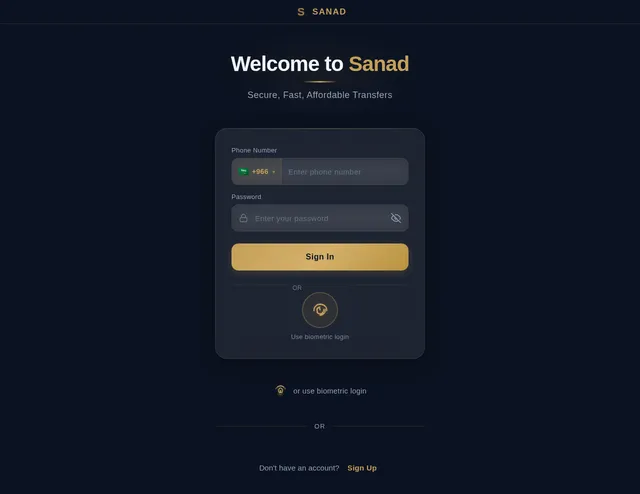
- As a User, I should see a Login screen with input fields for phone number and password, and a prominent fingerprint icon for biometric login.
- As a User, I should see a Registration screen with input fields for name, email, phone number, and password.
- As a User, I should see an Identity Verification screen with a live camera view and a frame for scanning my ID.
- As a User, I should see a Verification in Progress screen with a circular progress ring.
- As a User, I should see a Verification Successful screen with a large checkmark and a confirmation message.
Group 3: Transfer Flow (Screens 11-13)
- As a User, I should see a Dashboard showing my balances in a large card, with a live market rates ticker below.
- As a User, I should see an Amount Input screen where I can enter amounts and see the corresponding conversion in real-time.
- As a User, I should see a Recipient Details screen with fields for name, city, and phone number, and a 'Continue' button.
Group 4: 3-Tier Bidding System (Screens 14-15)
- As a User, I should see a Bidding Screen with three cards:
- Card for the 'Best Rate.'
- Card for the 'Fastest.'
- Card for the 'Top Rated.'
- As a User, I should see a Transaction Preview screen with a detailed receipt-style layout showing final amounts and fees before locking funds.
Group 5: Escrow Execution (Screens 16-18)
- As a User, I should see a Live Escrow Tracker with a vertical timeline showing transaction stages.
- As a User, I should see a Secure Chat screen with encrypted messaging and a warning banner: "Do not share numbers outside the app."
- As a User, I should see a Success screen with confetti, a checkmark, and a 'Download Receipt PDF' button.
Group 6: Merchant Portal (Screens 19-22)
- As a Merchant, I should see a Dashboard showing available bidding requests with location tags.
- As a Merchant, I should see an Active Orders screen for managing ongoing transactions.
- As a Merchant, I should see a Wallet Overview screen with a line chart showing weekly earnings.
- As a Merchant, I should see a Payout screen with local bank details and a 'Withdraw Funds' button.
Group 7: Admin Dashboard (Screens 23-25)
- As the Owner, I should see a Comprehensive Dashboard showing all ongoing transactions, user activity, and revenue streams.
- As the Owner, I should be able to Set and Adjust Fees for transfers, bidding, and premium services.
- As the Owner, I should see Profit Reports with dynamic charts showing daily, weekly, and monthly earnings.
- As the Owner, I should be able to Manage Users by approving, suspending, or banning accounts.
- As the Owner, I should be able to Withdraw Profits directly to my bank account.
- As the Admin, I should have a User Management Screen to view, edit, and manage user accounts.
- As the Admin, I should have a Content Management Screen to manage app content and notifications.
4. User Personas
Persona 1: Expat
- Description: Individuals sending money to their home country.
- Goals: Secure, fast, and affordable transfers.
- Pain Points: High fees, lack of transparency, and delays.
Persona 2: Merchant
- Description: Business owners managing transactions and bids.
- Goals: Efficient order management and timely payouts.
- Pain Points: Complex systems and delayed payments.
Persona 3: Admin (Owner)
- Description: Mohammed Bakri Osman, the app owner.
- Goals: Maximize profitability, monitor all operations, and maintain control over the platform.
- Pain Points: Lack of visibility into operations and difficulty in managing revenue streams.
Persona 4: Admin (Manager)
- Description: App administrators managing daily operations.
- Goals: Ensure smooth operations and resolve user issues.
- Pain Points: Limited tools for user and content management.
5. Visuals Colors and Theme
Color Palette
- Background: Soft Cream (#F7F3EF)
- Surface: Pearl White (#FFFFFF)
- Text: Charcoal Gray (#333333)
- Accent: Deep Emerald (#2A7F62)
- Muted Tones: Sand Beige (#D9CBB6)
6. Signature Design Concept
The laser-fintech app will feature a luxurious and modern aesthetic with a highly interactive and visually stunning experience.
Home Page / Landing Page:
- Interactive Globe Animation: The home page will feature a rotating 3D globe that highlights major remittance routes in real-time. Users can tap on a country to view specific services and rates.
- Elegant Transitions: Smooth animations will guide users between sections, with subtle fade-ins and parallax effects.
- Dynamic Greeting: A personalized greeting (e.g., "Welcome, Mohammed!") will be displayed with a live clock showing the local time.
- Offline Mode Indicator: A sleek banner will notify users when the app is in offline mode, with a progress indicator for syncing data.
7. Non-Functional Requirements
- Performance: App should load within 2 seconds on 3G networks and function seamlessly on weak or unstable internet connections.
- Localization: Full RTL support for Arabic and LTR for English.
- Security: End-to-end encryption for all communications and transactions.
- Accessibility: WCAG 2.1 compliance for color contrast and screen reader support.
- Rate Limiting: Protect APIs from brute force attacks, especially on login and KYC screens.
- Offline Persistence: Cache data temporarily to ensure smooth functionality during network disruptions.
8. Tech Stack
Frontend
- React Native for mobile app development.
No completed page designs yet.
Completed design pages will appear here when they are ready to preview.
No comments yet. Be the first!