
kjh

byKAIYABEAR J.B.

A funny website for kids what funny apps and funny videos to use

LandingAppsContentVideos
Landing

Comments (0)

No comments yet. Be the first!

System Requirements

System Requirement Document
Page 1 of 4

System Requirements Document for Project KJH

1. Introduction

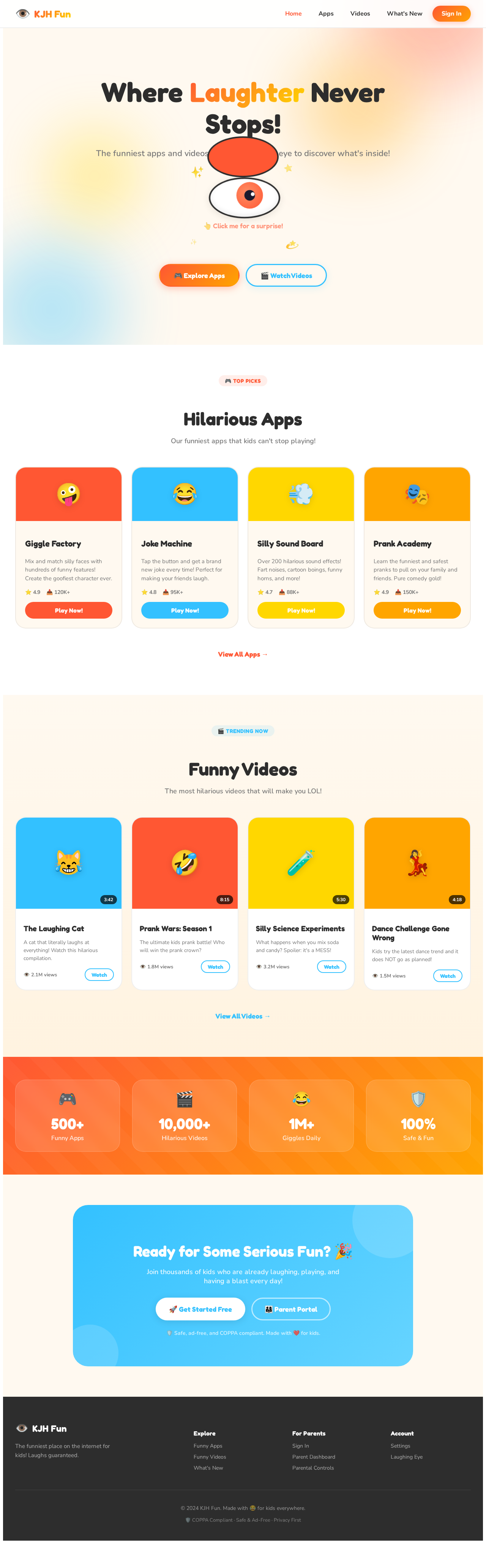
The purpose of this System Requirements Document (SRD) is to outline the specifications for the "kjh" project, a humorous and engaging website designed for children. The website will feature funny apps and videos, with a distinctive laughing eye icon as its emblem.

2. System Overview

The "kjh" project aims to create an entertaining online platform for kids, offering a collection of funny apps and videos. The website will be visually appealing, user-friendly, and interactive, ensuring a delightful experience for its young audience. The laughing eye icon will serve as the website's unique identifier, symbolizing fun and laughter.

3. Functional Requirements

  • As a Child, I should be able to access a variety of funny apps on the website.
  • As a Child, I should be able to watch funny videos on the website.
  • As a Child, I should see a laughing eye icon representing the website.
  • As a Parent, I should be able to monitor the content my child accesses for safety.
  • As an Admin, I should be able to upload and manage funny apps and videos.
  • As an Admin, I should be able to update the laughing eye icon as needed.
Page 2 of 4

4. User Personas

  • Child: The primary user who interacts with the funny apps and videos.
  • Parent: Oversees the child's activities on the website for safety.
  • Admin: Manages content and updates the website's features.

5. Core User Flows

  • Child navigates to the website -> selects a funny app -> interacts with the app.
  • Child navigates to the website -> selects a funny video -> watches the video.
  • Admin logs in -> uploads new funny app/video -> updates content library.
  • Parent logs in -> reviews child's activity -> sets parental controls if necessary.

6. Visuals Colors and Theme

  • primary: #FF5733 (a vibrant orange to evoke fun and excitement)
  • primary_light: #FF8F66 (a lighter tint of orange for hover states)
  • secondary: #33C1FF (a bright blue for emphasis and links)
  • accent: #FFD700 (a vibrant gold for CTAs and active states)
  • highlight: #FFA500 (a warm orange for notifications and active indicators)
  • bg: #FFFFFF (a clean white background for clarity)
  • surface: rgba(255, 255, 255, 0.9) (a slightly transparent white for panels)
  • text: #333333 (a dark grey for primary text)
  • text_muted: #777777 (a softer grey for secondary text)
  • border: rgba(51, 51, 51, 0.1) (a subtle grey for borders)
Page 3 of 4

7. Signature Design Concept

The homepage will feature an interactive "Laughing Eye" animation. As users hover over the eye, it will blink and giggle, creating a playful interaction. The eye will serve as a portal, where clicking on it will reveal a carousel of the latest funny apps and videos. The background will be a dynamic, colorful swirl that changes hues as users navigate the site, using framer-motion for smooth transitions and gsap for the interactive eye animation.

8. Interaction Model & Motion Direction

The landing page will employ a "parallax" interaction model, creating a layered depth effect as users scroll. The laughing eye and content sections will move at different speeds, enhancing the playful and immersive experience. Internal pages will maintain a "static" model for clarity and ease of navigation.

9. Non-Functional Requirements

  • The website must be responsive and accessible on various devices and screen sizes.
  • Content must load quickly to maintain user engagement.
  • The platform should ensure data privacy and security, especially for child users.
Page 4 of 4

10. Tech Stack

  • Frontend: React for Web
  • Backend: Python with FastAPI
  • Database: MongoDB for flexible content management
  • AI Tools: Not applicable unless specified for content moderation
  • Orchestration: Docker for local development, Kubernetes for server-side orchestration

11. Assumptions and Constraints

  • The website will primarily target children in the US, adhering to local regulations for child safety online.
  • The content will be curated to ensure it is age-appropriate and safe for children.
  • The website must be scalable to accommodate a growing library of apps and videos.

12. Glossary

  • Laughing Eye Icon: The unique symbol representing the website, designed to evoke fun and laughter.
  • Parallax: A scrolling effect where background images move slower than foreground images, creating an illusion of depth.
  • Static Model: A design approach focusing on minimal motion for clarity and ease of use.
Landing design preview
Login: Sign In
Dashboard: View Library
Content: Upload App
Content: Upload Video
Content: Manage Library
Icon: Update Laughing Eye
Content: Delete Item
Settings: Configure Site