Gmail Integration
Connect multiple Gmail accounts securely via Google OAuth and manage them all from one workspace.
 King Smart
BUILD A COMPLETE SaaS WEB APPLICATION CALLED "KINGSMART SENDER" OVERVIEW Create a modern SaaS platform called KingSmart Sender with a premium UI/UX similar to the current KingSmart Sender landing page. The design should feel modern, clean, fast, mobile-responsive, and conversion-focused. The application allows users to connect multiple Gmail accounts using Google OAuth, upload recipient lists, create email campaigns, manage sending queues, rotate between connected Gmail accounts based on configurable limits, and track campaign performance from a central dashboard. TECH STACK Frontend: - React - TypeScript - Tailwind CSS - Shadcn UI - React Router - React Query Backend: - Supabase - Supabase Authentication - Supabase Database - Supabase Edge Functions Email Integration: - Google OAuth - Gmail API GENERAL DESIGN REQUIREMENTS - Use the same visual style as the current KingSmart Sender website - Modern SaaS dashboard - Glassmorphism accents where appropriate - Dark and light mode support - Mobile-first responsive design - Smooth animations - Professional typography - Fast-loading interface - Premium software feel AUTHENTICATION Create: - Login page - Registration page - Forgot password page - Email verification flow Support: - Email/password authentication - Google sign-in - Secure session management DASHBOARD After login, users land on a dashboard showing: Cards: - Connected Gmail Accounts - Active Campaigns - Emails Sent Today - Pending Emails - Delivery Success Rate Charts: - Daily Emails Sent - Campaign Performance - Account Usage Recent Activity: - Campaign Started - Campaign Paused - Gmail Account Connected - Email Delivery Events GMAIL ACCOUNT MANAGEMENT Create a Gmail Accounts section. Features: - Connect Gmail account via Google OAuth - Add multiple Gmail accounts - Remove Gmail account - Reconnect account - Pause account - Resume account Display: - Gmail address - Connection status - Daily usage - Last activity - Account health Allow users to connect multiple Gmail accounts. CAMPAIGN CREATION Create a campaign builder. Campaign fields: Campaign Name Subject Line Email Body Sender Name Reply-To Email Template Selection Features: - Rich text editor - Live preview - Save draft - Duplicate campaign - Schedule campaign - Send immediately EMAIL TEMPLATE EDITOR Build a professional template editor. Support merge tags: {{first_name}} {{last_name}} {{email}} {{company}} {{website}} {{custom_field}} Features: - Save templates - Duplicate templates - Delete templates - Template categories - Preview mode CSV IMPORT SYSTEM Create CSV upload functionality. Supported columns: email first_name last_name company website custom fields Features: - Drag and drop upload - CSV validation - Error reporting - Duplicate detection - Contact count preview - Import history CONTACT MANAGEMENT Create a Contacts section. Features: - Search contacts - Filter contacts - Tag contacts - Import contacts - Export contacts - Delete contacts - Segment contacts SENDING QUEUE SYSTEM Build a queue engine. Features: - Queue management - Start campaign - Pause campaign - Resume campaign - Stop campaign - Retry failed sends Display: - Total queued - Processing - Completed - Failed ACCOUNT ROTATION ENGINE Create a configurable sending rotation system. Requirements: - User sets sending limit per account - System automatically rotates between connected Gmail accounts - Track usage per account - Skip disconnected accounts - Resume from last processed recipient if interrupted Dashboard should show: Current Sending Account Next Account Emails Sent Per Account Remaining Capacity PROGRESS TRACKING Create a live campaign monitor. Show: Campaign Status Total Recipients Emails Sent Emails Remaining Success Rate Failure Rate Estimated Completion Time Progress Bar Live Activity Feed REPORTING Campaign reports should include: Emails Sent Delivery Success Bounce Events Open Tracking (where supported and compliant) Link Click Tracking (where supported and compliant) Account Performance Export reports to CSV NOTIFICATIONS Create notification system. Notify users when: Campaign Started Campaign Completed Campaign Paused Account Disconnected Import Completed Errors Occur SETTINGS PAGE User Settings: Profile Information Password Change Timezone Notification Preferences Account Limits Sending Preferences ADMIN PANEL Create admin dashboard with: Total Users Total Campaigns Total Emails Sent Revenue Tracking User Management Subscription Management Analytics DATABASE STRUCTURE Tables: users gmail_accounts campaigns campaign_recipients contacts templates sending_queue campaign_logs notifications settings subscriptions activity_logs SUPABASE POLICIES Implement: Row-level security User data isolation Secure API access Protected routes OAuth token management LANDING PAGE Build a high-converting SaaS landing page. Sections: Hero Section Features How It Works Benefits Testimonials Pricing FAQ Call To Action Footer Hero Headline: Connect Multiple Gmail Accounts and Manage Email Campaigns from One Dashboard Subheadline: Create campaigns, upload contacts, manage sending queues, and monitor performance through a simple and professional interface. CTA Buttons: Start Free Trial Connect Gmail PRICING PAGE Include: Starter Professional Agency Enterprise Each plan should display: Connected Accounts Monthly Email Volume Campaign Limits Support Level FINAL REQUIREMENTS - Production-ready code structure - Fully responsive - Professional SaaS design - Fast performance - Clean architecture - Reusable components - Secure authentication - Supabase integration - Gmail OAuth integration - Queue management - Multi-account management - Campaign analytics - Modern dashboard experience


Sign in to leave a comment
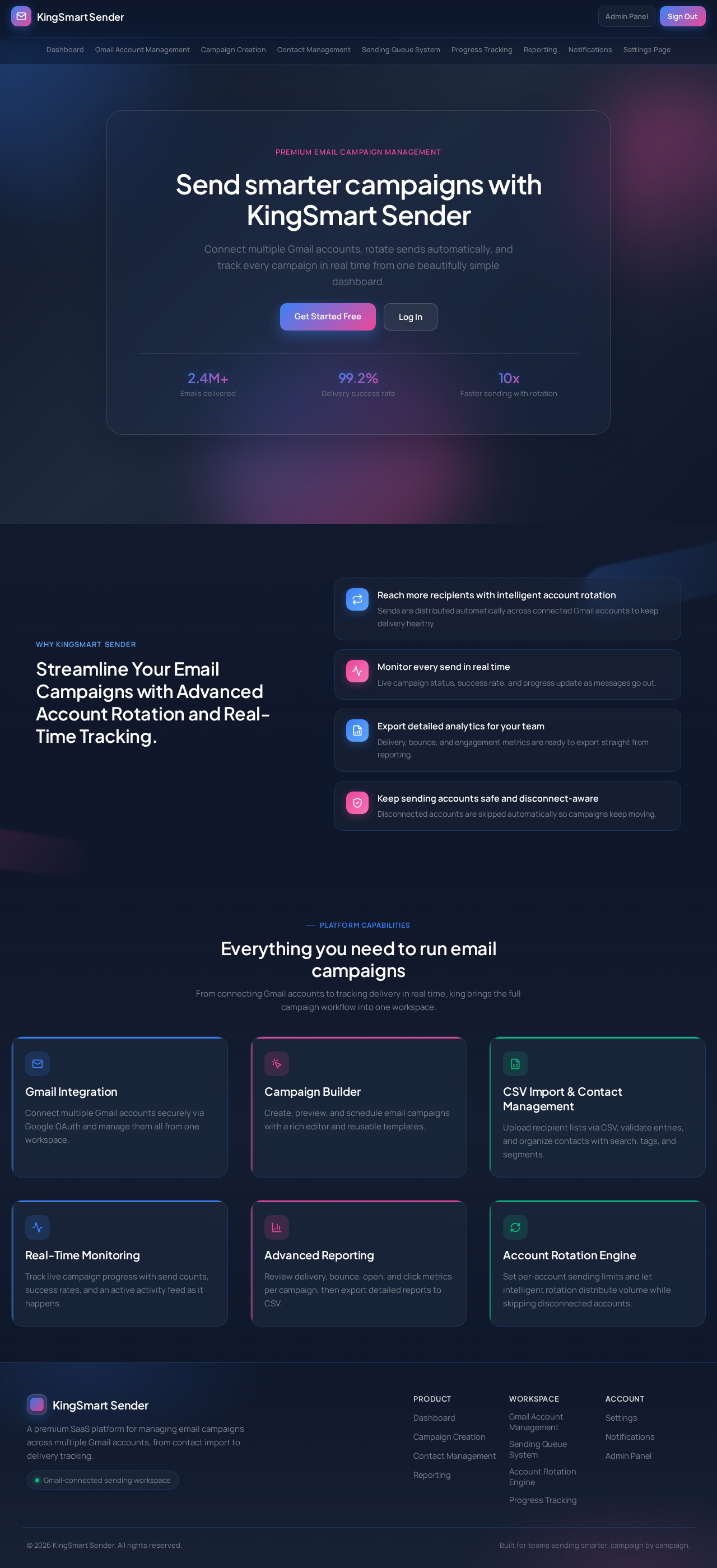
Premium email campaign management
Connect multiple Gmail accounts, rotate sends automatically, and track every campaign in real time from one beautifully simple dashboard.
Why KingSmart Sender
Reach more recipients with intelligent account rotation
Sends are distributed automatically across connected Gmail accounts to keep delivery healthy.
Monitor every send in real time
Live campaign status, success rate, and progress update as messages go out.
Export detailed analytics for your team
Delivery, bounce, and engagement metrics are ready to export straight from reporting.
Keep sending accounts safe and disconnect-aware
Disconnected accounts are skipped automatically so campaigns keep moving.
Platform Capabilities
From connecting Gmail accounts to tracking delivery in real time, king brings the full campaign workflow into one workspace.
Connect multiple Gmail accounts securely via Google OAuth and manage them all from one workspace.
Create, preview, and schedule email campaigns with a rich editor and reusable templates.
Upload recipient lists via CSV, validate entries, and organize contacts with search, tags, and segments.
Track live campaign progress with send counts, success rates, and an active activity feed as it happens.
Review delivery, bounce, open, and click metrics per campaign, then export detailed reports to CSV.
Set per-account sending limits and let intelligent rotation distribute volume while skipping disconnected accounts.
Premium email campaign management
Connect multiple Gmail accounts, rotate sends automatically, and track every campaign in real time from one beautifully simple dashboard.
Why KingSmart Sender
Reach more recipients with intelligent account rotation
Sends are distributed automatically across connected Gmail accounts to keep delivery healthy.
Monitor every send in real time
Live campaign status, success rate, and progress update as messages go out.
Export detailed analytics for your team
Delivery, bounce, and engagement metrics are ready to export straight from reporting.
Keep sending accounts safe and disconnect-aware
Disconnected accounts are skipped automatically so campaigns keep moving.
Platform Capabilities
From connecting Gmail accounts to tracking delivery in real time, king brings the full campaign workflow into one workspace.
Connect multiple Gmail accounts securely via Google OAuth and manage them all from one workspace.
Create, preview, and schedule email campaigns with a rich editor and reusable templates.
Upload recipient lists via CSV, validate entries, and organize contacts with search, tags, and segments.
Track live campaign progress with send counts, success rates, and an active activity feed as it happens.
Review delivery, bounce, open, and click metrics per campaign, then export detailed reports to CSV.
Set per-account sending limits and let intelligent rotation distribute volume while skipping disconnected accounts.
No comments yet. Be the first!