kinetic-fatakseride
 Ravi Das
BUILD A PRODUCTION-QUALITY ANDROID APPLICATION CALLED: FATAKSERIDE TAGLINE: "Ride Faster. Work Smarter." Act as a senior Flutter + Android Kotlin developer, UI/UX designer, accessibility engineer, performance engineer, and QA engineer. I will provide screenshots/reference UI separately. Use them as behavioral and visual references. Do not build a generic taxi app or a simple mockup. 1. CORE PURPOSE FatakSeRide is a driver-focused ride-request filtering and assistance application. The driver selects a supported ride platform, configures filters, uses the target ride app, and FatakSeRide detects relevant ride requests, evaluates them locally, and assists with the appropriate platform-specific action. 2. TECHNOLOGY Use Flutter/Dart for FatakSeRide's UI and native Android Kotlin for performance-critical functionality. Use AccessibilityService, AccessibilityEvent, AccessibilityNodeInfo, GestureDescription, dispatchGesture(), Room, and Flutter Platform Channels or Pigeon. 3. ARCHITECTURE Use: Flutter UI ↓ Platform Channel ↓ Native Kotlin ↓ AccessibilityService ↓ Event Processor ↓ Platform Adapter ↓ Ride Parser ↓ Filter Engine ↓ Decision Engine ↓ Action Engine ↓ Verification 4. LOW LATENCY Optimize the complete detection-to-action pipeline. Keep critical processing in Kotlin. Do not send ride information to a server before making a filter decision. Measure actual latency instead of claiming guaranteed one-second performance. 5. EVENT-DRIVEN PROCESSING Use AccessibilityEvent-driven processing. Do not continuously screenshot, OCR, or poll the screen every few milliseconds. Process only relevant events and use debouncing/deduplication. 6. PLATFORM ADAPTERS Create separate adapters: UberAdapter OlaAdapter RapidoAdapter PorterAdapter Never use one universal implementation for every platform. 7. PACKAGE DETECTION Identify the active Android package and route it to the correct adapter. Unknown packages must be ignored. If the active package changes while an action is pending, cancel the action. 8. REQUEST DETECTION Detect only genuine active ride/order requests. Do not trigger on home screens, profiles, settings, maps, navigation, completed trips, login, OTP, messages, or unrelated popups. 9. ACCESSIBILITY TREE Use getRootInActiveWindow() and AccessibilityNodeInfo to inspect relevant UI information including text, contentDescription, resourceName, className, clickable state, enabled state, visibility, bounds, and available actions. 10. FRAMEWORK INDEPENDENCE Do not assume the target app is Flutter. It may use native Android, Flutter, React Native, custom rendering, or another framework. FatakSeRide must interact through legitimate Android accessibility/UI mechanisms. 11. ACTION DETECTION Support: NONE TAP_ACCEPT SWIPE_ACCEPT MATCH TAP_MATCH DISMISS CUSTOM_GESTURE Never blindly assume that Accept and Match are the same action. 12. MULTILINGUAL SUPPORT Support English and Hindi action text. Examples: Accept Accept Ride Accept Order Match Confirm स्वीकार स्वीकार करें मैच मिलान Also inspect contentDescription, accessibility labels, resource IDs, and accessibility actions. 13. DYNAMIC SWIPE For swipe-to-accept controls, dynamically locate the current control and obtain its bounds. Calculate start/end points from those bounds and use GestureDescription + dispatchGesture(). Never rely on permanent coordinates such as x=500,y=1800. 14. GESTURE ENGINE Create a GestureActionEngine supporting: TAP SWIPE_LEFT SWIPE_RIGHT SWIPE_UP SWIPE_DOWN CUSTOM Each action should contain target bounds, coordinates, duration, action type, and confidence. 15. UBER ADAPTER Implement Uber-specific request detection. Distinguish request types such as Exclusive requests and Trip Radar where the current UI provides sufficient evidence. If the current UI requires Accept, find Accept. If it requires Match, find Match. Never blindly press the wrong action. 16. RAPIDO ADAPTER Create an independent Rapido adapter. Detect, where available: fare pickup distance trip distance pickup destination ride type request state accept control dismiss control Determine dynamically whether the correct action is tap or swipe. 17. OLA ADAPTER Create an independent Ola adapter. Detect the current request UI and identify fare, pickup, destination, distance, ride type, request type, request state, and action control. Do not reuse hardcoded coordinates from another platform. 18. PORTER ADAPTER Create an independent Porter adapter supporting platform-specific order information such as amount, pickup, drop, distance, vehicle/order type, request state, and accept action. 19. RIDE DATA MODEL Create RideRequest with: id platform requestType fare pickupDistance tripDistance pickupAddress destinationAddress rideType rating actionType timestamp actionBounds confidence Use nullable fields where information is unavailable. Never fabricate missing data. 20. FILTER ENGINE Create a fast local FilterEngine. Example: Minimum Fare = ₹200 ₹199 → IGNORE ₹200 → MATCH ₹201 → MATCH ₹500 → MATCH The comparison MUST be: fare >= minimumFare ₹200 means ₹200 and above, not exact ₹200. 21. ADVANCED FILTERS Support: Minimum Fare Maximum Fare Minimum Trip Distance Maximum Trip Distance Maximum Pickup Distance Minimum Fare/KM Maximum Fare/KM Ride Type Platform Request Type All enabled filters must be evaluated using AND logic. 22. FARE/KM Calculate: farePerKm = fare / tripDistance Example: ₹900 / 30 km = ₹30/km If trip distance is zero or unavailable, fare/km is unavailable. If the fare/km filter is enabled and the required value is unavailable, do not accept. 23. FILTER PRIORITY Optimize filtering by evaluating cheap conditions first: Platform Request validity Fare Pickup distance Trip distance Fare/KM Ride type Request type If an early condition fails, stop processing immediately. 24. NO GUESSING If a required filter value is unavailable, do not guess it. Example: Minimum Fare = ₹200 Maximum Pickup = 5 km Fare = ₹300 Pickup = unavailable Result: NO ACTION Reason: Pickup distance unavailable. 25. ACTION CONFIDENCE Before executing an action, calculate confidence based on platform, request, data, and action detection. If the correct action cannot be confidently identified, do nothing. 26. FINAL VALIDATION Immediately before executing: FatakSeRide must be ON correct package must be active request must still exist request must still be active filter must still match action control must still exist action control must be enabled bounds must still be valid confidence must be sufficient emergency stop must not be active. 27. POST-ACTION VERIFICATION After tap/swipe/match, verify that the action actually succeeded. Possible signals: request disappears accepted screen appears matched screen appears request card changes confirmation appears new trip screen appears If verification fails, record ACTION_UNCONFIRMED and do not blindly repeat the action. 28. DUPLICATE PROTECTION Create a request fingerprint using relevant information such as: platform fare pickupDistance tripDistance destination rideType requestType Use a short deduplication window so multiple accessibility events do not process the same request repeatedly. 29. FLUTTER UI Create a premium driver-focused UI containing: Home Live Rides Filters History Analytics Settings Permissions Subscription Account Test Mode Developer Mode Home should show: FATAKSERIDE "Ride Faster. Work Smarter." Assist ON/OFF Selected platform Current filters Matched today Accepted today Ignored today Average processing time STOP ASSIST 30. TESTING + DEVELOPER MODE Create a Filter Tester and Developer Diagnostics screen. Test examples: ₹199 + minimum ₹200 → IGNORE ₹200 + minimum ₹200 → MATCH ₹300 + pickup 7 km + maximum pickup 5 km → IGNORE ₹900 / 30 km → ₹30/km missing required data → NO ACTION unknown package → IGNORE package changes → CANCEL duplicate event → PROCESS ONCE emergency stop → CANCEL Developer screen should show current package, service status, last event, parsed RideRequest, filter result, action type, confidence, bounds, errors, and real latency. 31. PERMISSIONS, STORAGE, SAFETY Create a Permission Center showing only permissions actually required, such as Accessibility Service, Notification Access, Overlay, Foreground Service, and Notifications. Use Room for local history/settings. Do not collect passwords, OTPs, unrelated messages, or unnecessary personal information. When uncertain: DO NOTHING. Never randomly tap, swipe, or guess missing ride information. 32. PRODUCTION REQUIREMENTS This must be a REAL Android application, not a screenshot mockup or fake demo. Implement: Flutter UI Native Kotlin AccessibilityService Platform adapters Ride parser Local filter engine Dynamic action detection Gesture engine Action validation Post-action verification Room database History Analytics Test Mode Developer Mode Permission Center Flutter/Kotlin bridge Unit tests Integration tests Android tests Latency monitoring Error handling Responsive UI Release-ready Gradle configuration. Do not leave core functionality as fake APIs, simulated acceptance, fake latency, hardcoded success, or placeholder methods. Do not hardcode screen coordinates as the primary interaction method. Build the project, run tests, fix compilation/runtime errors, and verify the Flutter/Kotlin integration before declaring the application complete. PRIORITIES: 1. Correctness 2. Safety 3. Reliability 4. Low latency 5. Maintainability 6. Professional UI/UX When the UI or target application behavior is uncertain, use the provided screenshots/reference material and official Android capabilities. Do not invent behavior. FINAL PRODUCT: FATAKSERIDE "Ride Faster. Work Smarter."

Comments (0)
Sign in to leave a comment
System Requirements
System Requirements Document for kinetic-fatakseride
1. Introduction
FatakSeRide is a production-quality Android application for professional ride-hailing and logistics drivers. Its tagline is "Ride Faster. Work Smarter."
FatakSeRide is a driver-focused ride-request filtering and assistance application. The driver selects a supported ride platform, configures filters, uses the target ride app, and FatakSeRide detects relevant ride requests, evaluates them locally, and assists with the appropriate platform-specific action. It is not a generic taxi app and not a mockup: it is a real Android application whose core value is a correct, safe, low-latency decision about whether a detected ride request matches the driver's configured filters, followed by a verified platform-specific action.
The audience is the working driver — a gig-economy professional operating Uber, Ola, Rapido, or Porter on a phone mounted in a dashboard cradle, in daylight and at night, over long shifts. The application is an instrument panel for that driver: fare, distance, decision, and status must be readable at a glance with a thumb, in under a second.
Product priorities, in order, are: 1. Correctness, 2. Safety, 3. Reliability, 4. Low latency, 5. Maintainability, 6. Professional UI/UX.
2. System Overview
FatakSeRide runs as a Flutter UI over a native Android Kotlin core. The Flutter layer presents the driver-facing instrument surfaces; the Kotlin layer performs the performance-critical detection, parsing, filtering, decision, action, and verification work. The two communicate over Flutter Platform Channels or Pigeon.
The runtime pipeline is fixed:
Flutter UI
   ↓
Platform Channel
   ↓
Native Kotlin
   ↓
AccessibilityService
   ↓
Event Processor
   ↓
Platform Adapter
   ↓
Ride Parser
   ↓
Filter Engine
   ↓
Decision Engine
   ↓
Action Engine
   ↓
Verification
Processing is event-driven. The AccessibilityService consumes AccessibilityEvents, the Event Processor debounces and deduplicates them, the active Android package is identified and routed to the correct platform adapter (UberAdapter, OlaAdapter, RapidoAdapter, PorterAdapter — never one universal implementation), the adapter parses a RideRequest from the accessibility tree, the FilterEngine evaluates the enabled filters locally, the DecisionEngine produces a decision, the ActionEngine executes a dynamically located gesture, and Verification confirms the outcome.
Critical processing stays in Kotlin. Ride information is never sent to a server before a filter decision is made. Latency is measured, not claimed.
The sole in-product human actor is the Ride Driver (FatakSeRide operator). A second accepted role, the Developer / QA tester, works in the restricted Test Mode and Developer Mode destinations. All other actors in the system — the target ride platforms, the Android accessibility framework, and the local Room store — are non-persona system or provider actors.
2a. Product Interpretation and Delivery Boundary
Delivery shape. FatakSeRide is a first-party Android application with custom Flutter UI and native background automation. The application owns its own identity: the driver enrolls once, and their durable state — filters, history, analytics, settings, subscription, account, and assistance state — is bound to that identity and resumes across sessions. The application also owns a background automation surface: the Kotlin AccessibilityService, which runs while the driver uses a target ride app.
Access ownership. The public entry surface (Landing) is anonymously reachable and explains FatakSeRide, its driver audience, and ride-request assistance before identity is established. Identity establishment is self-service: a new driver creates their own account on Sign Up, and a returning driver verifies on Login. Both are anonymously reachable entry states; protected destinations remain unavailable until identity is established. Restricted Test Mode and Developer Mode destinations require authorization for the Developer / QA tester role. The driver-facing operational destinations (Home, Live Rides, Filters, History, Analytics, Settings, Permissions, Subscription, Account, Permission Center, Wallet) require an established driver identity because they read and write durable driver-specific state.
Android permission boundary. FatakSeRide cannot detect or act on ride requests until the driver grants the Android permissions it actually requires and enables the AccessibilityService. The Permission Center and Permissions destinations exist to make that boundary explicit and to show only permissions actually required.
Local-first boundary. Filter decisions are made on-device. Ride information is not sent to a server before a filter decision. History and settings persist locally through Room.
Current vs. future. Everything specified in this document is current. No future-horizon capabilities are defined by the source; nothing in this document should be read as authorizing adjacent capabilities such as account administration, social features, or third-party integrations beyond the four named platform adapters.
Explicit exclusions. FatakSeRide does not continuously screenshot, OCR, or poll the screen every few milliseconds. It does not use one universal adapter for every platform. It does not trigger on home screens, profiles, settings, maps, navigation, completed trips, login, OTP, messages, or unrelated popups. It does not assume the target app is Flutter. It does not blindly assume Accept and Match are the same action. It does not rely on permanent coordinates such as x=500,y=1800. It does not fabricate missing ride data. It does not guess missing required filter values. It does not blindly repeat an action after failed verification. It does not collect passwords, OTPs, unrelated messages, or unnecessary personal information. It does not leave core functionality as fake APIs, simulated acceptance, fake latency, hardcoded success, or placeholder methods. It does not hardcode screen coordinates as the primary interaction method. It does not claim guaranteed one-second performance.
2c. Page Content and Component Coverage
Landing
- Information / state: Product identity — FATAKSERIDE wordmark, tagline "Ride Faster. Work Smarter.", a concise statement of what the application does for a driver (select a supported platform, configure filters, use the target ride app, and FatakSeRide detects, evaluates locally, and assists with the platform-specific action), and the four supported platforms rendered as outlined monochrome glyph badges (Uber / Ola / Rapido / Porter). No protected driver state is shown.
- Primary actions: Continue to Sign Up (new driver); Continue to Login (returning driver).
- Supporting actions: Read the platform rail; read the assistance explanation.
- Domain entities: Supported platform identity (Uber, Ola, Rapido, Porter).
- Component responsibilities: Full-bleed dark status header carrying the wordmark and tracked micro-caps tagline; topographic hairline background texture at low opacity; platform glyph rail; two entry controls.
- States: Loading (static content, no network dependency); Empty (not applicable — content is fixed); Success (entry controls active); Error (not applicable); Recovery (not applicable).
Login
- Information / state: Returning-driver verification form; the destination the driver will return to after verification; a link to Sign Up for a driver without an account.
- Primary actions: Submit returning-driver credentials to verify identity and resume durable driver state.
- Supporting actions: Navigate to Sign Up; correct an entry error.
- Domain entities: Driver identity.
- Component responsibilities: Credential fields; submit control; inline validation messaging; navigation to Sign Up.
- States: Loading (submission in progress); Empty (fields untouched); Success (identity verified, driver routed to the protected destination they requested); Error (invalid credentials or verification failure, with a retry path); Recovery (retry without losing entered non-secret field values).
Sign Up
- Information / state: Self-service enrollment form for a new driver; explanation that enrollment is what binds filters, history, analytics, settings, subscription, account, and assistance state to this driver.
- Primary actions: Create the driver account.
- Supporting actions: Navigate to Login; correct an entry error.
- Domain entities: Driver identity.
- Component responsibilities: Enrollment fields; submit control; inline validation messaging; navigation to Login.
- States: Loading (submission in progress); Empty (fields untouched); Success (account created, driver routed into protected driver destinations); Error (validation or creation failure, with a retry path); Recovery (retry without losing entered non-secret field values).
Home
- Information / state: FATAKSERIDE wordmark; tagline "Ride Faster. Work Smarter."; Assist ON/OFF state; selected platform; current filters; Matched today; Accepted today; Ignored today; Average processing time; STOP ASSIST control.
- Primary actions: Toggle Assist ON/OFF; press-and-hold STOP ASSIST; change the selected platform.
- Supporting actions: Navigate to Live Rides, Filters, History, and the remaining destinations from the bottom rail.
- Domain entities: Assistance state, selected platform, active filter set, daily counters (matched, accepted, ignored), average processing time.
- Component responsibilities: Full-bleed status header with wordmark and tracked micro-caps tagline; large circular ASSIST gauge with an amber arc when ON and a neutral track when OFF, carrying the average processing time numeral at its centre; ruled SESSION table of Matched / Accepted / Ignored / Unconfirmed with right-aligned tabular numerals; FILTERS ARMED list of active filters as label/value rows with amber ticks; platform glyph rail with the active platform filled amber; full-width STOP ASSIST bar pinned above the bottom navigation rail.
- States: Loading (assistance state and counters being read from the local store); Empty (no requests processed today — counters read zero, gauge shows no arc); Success (Assist ON with live counters and a live average processing time); Error (service unavailable or permission missing — Assist cannot be ON, with a route to Permissions); Recovery (driver grants the missing permission and returns; counters and state reload from the local store).
Live Rides
- Information / state: Currently detected or active ride requests, each with the parsed request facts available for it (platform, request type, fare, pickup distance, trip distance, pickup address, destination address, ride type, rating, action type, timestamp, confidence) and its current processing state.
- Primary actions: Inspect a live request's parsed facts and decision.
- Supporting actions: Navigate to Developer Diagnostics for the same request when authorized; return to Home.
- Domain entities: RideRequest, decision outcome, action state.
- Component responsibilities: Ruled request rows with label/value pairs and units; per-request state marker; empty-state message when nothing is live.
- States: Loading (live request stream initializing); Empty (no current rides — an explicit "no current rides" message); Success (one or more live requests listed with their parsed facts); Error (service not running or permission missing, with a route to Permissions); Recovery (service restored, list repopulates from live events).
Filters
- Information / state: Platform selection; the full advanced filter set — Minimum Fare, Maximum Fare, Minimum Trip Distance, Maximum Trip Distance, Maximum Pickup Distance, Minimum Fare/KM, Maximum Fare/KM, Ride Type, Platform, Request Type — each with its enabled/disabled state and configured value; a statement that all enabled filters are evaluated using AND logic.
- Primary actions: Enable or disable an individual filter; set a filter's value; select the active platform.
- Supporting actions: Clear a filter value; review which filters are currently armed.
- Domain entities: Filter configuration, platform selection.
- Component responsibilities: Ruled label/value rows with units for every filter; per-filter enable control; value entry; platform glyph rail; persistence of the configuration to the local store.
- States: Loading (configuration read from the local store); Empty (no filters enabled — the driver is told that no filtering is active); Success (configuration saved and reflected on Home as FILTERS ARMED); Error (invalid value or persistence failure, with the offending row identified); Recovery (correct the value and re-save).
History
- Information / state: Browseable history of processed requests and action outcomes, including the recorded outcome for each entry, including ACTION_UNCONFIRMED where verification failed.
- Primary actions: Browse and inspect a historical entry's recorded facts and outcome.
- Supporting actions: Filter or scan the list; return to Home.
- Domain entities: Historical RideRequest records, decision outcomes, action outcomes, verification outcomes.
- Component responsibilities: Ruled history rows with label/value pairs and units; outcome marker distinguishing matched, ignored, accepted, and unconfirmed; empty-state message.
- States: Loading (history read from the local Room store); Empty (no history yet); Success (entries listed with their outcomes); Error (local store read failure, with a retry path); Recovery (retry restores the list).
Analytics
- Information / state: Ride performance, earnings, distance, speed, completion, rejection, and acceptance metrics derived from recorded history.
- Primary actions: Select the reporting period; inspect a metric.
- Supporting actions: Drill into a metric's contributing entries; return to Home.
- Domain entities: Aggregated performance metrics, earnings, distance, average speed, completed rides, rejected rides, average fare, acceptance rate.
- Component responsibilities: Period selector; headline metric panel; quick-stat tiles for Accepted, Completed, Distance, and Avg. speed; earnings overview with a daily series across the week; ride performance rows for Completed rides, Rejected rides, Total distance, and Average fare; acceptance-rate panel showing the accepted/rejected split; a performance prompt panel.
- States: Loading (aggregation in progress); Empty (no recorded activity — metrics read zero and the series is flat); Success (metrics and series populated); Error (aggregation failure, with a retry path); Recovery (retry recomputes from the local store).
Settings
- Information / state: Application configuration and driver assistance preferences.
- Primary actions: Change a setting.
- Supporting actions: Navigate to Permissions, Permission Center, Subscription, and Account.
- Domain entities: Application settings, assistance preferences.
- Component responsibilities: Ruled setting rows with label/value pairs; per-setting control; persistence to the local store.
- States: Loading (settings read from the local store); Empty (defaults in effect); Success (setting saved); Error (persistence failure, with the offending row identified); Recovery (retry the change).
Permissions
- Information / state: Entry to the required Android permission and service controls, with the current grant state of each.
- Primary actions: Open the relevant Android permission or service control.
- Supporting actions: Navigate to Permission Center for the detailed view.
- Domain entities: Android permission grant state, AccessibilityService enablement state.
- Component responsibilities: Ruled permission rows with current state; per-permission action control that opens the correct Android surface.
- States: Loading (grant state being read); Empty (not applicable — the required set is fixed); Success (all required permissions granted and the service enabled); Error (a required permission is missing or the service is disabled, with the specific item identified); Recovery (driver grants the item and returns; state re-reads).
Subscription
- Information / state: Driver subscription management and status, including the current plan state and any subscription charge reflected in the wallet.
- Primary actions: Manage the driver's subscription.
- Supporting actions: Navigate to Wallet to see the corresponding transaction.
- Domain entities: Subscription status, subscription plan, subscription charge.
- Component responsibilities: Ruled status rows with label/value pairs; subscription action control; link to Wallet.
- States: Loading (subscription status being read); Empty (no active subscription); Success (active subscription with its status shown); Error (status unavailable, with a retry path); Recovery (retry restores the status).
Account
- Information / state: Driver account and identity-related application management.
- Primary actions: Manage the driver's account details.
- Supporting actions: Navigate to Subscription and Wallet.
- Domain entities: Driver identity, account details.
- Component responsibilities: Ruled account rows with label/value pairs; per-field management control.
- States: Loading (account details being read); Empty (not applicable — an established identity always has account details); Success (details shown and editable); Error (read or update failure, with a retry path); Recovery (retry restores the details).
Test Mode
- Information / state: QA workspace for running the specified filter and safety test cases, with each case's expected outcome.
- Primary actions: Run a test case; run the full specified set.
- Supporting actions: Inspect a case's expected and actual outcome; navigate to Filter Tester for focused threshold testing.
- Domain entities: Test case, expected outcome, actual outcome.
- Component responsibilities: Ruled test-case rows; run controls; per-case result marker; the specified cases: ₹199 + minimum ₹200 → IGNORE; ₹200 + minimum ₹200 → MATCH; ₹300 + pickup 7 km + maximum pickup 5 km → IGNORE; ₹900 / 30 km → ₹30/km; missing required data → NO ACTION; unknown package → IGNORE; package changes → CANCEL; duplicate event → PROCESS ONCE; emergency stop → CANCEL.
- States: Loading (test harness initializing); Empty (no case run yet); Success (all run cases produced their expected outcome); Error (a case produced an unexpected outcome, with the case and both outcomes identified); Recovery (re-run the failing case after correcting the cause).
Developer Mode
- Information / state: Restricted developer workspace for diagnostics and implementation verification, including the entry point to Developer Diagnostics and the build/test verification state.
- Primary actions: Open Developer Diagnostics; run the build and test verification.
- Supporting actions: Navigate to Test Mode and Filter Tester.
- Domain entities: Build state, test state, integration verification state.
- Component responsibilities: Ruled status rows; navigation controls to the diagnostics and test destinations.
- States: Loading (verification state being read); Empty (no verification run yet); Success (build, tests, and Flutter/Kotlin integration verified); Error (a compilation, runtime, or integration failure, with the failing item identified); Recovery (fix the failure and re-run verification).
Filter Tester
- Information / state: Focused test destination for validating filter thresholds, missing data, and decision outcomes, with the entered inputs and the resulting decision and reason.
- Primary actions: Enter a fare, pickup distance, trip distance, and the relevant filter thresholds; run the evaluation.
- Supporting actions: Load a specified example case; clear the inputs.
- Domain entities: Filter inputs, decision outcome, decision reason.
- Component responsibilities: Ruled input rows with units; run control; result panel showing the decision and, when the decision is NO ACTION, the reason; the specified examples: ₹199 + minimum ₹200 → IGNORE; ₹200 + minimum ₹200 → MATCH; ₹300 + pickup 7 km + maximum pickup 5 km → IGNORE; ₹900 / 30 km → ₹30/km; missing required data → NO ACTION.
- States: Loading (evaluator initializing); Empty (no inputs entered); Success (decision and reason shown, including the computed fare/km where applicable); Error (invalid input, with the offending field identified); Recovery (correct the input and re-run).
Developer Diagnostics
- Information / state: Current package; service status; last event; parsed RideRequest; filter result; action type; confidence; bounds; errors; real latency.
- Primary actions: Inspect the current diagnostic values; refresh.
- Supporting actions: Navigate to Filter Tester and Test Mode.
- Domain entities: Active package, service status, accessibility event, parsed RideRequest, filter result, action type, confidence, action bounds, errors, measured latency.
- Component responsibilities: Ruled diagnostic rows with label/value pairs and units, including latency in milliseconds and confidence as a percentage; error list; refresh control.
- States: Loading (diagnostic values being read); Empty (no event processed yet — rows show no value rather than a fabricated one); Success (live diagnostic values shown, including real measured latency); Error (service not running or a recorded error, with the error surfaced in the error list); Recovery (restore the service and refresh).
Permission Center
- Information / state: Only the permissions actually required by FatakSeRide, such as Accessibility Service, Notification Access, Overlay, Foreground Service, and Notifications, each with its current grant state and an explanation of why it is required.
- Primary actions: Open the relevant Android permission or service control for a listed item.
- Supporting actions: Review why each listed permission is required.
- Domain entities: Android permission grant state, AccessibilityService enablement state.
- Component responsibilities: Ruled permission rows with current state and rationale; per-permission action control; no permission is listed that the application does not actually require.
- States: Loading (grant state being read); Empty (not applicable — the required set is fixed); Success (all required permissions granted and the service enabled); Error (a required permission is missing or the service is disabled, with the specific item identified); Recovery (driver grants the item and returns; state re-reads).
Wallet
- Information / state: Available balance; referral rewards; subscription charges; recent transactions.
- Primary actions: Inspect the balance and a transaction.
- Supporting actions: View all transactions; navigate to Subscription.
- Domain entities: Wallet balance, referral rewards, transaction records, subscription charges.
- Component responsibilities: Balance panel showing available balance and referral rewards; recent transactions list with each transaction's label, description, and signed amount; a security assurance note stating that wallet and payment information are protected.
- States: Loading (balance and transactions being read); Empty (no transactions yet — balance shown with an empty transaction list); Success (balance and transactions shown); Error (read failure, with a retry path); Recovery (retry restores the balance and list).
3. Functional Requirements
FR-01 — Product identity and tagline (explicit) As a Ride Driver, I should see the application presented as FATAKSERIDE with the tagline "Ride Faster. Work Smarter." so that I recognize the product I am operating.
- Trigger: any application surface that carries product identity.
- Observable result: the wordmark FATAKSERIDE and the tagline "Ride Faster. Work Smarter." are displayed.
- Access state: Landing is anonymous; Home requires an established driver identity.
- Failure/recovery: not applicable.
- Continuation: the driver proceeds into the application.
FR-02 — Driver selects a supported ride platform (explicit) As a Ride Driver, I should select a supported ride platform so that FatakSeRide routes detection to the correct platform adapter.
- Trigger: the driver selects a platform on Home or Filters.
- Input: one of Uber, Ola, Rapido, Porter.
- Observable result: the selected platform is shown on Home and the corresponding adapter is the one used for detection.
- Access state: requires an established driver identity.
- Failure/recovery: if no platform is selected, no adapter is engaged and no action is taken.
- Continuation: the driver configures filters or turns Assist ON.
FR-03 — Driver configures filters (explicit) As a Ride Driver, I should configure filters so that FatakSeRide evaluates detected requests against my criteria.
- Trigger: the driver enables, disables, or sets a filter value on Filters.
- Input: Minimum Fare, Maximum Fare, Minimum Trip Distance, Maximum Trip Distance, Maximum Pickup Distance, Minimum Fare/KM, Maximum Fare/KM, Ride Type, Platform, Request Type.
- Observable result: the configuration is persisted locally and reflected on Home as FILTERS ARMED.
- Access state: requires an established driver identity.
- Failure/recovery: an invalid value is rejected with the offending row identified; the previous valid configuration remains in effect.
- Continuation: the driver turns Assist ON.
FR-04 — Assist ON/OFF (explicit) As a Ride Driver, I should turn Assist ON or OFF so that I control whether FatakSeRide evaluates and acts on detected requests.
- Trigger: the driver toggles Assist on Home.
- Observable result: the ASSIST gauge shows amber when ON and the neutral track when OFF; the state is durable.
- Access state: requires an established driver identity and the required Android permissions and enabled AccessibilityService for Assist to be ON.
- Failure/recovery: if a required permission is missing or the service is disabled, Assist cannot be ON and the driver is routed to Permissions.
- Continuation: with Assist ON, the driver switches to the target ride app.
FR-05 — STOP ASSIST (explicit) As a Ride Driver, I should be able to stop assistance immediately so that no further action is taken on my behalf.
- Trigger: the driver presses and holds the STOP ASSIST bar.
- Observable result: after the hold completes, assistance stops and no further action is executed.
- Access state: requires an established driver identity.
- Failure/recovery: releasing before the hold completes cancels the stop and leaves the current state unchanged.
- Continuation: the driver can turn Assist back ON.
FR-06 — Home session readout (explicit) As a Ride Driver, I should see my session at a glance so that I know how assistance is performing.
- Trigger: opening Home.
- Observable result: FATAKSERIDE, the tagline, Assist ON/OFF, selected platform, current filters, Matched today, Accepted today, Ignored today, and Average processing time are all shown.
- Access state: requires an established driver identity.
- Failure/recovery: if the local store cannot be read, the counters are shown as unavailable rather than fabricated.
- Continuation: the driver acts on the readout.
FR-07 — Event-driven processing (explicit) As a Ride Driver, I should have FatakSeRide process only relevant accessibility events so that it does not waste battery or degrade the phone.
- Trigger: an AccessibilityEvent is delivered to the AccessibilityService.
- Observable result: only relevant events are processed; debouncing and deduplication suppress repeated processing of the same request.
- Access state: requires the AccessibilityService to be enabled.
- Failure/recovery: irrelevant events are discarded without processing.
- Continuation: relevant events proceed to package routing.
FR-08 — Package detection and routing (explicit) As a Ride Driver, I should have FatakSeRide identify the active Android package and route it to the correct adapter so that platform-specific behavior is used.
- Trigger: a relevant event with an identified active package.
- Observable result: the active package is routed to UberAdapter, OlaAdapter, RapidoAdapter, or PorterAdapter.
- Access state: requires the AccessibilityService to be enabled.
- Failure/recovery: unknown packages are ignored; if the active package changes while an action is pending, the action is cancelled.
- Continuation: a recognized package proceeds to request detection.
FR-09 — Genuine request detection only (explicit) As a Ride Driver, I should have FatakSeRide detect only genuine active ride/order requests so that it never acts on the wrong screen.
- Trigger: a relevant event on a recognized package.
- Observable result: a request is detected only when the current UI is a genuine active ride/order request.
- Access state: requires the AccessibilityService to be enabled.
- Failure/recovery: home screens, profiles, settings, maps, navigation, completed trips, login, OTP, messages, and unrelated popups do not trigger detection.
- Continuation: a genuine request proceeds to parsing.
**FR-
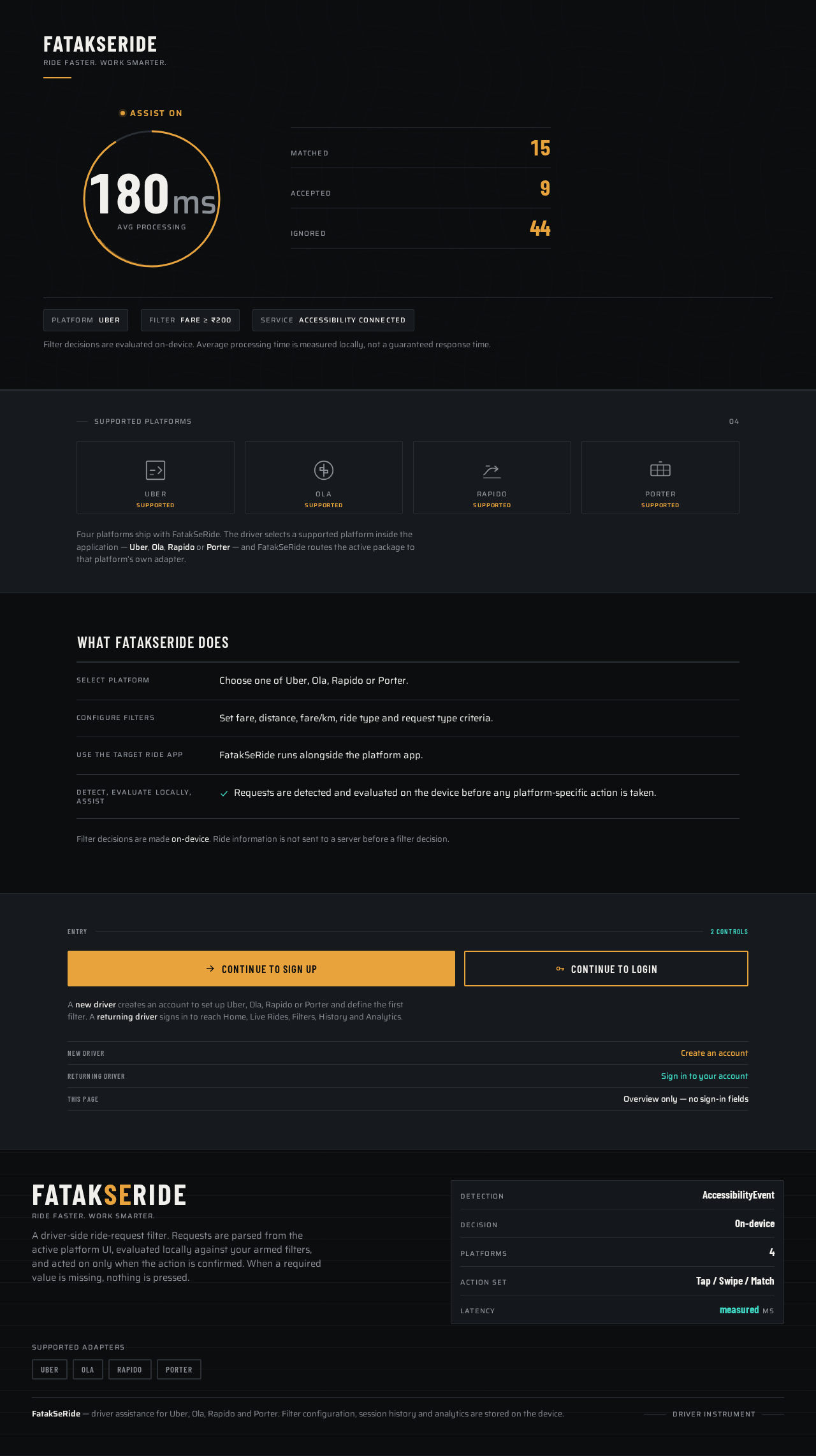
FATAKSERIDE
Ride Faster. Work Smarter.
Assist On
Avg processing
Filter decisions are evaluated on-device. Average processing time is measured locally, not a guaranteed response time.
Supported Platforms
04- UberSupported
- OlaSupported
- RapidoSupported
- PorterSupported
Four platforms ship with FatakSeRide. The driver selects a supported platform inside the application — Uber, Ola, Rapido or Porter — and FatakSeRide routes the active package to that platform’s own adapter.
What FatakSeRide Does
- SELECT PLATFORM
- Choose one of Uber, Ola, Rapido or Porter.
- CONFIGURE FILTERS
- Set fare, distance, fare/km, ride type and request type criteria.
- USE THE TARGET RIDE APP
- FatakSeRide runs alongside the platform app.
- DETECT, EVALUATE LOCALLY, ASSIST
- Requests are detected and evaluated on the device before any platform-specific action is taken.
Filter decisions are made on-device. Ride information is not sent to a server before a filter decision.
A new driver creates an account to set up Uber, Ola, Rapido or Porter and define the first filter. A returning driver signs in to reach Home, Live Rides, Filters, History and Analytics.
FATAKSERIDE
Ride Faster. Work Smarter.
Assist On
Avg processing
Filter decisions are evaluated on-device. Average processing time is measured locally, not a guaranteed response time.
Supported Platforms
04- UberSupported
- OlaSupported
- RapidoSupported
- PorterSupported
Four platforms ship with FatakSeRide. The driver selects a supported platform inside the application — Uber, Ola, Rapido or Porter — and FatakSeRide routes the active package to that platform’s own adapter.
What FatakSeRide Does
- SELECT PLATFORM
- Choose one of Uber, Ola, Rapido or Porter.
- CONFIGURE FILTERS
- Set fare, distance, fare/km, ride type and request type criteria.
- USE THE TARGET RIDE APP
- FatakSeRide runs alongside the platform app.
- DETECT, EVALUATE LOCALLY, ASSIST
- Requests are detected and evaluated on the device before any platform-specific action is taken.
Filter decisions are made on-device. Ride information is not sent to a server before a filter decision.
A new driver creates an account to set up Uber, Ola, Rapido or Porter and define the first filter. A returning driver signs in to reach Home, Live Rides, Filters, History and Analytics.
No comments yet. Be the first!