kinetic-calculator
 Diya Trivedi
start a project to build simple single page design of calculator

Comments (0)
Sign in to leave a comment
System Requirements
System Requirements Document for kinetic-calculator
1. Introduction
kinetic-calculator is a simple calculator delivered as a single-page design. The product intent is narrow and complete: one screen, one keypad, one display, where a visitor can perform everyday arithmetic — enter numbers and operators, see the running result, and clear or correct the entry to start again — without leaving the page.
The audience is anyone who needs a fast, correct calculation: students, freelancers, shoppers, and desk workers. There is no brand, no onboarding, no dashboard, and no account. The joy of the product comes from the keypad itself: the interface's response to the pointer and the thumb is the product, while the arithmetic stays dead simple.
The requester is Diya Trivedi (IN). The project is named kinetic-calculator.
2. System Overview
kinetic-calculator is a single-page, anonymous, client-facing calculator. It is delivered as a React frontend served alongside a shared FastAPI backend process and a MariaDB database provisioned in the initial scaffold. The calculator's arithmetic, display, expression strip, history ticker, and keypad interaction are the product; the backend and database are provisioned infrastructure and do not by themselves introduce accounts, persistence of calculations, or domain entities.
Actors:
- Calculator user (active human persona, required_inference) — the anonymous visitor who enters numbers and operators, reads the result, and clears or corrects the entry.
- Frontend application (system) — renders the single Calculator page, holds the in-page calculation state, and performs arithmetic.
- Shared backend (system) — the FastAPI process available for application APIs and domain modules; no accepted calculator workflow requires a server round-trip.
- Database (system) — MariaDB provisioned for application-owned persistent data; no accepted calculator workflow requires persisted calculation data.
Accepted behavior in scope:
- A simple calculator.
- Delivered as a single-page design.
- Number and operator entry, result display, running expression display, a short history of recent results, and clearing/correcting the entry.
- The kinetic, cursor-reactive keypad presentation described in the creative direction.
Narrow exclusions: no second page, no modal, no settings panel, no onboarding overlay, no account or sign-in, no scientific functions beyond the arithmetic operators shown on the keypad, no persistence of calculation history across sessions, and no dashboards.
Removed from scope
- None. No concept was explicitly removed by the user.
2a. Product Interpretation and Delivery Boundary
The user asked for a simple single-page design of a calculator. That request is the whole product: one anonymously reachable page that owns number and operator entry, the result display, the running expression, a short history of recent results, and clearing the calculation. There is no identity requirement — the calculator is public and ephemeral, and nothing about a calculation needs to be privately owned, resumed, or bound to a participant. No account, sign-in, or provisioning flow is introduced.
The single page is the entire current delivery. There is no future horizon stated by the user; anything beyond the accepted calculator behavior is out of scope for this document. The provisioned backend and database remain available infrastructure but carry no accepted calculator responsibility, and no server-side or persistent behavior is invented to justify them.
2c. Page Content and Component Coverage
Calculator
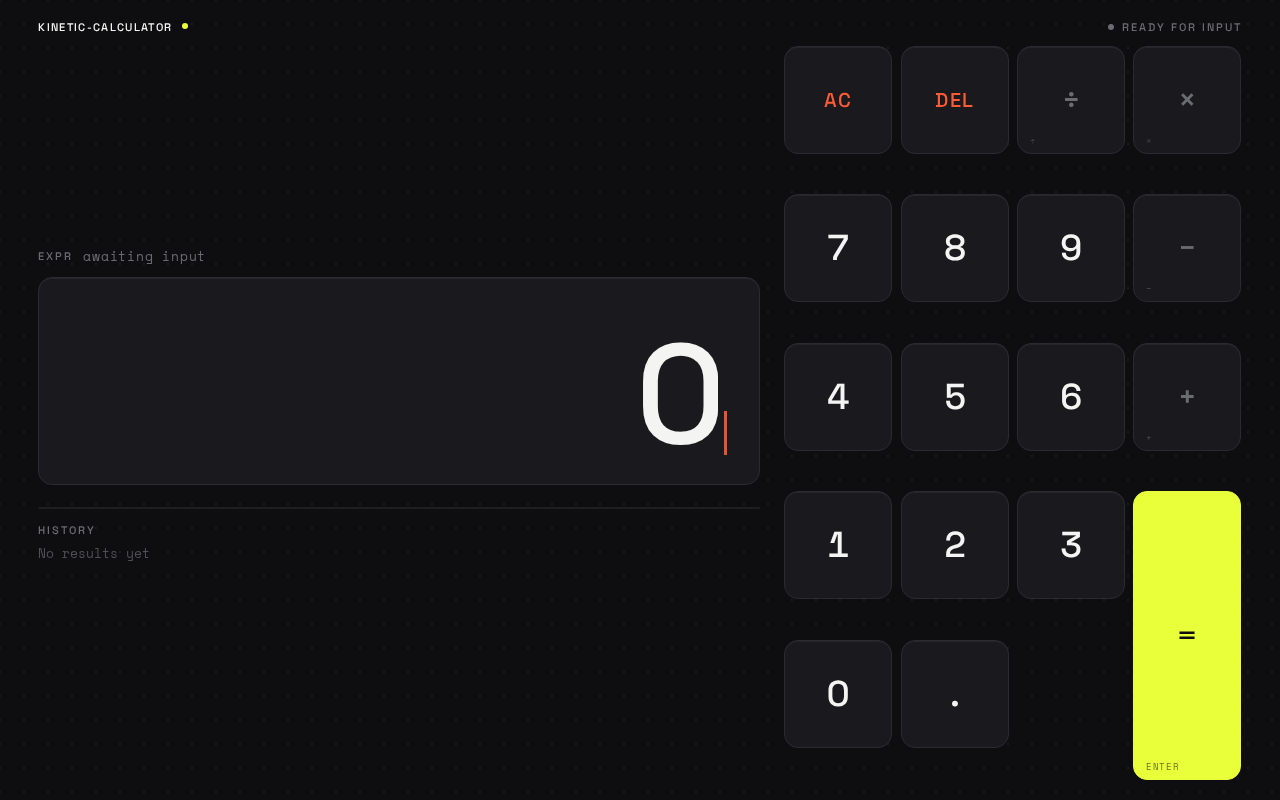
The single, anonymously reachable public entry page. It is a full-viewport dark stage with no scroll on desktop: the display well occupies the left 60% and the 4×5 keypad occupies the right 40%, aligned to a strict 8pt grid. On tablet the display stacks above the keypad; at 375px the display well compresses to a single 96px-tall band, the expression strip scrolls horizontally, and the keypad fills the remaining height with 56px-minimum tap targets. Everything fits inside the viewport at 375, 768, and 1280 with no element overlapping the display numerals or the keys.
Information and state
- Result display — the current result or entry, set in Space Grotesk 500 with tight −0.04em tracking, tabular figures, clamp 64px–148px, flush right in the display well so digits grow leftward as the user types. Initial state shows a waiting number (e.g.
0) ready to be typed. - Expression strip — the raw keystroke chain (e.g.
128 × 4 −) in Space Mono 400, above the display, with a 2px acid inner rule along the display well's bottom edge that fills left-to-right proportionally to the length of the running expression. - History ticker — the last three results in muted grey below the display.
- Pending-operator state — while an operator is pending, the operator keys carry a slow 3s acid pulse (a static acid underline under
prefers-reduced-motion), and the live operator state is shown in acid yellow. - Active-result caret — a burnt-orange caret marking the active result position.
Primary actions
- Press digit keys
0–9and the decimal point to build the current number. - Press operator keys
÷,×,−,+to select an operation; the selected operator enters the pending state. - Press the double-height acid-yellow
=key to resolve the calculation; the result number does a 200ms scale-from-0.96 settle. - Press
ACto clear the calculation and start fresh. - Press
DELto delete the last entered digit.
Supporting actions and component responsibilities
- Keypad grid — 4×5 grid of hard-edged keys with 14px radii and 1px
#2A2A30borders, perfect squares on desktop and 1:1.15 rectangles on mobile, separated by 8px gutters. Each key tilts up to 4deg toward the pointer on hover (CSS transform, no library) and depresses 2px with a 90mscubic-bezier(0.2,0.8,0.2,1)snap on press. - Equals key — spans two rows, is the only saturated surface on the page, and pulses slowly while an operator is pending.
- Dot-grid background — a faint 24px dot-grid etched into the background at 6% opacity that ripples outward in a single 400ms wave from whichever key was last pressed.
- Digit-arrival animation — each new numeral slides in from the right with a 6px overshoot and settles over 240ms.
Domain entities
- Calculation — the in-page expression being built (operands, pending operator, running expression) and its resolved result. Held in page state only; not persisted.
- History entry — one of the last three resolved results shown in the ticker. Held in page state only.
States
- Loading — none required; the page renders immediately with an empty calculation.
- Empty — initial state: display shows a waiting number, expression strip empty, history ticker empty.
- Success — a resolved result appears in the display, the expression strip shows the completed chain, and the result is pushed into the history ticker (keeping the last three).
- Error — division by zero or an otherwise undefined result is shown in the display as an error state; the user recovers by pressing
ACorDELto resume entry. - Recovery —
ACclears the calculation and history of the current expression;DELremoves the last digit so the user can correct a mistyped entry. - Reduced motion — with
prefers-reduced-motion, every animation collapses to an instant state change and the operator pulse becomes a static acid underline.
3. Functional Requirements
FR-1 — Single-page calculator delivery (explicit) As a Calculator user, I should get a simple calculator delivered as a single page, so that I can perform everyday arithmetic without navigating anywhere.
- Trigger: the user opens the product.
- Observable result: the Calculator page renders as the only page, with the display well and keypad visible.
- Access: anonymous, no identity required.
- Failure/recovery: none applicable; the page is the entire product.
- Continuation: the user proceeds to enter a calculation.
FR-2 — Digit and decimal entry (explicit) As a Calculator user, I should press digit keys and the decimal point to build a number, so that I can enter the operands of my calculation.
- Trigger: the user presses a digit key
0–9or the decimal point. - Observable result: the new numeral appears in the result display, sliding in from the right with a 6px overshoot and settling over 240ms; the expression strip updates with the raw keystroke chain; the acid rule under the display fills proportionally to the expression length.
- Access: anonymous.
- Failure/recovery:
DELremoves the last entered digit so a mistyped entry can be corrected. - Continuation: the user presses an operator or
=.
FR-3 — Operator selection (explicit) As a Calculator user, I should press an operator key to choose an operation, so that I can combine operands.
- Trigger: the user presses
÷,×,−, or+. - Observable result: the operator enters the pending state, shown in acid yellow; the operator keys carry a slow 3s acid pulse (static acid underline under reduced motion); the expression strip shows the operator in the keystroke chain.
- Access: anonymous.
- Failure/recovery: pressing
ACclears the pending operator and expression. - Continuation: the user enters the next operand and presses
=.
FR-4 — Resolve the calculation (explicit) As a Calculator user, I should press the equals key to resolve my calculation, so that I see the correct result.
- Trigger: the user presses the double-height acid-yellow
=key. - Observable result: the result appears in the display with a 200ms scale-from-0.96 settle; the expression strip shows the completed chain; the result is pushed into the history ticker, which keeps the last three results.
- Access: anonymous.
- Failure/recovery: division by zero or an undefined result shows an error state in the display; the user presses
ACorDELto recover. - Continuation: the user starts a new calculation or continues from the result.
FR-5 — Clear the calculation (explicit)
As a Calculator user, I should press AC to clear the calculation, so that I can start a new calculation.
- Trigger: the user presses
AC. - Observable result: the display returns to the waiting number, the expression strip empties, and the pending operator state clears.
- Access: anonymous.
- Failure/recovery: none applicable.
- Continuation: the user begins a new entry.
FR-6 — Delete the last digit (explicit)
As a Calculator user, I should press DEL to remove the last entered digit, so that I can correct a mistyped entry without clearing everything.
- Trigger: the user presses
DEL. - Observable result: the last entered digit is removed from the display and the expression strip updates.
- Access: anonymous.
- Failure/recovery: if the entry is empty,
DELleaves the display unchanged. - Continuation: the user continues entry or presses
AC.
FR-7 — Running expression and history visibility (explicit) As a Calculator user, I should see the running expression and the last three results, so that the calculator shows its working like a piece of instrumentation.
- Trigger: any entry, operator, or resolution.
- Observable result: the Space Mono expression strip above the display shows the raw keystroke chain; the history ticker below shows the last three results in muted grey.
- Access: anonymous.
- Failure/recovery: the history ticker is empty until the first result resolves.
- Continuation: the user reads the working and continues.
FR-8 — Cursor-reactive keypad (explicit) As a Calculator user, I should feel the keypad respond to my pointer and press, so that entry feels physical rather than transactional.
- Trigger: pointer movement over a key, or a key press.
- Observable result: the hovered key tilts up to 4deg toward the cursor; a pressed key depresses 2px with a 90ms snap; a single 400ms dot-grid ripple spreads from the last pressed key across the background.
- Access: anonymous.
- Failure/recovery: with
prefers-reduced-motion, all animation collapses to an instant state change and the operator pulse becomes a static acid underline. - Continuation: the user continues entry.
4. User Personas
Calculator user
Product context. The Calculator user is an anonymous visitor who needs a fast, correct calculation — a student, freelancer, shopper, or desk worker. They arrive at the single Calculator page with no account, no onboarding, and no prior state; the page is the whole product.
Primary goal. Get the correct result of an everyday arithmetic calculation without leaving the page.
Distinct accepted responsibilities.
- Enter numbers and operators using the keypad.
- Read the running expression and the result display.
- Resolve the calculation with
=. - Clear the calculation with
ACor correct the entry withDELto start a new calculation. - Read the last three results in the history ticker.
Relevant inputs and decisions. Which digits and decimal point to enter, which operator to select, when to resolve with =, and whether to correct with DEL or clear with AC.
Interactions with other accepted participants. None beyond the calculator itself; the Calculator user is the only active human participant, and the frontend application performs the arithmetic and renders the response.
Observable success. The correct result appears in the display, the expression strip shows the completed chain, and the result is recorded in the history ticker — all without leaving the page.
5. Core User Flows
Flow 1 — Perform a calculation
- The Calculator user opens the product. The Calculator page renders as the only page, with the display well on the left and the keypad on the right (stacked on tablet, compressed at 375px).
- The user presses digit keys to enter the first operand. Each new numeral slides in from the right with a 6px overshoot and settles; the expression strip shows the keystroke chain; the acid rule fills proportionally.
- The user presses an operator key (
÷,×,−, or+). The operator enters the pending state in acid yellow and the operator keys carry the slow 3s acid pulse. - The user presses digit keys to enter the second operand.
- The user presses the double-height acid-yellow
=key. The result appears in the display with a 200ms scale-from-0.96 settle, the expression strip shows the completed chain, and the result is pushed into the history ticker (keeping the last three). - The user reads the result and either starts a new calculation or continues from the result.
Failure/recovery. If the calculation divides by zero or produces an undefined result, the display shows an error state; the user presses AC to clear or DEL to correct and resumes entry.
Flow 2 — Correct a mistyped entry
- The Calculator user is mid-entry on the Calculator page.
- The user notices a wrong digit and presses
DEL. The last entered digit is removed from the display and the expression strip updates. - The user continues entering the correct digits and proceeds with the calculation.
Failure/recovery. If the entry is already empty, DEL leaves the display unchanged and the user continues.
Flow 3 — Clear and start a new calculation
- The Calculator user has a result or a partial expression on the Calculator page.
- The user presses
AC. The display returns to the waiting number, the expression strip empties, and the pending operator state clears. - The user begins a new entry.
Flow 4 — Feel the keypad respond
- The Calculator user moves the pointer across the keypad. The hovered key tilts up to 4deg toward the cursor.
- The user presses a key. The key depresses 2px with a 90ms snap and a single 400ms dot-grid ripple spreads from the pressed key across the background.
- With
prefers-reduced-motion, every animation collapses to an instant state change and the operator pulse becomes a static acid underline.
6. Visuals Colors and Theme
The creative direction is authoritative for this section. Muse: Yugo Nakamura — interaction as delight, a calculator that answers your hands. Headline concept: the calculator IS the hero.
Mode. Dark mode only.
Colour tokens (exact hex by role).
| Role | Hex | Usage |
|---|---|---|
| Background | #0E0E10 | Near-black graphite ground, ~70% of the screen |
| Surface | #1A1A1E | Key plates |
| Text | #F4F4F2 | Numerals and readable text |
| Primary | #E8FF3A | Acid yellow — equals key and live operator state only |
| Accent | #FF5C36 | Burnt orange — clear/delete and active-result caret |
| Muted | #6B6B72 | Operator glyphs at rest and hairline key borders |
| Key border | #2A2A30 | 1px key borders |
No blue, no gradient, no glass. The acid yellow is the single hot accent and belongs to the equals key and the live operator state — nothing else.
Typography.
- Headings and display numerals: Space Grotesk 500, tight −0.04em tracking, tabular figures, display set enormous at clamp 64px–148px, flush right in the display well.
- Labels: Space Grotesk 500 uppercase 11px with 0.18em letterspacing.
- Body and technical voice: Space Mono 400, reserved for the running expression strip and key sub-labels (
AC,DEL,÷,×,−,+,=). - Scale: 1.25 modular — display 148/96/64, key numerals 40/32/28, labels 11, footnote 13.
Shape language. Hard-edged keys with 14px radii and 1px #2A2A30 borders — a calculator body, not a pill festival. The display well is a wide rectangle with a 2px acid inner rule along its bottom edge that fills left-to-right as the expression grows. Keys are perfect squares on desktop, 1:1.15 rectangles on mobile, separated by 8px gutters. No blobs, no frosted panels, no drop shadows beyond a 1px inner top highlight.
Layout. One full-viewport dark stage, no scroll on desktop. Left 60% is the display well; right 40% is the 4×5 keypad on a strict 8pt grid, with the equals key spanning two rows in acid yellow. On tablet the display stacks above the keypad; at 375px the display well compresses to a single 96px-tall band, the expression strip scrolls horizontally, and the keypad fills the remaining height with 56px-minimum tap targets. Everything fits inside the viewport at 375, 768, and 1280 with no element overlapping the display numerals or the keys.
Imagery. No photography, no illustration, no 3D props. The graphic content is the interface itself plus one procedural element: a faint 24px dot-grid etched into the background at 6% opacity that ripples outward in a single 400ms wave from whichever key was last pressed.
Avoid. Blue or indigo anywhere; Inter, Roboto, Arial, Helvetica, Poppins, or system-ui for headings or numerals; gradient-blob backgrounds, frosted glass, or a grid of identical hover-lift cards; a centred headline + subtext + button hero; playful bounce easing on the result number or springy overshoot beyond the 6px digit arrival; photography, illustration, emoji, or 3D props standing in for the interface; any second page, modal, settings panel, or onboarding overlay; decorative motion that runs without a user action other than the pending-operator pulse.
7. Signature Design Concept
The public entry is the Calculator page itself, and the calculator is the hero. A full-bleed near-black stage (#0E0E10) holds a 148px acid-lit result number occupying the left two-thirds, flush right against the display well's inner rule, while the keypad's dark plates sit on the right like a machined control panel. The only saturated colour on first paint is the acid-yellow equals key and the thin rule under the display. There is no headline, no subhead, no CTA button, and no gradient — the first thing a visitor sees is a number waiting to be typed and a keypad that visibly reacts to the cursor.
Signature moves, all recomposing accepted content and controls:
- An oversized 148px result numeral that grows leftward from the right edge of the display well, with a 2px acid rule beneath it that fills proportionally to the length of the running expression.
- A cursor-reactive keypad: each key tilts up to 4deg toward the pointer on hover and depresses 2px on press, with a 400ms dot-grid ripple spreading from the last pressed key across the background.
- The equals key as a double-height acid-yellow block that is the only saturated surface on the page, pulsing slowly while an operator is pending.
- A Space Mono expression ticker above the display showing the raw keystroke chain (e.g.
128 × 4 −) and a three-result history strip below in muted grey. - Digit-arrival animation: each new numeral slides in from the right with a 6px overshoot and settles.
8. Interaction Model & Motion Direction
Interaction Model: Animated Motion Tempo: expressive Hero Dimensionality: layered_2d
Landing Hero Motion Brief
- Focal subject. The oversized result numeral in the display well and the machined keypad beside it — the calculator itself, with no headline, subhead, or CTA.
- Input → transformation → outcome thesis. Pointer movement over a key tilts it up to 4deg toward the cursor; a press depresses the key 2px with a 90ms
cubic-bezier(0.2,0.8,0.2,1)snap and fires a single 400ms dot-grid ripple from that key; the new numeral slides in from the right with a 6px overshoot and settles over 240ms; pressing=resolves the calculation and the result number does a 200ms scale-from-0.96 settle. Every motion is a response to a user action. - Motion vocabulary. Kinetic but purposeful: 90ms key-press snap, 240ms digit arrival with 6px overshoot, 200ms result settle, 3s acid pulse on pending operators, 400ms dot-grid ripple, 4deg cursor tilt. No springy overshoot beyond the 6px digit arrival and no bounce easing on the result number.
- Composed first frame. Near-black stage; a waiting number flush right in the display well; the 2px acid rule under the display; the double-height acid-yellow equals key as the only saturated surface; the faint 24px dot-grid at 6% opacity; the keypad's dark plates at rest.
- Reduced-motion state. With
prefers-reduced-motion, every animation collapses to an instant state change and the operator pulse becomes a static acid underline; the layout remains fully usable and readable.
9. Non-Functional Requirements
- Single-page constraint (explicit): the calculator design must be a single page. No second page, modal, settings panel, or onboarding overlay.
- Simplicity (explicit): the design must be a simple single-page calculator; no scientific functions beyond the arithmetic operators shown on the keypad.
- Viewport fit (explicit, from creative direction): everything fits inside the viewport at 375, 768, and 1280 with no element overlapping the display numerals or the keys; readable text and controls stay whole at every viewport.
- Tap targets (explicit, from creative direction): 56px-minimum tap targets at 375px.
- Reduced motion (explicit, from creative direction): with
prefers-reduced-motion, every animation collapses to an instant state change and the operator pulse becomes a static acid underline. - Access (required_inference): the Calculator page is anonymously reachable with no identity requirement; no account, sign-in, or provisioning flow is introduced.
- No persistence (required_inference): calculation state and the three-result history are held in page state only and are not persisted across sessions; the provisioned database carries no accepted calculator responsibility.
10. Tech Stack
- Frontend: React application UI rendering the single Calculator page, with CSS transforms for the cursor-reactive keypad and CSS animations for the digit arrival, result settle, operator pulse, and dot-grid ripple.
- Backend: shared FastAPI process for application APIs and domain modules, provisioned in the initial scaffold; no accepted calculator workflow requires a server round-trip.
- Database: MariaDB for application-owned persistent data, provisioned in the initial scaffold; no accepted calculator workflow requires persisted calculation data.
- Containerization: docker-compose.yml as the inventory of runnable services —
backend,database, andfrontend.
11. Assumptions and Constraints
- Assumption (required_inference): the calculator is anonymous and public; no identity, account, or session continuity is required.
- Assumption (required_inference): calculation state and the three-result history live in page state only and are not persisted.
- Assumption (required_inference): the arithmetic operators are the four shown on the keypad (
÷,×,−,+) plus=,AC,DEL, and the decimal point. - Constraint (explicit): the calculator design must be a single page.
- Constraint (explicit): the design must be a simple single-page calculator.
- Constraint (explicit, from creative direction): dark mode only; no blue or indigo anywhere; no second page, modal, settings panel, or onboarding overlay.
- Constraint (explicit, from creative direction): decorative motion runs only in response to a user action, other than the pending-operator pulse.
12. Glossary
- Calculator page — the single, anonymously reachable public entry page that owns number and operator entry, result display, running expression, history ticker, and clearing.
- Display well — the wide rectangle on the left of the page holding the oversized result numeral and the 2px acid inner rule.
- Expression strip — the Space Mono line above the display showing the raw keystroke chain.
- History ticker — the muted-grey strip below the display showing the last three results.
- Pending operator — the operator state shown in acid yellow while an operator has been selected but not yet resolved.
- Dot-grid ripple — the single 400ms wave that spreads from the last pressed key across the 6%-opacity background dot-grid.
- Digit arrival — the 240ms animation in which a new numeral slides in from the right with a 6px overshoot and settles.
- Reduced motion — the
prefers-reduced-motionstate in which every animation collapses to an instant state change and the operator pulse becomes a static acid underline.
awaiting input
awaiting input
No comments yet. Be the first!